— Contents 10 sections
- 01 Is the Aster referral code “140fcf” still active?
- 02 Aster sign-up steps with the referral code
- 03 What to do after connecting to Aster
- 04 The Aster referral code cannot be added after sign-up
- 05 Aster points program and airdrop
- 06 What is Aster
- 07 What makes Aster distinct
- 08 Aster regulatory landscape
- 09 Aster availability across major jurisdictions
- 10 Risks to acknowledge before using Aster
chainhelm’s exclusive Aster referral code is .
As of 2026-07-24, we connected a new wallet and confirmed that the referral code was applied.
The referral code can only be applied when you first connect your wallet, so we recommend taking care of it then.
This article covers the sign-up process (wallet connection) with the Aster referral code, Aster’s distinguishing features, availability in major jurisdictions, and the risks to acknowledge — with the connection flow and code application verified first-hand by chainhelm’s editorial team.
Is the Aster referral code “140fcf” still active?
The chainhelm editorial team connected to Aster with a fresh wallet on 2026-07-24 and confirmed that the referral code “140fcf” is still active. Reaching Aster through the chainhelm referral link — the /referral/140fcf or ?ref=140fcf path — pre-fills the invite code, and it binds at your first wallet connection, so there is no separate code to enter later.
Here is the actual screen captured during verification.
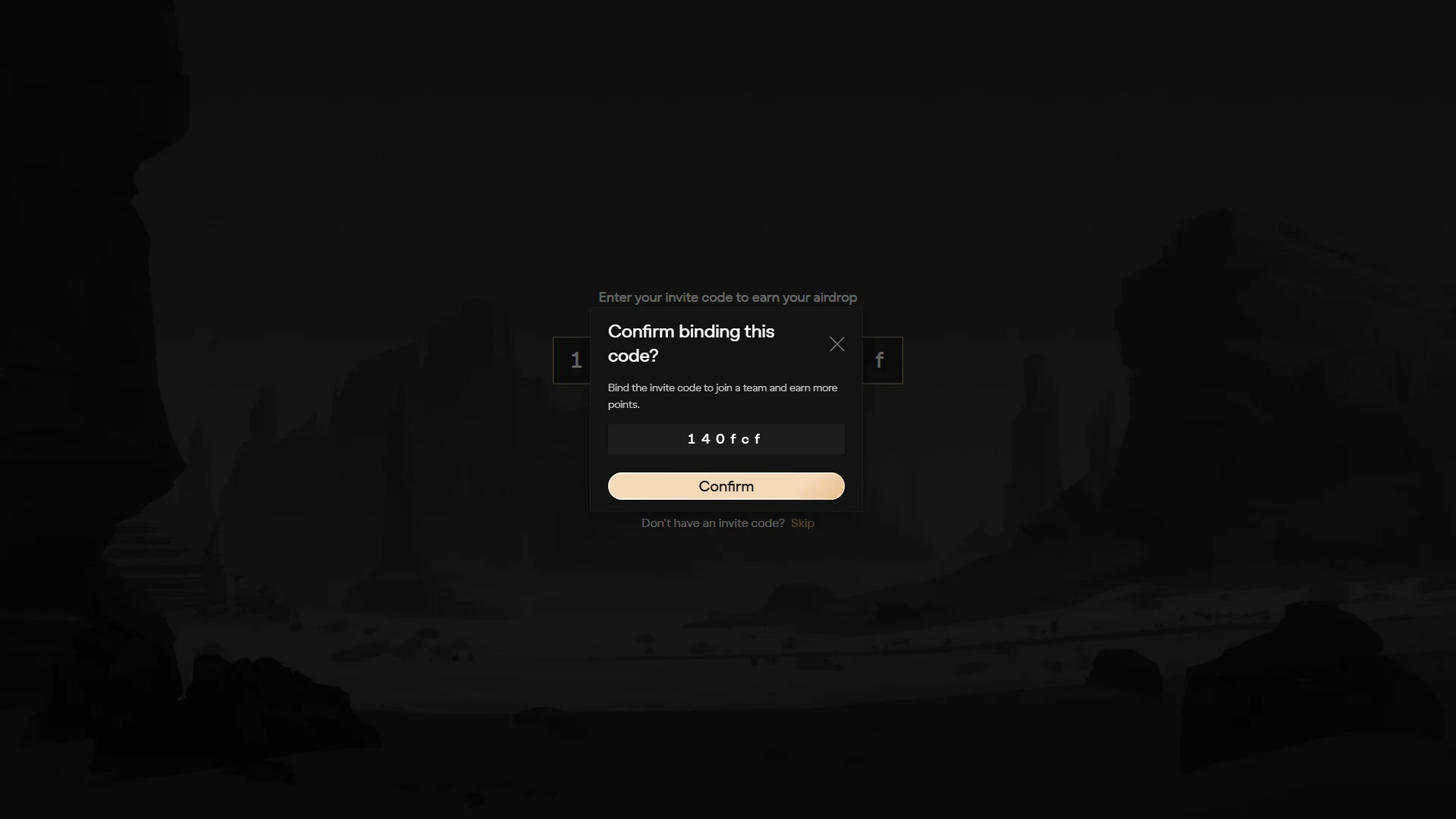
The screen shows “Confirm binding this code?”, confirming that the referral code 140fcf was correctly applied. chainhelm continuously verifies the validity of the code and confirms it remains usable.
That first-hand check covers the code binding and the connect-and-deposit steps only; the availability, regulatory, and risk points later in this guide are drawn from public sources rather than from our own testing.
Aster sign-up steps with the referral code
We cover the connection process separately for PC/browser and smartphone (mobile).
PC/browser connection steps
-
First, open the Aster official page (the link applies the referral code). When you open it, you’ll see a screen like the one below.
-
Enter your invite code
— Figure 2Invite code entry2026-07-24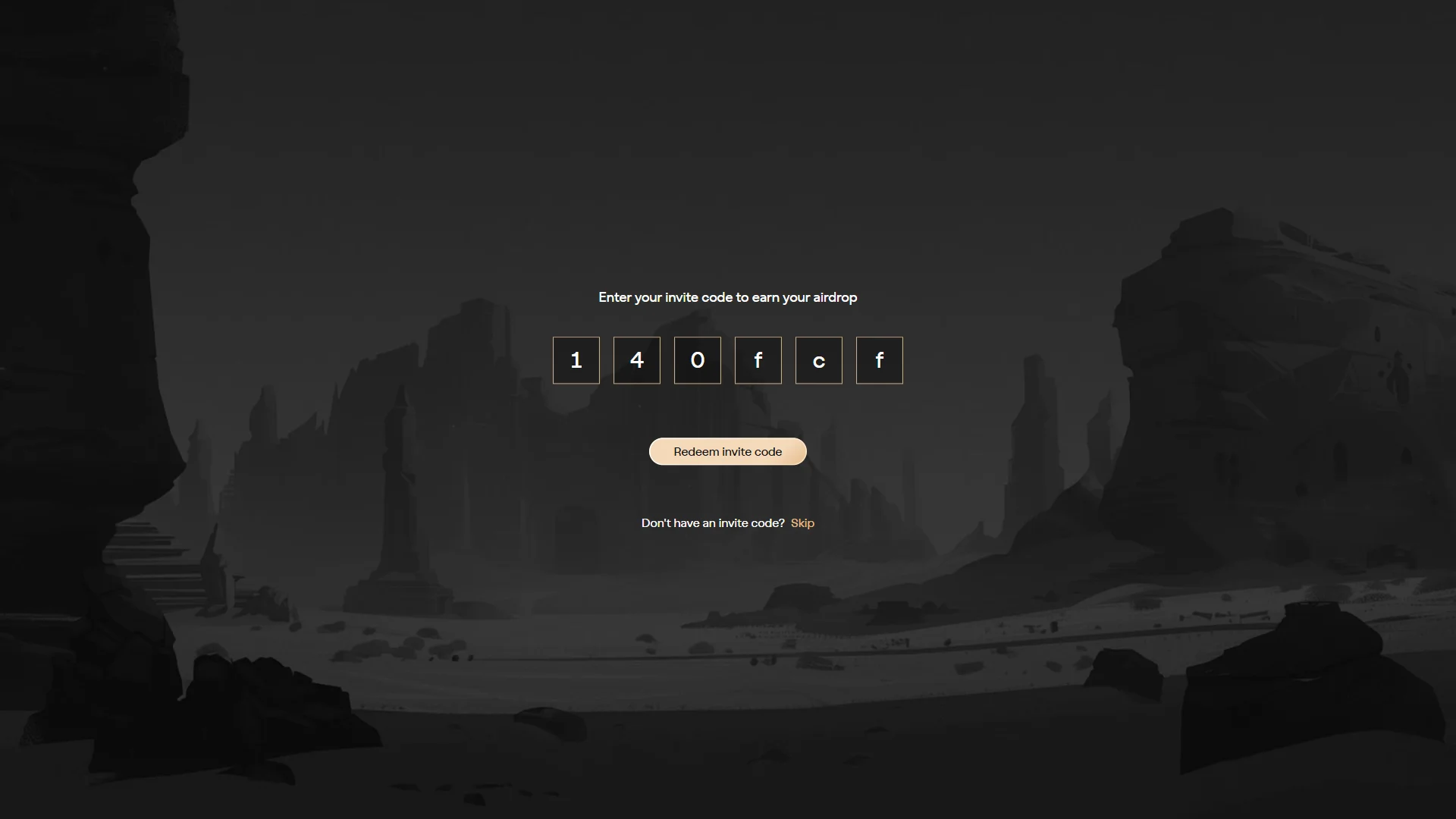
The six-box invite field is pre-filled with the referral code "140fcf", ready to redeem with the button below. Source: chainhelm editorial You reach this screen through the referral link, so the six-box invite field already holds the code “140fcf”. Confirm it reads correctly, then click “Redeem invite code” to apply it and open the wallet connection dialog.
-
Select your ecosystem
— Figure 3Ecosystem selection2026-07-24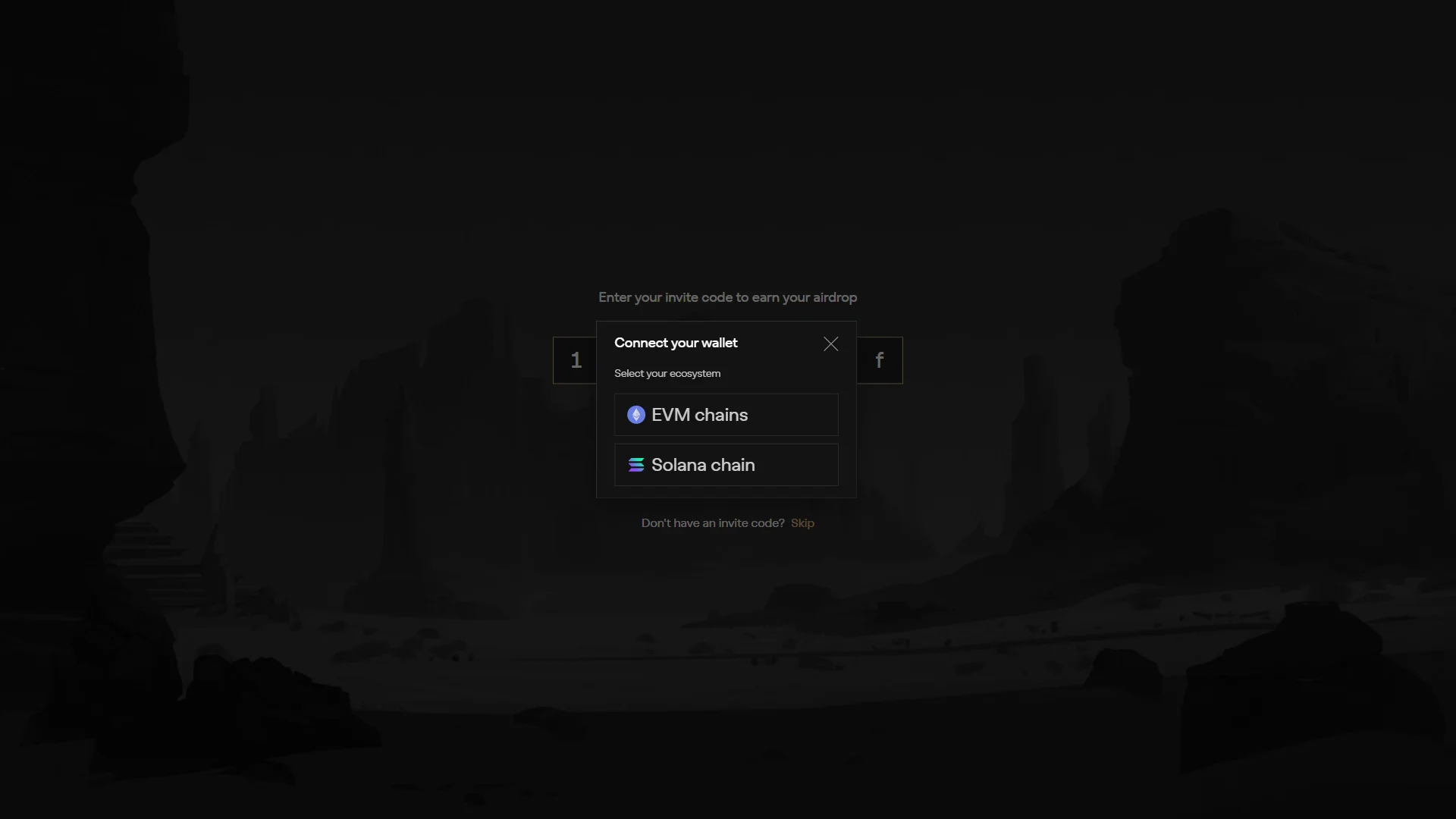
The "Connect your wallet" dialog offers two ecosystems: "EVM chains" and "Solana chain". Source: chainhelm editorial In the “Connect your wallet” dialog, choose the network family your wallet belongs to under “Select your ecosystem”. Click “EVM chains” to follow this guide with an EVM wallet, or “Solana chain” if you hold a Solana wallet. Your choice opens the matching wallet list.
-
Choose your wallet
— Figure 4Wallet selection2026-07-24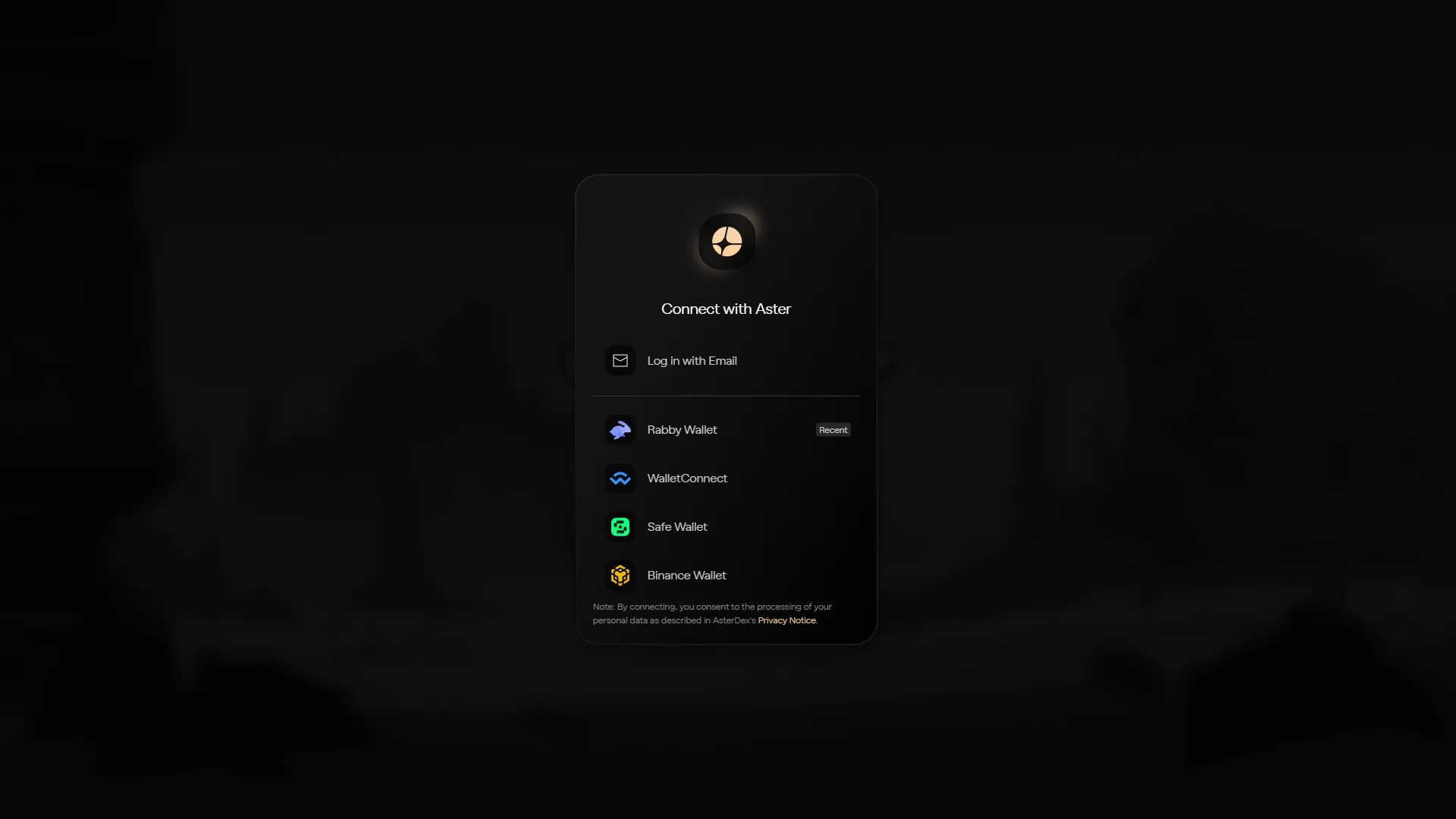
The "Connect with Aster" list holds "Rabby Wallet", "WalletConnect", "Safe Wallet", and "Binance Wallet", plus "Log in with Email". Source: chainhelm editorial The “Connect with Aster” list shows the wallets you can link. Click “Rabby Wallet” to follow this guide, or pick “WalletConnect”, “Safe Wallet”, or “Binance Wallet” to match your own setup.
If you’d rather not use a wallet, “Log in with Email” sits at the top instead. Whichever you choose, its approval prompt opens next.
-
Approve the connection
— Figure 5Connection approval2026-07-24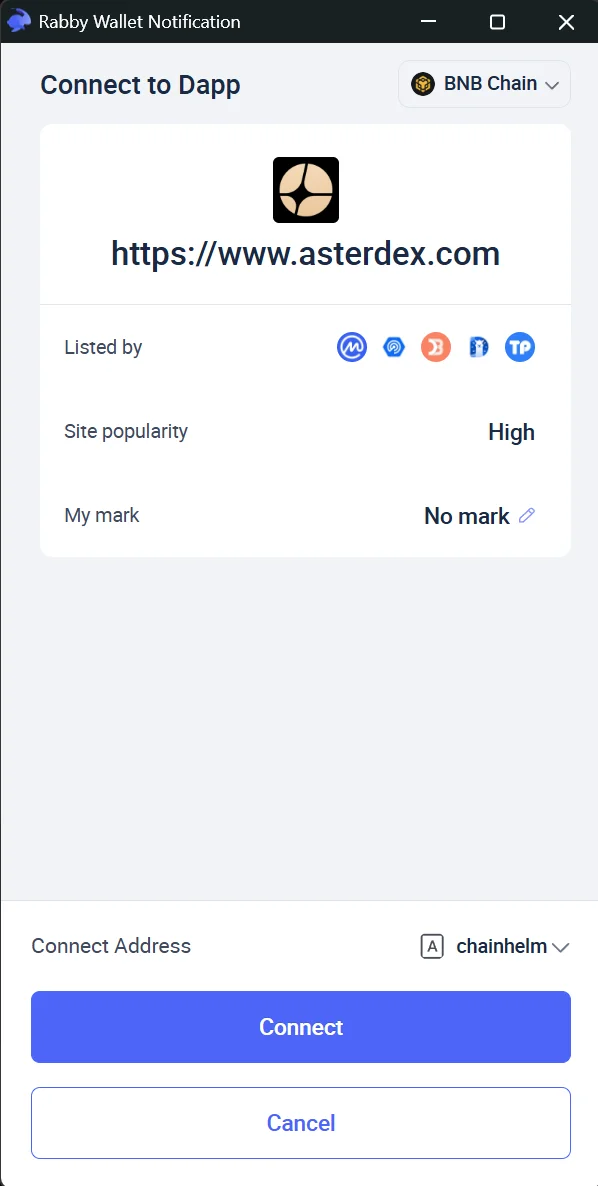
The wallet's connection prompt confirms the asterdex.com site before you approve or cancel the link. Source: chainhelm editorial Approve the connection request your wallet raises. On desktop, Rabby’s “Connect to Dapp” popup names the site as asterdex.com — confirm that origin, then click “Connect” (or “Cancel” to back out).
On mobile, the “WalletConnect” sheet asks you to “Select Wallet” and hand off to your wallet app, where you approve the same request. Once you approve, the wallet is linked and Aster asks for a session signature next.
-
Sign the “ApproveAgent” request
— Figure 6ApproveAgent signature2026-07-24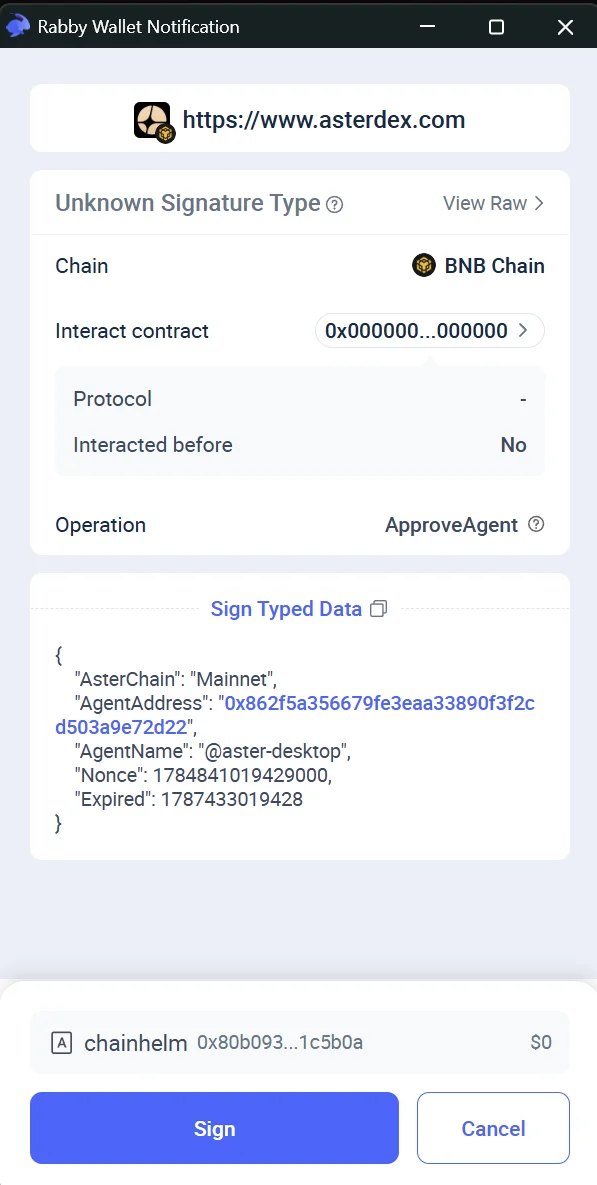
The desktop "Sign Typed Data" prompt shows the "ApproveAgent" operation on "BNB Chain"; on mobile the same request appears in your wallet app. Source: chainhelm editorial Your wallet now asks you to sign an “ApproveAgent” request on “BNB Chain”. This authorizes a trading session key for your account — it does not move any funds. Check that the “Sign Typed Data” details show the “ApproveAgent” operation, then click “Sign” (or “Cancel” to stop).
The screenshot shows Rabby’s desktop extension; on mobile you sign the same content inside your wallet app. Signing returns you to Aster to bind your invite code.
-
Confirm the code binding
— Figure 7Bind code confirmation2026-07-24 The confirmation dialog shows the invite code "140fcf" with a "Confirm" button to bind it. Source: chainhelm editorial Aster asks you to “Confirm binding this code?” with the code “140fcf” shown. Click “Confirm” to bind the referral code to your account. Binding drops you onto the trading screen with your wallet connected.
-
Wallet connected
— Figure 8Wallet connected2026-07-24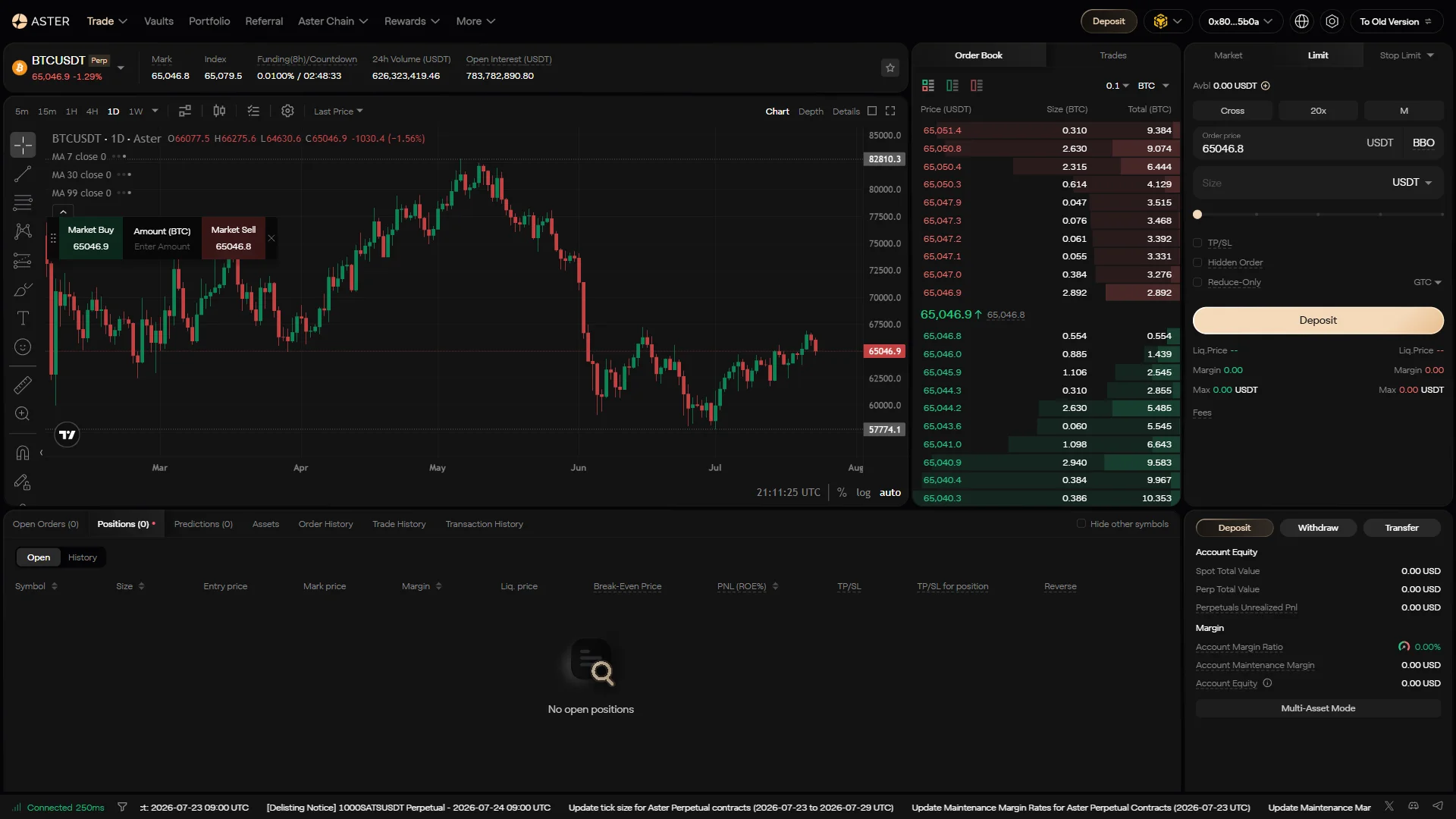
The BTCUSDT trading screen shows the wallet connected, with a shortened address and a "Deposit" button in the header. Source: chainhelm editorial The trading screen loads with your wallet linked — the header carries your shortened address and a “Deposit” button. Signup is complete at this point; click “Deposit” when you’re ready to fund the account before trading.
Smartphone (iOS / Android) connection steps
-
First, open the Aster official page in your mobile browser or your wallet app’s in-app browser (the link applies the referral code). When you open it, you’ll see a screen like the one below.
-
Enter your invite code
— Figure 9Invite code entry2026-07-24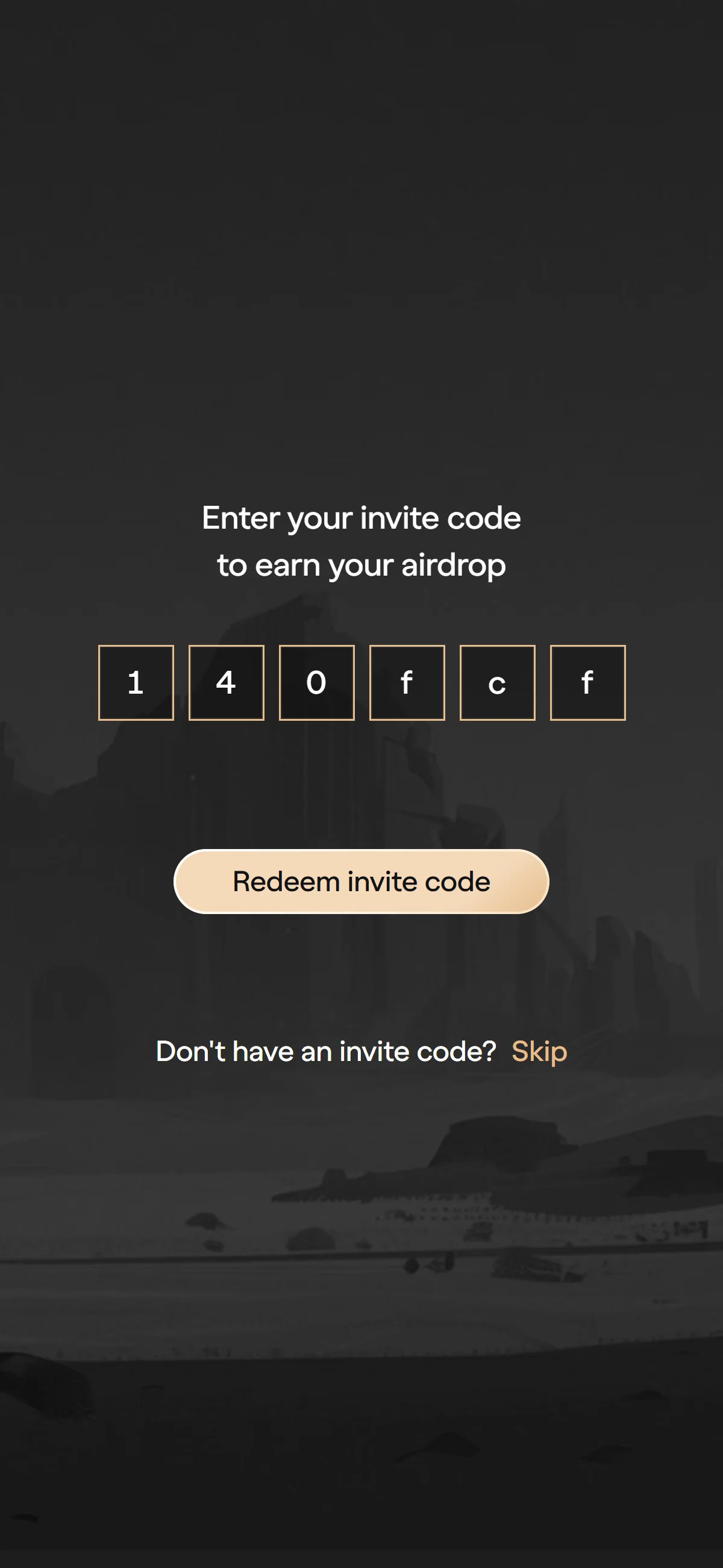
The six-box invite field is pre-filled with the referral code "140fcf", ready to redeem with the button below. Source: chainhelm editorial You reach this screen through the referral link, so the six-box invite field already holds the code “140fcf”. Confirm it reads correctly, then click “Redeem invite code” to apply it and open the wallet connection dialog.
-
Select your ecosystem
— Figure 10Ecosystem selection2026-07-24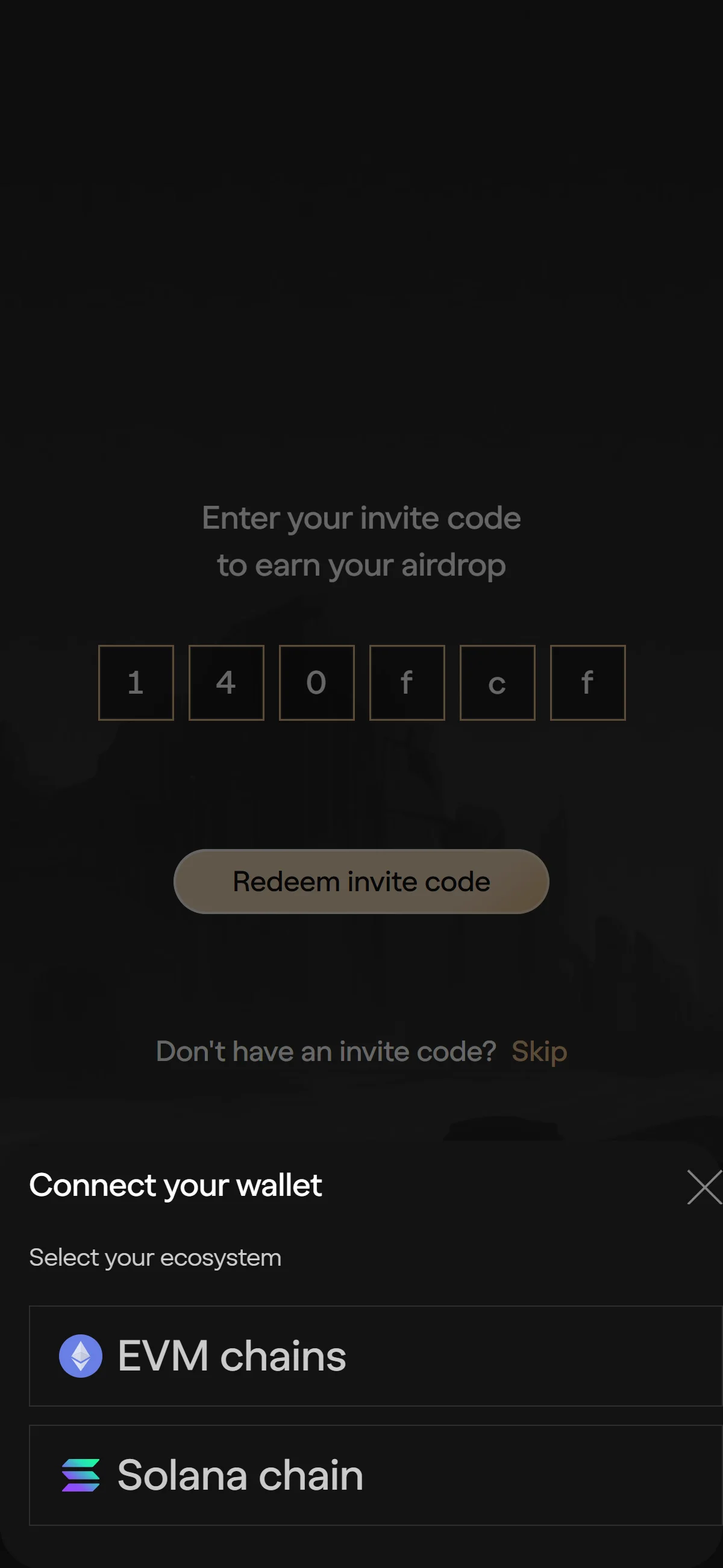
The "Connect your wallet" dialog offers two ecosystems: "EVM chains" and "Solana chain". Source: chainhelm editorial In the “Connect your wallet” dialog, choose the network family your wallet belongs to under “Select your ecosystem”. Click “EVM chains” to follow this guide with an EVM wallet, or “Solana chain” if you hold a Solana wallet. Your choice opens the matching wallet list.
-
Choose your wallet
— Figure 11Wallet selection2026-07-24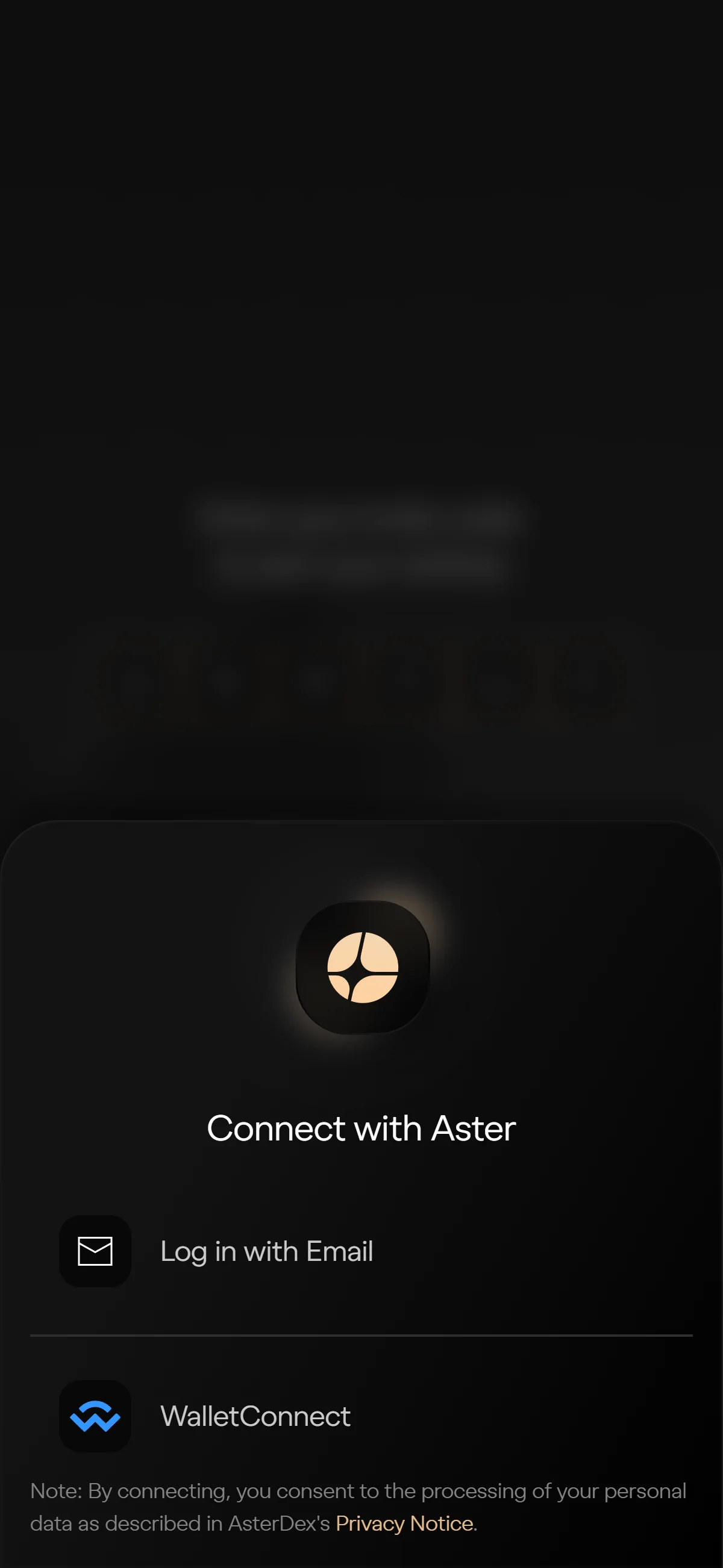
The "Connect with Aster" list holds "Rabby Wallet", "WalletConnect", "Safe Wallet", and "Binance Wallet", plus "Log in with Email". Source: chainhelm editorial The “Connect with Aster” list shows the wallets you can link. Click “Rabby Wallet” to follow this guide, or pick “WalletConnect”, “Safe Wallet”, or “Binance Wallet” to match your own setup.
If you’d rather not use a wallet, “Log in with Email” sits at the top instead. Whichever you choose, its approval prompt opens next.
-
Approve the connection
— Figure 12Connection approval2026-07-24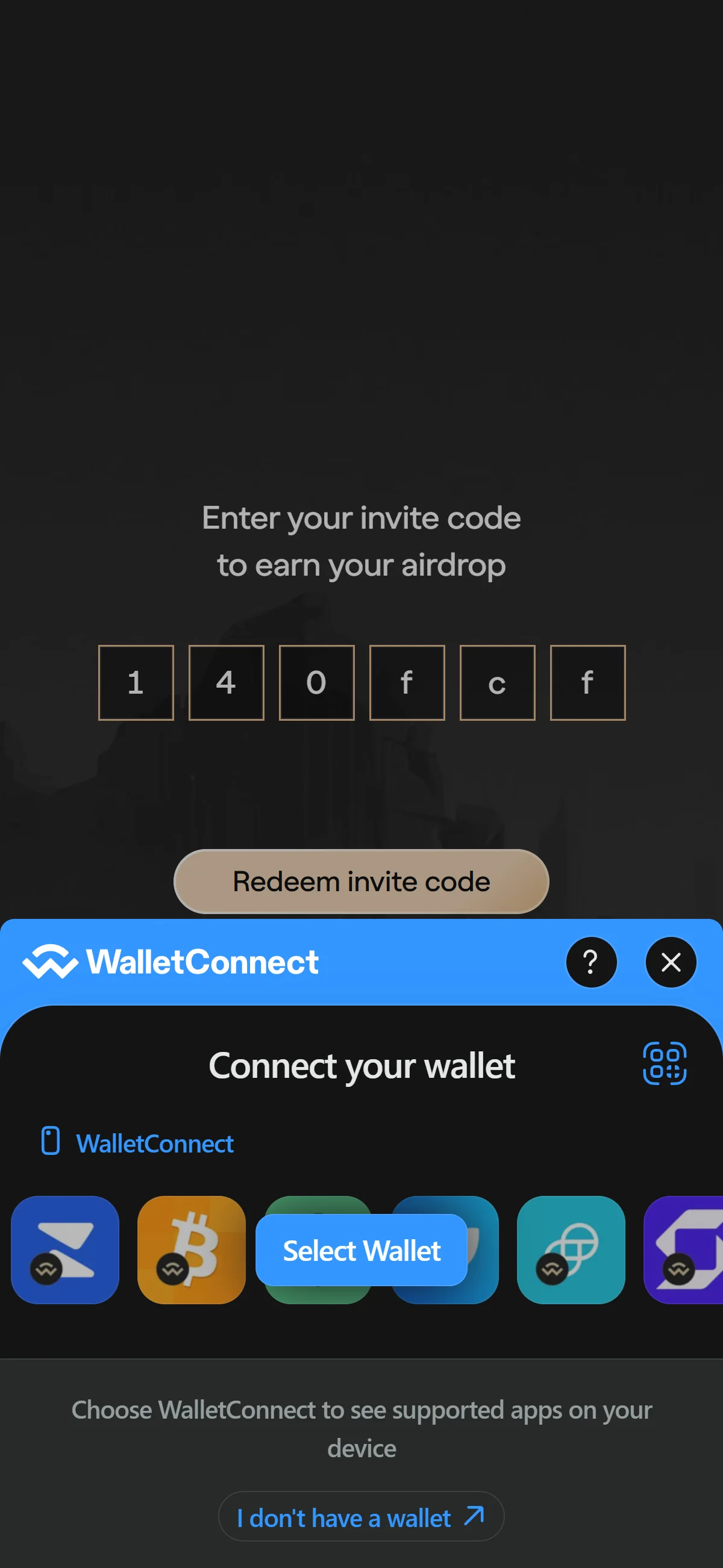
The wallet's connection prompt confirms the asterdex.com site before you approve or cancel the link. Source: chainhelm editorial Approve the connection request your wallet raises. On desktop, Rabby’s “Connect to Dapp” popup names the site as asterdex.com — confirm that origin, then click “Connect” (or “Cancel” to back out).
On mobile, the “WalletConnect” sheet asks you to “Select Wallet” and hand off to your wallet app, where you approve the same request. Once you approve, the wallet is linked and Aster asks for a session signature next.
-
Sign the “ApproveAgent” request
— Figure 13ApproveAgent signature2026-07-24 The desktop "Sign Typed Data" prompt shows the "ApproveAgent" operation on "BNB Chain"; on mobile the same request appears in your wallet app. Source: chainhelm editorial Your wallet now asks you to sign an “ApproveAgent” request on “BNB Chain”. This authorizes a trading session key for your account — it does not move any funds. Check that the “Sign Typed Data” details show the “ApproveAgent” operation, then click “Sign” (or “Cancel” to stop).
The screenshot shows Rabby’s desktop extension; on mobile you sign the same content inside your wallet app. Signing returns you to Aster to bind your invite code.
-
Confirm the code binding
— Figure 14Bind code confirmation2026-07-24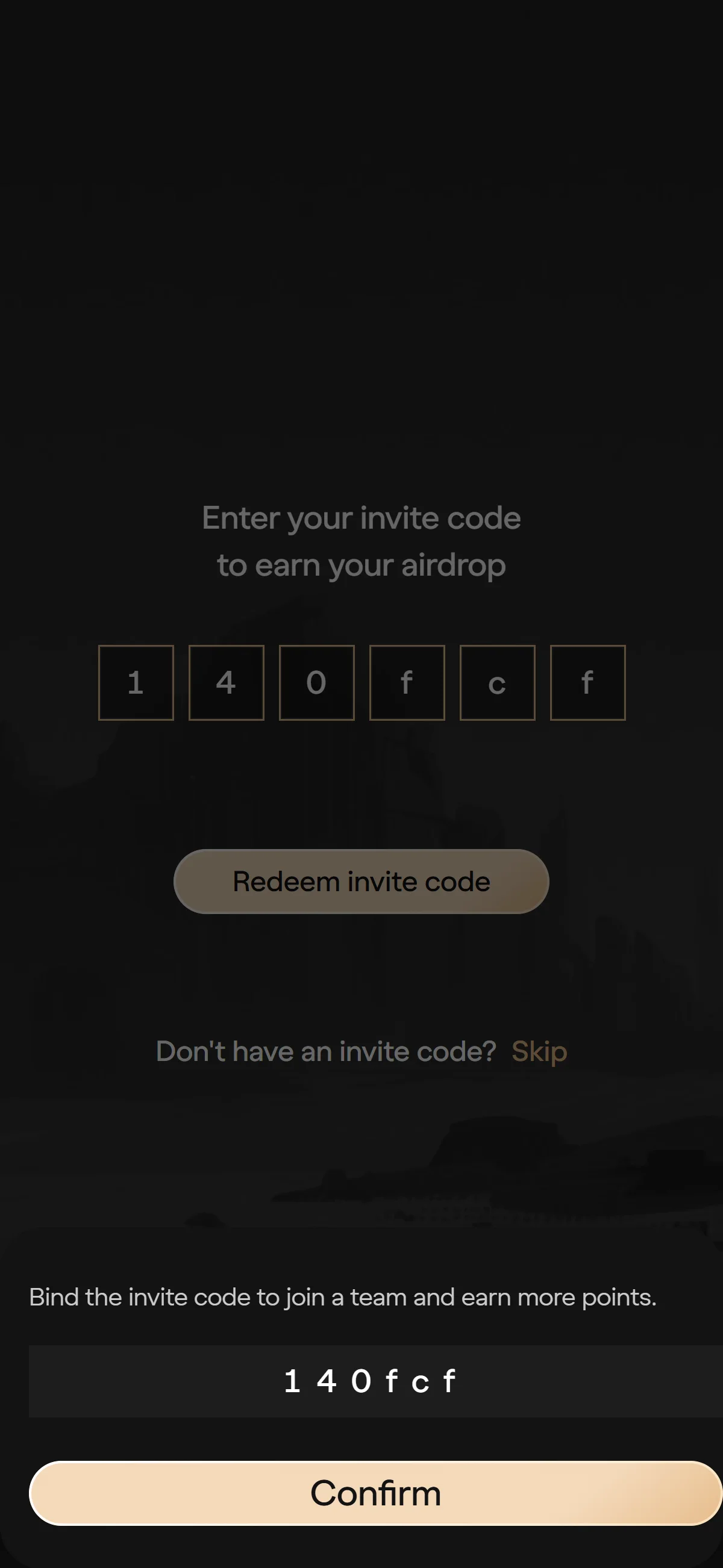
The confirmation dialog shows the invite code "140fcf" with a "Confirm" button to bind it. Source: chainhelm editorial Aster asks you to “Confirm binding this code?” with the code “140fcf” shown. Click “Confirm” to bind the referral code to your account. Binding drops you onto the trading screen with your wallet connected.
-
Wallet connected
— Figure 15Wallet connected2026-07-24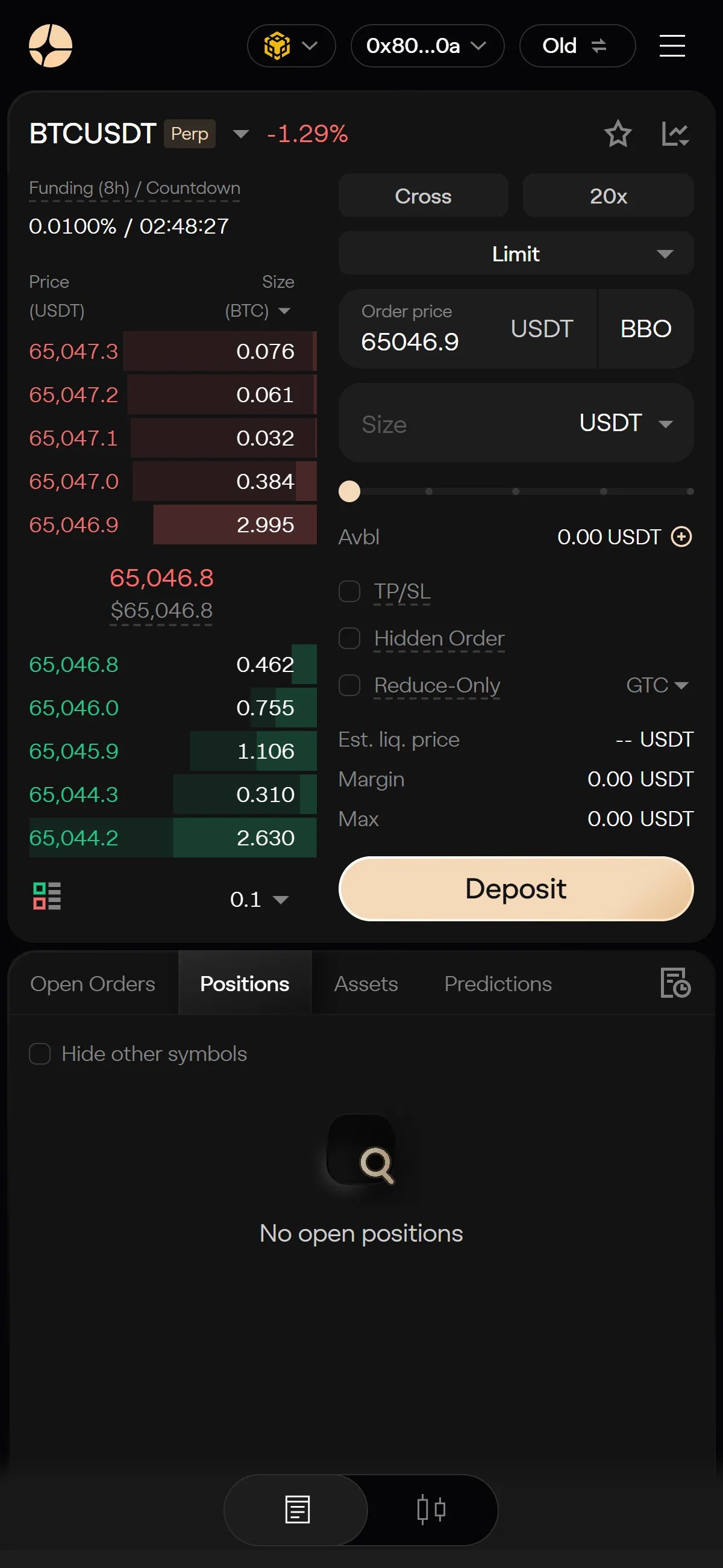
The BTCUSDT trading screen shows the wallet connected, with a shortened address and a "Deposit" button in the header. Source: chainhelm editorial The trading screen loads with your wallet linked — the header carries your shortened address and a “Deposit” button. Signup is complete at this point; click “Deposit” when you’re ready to fund the account before trading.
What to do after connecting to Aster
We cover the deposit process separately for PC/browser and smartphone (mobile).
PC/browser deposit steps
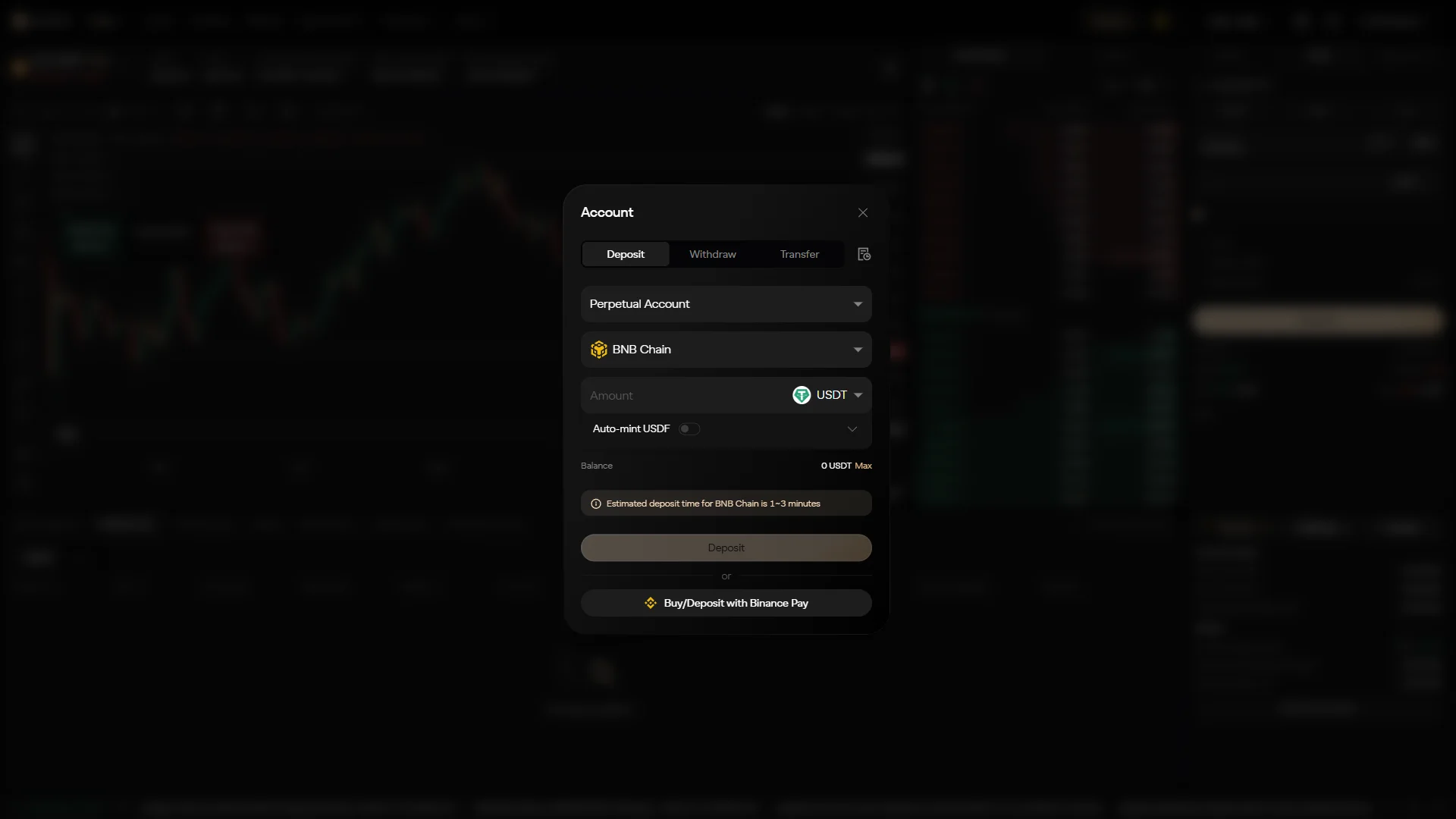
Open the “Account” panel from the “Deposit” button; it lands on the “Deposit” tab. Set “Perpetual Account” as the destination, keep “BNB Chain” or open the network selector to switch chains, and enter how much you want to move in the “Amount” field (USDT here, with an optional “Auto-mint USDF” toggle beneath it).
The panel notes a BNB Chain deposit takes about 1–3 minutes. If you’d rather buy in, “Buy/Deposit with Binance Pay” sits below as an alternative.
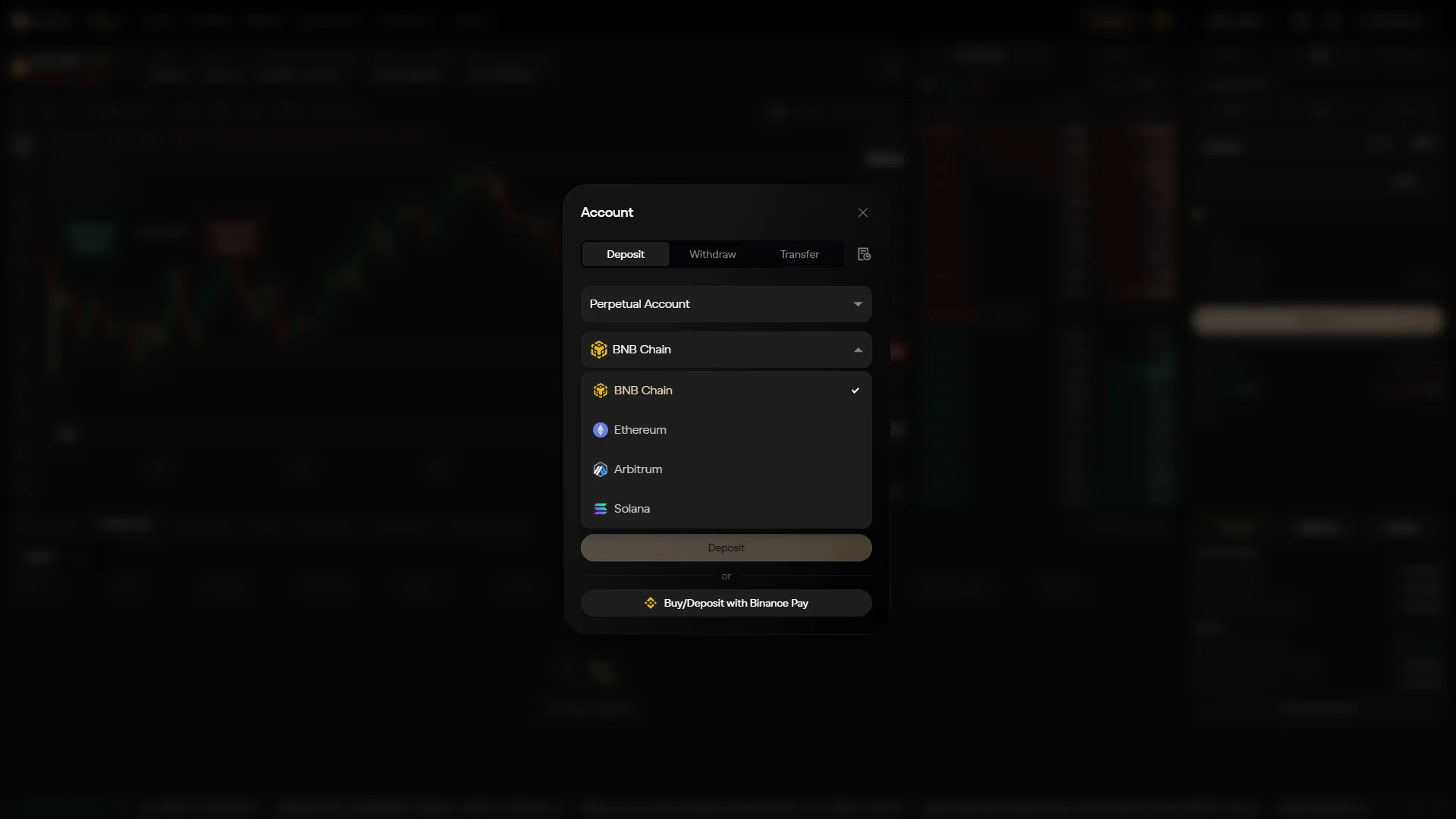
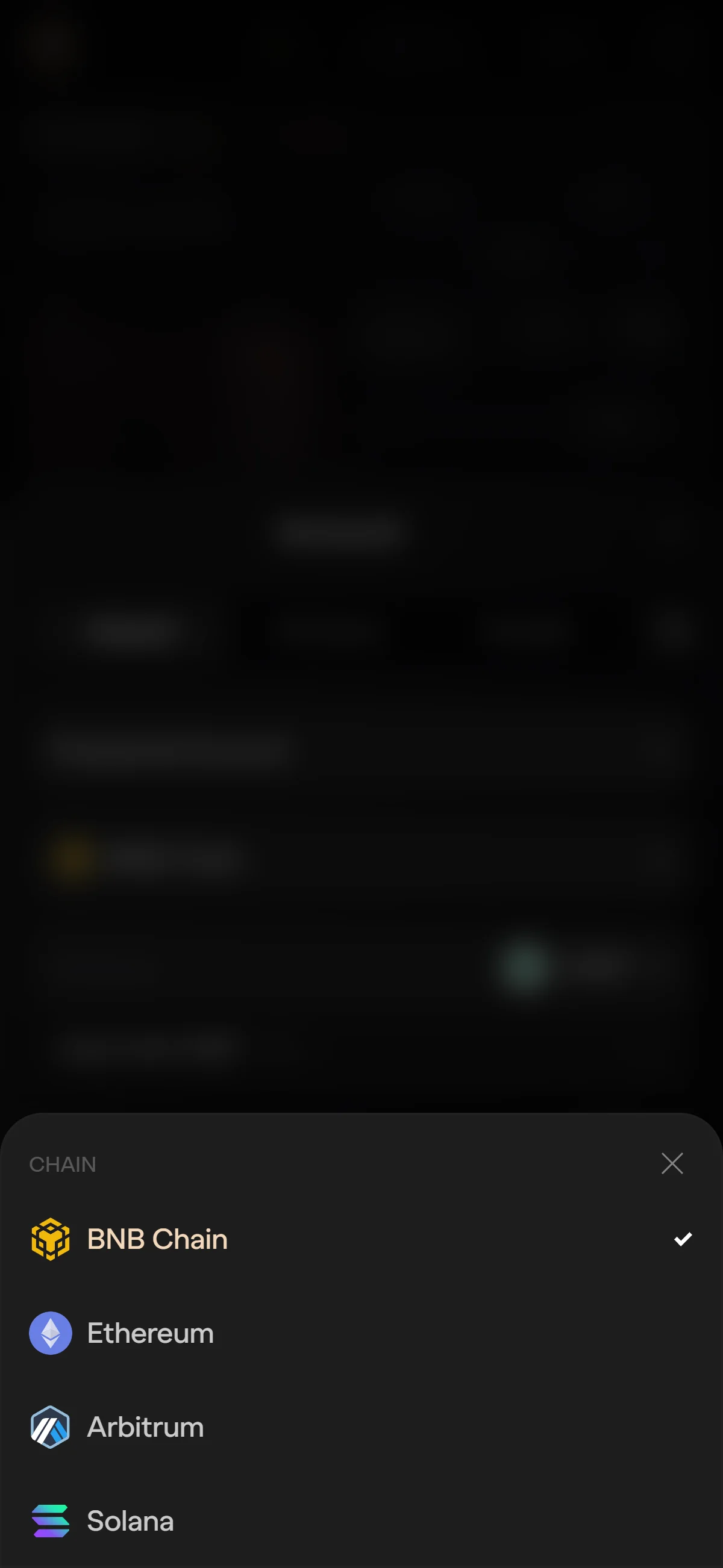
Open the network dropdown to pick the chain you’ll deposit from. It lists “BNB Chain” (currently selected), “Ethereum”, “Arbitrum”, and “Solana” — click the one your funds sit on. Your choice sets which token list appears next.
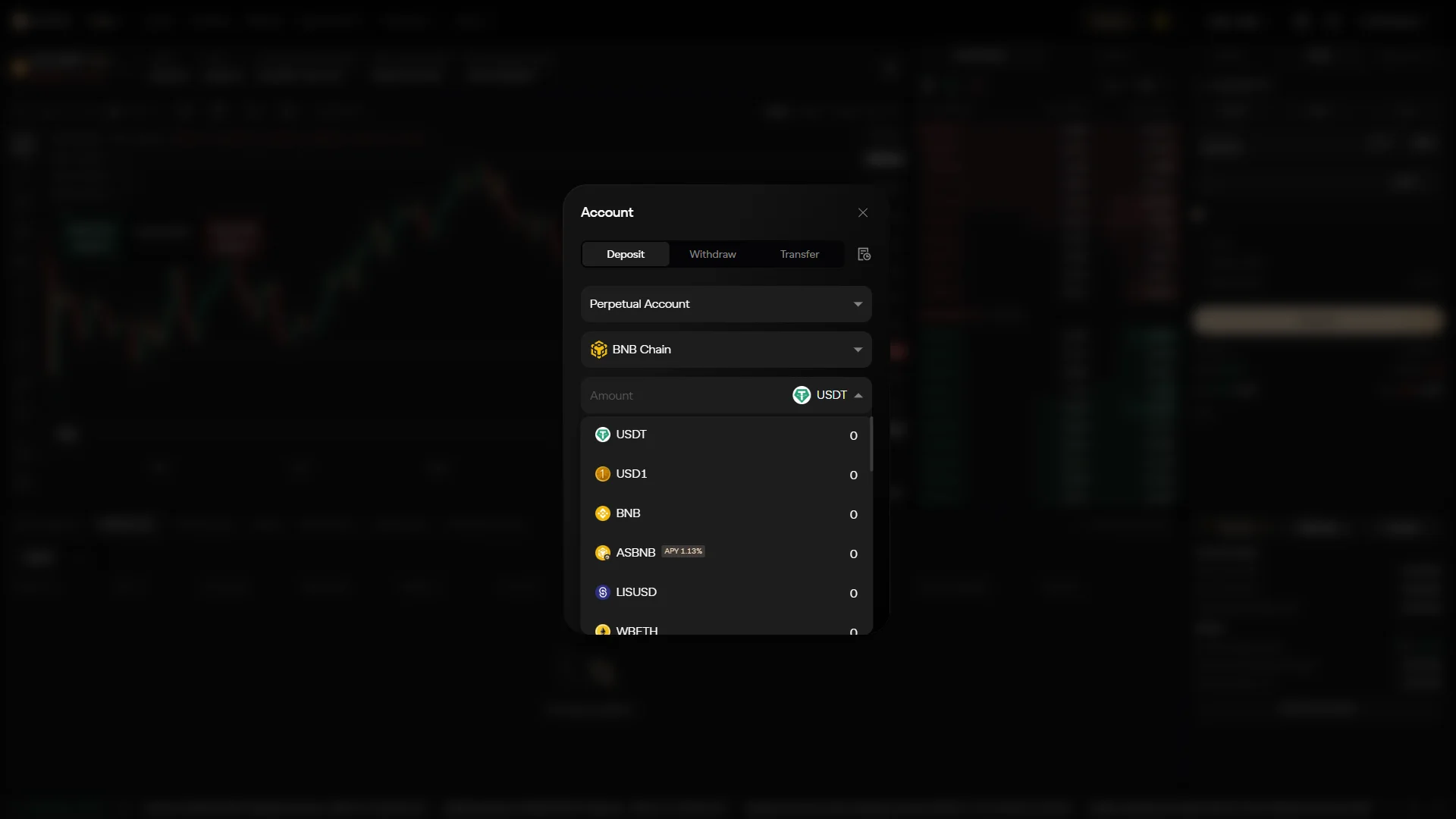
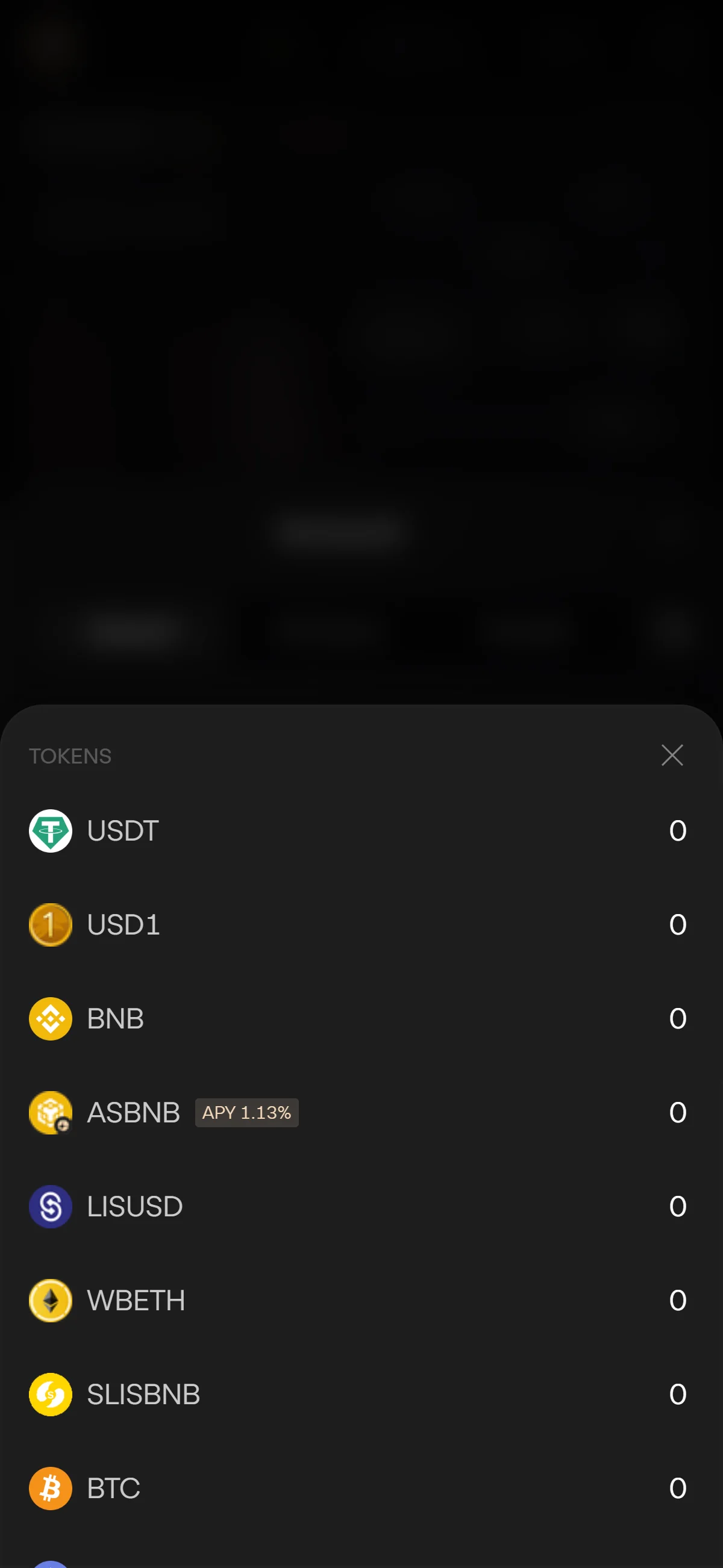
Open the token dropdown and choose the asset you’re depositing. The list covers “USDT”, “USD1”, “BNB”, and more, each showing a balance — all zero on this fresh capture account. Pick your token to finish filling out the deposit form; entering an amount and confirming the transfer is left to you.
Smartphone (iOS / Android) deposit steps
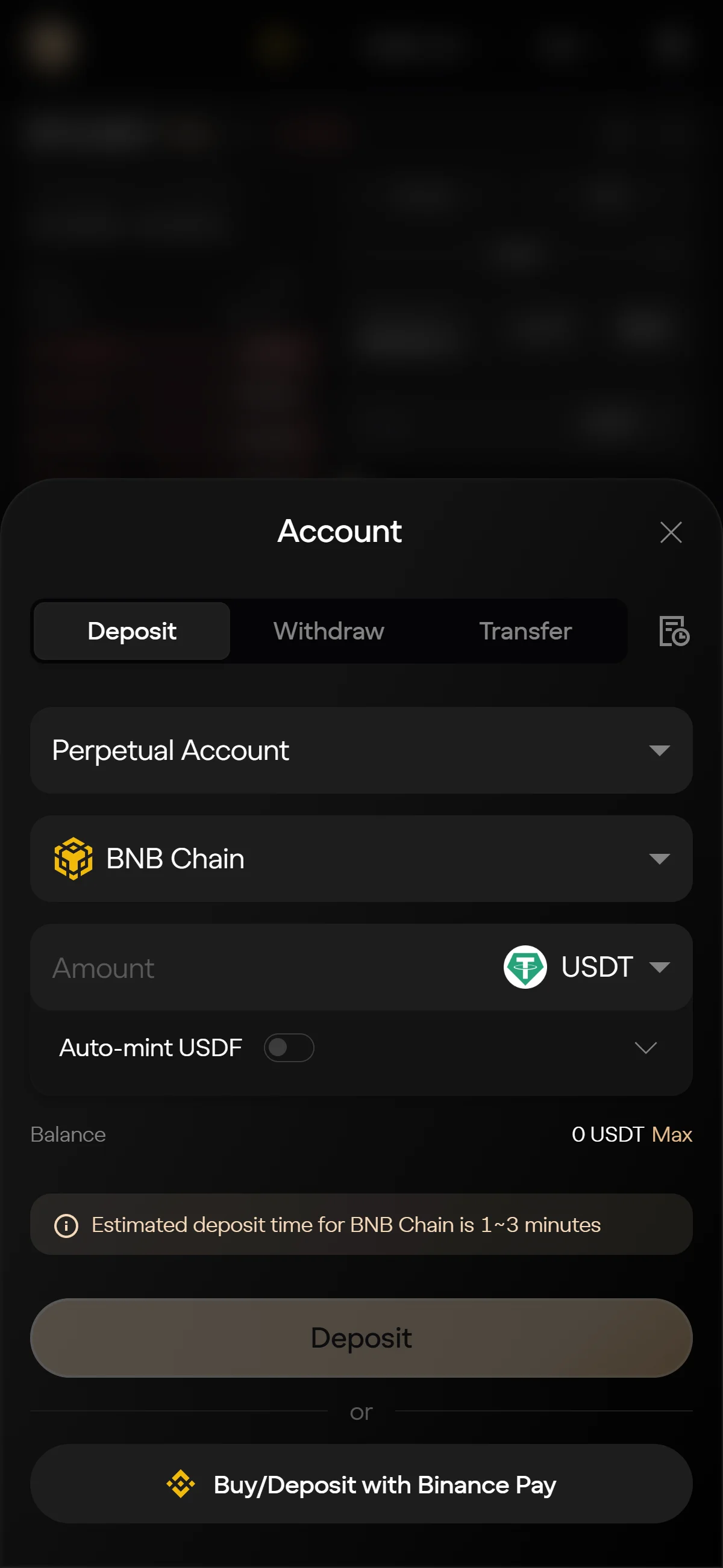
Open the “Account” panel from the “Deposit” button; it lands on the “Deposit” tab. Set “Perpetual Account” as the destination, keep “BNB Chain” or open the network selector to switch chains, and enter how much you want to move in the “Amount” field (USDT here, with an optional “Auto-mint USDF” toggle beneath it).
The panel notes a BNB Chain deposit takes about 1–3 minutes. If you’d rather buy in, “Buy/Deposit with Binance Pay” sits below as an alternative.
Open the network dropdown to pick the chain you’ll deposit from. It lists “BNB Chain” (currently selected), “Ethereum”, “Arbitrum”, and “Solana” — click the one your funds sit on. Your choice sets which token list appears next.
Open the token dropdown and choose the asset you’re depositing. The list covers “USDT”, “USD1”, “BNB”, and more, each showing a balance — all zero on this fresh capture account. Pick your token to finish filling out the deposit form; entering an amount and confirming the transfer is left to you.
This guide walks through connecting a wallet and filling out the deposit form up to chain and token selection; entering an amount and confirming the transfer is yours to complete when you’re ready.
The Aster referral code cannot be added after sign-up
The referral code can only be applied when you connect your wallet — it cannot be added afterwards.
If you overlook this and complete the connection without the code, there is no mechanism for linking it to that wallet after the fact.
Registering again with a fresh wallet is an option worth considering.
- Is the referral code 140fcf shown as applied when you connect your wallet? (check any on-screen notice that appears when you arrive via the referral link, and the code field where the venue provides one)
- After connecting, open the Referral / Rewards page and check that the referral is reflected there — referral-linked displays such as the commission rate appear only once a wallet is connected
Aster points program and airdrop
Aster’s points campaigns and season structure
Aster runs its rewards as a sequence of points campaigns rather than a single program. The stages documented as current are Aster Crystal (Stage 5) and Aster Convergence (Stage 6), following earlier rounds branded Aster Gems and Aster Spectra; each stage carries its own referral bonuses and team boosts, and points boosts also run on newly listed real-world-asset markets.
Points accrue from two activities: trading volume and referrals. Eligibility before the token generation event was tied to concrete participation — Aster Spectra Stage 0 and Stage 1 activity, Aster Gems allocations, and Aster Pro trading loyalty — rather than to a one-off snapshot, which is worth knowing if you are reading historical points as a guide to how the current stages reward activity.
The referral program sits alongside the points system as a set of published rules: the default commission is 10% to the referrer, rising to as much as 20% on volume from VIP1 referees (10% from VIP2 and above) for approved high-volume affiliates, with a 365-day attribution window. Liquidation fees, self-trades, and zero-fee volume are excluded, and a referrer may split the commission with the person they invited, though by default the invitee’s portion of it is 0%.
The ASTER token and the 2025-09-17 TGE airdrop
Aster’s token went live at a token generation event on 2025-09-17. ASTER is a BEP-20 token on BNB Chain, and — unlike a points program that is still accruing — its launch airdrop is a completed event rather than something still ahead.
The TGE tranche was claimable from 2025-09-17 to 2025-10-17, credited gas-free to Aster Spot accounts, with anything left unclaimed redirected to Community Rewards. The wider airdrop allocation is scheduled to release gradually rather than all at once, and that schedule is the extent of what the documentation commits to — the record above is a past distribution, not a signal about any future one.
Aster’s official stance and who is eligible
Aster’s own position is that the airdrop was delivered at the TGE and that it makes no promise of further token distribution. That distribution was not without controversy: it drew Sybil and bot-farming complaints alongside wash-trading criticism, the CEO attributed the volume anomalies to “opportunistic API traders” chasing airdrop rewards, and the team adjusted or delayed portions of the distribution amid accusations of bot bias. The reported-volume dispute that sits underneath those complaints is examined in the risks section below; here it is enough to note that the rewards program and the volume questions are intertwined.
Eligibility carries its own limits. Users in the jurisdictions Aster’s terms exclude are geo-blocked out of the program, the referral rules bar self-referral and multi-account farming, and pre-TGE eligibility was gated on the documented participation stages noted above rather than open to anyone. None of this is guidance to trade for points — it is simply the shape of the program as Aster has published it.
What is Aster
What Aster is: scale, lineage, and architecture
Aster is one of the larger perpetual DEXs by reported volume, but its headline figures come with a caveat worth stating up front: DeFi Llama publishes a reported volume for Aster and leaves the normalized figure blank, so the numbers here are what Aster reports rather than what an independent source has verified. Why that matters is taken up in the risks section.
The protocol is young but has moved quickly, arriving at its current shape through a merger and expanding into its own chain within a year.
At the Aster Chain genesis, roughly 450M ASTER was staked and 112 real-world-asset markets were already live. Who operates all of this is deliberately thin on paper: no incorporated company, legal headquarters, or registered jurisdiction is publicly disclosed — typical of a non-custodial perp DEX — though the terms of service are governed by Hong Kong law. The project is backed by YZi Labs, formerly Binance Labs, with a public endorsement from Binance founder CZ, while the CEO is known only by the pseudonym “Leonard” and the team is largely anonymous.
The product line is unusually broad for a DEX: crypto perps, stock perps referencing US, Hong Kong, and Korean equities, real-world-asset and pre-IPO perps, and prediction markets, plus spot trading and the Aster Earn suite (ALP, asBNB, USDF and asUSDF). Under the hood it is a hybrid — Pro perps run on a central limit order book with off-chain matching and on-chain settlement, while an AMM-style “Shield Mode” and the high-leverage “1001x” mode use the ALP liquidity pool as their counterparty. Settlement now sits on Aster Chain, advertised at 50ms blocks, over 100,000 TPS, zero gas, and ZK-encrypted orders with stealth addresses; the older Earn and legacy rails stay multichain across BNB Chain, Ethereum, Arbitrum, Solana, and SUI.
Trading costs: fees, funding, and the native ASTER discount
The real cost of holding a perp is three things stacked together — the trading fee, the funding you pay or receive while the position is open, and the gas or bridge cost of moving funds in and out. Aster’s per-contract trading fees, as of 2026-07-24, break down like this:
- USDT-Perp
- 0% maker / 0.04% taker
- USD1-Perp
- 0.005% taker
- Stock-Perp
- 0.009% taker
- ”1001x” mode
- 0.08% to open + 0.08% to close
One wrinkle to flag: an older overview page still lists 0.01% maker / 0.035% taker, so if you see those figures elsewhere, treat the current per-contract schedule above as the authoritative one. Funding settles every eight hours by default — a premium-index component plus an interest component that typically runs around 0.01%, though it is 0% for BNBUSDT — and Aster reserves the right to shorten that interval during extreme volatility.
The zero maker fee is a structural choice rather than a concession: with maker fees at 0% across the perp contracts, the venue earns from taker fees, funding, spread, the ALP pool’s counterparty profit and loss, and liquidations, and it has at times waived fees promotionally on select stock and RWA perps such as NVDA and TSLA. Separately, the protocol offers a 5% reduction on perp and spot trading fees when those fees are paid in ASTER: you deposit ASTER and enable the fee-payment setting. This is a native token mechanism built into the protocol, independent of the trading fees above.
What makes Aster distinct
Where Aster stands apart: privacy, asset breadth, leverage, and backing
Measured against the perp DEXs readers usually weigh it against — Hyperliquid as the category leader, plus ApeX, Lighter, and Grvt — Aster’s distinctiveness is less about being cheaper and more about four structural choices, each of which is a trade-off rather than an unqualified win.
Private by default
Beyond crypto-only
Higher headline leverage
Binance-ecosystem ties
None of these is free. Privacy-by-default complicates any external verification of activity, the broad synthetic-asset menu is exactly what raises the securities-law questions covered later, and the leverage and the backing each cut both ways. What Aster offers is a particular mix, not a strictly better one.
When another venue is the better fit
A fair guide has to say where Aster is not the answer. The first case is simple and non-negotiable: if you are in a jurisdiction Aster’s terms prohibit — the United States, Canada, the United Kingdom, and others — the frontend geo-blocks you, so the platform is simply not accessible; that is a hard limit rather than a matter of fit. The second case is about trust in the numbers. If your priority is fully verifiable, transparent volume and a long, uninterrupted track record, Aster is a weaker fit: its reported volumes have been disputed, DeFi Llama has delisted and relisted its data, no normalized volume is shown, and the protocol is comparatively young.
Aster’s reported perp volumes are sensitive to incentives and wash trading, and no independent source has verified them — so they should be read as reported, never as confirmed.DeFi Llama, reported-only
That honesty cuts to who Aster suits. It fits a trader who wants broad synthetic-asset access, high leverage, and privacy at the execution layer, and who is comfortable operating on a young, Binance-linked venue outside investor protections. It fits far less well for anyone who needs verifiable volume, a long history, or the safety rails of a regulated venue — and it is not available at all to anyone the geo-block excludes.
Aster regulatory landscape
Where Aster geo-blocks access, and how the block works
Aster’s regulatory posture starts with who it turns away. Section 2.1.c of its terms lists a set of excluded regions, and residents of those places cannot connect a wallet to the frontend at all.
The block has a structure worth understanding. It operates at the web and app frontend — the interface layer — not at the protocol itself: Aster is non-custodial, does not operate the underlying chains or hold assets, and the underlying smart contracts are permissionless. In practice, geo-restricted regions cannot connect a wallet through the AsterDex frontend, and the terms require users to attest to an accurate location and not to circumvent the restrictions; the exact technical method, whether IP-based blocking or wallet screening, is not spelled out.
Part of why the perimeter is drawn this way is what Aster lists. Its stock, real-world-asset, and pre-IPO perps, together with its prediction markets, are synthetic derivatives that reference securities and events — a design that heightens securities-law exposure and underlies the US block and several others.
How regulators view Aster and perp DEXs
No US regulator has named Aster specifically, but the category stance is on record. In 2023 the CFTC settled charges against three DeFi protocols — Opyn, ZeroEx, and Deridex — for offering leveraged and perpetual digital-asset derivatives to US persons without registration. That is the on-point precedent for any perp DEX that would serve US customers, and it is a large part of why venues like Aster geo-block the country rather than test it.
One national regulator has named Aster directly. France’s AMF added asterdex.com to its blacklist of unauthorized crypto-asset-derivatives providers, listed on 2026-02-27, for offering financial services without authorization. This is worth flagging carefully: entity-level research recorded no enforcement action naming Aster, so the AMF listing surfaced as a discrepancy that we resolve by carrying the primary regulator source. France is outside this guide’s covered markets and is included here only for the global regulatory picture.
Regulatory trajectory: self-restricting while widening securities-like products
Read as a whole, the direction is a kind of self-restriction. Aster proactively geo-blocks major regulated markets — the US, the UK, Canada — while simultaneously widening into stock, real-world-asset, and pre-IPO synthetic perps that raise exactly the securities-law questions those markets care about, and its Binance-ecosystem ties invite additional scrutiny. As of 2026-07-24 there are no known enforcement events, easing or tightening, specific to Aster beyond the AMF listing above. The tension is structural: the more Aster expands its synthetic-asset menu, the more it draws the kind of attention its geo-blocks are designed to avoid.
Aster availability across major jurisdictions
Whether you can use Aster at all — and on what terms — depends on where you are. Across the markets this guide covers, the picture splits cleanly into two blocked markets and three where access is open but unregulated.
United States: geo-blocked, sign-up not possible
For US residents the answer is straightforward: Aster is not available. Its terms of service list the United States as a Prohibited Jurisdiction under Section 2.1.c, and the frontend geo-blocks US access, so there is no way to sign up or apply the referral code from the country. The backdrop is that Aster is unregistered with US regulators, and the Commodity Exchange Act restricts retail leveraged commodity trading to registered venues; no enforcement action naming Aster in the US was found as of 2026-07-24. The practical takeaway is simply that the block is firm — there is nothing to work around here, only to note.
United Kingdom: geo-blocked, with an FCA retail-derivatives ban
The UK is also listed as a Prohibited Jurisdiction in Aster’s terms, and the frontend is geo-blocked, so UK residents cannot sign up. Sitting behind that, as a separate fact rather than the cause of the block, is the FCA’s prohibition on selling crypto derivatives to UK retail investors, in force since 2021-01-06, with the financial-promotions regime applying from 2023-10-08. Aster is not FCA-registered, and no FCA action naming Aster was found — but between the platform’s own geo-block and the UK’s retail-derivatives ban, this is a market Aster stays out of.
Singapore: accessible, outside the MAS licensed perimeter
Singapore is a different situation: Aster does not exclude it, and the site is accessible. What matters here is that MAS’s rules land on service providers, not individual users — its ban on offering retail leverage for digital-token trading is a provider-side obligation, and Aster simply sits outside that licensed perimeter rather than breaking a rule aimed at you. Two things follow for a Singapore-based reader: your trading happens outside the MAS-licensed framework and the protections that come with it, and on the tax side, IRAS generally does not treat individual gains as taxable capital gains unless they amount to trading income — a judgment you are expected to self-assess.
Australia: accessible, with no offshore-DEX prohibition
Australia is open too, with no law preventing residents from using an offshore DEX. Aster holds no AFS license or AUSTRAC registration, and while ASIC caps retail crypto-CFD leverage at 2:1, that cap does not reach offshore perp DEXs in practice — Report 835 places them outside the perimeter. The consequence is that your trades happen outside Australian investor protections. Crypto disposals fall under the capital-gains tax rules and are self-reported to the ATO, so the record-keeping is on you.
India: accessible, legal-but-unregulated with a 30% VDA tax
India does not prohibit residents from trading on a DEX. Virtual digital assets remain legal but largely unregulated, and no SEBI leverage cap applies to crypto perps, so access to Aster is unrestricted in principle. The weight here is tax and compliance: a flat 30% tax on virtual-digital-asset gains applies, plus the applicable cess and a 1% TDS, and because Aster is an offshore, non-custodial platform, the entire compliance burden — tracking, reporting, and paying — falls on you rather than on any intermediary.
Risks to acknowledge before using Aster
Protocol health: audits, governance opacity, and the counterparty pool
The audits Aster publishes cover its Earn and stablecoin components — and only those.
- Salus Security
- asBNB, asCAKE
- PeckShield
- asBNB, USDF
- Halborn
- USDF and asUSDF
- Unnamed auditor
- AsterVault / AsterEarn
What is not on that list is the important part: there is no published audit specifically for the perpetuals or matching engine, none for the Aster Chain layer-1, and the audit index does not show dates. Governance is similarly opaque — contract upgradeability and proxy details, the multisig signer set and threshold, and any timelock are not disclosed in the reviewed documentation, and no bug-bounty program is published; on-chain governance through ASTER and veASTER was announced for Q2 2026 but is a forward item, not a current control.
There is also no separately branded insurance fund. The ALP liquidity pool doubles as the perp counterparty, absorbing profit and loss including liquidations, and the auto-deleveraging details are undocumented. Pricing for the 1001x mode leans on a stack of oracles — Pyth as the primary anchor, Chainlink for cross-verification, and Binance Oracle as a fallback — with a circuit breaker that fails a transaction outright if Pyth diverges from Chainlink by more than 1%.
Leverage and liquidation: the core trading-structure risk
On a KYC-less, self-custodied venue with no investor-protection backstop, the leverage on offer is itself the headline risk. Aster’s “1001x” mode makes leverage of up to 1001x available immediately — standard order-book perps use lower per-market caps — and that is not a feature to be walked past.
None of that is a reason not to trade; it is the reason to size positions against the liquidation math rather than the maximum the interface allows. The high-leverage structure, the counterparty pool that clears liquidations, and the funding you carry are the three things that decide the real risk of a perp position here.
Reported-volume disputes, centralization, and self-custody
The most concrete mark on Aster’s record is a data-integrity dispute, not a hack. In October 2025 DeFi Llama delisted Aster’s trading data over wash-trading and verification concerns — Aster’s volumes had tracked Binance’s perp volumes unusually closely — then relisted it later that month with an explicit caveat that it could not verify the numbers, calling them a “black box”. As of 2026-07-24 DeFi Llama still shows no normalized 24-hour volume for Aster. ASTER’s price reportedly fell around 10% around the episode, but no user funds were lost; this was a question about the integrity of the reported numbers, not an exploit.
On the security side, no smart-contract exploit, oracle-manipulation, or protocol-drain incident affecting Aster was identified as of 2026-07-24. There is a separate, external hazard, though.
Centralization is worth naming plainly. The order matching runs off-chain on a legacy design, the API and infrastructure are Binance-derived, and the Aster Chain validator and sequencer set is not publicly detailed. A widely repeated figure that six wallets hold roughly 96% of the ASTER supply is third-party and secondary — treat it as unverified rather than established. Finally, self-custody cuts both ways: it means no one can freeze your funds, but the secret-key and loss risk is entirely yours, and while a frontend geo-block or outage would not stop the permissionless contracts underneath, actually reaching them depends on your own wallet control.