— Contents 10 sections
- 01 Is the Bitfinex referral code “4L39Hns5S” still active?
- 02 What the Bitfinex referral code “4L39Hns5S” gets you
- 03 Bitfinex sign-up steps with the referral code
- 04 What to do after signing up at Bitfinex
- 05 The Bitfinex referral code cannot be added after sign-up
- 06 What is Bitfinex
- 07 What makes Bitfinex distinct
- 08 Bitfinex regulatory landscape
- 09 Bitfinex availability across major jurisdictions
- 10 Risks to acknowledge before using Bitfinex
chainhelm’s exclusive Bitfinex referral code is .
As of 2026-07-17, we signed up as a new user and confirmed that the referral code was applied.
Enter the code at sign-up to receive a 6% fee rebate for new users. You can only do this during registration, so we recommend entering it right then and there.
This article covers the sign-up process with the Bitfinex referral code, Bitfinex’s distinguishing features, availability in major markets, and the risks to acknowledge — with the sign-up flow and code application verified first-hand by chainhelm’s editorial team.
Is the Bitfinex referral code “4L39Hns5S” still active?
The chainhelm editorial team created a fresh Bitfinex account on 2026-07-17 and confirmed that the referral code “4L39Hns5S” is still active.
Here is the actual screen captured during verification.
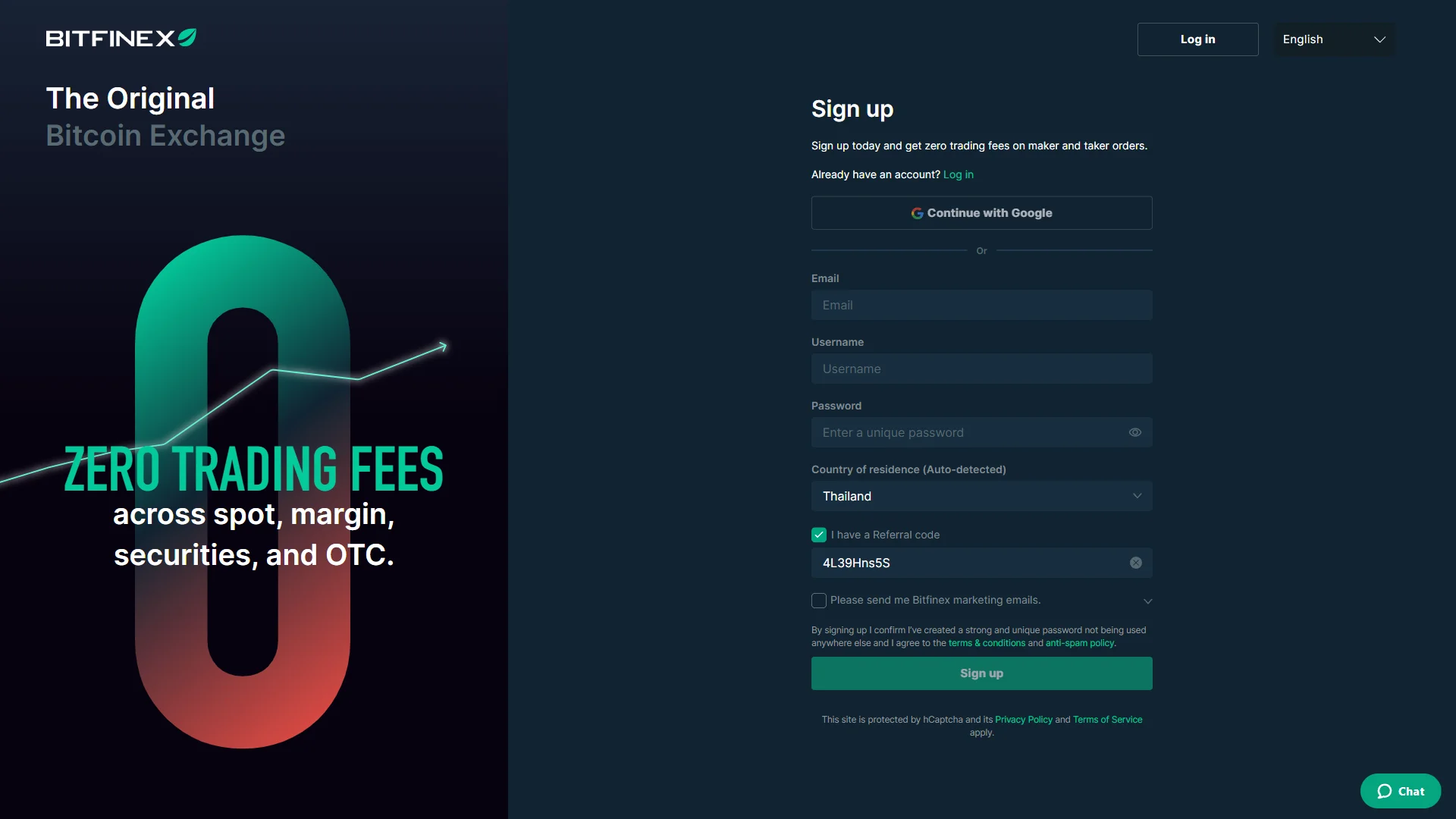
The screen shows “I have a Referral code”, confirming that the referral code 4L39Hns5S was correctly applied.
chainhelm continuously verifies the validity of the code and confirms it remains usable.
What the Bitfinex referral code “4L39Hns5S” gets you
Apply this code at sign-up to receive the following benefits on Bitfinex:
- Benefit: a 6% fee rebate for new users
- Expiration: None
- Eligibility: New users
To receive the benefits, you need to enter the code when you create your account. Be careful not to miss this step.
Bitfinex sign-up steps with the referral code
We cover the sign-up process separately for PC/browser and smartphone (mobile).
PC/browser sign-up steps
-
First, open the Bitfinex official sign-up page (the link applies the referral code). When you open it, you’ll see a screen like the one below.
-
Open the sign-up form
— Figure 2Sign-up form, referral applied2026-07-17 The sign-up fields sit empty beside a promotional banner for zero trading fees, while the "I have a Referral code" box is already checked and pre-filled from the invite link. Source: chainhelm editorial Reaching Bitfinex through your referral link opens the sign-up form with the “I have a Referral code” box already checked and the code filled in for you, so there is nothing to enter there by hand.
Type your email address, choose a username, and set a unique password in the fields provided. Confirm that “Country of residence (Auto-detected)” matches where you actually live, since Bitfinex uses this to decide which features and verification steps apply to you.
If you would rather not create a separate password, “Continue with Google” at the top offers an alternative, but the email route keeps your login independent of a third-party account. Once the fields are complete, the form is ready to submit.
-
Fill in your details and submit
— Figure 3Sign-up form, filled in2026-07-17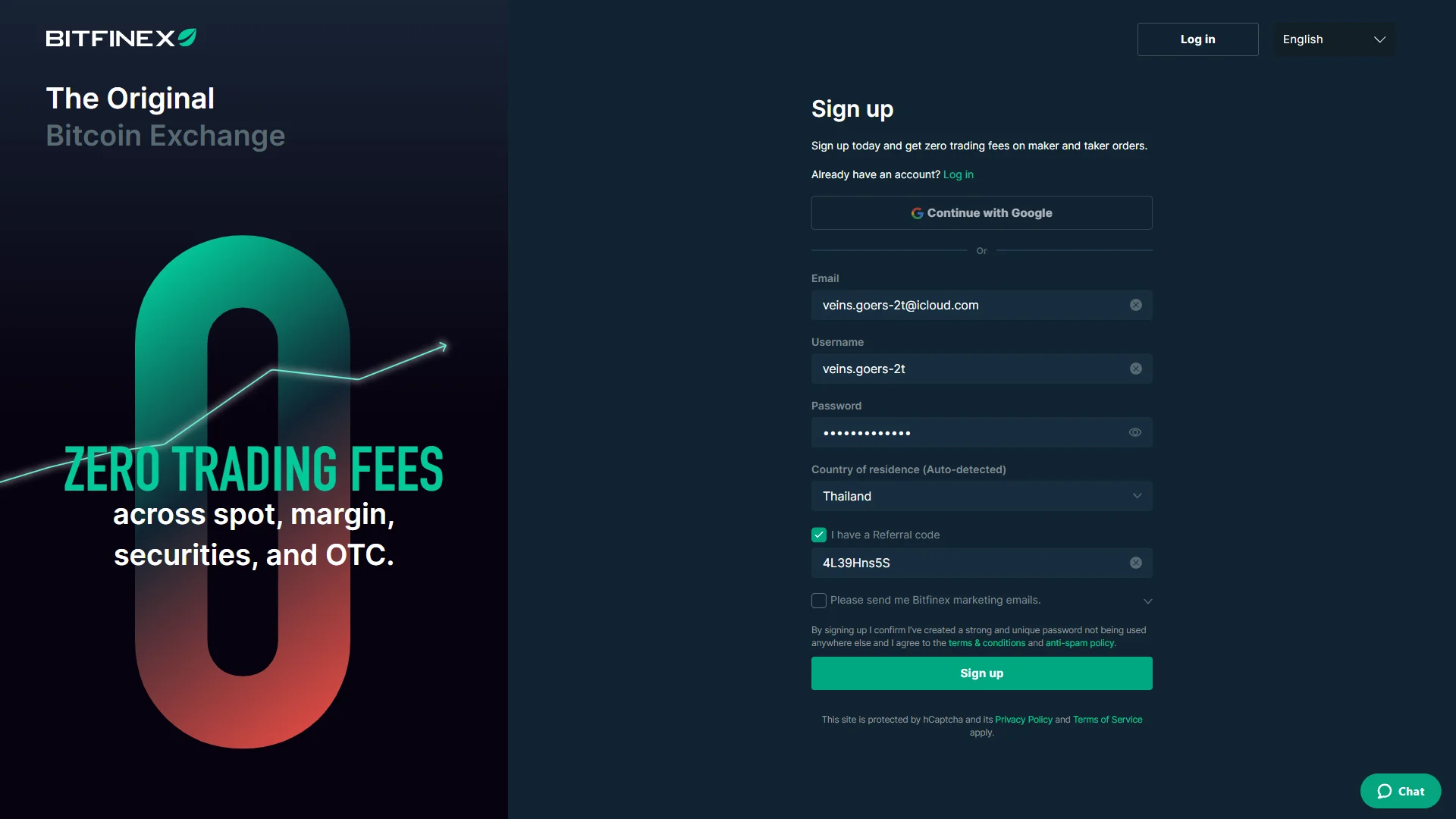
The email and username fields now show entered values and the password is masked, leaving the completed form ready to submit. Source: chainhelm editorial With your email, username, and password entered, take a moment to confirm they are correct. Bitfinex masks the password by default, so use the eye icon beside it if you want to check the characters before continuing.
Selecting “Sign up” submits the form. Doing so also confirms that you agree to Bitfinex’s terms & conditions and anti-spam policy, as stated in the line just above the button, so there is no separate checkbox to tick.
A verification challenge then opens on top of the form.
-
Complete the captcha challenge
— Figure 4Captcha challenge2026-07-17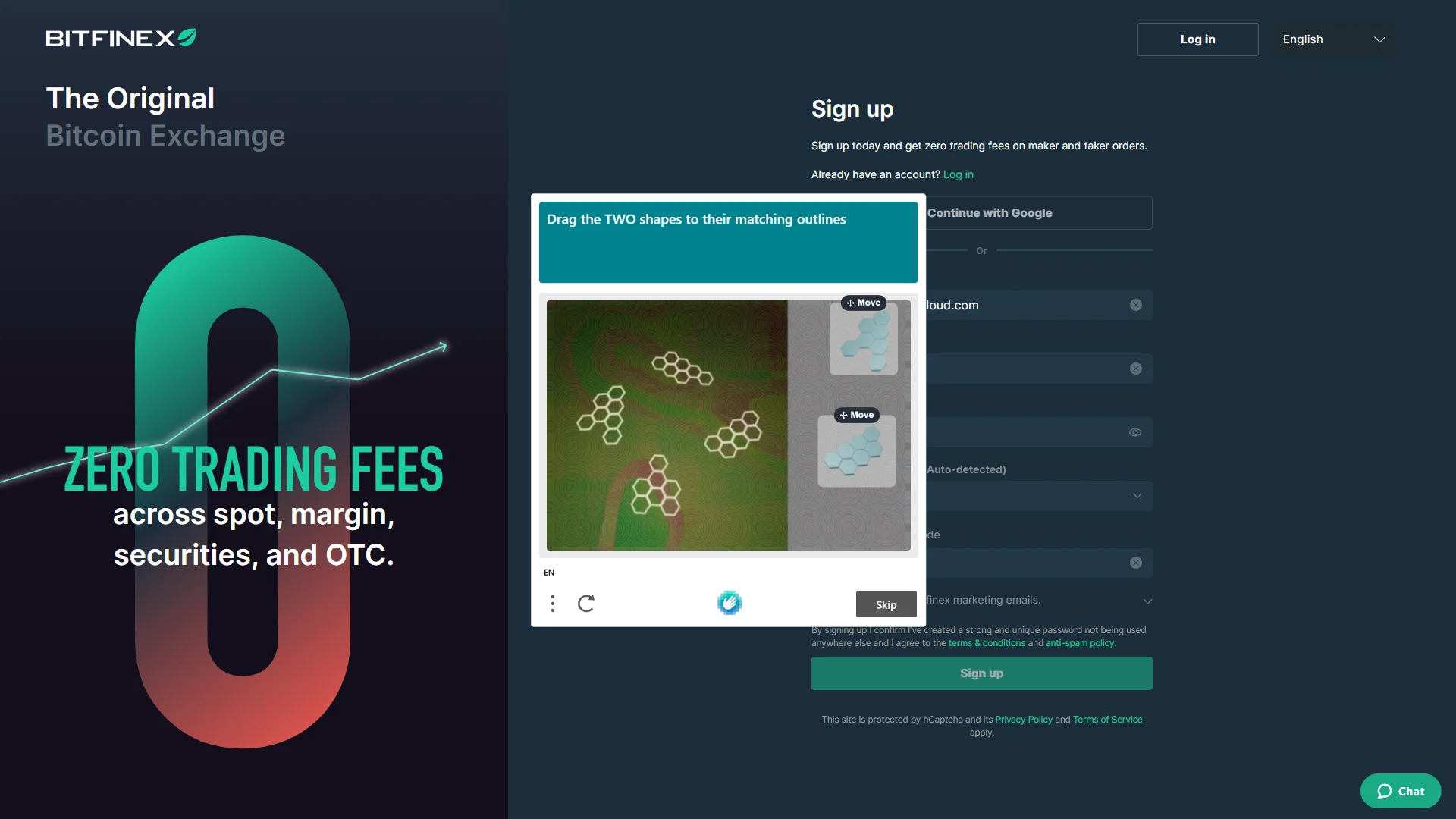
A captcha modal presents two shapes to drag onto their matching outlines, with the exact puzzle differing on each attempt. Source: chainhelm editorial A captcha window appears with the prompt “Drag the TWO shapes to their matching outlines”. Drag each shape from the panel on the right onto the outline it fits within the image.
The exact puzzle changes from one attempt to the next, so match whatever shapes you are shown rather than following a fixed pattern. Once both shapes are placed correctly, Bitfinex accepts the challenge and moves you on to email verification.
-
Enter the email verification code
— Figure 5Email code entry2026-07-17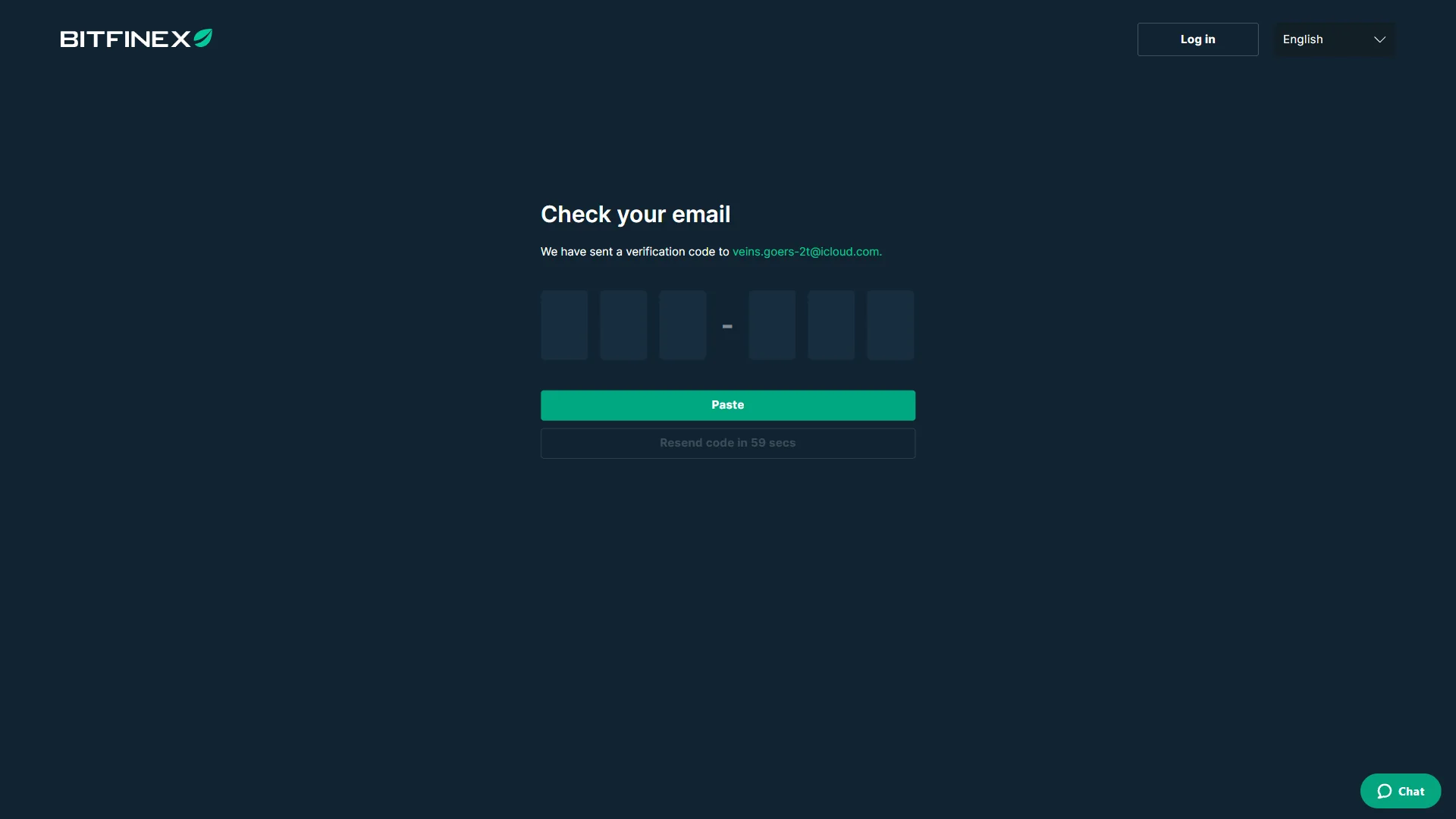
The six code boxes are empty, with a "Paste" button and a resend-code timer counting down beneath them. Source: chainhelm editorial Bitfinex sends a six-digit verification code to the address you registered and shows a “Check your email” screen with six input boxes. Open the email, covered in the next step, then type the code into the boxes or use “Paste” to drop in a copied code all at once.
If the code does not arrive, “Resend code” becomes available once the countdown beneath the boxes finishes. Entering the correct code confirms your email address and moves you into account setup.
-
Find the code in your inbox
— Figure 6Verification email2026-07-17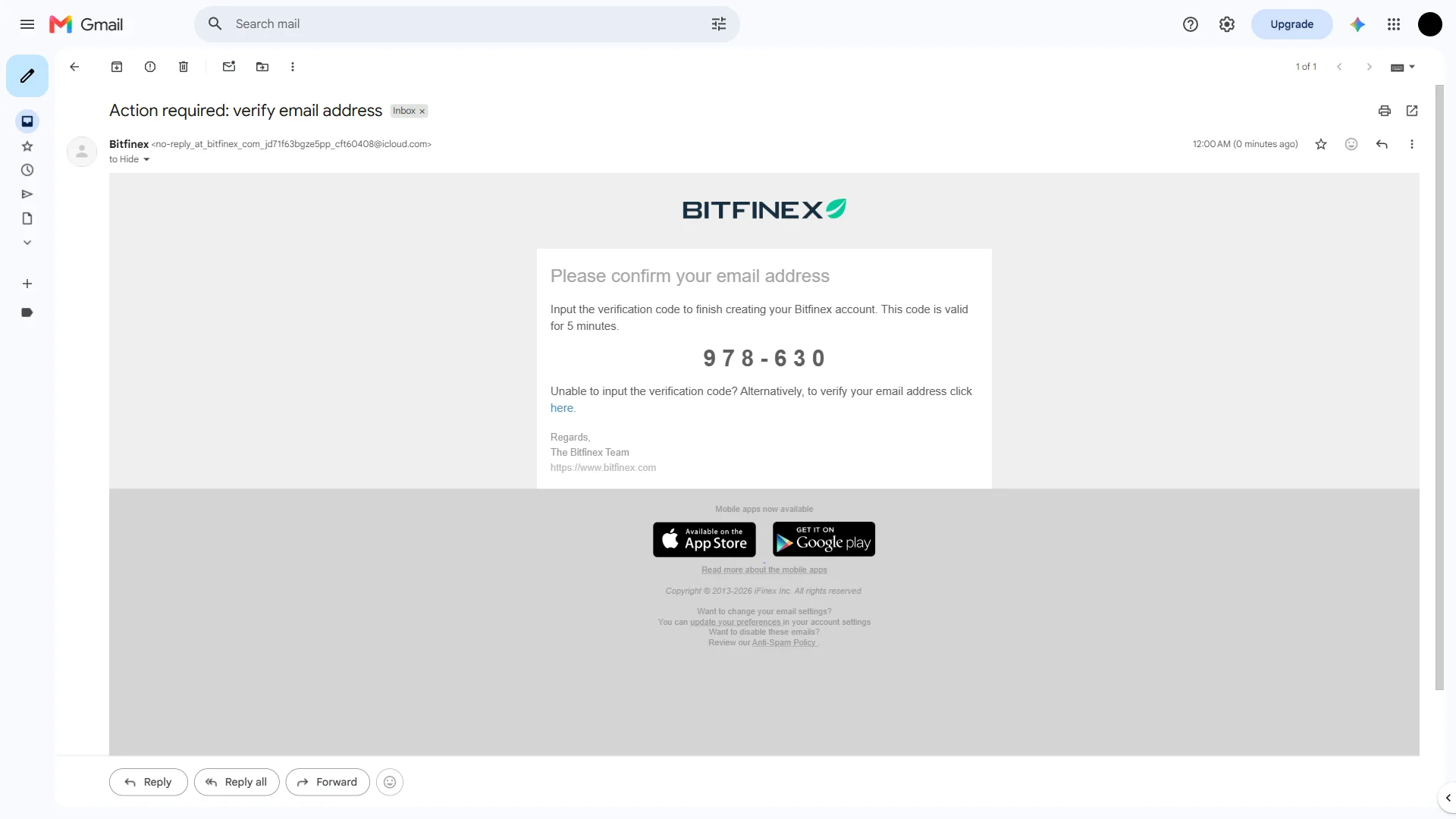
The Bitfinex email displays the verification code prominently and notes that it stays valid for five minutes. Source: chainhelm editorial In your inbox, open the message from Bitfinex titled “Action required: verify email address”. It opens with the heading “Please confirm your email address” and shows the verification code in large digits in the middle of the message.
Copy or note this code, then return to the “Check your email” screen to enter it. The code is only valid for five minutes, so retrieve it promptly; if it expires, request a fresh one from the verification screen.
Smartphone (iOS / Android) sign-up steps
-
First, open the Bitfinex official sign-up page in the mobile app or browser (the link applies the referral code). When you open it, you’ll see a screen like the one below.
-
Open the sign-up form
— Figure 2Sign-up form, referral applied2026-07-17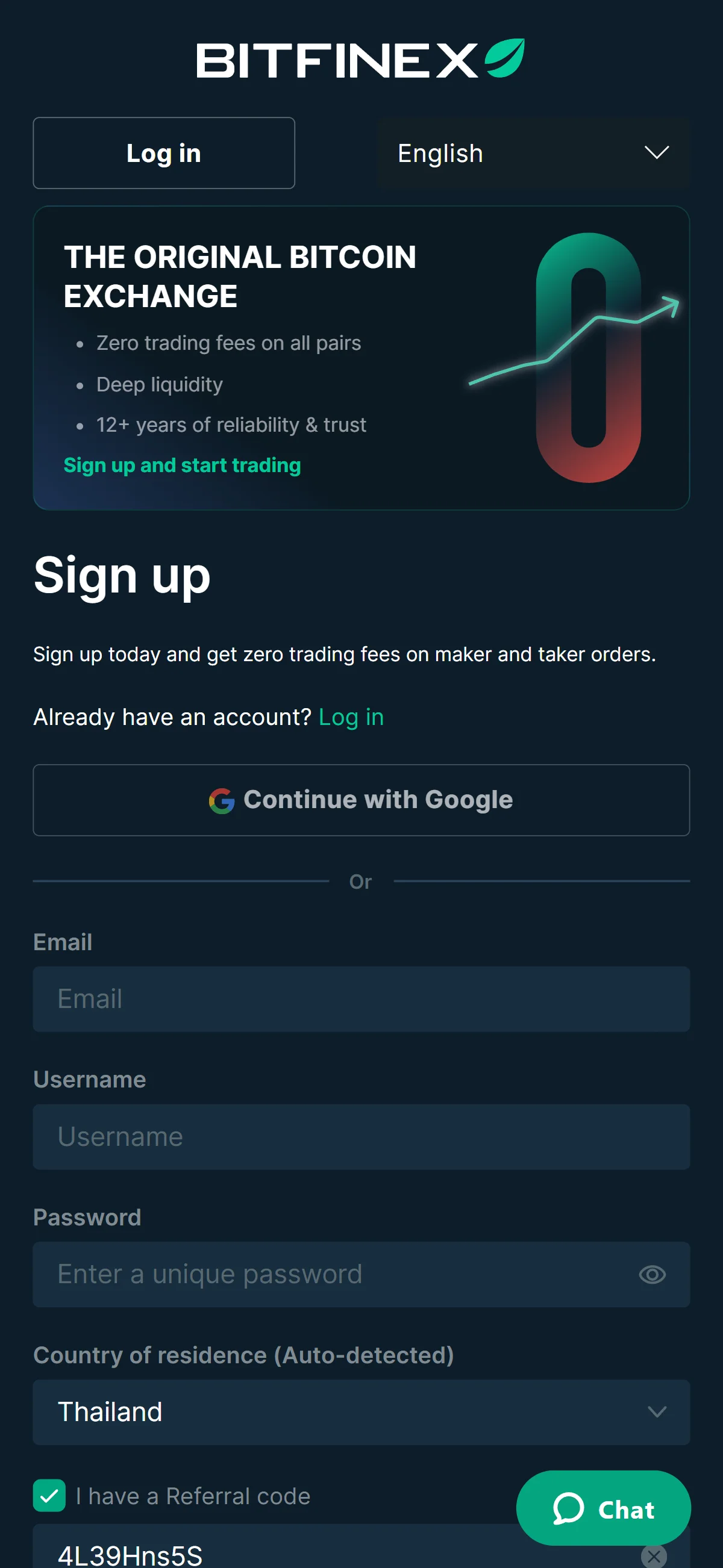
The sign-up fields sit empty beside a promotional banner for zero trading fees, while the "I have a Referral code" box is already checked and pre-filled from the invite link. Source: chainhelm editorial Reaching Bitfinex through your referral link opens the sign-up form with the “I have a Referral code” box already checked and the code filled in for you, so there is nothing to enter there by hand.
Type your email address, choose a username, and set a unique password in the fields provided. Confirm that “Country of residence (Auto-detected)” matches where you actually live, since Bitfinex uses this to decide which features and verification steps apply to you.
If you would rather not create a separate password, “Continue with Google” at the top offers an alternative, but the email route keeps your login independent of a third-party account. Once the fields are complete, the form is ready to submit.
-
Fill in your details and submit
— Figure 3Sign-up form, filled in2026-07-17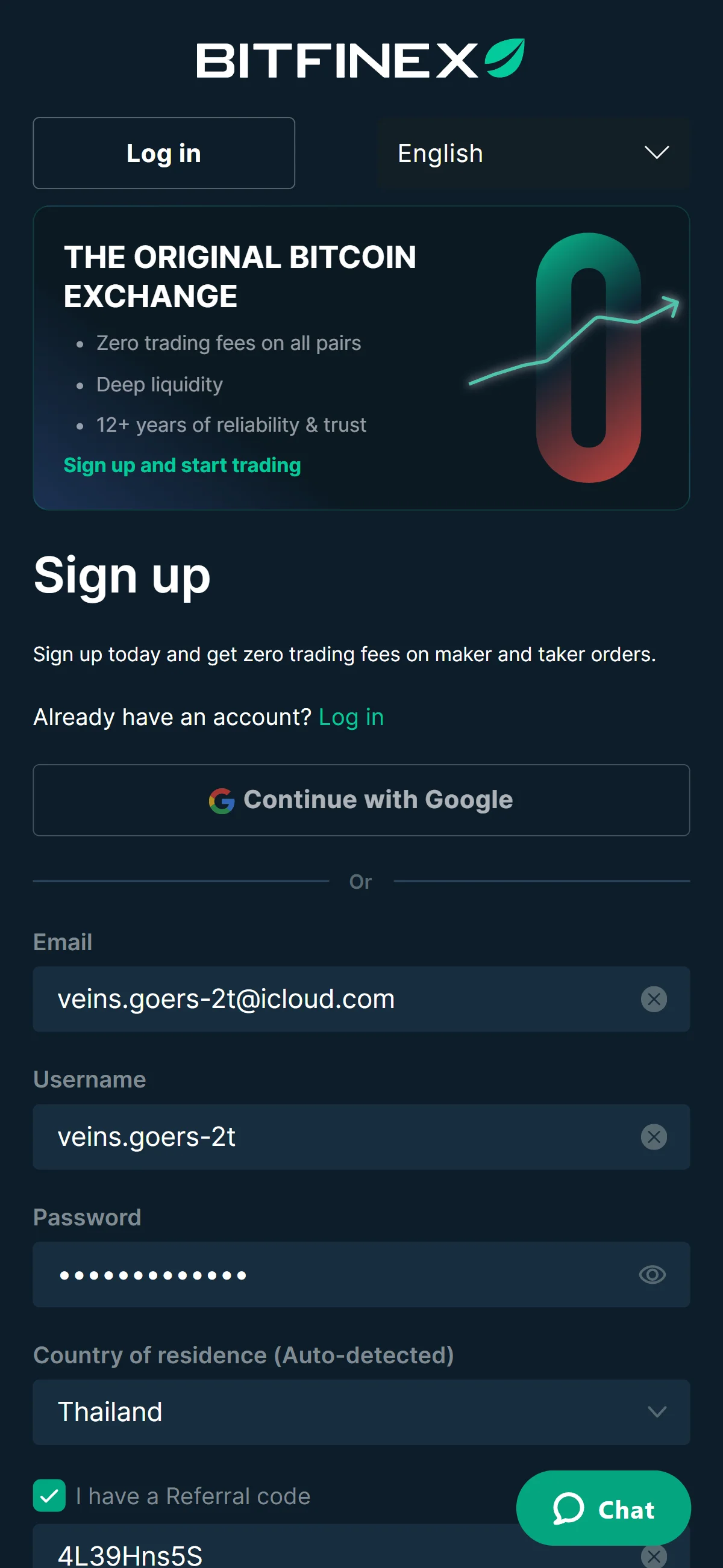
The email and username fields now show entered values and the password is masked, leaving the completed form ready to submit. Source: chainhelm editorial With your email, username, and password entered, take a moment to confirm they are correct. Bitfinex masks the password by default, so use the eye icon beside it if you want to check the characters before continuing.
Selecting “Sign up” submits the form. Doing so also confirms that you agree to Bitfinex’s terms & conditions and anti-spam policy, as stated in the line just above the button, so there is no separate checkbox to tick.
A verification challenge then opens on top of the form.
-
Complete the captcha challenge
— Figure 4Captcha challenge2026-07-17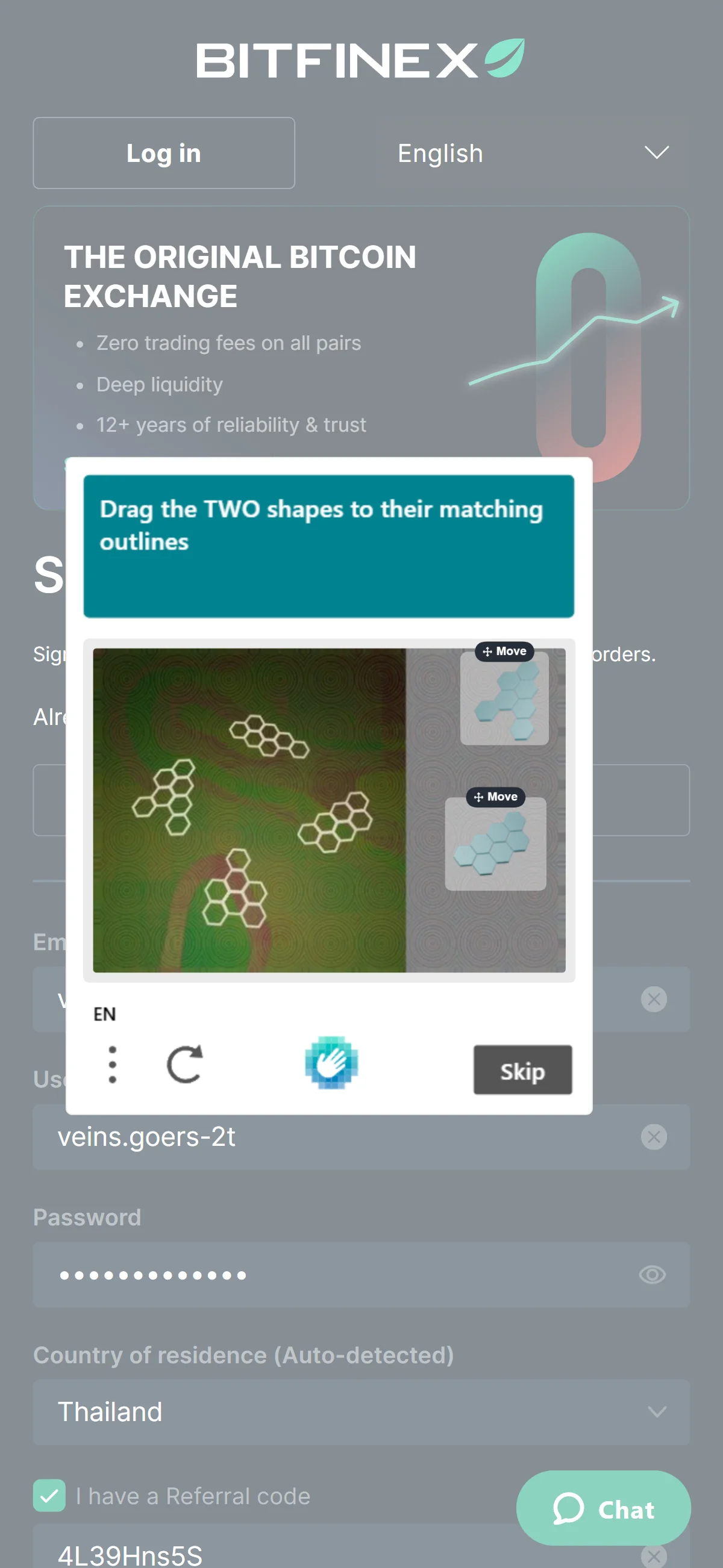
A captcha modal presents two shapes to drag onto their matching outlines, with the exact puzzle differing on each attempt. Source: chainhelm editorial A captcha window appears with the prompt “Drag the TWO shapes to their matching outlines”. Drag each shape from the panel on the right onto the outline it fits within the image.
The exact puzzle changes from one attempt to the next, so match whatever shapes you are shown rather than following a fixed pattern. Once both shapes are placed correctly, Bitfinex accepts the challenge and moves you on to email verification.
-
Enter the email verification code
— Figure 5Email code entry2026-07-17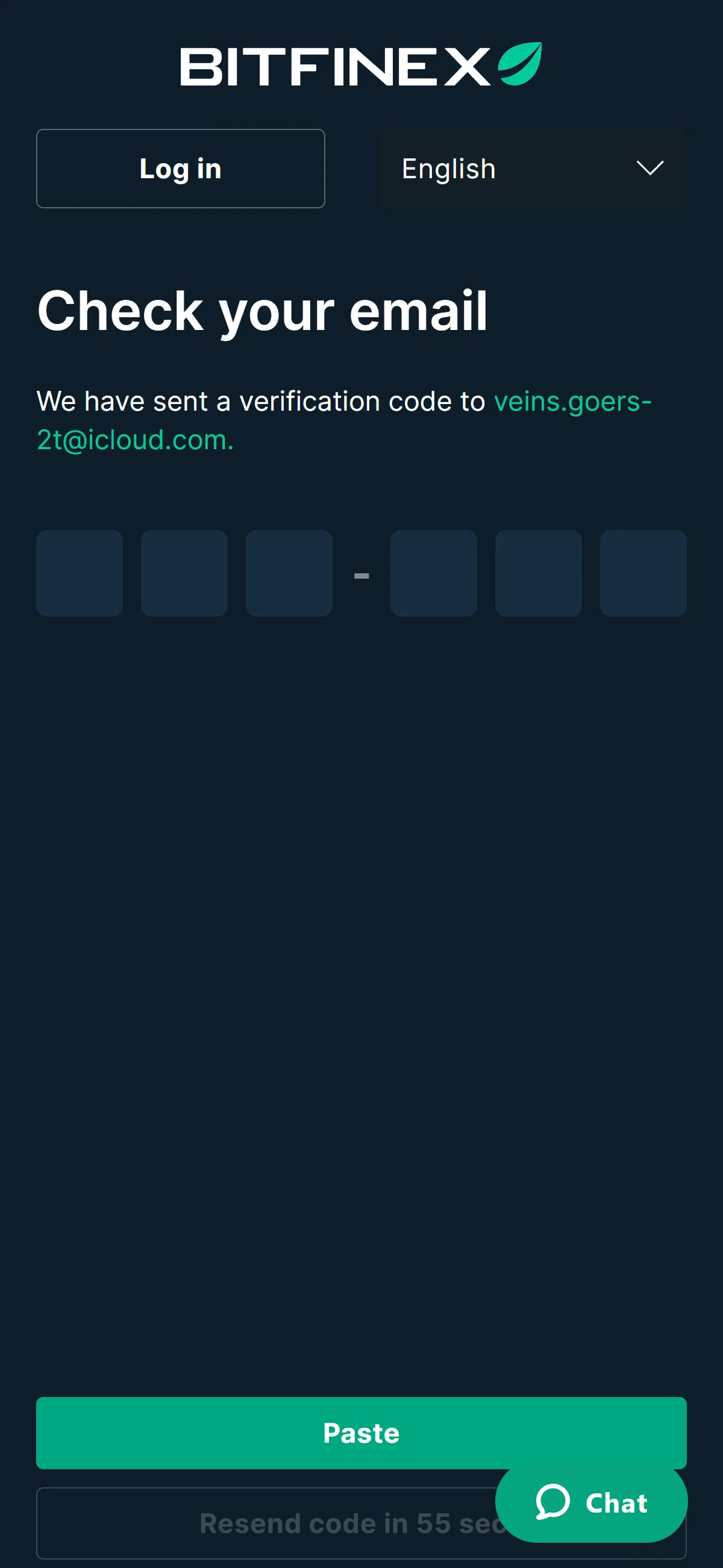
The six code boxes are empty, with a "Paste" button and a resend-code timer counting down beneath them. Source: chainhelm editorial Bitfinex sends a six-digit verification code to the address you registered and shows a “Check your email” screen with six input boxes. Open the email, covered in the next step, then type the code into the boxes or use “Paste” to drop in a copied code all at once.
If the code does not arrive, “Resend code” becomes available once the countdown beneath the boxes finishes. Entering the correct code confirms your email address and moves you into account setup.
-
Find the code in your inbox
— Figure 6Verification email2026-07-17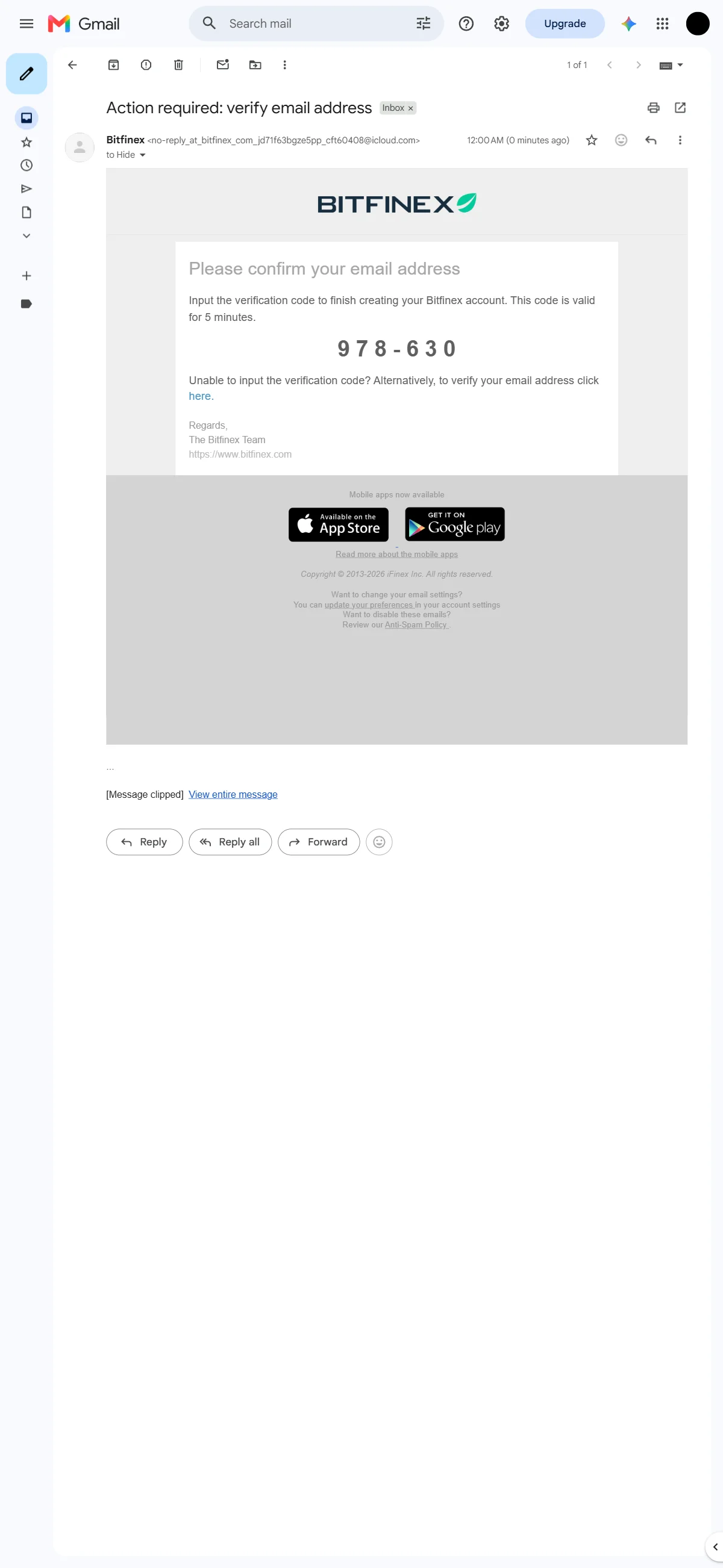
The Bitfinex email displays the verification code prominently and notes that it stays valid for five minutes. Source: chainhelm editorial In your inbox, open the message from Bitfinex titled “Action required: verify email address”. It opens with the heading “Please confirm your email address” and shows the verification code in large digits in the middle of the message.
Copy or note this code, then return to the “Check your email” screen to enter it. The code is only valid for five minutes, so retrieve it promptly; if it expires, request a fresh one from the verification screen.
What to do after signing up at Bitfinex
We cover identity verification separately for PC/browser and smartphone (mobile).
PC/browser identity verification
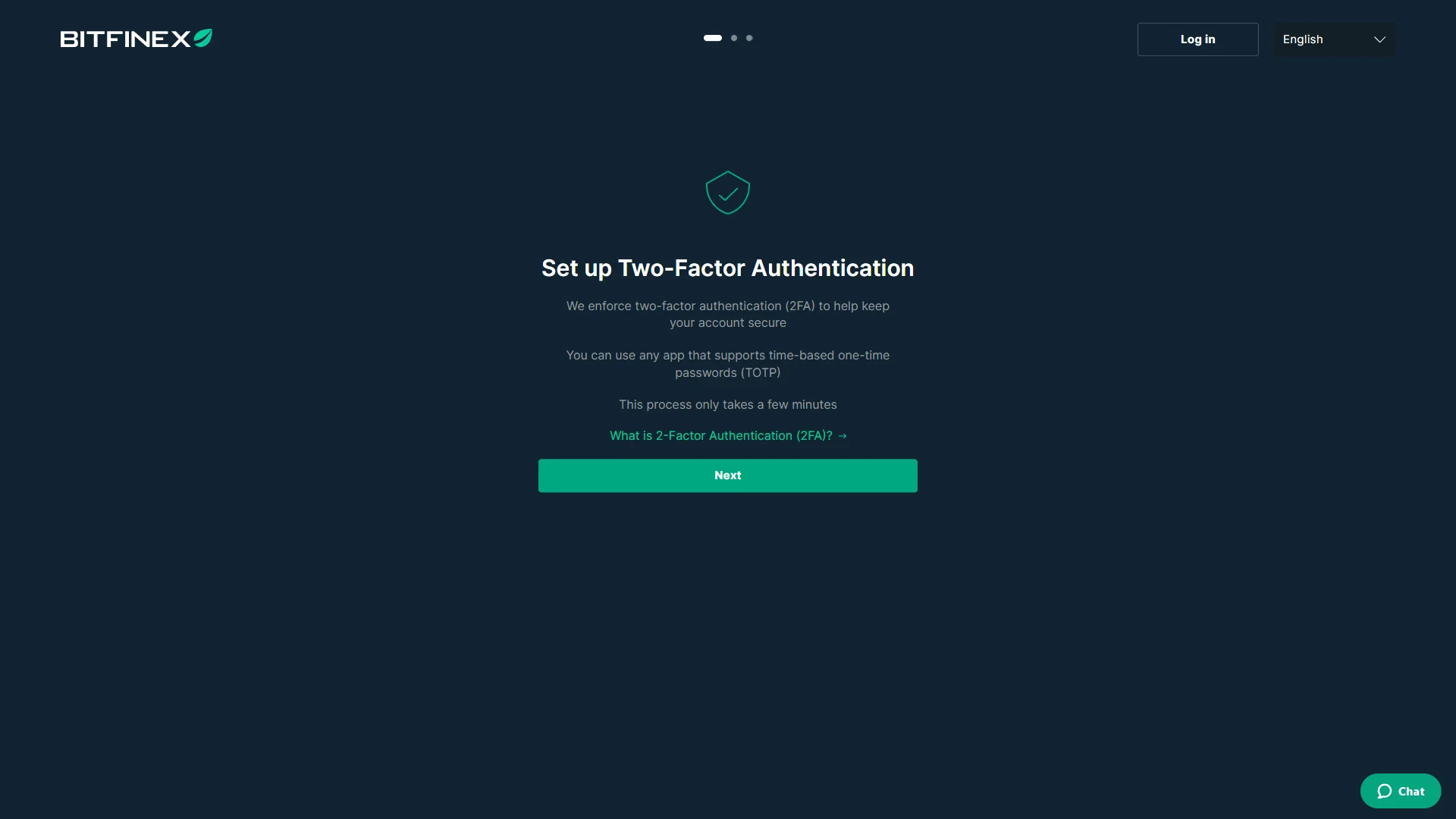
Once your email is verified, Bitfinex opens the “Set up Two-Factor Authentication” screen. The page explains that 2FA is enforced on every account and that you can use any app supporting time-based one-time passwords (TOTP).
This is a required step rather than an optional one, and the indicator at the top shows it as the first of several setup screens. Select “Next” to begin configuring your authenticator app.
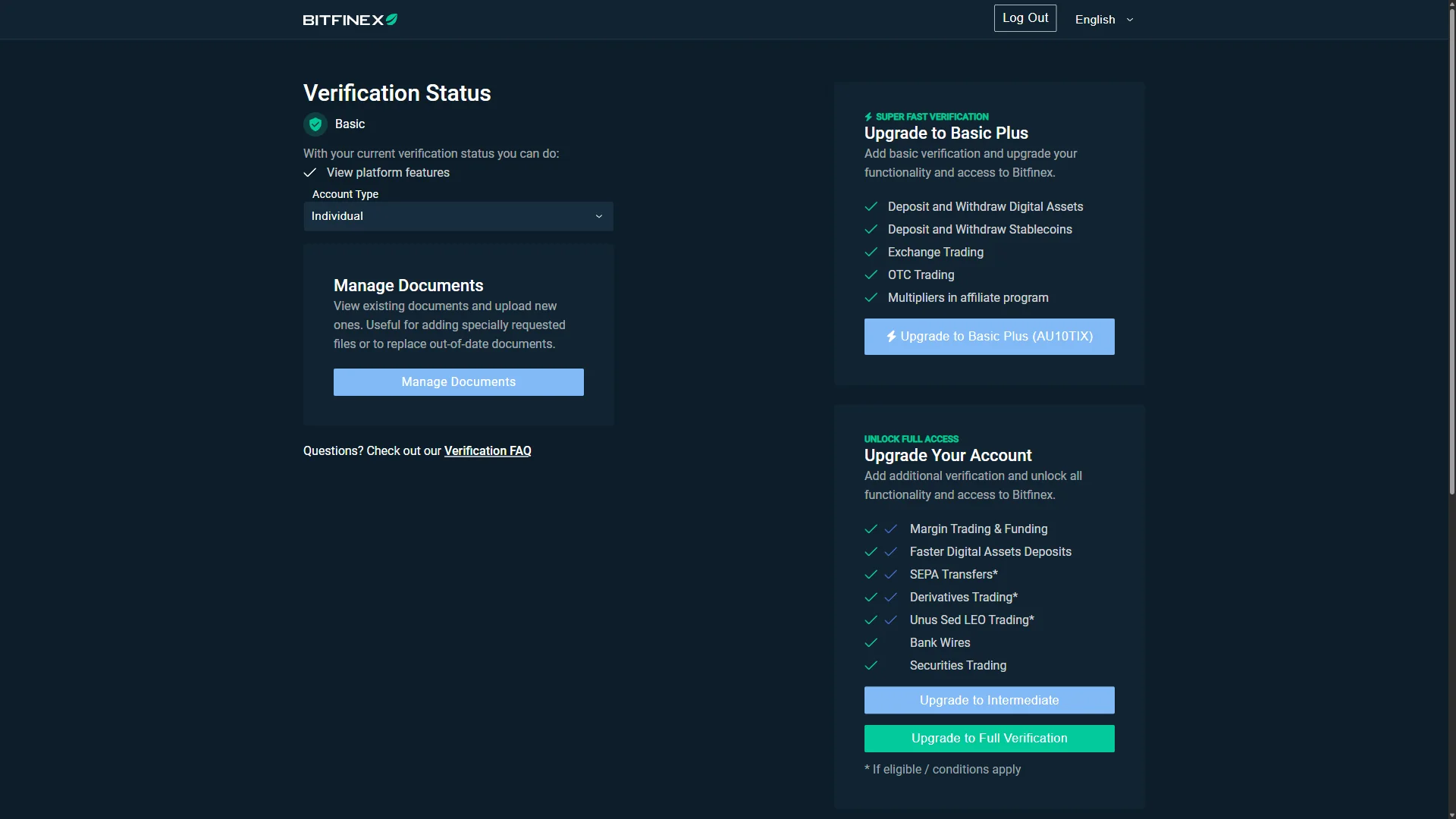
The Verification Status page shows your account at the “Basic” level, which on its own only lets you view platform features rather than deposit or trade. Your account type is set here as well, shown as “Individual” in the dropdown.
To do more, pick an upgrade path from the cards on the right. “Upgrade to Basic Plus (AU10TIX)” unlocks deposits, withdrawals, and exchange trading, while “Upgrade to Intermediate” and “Upgrade to Full Verification” add margin trading, bank wires, and further access. Each level lists the features it grants, so choose the one that matches what you plan to do and start it from its button.
Use “Manage Documents” at any point to review or replace the identity documents tied to your verification.
Your Bitfinex account exists once your email is verified, but two-factor authentication is enforced before you go further, and your verification level ultimately determines whether you can deposit and trade.
Smartphone (iOS / Android) identity verification
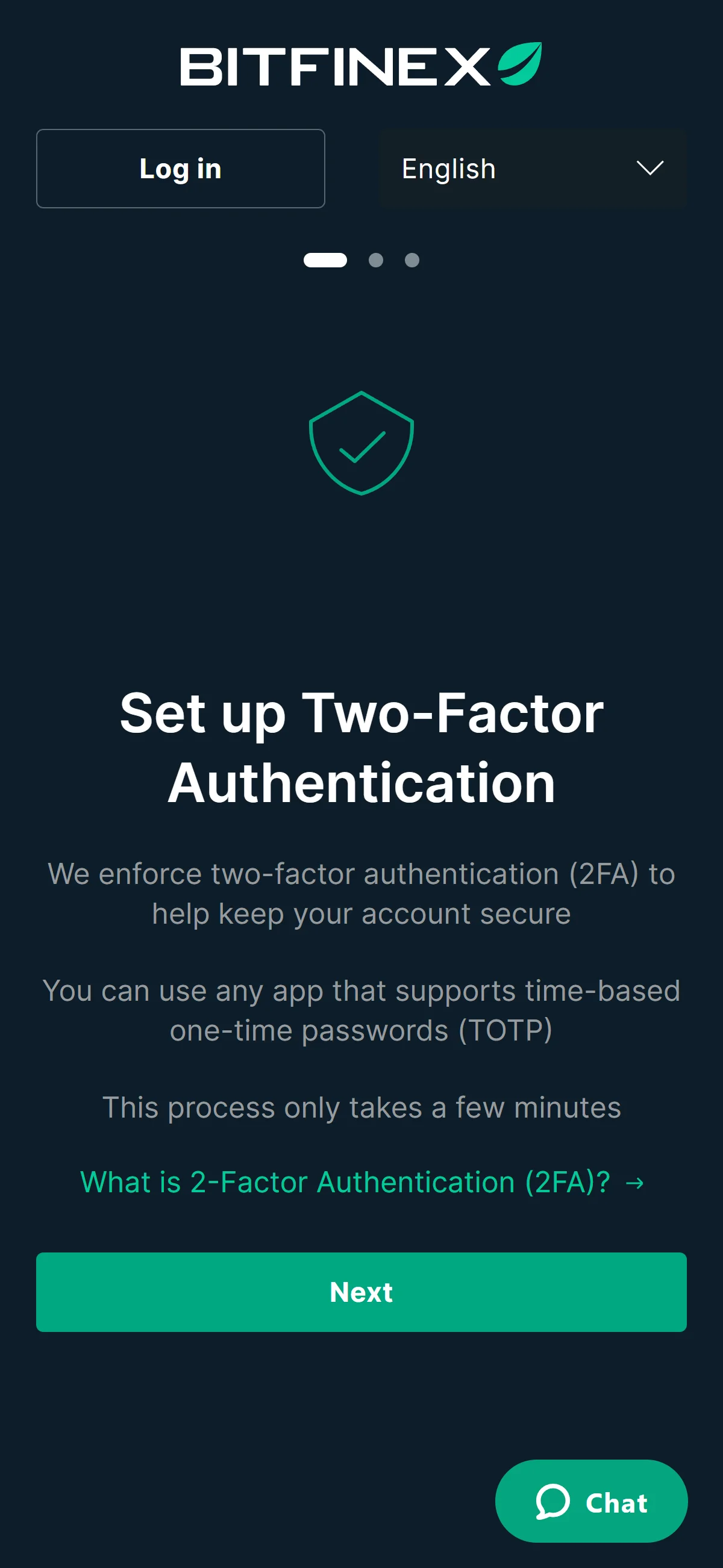
Once your email is verified, Bitfinex opens the “Set up Two-Factor Authentication” screen. The page explains that 2FA is enforced on every account and that you can use any app supporting time-based one-time passwords (TOTP).
This is a required step rather than an optional one, and the indicator at the top shows it as the first of several setup screens. Select “Next” to begin configuring your authenticator app.
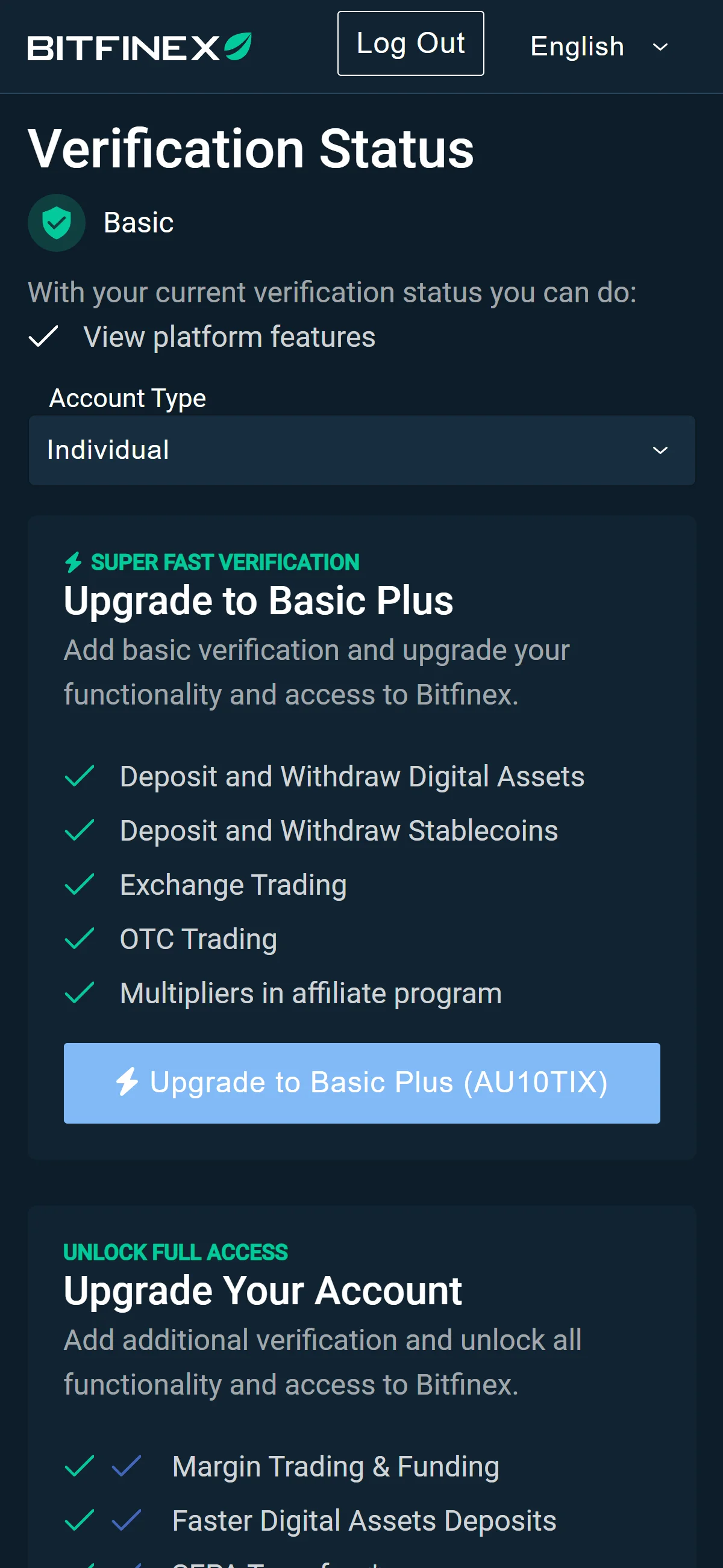
The Verification Status page shows your account at the “Basic” level, which on its own only lets you view platform features rather than deposit or trade. Your account type is set here as well, shown as “Individual” in the dropdown.
To do more, pick an upgrade path from the cards on the right. “Upgrade to Basic Plus (AU10TIX)” unlocks deposits, withdrawals, and exchange trading, while “Upgrade to Intermediate” and “Upgrade to Full Verification” add margin trading, bank wires, and further access. Each level lists the features it grants, so choose the one that matches what you plan to do and start it from its button.
Use “Manage Documents” at any point to review or replace the identity documents tied to your verification.
Your Bitfinex account exists once your email is verified, but two-factor authentication is enforced before you go further, and your verification level ultimately determines whether you can deposit and trade.
The Bitfinex referral code cannot be added after sign-up
The referral code can only be entered at sign-up — it cannot be added afterwards.
If you overlook this and complete registration without the code, there is no mechanism for linking it to that account after the fact.
If you have not yet completed KYC (identity verification), creating a fresh account is an option worth considering. Some exchanges, though, restrict opening more than one account in their terms of use.
- Does the sign-up screen show referral code 4L39Hns5S as applied? (Going through the link applies it automatically; where the exchange provides a code field, check there as well.)
- Once registration is complete, open the Referral / Rewards page and confirm that the referral shows as linked to your account
◆ ◇ ◆
What is Bitfinex
Bitfinex’s origins, operator, and trading scale
Bitfinex launched in 2012 and is operated by iFinex Inc., incorporated in the British Virgin Islands on 2013-05-21, with related operating entities BFXNA Inc. and BFXWW Inc. It shares the same group parent as Tether, the issuer of the USDt stablecoin, and publishes no formal operational headquarters — its reported historical presence spans Hong Kong, Taiwan, and Switzerland. That offshore, no-single-home structure is not incidental: it shapes both where the exchange can operate and the counterparty questions that return in the regulatory and risk sections below.
On the numbers, Bitfinex is a mid-sized venue by rank but a heavyweight by reserves. The figures below are as of 2026-07-17.
The product surface matches that profile. Spot covers roughly 250 currencies (about 140 pairs), alongside USDt-margined perpetual futures across about 85 pairs, margin of up to 10x sourced through the peer-to-peer funding market, options via the third-party venue Thalex, tokenized securities via the separate Bitfinex Securities entities, an Earn desk combining staking and P2P funding, and an OTC desk. Fiat runs through bank wire in USD, EUR, GBP, and JPY. The breadth leans toward active and professional users rather than first-time buyers.
Zero-fee trading, withdrawal costs, and the LEO funding discount
Bitfinex’s headline cost story is unusual, so it is worth separating the trading cost from what it actually costs to move money in and out.
- Spot, margin, derivatives, securities and OTC trading
- 0% maker and 0% taker for every customer since 2025-12-17, with no VIP volume tiers to climb
- On-chain withdrawals
- free on many networks (Algorand, Avalanche, Arbitrum, Aptos); a fixed on-chain fee on others
- Bank wire withdrawal
- 0.100% (minimum 100 USD/EUR); express wire 1.000% (minimum 125)
Bitfinex frames the zero-fee move as a long-term strategy rather than a limited-time promotion, and because there are no volume tiers, a first-day retail account pays the same 0% as the largest professional desk. The real cost of using the exchange therefore sits on the funding rails above, not on the trade itself.
The native token, UNUS SED LEO (LEO), launched in 2019, does not touch that trading cost — since trading is already free, holding LEO grants no spot or derivatives discount. What it does instead is reduce peer-to-peer lending and borrowing (funding) fees by up to 5%, at a rate of 0.05% per 10,000 USDt-equivalent held. It is a funding-market perk that lowers a funding cost rather than a trading cost, which is already zero for everyone.
What makes Bitfinex distinct
Bitfinex’s four structural differentiators
Four features set Bitfinex apart, and each one points to a specific kind of user rather than a general audience.
Zero fees for everyone
Peer-to-peer margin funding
Tokenized securities
Institutional connectivity
Who Bitfinex suits and when another venue is better
Taken together, those edges point at one profile.
Bitfinex is built for experienced, professional, and institutional traders who want deep liquidity, advanced order types, peer-to-peer margin funding — and now zero fees.
That focus cuts both ways, and it is worth being honest about who should look elsewhere.
On a relative footing, Bitfinex sits around CoinGecko spot rank 42 while ranking 5th by DeFiLlama reserves — strong custody weight for a mid-ranked order book. Keep those comparisons loose: reported spot volumes mix spot and derivatives and carry wash-trading caveats, so they are better read as a rough position than a precise league table. Because this guide spans several markets, the fairer test is Bitfinex against a small set of majors rather than one local venue — and the per-market question of where you can legally use it is handled next.
Bitfinex regulatory landscape
Bitfinex’s offshore-licensed footprint
Where Bitfinex is formally licensed, it is offshore and specific rather than broad.
Bitfinex Securities El Salvador
Bitfinex Securities Limited
These are named, specific authorizations, but they cover securities-token activity and, in El Salvador’s case, the core platform under a Salvadoran regime — not a passport into major Western retail markets.
Excluded regions, restricted markets, and where it stays openly available
The other side of the map is where Bitfinex cannot, or will not, serve users. A snapshot of the markets in this guide’s scope:
Beyond those, Bitfinex’s official excluded regions also cover Cuba, Iran, North Korea, Syria, and the OFAC-sanctioned occupied-Ukraine regions of Crimea, Donetsk, Luhansk, Kherson, and Zaporizhzhia; the Bitfinex Securities arm layers on further exclusions, including the British Virgin Islands, the Venezuelan government, Spain, Austria, and Italy.
For this guide’s scope, Singapore and Australia are the openly available markets: neither sits on Bitfinex’s excluded or restricted lists. That said, Bitfinex carries no Singapore- or Australia-specific authorization that we can point to, so treat access as availability rather than local licensing and confirm the current status on the official site before you rely on it.
Bitfinex also fields a handful of locally-branded entities — Bitfinex Türkiye (discontinued), Bitfinex Securities Limited in Kazakhstan (active), and Bitfinex Securities El Salvador (active) — which are separate from the main exchange; how any of them bears on your own market is a matter for the availability section below.
The regulatory trajectory: offshore licensing versus Western retail exit
Read as a sequence, the direction of travel is clear.
The trajectory runs in two directions at once: Bitfinex keeps acquiring digital-asset licenses in crypto-friendly jurisdictions while stepping back from strict-regulation markets. The net effect is a company building an offshore-regulated footprint rather than one working its way into major Western retail markets — a distinction that matters directly for the markets covered next.
Bitfinex availability across major jurisdictions
Availability is where this guide splits by reader. In three of the markets in scope, the referral code is out of reach because the sign-up itself is blocked — so each section below states the status plainly and points to venues that are actually authorized there.
United States — prohibited for US Persons
ProhibitedBitfinex prohibits US Persons under its Exchange Terms and lists the United States among its excluded regions; it wound down its US retail market in 2017 (completed around 2017-11-09). The enforcement record is on file: a 2016 CFTC order (USD 75k), a 2021 CFTC order (USD 1.5M, which found Bitfinex had violated the 2016 order), and a 2021 NYAG settlement (USD 18.5M, barring it from any further trading with New Yorkers). A narrow, discretionary Eligible Contract Participant exception exists for institutions via BFXNA Inc., but ordinary retail US persons have no route and cannot register or apply the referral code. If that is you, a US-registered venue is the practical alternative:
Coinbase
Kraken
Crypto.com
Gemini
United Kingdom — retail individuals off-boarded after the FCA Warning List
Off-boarded (retail)The United Kingdom is on Bitfinex’s excluded-regions list, and the FCA placed Bitfinex on its Warning List (first published 2023-10-27) as an unauthorized firm. Bitfinex stopped Individual verification for accounts created on or after 2023-11-01, then wound existing individual UK users down to withdraw-only through early 2024: no new deposits or orders from 2024-01-10, the OTC desk closed 2024-01-31, and staking, lending, borrowing, and securities were disabled 2024-02-14. Only exempt high-net-worth corporate clients kept access, and UK crypto activity here carries no FSCS or FOS protection. Retail readers cannot sign up with the code, so an FCA-registered venue is the route that stays open:
Coinbase
Kraken
Bitstamp
Revolut
India — blocked after the FIU-IND action
BlockedBitfinex is not registered with FIU-IND, which is a legal prerequisite to serve Indian users. After a 2023-12-28 show-cause notice under Section 13 of the PMLA — one of nine offshore virtual-digital-asset providers named — the Director FIU-IND asked MeitY to block the relevant URLs, and the Bitfinex app was removed from the Indian Apple App Store around 2024-01-09. Unlike Binance and KuCoin from the same batch, which paid penalties and registered, Bitfinex did not re-enter, so Indian readers cannot reach the sign-up flow or apply the code. FIU-registered venues are the alternative:
CoinDCX
CoinSwitch
KuCoin
Binance
Risks to acknowledge before using Bitfinex
Counterparty and security track record
The first question about any venue is whether it can keep your funds safe, and Bitfinex’s own record is the evidence.
On solvency today, Bitfinex publishes its own proof of reserves using in-house open-source tooling (Antani and Ballot) and has disclosed its wallets publicly since 2022-11. That is a self-attestation rather than a standard third-party Merkle-tree attestation, and the ≈16.6B USD in aggregator-reported reserves is itself methodology-dependent.
Fund-access history and the Tether-linked settlements
Keeping funds safe is one thing; being able to withdraw them is another, and here too there is a specific history rather than a hypothetical.
In 2017 and 2018, USD fiat withdrawals were delayed after Wells Fargo cut off wire transfers in April 2017 and banking channels fell away; roughly 850M USD held with the payment processor Crypto Capital became inaccessible and later sat at the center of the NYAG action. A June 2018 DDoS attack took the exchange offline for about an hour. On the regulatory side, the NYAG settled on 2021-02-23 (18.5M USD, ceasing trading with New Yorkers) and the CFTC ordered on 2021-10-15 (Bitfinex 1.5M USD, a combined 42.5M USD with Tether’s 41M) over misrepresentations about USDt’s USD backing and the undisclosed ≈850M USD loss cover — and the 2021 CFTC conduct was found to have violated the 2016 order.
A shrinking retail footprint in tightening jurisdictions
The last risk is directional: Bitfinex’s own pattern is to withdraw as jurisdictions tighten rather than to localize into them.
It is already prohibited in the US (since 2017), has restricted UK individuals (since 2023), and wound down its Turkish local entity in 2025. Ahead of it sit several pending measures: Brazil’s authorization deadline of 2026-10-30, pending offshore-platform blocks in Vietnam and Russia, and incoming licensing regimes in Thailand and Taiwan.
Bitfinex’s track record is a shrinking retail footprint: as jurisdictions tighten, it has tended to retreat rather than localize.
For you, that is a forward-looking access risk. If you are in a market where a regime is about to bite, the base rate from Bitfinex’s history is that access narrows rather than that it stays and adapts — so keep an exit and self-custody plan in mind rather than assuming today’s availability is permanent.