— Contents 10 sections
- 01 Is the XT.com referral code “REQ9DQ” still active?
- 02 What the XT.com referral code “REQ9DQ” gets you
- 03 XT.com sign-up steps with the referral code
- 04 What to do after signing up at XT.com
- 05 The XT.com referral code cannot be added after sign-up
- 06 What is XT.com
- 07 What makes XT.com distinct
- 08 XT.com regulatory landscape
- 09 XT.com availability across major jurisdictions
- 10 Risks to acknowledge before using XT.com
chainhelm’s exclusive XT.com referral code is .
As of 2026-07-17, we signed up as a new user and confirmed that the referral code was applied.
Enter the code at sign-up to receive a new-user bonus of up to 8,888 USD equivalent. You can only do this during registration, so we recommend entering it right then and there.
This article covers the sign-up process with the XT.com referral code, XT.com’s distinguishing features, availability across major jurisdictions, and the risks to acknowledge — with the sign-up flow and code application verified first-hand by chainhelm’s editorial team.
Is the XT.com referral code “REQ9DQ” still active?
The chainhelm editorial team created a fresh XT.com account on 2026-07-17 and confirmed that the referral code “REQ9DQ” is still active.
Here is the actual screen captured during verification.
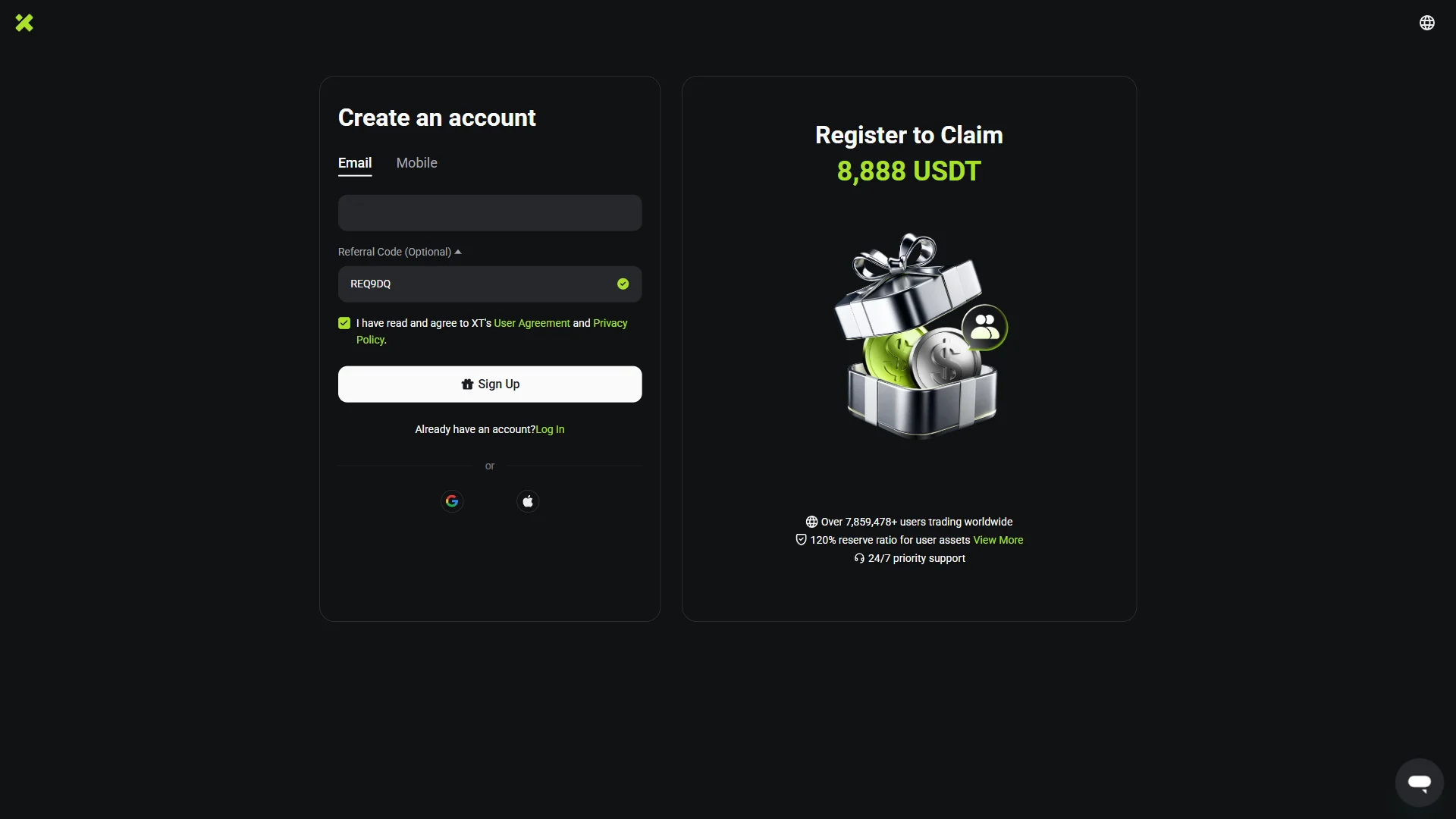
The screen shows “REQ9DQ”, confirming that the referral code REQ9DQ was correctly applied.
chainhelm continuously verifies the validity of the code and confirms it remains usable.
What the XT.com referral code “REQ9DQ” gets you
Apply this code at sign-up to receive the following benefits on XT.com:
- Benefit: a new-user bonus of up to 8,888 USD equivalent
- Expiration: None
- Eligibility: New users
To receive the benefits, you need to enter the code when you create your account. Be careful not to miss this step.
XT.com sign-up steps with the referral code
We cover the sign-up process separately for PC/browser and smartphone (mobile).
PC/browser sign-up steps
-
First, open the XT.com official sign-up page (the link applies the referral code). When you open it, you’ll see a screen like the one below.
-
Create your account
— Figure 2Account creation form2026-07-17 The email field is empty while the referral code REQ9DQ shows pre-filled with a green check and the agreement box is already ticked. Source: chainhelm editorial On the “Create an account” screen, keep the “Email” tab selected and type the address you want to register into the field below it. (Prefer a phone number? Switch to the “Mobile” tab instead.)
Under “Referral Code (Optional)”, check that the code REQ9DQ is already filled in and marked with a green check — this is what links your account to chainhelm’s referral, so leave it as is. Then make sure the box agreeing to XT’s “User Agreement” and “Privacy Policy” is ticked.
Click “Sign Up” to submit — on mobile the same button reads “Register & Claim 8,888 USDT”. (You can also sign up with the Google or Apple buttons under “or”, and the panel beside the form advertises a “Register to Claim 8,888 USDT” bonus.) XT then emails you a code and moves you to the verification screen.
-
Enter the email verification code
— Figure 3Email code entry2026-07-17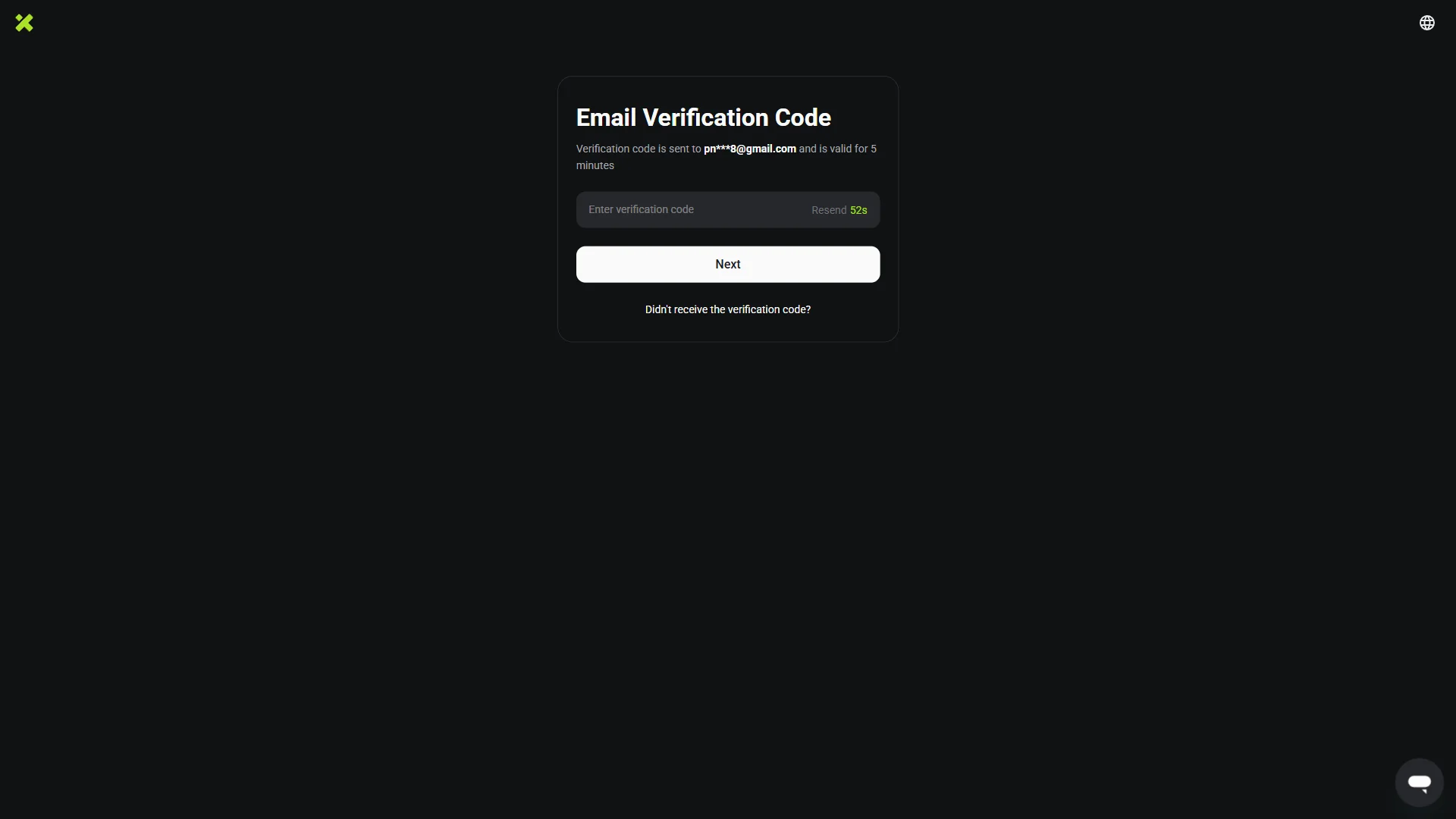
The code field is empty, with the masked destination address and a five-minute validity note above it and the "Resend" timer counting down. Source: chainhelm editorial The “Email Verification Code” screen confirms a code has gone to your address — shown partly masked, like pn***[email protected] — and that it stays valid for 5 minutes. Open your inbox to read it; the next figure shows where it lands.
Type the six-digit code into the “Enter verification code” field. If nothing arrives, wait for the “Resend” countdown to run out and request a fresh one.
Click “Next”. Once the code checks out, XT takes you on to the password creation screen.
-
Find the code in your inbox
— Figure 4The verification email2026-07-17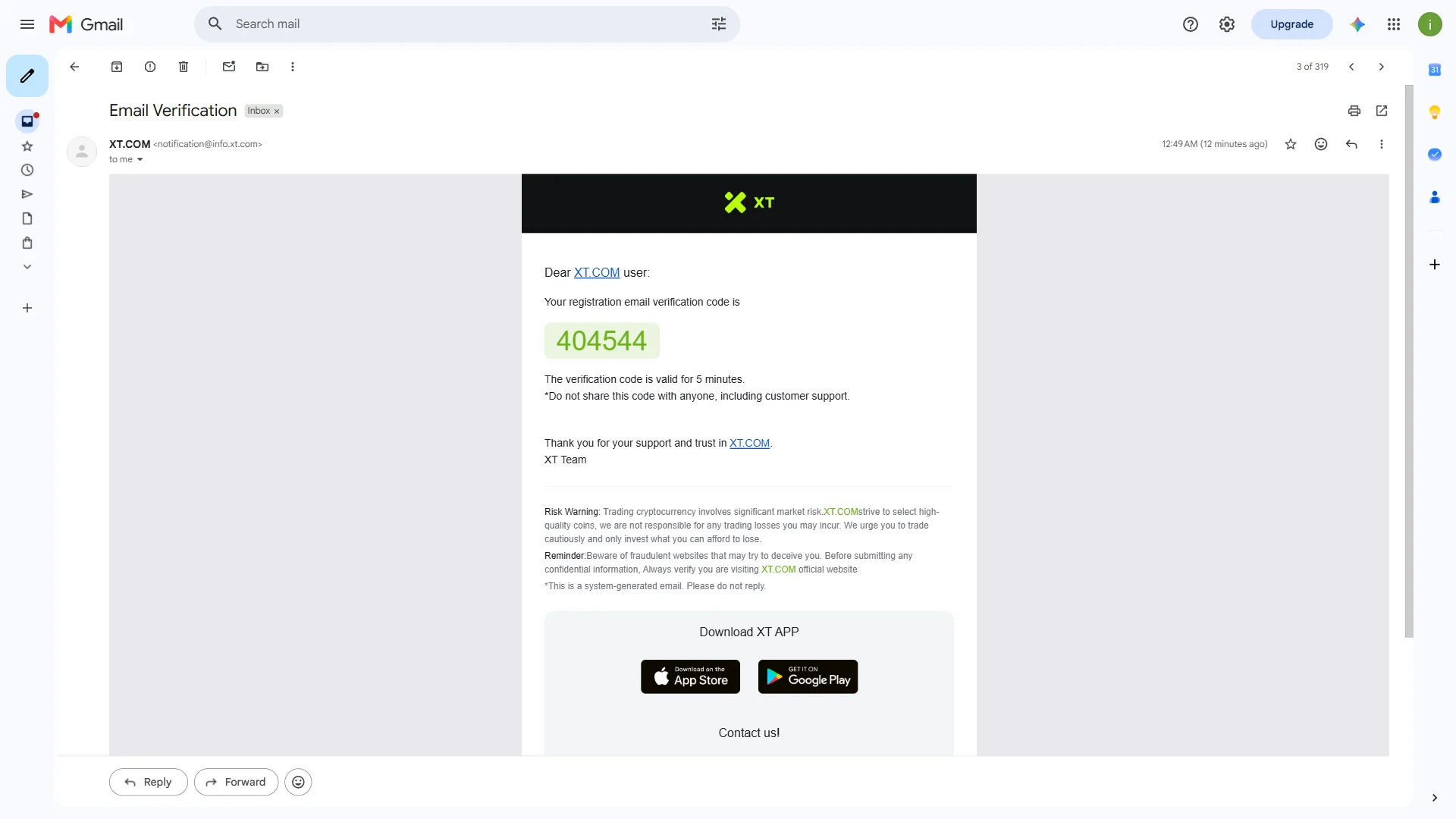
The email from XT.COM displays the six-digit registration code in a green highlight, noting it is valid for five minutes. Source: chainhelm editorial Open the message titled “Email Verification” from the sender XT.COM ([email protected]) in your inbox. Inside, XT highlights your six-digit registration code in green, alongside a reminder that it is valid for 5 minutes and should never be shared — not even with support.
Read off the code, then return to the verification screen from the previous step to enter it.
-
Create your password
— Figure 5Password creation2026-07-17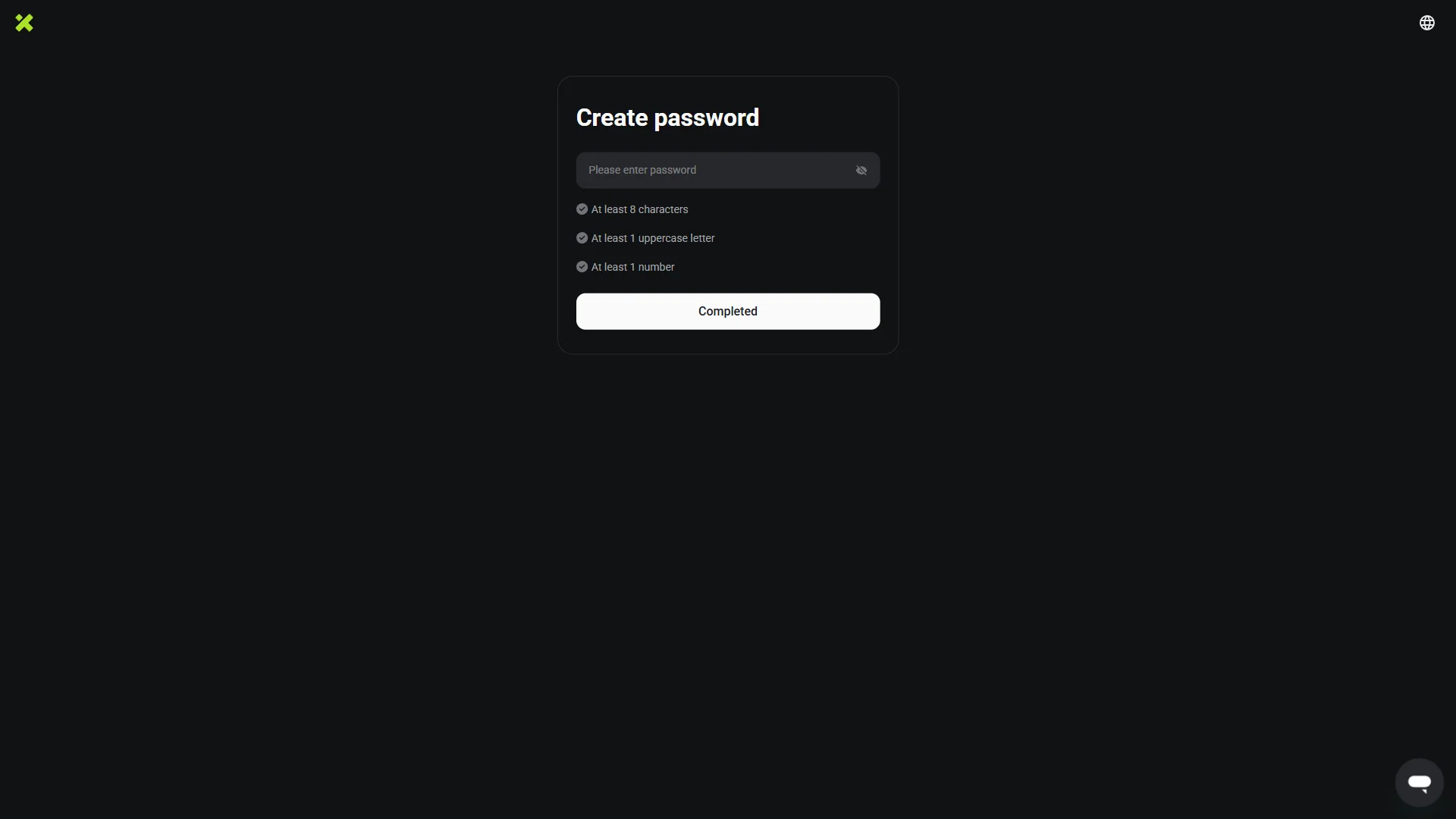
The password field is empty and the three requirement checks below it are all still grayed out. Source: chainhelm editorial On the “Create password” screen, click into the “Please enter password” field and type the password you want to use.
Below the field, XT lists three requirements — “At least 8 characters”, “At least 1 uppercase letter”, and “At least 1 number” — each grayed out until your entry meets it. Choose something that satisfies all three; the checks update as you type, which the next step shows once every rule is met.
-
Confirm and finish sign-up
— Figure 6Requirements met2026-07-17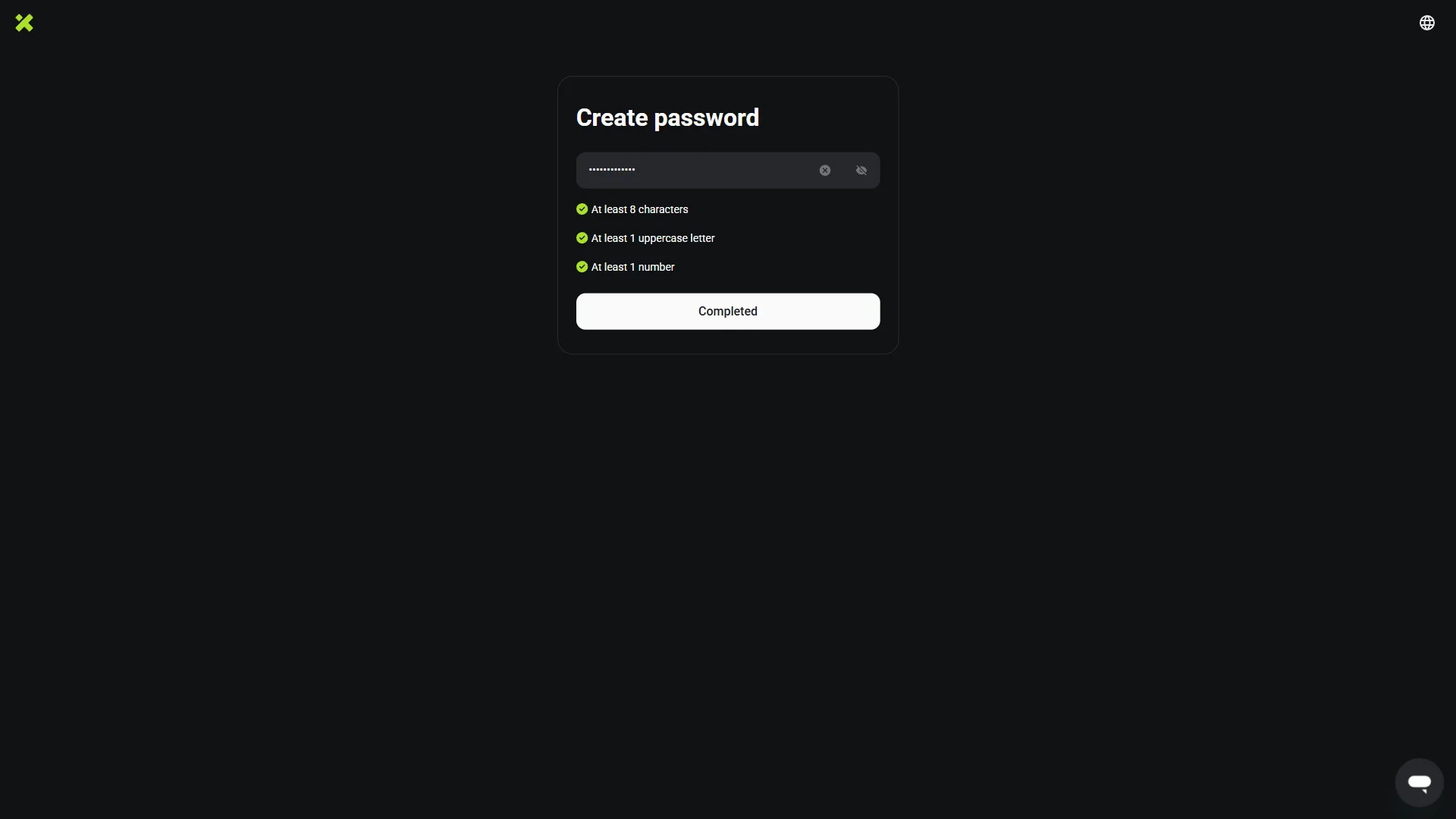
The password field is filled and all three requirement checks below it now show green, with "Completed" ready to submit. Source: chainhelm editorial Once your password is entered, confirm that all three requirement checks — 8 characters, an uppercase letter, and a number — have turned green. That green is your cue to proceed.
Click “Completed” to finish creating the account. Sign-up is now done, and XT logs you in and opens the homepage.
Smartphone (iOS / Android) sign-up steps
-
First, open the XT.com official sign-up page in the mobile app or browser (the link applies the referral code). When you open it, you’ll see a screen like the one below.
-
Create your account
— Figure 7Account creation form2026-07-17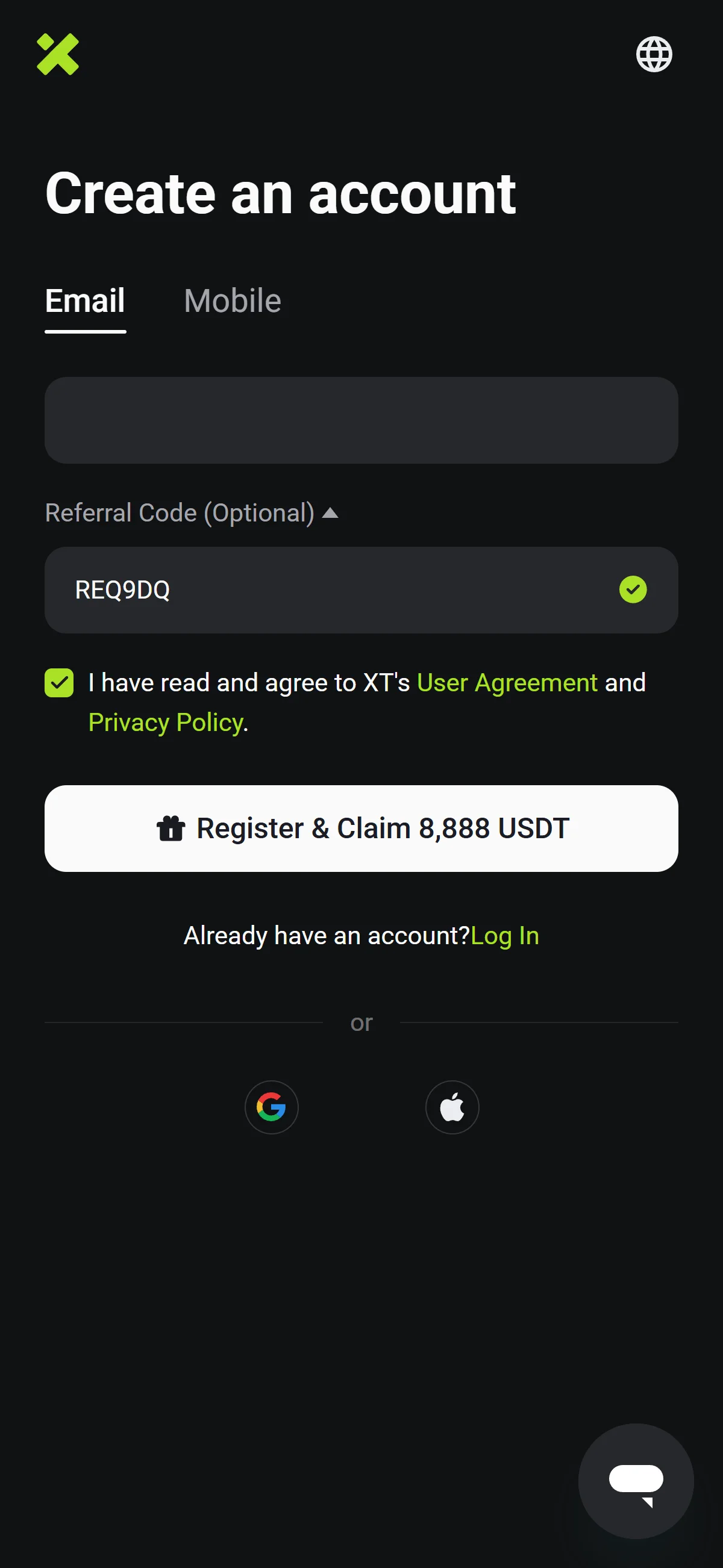
The email field is empty while the referral code REQ9DQ shows pre-filled with a green check and the agreement box is already ticked. Source: chainhelm editorial On the “Create an account” screen, keep the “Email” tab selected and type the address you want to register into the field below it. (Prefer a phone number? Switch to the “Mobile” tab instead.)
Under “Referral Code (Optional)”, check that the code REQ9DQ is already filled in and marked with a green check — this is what links your account to chainhelm’s referral, so leave it as is. Then make sure the box agreeing to XT’s “User Agreement” and “Privacy Policy” is ticked.
Click “Sign Up” to submit — on mobile the same button reads “Register & Claim 8,888 USDT”. (You can also sign up with the Google or Apple buttons under “or”, and the panel beside the form advertises a “Register to Claim 8,888 USDT” bonus.) XT then emails you a code and moves you to the verification screen.
-
Enter the email verification code
— Figure 8Email code entry2026-07-17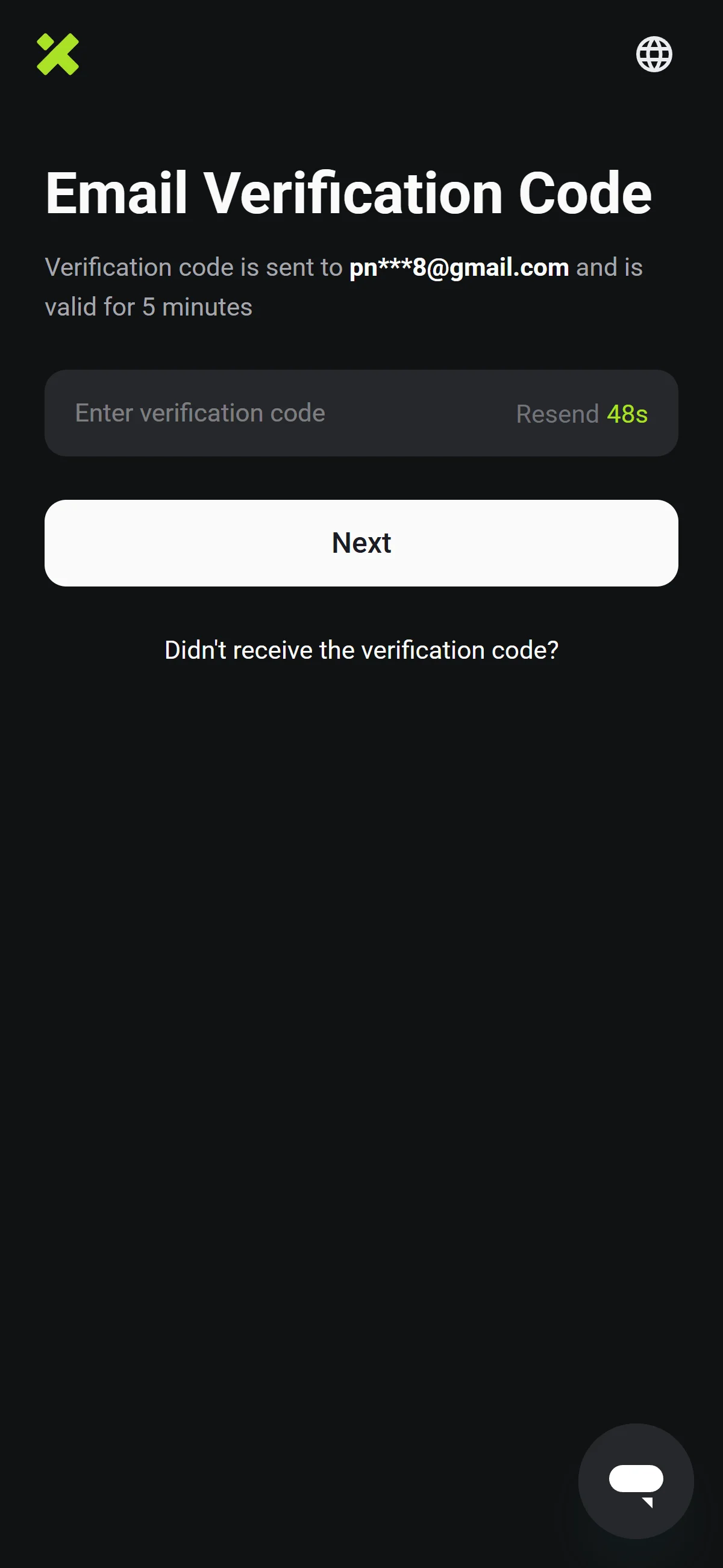
The code field is empty, with the masked destination address and a five-minute validity note above it and the "Resend" timer counting down. Source: chainhelm editorial The “Email Verification Code” screen confirms a code has gone to your address — shown partly masked, like pn***[email protected] — and that it stays valid for 5 minutes. Open your inbox to read it; the next figure shows where it lands.
Type the six-digit code into the “Enter verification code” field. If nothing arrives, wait for the “Resend” countdown to run out and request a fresh one.
Click “Next”. Once the code checks out, XT takes you on to the password creation screen.
-
Find the code in your inbox
— Figure 9The verification email2026-07-17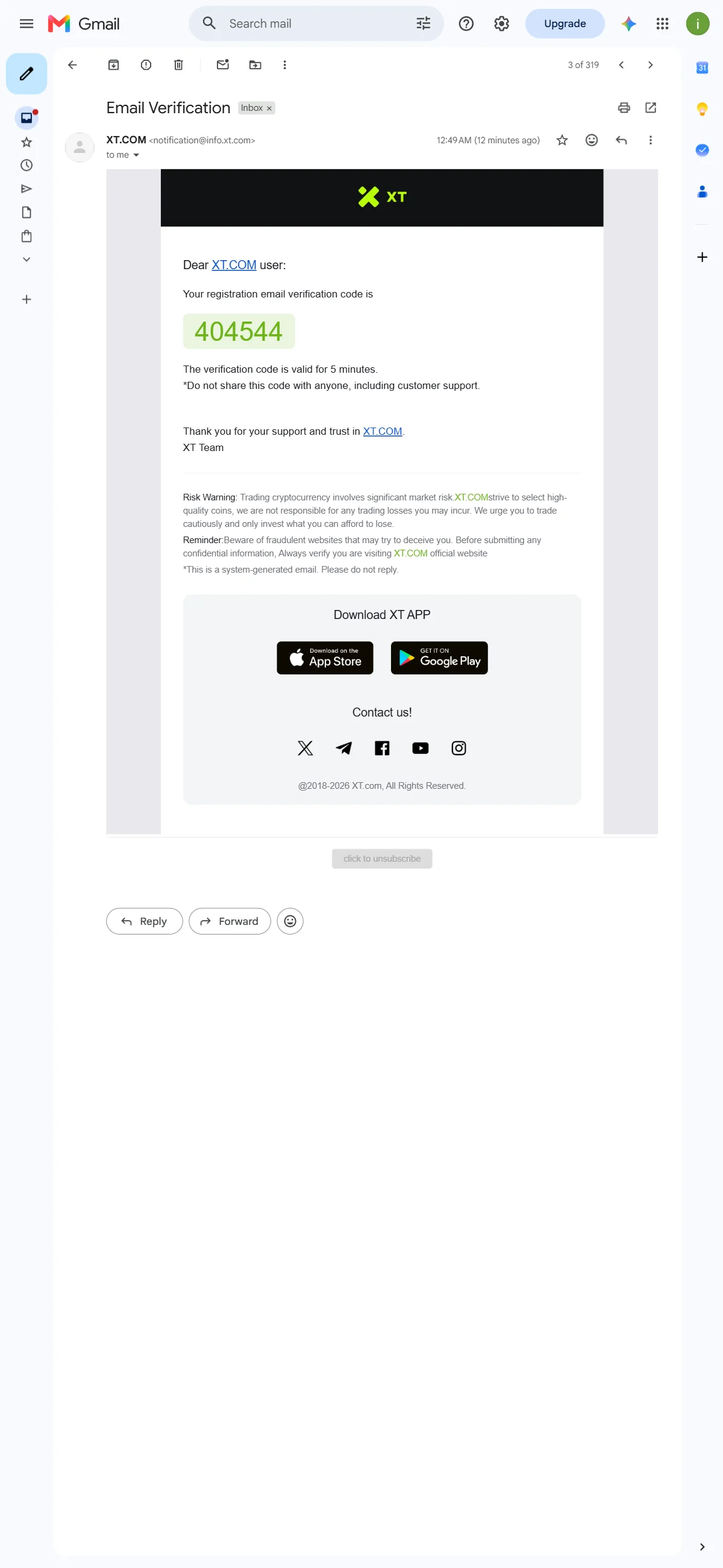
The email from XT.COM displays the six-digit registration code in a green highlight, noting it is valid for five minutes. Source: chainhelm editorial Open the message titled “Email Verification” from the sender XT.COM ([email protected]) in your inbox. Inside, XT highlights your six-digit registration code in green, alongside a reminder that it is valid for 5 minutes and should never be shared — not even with support.
Read off the code, then return to the verification screen from the previous step to enter it.
-
Create your password
— Figure 10Password creation2026-07-17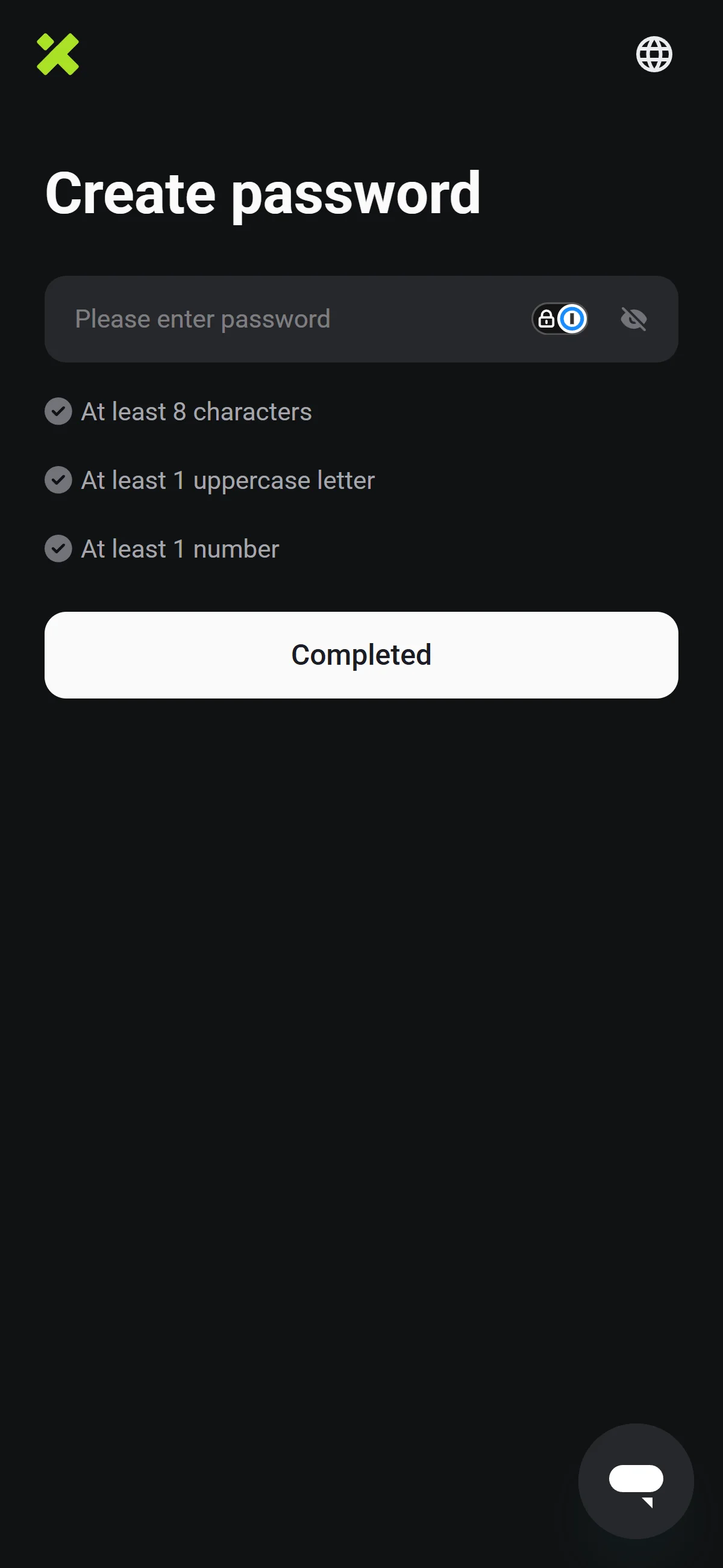
The password field is empty and the three requirement checks below it are all still grayed out. Source: chainhelm editorial On the “Create password” screen, click into the “Please enter password” field and type the password you want to use.
Below the field, XT lists three requirements — “At least 8 characters”, “At least 1 uppercase letter”, and “At least 1 number” — each grayed out until your entry meets it. Choose something that satisfies all three; the checks update as you type, which the next step shows once every rule is met.
-
Confirm and finish sign-up
— Figure 11Requirements met2026-07-17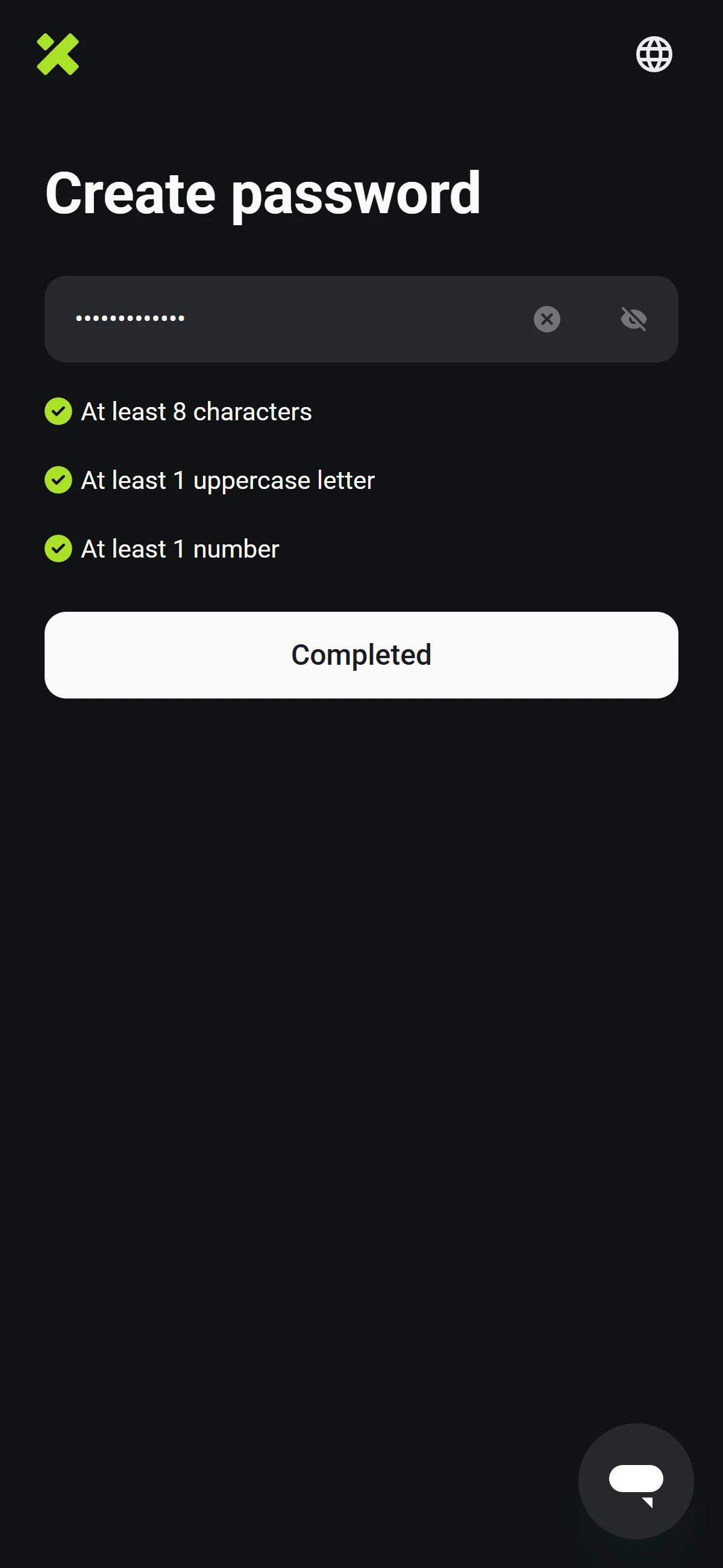
The password field is filled and all three requirement checks below it now show green, with "Completed" ready to submit. Source: chainhelm editorial Once your password is entered, confirm that all three requirement checks — 8 characters, an uppercase letter, and a number — have turned green. That green is your cue to proceed.
Click “Completed” to finish creating the account. Sign-up is now done, and XT logs you in and opens the homepage.
What to do after signing up at XT.com
We cover identity verification separately for PC/browser and smartphone (mobile).
PC/browser identity verification
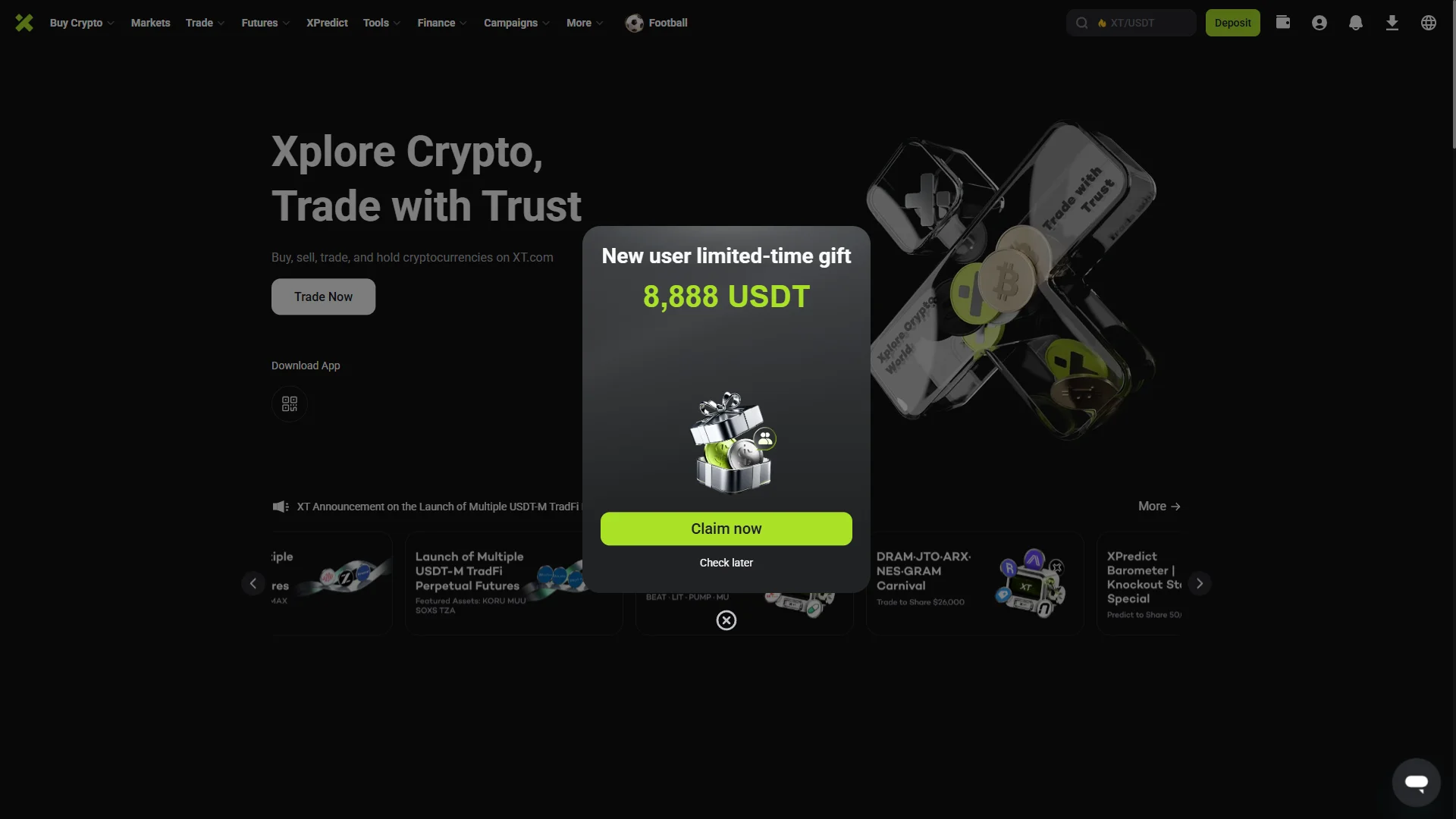
Signing up drops you onto XT’s homepage, already logged in — the top bar now carries your account icon, a “Deposit” button, and the full trading menu. A “New user limited-time gift” modal opens over the page, offering up to “8,888 USDT” for new accounts, with “Claim now” and “Check later” beneath it.
Pick “Claim now” to follow that promotion or “Check later” to dismiss it; neither blocks what comes next. To lift your account’s limits before trading, open your account area and head to Identity Verification, which the next figure covers.
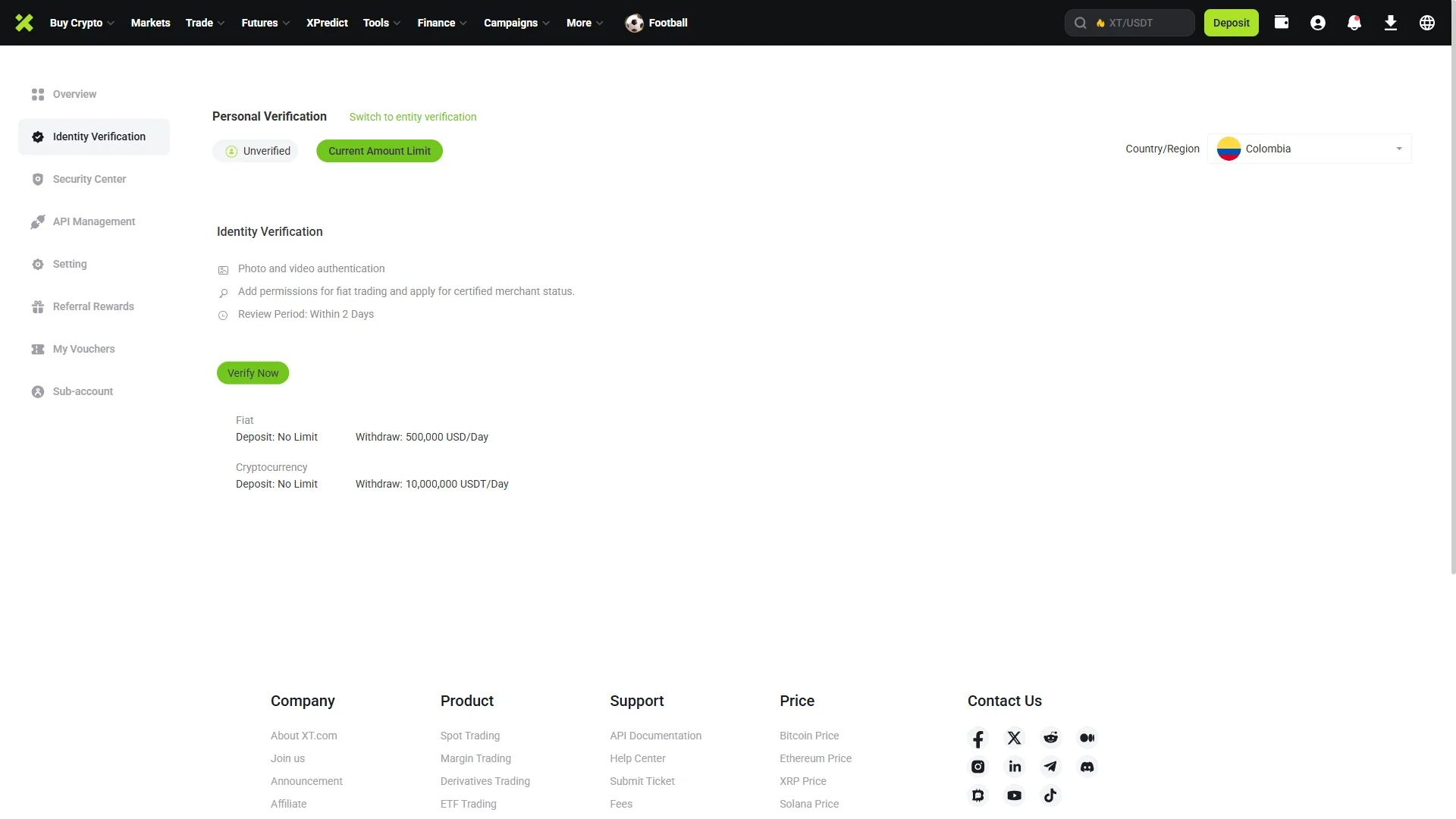
In your account, open the “Identity Verification” tab. At the top, “Personal Verification” is selected and your status reads “Unverified”, next to a “Current Amount Limit” tag; the “Fiat” and “Cryptocurrency” rows below spell out the limits that apply until you verify — deposits are unlimited, while daily withdrawals are capped.
XT notes that verification uses photo and video authentication and that review takes up to 2 days. Click “Verify Now” to begin, and the identity verification form opens — the next figure walks through it.
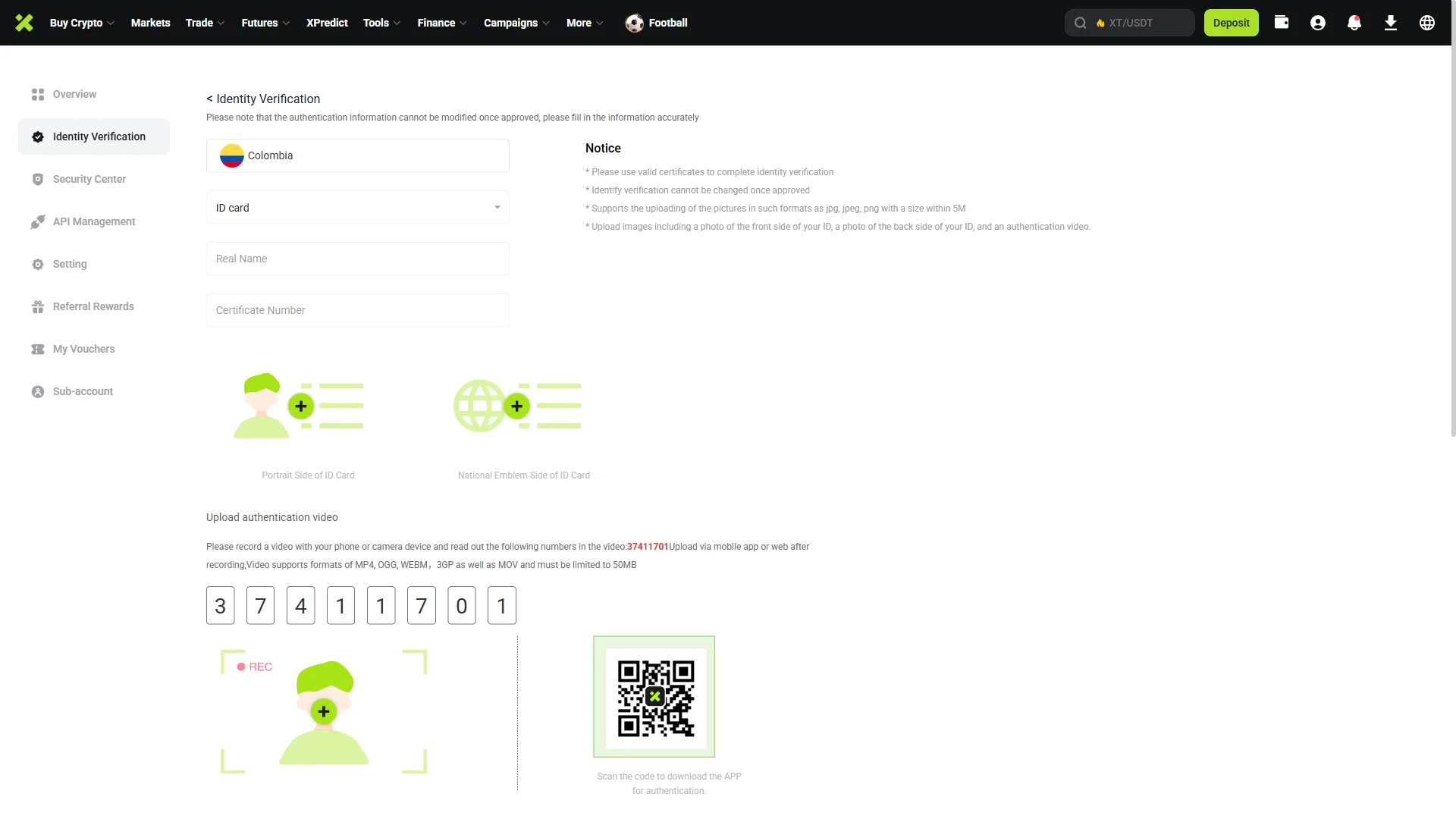
The identity verification form opens with a warning that details cannot be changed once approved, so fill it in carefully. Your country (“Colombia” here) and document type (“ID card”) are pre-selected at the top; adjust them if needed, then enter “Real Name” and “Certificate Number” exactly as they appear on your document.
Upload a clear photo for the “Portrait Side of ID Card” and one for the “National Emblem Side of ID Card”, keeping to the jpg, jpeg, or png formats and the 5 MB size the notice lists.
At the “Upload authentication video” step, record yourself reading out the digits XT shows on screen — or scan the QR code to download the XT app and record it there — then upload the clip. With every field and file in place, submit the form to send your documents for review.
Smartphone (iOS / Android) identity verification
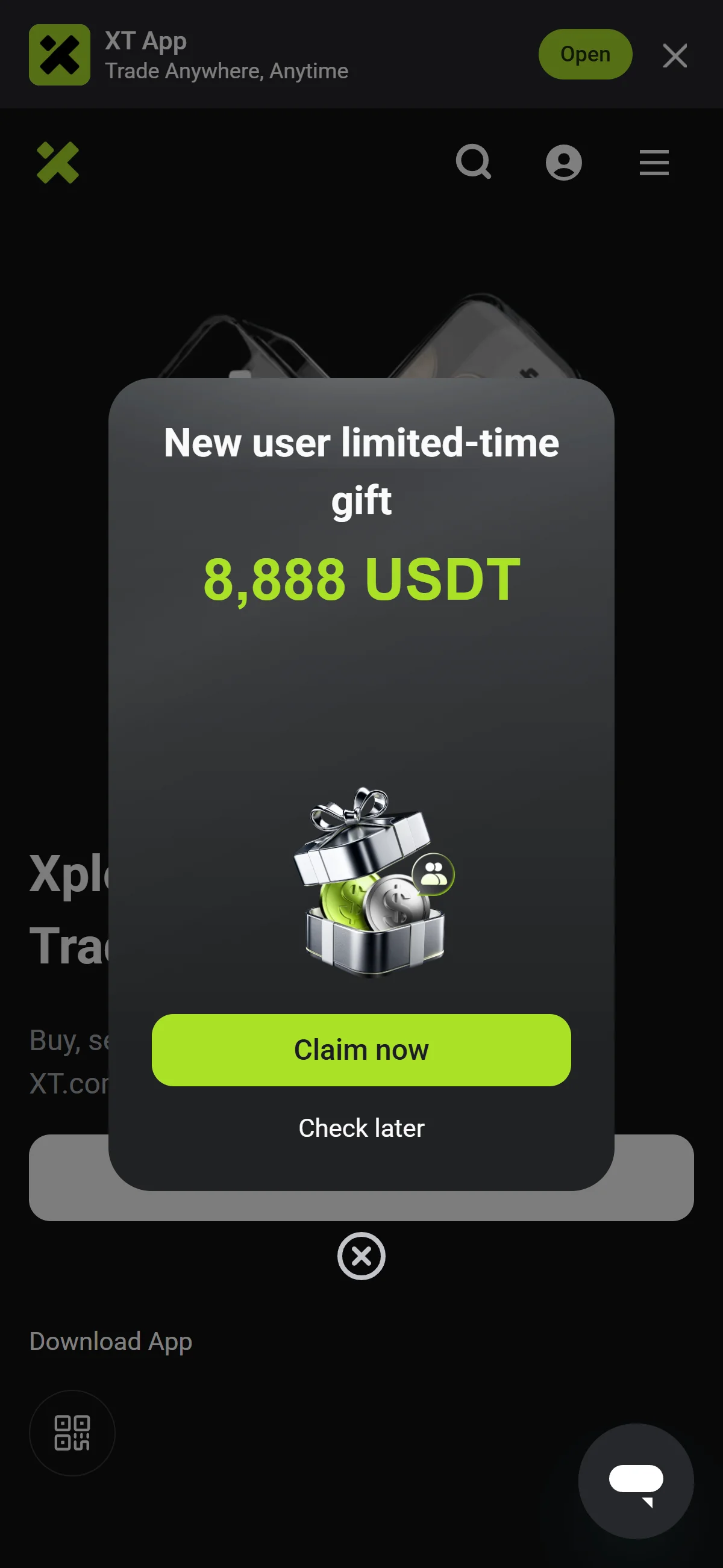
Signing up drops you onto XT’s homepage, already logged in — the top bar now carries your account icon, a “Deposit” button, and the full trading menu. A “New user limited-time gift” modal opens over the page, offering up to “8,888 USDT” for new accounts, with “Claim now” and “Check later” beneath it.
Pick “Claim now” to follow that promotion or “Check later” to dismiss it; neither blocks what comes next. To lift your account’s limits before trading, open your account area and head to Identity Verification, which the next figure covers.
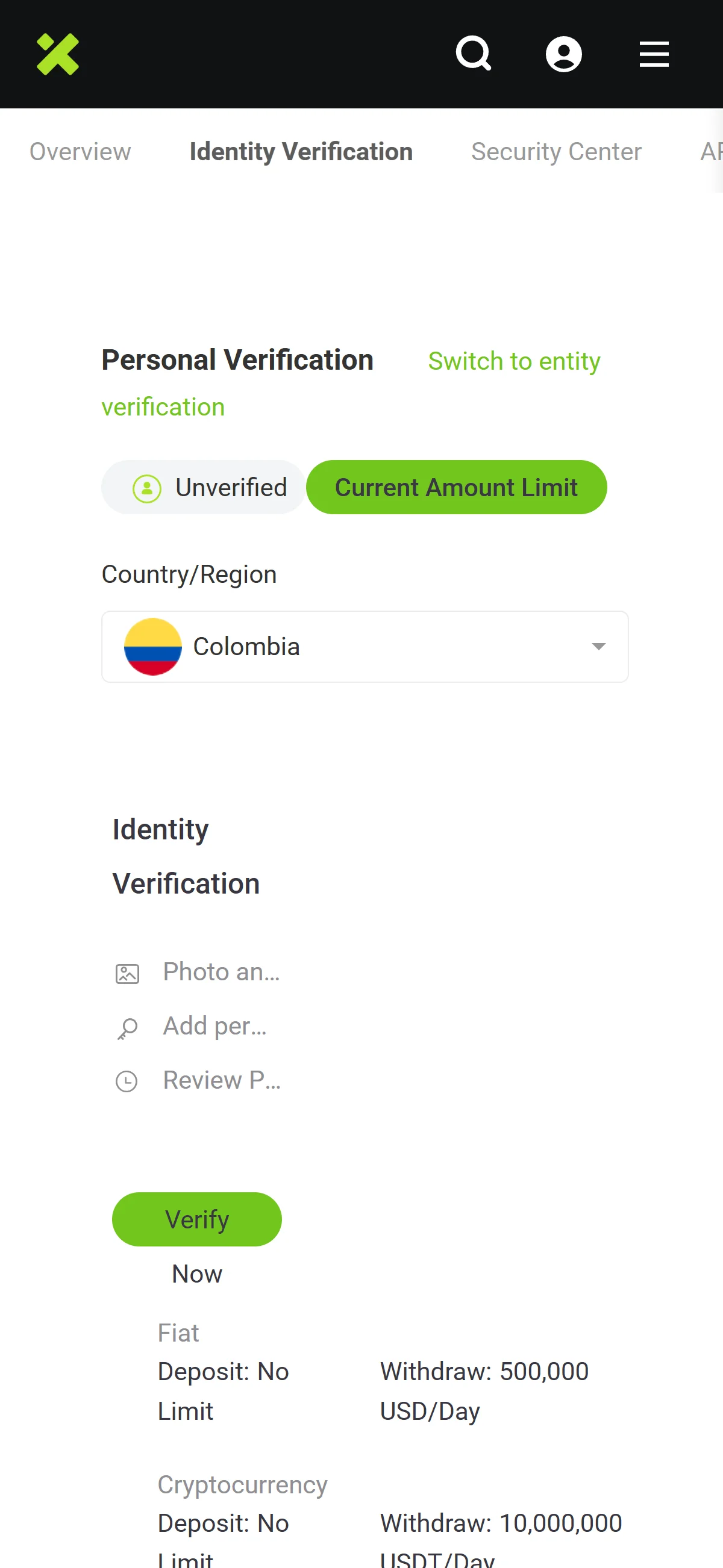
In your account, open the “Identity Verification” tab. At the top, “Personal Verification” is selected and your status reads “Unverified”, next to a “Current Amount Limit” tag; the “Fiat” and “Cryptocurrency” rows below spell out the limits that apply until you verify — deposits are unlimited, while daily withdrawals are capped.
XT notes that verification uses photo and video authentication and that review takes up to 2 days. Click “Verify Now” to begin, and the identity verification form opens — the next figure walks through it.
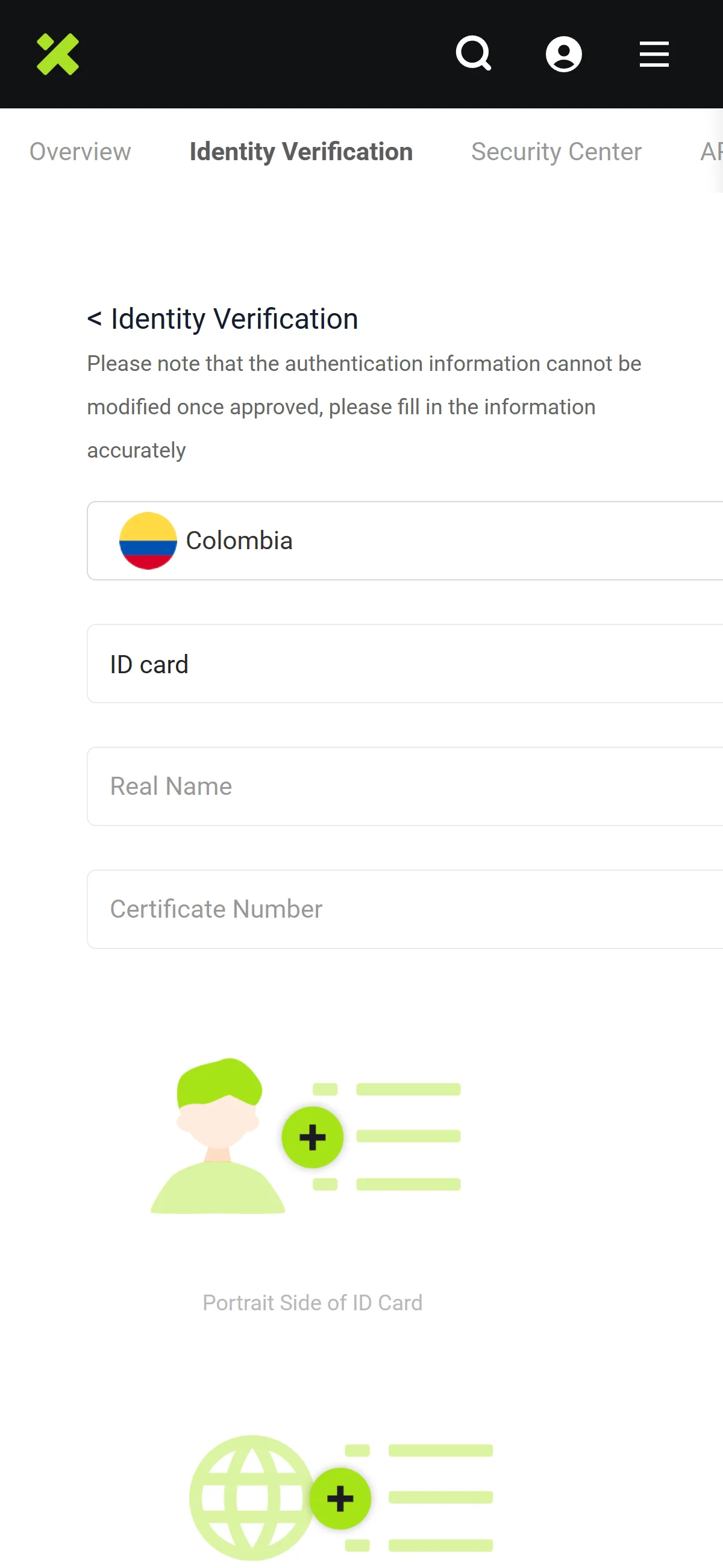
The identity verification form opens with a warning that details cannot be changed once approved, so fill it in carefully. Your country (“Colombia” here) and document type (“ID card”) are pre-selected at the top; adjust them if needed, then enter “Real Name” and “Certificate Number” exactly as they appear on your document.
Upload a clear photo for the “Portrait Side of ID Card” and one for the “National Emblem Side of ID Card”, keeping to the jpg, jpeg, or png formats and the 5 MB size the notice lists.
At the “Upload authentication video” step, record yourself reading out the digits XT shows on screen — or scan the QR code to download the XT app and record it there — then upload the clip. With every field and file in place, submit the form to send your documents for review.
With your account created through chainhelm’s referral link and identity verification now underway, you’re set to fund the account and start trading on XT once the review clears.
The XT.com referral code cannot be added after sign-up
The referral code can only be entered at sign-up — it cannot be added afterwards.
If you overlook this and complete registration without the code, there is no mechanism for linking it to that account after the fact.
If you have not yet completed KYC (identity verification), creating a fresh account is an option worth considering. Some exchanges, though, restrict opening more than one account in their terms of use.
- Does the sign-up screen show referral code REQ9DQ as applied? (Going through the link applies it automatically; where the exchange provides a code field, check there as well.)
- Once registration is complete, open the Referral / Rewards page and confirm that the referral shows as linked to your account
What is XT.com
XT.com’s origins, scale, and where its volume actually sits
XT.com launched in October 2018 and has grown into a mid-tier global exchange, but pinning down basic facts about it takes some care. Exchange trackers place its registration in the Seychelles, the press routinely describes its operations as Dubai-based, and XT itself names no single headquarters city; third-party profiles list the operating entity as “Fibtc Ltd”, which XT does not confirm through any official channel.
Those headline figures come with caveats worth stating plainly. XT’s own About page contradicts itself on scale — the headline reads “12,000,000+” registered users while the body text says “over 7.8 million”, and no audited number exists, which is why we carry it as a range. CoinMarketCap puts spot turnover slightly higher at around USD 1.52B, and CER.live assigns the platform a security grade of BBB (76/100). On breadth, XT advertises 1,000+ coins and 1,300+ trading pairs, though aggregators count fewer active markets (CoinGecko lists 720 coins and 791 pairs; CoinMarketCap counts 800+ coins).
The single most important fact about XT sits in the gap between its two order books: its derivatives franchise (CoinMarketCap rank #10, open interest around USD 6.5B) ranks far above its spot business, which the panel above places at rank #84. This is a futures-first venue whose spot listings are the secondary act — a framing that shapes everything in the chapter that follows. For the same reason, we do not describe XT as regulated or licensed anywhere; nothing in its scale implies that.
Trading fees and the XT-token discount
- Spot trading
- 0.2% maker / 0.2% taker at the standard tier, falling by VIP level to 0.02% at Premium VIP.
- Futures trading
- ≈0.02% maker / ≈0.06% taker at the standard tier (the full per-tier futures table sits behind a login).
- XT-token fee discount
- Around 25% off spot fees when fees are paid in XT, the platform’s native token (secondary sources cite a 10–50% range; spot only, with no futures discount reported).
These are the headline tiers as of 2026-07-17, and the schedule tightens with VIP volume, so active traders pay less than the standard rate shown. The native-token discount is best read as a structural condition rather than an offer: it applies only when you settle fees in XT and only on the spot side, so it rewards holders of the token rather than lowering the sticker rate for everyone. XT does not publish a comparable withdrawal or deposit cost table in a durable form, so we leave those out rather than estimate them.
What makes XT.com distinct
XT.com’s edge: a derivatives-led, high-leverage, long-tail profile
If XT is a futures-first venue, its distinguishing features all cluster around that identity. Against the spot-first mid-tier field it competes with, four things set it apart — and each is a reason a particular kind of trader ends up here rather than at a larger, more conservative exchange.
- Derivatives-led liquidity
- Its futures book (derivatives rank #8 on CoinGecko, #10 on CoinMarketCap, around USD 7.2B in 24h turnover) materially outranks its spot book — the reverse of most mid-tier peers, which lead with spot.
- TradFi perpetuals
- USDT-margined perpetual futures on equity indices (SP500, NAS100, DJ30) and commodities (OIL, GOLD/XAUT) at up to 500x leverage — products most mid-tier crypto exchanges do not offer at all.
- Interest-free margin
- Margin trading at 3x–20x with no interest charged, an atypical structure XT claims as a “first” among centralized exchanges.
- Long-tail listings
- A broad, fast-moving listing pipeline (1,000+ coins, 1,300+ pairs) that onboards small-cap, meme and prediction-token markets quickly.
Read together, these are the levers XT pulls to win a specific trader: someone who wants leverage, TradFi-style perpetuals, and early access to thin-float tokens under one login. None of it is unique in isolation, but the combination is uncommon at XT’s size, which is the honest case for choosing it over a bigger, plainer venue.
Who XT.com fits, and when a licensed venue serves you better
XT suits
A licensed venue serves you better
That second column is a real recommendation, not a hedge: if statutory protection matters to you more than product range, a regulated venue wins outright. The honest complication is that XT’s derivatives franchise — up-to-500x crypto and TradFi perpetuals, interest-free margin, a long tail of listings — has no like-for-like at those regulated venues, so the trade-off is genuine rather than one-sided. Whether XT is the right home depends on which side of that trade you are actually willing to make, and this guide keeps availability and legality (the next chapters) separate from the fit question answered here.
XT.com regulatory landscape
No confirmed major license, and a Seychelles regulator’s disavowal
XT describes itself as holding “major regulatory licenses”, but it names no specific authority and no license number, and we located no verified major license in any jurisdiction — so we do not repeat the claim as fact. On a subject this consequential, an undocumented assertion is not evidence of regulation.
The clearest external signal points the other way. The Seychelles Financial Services Authority published a notice dated 2026-04-09 stating that www.xt.com is not linked to any entity it licenses or regulates in any capacity — a disavowal from the very jurisdiction where trackers say XT is registered. Set against a derivatives book that turns over billions a day, that is a thin regulatory footing, and the direction of travel is toward more scrutiny, not less, even as XT publicly emphasizes “compliance”. One structural point matters for everything below: XT runs a single global platform with no regional sibling entities, so where that platform is closed to a market, the alternative is a third-party licensed exchange, not a local XT.
Excluded regions and named regulatory warnings
Two of those exclusions — the United States and Singapore — carry through to who can actually sign up, which the next chapter handles for readers in those markets. The United Kingdom is a different case: XT stays reachable there, but the Financial Conduct Authority added XT.com to its Warning List as an unauthorized firm (first published and last updated 2025-03-25), which means UK users have no recourse to the Financial Ombudsman Service and no FSCS protection if something goes wrong. Separately, the FCA’s ban on selling crypto-derivatives — CFDs, options and futures — to UK retail consumers (in force since 2021-01-06) bars XT’s high-leverage crypto and TradFi perpetuals for retail users in Britain.
Where XT.com operates unregistered across the target markets
Across these markets the pattern is consistent, as the panel above shows: XT operates without local registration or authorization, but outside the UK it has mostly stayed off the enforcement radar rather than earning a named action. “Unregistered” is a lighter status than an outright ban — yet it is not the same as being regulated, and it leaves users with no domestic body to turn to. We found no documented, dated instance of XT exiting a market or jurisdiction, which is worth noting here and revisiting as a forward-looking risk in the final chapter.
XT.com availability across major jurisdictions
XT is open in most of the markets this guide covers, but two of them — the United States and Singapore — are exceptions the referral link cannot get you around. Here is what applies in each, and where to go instead.
United States: XT.com does not accept US residents
XT’s User Agreement lists the United States among its excluded regions, and US persons are fully prohibited. In practice that means new sign-ups and referral-code use are simply not available to US residents — the block is XT’s own, enforced by IP geoblocking, not a ban imposed on XT by a US regulator. Because XT runs no US entity, there is no compliant way in from the United States, so the sensible move is a US-licensed venue instead.
Coinbase
Kraken
Gemini
Crypto.com
None of these carries XT’s up-to-500x leverage or its long tail of listings — that is the cost of trading somewhere with statutory protection — but for a US resident they are the venues that will actually open an account and stand behind it.
Singapore: XT.com self-prohibits new sign-ups
Singapore is also on XT’s excluded-regions list, so new sign-ups from Singapore are not accepted. As with the US, this is an exchange-imposed geoblock — XT holds no MAS license and has closed the market itself — rather than a ban handed down by the Monetary Authority of Singapore. One honest caveat before the alternatives: MAS restricts retail crypto derivatives and leverage, so the licensed Singapore venues below are regulated spot exchanges, not a like-for-like replacement for XT’s leveraged derivatives.
Coinhako
Independent Reserve
OKX SG
Crypto.com
For a Singapore resident who wants regulated custody and SGD rails, any of these is a cleaner route than trying to reach a venue that has closed the door — with the standing caveat that the leverage and derivatives XT offers are, by MAS design, not part of the deal.
Risks to acknowledge before using XT.com
Counterparty health and an unaudited proof-of-reserves page
The first risk with any exchange is the boring, existential one: can it stay solvent, and can you get your money out? XT’s record on both is specific enough to look at directly rather than in the abstract.
The 2024-11-28 breach in the panel above is the clearest test case. Analysts read it as a compromised private key rather than a protocol flaw, and PeckShield flagged it first; XT initially described the withdrawal freeze as “wallet upgrade and maintenance” before confirming the incident and restoring access. Stated neutrally, this is one operational-wallet compromise handled with a same-day freeze and a reserves reassurance — neither a catastrophe nor a non-event, but a real data point about how XT secures funds and how it communicates under stress.
Thin regulatory standing and up-to-500x leverage exposure
The regulatory facts from the previous chapter return here as a risk you carry personally. XT holds no confirmed major license; the Seychelles FSA has publicly disavowed any link to it (2026-04-09); and it has drawn named action in more than one market — the UK FCA Warning List (2025-03-25) and, in South Korea, a KoFIU referral naming XT among unregistered foreign platforms (2022-08-18) followed by a Google Play block of its Android app around 2025-03-25. The practical consequence is blunt: where XT is unlicensed — which is everywhere we looked — no domestic investor-protection scheme stands behind your balance.
The other XT-specific exposure sits in the panel above: leverage of up to 500x on select perpetual contracts — including the TradFi index and commodity perps that make XT distinctive — turns small adverse moves into liquidations, and it does so on a platform whose security certifications the same panel shows to be thin. This is not a generic caution about leverage in the abstract; it is the specific pairing of very high leverage with a mid-grade security posture that defines XT’s risk profile.
Very high leverage on a thinly regulated, mid-grade-security venue is the trade every XT user makes — knowingly or not.