— Contents 10 sections
- 01 Is the BingX referral code “LDIOMM” still active?
- 02 What the BingX referral code “LDIOMM” gets you
- 03 BingX sign-up steps with the referral code
- 04 What to do after signing up at BingX
- 05 The BingX referral code cannot be added after sign-up
- 06 What is BingX
- 07 What makes BingX distinct
- 08 BingX regulatory landscape
- 09 BingX availability across major jurisdictions
- 10 Risks to acknowledge before using BingX
chainhelm’s exclusive BingX referral code is .
As of 2026-07-11, we signed up as a new user and confirmed that the referral code was applied.
Enter the code at sign-up to receive up to 10,800 USD equivalent in new-user bonuses. You can only do this during registration, so we recommend entering it right then and there.
This article covers the sign-up process with the BingX referral code, BingX’s distinguishing features, availability across major markets, and the risks to acknowledge — with the sign-up flow and code application verified first-hand by chainhelm’s editorial team.
Is the BingX referral code “LDIOMM” still active?
The chainhelm editorial team created a fresh BingX account on 2026-07-11 and confirmed that the referral code “LDIOMM” is still active.
Here is the actual screen captured during verification.
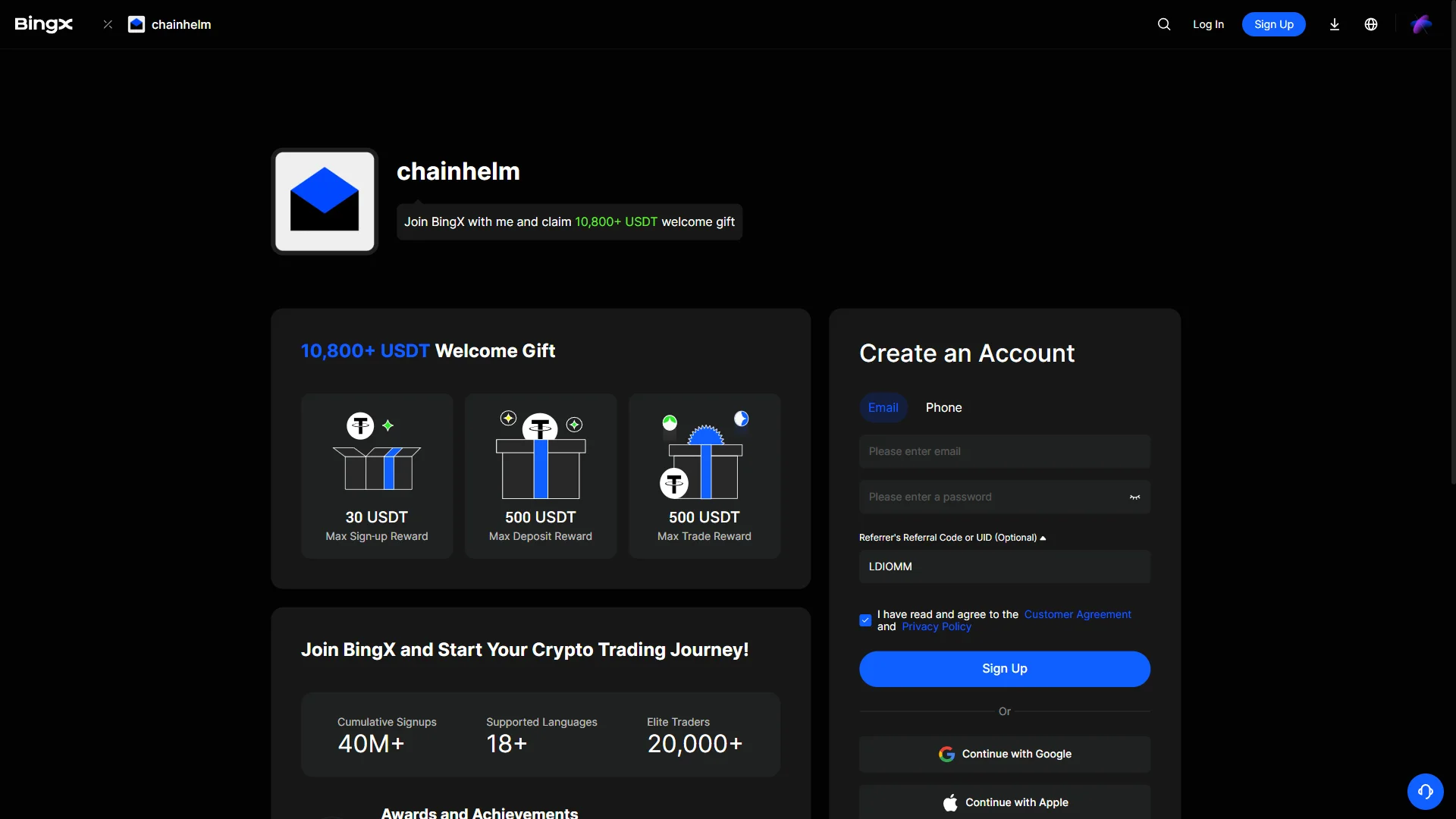
The screen shows “10,800+ USDT Welcome Gift”, confirming that the referral code LDIOMM was correctly applied.
chainhelm continuously verifies the validity of the code and confirms it remains usable.
What the BingX referral code “LDIOMM” gets you
Apply this code at sign-up to receive the following benefits on BingX:
- Benefit: up to 10,800 USD equivalent in new-user bonuses
- Expiration: None
- Eligibility: New users
To receive the benefits, you need to enter the code when you create your account. Be careful not to miss this step.
BingX sign-up steps with the referral code
We cover the sign-up process separately for PC/browser and smartphone (mobile).
PC/browser sign-up steps
-
First, open the BingX official sign-up page (the link applies the referral code). When you open it, you’ll see a screen like the one below.
— Figure 2The referral sign-up page2026-07-11 BingX's "Create an Account" form beside the chainhelm referrer banner, with the referral code already filled in. Source: chainhelm editorial Opening chainhelm’s invite link brings you to BingX’s “Create an Account” form, with the referrer’s referral code already filled in. The referrer banner and the “10,800+ USDT Welcome Gift” reward tiers sit next to the form for reference.
You go straight into entering your own details, since the referral code is already in place and doesn’t need to be typed by hand.
-
Enter your email and password
— Figure 3The completed sign-up form2026-07-11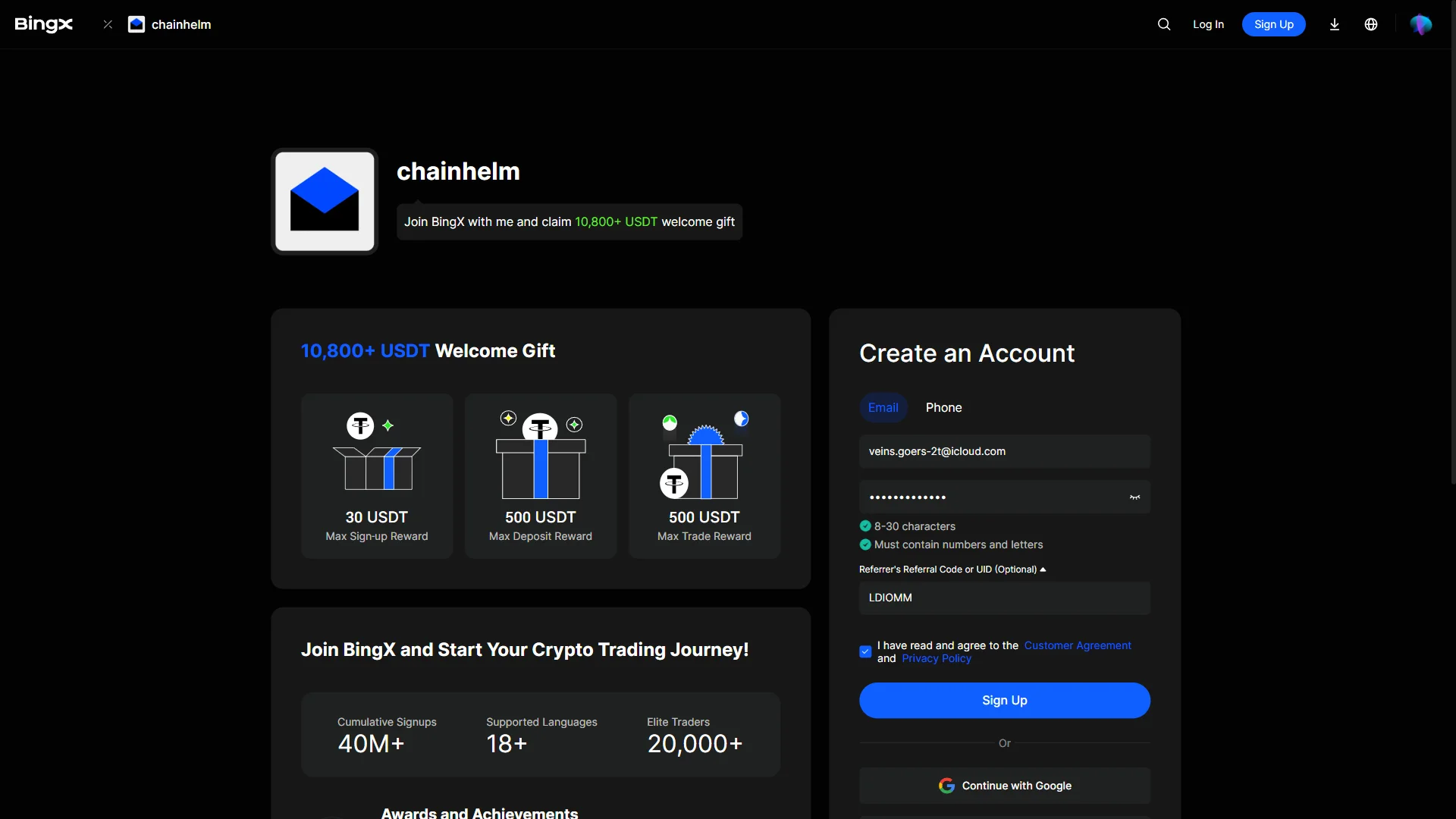
The sign-up form filled in, with both password rules met and the agreement box ticked. Source: chainhelm editorial In the “Email” field, enter the address you want to register, then set a password that meets the two rules shown: 8 to 30 characters, and a mix of numbers and letters. The “Referrer’s Referral Code or UID (Optional)” field already holds the referrer’s code, so you can leave it as it is.
Tick the box to agree to the Customer Agreement and Privacy Policy, then click “Sign Up”. BingX moves you on to a security verification step to confirm your email.
If you’d rather not set a password, you can also start the sign-up with your Google or Apple account.
-
Open your email for the verification code
— Figure 4The security verification window2026-07-11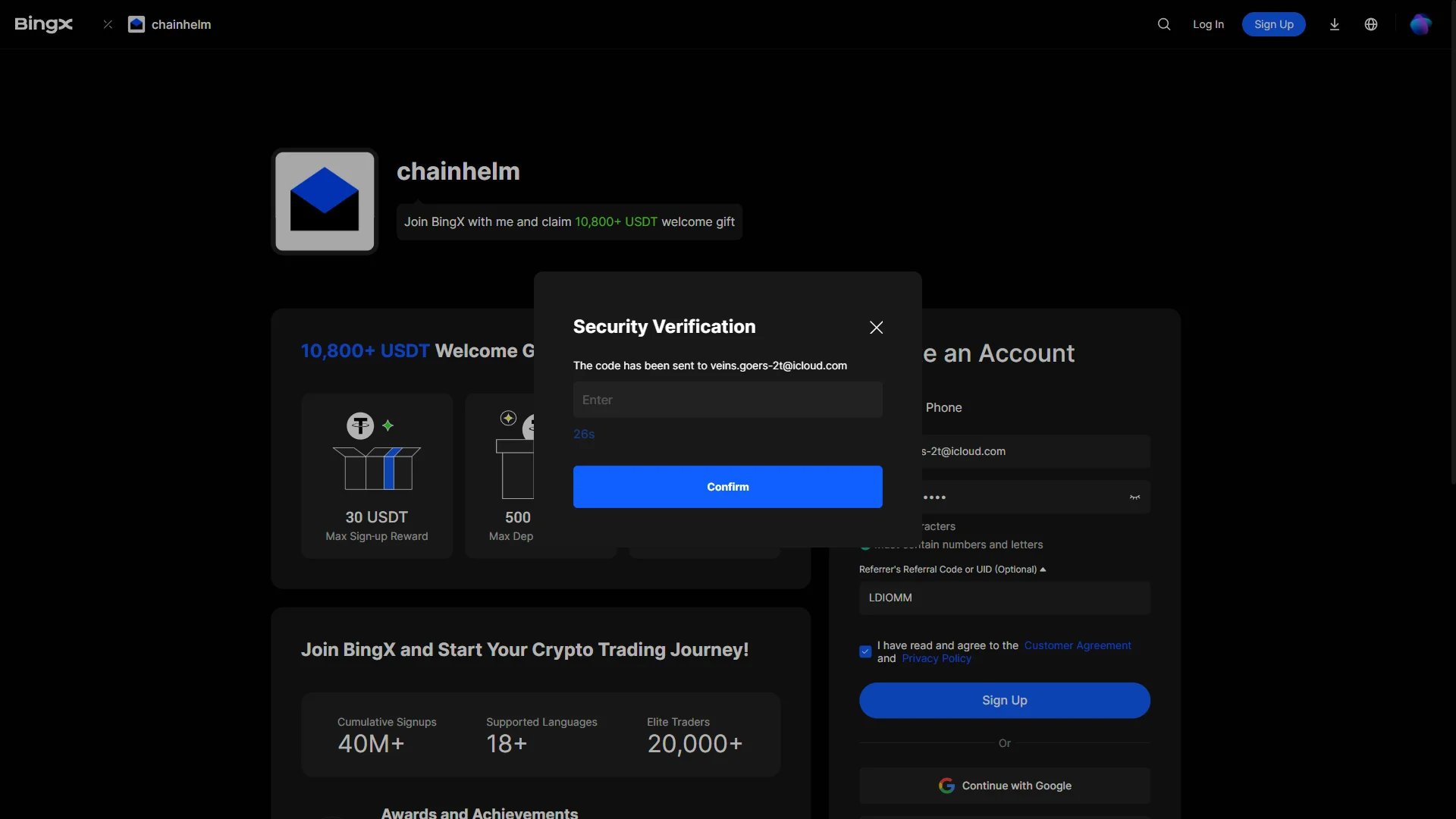
The "Security Verification" window with an empty code field and a running resend countdown. Source: chainhelm editorial After you submit the form, a “Security Verification” window opens and BingX emails a code to the address you just registered. The entry field starts empty, waiting for that code.
Leave this window open and go to your email inbox to fetch the code. If it doesn’t arrive, the countdown below the field shows when you can request a new one.
-
Copy the six-digit code
— Figure 5The verification code email2026-07-11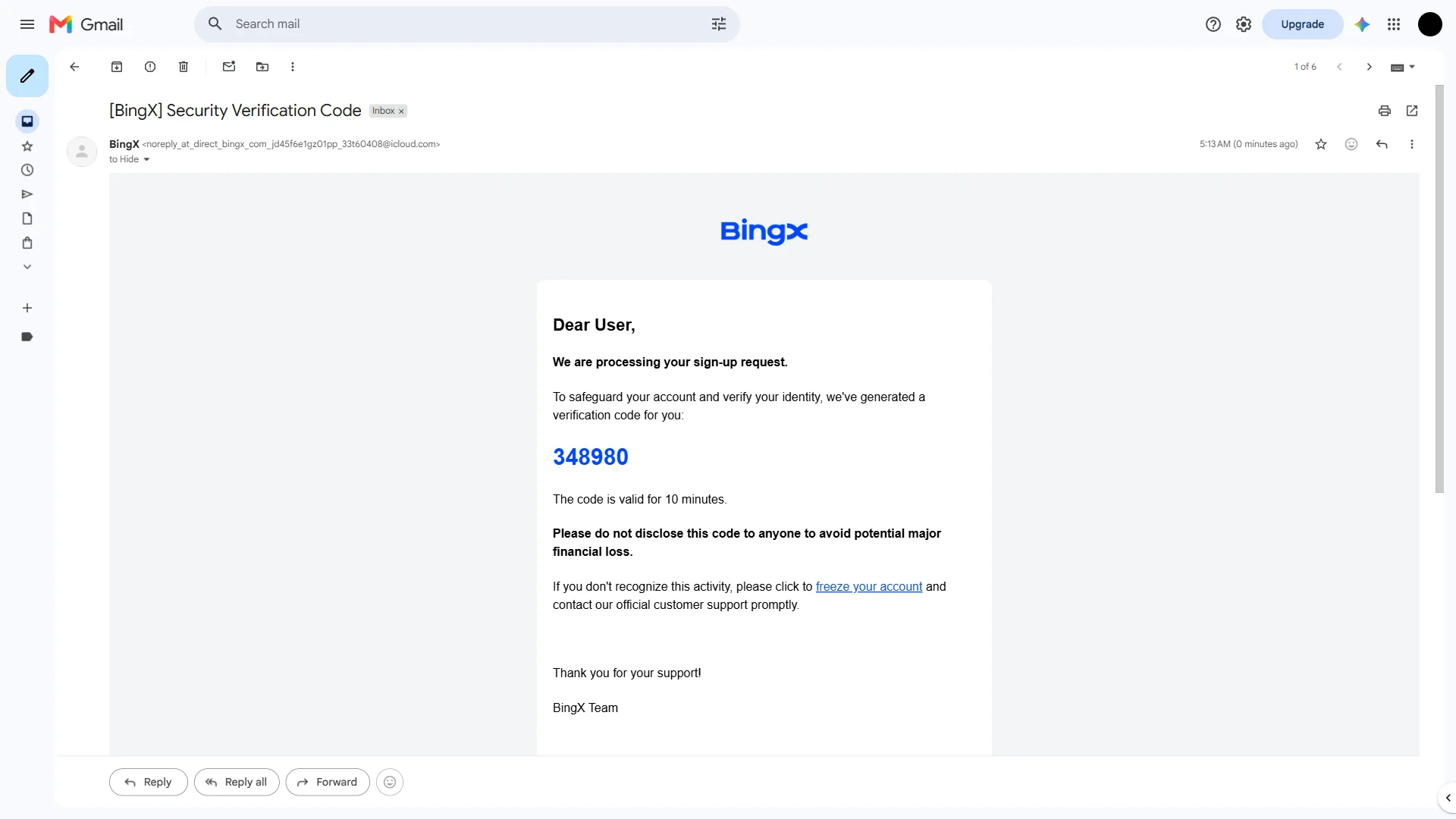
The "[BingX] Security Verification Code" email showing a six-digit code valid for 10 minutes. Source: chainhelm editorial In your inbox, open the email titled “[BingX] Security Verification Code”. It carries a six-digit code that stays valid for 10 minutes.
Copy the code, then switch back to the BingX verification window to enter it. The email also reminds you to keep the code to yourself, since anyone who has it could reach your account.
-
Enter the code and confirm
— Figure 6The code entered, ready to confirm2026-07-11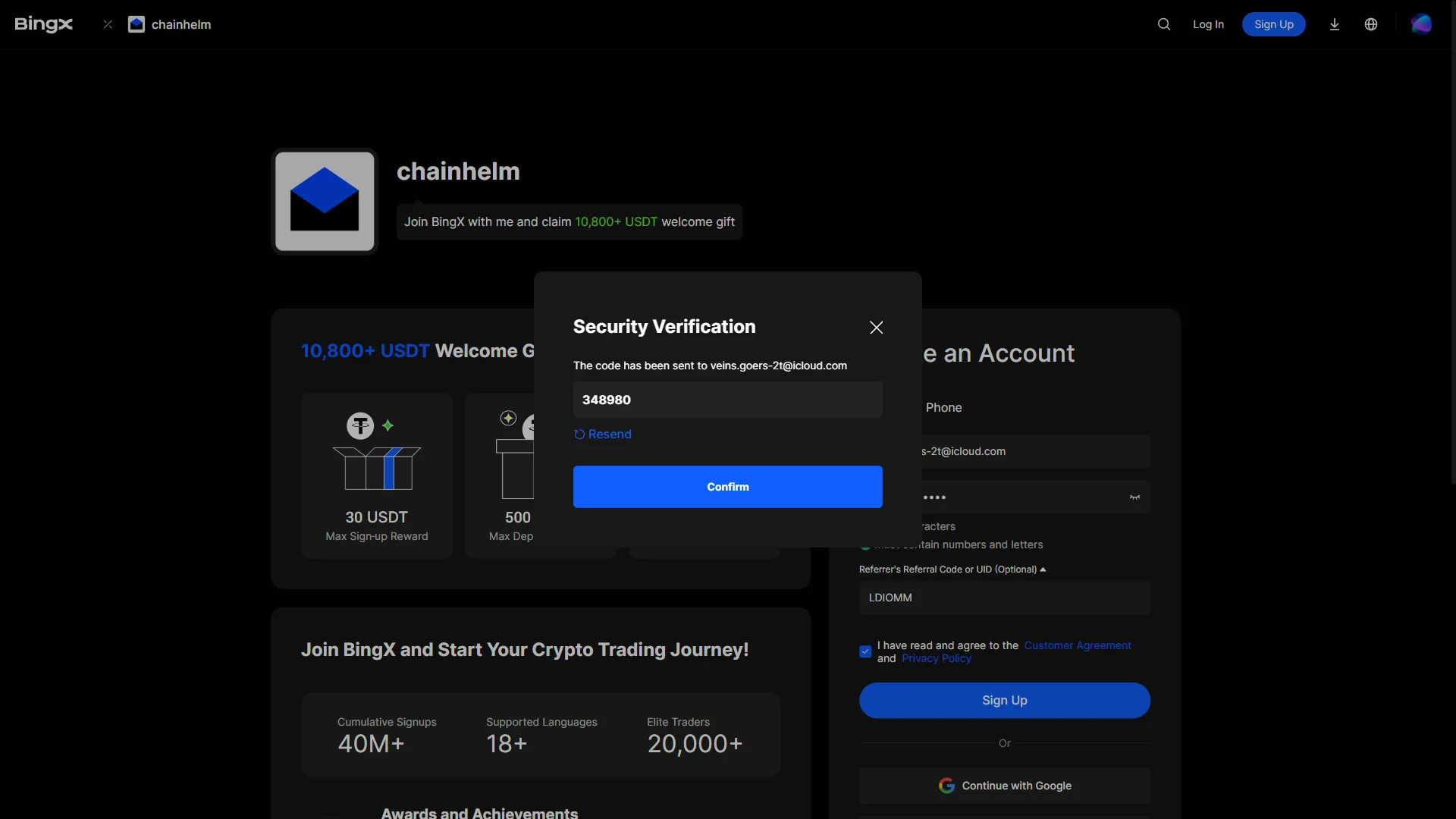
The "Security Verification" window with the six-digit code entered and "Confirm" ready to submit. Source: chainhelm editorial Back in the “Security Verification” window, type the six-digit code into the field and click “Confirm”. This clears the check and creates your BingX account.
If the code never arrived or has expired, use the “Resend” link to send a fresh one before confirming.
Smartphone (iOS / Android) sign-up steps
-
First, open the BingX official sign-up page in the mobile app or browser (the link applies the referral code). When you open it, you’ll see a screen like the one below.
— Figure 7The referral sign-up page2026-07-11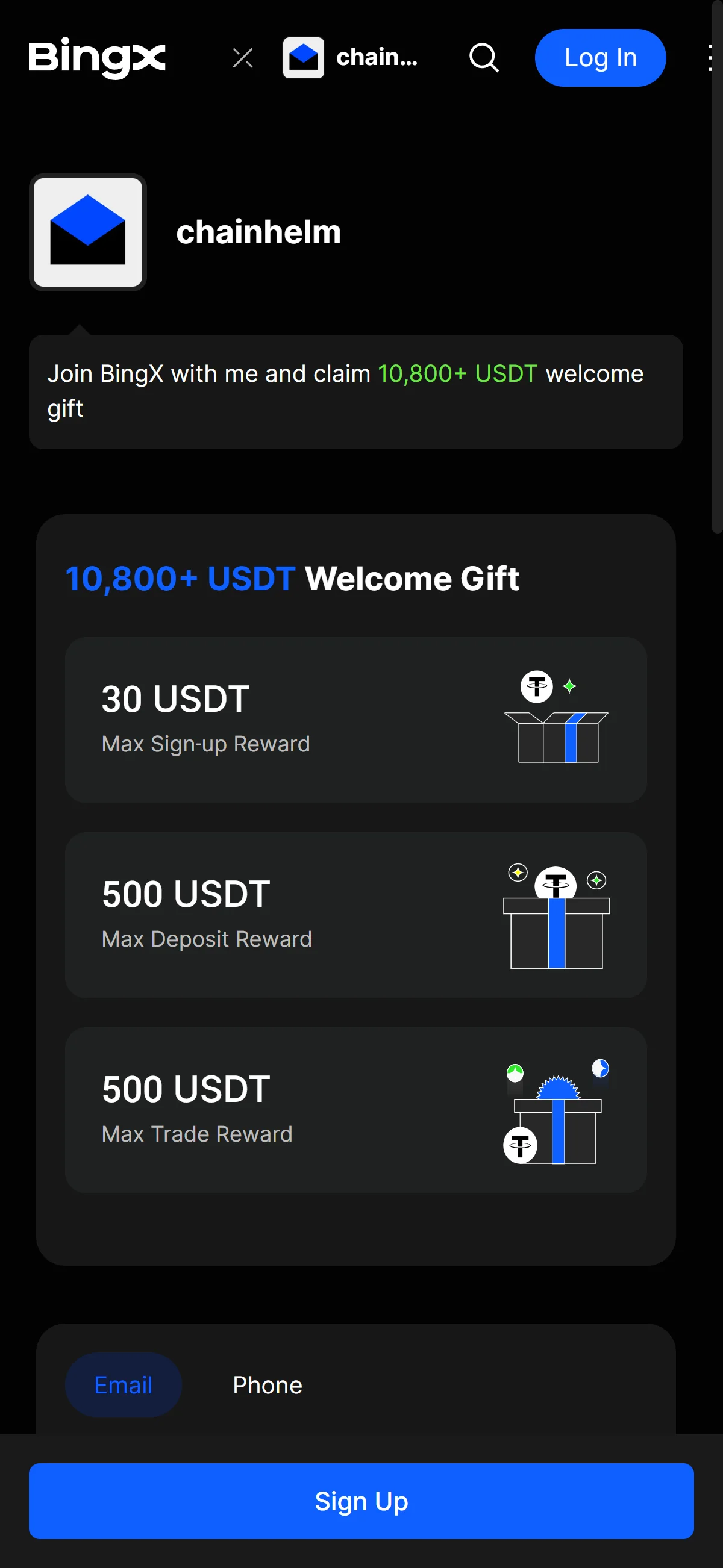
BingX's "Create an Account" form beside the chainhelm referrer banner, with the referral code already filled in. Source: chainhelm editorial Opening chainhelm’s invite link brings you to BingX’s “Create an Account” form, with the referrer’s referral code already filled in. The referrer banner and the “10,800+ USDT Welcome Gift” reward tiers sit next to the form for reference.
You go straight into entering your own details, since the referral code is already in place and doesn’t need to be typed by hand.
-
Enter your email and password
— Figure 8The completed sign-up form2026-07-11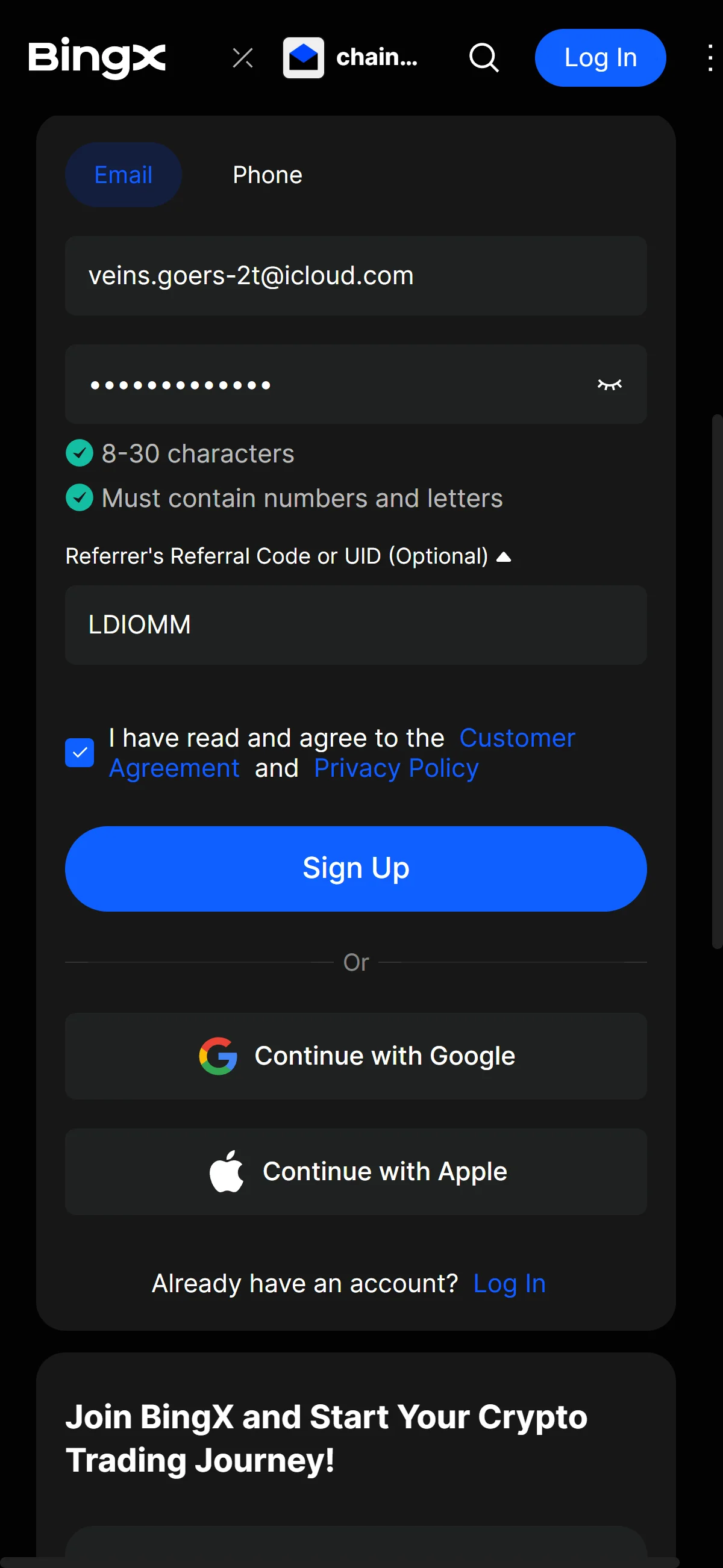
The sign-up form filled in, with both password rules met and the agreement box ticked. Source: chainhelm editorial In the “Email” field, enter the address you want to register, then set a password that meets the two rules shown: 8 to 30 characters, and a mix of numbers and letters. The “Referrer’s Referral Code or UID (Optional)” field already holds the referrer’s code, so you can leave it as it is.
Tick the box to agree to the Customer Agreement and Privacy Policy, then click “Sign Up”. BingX moves you on to a security verification step to confirm your email.
If you’d rather not set a password, you can also start the sign-up with your Google or Apple account.
-
Open your email for the verification code
— Figure 9The security verification window2026-07-11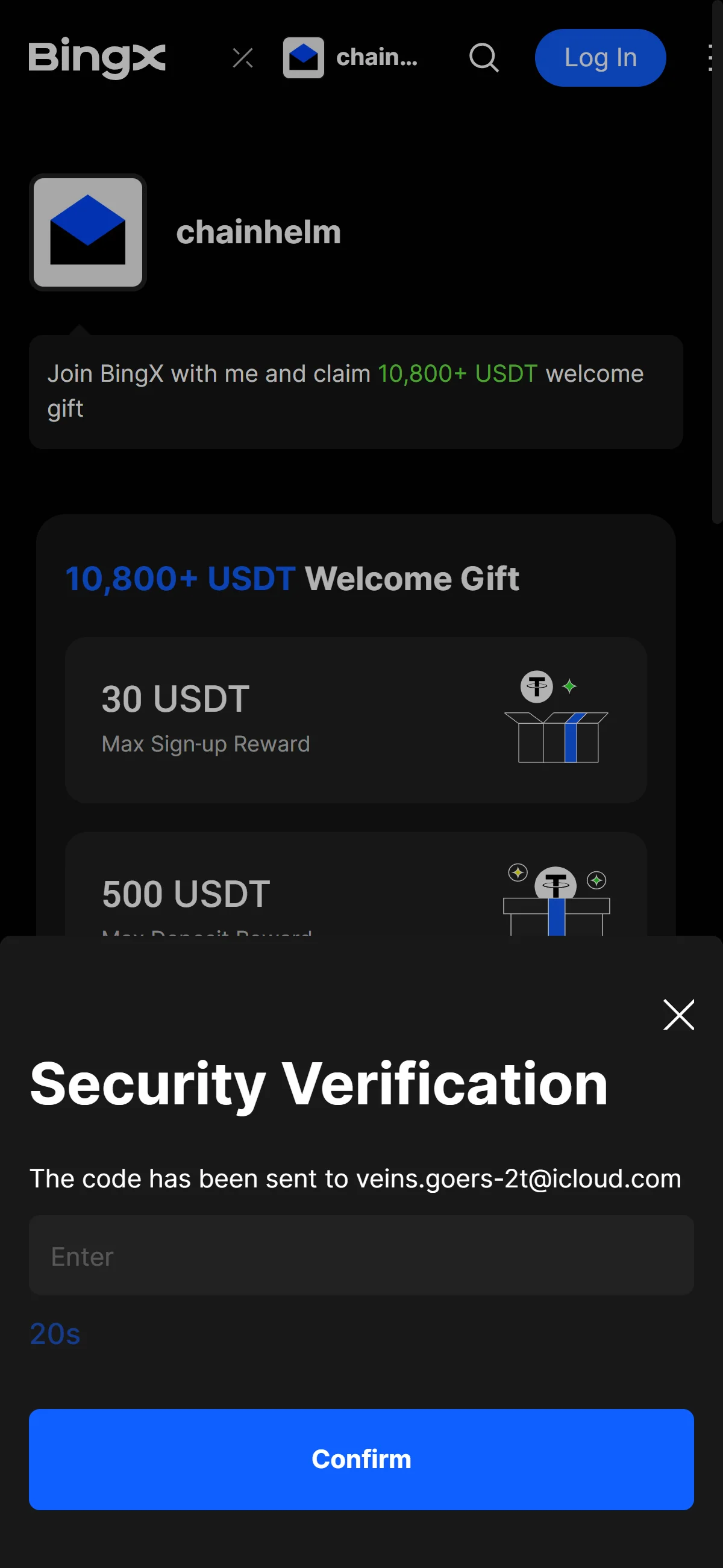
The "Security Verification" window with an empty code field and a running resend countdown. Source: chainhelm editorial After you submit the form, a “Security Verification” window opens and BingX emails a code to the address you just registered. The entry field starts empty, waiting for that code.
Leave this window open and go to your email inbox to fetch the code. If it doesn’t arrive, the countdown below the field shows when you can request a new one.
-
Copy the six-digit code
— Figure 10The verification code email2026-07-11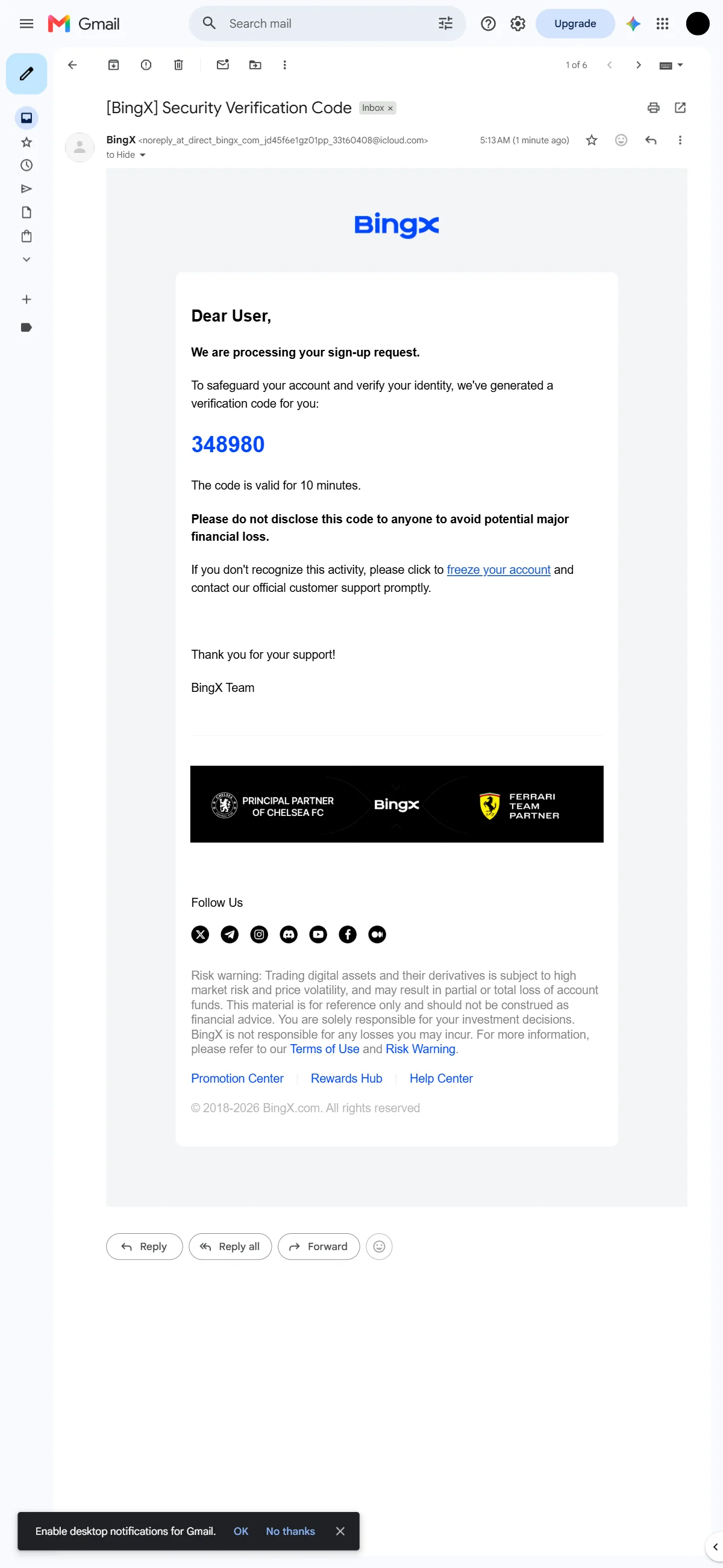
The "[BingX] Security Verification Code" email showing a six-digit code valid for 10 minutes. Source: chainhelm editorial In your inbox, open the email titled “[BingX] Security Verification Code”. It carries a six-digit code that stays valid for 10 minutes.
Copy the code, then switch back to the BingX verification window to enter it. The email also reminds you to keep the code to yourself, since anyone who has it could reach your account.
-
Enter the code and confirm
— Figure 11The code entered, ready to confirm2026-07-11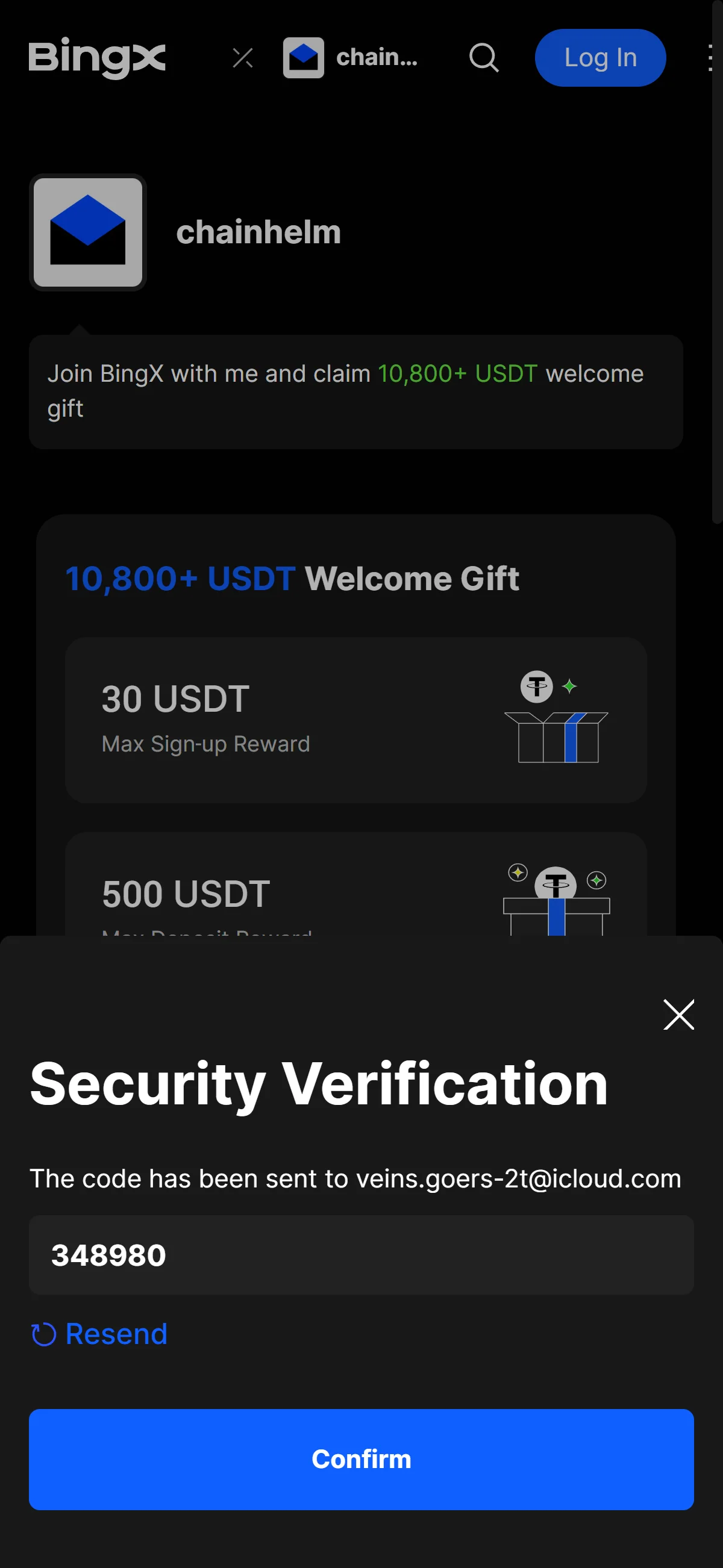
The "Security Verification" window with the six-digit code entered and "Confirm" ready to submit. Source: chainhelm editorial Back in the “Security Verification” window, type the six-digit code into the field and click “Confirm”. This clears the check and creates your BingX account.
If the code never arrived or has expired, use the “Resend” link to send a fresh one before confirming.
What to do after signing up at BingX
We cover identity verification separately for PC/browser and smartphone (mobile).
PC/browser identity verification
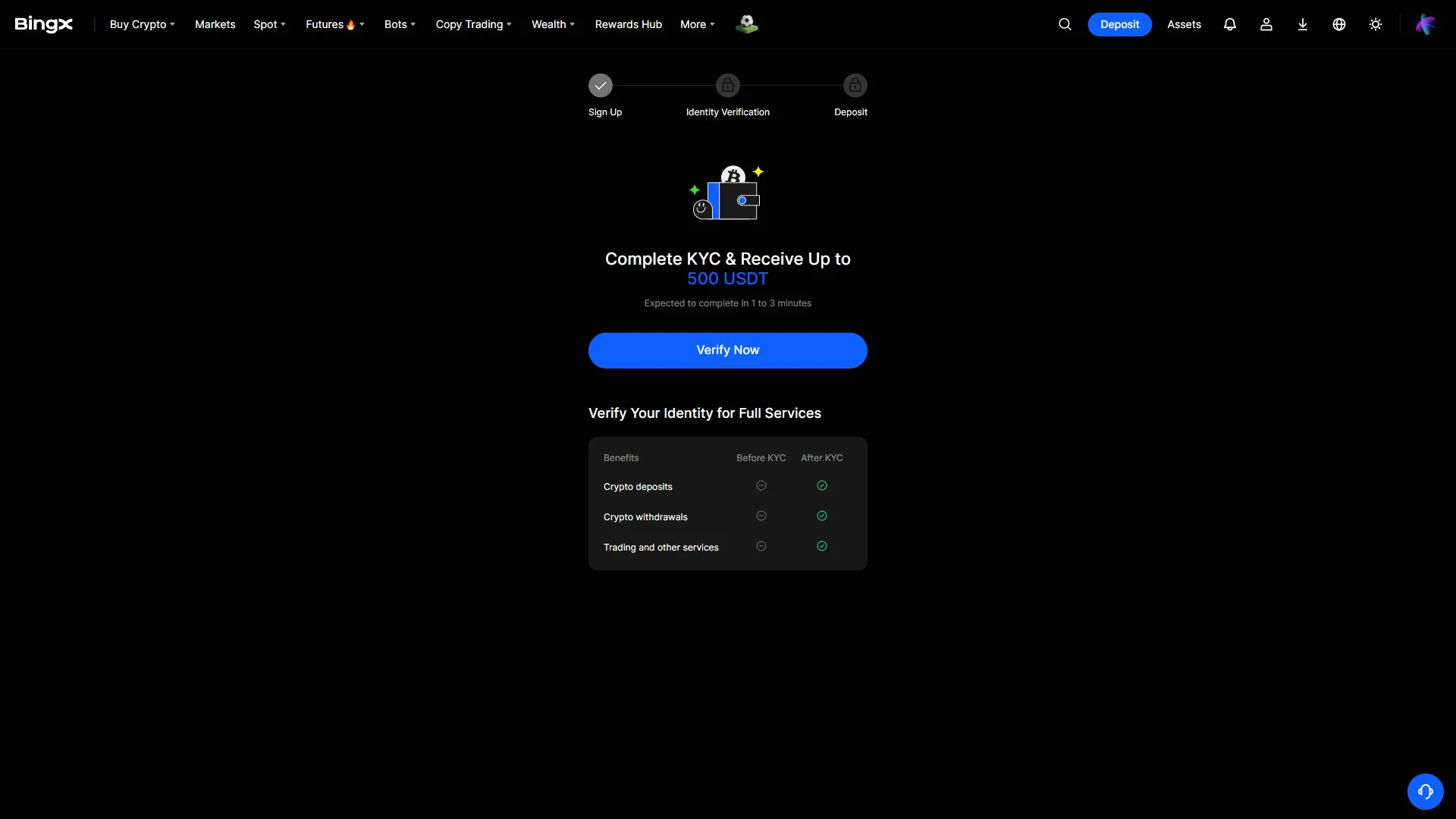
With your account created, BingX moves you to an onboarding screen. Here you click “Verify Now” to begin identity verification, the stage the tracker highlights after “Sign Up” and before “Deposit”.
The table below spells out why it matters: crypto deposits, withdrawals, and trading stay locked before verification and open only once it is complete.
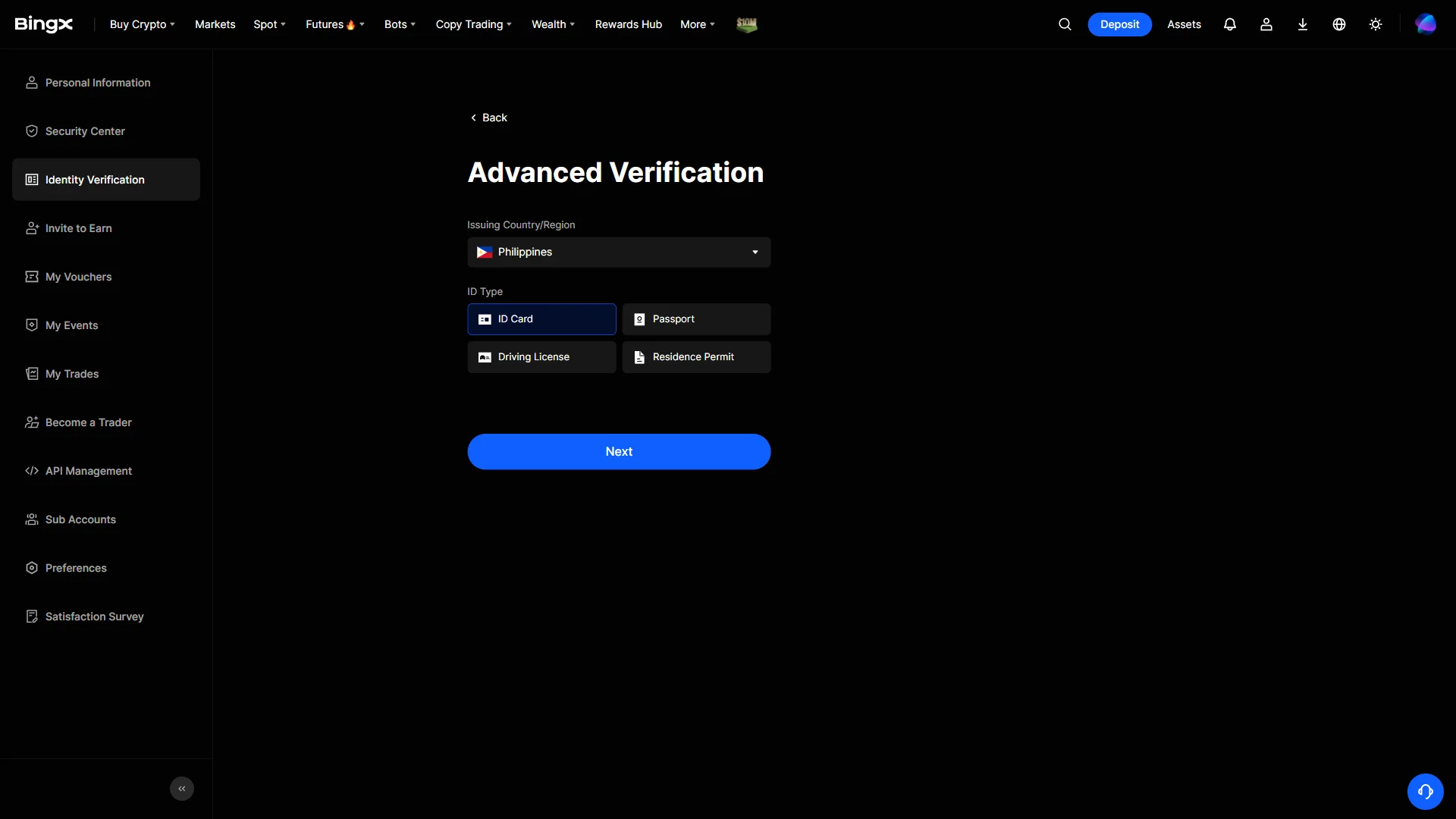
On the “Advanced Verification” screen, open the “Issuing Country/Region” dropdown and choose the country that issued your ID; here it is set to Philippines as an example.
Then pick the document you will use from the ID Type options: “ID Card”, “Passport”, “Driving License”, or “Residence Permit”. Once your country and ID type are set, click “Next”.
Smartphone (iOS / Android) identity verification
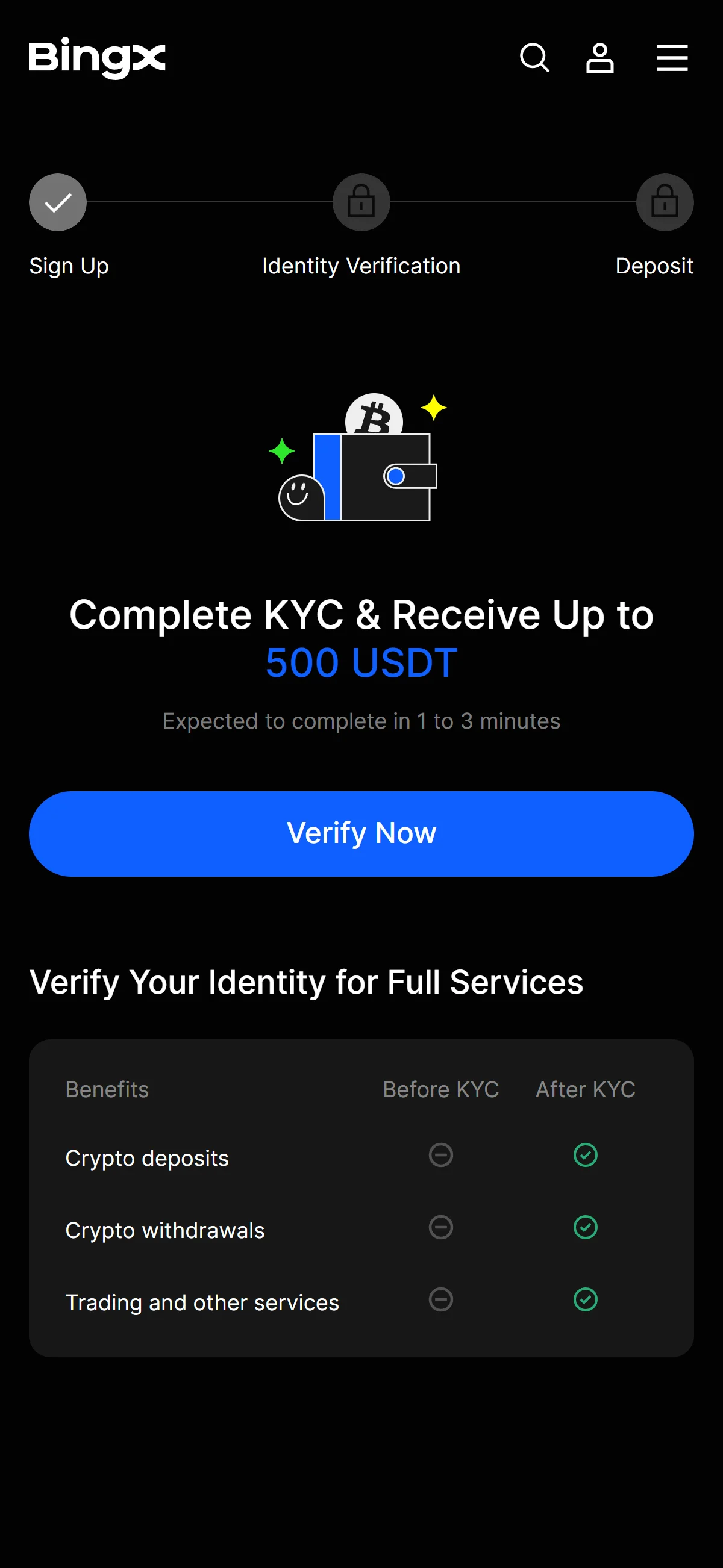
With your account created, BingX moves you to an onboarding screen. Here you click “Verify Now” to begin identity verification, the stage the tracker highlights after “Sign Up” and before “Deposit”.
The table below spells out why it matters: crypto deposits, withdrawals, and trading stay locked before verification and open only once it is complete.
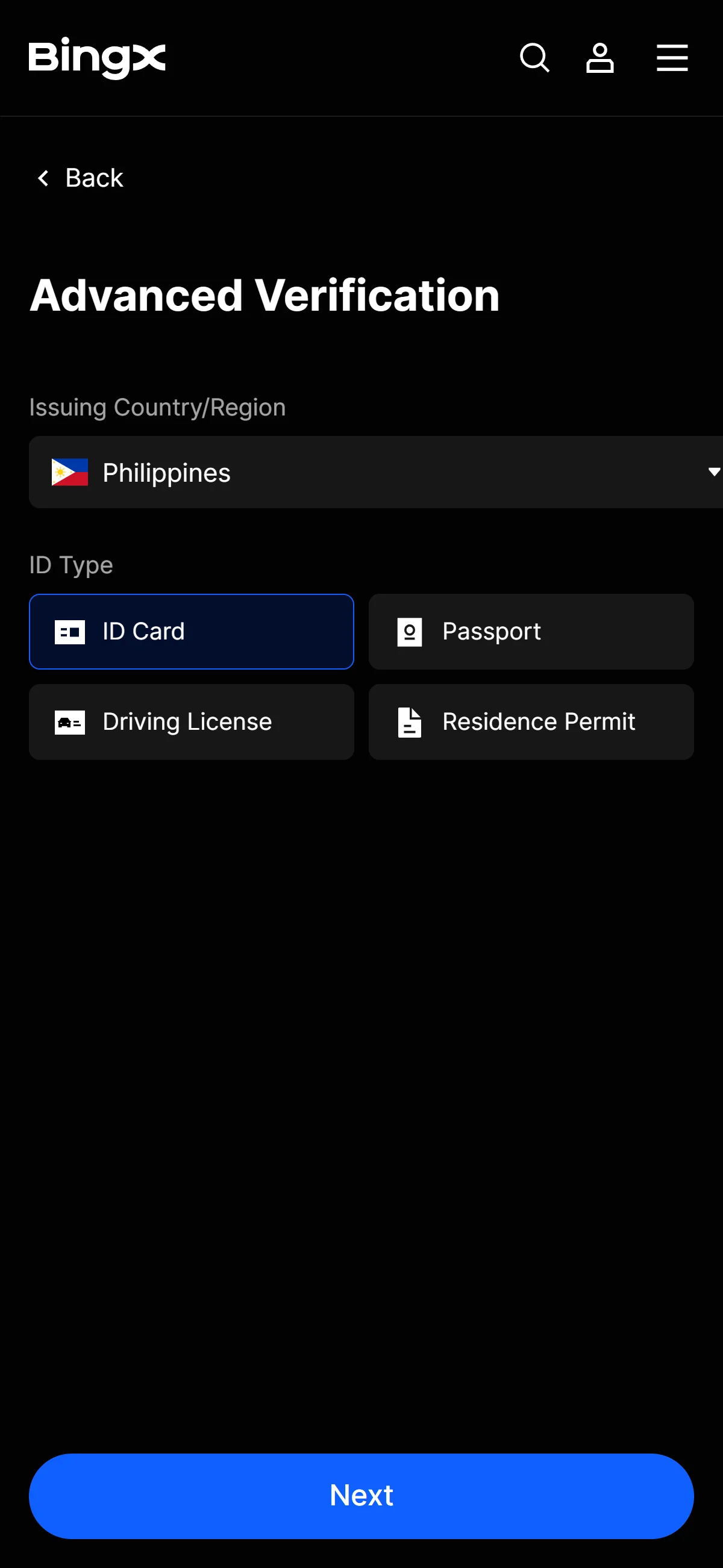
On the “Advanced Verification” screen, open the “Issuing Country/Region” dropdown and choose the country that issued your ID; here it is set to Philippines as an example.
Then pick the document you will use from the ID Type options: “ID Card”, “Passport”, “Driving License”, or “Residence Permit”. Once your country and ID type are set, click “Next”.
Once identity verification goes through, the account is fully open, with deposits, withdrawals, and trading all becoming available.
The BingX referral code cannot be added after sign-up
The referral code can only be entered at sign-up — it cannot be added afterwards.
If you overlook this and complete registration without the code, there is no mechanism for linking it to that account after the fact.
If you have not yet completed KYC (identity verification), creating a fresh account is an option worth considering. Some exchanges, though, restrict opening more than one account in their terms of use.
- Does the sign-up screen show referral code LDIOMM as applied? (Going through the link applies it automatically; where the exchange provides a code field, check there as well.)
- Once registration is complete, open the Referral / Rewards page and confirm that the referral shows as linked to your account
What is BingX
BingX’s origins, scale, and product range
BingX is easier to place by what it emphasizes than by its size. It launched in May 2018 — first as Bingbon, later rebranded — and built its early identity around copy and social trading, a product most large exchanges added only years later.
The corporate picture is thinner than the marketing. BingX is registered in the British Virgin Islands (BingX Group Limited, Road Town, Tortola), with reported branch offices in Canada, the EU and Australia; the “Singapore-based” label some outlets use sits awkwardly against BingX’s own decision to restrict Singapore. More telling is what stays undisclosed — there is no authoritative public record of a founder, chief executive or ultimate beneficial owner, and the most senior named executive is Chief Product Officer Vivien Lin. We flag that opacity here as a plain fact and return to it as counterparty risk further down.
Read together, the figures above point one way: BingX is a derivatives-first venue rather than a spot-liquidity leader. Its self-reported user count is unaudited and trackers disagree, and its spot depth trails the largest exchanges, but its derivatives volume and ranking are where it actually competes. Reserve estimates diverge by methodology — DeFiLlama and CoinGecko put total assets around USD 609.5M, others higher or lower — so treat any single number as indicative, not audited.
The product range is broad for a venue this size: spot, USDT-margined perpetuals and a simplified Standard Futures, copy and social trading, bots, Earn, Convert, a Web3 wallet, and a contract-based TradFi desk spanning global equities, indices and pre-IPO ADRs. There is no options product and, notably, no native exchange token. Its public trajectory has leaned on sponsorship and AI — principal partner of Chelsea FC from 2024, first crypto partner of Scuderia Ferrari HP from 2026, and an “All-in AI” push built around BingX AI Claw.
Trading fees and the no-token VIP discount
Two things shape the true cost of trading here: the headline fees and the withdrawal side. The rates below are the standard tiers as of 2026-07-11.
- Spot (standard)
- 0.10% maker / 0.10% taker
- Perpetual futures (standard)
- 0.020% maker / 0.050% taker
- Standard Futures
- flat 0.045%, deducted on close
- Perpetuals at Supreme VIP
- 0.0000% maker / 0.0250% taker — reached by volume, no token required
What matters more than any single rate is what the schedule lacks: a native exchange token. BingX has none, so — unlike Binance’s BNB or MEXC’s MX — there is nothing to buy or hold to unlock the best pricing; reductions come only from volume- and asset-based VIP tiers, with the top perpetual tier reaching zero maker fees. We read that as a genuine structural difference rather than a promotion: it removes the token-price exposure those programs carry, but the entry-level 0.10% spot rate is unremarkable until volume builds. Withdrawal costs are the caveat — they vary by asset and network, and BingX publishes no single flat fee, so its per-asset schedule belongs in any real cost estimate.
What makes BingX distinct
BingX’s differentiators — copy trading, TradFi, and no native token
If the fee structure hints at BingX’s angle, three features make it explicit — and none of them is a native coin.
A pioneer, not an add-on
Stocks beside crypto
Nothing to hold for a discount
Read together, these are more than feature checkboxes. Copy trading is positioned as a front door for newcomers rather than a power-user afterthought; the TradFi desk lets one account hold crypto beside contract-based equities and pre-IPO exposure, framed honestly as derivative exposure and not registered securities brokerage; and the missing token is the quiet, load-bearing difference.
The absence of a discount token is BingX’s real signature — the best rates come from how much you trade, not how much of an in-house coin you hold.
Around that core sit high-leverage perpetuals — advertised up to 125x, with a “Guaranteed Price”, zero-slippage execution feature for VIPs — and a heavier AI-native posture than most peers, marketed through BingX AI Claw. A VIP Trial Pass can even match a rival exchange’s tier for a period (up to two levels higher, capped at VIP 5). None of this is unique in isolation; the combination, minus a token, is.
The better-fit alternatives and who they serve
No exchange fits everyone, and BingX fits some readers poorly. The venues you would actually weigh it against are the token-anchored majors — Binance (BNB), Bybit, OKX and MEXC (MX) — precisely because BingX’s edge is the missing token. Three cases point elsewhere, and we would send those readers away rather than push the code.
You are in a restricted market
You need proven backing
You trade size on spot
The reserve-audit and liquidity gaps are matters of degree, not disqualifiers; the jurisdiction question is binary, and it is where the next two chapters do their real work.
BingX regulatory landscape
BingX’s licensing footprint and self-excluded markets
Regulation is where BingX’s map turns uneven. It holds a scatter of regional registrations rather than one global license, and it excludes a long list of markets outright.
None of the registrations above is a general operating license; each is an AML-type registration held by a regional entity, and one — Canada’s FINTRAC MSB — likely covers a payment arm even though Canada itself sits on BingX’s restricted list. That restricted list is long and self-imposed: BingX declines customers in the United States (including its territories), the United Kingdom, Canada, Singapore, the Netherlands, Hong Kong, Macau and mainland China, alongside sanctioned jurisdictions such as Iran, North Korea, Cuba and Myanmar, among others. For readers in the major self-excluded markets, the practical routing lives in the next chapter; here the point is simply that the exclusions are BingX’s own.
Regulatory trajectory and same-brand registrations
The direction of travel is mixed but, on balance, tightening.
BingX holds or pursues registrations (AUSTRAC, Lithuania’s FCIS, Canada’s FINTRAC) and says it is working toward MiCA authorization, yet enforcement has moved the other way — India in late 2025, EU access in mid-2026 — on top of the broad exclusion list and lingering scrutiny from the 2024 hack. The three same-brand entities above (BingX Global Pty Ltd, BingX EU UAB, BingX Pay Limited) are registration and trust facts, not doorways for consumers in other countries. One target market sits on the served side of this line: Australia, where BingX operates on its global platform and its AUSTRAC-registered entity anchors the local footprint — a landscape note here, not a reroute.
BingX availability across major jurisdictions
Whether you can use BingX at all comes down to where you are — and for several major markets the honest answer is that you cannot. For each, here is the status and the licensed route we would take instead.
United States: closed to US persons
BingX bars US persons across every product, enforced at both KYC and geo level, so a referral sign-up is neither lawful nor practical — and there is no BingX US entity to weigh. One honest caveat before the alternatives: BingX’s subsidiary holds a FinCEN MSB registration scoped to “FX activities”, which some headlines inflate into “US-regulated”. An MSB does not authorize serving US retail crypto customers, and BingX still blocks US persons. The regulated routes are these:
Coinbase
Kraken
Crypto.com
Gemini
United Kingdom: self-excluded, with FCA-registered routes
BingX lists the United Kingdom as a restricted jurisdiction in its own terms and holds no FCA registration, so new UK sign-ups are self-excluded by the exchange. One scope point shapes the reroute: under the FCA’s PS20/10 ban, crypto derivatives cannot be sold to UK retail from any FCA venue — so a UK alternative replaces BingX’s spot side only, not its perpetuals or copy trading. The FCA-registered options:
Coinbase
Kraken
Crypto.com
Revolut / Revolut X
Singapore: outside MAS licensing, and the licensed alternatives
BingX self-excludes Singapore and is not MAS-licensed. Expect a narrower fit than BingX on paper: MAS restricts retail crypto-derivatives marketing, so most licensed venues are spot- and earn-oriented for retail, with OKX SG the one derivatives exception (gated behind a suitability quiz). The MAS-licensed set:
Coinhako
Independent Reserve
Crypto.com
OKX (OKX SG)
India: the FIU-IND takedown and compliant domestic venues
In October 2025 FIU-IND ordered a takedown of BingX, declaring it a non-compliant, unregistered VDA service provider under the PMLA; enforcement is reportedly patchy, but a referral sign-up is not a compliant route. One India-wide frame matters across every option: a flat 30% tax on VDA gains and a 1% TDS on transfers apply regardless, and FIU-registered domestic exchanges deduct that 1% TDS at source and issue Indian tax statements — where BingX, unregistered, withholds nothing and issues no Indian tax documents. The FIU-registered venues:
CoinDCX
CoinSwitch
Binance
ZebPay
Risks to acknowledge before using BingX
Counterparty soundness and transparency gaps
The risks that matter here are the ones you cannot control — what happens if BingX is breached, and whether you can rely on its standing over time.
BingX’s answer to whether it can keep your funds is mixed. It publishes monthly Merkle-tree proof-of-reserves snapshots, and the June 2026 ratios are all over-collateralized:
But the reassurance has gaps. BingX names no clearly identified independent auditor, and CER.live characterizes its proof of reserves as “without proof of reserves audit”, grading the exchange BBB (73/100, rank #47) — strong on server security, weak on penetration testing. Its user-protection Shield Fund, reported at 150,000,000 USDT, is modest against the 2024 loss range. And the ownership opacity noted earlier compounds here: when you must trust an operator with custody, an undisclosed founder, CEO and ultimate beneficial owner is itself a counterparty gap.
Regulatory and future-access risk
Present availability is one thing; keeping it is another. BingX’s own record shows access can narrow after you have signed up. Its exit from India in October 2025 (the FIU-IND takedown) and the temporary withdrawal suspension during the 2024 hack are the concrete precedents: a market BingX serves today, or an account you have funded, can later face restrictions you did not choose. Add the EU’s MiCA transition, which put European access at risk from 2026-07-01 with no place in ESMA’s CASP register, plus the broad self-imposed exclusion list, and the forward-looking risk is clear — not that BingX will necessarily fail, but that where and whether you can reach it is less settled than a sign-up page suggests. Country-by-country status sits in the availability chapter above; the point here is the trajectory.