— Contents 10 sections
- 01 Is the Bybit referral code “20533” still active?
- 02 What the Bybit referral code “20533” gets you
- 03 Bybit sign-up steps with the referral code
- 04 What to do after signing up at Bybit
- 05 The Bybit referral code cannot be added after sign-up
- 06 What is Bybit
- 07 What makes Bybit distinct
- 08 Bybit regulatory landscape
- 09 Bybit availability across major jurisdictions
- 10 Risks to acknowledge before using Bybit
chainhelm’s exclusive Bybit referral code is .
As of 2026-07-08, we signed up as a new user and confirmed that the referral code was applied.
Enter the code at sign-up to receive a new-user bonus worth up to 31,740 USD equivalent. You can only do this during registration, so we recommend entering it right then and there.
This article covers the sign-up process with the Bybit referral code, Bybit’s distinguishing features, availability in major markets, and the risks to acknowledge — with the sign-up flow and code application verified first-hand by chainhelm’s editorial team.
Is the Bybit referral code “20533” still active?
The chainhelm editorial team created a fresh Bybit account on 2026-07-08 and confirmed that the referral code “20533” is still active.
Here is the actual screen captured during verification.
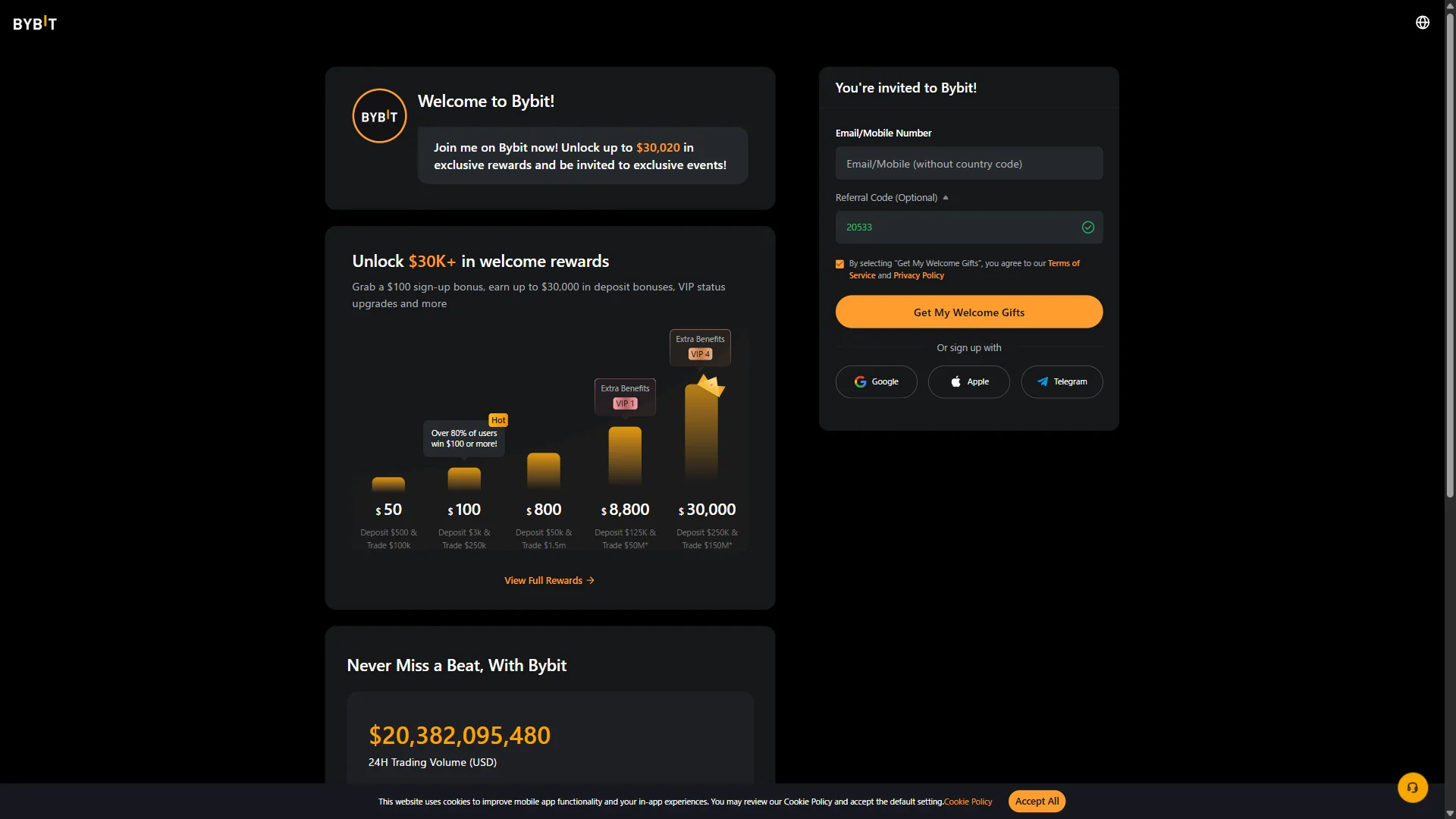
The screen shows “You’re invited to Bybit!”, confirming that the referral code 20533 was correctly applied. chainhelm continuously verifies the validity of the code and confirms it remains usable.
What the Bybit referral code “20533” gets you
Apply this code at sign-up to receive the following benefits on Bybit:
- Benefit: a new-user bonus worth up to 31,740 USD equivalent
- Expiration: None
- Eligibility: New users
To receive the benefits, you need to enter the code when you create your account. Be careful not to miss this step.
Bybit sign-up steps with the referral code
We cover the sign-up process separately for PC/browser and smartphone (mobile).
PC/browser sign-up steps
-
First, open the Bybit official sign-up page (the link applies the referral code). When you open it, you’ll see a screen like the one below.
-
Fill in the sign-up form
— Figure 2Empty Bybit sign-up form2026-07-08 The Bybit sign-up form with an empty email field and the referral code "20533" already applied and validated. Source: chainhelm editorial On the “You’re invited to Bybit!” form, type your email address or mobile number into the empty “Email/Mobile Number” field. You can leave the “Referral Code (Optional)” field as it is, since it already shows “20533” with a green check mark.
Keep the terms-of-service agreement box ticked so you can continue to the next step.
If you would rather not use email, you can start sign-up with a Google, Apple, or Telegram account instead.
-
Submit the sign-up form
— Figure 3Sign-up form filled in2026-07-08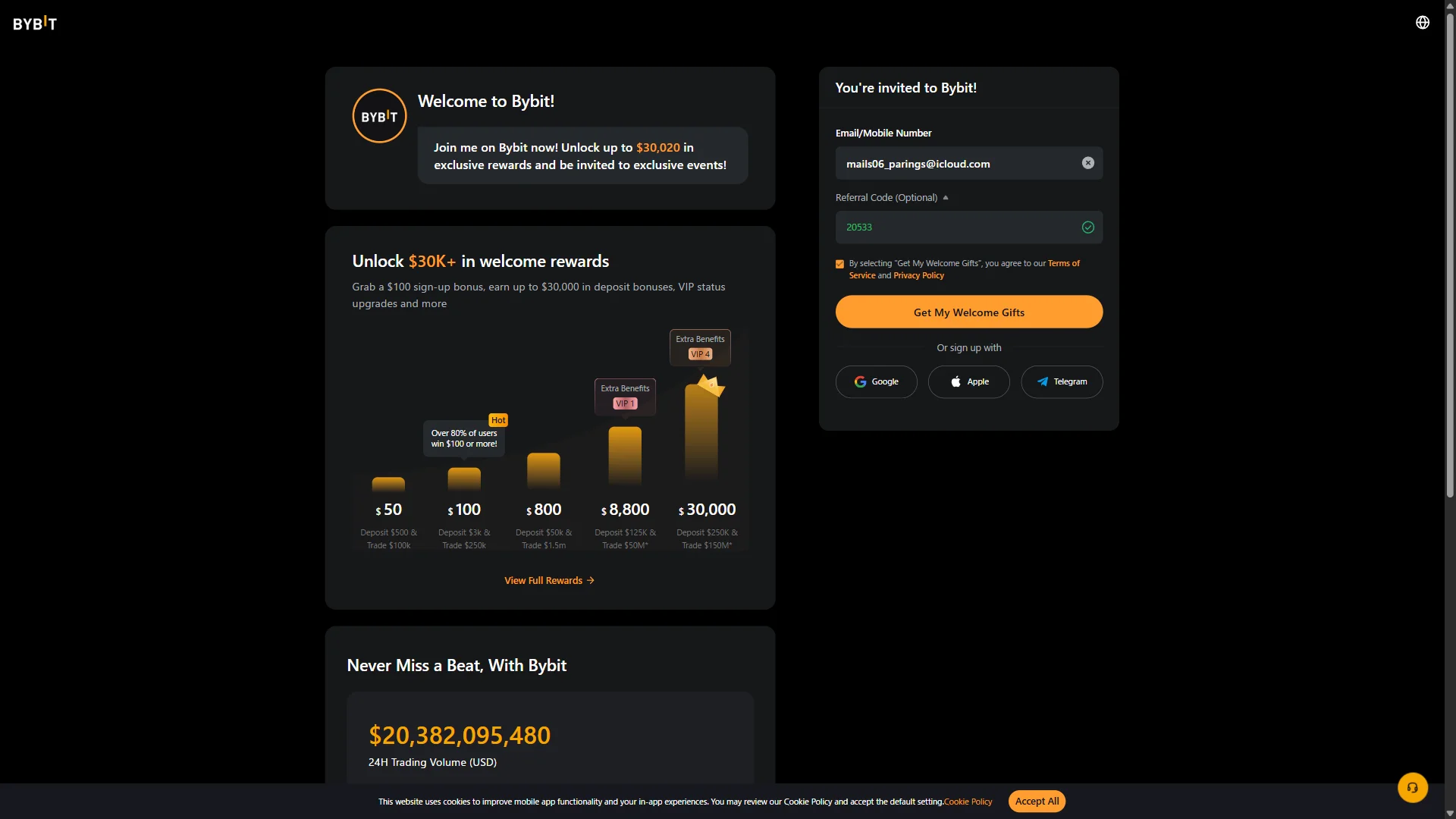
The sign-up form with an email address entered and the "Get My Welcome Gifts" button ready to submit. Source: chainhelm editorial With your email address entered and the referral code “20533” still in place, click “Get My Welcome Gifts” to submit the form. A slider puzzle then appears for you to solve before your details go through.
-
Complete the slider puzzle
— Figure 4Slider verification puzzle2026-07-08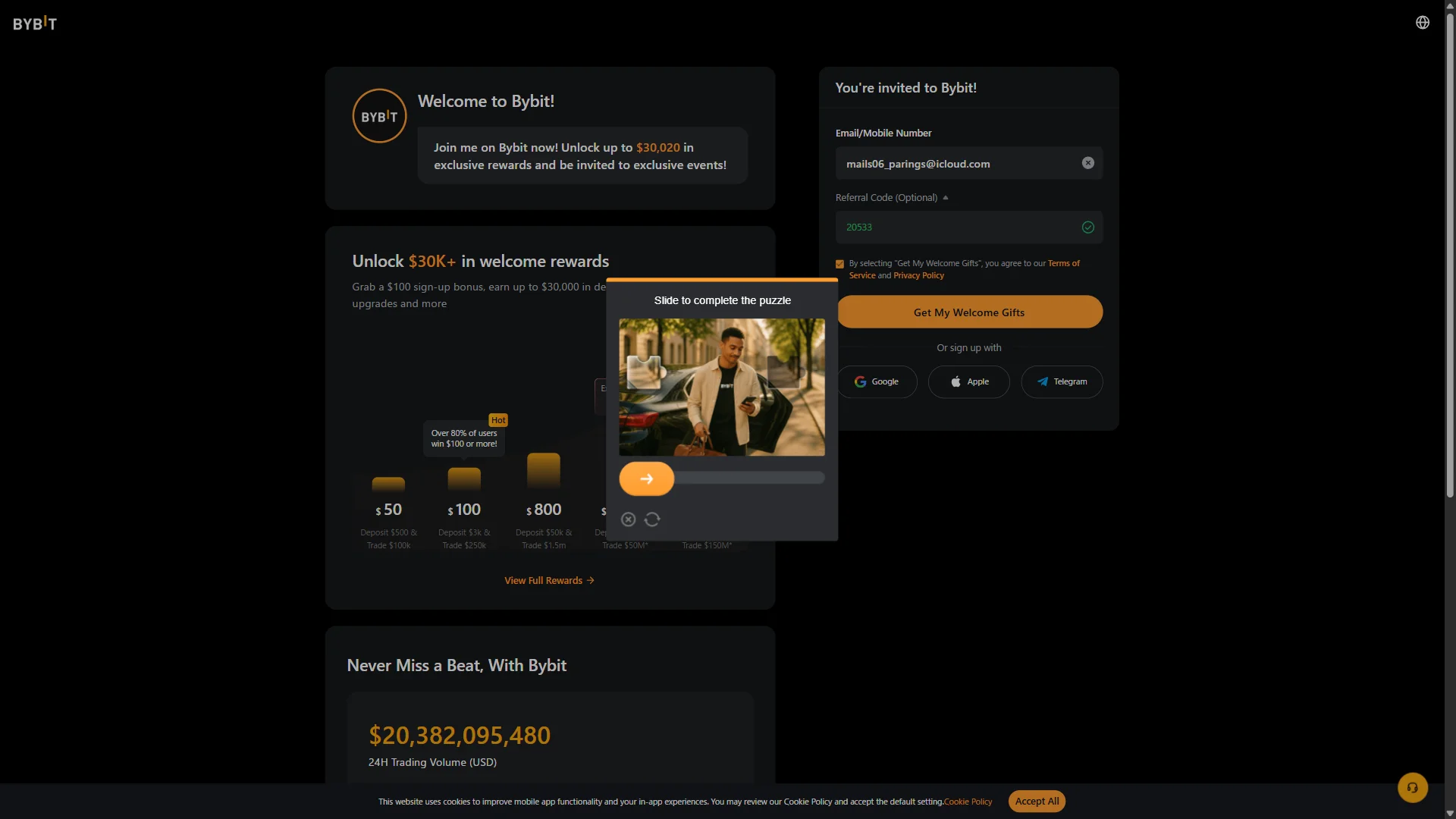
A slider captcha window asking you to complete the puzzle image before the form is sent. Source: chainhelm editorial When the “Slide to complete the puzzle” window appears, drag the slider to the right so the puzzle piece locks into place. Once it clears, Bybit emails you a verification code and takes you to the email verification screen.
-
Enter the verification code
— Figure 5Email code entry screen2026-07-08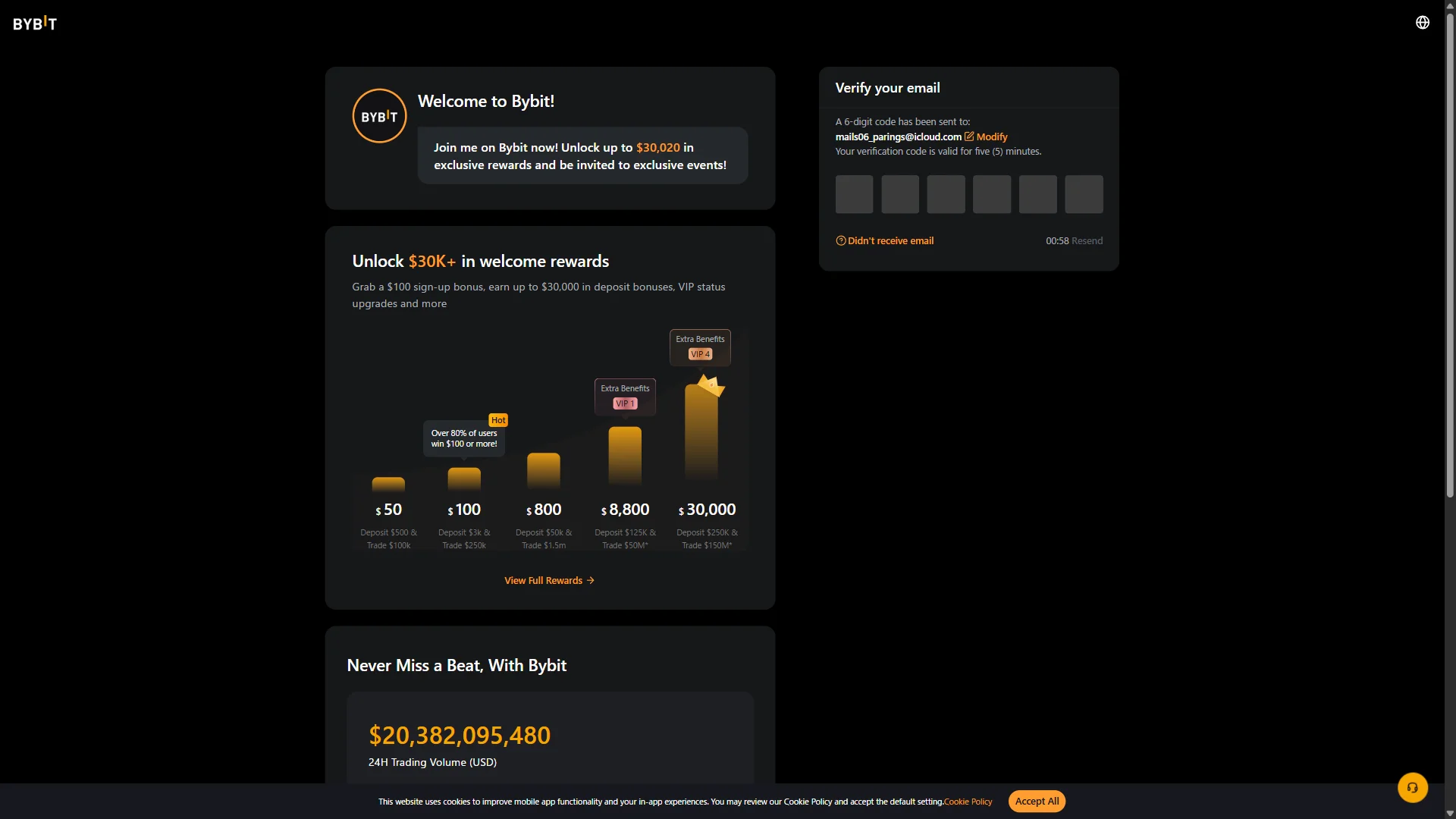
The "Verify your email" screen showing six empty code boxes and a countdown before the code can be resent. Source: chainhelm editorial On the “Verify your email” screen, type the 6-digit code from your inbox into the empty boxes. If nothing arrives, wait for the timer to finish and click “Resend”, or use “Modify” to correct the address you signed up with. Once the code is accepted, Bybit moves you on to create a password.
-
Get the code from your email
— Figure 6Bybit security code email2026-07-08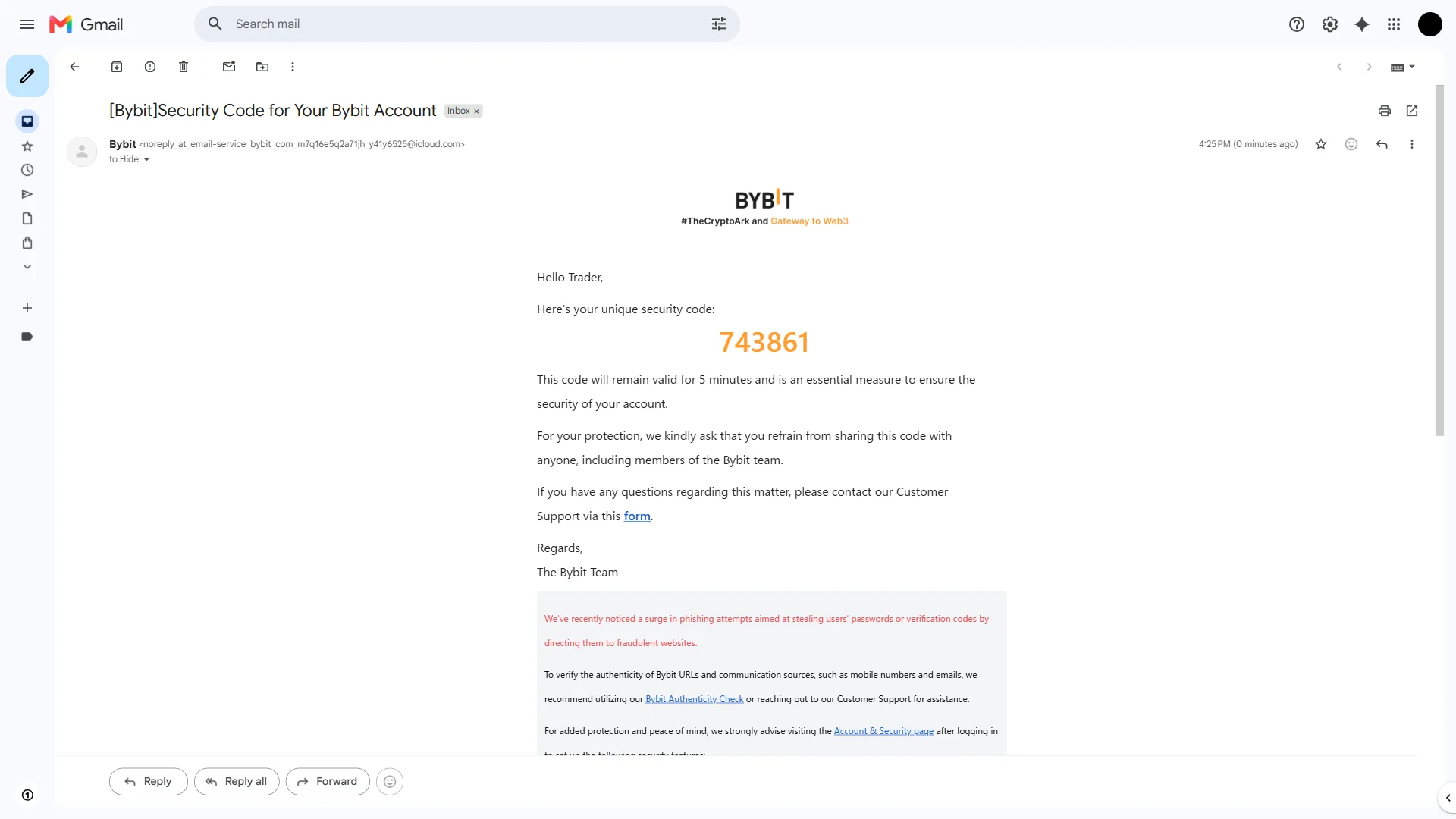
The Bybit email carrying the one-time security code, noted as valid for five minutes. Source: chainhelm editorial Open the email titled “[Bybit]Security Code for Your Bybit Account” in your inbox and read the 6-digit security code inside it. The code is only valid for five minutes, so enter it on the verification screen while it is still active.
-
Create a login password
— Figure 7Password requirements checklist2026-07-08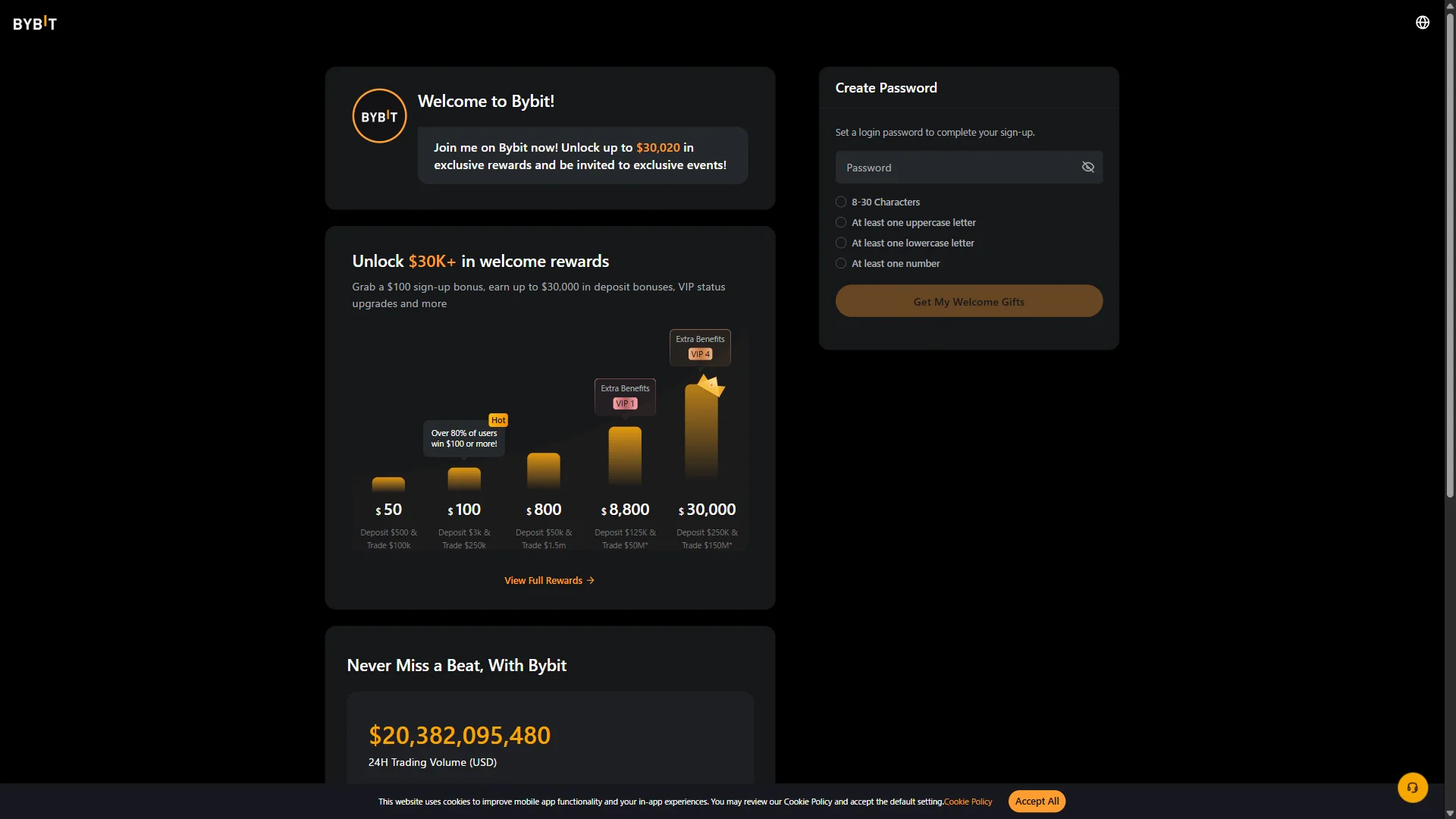
The "Create Password" screen with an empty password field and every requirement still unmet, leaving the submit button disabled. Source: chainhelm editorial On the “Create Password” screen, type a login password into the empty “Password” field. Work through the checklist underneath it — “8-30 Characters”, “At least one uppercase letter”, “At least one lowercase letter”, and “At least one number” — so every rule is satisfied. The “Get My Welcome Gifts” button stays grayed out until your password meets all of them.
-
Complete your sign-up
— Figure 8All password rules met2026-07-08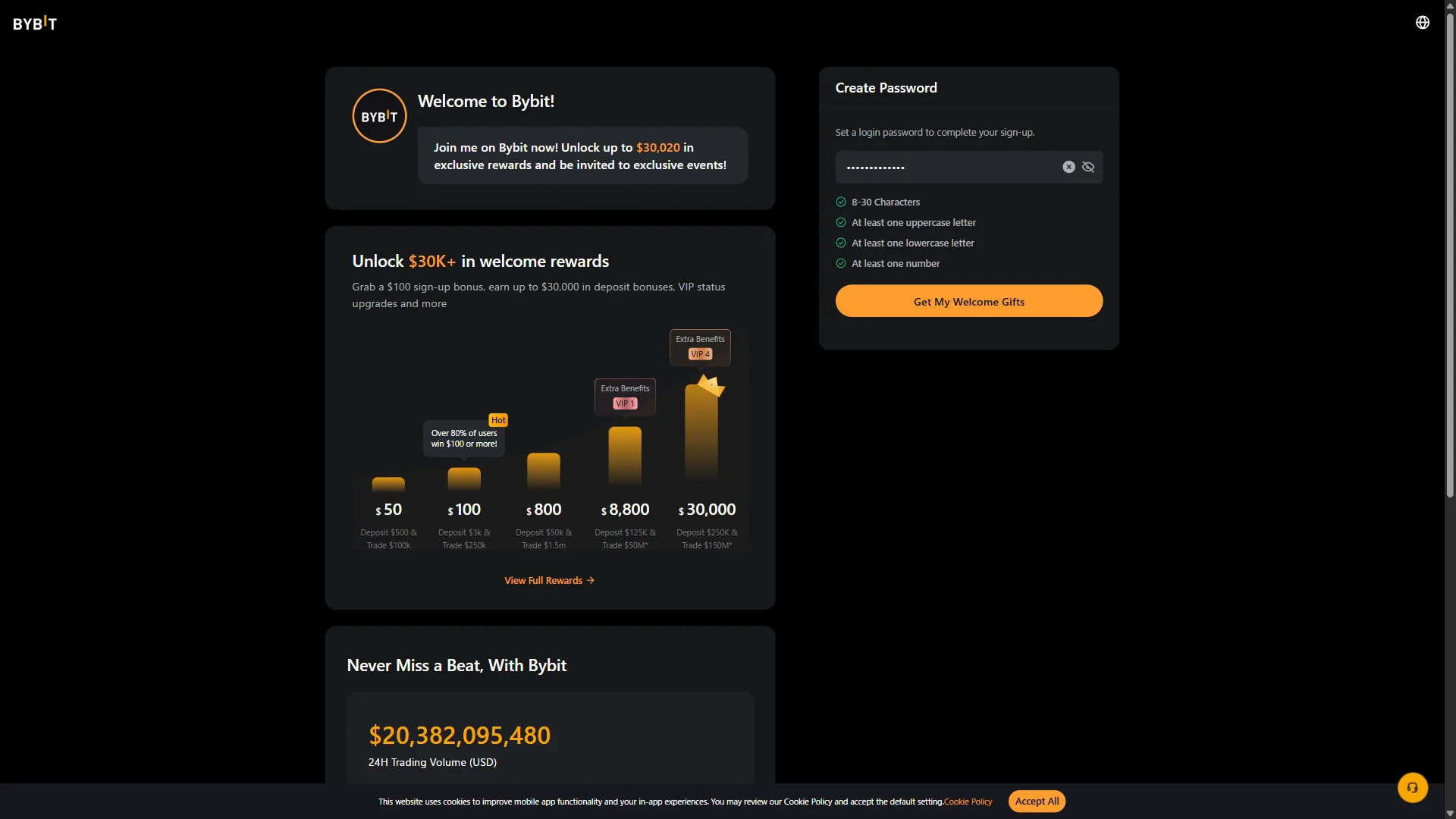
The password filled in with all four requirements showing green checks and "Get My Welcome Gifts" now active. Source: chainhelm editorial Once all four checklist items turn green, click the now-active “Get My Welcome Gifts” button to finish signing up. Bybit creates your account and opens your dashboard.
-
Arrive at your dashboard
— Figure 9Post-sign-up dashboard2026-07-08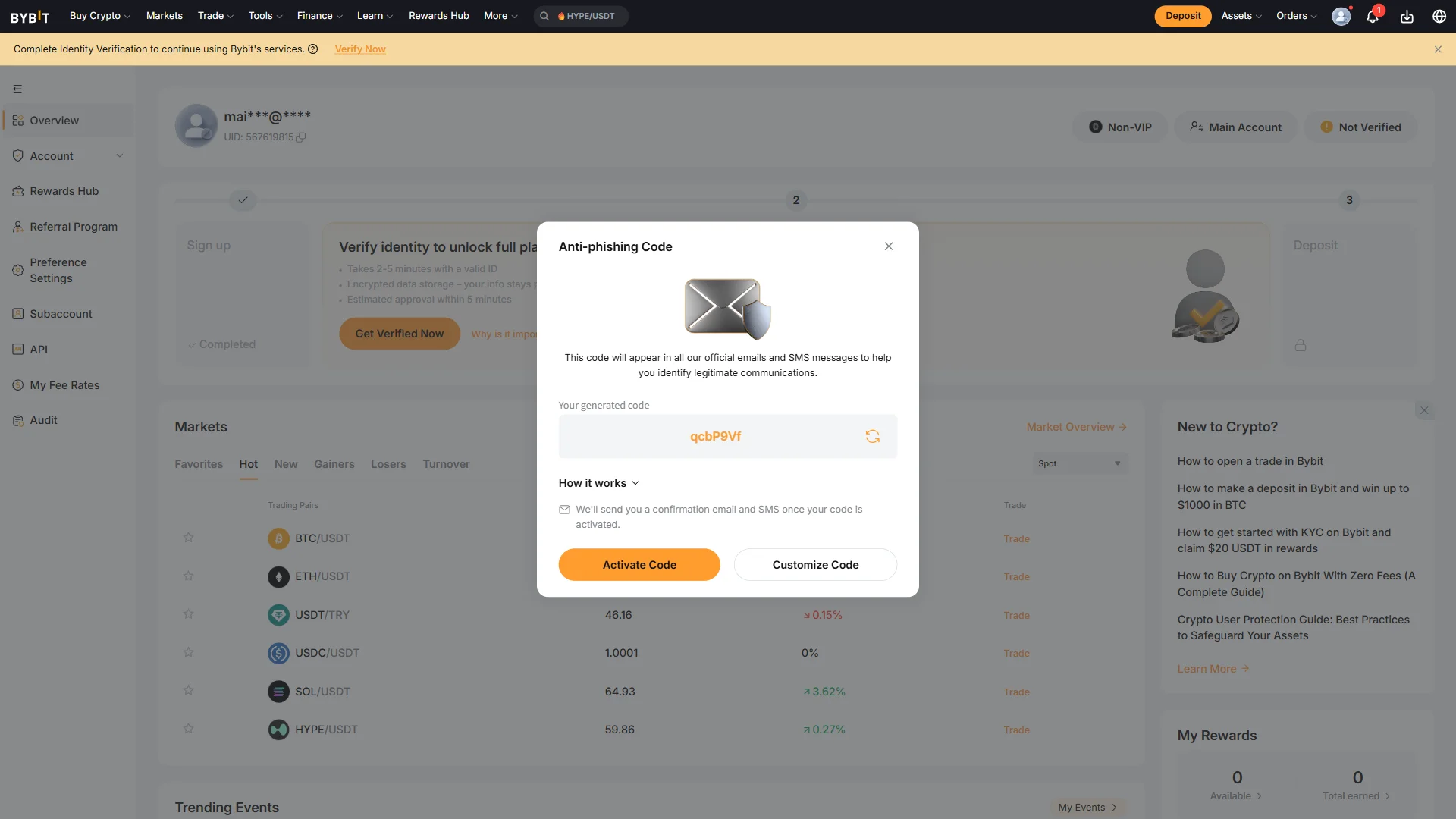
The signed-in Bybit dashboard with the "Anti-phishing Code" prompt open and a banner to complete identity verification. Source: chainhelm editorial Your dashboard opens with an “Anti-phishing Code” prompt. Set the feature up now with “Activate Code” or “Customize Code”, or close the prompt to handle it later. A banner reading “Complete Identity Verification to continue using Bybit’s services.” also appears, with a “Verify Now” link that starts the next step.
Smartphone (iOS / Android) sign-up steps
-
First, open the Bybit official sign-up page in the mobile app or browser (the link applies the referral code). When you open it, you’ll see a screen like the one below.
-
Fill in the sign-up form
— Figure 10Empty Bybit sign-up form2026-07-08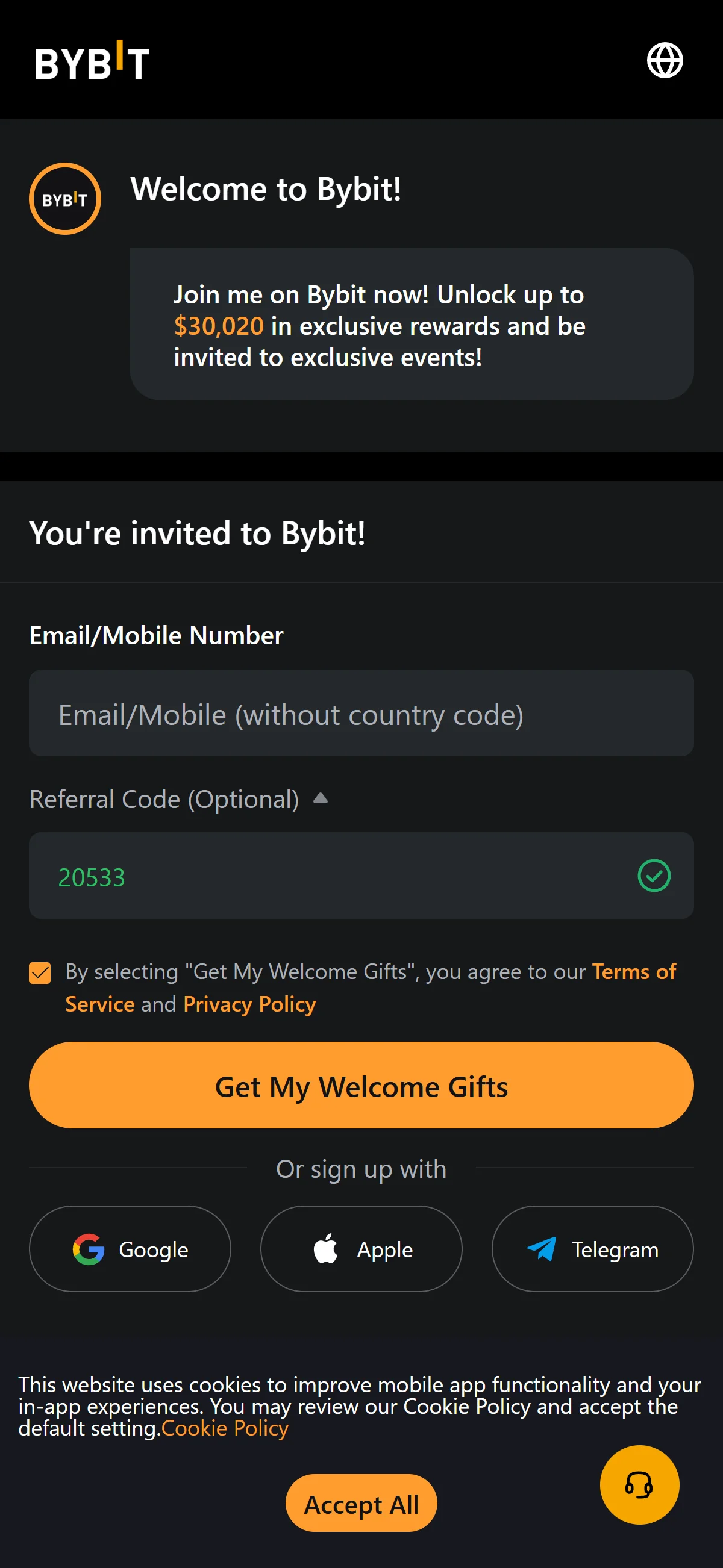
The Bybit sign-up form with an empty email field and the referral code "20533" already applied and validated. Source: chainhelm editorial On the “You’re invited to Bybit!” form, type your email address or mobile number into the empty “Email/Mobile Number” field. You can leave the “Referral Code (Optional)” field as it is, since it already shows “20533” with a green check mark.
Keep the terms-of-service agreement box ticked so you can continue to the next step.
If you would rather not use email, you can start sign-up with a Google, Apple, or Telegram account instead.
-
Submit the sign-up form
— Figure 11Sign-up form filled in2026-07-08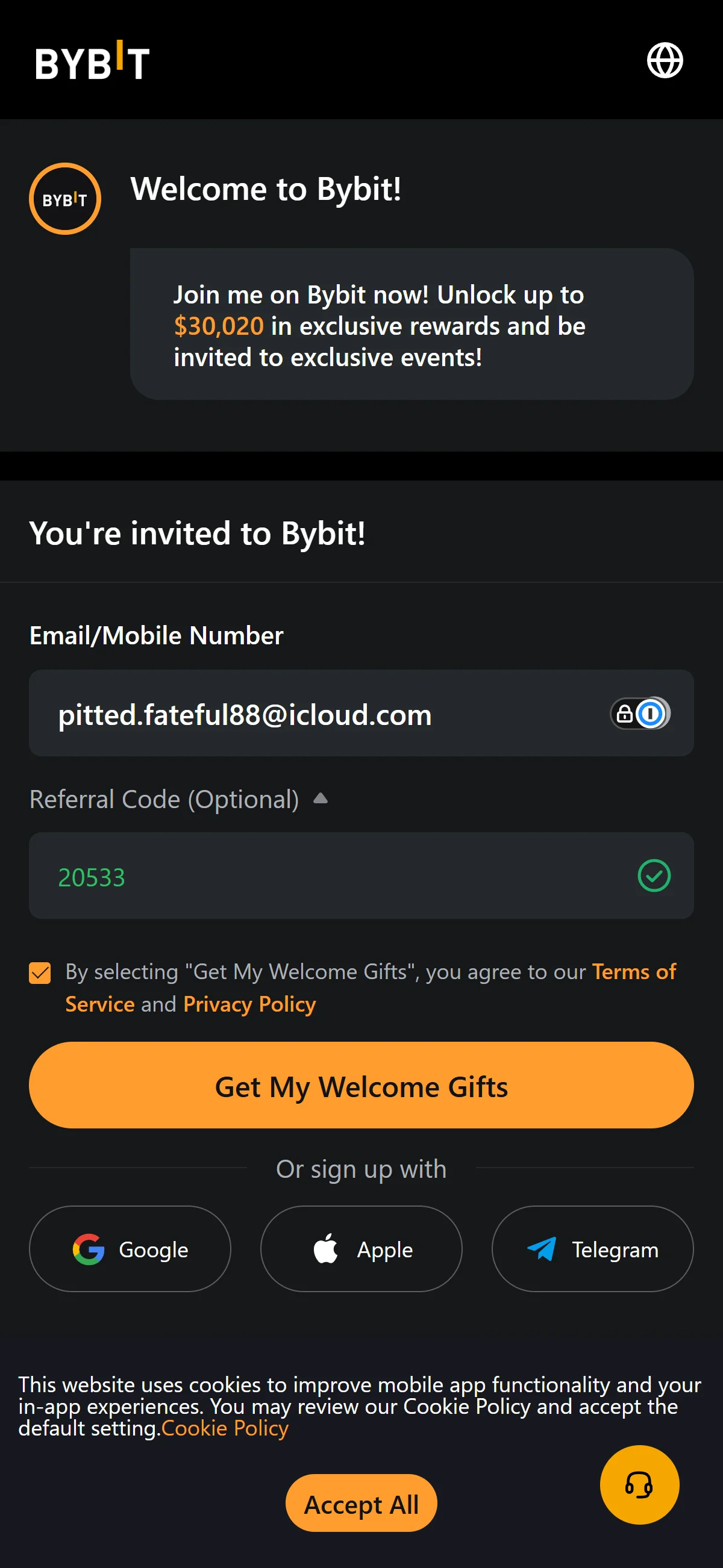
The sign-up form with an email address entered and the "Get My Welcome Gifts" button ready to submit. Source: chainhelm editorial With your email address entered and the referral code “20533” still in place, click “Get My Welcome Gifts” to submit the form. A slider puzzle then appears for you to solve before your details go through.
-
Complete the slider puzzle
— Figure 12Slider verification puzzle2026-07-08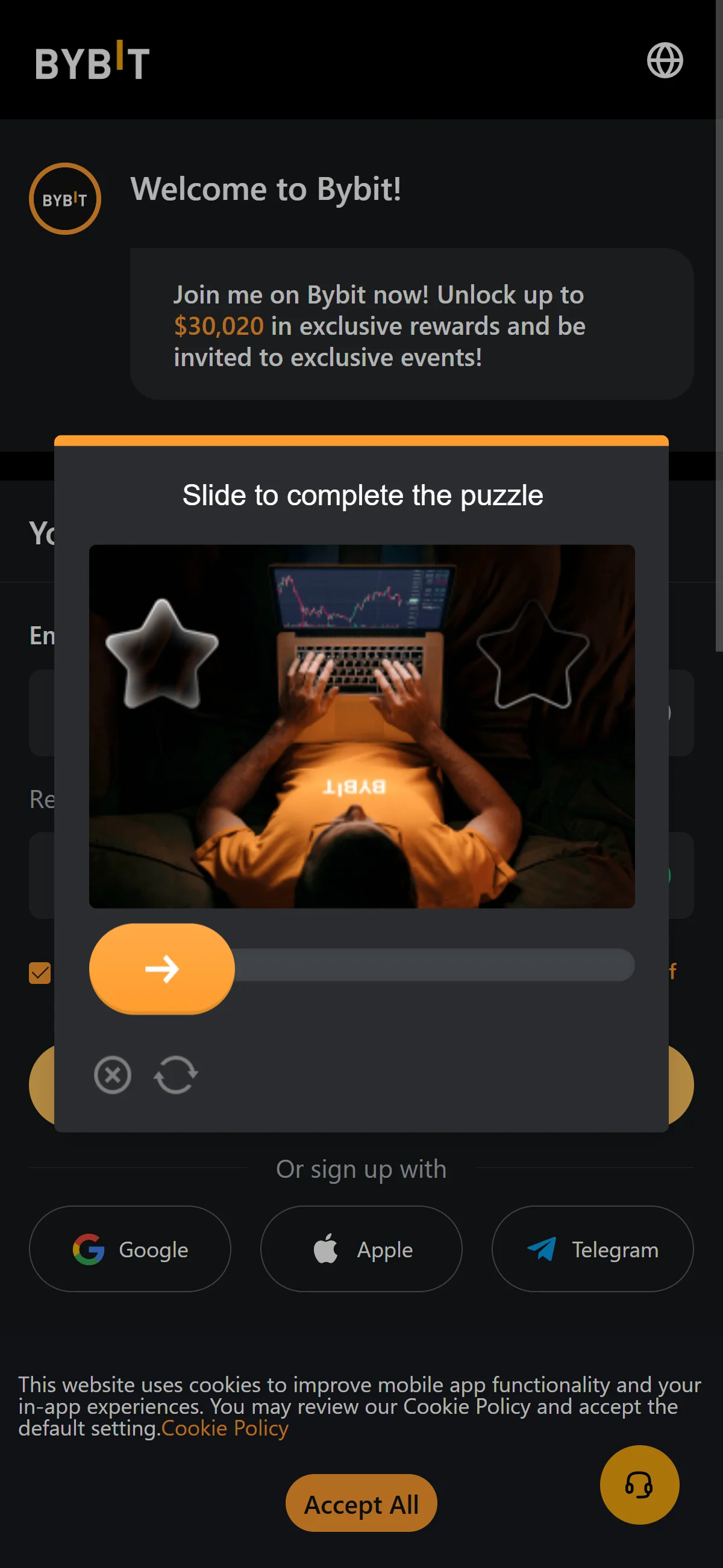
A slider captcha window asking you to complete the puzzle image before the form is sent. Source: chainhelm editorial When the “Slide to complete the puzzle” window appears, drag the slider to the right so the puzzle piece locks into place. Once it clears, Bybit emails you a verification code and takes you to the email verification screen.
-
Enter the verification code
— Figure 13Email code entry screen2026-07-08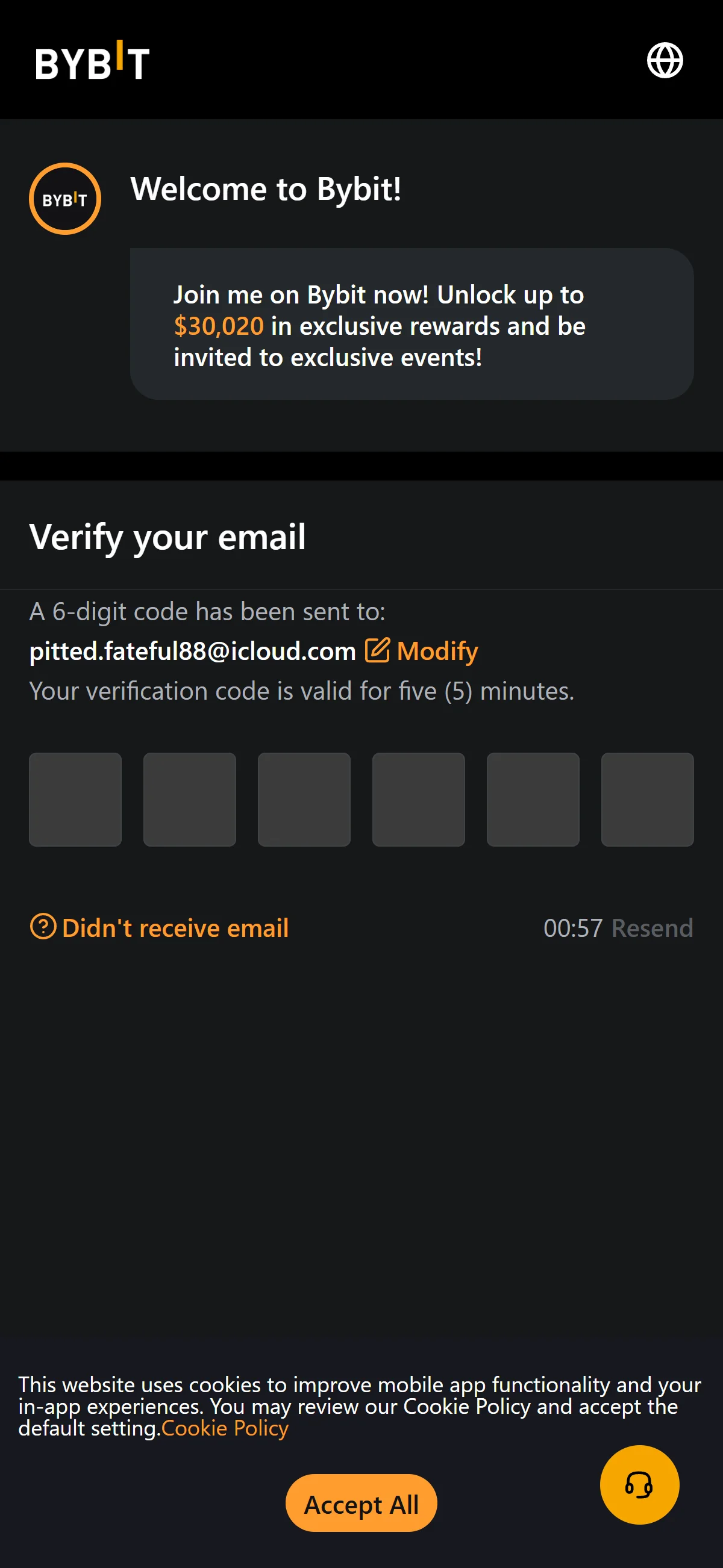
The "Verify your email" screen showing six empty code boxes and a countdown before the code can be resent. Source: chainhelm editorial On the “Verify your email” screen, type the 6-digit code from your inbox into the empty boxes. If nothing arrives, wait for the timer to finish and click “Resend”, or use “Modify” to correct the address you signed up with. Once the code is accepted, Bybit moves you on to create a password.
-
Get the code from your email
— Figure 14Bybit security code email2026-07-08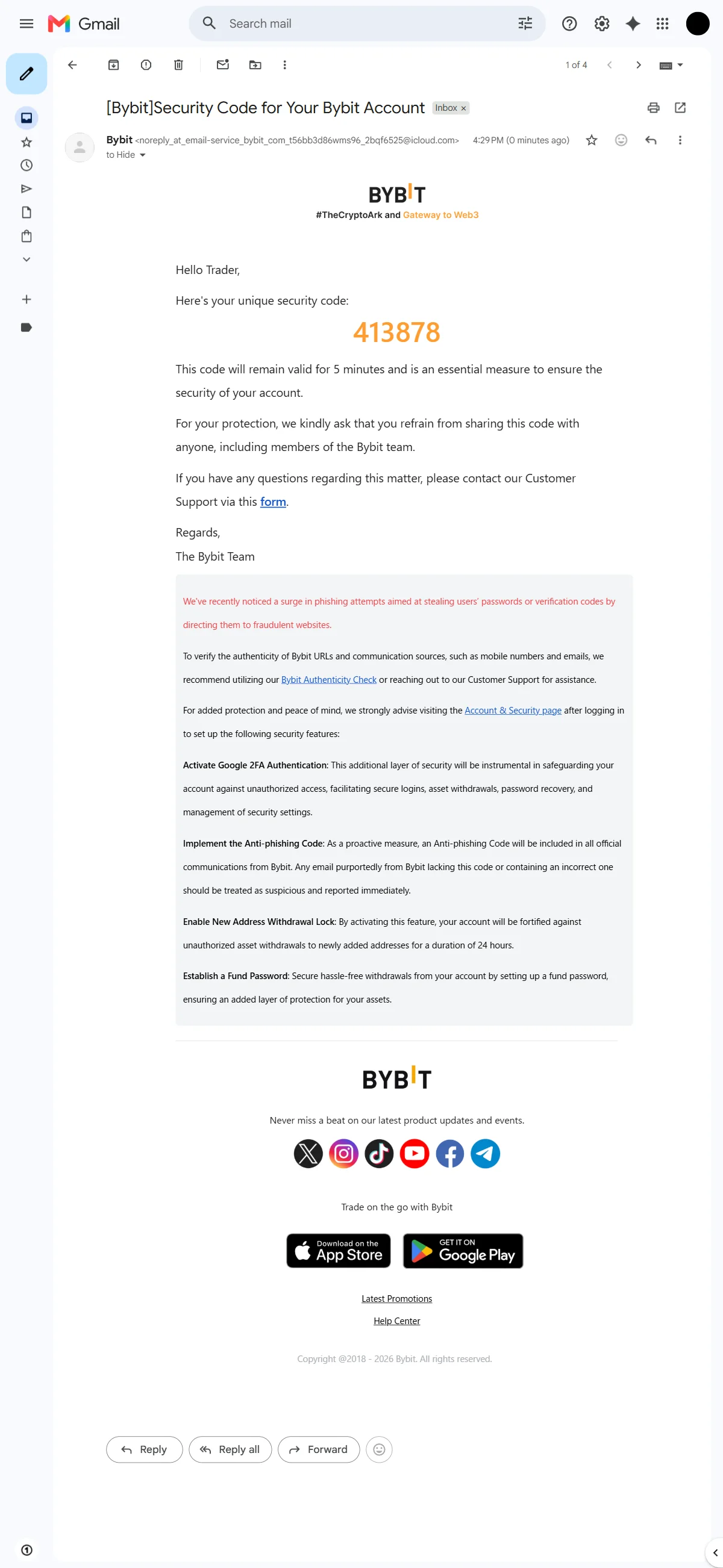
The Bybit email carrying the one-time security code, noted as valid for five minutes. Source: chainhelm editorial Open the email titled “[Bybit]Security Code for Your Bybit Account” in your inbox and read the 6-digit security code inside it. The code is only valid for five minutes, so enter it on the verification screen while it is still active.
-
Create a login password
— Figure 15Password requirements checklist2026-07-08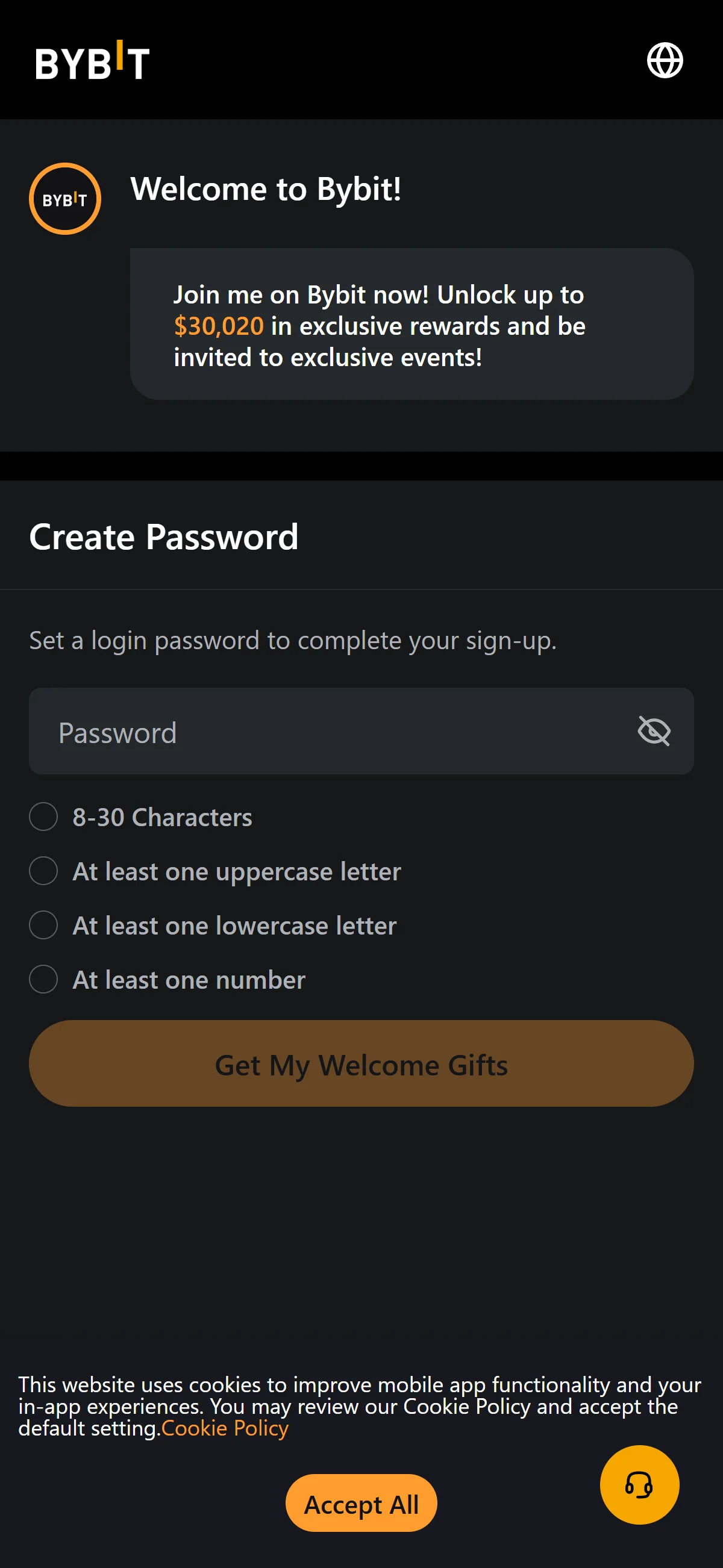
The "Create Password" screen with an empty password field and every requirement still unmet, leaving the submit button disabled. Source: chainhelm editorial On the “Create Password” screen, type a login password into the empty “Password” field. Work through the checklist underneath it — “8-30 Characters”, “At least one uppercase letter”, “At least one lowercase letter”, and “At least one number” — so every rule is satisfied. The “Get My Welcome Gifts” button stays grayed out until your password meets all of them.
-
Complete your sign-up
— Figure 16All password rules met2026-07-08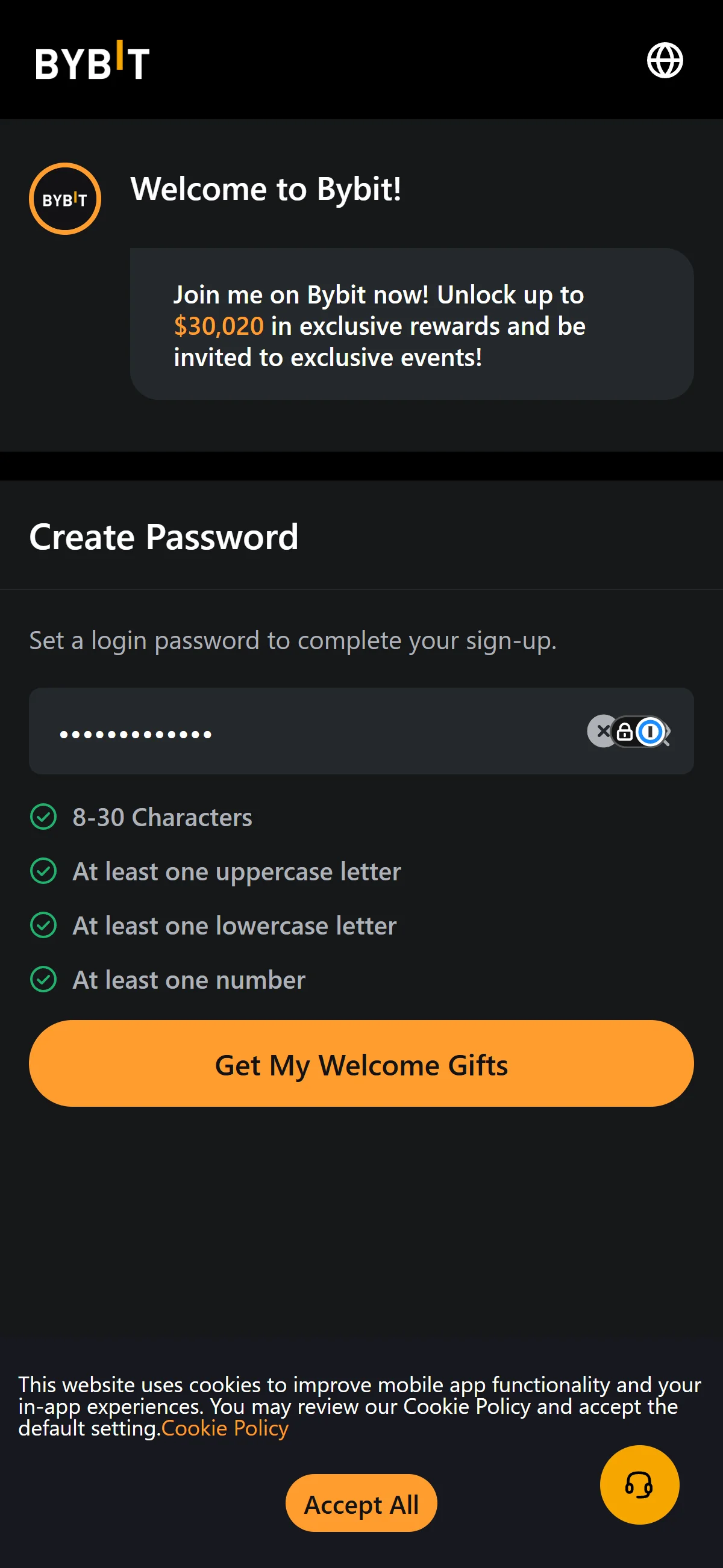
The password filled in with all four requirements showing green checks and "Get My Welcome Gifts" now active. Source: chainhelm editorial Once all four checklist items turn green, click the now-active “Get My Welcome Gifts” button to finish signing up. Bybit creates your account and opens your dashboard.
-
Arrive at your dashboard
— Figure 17Post-sign-up dashboard2026-07-08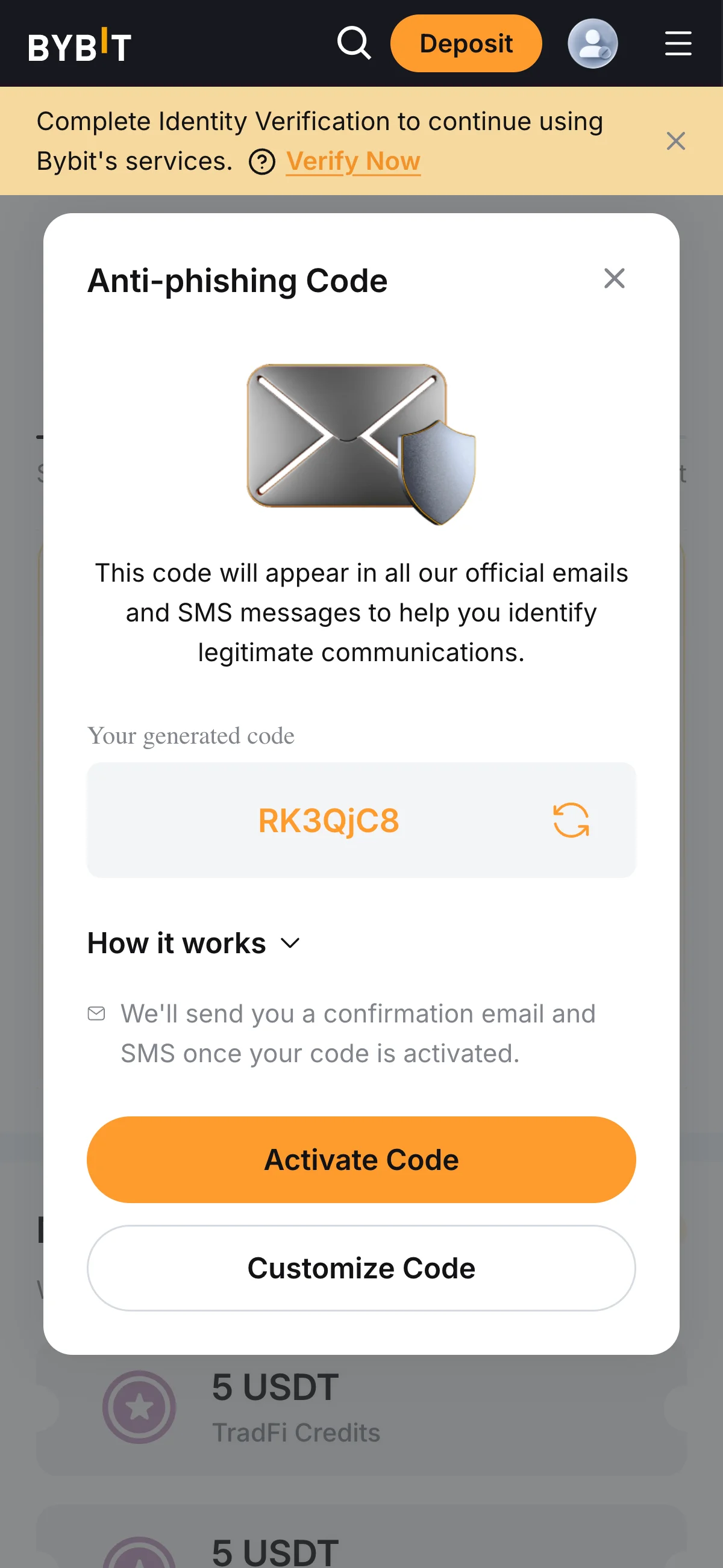
The signed-in Bybit dashboard with the "Anti-phishing Code" prompt open and a banner to complete identity verification. Source: chainhelm editorial Your dashboard opens with an “Anti-phishing Code” prompt. Set the feature up now with “Activate Code” or “Customize Code”, or close the prompt to handle it later. A banner reading “Complete Identity Verification to continue using Bybit’s services.” also appears, with a “Verify Now” link that starts the next step.
What to do after signing up at Bybit
We cover identity verification separately for PC/browser and smartphone (mobile).
PC/browser identity verification
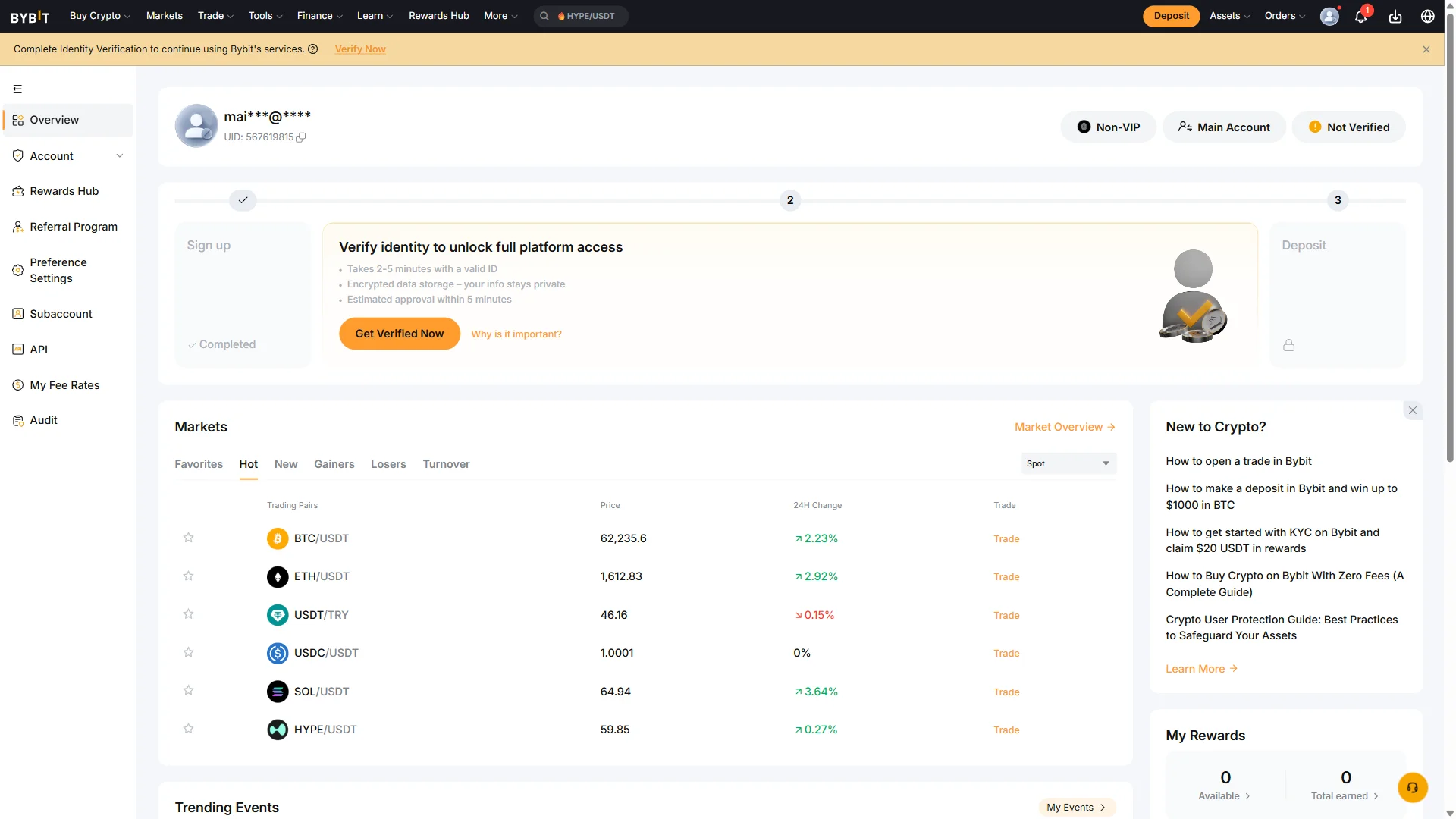
On the dashboard, the progress tracker shows “Sign up” already completed, with identity verification as the current step before “Deposit”. Click “Get Verified Now” under “Verify identity to unlock full platform access” to begin. This opens the identity verification flow, starting with your country of residence.
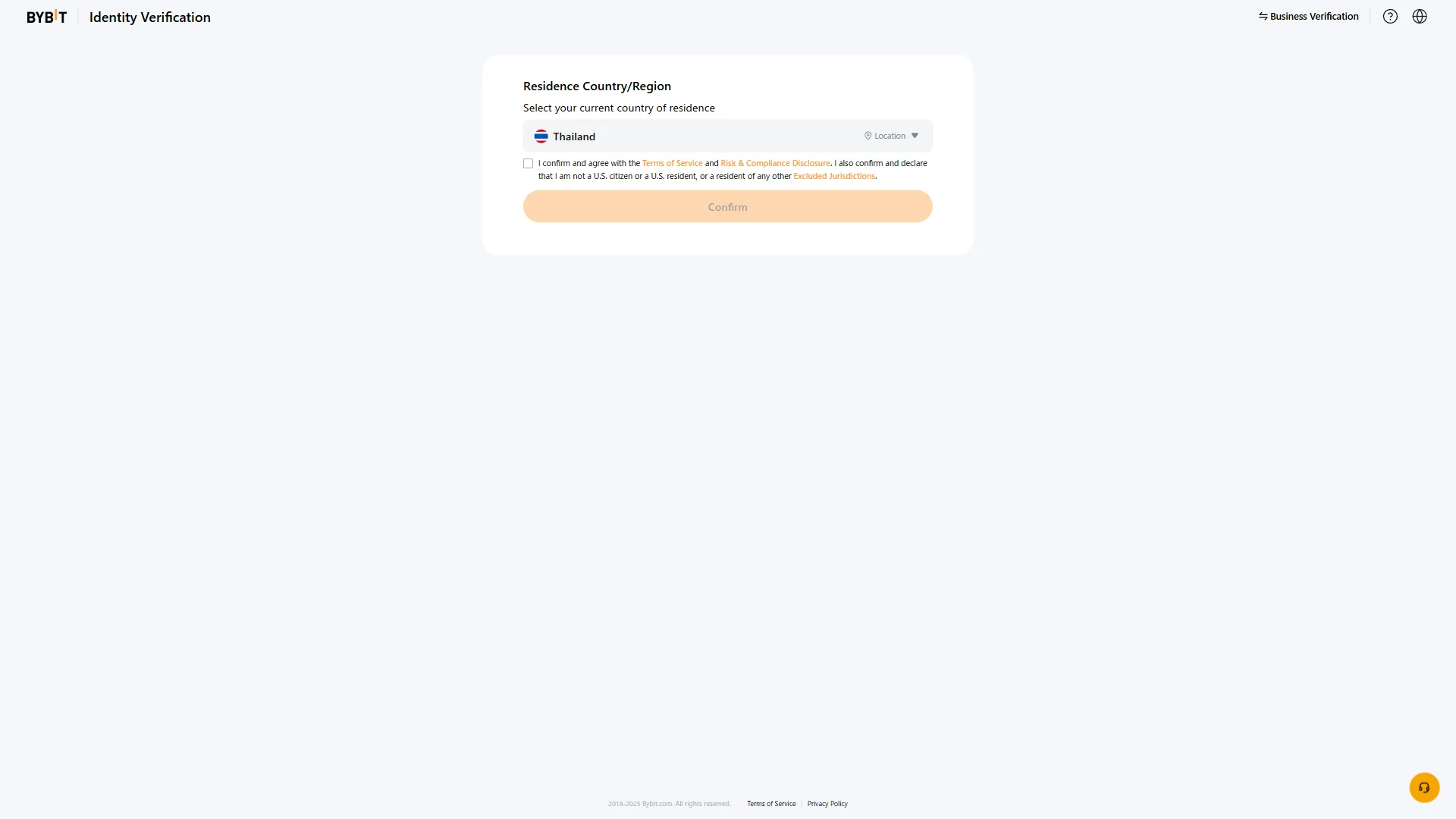
On the “Residence Country/Region” step, check that the automatically detected country is correct, changing it from the dropdown if needed. Tick the box to agree to the “Terms of Service” and “Risk & Compliance Disclosure” and to confirm you are not in an “Excluded Jurisdictions” region, then click “Confirm” to move on to document selection.
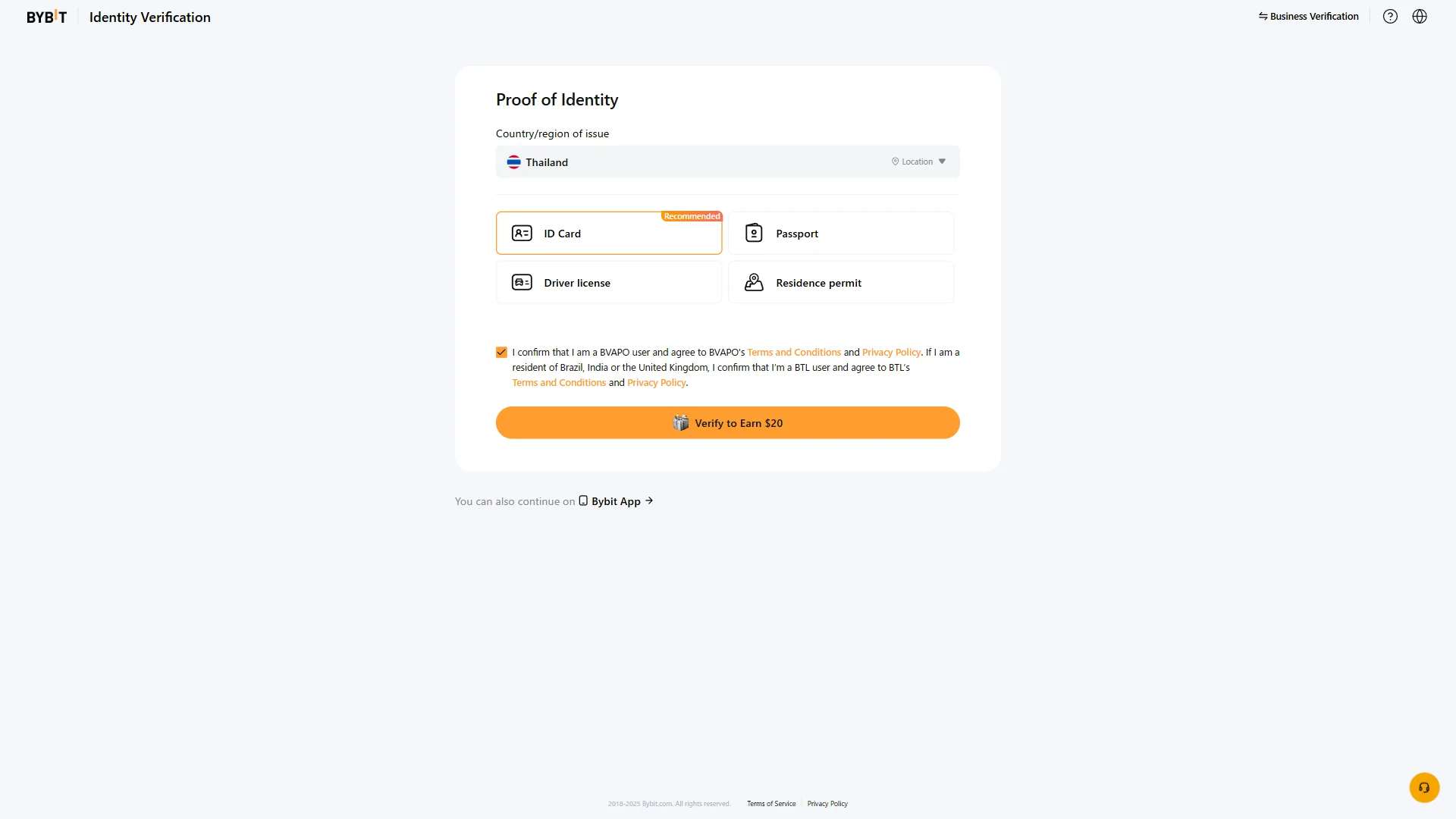
On the “Proof of Identity” step, confirm the “Country/region of issue” and choose the document you will submit — “ID Card” (marked “Recommended”), “Passport”, “Driver license”, or “Residence permit”. With the consent box ticked, click “Verify to Earn $20” to continue.
Once you submit your chosen document and identity verification is approved, your account unlocks full platform access on Bybit, including deposits and trading.
Smartphone (iOS / Android) identity verification
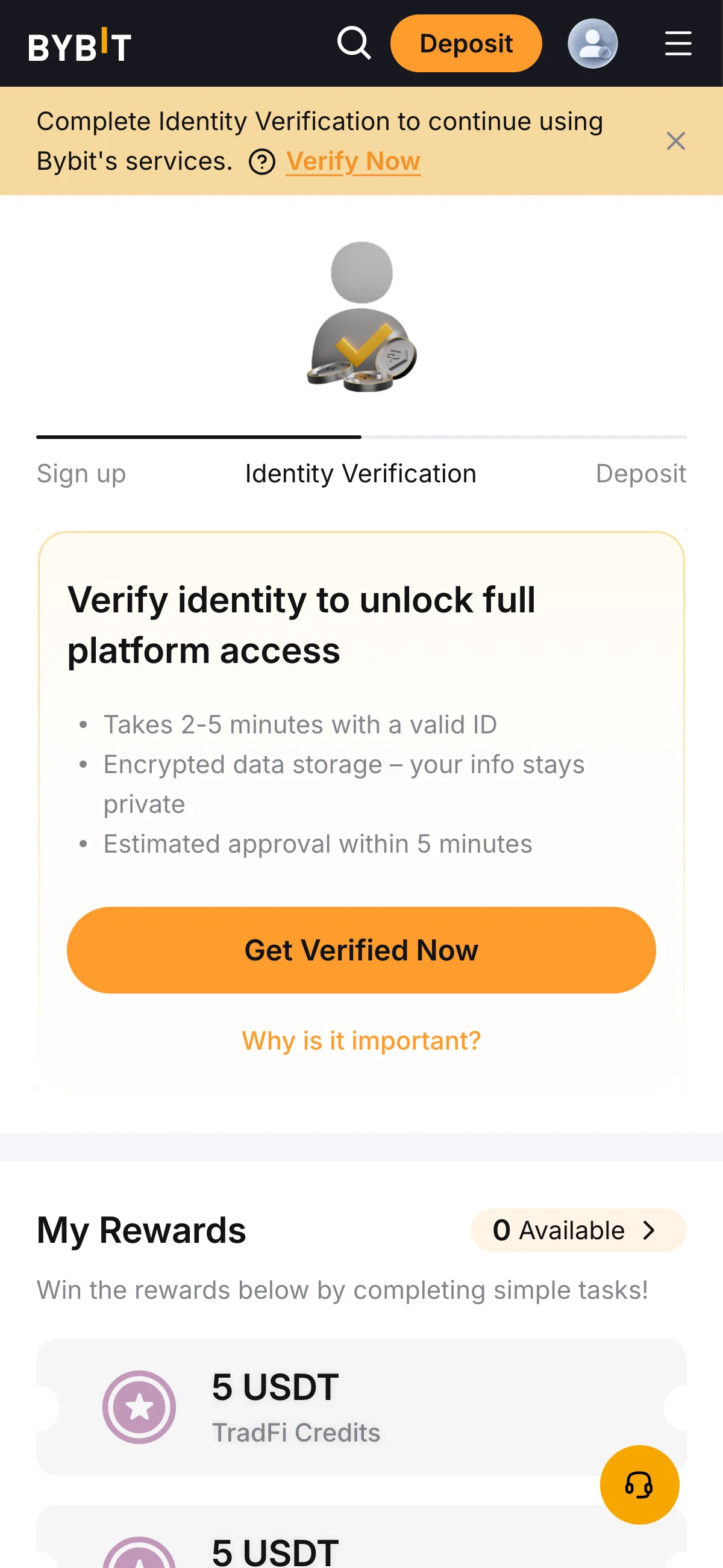
On the dashboard, the progress tracker shows “Sign up” already completed, with identity verification as the current step before “Deposit”. Click “Get Verified Now” under “Verify identity to unlock full platform access” to begin. This opens the identity verification flow, starting with your country of residence.
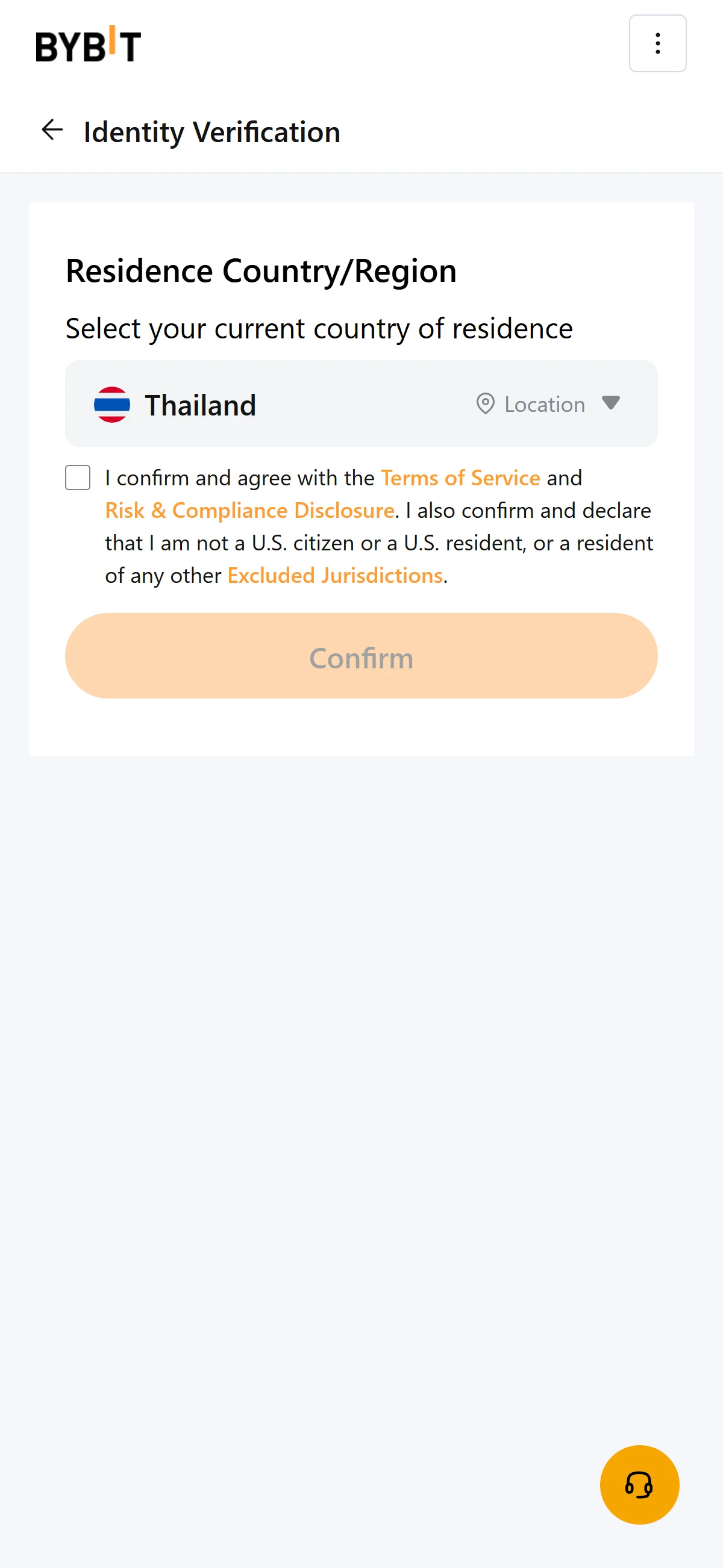
On the “Residence Country/Region” step, check that the automatically detected country is correct, changing it from the dropdown if needed. Tick the box to agree to the “Terms of Service” and “Risk & Compliance Disclosure” and to confirm you are not in an “Excluded Jurisdictions” region, then click “Confirm” to move on to document selection.
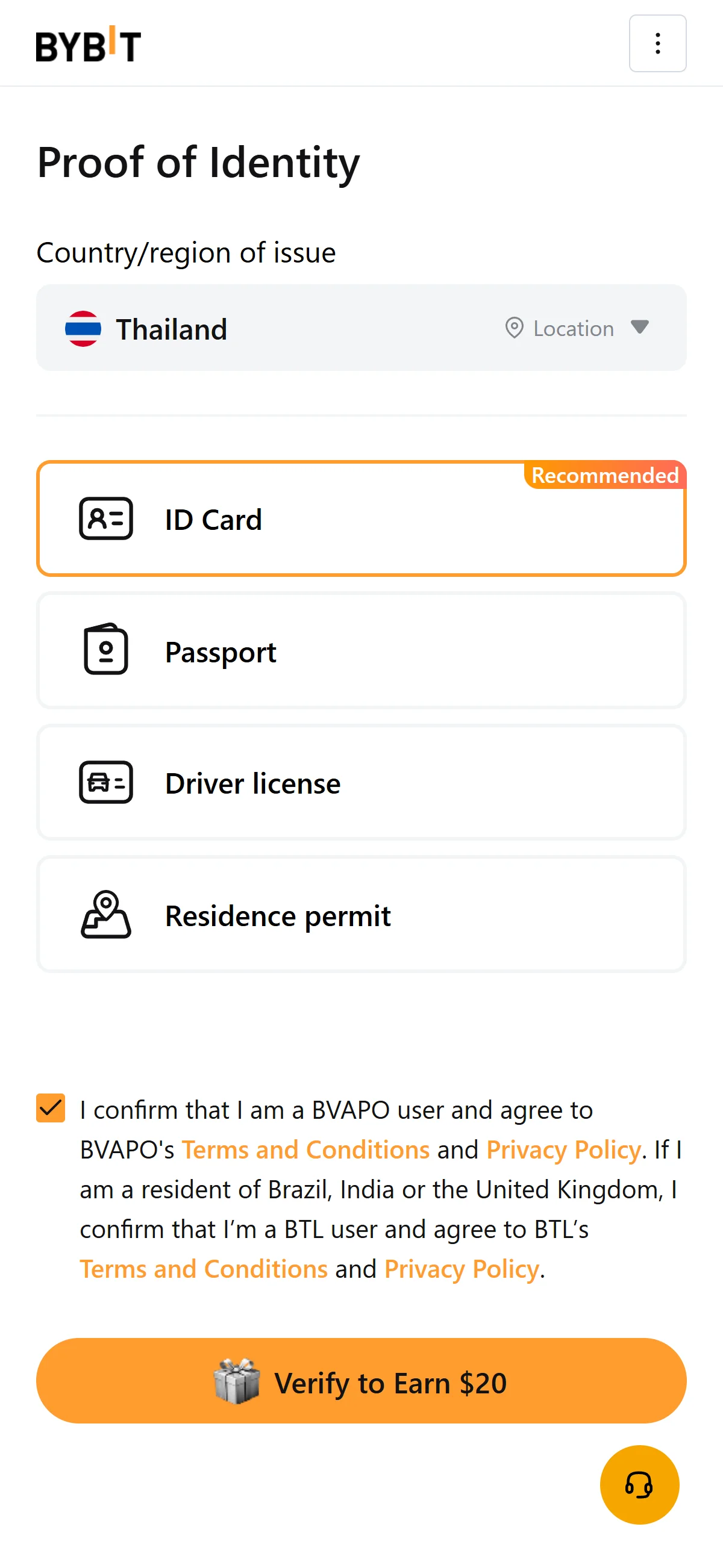
On the “Proof of Identity” step, confirm the “Country/region of issue” and choose the document you will submit — “ID Card” (marked “Recommended”), “Passport”, “Driver license”, or “Residence permit”. With the consent box ticked, click “Verify to Earn $20” to continue.
Once you submit your chosen document and identity verification is approved, your account unlocks full platform access on Bybit, including deposits and trading.
The Bybit referral code cannot be added after sign-up
The referral code can only be entered at sign-up — it cannot be added afterwards.
If you overlook this and complete registration without the code, there is no mechanism for linking it to that account after the fact.
If you have not yet completed KYC (identity verification), creating a fresh account is an option worth considering. Some exchanges, though, restrict opening more than one account in their terms of use.
- Does the sign-up screen show referral code 20533 as applied? (Going through the link applies it automatically; where the exchange provides a code field, check there as well.)
- Once registration is complete, open the Referral / Rewards page and confirm that the referral shows as linked to your account
What is Bybit
Scale, origins, and what Bybit trades
Bybit reached the front rank of crypto derivatives without ever becoming a mass-retail household name. The platform launched in March 2018, with Bybit Fintech Limited incorporated in the British Virgin Islands that August; co-founder Ben Zhou has been chief executive since the start. Its operating base is now Dubai, in the UAE, after a 2022 relocation from Singapore.
Bybit’s standing rests on derivatives: third by 24-hour futures volume, it belongs to the small group of venues — alongside Binance and OKX — that anchor global perpetual-futures liquidity. Its spot business is smaller, ranked eighth on CoinGecko’s trust-weighted list and fifth on CoinMarketCap’s volume-weighted one, and its user count is best read as the range shown above rather than a headline number: the figure you cite depends on whether you take CoinGecko’s description, proof-of-reserves coverage, or 2026 marketing. For a reader, that means Bybit is a derivatives-first venue you choose for depth, not a spot-first retail app.
What you can actually trade spans far beyond perpetuals. Spot covers 447 coins across 605 pairs; the futures suite runs to roughly 667 markets (USDT-, USDC-, coin-margined and inverse), sitting next to USDC options, spot margin up to 10x and — unusually for a crypto exchange — Bybit TradFi multi-asset CFDs with leverage up to 500x and tokenized-stock and IPO Express access. Copy trading, trading bots, an Earn suite, Web3, NFTs and full API access round out the stack. Under its 2026 “The New Financial Platform” vision, Bybit added a MyBank banking layer in February 2026 and opened IPO Express tokenized-IPO access starting with SpaceX in June 2026 — signaling an ambition well beyond a trading venue.
Trading costs and the MNT native-token discount
Real trading cost is more than the headline rate: funding and withdrawal charges decide the rest, so the base schedule is only a starting point.
- Spot (standard)
- maker 0.10% / taker 0.10%
- Futures (standard)
- maker 0.02% / taker 0.055%
- Crypto deposits
- free
- On-chain withdrawals
- dynamic per network and asset; no fixed schedule
Against that standard schedule, the cost structure turns distinctive at the native-token layer: paying fees in MNT (Mantle) cuts spot fees by up to 25% and linear-contract fees by up to 10%, stacked on top of VIP volume tiers. Because the live per-tier fee page was unreachable when we checked it, treat this as the headline discount rather than a precise basis-point schedule; it is accurate as of 2026-07-08, and the fine print will move. The practical implication is that a reader’s true cost depends less on the posted rate than on trading volume, the network chosen for withdrawals, and whether MNT is held to pay fees at all.
What makes Bybit distinct
Where Bybit leads: derivatives depth, copy trading, and TradFi access
If Bybit has a center of gravity, it is the perpetual-futures order book — and most of what makes the venue distinct radiates out from there.
Top-3 derivatives book
Native copy trading
TradFi and IPO Express
MNT and one-account Web3
Read together, these are less four separate features than one bet: that a trader wants depth and breadth under a single login. The derivatives book is why most advanced users arrive; copy trading and the Web3 and Earn stack are what keep a spot-and-perps user from needing a second venue; and the TradFi CFDs and tokenized IPOs push into territory few crypto exchanges occupy. The MNT program matters less as a discount — its fee effect lives in the cost section above — than as an ecosystem hook that ties a heavy user’s economics to Mantle, with an MNT Multiplier that speeds VIP-tier progression. If you value one account spanning perpetuals, social trading and tokenized equities, that combination is Bybit’s strongest argument.
Where another venue fits better
No single venue suits everyone, and the honest comparison is against Bybit’s actual peers. By clean reserves and by derivatives volume, the exchanges a global reader realistically weighs against Bybit are Binance and OKX — Bybit sits third behind both — so those are the primary alternatives at global scale, while country-level options are the subject of the next chapter.
The second point is not a rumor but a specific line item, and we return to it in the risk chapter; the first is a hard gate that the availability chapter answers market by market.
Bybit regulatory landscape
Bybit’s global license footprint
Bybit spent its early years as an offshore venue with few registrations; the map now looks different.
The pattern behind that map is a shift from a single global site toward jurisdiction-by-jurisdiction licensing. It also explains a proliferation of same-brand regional entities — Bybit EU GmbH, Bybit UAE, Bybit Türkiye, Bybit Indonesia, Bybit Kazakhstan and a Brazilian local entity among them — which exist as separately licensed vehicles rather than skins on the global platform. For a reader, the presence or absence of a license in your own market is what decides which door you actually use, and that is what the next two sections work through.
Excluded and restricted jurisdictions
Under §11.3 of its service agreement, Bybit self-excludes the following jurisdictions outright: the United States, mainland China, Hong Kong, Singapore, Canada, North Korea, Cuba, Iran, Uzbekistan, Sudan, Syria, the Russian-occupied regions of Ukraine, and the UAE — the last served instead by its separate SCA-licensed entity. Residents of those places are blocked from the global platform rather than merely discouraged.
- European Union
- Global services are restricted; EU residents are served only through the MiCA-regulated Bybit EU GmbH, with a narrower product set.
- United Kingdom
- Exited retail crypto-derivatives in 2021 under the FCA ban; re-entered spot and P2P through a financial-promotions arrangement approved by Archax.
Among the markets this edition covers, that leaves a light touch for three. The United Kingdom is the restricted case above, while Australia and India appear on neither the excluded nor the restricted list and are served on the global platform. The two markets that need a direct answer, because Bybit excludes them, are handled in the availability chapter.
Past market exits and regulatory trajectory
Set against the licensing wins, these exits describe one direction of travel: Bybit is trading an offshore, largely unregistered past for licensing it earns market by market — the UAE, MiCA, and the Argentine, Georgian and Kazakh registrations — while stepping out of markets where it cannot comply. The February 2025 hack sharpened that turn, adding visible emphasis on security and regulatory credibility. World-regulation facts read the same in every language edition; what varies by reader is the “can you use it” answer, and that is the next chapter.
Bybit availability across major jurisdictions
Of the markets this edition addresses, three are served and two are not.
The United Kingdom, Australia and India are covered at landscape level in the regulatory chapter above, and Bybit reaches readers there. The two markets that need a direct “can I register now” answer are the United States and Singapore, because Bybit excludes both. We answer each from the reader’s side — what is actually possible today, and where a locally licensed venue does the job instead — without steering back toward Bybit.
United States: excluded, with US-licensed alternatives
For a US resident there is no compliant Bybit route. The United States is an excluded jurisdiction under §11.3 of Bybit’s service agreement: every product is closed to US persons, enforced through IP geofencing and KYC — a US passport cannot complete verification — and there is no Bybit US entity to fall back on. The practical question is therefore not “how do I reach Bybit” but “which US-licensed venue do I use instead.”
Coinbase
Kraken
Gemini
None of these reproduces Bybit’s global breadth, and that is the point: each is licensed to serve US residents where Bybit is not. If you are in New York, Gemini is effectively the default, since Kraken excludes the state; if you want the widest coin selection, Kraken leads; if USD liquidity and a regulated perpetuals analog matter most, Coinbase fits. The choice here is between licensed venues, not between them and Bybit.
Singapore: excluded, with MAS-licensed alternatives
Singapore is the same story with a local wrinkle. It is an excluded jurisdiction that Bybit geo-blocks itself, and on 2026-06-17 the Monetary Authority of Singapore added Bybit to its Investor Alert List — a warning that a firm is unregulated, not an enforcement action. There is no Bybit SG entity, so a Singapore resident’s compliant options are the MAS-licensed venues below.
OKX
Coinhako
Crypto.com
Coinbase
As with the US list, these are alternatives Bybit’s exclusion makes necessary, not a ranking against it. OKX is the natural pick for a trader who wants Bybit-like breadth under a MAS license; Coinhako and Crypto.com lean on SGD-native rails for anyone who would rather skip the stablecoin hop; Coinbase trades some breadth for brand and track record. One neutral caveat applies across all of them: digital-token holdings are not covered by deposit insurance.
Risks to acknowledge before using Bybit
Counterparty health and the February 2025 hack
The most Bybit-specific risk a user carries is counterparty risk, and Bybit’s record on it is unusually concrete.
Bybit’s handling of that event belongs in the risk picture in both directions. It stated that user funds remained fully backed — reserves exceeded liabilities — kept withdrawals processing throughout, and launched a Recovery Bounty offering 10% of recovered funds. But it did so without a named, pre-funded protection pool: there is no publicly disclosed SAFU-equivalent, and the losses were absorbed through reserves and bridge loans rather than an insurance fund set aside for the purpose.
- CER.live overall grade
- AA (88/100)
- Penetration tests
- 0/100 — no completed independent pen-test on record
- ISO 27001
- Certified
- Bug bounty
- 100/100
- Proof of Reserves
- Merkle-tree, Hacken-audited, monthly; 30 consecutive reports as of Feb 2026; 1:1-or-greater backing
That profile is genuinely mixed rather than simply good or bad. Monthly Hacken-audited proof-of-reserves, an ISO 27001 certificate and a perfect bug-bounty score sit next to a penetration-testing line of zero — the concrete fact behind the “security-first users” caveat raised earlier. A reader who takes proof-of-reserves as evidence of backing should still register that Bybit has no completed independent penetration test on public record, and no dedicated protection fund if something goes wrong.
Regulatory record and future-access risk
- Japan FSA
- Unregistered-business warnings (2021, 2023, 2024)
- France AMF
- Blacklist (2022)
- Ontario OSC
- Settlement (2022): disgorged USD 2,468,910 plus costs, with an undertaking not to open new Ontario accounts
- BVI FSC
- Public Statement 26 of 2023
- Hong Kong SFC
- Unlicensed-platform flag (2024)
Individually these are the ordinary friction of an offshore exchange formalizing its status; together they set up the risk that matters most to a reader who can use Bybit today. The same regulatory pressure that produced the market exits above — the United Kingdom in 2021, Canada in 2023, Hong Kong in 2024, Japan’s phase-out in 2026, and the Brazilian migration now underway — can reach a currently-served market later, arriving as close-only trading and forced-liquidation windows rather than a clean shutdown. For readers here in the United Kingdom, Australia and India, that is the live consideration behind an otherwise routine sign-up.
Present availability is not a guarantee of continued access — regulatory exits have arrived as close-only and forced-liquidation windows before.