— Contents 10 sections
- 01 Is the edgeX referral code “CHAINHELM” still active?
- 02 edgeX sign-up steps with the referral code
- 03 What to do after connecting to edgeX
- 04 The edgeX referral code cannot be added after sign-up
- 05 edgeX points program and airdrop
- 06 What is edgeX
- 07 What makes edgeX distinct
- 08 edgeX regulatory landscape
- 09 edgeX availability across major jurisdictions
- 10 Risks to acknowledge before using edgeX
chainhelm’s exclusive edgeX referral code is .
As of 2026-07-27, we connected a new wallet and confirmed that the referral code was applied.
The referral code can only be applied when you first connect your wallet, so we recommend taking care of it then.
This article covers the sign-up process (wallet connection) with the edgeX referral code, edgeX’s distinguishing features, availability in major jurisdictions, and the risks to acknowledge — with the connection flow and code application verified first-hand by chainhelm’s editorial team.
Is the edgeX referral code “CHAINHELM” still active?
The chainhelm editorial team connected to edgeX with a fresh wallet on 2026-07-27 and confirmed that the referral code “CHAINHELM” is still active.
Here is the actual screen captured during verification.
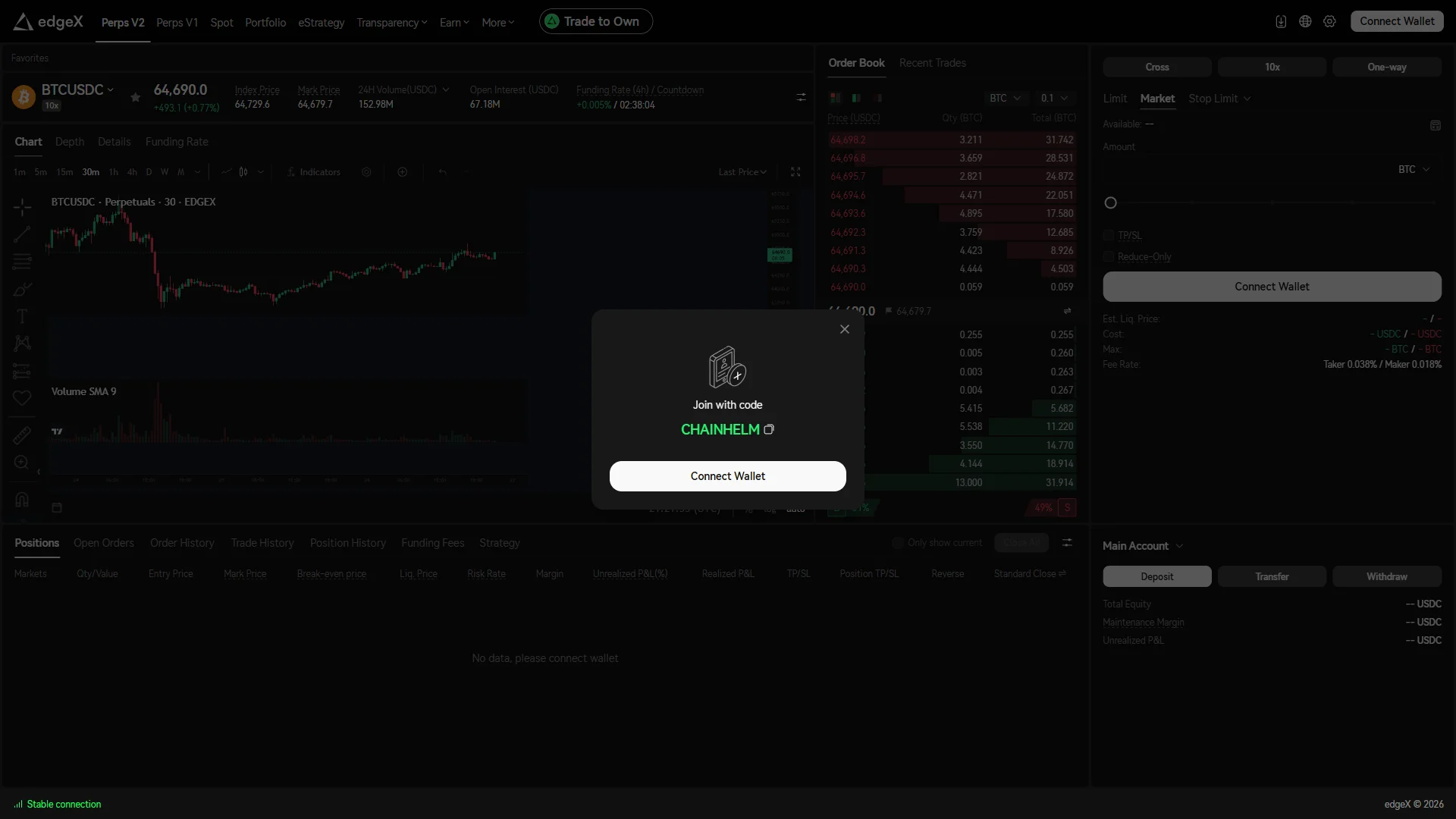
The screen shows “Join with code”, confirming that the referral code CHAINHELM was correctly applied.
After you connect, the Referral / Rewards page is the surface that shows referral status: the referral-linked display, including the commission rate, appears only once a wallet is connected.
chainhelm continuously verifies the validity of the code and confirms it remains usable.
edgeX sign-up steps with the referral code
We cover the connection process separately for PC/browser and smartphone (mobile).
PC/browser connection steps
-
First, open the edgeX official page (the link applies the referral code). When you open it, you’ll see a screen like the one below.
-
Start from the referral modal
— Figure 2Referral modal with code applied2026-07-27 A "Join with code" modal over the BTCUSDC screen shows "CHAINHELM" already applied above the "Connect Wallet" button. Source: chainhelm editorial Open the referral link to reach the perpetuals screen, where a “Join with code” modal sits in front of the trading view with the code “CHAINHELM” already applied. Check that the code matches the one you meant to use; the copy icon beside it keeps a copy for your own records.
Click “Connect Wallet” in the modal to begin. The login modal opens next.
-
Choose the wallet route to log in
— Figure 3Login modal, two entry methods2026-07-27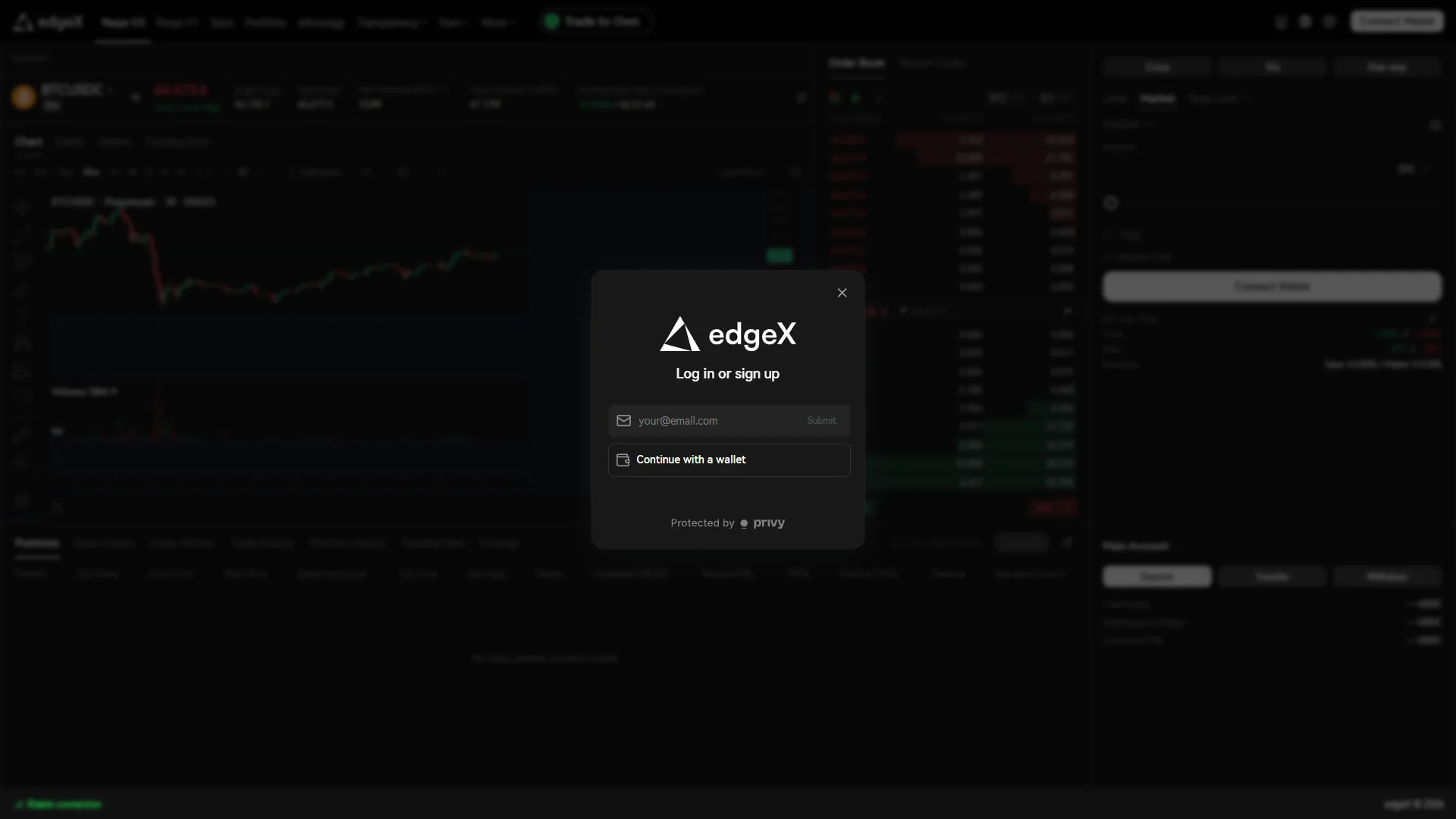
The "Log in or sign up" modal offers an email field with "Submit" and "Continue with a wallet", above a "Protected by privy" note. Source: chainhelm editorial Pick your entry method in the “Log in or sign up” modal. The email field with “Submit” ties the account to an email address, while “Continue with a wallet” uses a wallet you already control. This walkthrough takes the wallet route, so click “Continue with a wallet”.
Note the “Protected by privy” line at the bottom while you are here: it names the third party handling this authentication step, so you know who sits in the login path. The wallet selection modal opens next.
-
Pick your wallet from the list
— Figure 4Wallet selection modal2026-07-27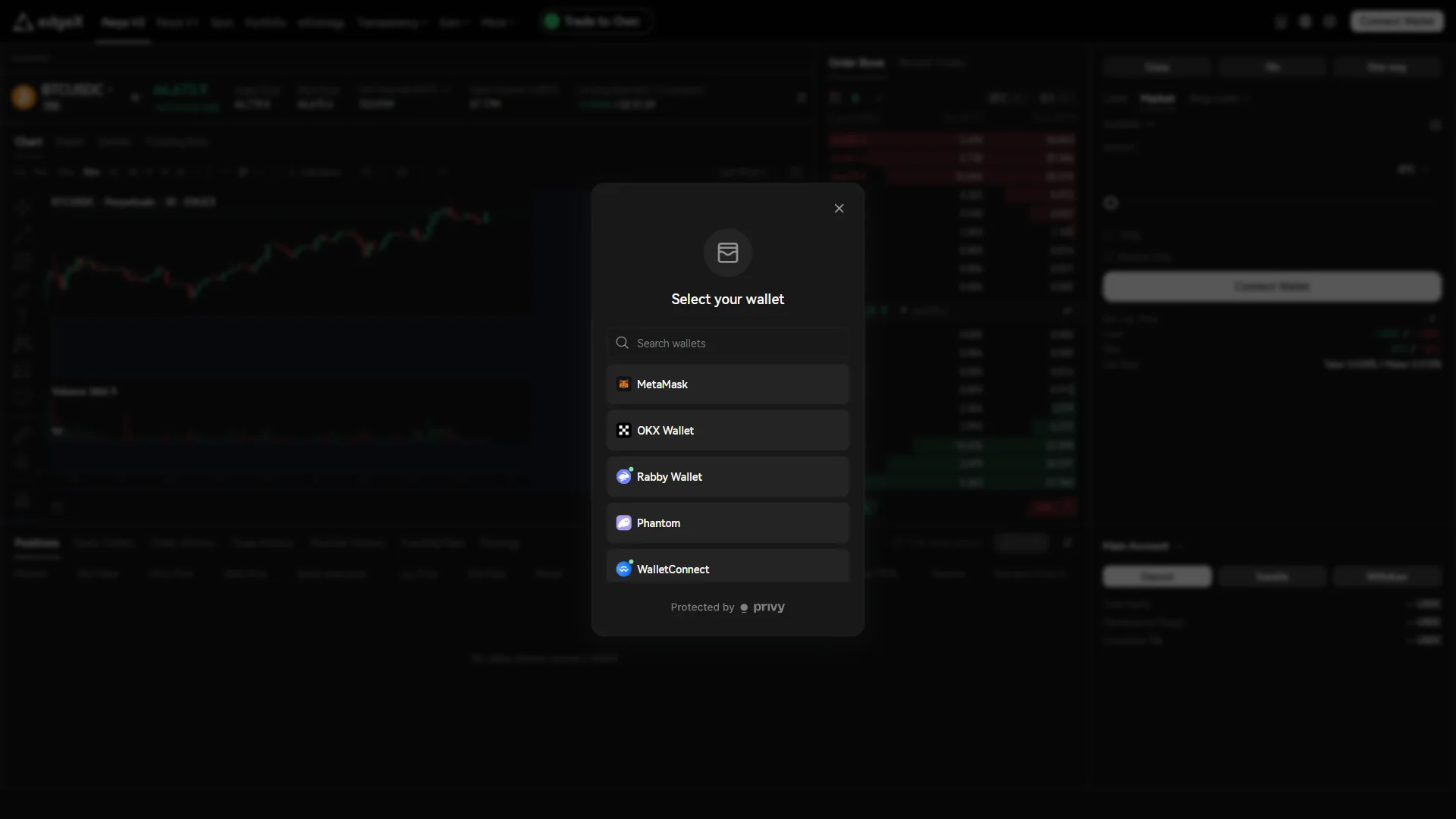
A search field sits above the wallet list, which shows "MetaMask", "OKX Wallet", "Rabby Wallet", "Phantom", and "WalletConnect". Source: chainhelm editorial Select your own wallet in the “Select your wallet” modal. “MetaMask”, “OKX Wallet”, “Rabby Wallet”, “Phantom”, and “WalletConnect” are listed directly, and the “Search wallets” field above the list narrows it if yours is not shown. This walkthrough continues with “Rabby Wallet”.
Confirm you are clicking the wallet you installed yourself rather than a similarly named entry, then let your wallet take over. The extension opens its own approval window.
-
Approve the connection in your wallet
— Figure 5Wallet connect approval window2026-07-27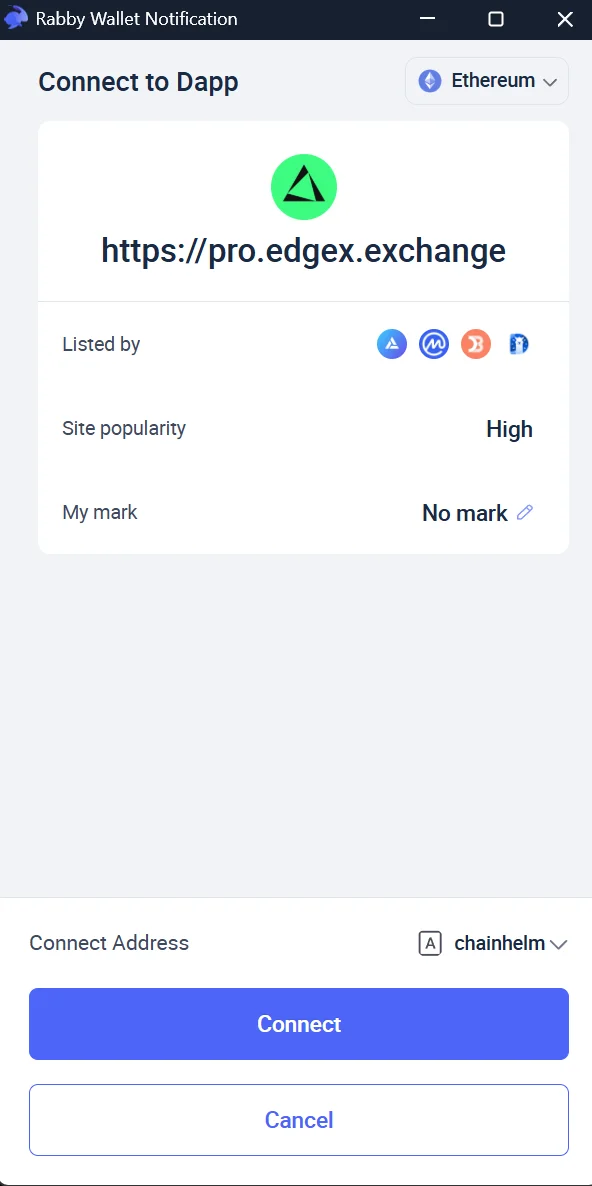
The wallet's "Connect to Dapp" window shows the site domain and network above the "Connect Address" row and the "Connect" button. Source: chainhelm editorial Read the site identity in the wallet’s “Connect to Dapp” window before you approve anything. The domain shown is the site you are about to link the wallet to, and the chain selector at the top right names the network for the connection, Ethereum in this capture.
Check the account in the “Connect Address” row, then click “Connect”; “Cancel” backs out with nothing granted. Approving here only shares your address with the site, and the page then asks for a signature.
-
Wait for the signature request
— Figure 6Waiting for the wallet to open2026-07-27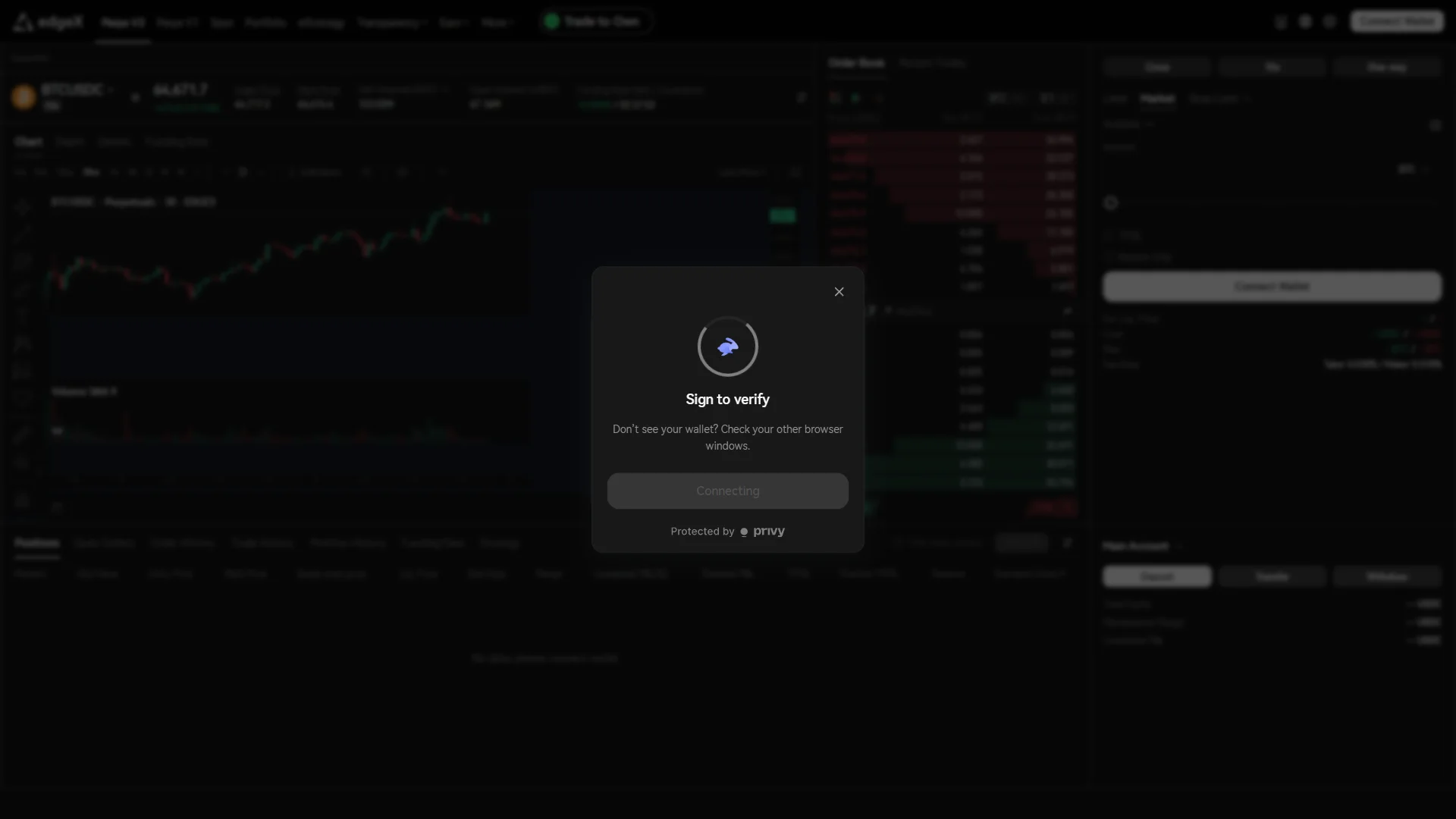
The page waits in a "Sign to verify" state with a disabled "Connecting" button and a hint to check other browser windows. Source: chainhelm editorial Watch the page after you approve the connection. It holds a “Sign to verify” state with the button locked to “Connecting” while it waits for your wallet to answer, so there is nothing to click on the page itself.
If no wallet window appears, follow the hint in the modal and check your other browser windows, since the popup often opens behind the one you are looking at. Bring it to the front and the signature request is waiting there.
-
Sign the ownership check
— Figure 7Ownership verification signature2026-07-27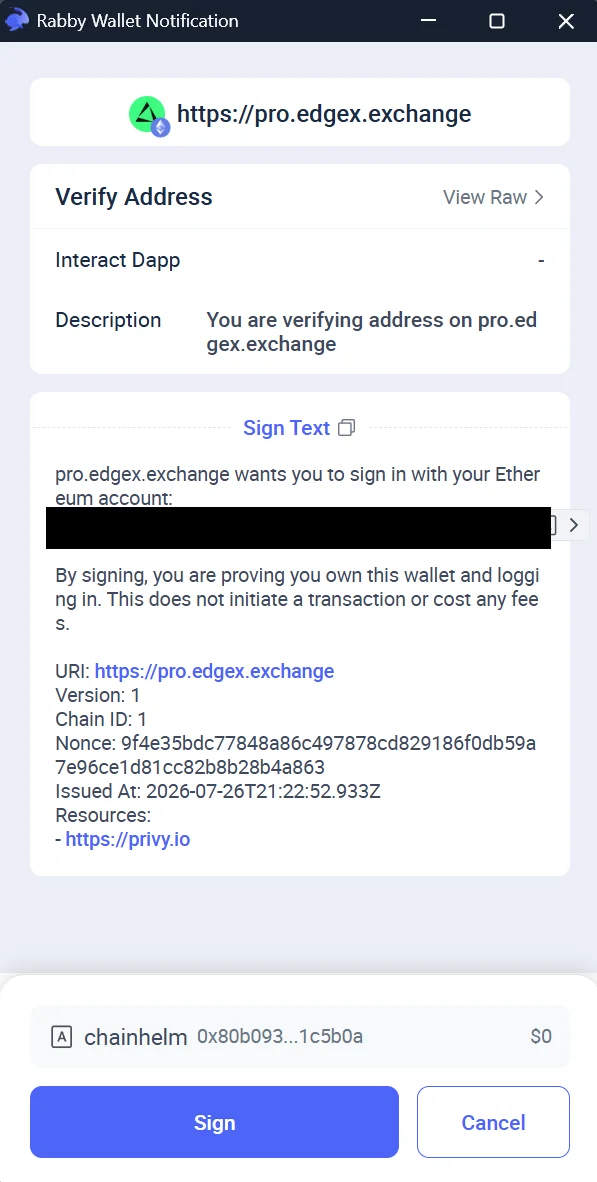
The "Verify Address" request shows sign-in text stating that no transaction or fee is involved, with "Sign" and "Cancel" below. Source: chainhelm editorial Read the message in the “Verify Address” request before you sign it. The “Sign Text” block spells out that you are signing in to prove you own this wallet and that the signature starts no transaction and costs no fees, so verify that wording and the domain yourself instead of trusting the request title.
Click “Sign” to prove ownership, or “Cancel” to stop. The page moves on to the agreement step once the signature goes through.
-
Agree to the terms and risk notices
— Figure 8Risk acknowledgments before connecting2026-07-27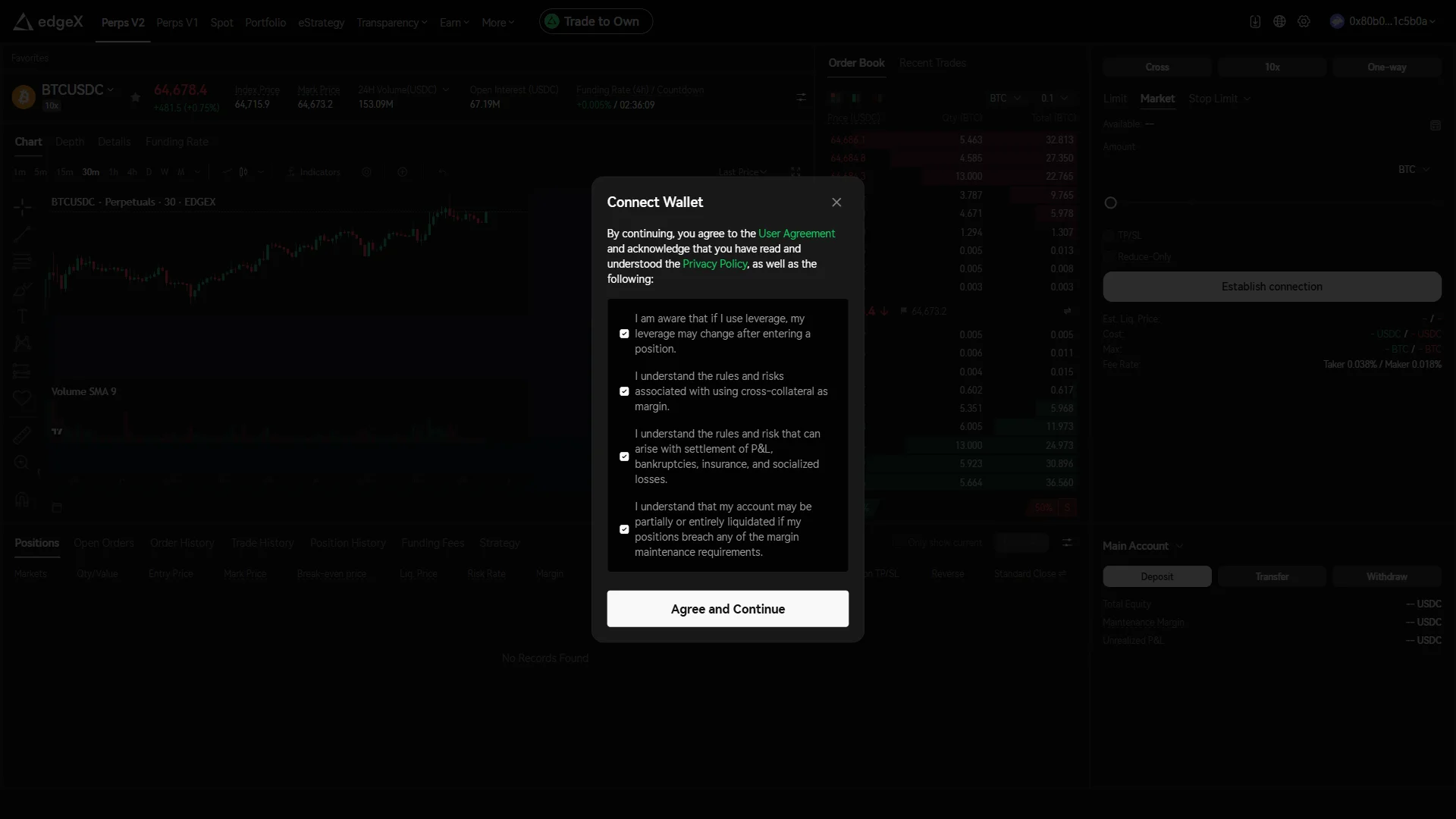
The "Connect Wallet" modal shows the agreement and privacy links above four checked risk acknowledgments and "Agree and Continue". Source: chainhelm editorial Open “User Agreement” and “Privacy Policy” from the “Connect Wallet” modal and read them before you check any of the boxes, because these are the terms the connected account runs under.
Then work through the four risk acknowledgments one at a time. They cover leverage changing after you enter a position, the rules and risks of cross-collateral margin, settlement of P&L together with bankruptcies, insurance, and socialized losses, and partial or full liquidation if your positions breach maintenance margin requirements. Click “Agree and Continue” once all four are checked, and the signature request step follows.
-
Send the two signature requests
— Figure 9Two signature requests explained2026-07-27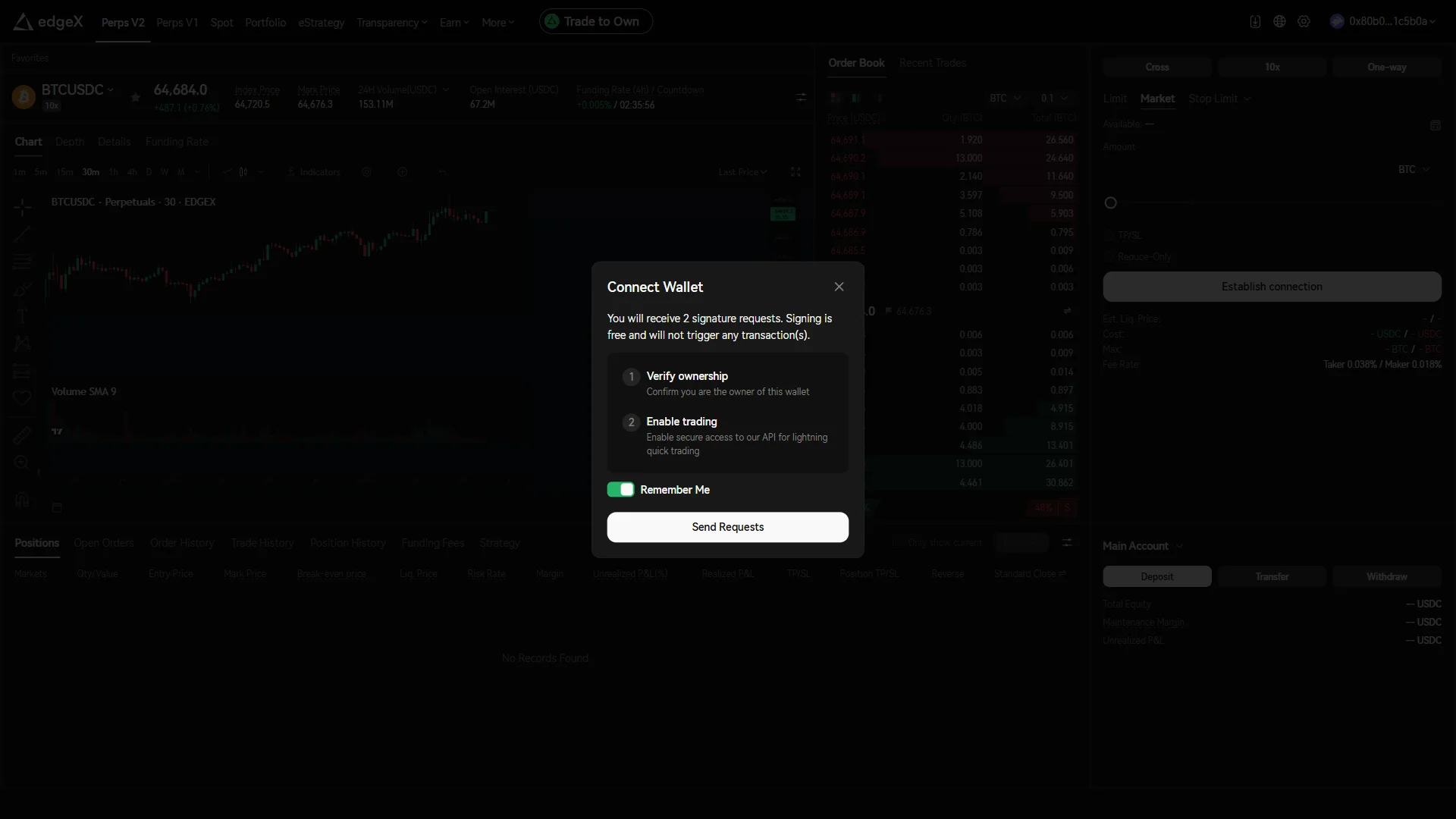
The modal lists "Verify ownership" and "Enable trading" as two free signatures, with "Remember Me" on above "Send Requests". Source: chainhelm editorial Read what the modal is asking for before you send it. “Verify ownership” confirms you control the wallet, “Enable trading” grants secure access to the exchange API that your trading runs through, and the text above them states that signing is free and triggers no transactions.
Decide on “Remember Me” as well: leaving it on keeps the session so you sign less often, while turning it off means signing again on later visits. Click “Send Requests”, and your wallet asks for the first of the two signatures.
-
Sign the trading key request
— Figure 10Trading key signature request2026-07-27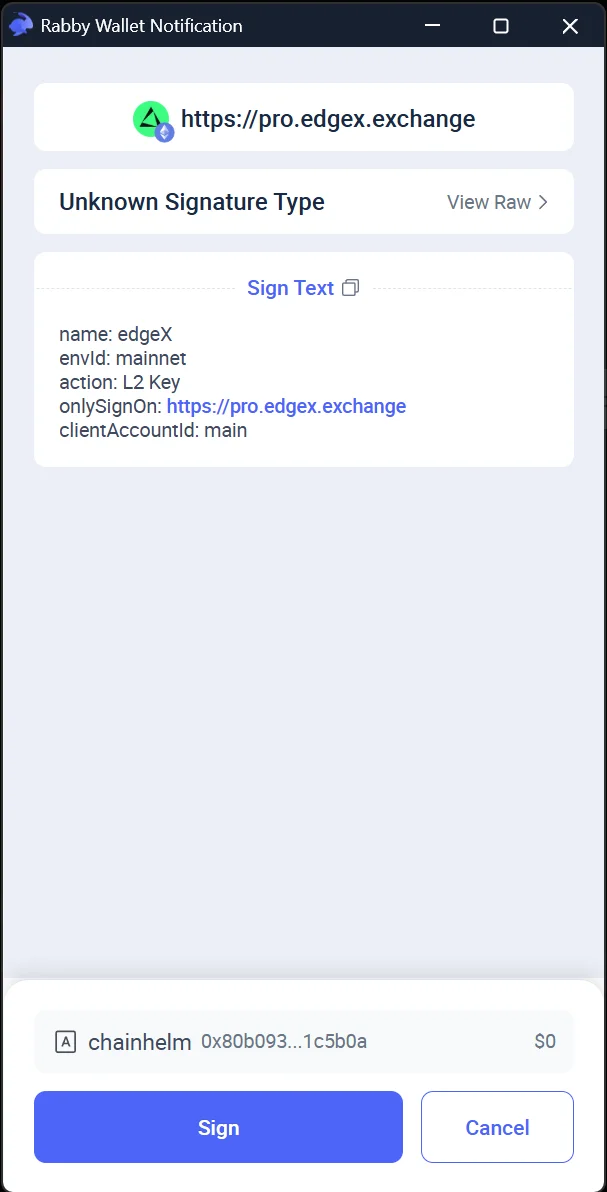
The request shows an "L2 Key" action with "onlySignOn" pinned to the official domain, under an "Unknown Signature Type" title. Source: chainhelm editorial Check the “Sign Text” block in the first request before you approve it. It names edgeX, the mainnet environment, and an “L2 Key” action, which is the trading key derived from this signature, and the “onlySignOn” line pins the signature to the official domain, so compare that domain with the site you are actually on.
Read the “Unknown Signature Type” title as your wallet saying it cannot classify this custom message, not as a warning about the message itself. Click “Sign” to continue, or “Cancel” to stop the setup here. The second request follows.
-
Sign the account activation request
— Figure 11Account activation signature2026-07-27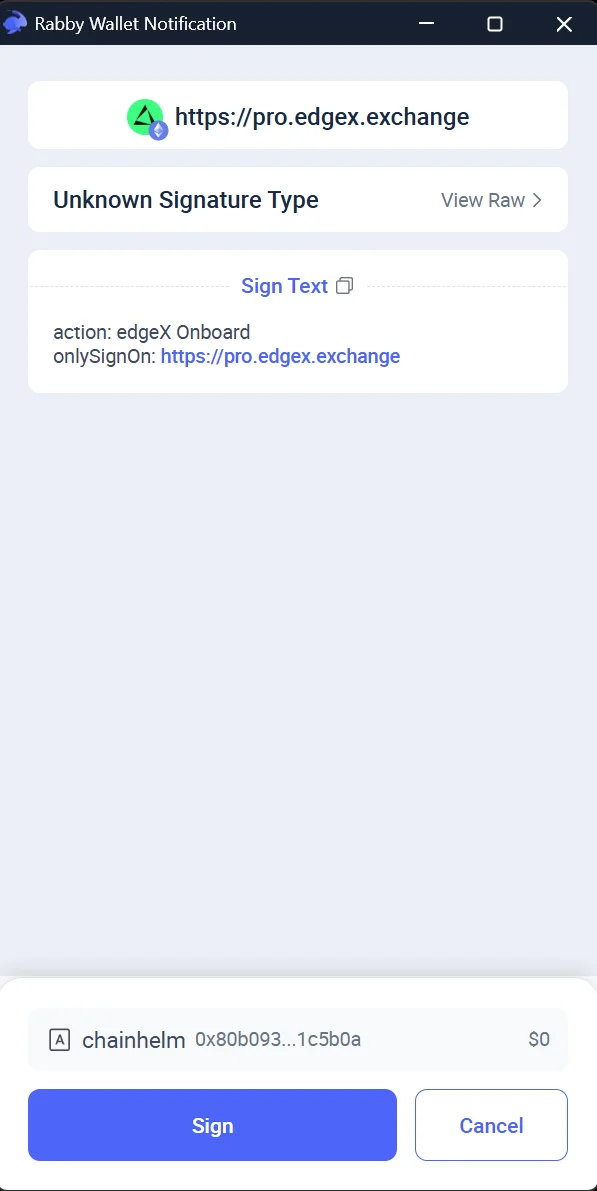
The final request shows an "edgeX Onboard" action pinned to the official domain, with "Sign" and "Cancel" as the only choices. Source: chainhelm editorial Check the second request the same way you checked the first. The “Sign Text” block shows an “edgeX Onboard” action with “onlySignOn” pointing at the official domain, and the title reads “Unknown Signature Type” again because the message uses a custom format.
Click “Sign” to finish the setup, or “Cancel” to leave the account inactive. This is the last of the two signatures announced earlier, and no on-chain transaction or fee is attached to it.
Smartphone (iOS / Android) connection steps
-
First, open the edgeX official page in your mobile browser or your wallet app’s in-app browser (the link applies the referral code). When you open it, you’ll see a screen like the one below.
-
Start from the referral modal
— Figure 12Referral modal with code applied2026-07-27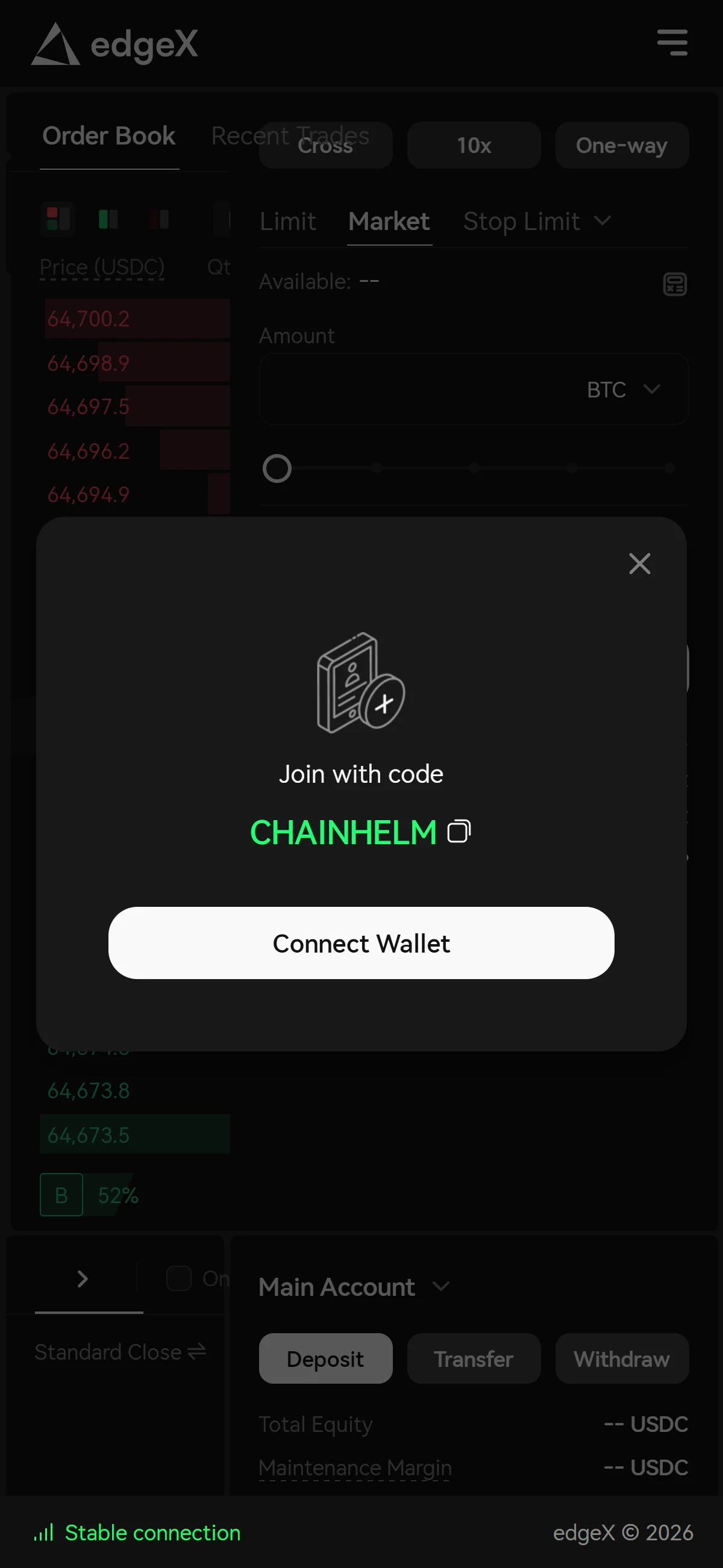
A "Join with code" modal over the BTCUSDC screen shows "CHAINHELM" already applied above the "Connect Wallet" button. Source: chainhelm editorial Open the referral link to reach the perpetuals screen, where a “Join with code” modal sits in front of the trading view with the code “CHAINHELM” already applied. Check that the code matches the one you meant to use; the copy icon beside it keeps a copy for your own records.
Click “Connect Wallet” in the modal to begin. The login modal opens next.
-
Choose the wallet route to log in
— Figure 13Login modal, two entry methods2026-07-27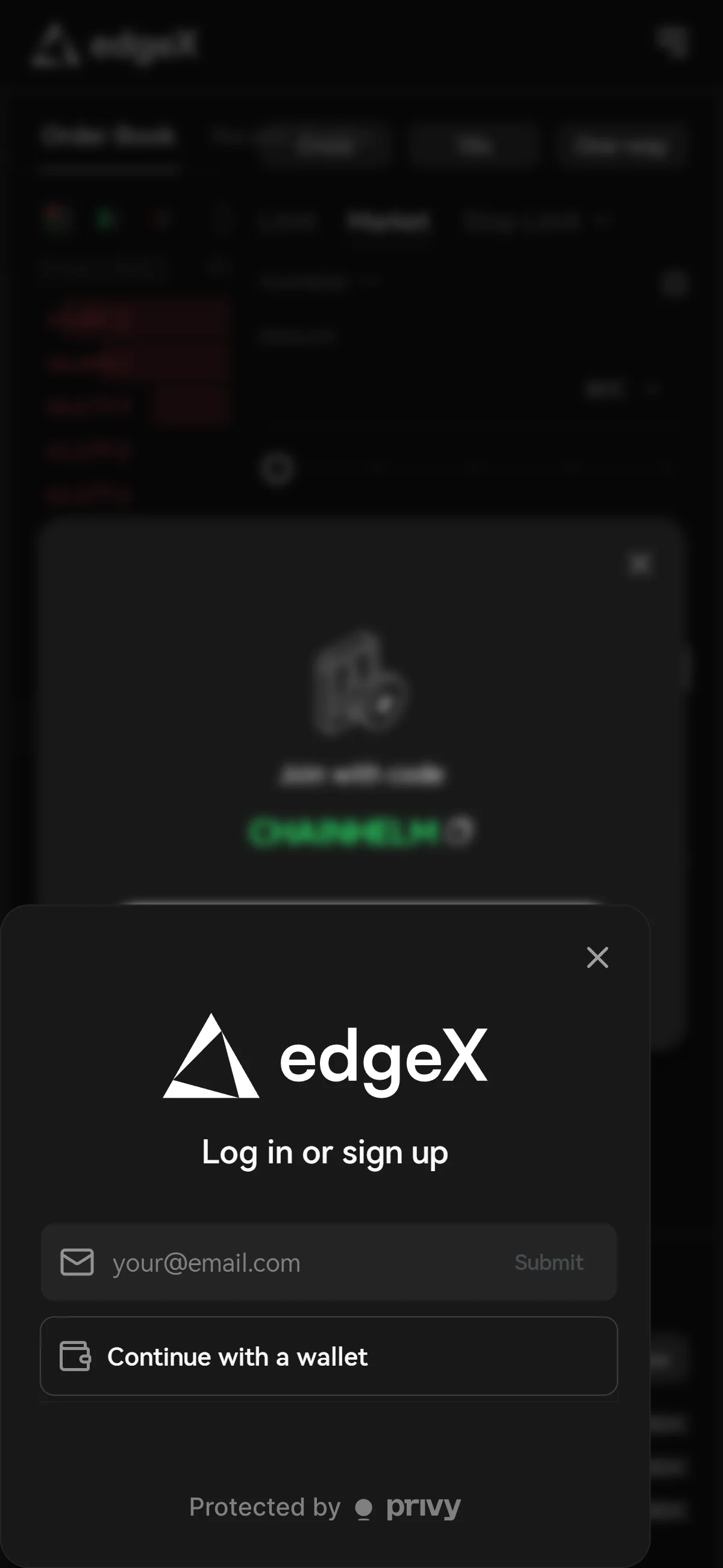
The "Log in or sign up" modal offers an email field with "Submit" and "Continue with a wallet", above a "Protected by privy" note. Source: chainhelm editorial Pick your entry method in the “Log in or sign up” modal. The email field with “Submit” ties the account to an email address, while “Continue with a wallet” uses a wallet you already control. This walkthrough takes the wallet route, so click “Continue with a wallet”.
Note the “Protected by privy” line at the bottom while you are here: it names the third party handling this authentication step, so you know who sits in the login path. The wallet selection modal opens next.
-
Pick your wallet from the list
— Figure 14Wallet selection modal2026-07-27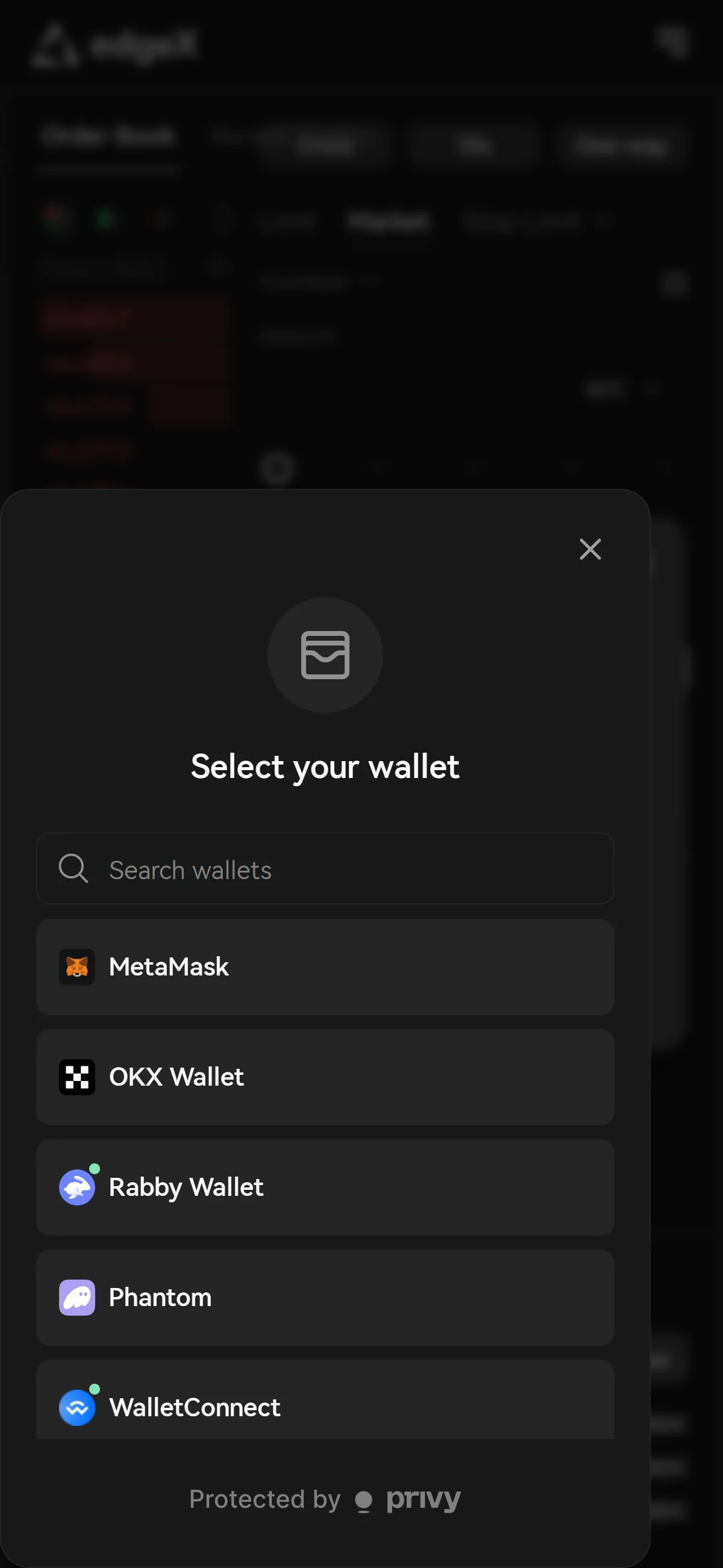
A search field sits above the wallet list, which shows "MetaMask", "OKX Wallet", "Rabby Wallet", "Phantom", and "WalletConnect". Source: chainhelm editorial Select your own wallet in the “Select your wallet” modal. “MetaMask”, “OKX Wallet”, “Rabby Wallet”, “Phantom”, and “WalletConnect” are listed directly, and the “Search wallets” field above the list narrows it if yours is not shown. This walkthrough continues with “Rabby Wallet”.
Confirm you are tapping the wallet you installed yourself rather than a similarly named entry, then let your wallet take over. On a phone the whole flow runs inside your wallet app’s in-app browser, so the tap hands control to the wallet app itself, which brings up its own connect-approval screen.
-
Approve the connection in your wallet
— Figure 15Wallet connect approval window2026-07-27 The wallet's "Connect to Dapp" window shows the site domain and network above the "Connect Address" row and the "Connect" button. Source: chainhelm editorial Read the site identity on the wallet app’s “Connect to Dapp” screen before you approve anything. The domain shown is the site you are about to link the wallet to, and the chain selector at the top right names the network for the connection, Ethereum in this capture.
Check the account in the “Connect Address” row, then tap “Connect”; “Cancel” backs out with nothing granted. Approving here only shares your address with the site, and the wallet app hands you back to the edgeX page, which then asks for a signature.
-
Wait for the signature request
— Figure 16Waiting for the wallet to open2026-07-27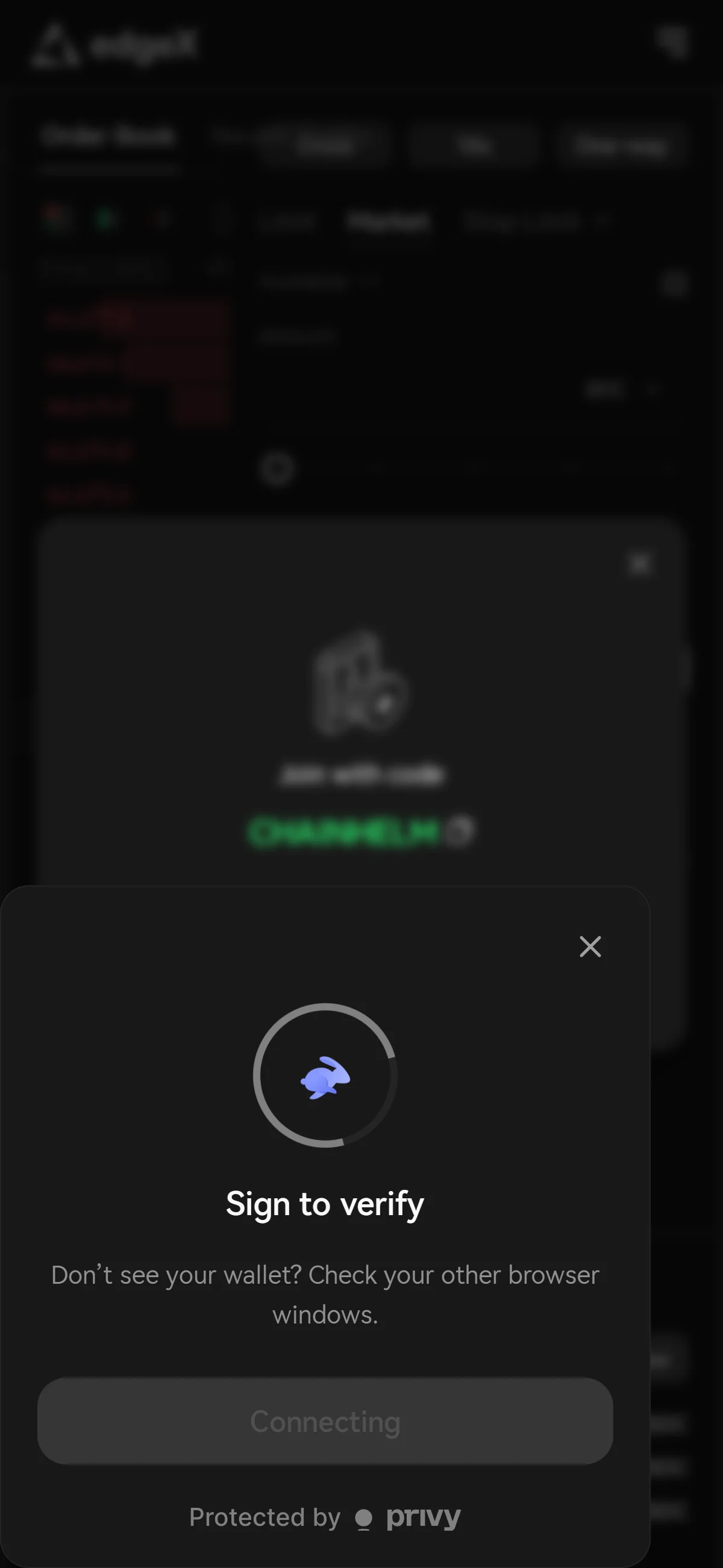
The page waits in a "Sign to verify" state with a disabled "Connecting" button and a hint to check other browser windows. Source: chainhelm editorial Watch the edgeX page in the in-app browser after you approve the connection. It holds a “Sign to verify” state with the button locked to “Connecting” while it waits for your wallet to answer, so there is nothing to tap on the page itself.
If no signature screen appears, read the hint in the modal as desktop wording: on a phone there are no other browser windows to check, so switch to the wallet app itself and the request is waiting there.
-
Sign the ownership check
— Figure 17Ownership verification signature2026-07-27 The "Verify Address" request shows sign-in text stating that no transaction or fee is involved, with "Sign" and "Cancel" below. Source: chainhelm editorial Read the message in the “Verify Address” request your wallet app opens before you sign it. The “Sign Text” block spells out that you are signing in to prove you own this wallet and that the signature starts no transaction and costs no fees, so verify that wording and the domain yourself instead of trusting the request title.
Tap “Sign” to prove ownership, or “Cancel” to stop. You are handed back to the edgeX screen, which moves on to the agreement step once the signature goes through.
-
Agree to the terms and risk notices
— Figure 18Risk acknowledgments before connecting2026-07-27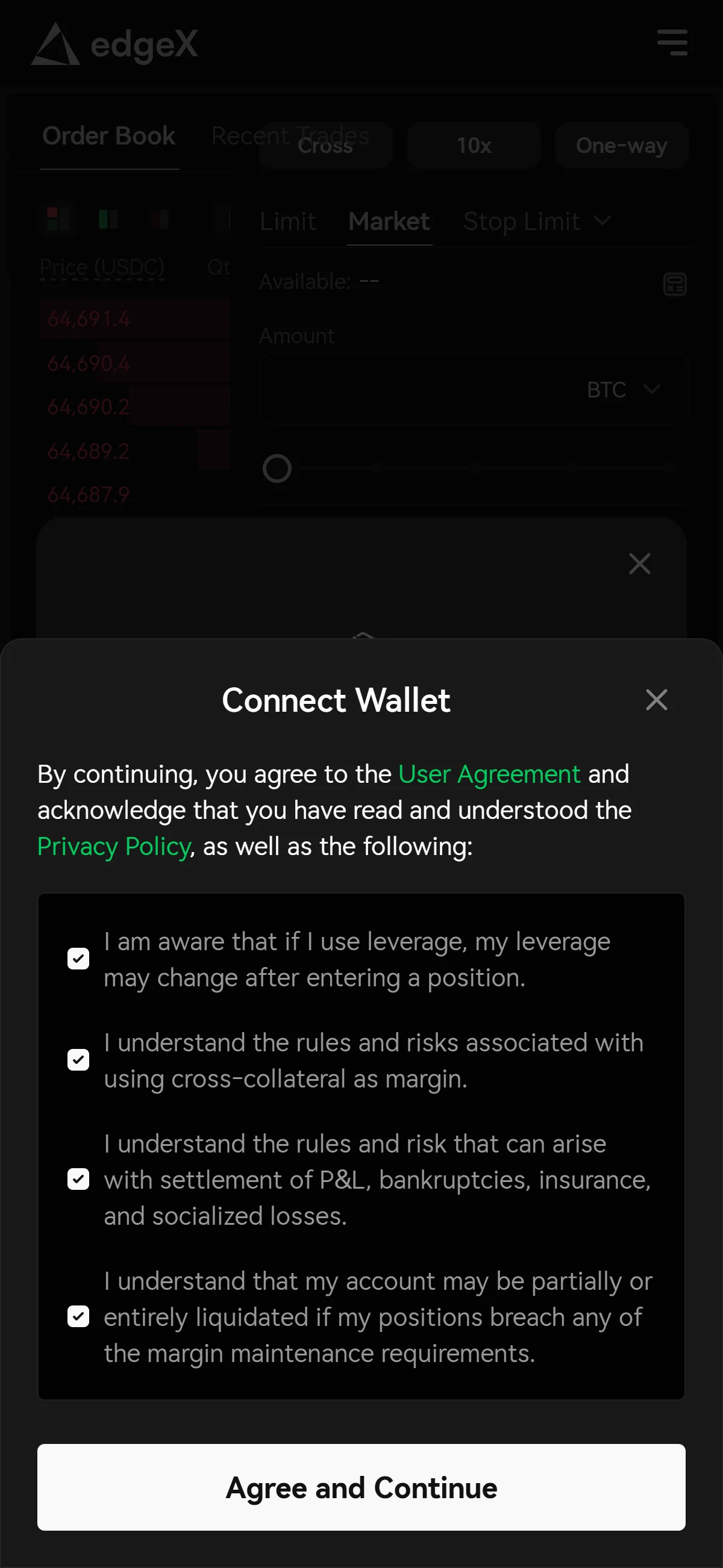
The "Connect Wallet" modal shows the agreement and privacy links above four checked risk acknowledgments and "Agree and Continue". Source: chainhelm editorial Open “User Agreement” and “Privacy Policy” from the “Connect Wallet” modal and read them before you check any of the boxes, because these are the terms the connected account runs under.
Then work through the four risk acknowledgments one at a time. They cover leverage changing after you enter a position, the rules and risks of cross-collateral margin, settlement of P&L together with bankruptcies, insurance, and socialized losses, and partial or full liquidation if your positions breach maintenance margin requirements. Click “Agree and Continue” once all four are checked, and the signature request step follows.
-
Send the two signature requests
— Figure 19Two signature requests explained2026-07-27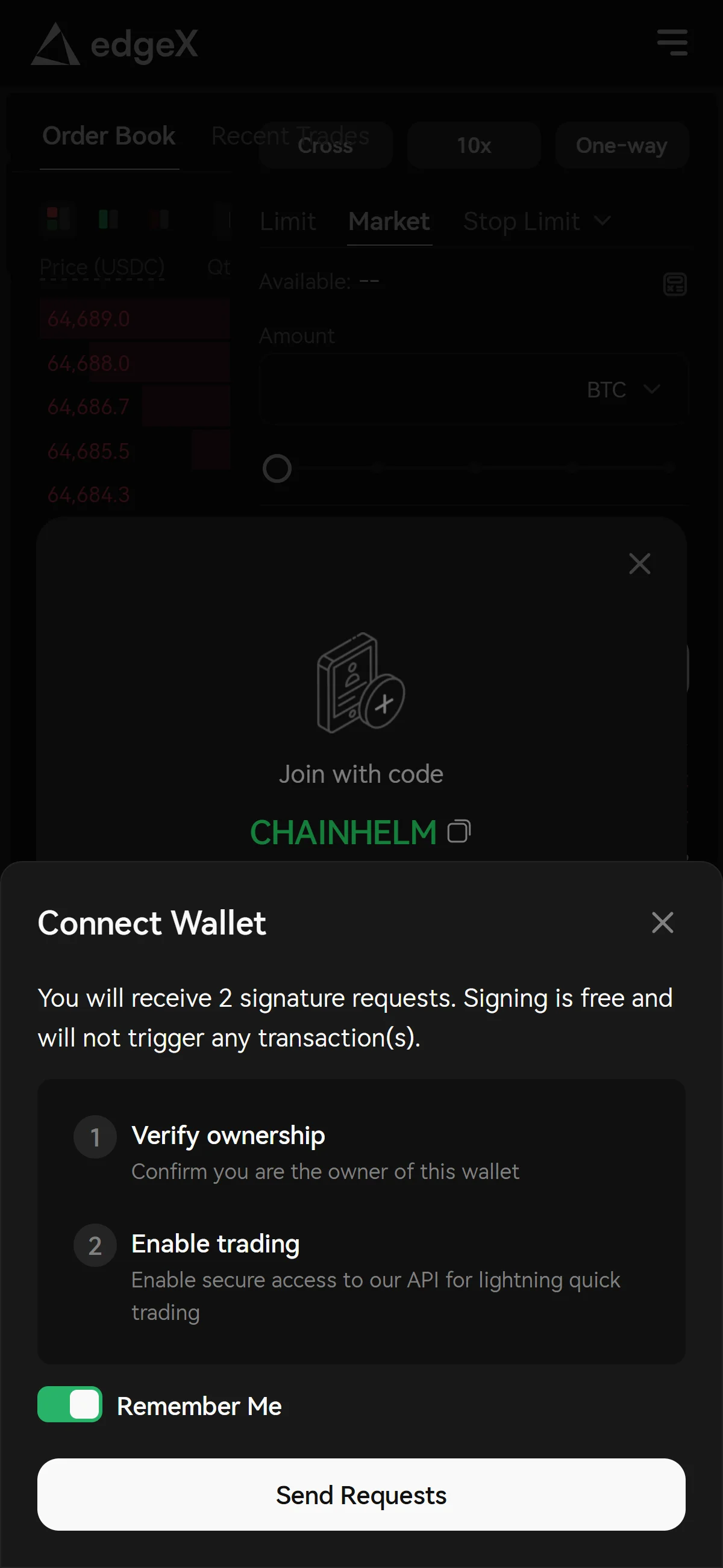
The modal lists "Verify ownership" and "Enable trading" as two free signatures, with "Remember Me" on above "Send Requests". Source: chainhelm editorial Read what the modal is asking for before you send it. “Verify ownership” confirms you control the wallet, “Enable trading” grants secure access to the exchange API that your trading runs through, and the text above them states that signing is free and triggers no transactions.
Decide on “Remember Me” as well: leaving it on keeps the session so you sign less often, while turning it off means signing again on later visits. Click “Send Requests”, and your wallet asks for the first of the two signatures.
-
Sign the trading key request
— Figure 20Trading key signature request2026-07-27 The request shows an "L2 Key" action with "onlySignOn" pinned to the official domain, under an "Unknown Signature Type" title. Source: chainhelm editorial Check the “Sign Text” block in the first request the wallet app opens before you approve it. It names edgeX, the mainnet environment, and an “L2 Key” action, which is the trading key derived from this signature, and the “onlySignOn” line pins the signature to the official domain, so compare that domain with the site you are actually on.
Read the “Unknown Signature Type” title as your wallet saying it cannot classify this custom message, not as a warning about the message itself. Tap “Sign” to continue, or “Cancel” to stop the setup here. The second request follows in the wallet app.
-
Sign the account activation request
— Figure 21Account activation signature2026-07-27 The final request shows an "edgeX Onboard" action pinned to the official domain, with "Sign" and "Cancel" as the only choices. Source: chainhelm editorial Check the second request the same way you checked the first. The “Sign Text” block shows an “edgeX Onboard” action with “onlySignOn” pointing at the official domain, and the title reads “Unknown Signature Type” again because the message uses a custom format.
Tap “Sign” to finish the setup, or “Cancel” to leave the account inactive. This is the last of the two signatures announced earlier, and no on-chain transaction or fee is attached to it; the wallet app then returns you to the edgeX screen in the in-app browser.
What to do after connecting to edgeX
We cover the deposit process separately for PC/browser and smartphone (mobile).
PC/browser deposit steps
Open “Deposit” and set what you are funding the account with. The “Asset” and “Chain” selectors at the top of the modal control that pair, shown here as USDC on Ethereum, and it is worth setting them first because what follows hangs on them: the routes below, and the fee and arrival figures on the amount form.
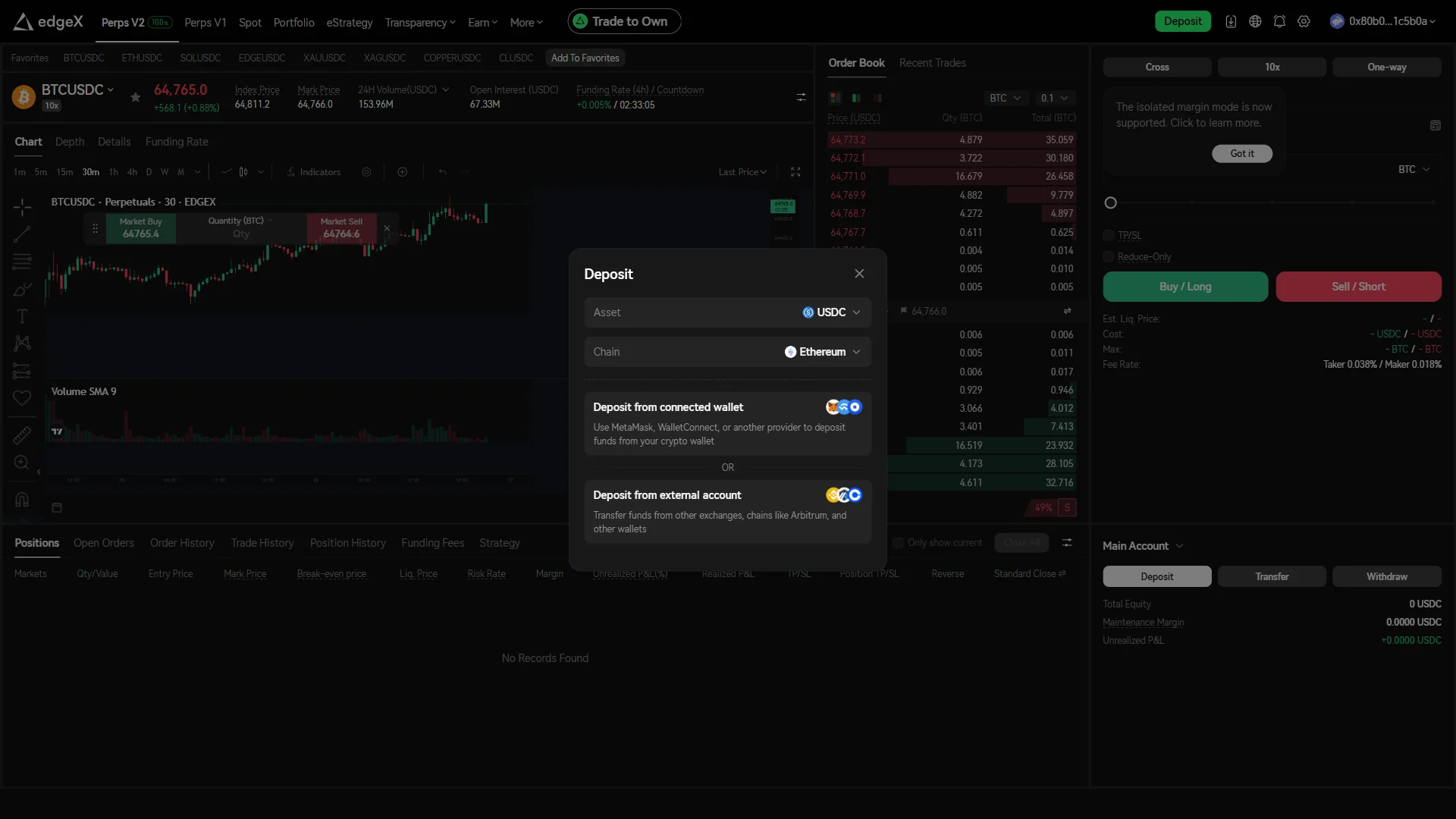
Then choose how the funds arrive. “Deposit from connected wallet” moves them straight from the wallet you just linked, while “Deposit from external account” is the path for funds sitting on another exchange or another chain, including Arbitrum and other wallets. Take the connected-wallet route and the amount form opens.
Set the destination and speed first. “Account” points the funds at your “Spot Account”, and the “Fast” and “Standard” tabs set the transfer speed, with “Fast” selected in this capture. Then enter the amount, or use “Max” to pull in the whole “Available” balance shown under the field.
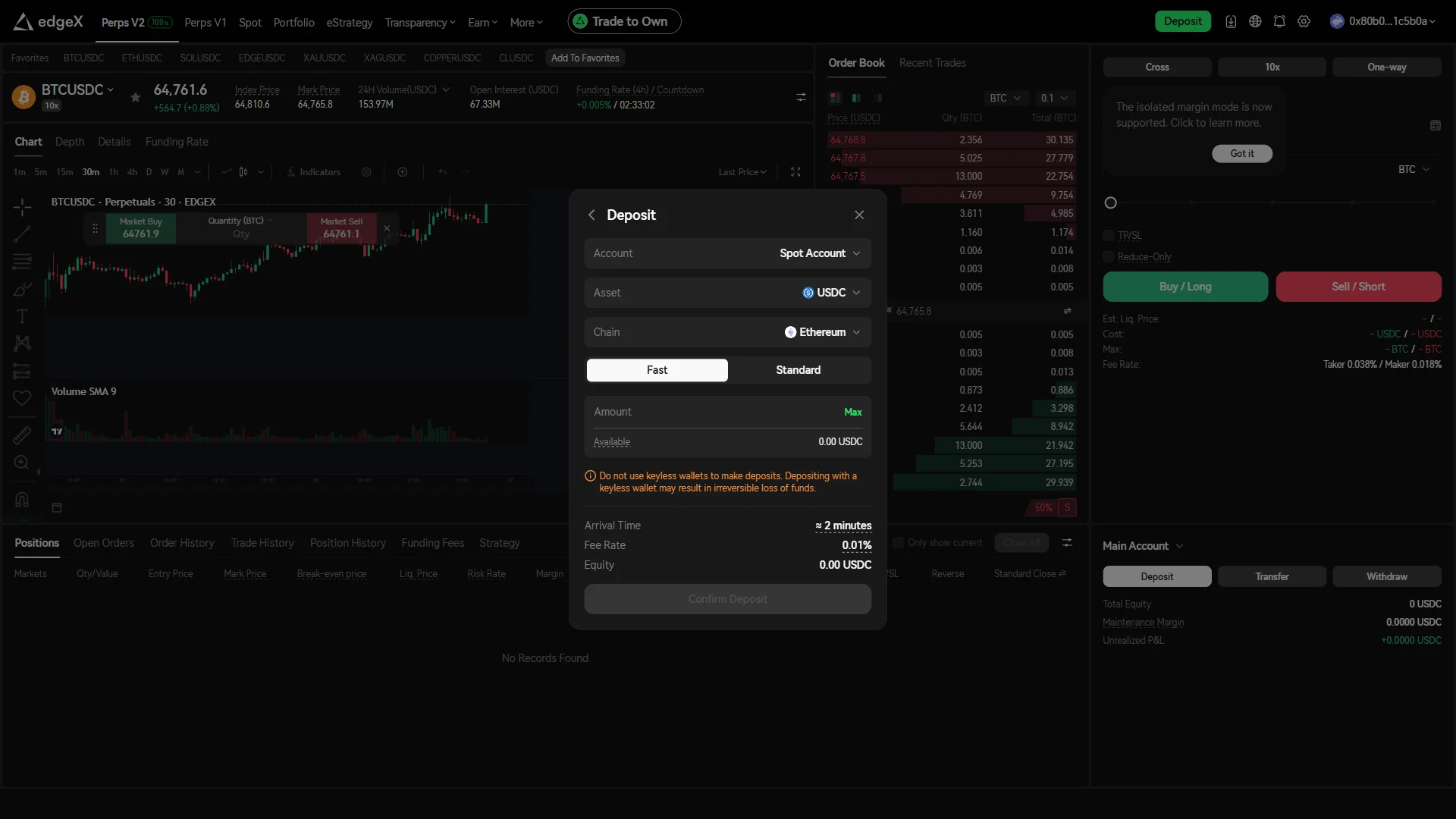
Read the two things the form puts in front of you before you commit funds: the warning against depositing from a keyless wallet, where funds can be lost irreversibly, and the “Arrival Time” and “Fee Rate” figures, about 2 minutes at 0.01% for the route in this capture. “Confirm Deposit” stays disabled until an amount is in the field, so you can check every number while you still have the choice.
Smartphone (iOS / Android) deposit steps
Open “Deposit” and set what you are funding the account with. The “Asset” and “Chain” selectors at the top of the modal control that pair, shown here as USDC on Ethereum, and it is worth setting them first because what follows hangs on them: the routes below, and the fee and arrival figures on the amount form.
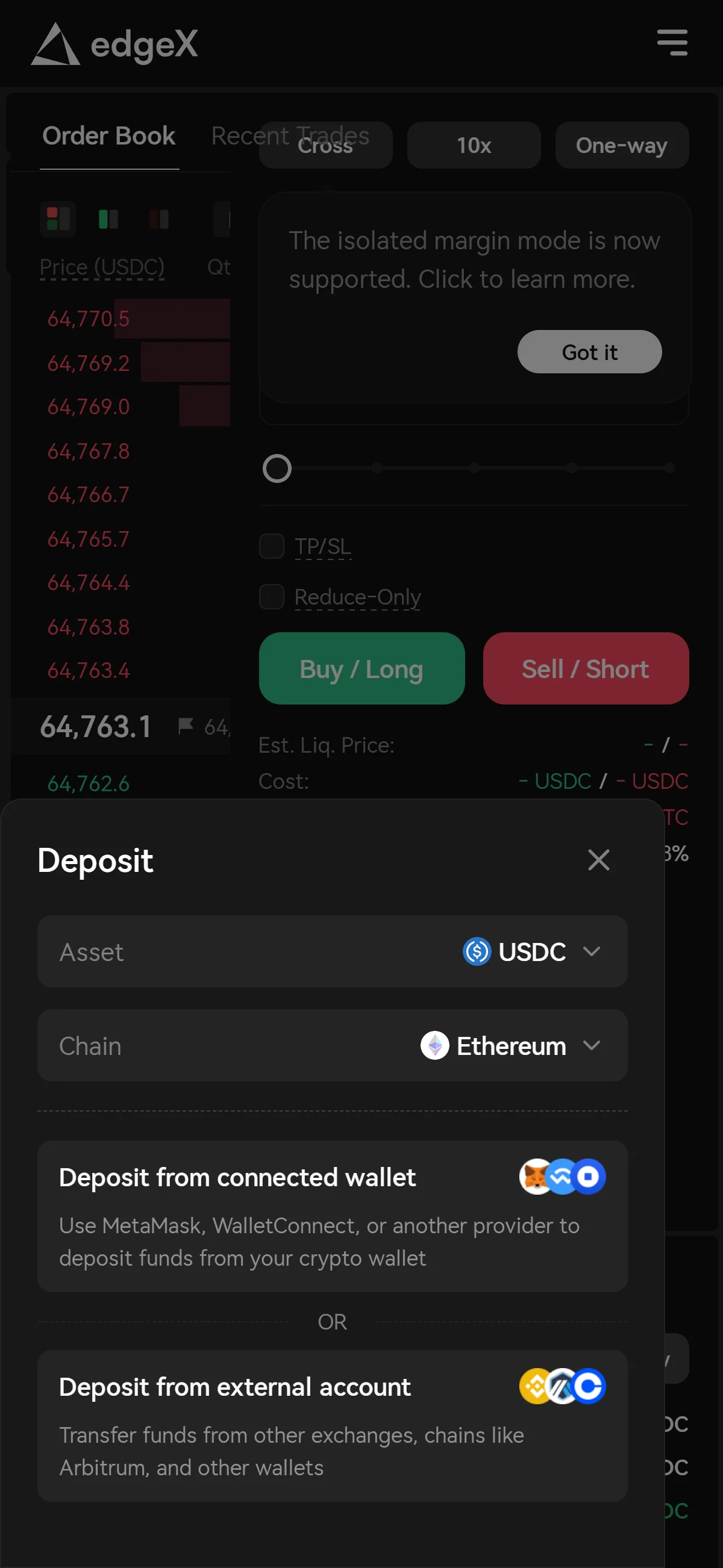
Then choose how the funds arrive. “Deposit from connected wallet” moves them straight from the wallet you just linked, while “Deposit from external account” is the path for funds sitting on another exchange or another chain, including Arbitrum and other wallets. Take the connected-wallet route and the amount form opens.
Set the destination and speed first. “Account” points the funds at your “Spot Account”, and the “Fast” and “Standard” tabs set the transfer speed, with “Fast” selected in this capture. Then enter the amount, or use “Max” to pull in the whole “Available” balance shown under the field.
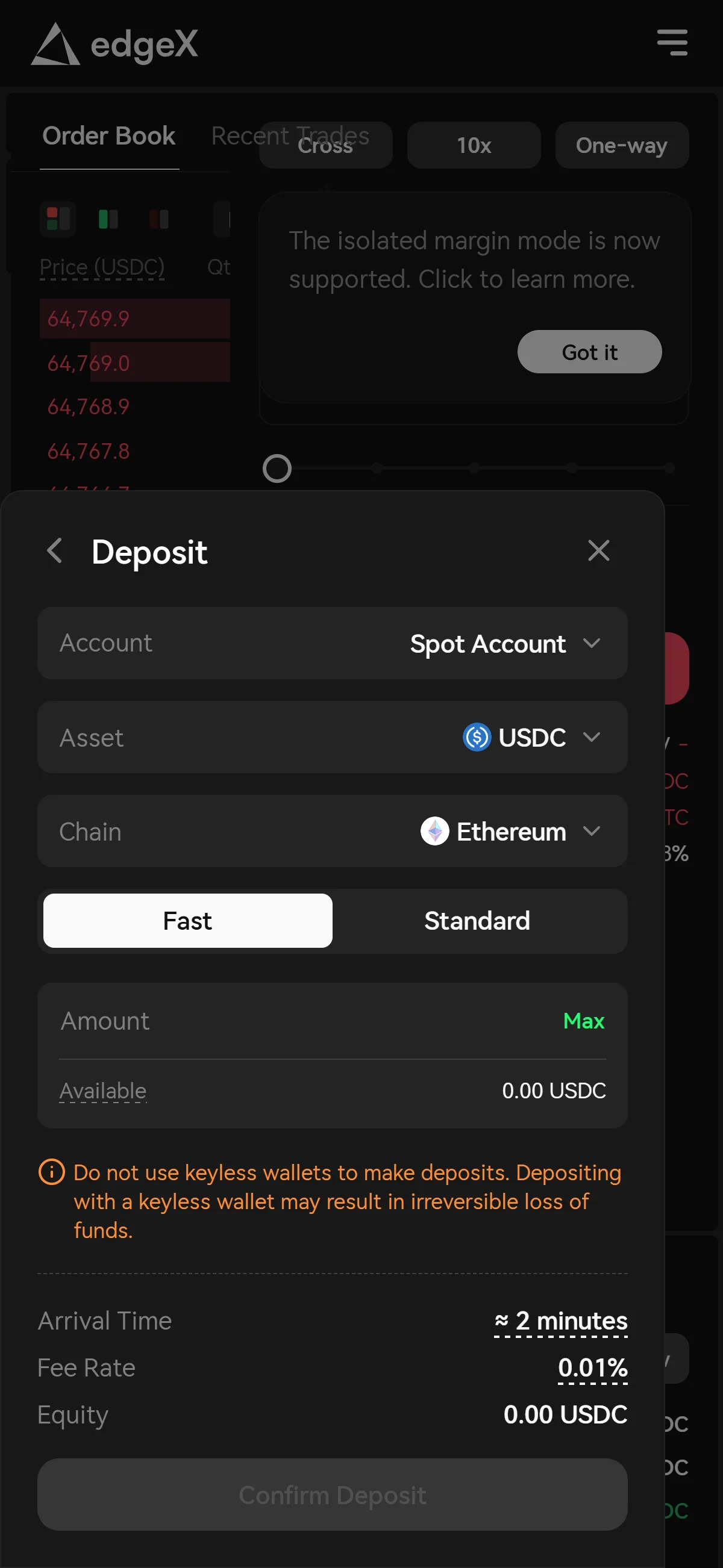
Read the two things the form puts in front of you before you commit funds: the warning against depositing from a keyless wallet, where funds can be lost irreversibly, and the “Arrival Time” and “Fee Rate” figures, about 2 minutes at 0.01% for the route in this capture. “Confirm Deposit” stays disabled until an amount is in the field, so you can check every number while you still have the choice.
With the wallet connected, the account activated, and both deposit routes mapped out, you can read the fee and arrival time for a transfer before committing any funds.
The edgeX referral code cannot be added after sign-up
The referral code can only be applied when you connect your wallet — it cannot be added afterwards.
If you overlook this and complete the connection without the code, there is no mechanism for linking it to that wallet after the fact.
Registering again with a fresh wallet is an option worth considering.
- Is the referral code CHAINHELM shown as applied when you connect your wallet? (check any on-screen notice that appears when you arrive via the referral link, and the code field where the venue provides one)
- After connecting, open the Referral / Rewards page and check that the referral is reflected there — referral-linked displays such as the commission rate appear only once a wallet is connected
edgeX points program and airdrop
Search results still treat the edgeX airdrop as something to chase. It is not: the distribution closed at the token generation event on 2026-03-31, and the confirmation window shut three weeks after that. Reading that record as history rather than as an opportunity is the first thing to get right about this venue.
The EDGE airdrop concluded at the 2026-03-31 TGE
No successor season appears in the official announcement feed, on the points page or in the documentation as of 2026-07-27. That makes this a program that ended rather than one sitting between seasons, and it is the single most useful correction a reader can carry away from this chapter: any page still inviting you to farm edgeX points is describing a state of the world that closed in April.
Nothing that follows should be read as a hint that another distribution is coming. edgeX has not said one is, and chainhelm does not guess at token value, timing or conversion.
Trade to Own returns 40% of fees in USDC and 60% in locked EDGE
What runs today is a fee-rebate and reward scheme rather than a points program, and the difference matters: the amounts are a function of fees you have already paid, not of a score whose exchange rate is decided later.
- Immediate return
- 40% of V2 perpetual trading fees, paid back in USDC.
- Locked return
- 60% credited as locked EDGE, valued at the EDGE price at the moment the fee was incurred.
- Holding-duration multiplier
- 0.8 for positions held one minute or less, 0.9 for three minutes or less, 1 above three minutes.
- Average open-interest boost
- 1 below USD 1m, rising to 1.05 at USD 5m.
- Unlock and expiry
- Locked EDGE unlocks at 20% of the trading fees generated by the trader or by invited users, is claimable after 00:00 UTC daily, and returns to the Liquidity Fund if it goes unclaimed for 14 days.
Where the referral sits inside that machinery is not where a reader arriving from a code search would assume, so it is worth stating flatly. Both documented streams accrue to the referrer: their locked EDGE unlocks against the fees invited users generate, and a separate referral rebate pays at a rate that depends on VIP level. The 5% figure that appears in official copy is an illustrative example rather than a published rate, no rate schedule is public, and no benefit for the invited user is documented in official material as of 2026-07-27. Third-party pages advertising invitee fee discounts are not official, and chainhelm does not carry them.
One design detail closes the loop and is worth knowing before you read the token’s supply figures anywhere else: edgeX states that 100% of protocol net profit from V2 perpetual contracts buys EDGE on the open market, and that all repurchased EDGE is burned on-chain. The tokenomics page reports 4.58% of total supply repurchased and burned, net circulating supply of 30.43% and 65% locked, as of 2026-07-27.
No future airdrop is promised, and rewards can be refused
The honest reading of the official stance is that there is an absence in both directions. No commitment to any future airdrop, and no statement declining to conduct one, was located in official material as of 2026-07-27, so the pre-TGE style disclaimer some protocols publish has no counterpart here. What edgeX does publish is a Transparency Act commitment carrying per-allocation contract addresses and an unlock schedule that runs to 2029.
On the token itself, the issuer’s own characterization is more useful than a market one. The MiCA white paper states that EDGE has no intrinsic value or asset backing and is not a utility token under Article 3(1)(9) of Regulation (EU) 2023/1114, and describes its roles as governance over edgeX Improvement Proposals, delegated staking and incentives. That white paper is a notified disclosure which says on its face that it has not been approved by any competent authority. It is a filing, not a license: it places edgeX under no supervision, and a page that presents it as approval is misreading the document.
What is edgeX
edgeX matches orders off-chain and settles them on its own EDGE Chain
One structural choice explains most of what follows. Matching is a central limit order book run off-chain in an operator-run microservice cluster, which edgeX itself describes as delivering a centralized-exchange-like order book experience, while settlement happens on-chain. V2 settles on EDGE Chain, an edgeX-operated Ethereum rollup (chain id 3343) built on the Arbitrum Orbit Stack that edgeX calls a transitional framework, with batches anchored back to Ethereum mainnet.
The generations are worth keeping straight because both are live. The V1 beta launched in August 2024 on StarkEx as an Ethereum L2 with the same off-chain matching and on-chain settlement split; V2 has run since 2026-03-31; and V1 is winding down, with perpetual pair delistings from 2026-07-07 and a migration announced on 2026-07-17.
The operating entities do not resolve to a single clean answer, so chainhelm carries both readings with their source and date rather than picking one silently. The live Terms of Use, last updated 2026-03-24, name EdgeX Infra Corporation as the company providing the site, with EDGEX DAO INC as an intended third-party beneficiary; the documentation copy of the same terms names edgeX Trading Inc. The token issuer is edgeX DAO Limited, a BVI company registered 2025-12-11 whose parent and sole director is the Cayman Islands edgeX Foundation. Amber Group is the incubator and lead investor of the December 2024 pre-seed round, not a disclosed operator. Governing law is England and Wales, with HKIAC arbitration seated in Hong Kong.
The spread between those readings is the finding, not a rounding problem: a factor of roughly six separates the widest from the narrowest, and open interest ranges from USD 437.82m on DefiLlama down to USD 362.12m on CoinGecko’s partial view. No official volume figure is published, and TVL could not be retrieved on 2026-07-27. The practical rule for a reader is to distrust any single edgeX volume number that does not name its aggregator, its basis and its date, and never to add V1 and V2 figures together.
Breadth and leverage complete the picture of what this venue actually is. There are 110 tradable V2 markets, all quoted and settled in USDC, of which 47 are perpetuals on equity and ETF underlyings; spot exists at a much smaller scale of 4 pairs. Maximum leverage is 100x on BTCUSDC and ETHUSDC, 75x on SOL, 50x on XAU, 30x on EDGE and typically 10-20x on equity perpetuals, stepping down by position size through per-contract risk tiers. Cross margin is the default, so collateral is shared across positions in a trading account; a trader who wants isolated risk gets it through the sub-accounts, of which each wallet can hold up to 20.
Fees are 0.018% maker and 0.038% taker, with no discount for holding EDGE
The rate card is short, and it is the same everywhere on V2, which is unusual enough to state plainly. The rates below come from the official metadata and were confirmed on the live interface as of 2026-07-27; V1 defaults vary by pair.
- Trading fees
- 0.018% maker and 0.038% taker, uniform across all 110 tradable V2 contracts as of 2026-07-27.
- Funding
- Exchanged every 4 hours on V2: the average premium index plus a clamped interest-rate component with a symmetrical 0.05% dampener, with published per-contract caps, for example plus or minus 0.2% per interval on BTCUSDC.
- Gas
- Trading is gasless because edgeX covers settlement gas; you pay source-chain gas when depositing from an external chain.
- Transfers
- V2 withdrawals carry a zero fee rate with a 1 USDC minimum fee, a 2 USDC minimum withdrawal and a 10 USDC minimum deposit.
Volume tiers do exist behind that flat headline — rolling 30-day volume, updated daily at 00:00 UTC, with sub-account volume aggregated — but the schedule renders only after a wallet is connected, and no unauthenticated endpoint exposes it. Not a single threshold or tier rate could be retrieved as of 2026-07-27, and the third-party figures in circulation contradict the official base maker rate. Publishing that gap is more useful than filling it: a high-volume trader cannot model the cost of this venue in advance, and any tier table you find elsewhere is unsourced by construction.
The native-token question has a clean answer. Holding or staking EDGE buys no maker or taker reduction, and no holding- or staking-based fee discount is documented anywhere official. Fee value comes back after the fact through the separate Trade to Own scheme, which makes this a rebate venue rather than a zero-fee one — a distinction worth holding onto when comparing headline rates across venues that recycle fees differently.
USDC is the only collateral, and access runs through apps, APIs and CCTP
V2 uses USDC as its single collateral and quote asset, with native USDC on EDGE Chain and Circle’s CCTP as the cross-chain path, configured for Ethereum, Arbitrum, Base, Optimism and Polygon. V1 used USDT, which is one more reason the two generations should not be read as interchangeable.
Access surfaces are broad for a venue of this age: native iOS and Android apps alongside the web app, with public REST and WebSocket APIs and official Python and Go SDKs. Public metadata, quote and funding endpoints need no authentication, while private endpoints use signature-based auth. Published rate limits are qualitative only, which is a real constraint for anyone sizing an automated strategy against them.
One adjacent product deserves a line, no more, because it is not what a referral-code reader came for: eStrategy is the vault product, automated market-making in its first phase, with revenue stated as passive market-making profit, liquidation fees and a portion of platform trading fees, and redemption taking up to 48 hours. A native USDC vault built with Gauntlet went live on V2 on 2026-07-02.
What makes edgeX distinct
edgeX sat 5th on DefiLlama’s perps table on 2026-07-27
Placing a venue among its peers is only useful with a date attached, so here is the dated version: on 2026-07-27 edgeX sat 5th on DefiLlama’s perps table under its default volume-ordered sort, behind Hyperliquid, Lighter, Aster and ApeX Protocol, with roughly 7.7% of aggregate perp volume on a reported basis or 4.9% normalized. Trade press placed edgeX 3rd around the March 2026 TGE. That movement is the point: this is a position, not a property.
47 of 110 markets are equity and ETF perpetuals
Breadth is the clearest thing that separates edgeX from the venues around it, and it is concrete rather than positioning. Alongside crypto, the market list carries commodity perpetuals on gold, silver, platinum, palladium, copper, natural gas and crude, plus FX-adjacent markets, all cash-settled in USDC and quoted around the clock. Equity coverage reaches beyond US large caps to Samsung, SK Hynix, Tencent, Xiaomi, PopMart and Zhipu, with new listings added on 2026-07-22 and 2026-07-23.
The mechanics of that around-the-clock quote matter more than the headline count. edgeX documents 24/7 trading with limit-order-only windows and a 0.5%-per-3-seconds price clamp while the underlying market is closed, which is what decides whether an off-hours quote is usable for you or merely visible.
The reward design is the second distinguishing trait, and it cuts against the usual pattern: it penalizes very short holding periods through the duration multiplier and ties payouts to protocol revenue rather than to inflationary emission, paired with the stated buyback and on-chain burn. That is edgeX’s own disclosure, characterized here without benchmarking rival programs.
Two structural traits round it out. Running its own settlement chain with off-chain matching places edgeX in the appchain tier rather than the deploy-on-a-shared-L2 tier, though edgeX calls the Arbitrum stack transitional, so read it as a current state rather than a settled endpoint. And entity-level disclosure through the MiCA white paper — named directors, registered addresses, registration date and identifier, Article 6 statements — is uncommon for a perp DEX token. It remains a disclosure and a notification: not an authorization, and not a license for the exchange.
The onboarding surface is a minor differentiator that arrives with its trade-off attached. Native mobile apps and an email-provisioned embedded wallet (Privy-backed MPC with passcode recovery, social logins disabled) lower the step count relative to wallet-only venues, at the cost of a different custody and recovery model. The path this article walks is the wallet route, which is the one where you hold the keys throughout.
edgeX fits cross-asset traders, and four cases favor another venue
edgeX suits an active perpetual trader outside the United States and Canada who wants centralized-exchange-style execution with on-chain settlement and self-custody withdrawal paths, and who specifically wants breadth beyond crypto.
Mobile-first and API-first traders are both served, and the verdict above is the only one the article offers: the availability and risk chapters that follow describe a state of affairs rather than repeat a recommendation.
Four documented cases point the other way, and each comes from official sources rather than from hedging. Residents of the United States or Canada have no path at all: the terms place both countries under a complete interface restriction. Traders who need verifiable on-chain matching or a documented decentralized sequencer set will not find it here, because matching is off-chain and operator-run, the chain sits on a stack edgeX itself calls transitional, no sequencer or validator decentralization design or timeline is documented, and oracle prices are computed in edgeX’s own backend behind a 1-of-5 signer quorum. High-volume traders who need to compare fee schedules before committing cannot, because only the base rate is published. And traders who want an explicit insurance-fund and auto-deleveraging disclosure before taking leveraged risk will find none documented anywhere official.
That is an objective comparison and not a redirect. chainhelm names no substitute venue anywhere in this article, including for readers in markets edgeX blocks.
edgeX regulatory landscape
The terms draw two tiers of exclusion, and both belong in a reader’s model of where this venue will and will not serve. The distinction is not cosmetic: one tier removes the interface, the other removes the services entirely, and the clause behind them is written so that it can grow without anyone amending the document.
The United States and Canada are blocked, and the sanctions tier is open-ended
Blocked Countries
Restricted Territories
The clause extends to any other country or region subject to comprehensive US economic sanctions, so the list above is open-ended and can grow without a terms amendment, and individuals on sanctions lists are excluded regardless of where they are.
One wrinkle inside the same document is worth carrying, because its two exclusion provisions do not draw the same map. Alongside the Blocked Countries list above, the terms separately define Restricted Persons as residents, citizens and entities in the United States and in Ontario, Canada, together with sanctioned jurisdictions — a narrower reading of Canada than the interface-level restriction.
Enforcement is geographic rather than identity-based, which is the mechanism a reader should understand before wondering how the venue knows anything about them. The application calls an unauthenticated region-check endpoint that returns an allow decision, and no KYC, identity verification or address screening is described in the terms at all. Eligibility is therefore settled by where a request comes from, and it is settled before an account exists.
The block binds the frontend, not the settlement contracts
The distinction between the two layers decides what a blocked user can and cannot do, so it is worth drawing carefully. The block binds the operator’s frontend and services rather than the settlement contracts: V2 settles on EDGE Chain and V1 on a StarkEx contract on Ethereum, and edgeX documents EIP-712-signed withdrawals that bypass the operator on V2, plus an explicit forced-withdrawal path on V1.
The limit of that is precise, and stating it is more useful than leaving the implication open. Matching is off-chain and operator-run, so a blocked user keeps a documented route to move assets out but no route to trade. Both layers are edgeX-operated, which means this is not a case of an independent protocol persisting beyond a frontend that went away.
Disclosure has grown while licensing has not
The starting point is an absence. No regulatory action, warning, restriction, lawsuit, settlement or sanction against edgeX or its entities was located in any jurisdiction as of 2026-07-27, including checks of the FCA and CONSOB warning lists.
edgeX holds no disclosed VASP, CASP, derivatives or securities license in any jurisdiction. That is the normal state for a perp DEX rather than an edgeX-specific deficiency, and reading it as a scandal would misdescribe the category. The nearest regulatory artifact is a disclosure: on 2026-02-26 edgeX DAO Limited notified an EDGE crypto-asset white paper under Article 6 of Regulation (EU) 2023/1114, a document which itself states that it has not been approved by any competent authority in any EU member state. The regulated party in that arrangement is Kraken (Payward Global Solutions Limited), a CASP authorized by the Central Bank of Ireland — not edgeX.
Direction of travel, as of 2026-07-27, is best left with its tension visible. Pulling one way: more formal disclosure without movement toward licensing, in the shape of a Cayman foundation and BVI issuer structure with the issuer registered 2025-12-11, the MiCA white paper notified 2026-02-26, admission arranged through a CBI-authorized CASP, and Circle Ventures investing in January 2026 with native USDC and CCTP brought onto the chain. Pulling the other way: the market-facing perimeter is unchanged and broad, enforcement rests on IP geolocation with no identity checks, and 47 of the 110 markets are equity and ETF perpetuals offered without any securities or derivatives authorization anywhere.
Those equity and ETF perpetuals deserve one clarifying sentence, because they are the part of the product most likely to attract attention later: they are contracts cash-settled in USDC that convey no ownership or shareholder rights, and no regulator action concerning them was located as of 2026-07-27.
edgeX availability across major jurisdictions
Where you are decides more about this venue than anything in the chapters above, and it decides it before you connect. The summary below reflects the position as of 2026-07-27; each sub-section then names the instrument or the register behind it, because a one-word status is not something a reader should have to take on trust.
United States: blocked at the frontend and excluded by the terms
There is no softened version of this one. The official frontend is geo-blocked for the United States, and the terms of use define Restricted Persons to include residents, citizens and entities in the United States and in Ontario, Canada, as well as sanctioned jurisdictions, while the Blocked Countries list in the same terms puts Canada as a whole under the interface restriction. No compliant way exists for a US resident to sign up, and edgeX bars US users outright rather than seeking US registration.
What kind of exclusion this is matters more than the fact of it, and it is the part most easily misread: it is contractual and technical, not the result of an action against edgeX. No CFTC or SEC entry naming edgeX was found as of 2026-07-27. The CFTC’s activity in this area concerns other DeFi protocol operators, and its 2026 perpetual-contract policy statement concerns designated contract markets; neither names edgeX.
One sentence in wide circulation needs its date attached before it is quoted again. The statement that edgeX is not registered or licensed by any regulatory agency appears in the archived terms — US material cites the 2024-11-03 archive — and is absent from the 2026-03-24 rewrite, which makes no affirmative license claim either. The absence of that sentence is not a claim of licensure.
◆ ◇ ◆
United Kingdom: reachable, with no authorized route to the product
The GB position is two-sided, and both sides need saying in the same breath. No UK measure identified prohibits a GB resident from trading crypto perpetuals on their own initiative, and the frontend is reachable with no geo-block observed. Equally, no measure authorizes edgeX to serve them, as of 2026-07-27.
The instrument to anchor that in is specific. FCA Handbook COBS 22.6 prohibits the marketing, distribution and sale of cryptoasset derivatives to UK retail clients through FCA-regulated firms, originating in PS20/10; a 2025 amendment narrowed the prohibition for exchange traded notes only, leaving derivatives untouched. The practical consequence is the one a reader is actually looking for: no authorized route to this product exists in the UK at all, so the choice is not between a regulated venue and an unregulated one.
edgeX’s own standing is quickly stated. FCA site-wide search returns no results for edgeX, the FCA cryptoasset register holds no edgeX entry, and the terms claim no FCA authorization. The cryptoasset financial promotions regime is expressly extraterritorial, which is a fact about the regime rather than a finding against this venue.
The direction of travel is dated rather than predicted. A new regime is being built through the FSMA (Cryptoassets) Regulations 2026 and the FCA’s 2026 policy statements, taking effect 2027-10-25, with DeFi caught where an identifiable controlling entity exists. Until then, using edgeX from the UK sits entirely outside UK consumer protections.
Singapore: no prohibition, no MAS license, no local recourse
Singapore imposes no prohibition on residents accessing an unlicensed overseas platform, and no Singapore law or MAS instrument was identified that does, as of 2026-07-27. MAS’s published framing is caution plus the absence of protection rather than a ban.
MAS’s instruments in this area are aimed at providers, which is exactly why they do not translate into a rule for an individual reader: a 2020 parliamentary reply setting the crypto-derivatives perimeter, 2022 guidelines that providers should not promote digital payment token services to the general public, 2023 consumer access measures including not providing financing, margin or leverage to retail customers, and the 2025 clarification of the digital token service provider regime. MAS’s Financial Institutions Directory returns no edgeX result.
The implication is one an SG reader can act on without overstating it. The 2023 measures describe what a locally licensed provider may not offer retail customers, while edgeX offers up to 100x leverage from outside that perimeter entirely. Trading here means trading without local regulatory protection or recourse, and unlicensed status is the normal condition for a non-custodial perp DEX rather than a finding specific to edgeX.
Australia: no prohibition found, and no Australian license claimed
No explicit prohibition on Australian residents was found as of 2026-07-27, and edgeX is absent from ASIC’s investor alert list, checked across 4231 entries. Absence from an alert list is not an endorsement and not a clearance, and it should not be read as either.
ASIC’s actual position belongs next to that absence. ASIC warns about trading crypto-asset related financial products through unlicensed entities, and its revised INFO 225 classifies products of this type as financial products requiring an Australian financial services license, with a license application deadline of 2026-06-30. edgeX claims no Australian license of any kind, so on ASIC’s own classification the product sits inside a perimeter this venue has not entered.
What that leaves for an AU reader is concrete. The operator is offshore, the terms are governed by the laws of England and Wales, and disputes are routed to HKIAC arbitration, so usage falls outside the AFSL consumer protection perimeter and outside any local complaints channel.
India: neither prohibited nor regulated, with tax self-reported
India neither prohibits nor regulates individual use of an offshore venue like edgeX: not prohibited, but unregulated for individual users as of 2026-07-27. Both halves need to be heard together, because a reader who takes away only “not prohibited” draws the wrong conclusion about protection.
The framework that does exist is worth naming. FIU-IND registers virtual digital asset service providers as reporting entities under the anti-money-laundering framework, and it has acted against offshore platforms operating without registration; no FIU-IND registration for edgeX was identified, and the terms disclaim regulated-intermediary status. That enforcement record concerns platforms rather than individual users, and no Indian authority has named edgeX.
Tax and direction, kept factual. The Income Tax Department’s virtual digital asset taxation framework governs the user’s own reporting, and edgeX provides no tax documentation, so obligations here are self-reported in full. The parliamentary standing committee on finance has published the current policy discussion, which is where the framework may move rather than a rule in force today.
Risks to acknowledge before using edgeX
Two things carry the risk at a venue like this: the protocol, which is outside your control, and the trading structure, which is inside it but unforgiving. The incidents and gaps below are evidence for one or the other, dated and attributed, rather than a list assembled for volume.
Seven audits, no published dates, and an admin-key structure that is not documented
Audit coverage is broad but undated, and the second half of that sentence is where the risk lives.
Seven edgeX-commissioned reports sit in a public repository last updated 2026-04-13, covering these scopes.
- V1
- RigSec, SlowMist
- V2
- Halborn, Spearbit
- Core vaults and the CCTP integration
- Binenet
- EDGE token contract and distributor
- SlowMist
One further audit sits alongside those seven rather than inside them: PeckShield’s review of the StarkEx v4.5 code underlying V1, which StarkWare commissioned rather than edgeX.
Not one of the reports carries a published date anywhere in the index, which means recency cannot be asserted for any of them — and the documentation’s audits page lags the repository, listing only the two V1 reports plus the StarkEx one. Broad coverage that you cannot date is a weaker assurance than it looks.
Admin control is undocumented exactly where it matters most. Contract upgradeability, multisig configuration and timelocks are absent from the self-custody pages, the architecture page, the tokenomics page and the MiCA white paper, and on-chain verification was attempted and blocked. The privileged addresses that are public are operational ones: an isolated-margin signer and five oracle price signers. What edgeX documents in place of protocol control is asset exit, which is a different guarantee and covers a different failure.
The execution path is not independently reviewable either. The core matching engine, the risk engine and the chain node implementation are unpublished, and the seven public repositories are SDKs, audit reports and forks. The Immunefi bug bounty has been live since 2026-04-07 with a maximum payout of USD 10,000, which is small relative to the size of the protocol and therefore a weak incentive for the researchers most worth attracting.
On the incident record, the absence and the one real event deserve equal care. No smart contract exploit, chain or sequencer outage, depeg or frontend compromise affecting edgeX was found as of 2026-07-27, and that absence reflects the limits of public sources rather than a clean bill of health. The significant event is the EDGE flash crash of 2026-06-02.
By edgeX’s account those sales produced a roughly 23% spot drop that fed centralized exchange oracle feeds, and the imbalance turned that move into cascading liquidations across several venues. edgeX stated that no hack, exploit or breach occurred and that the platform kept operating. The response was goodwill payments for liquidated EDGE longs — actual realized losses excluding fees, funding and unrealized profit, capped at 100,000 USDC per user, half paid in USDC within seven days and the rest in EDGE at a seven-day weighted average price — plus a 200,000 USDC information bounty and additional market makers, with first payouts reported complete by 2026-06-08. Those statements went out on social channels and are not preserved on a durable official page, which is itself worth knowing before you rely on them.
Up to 100x leverage on an account with no identity check behind it
Up to 100x on BTC and ETH is reachable within minutes of connecting a wallet, with no identity check anywhere in the flow and no local protection framework behind the account.
The structure around that number softens it slightly and complicates it in other ways. Leverage steps down by position size through per-contract risk tiers, and 63 of the 110 markets cap at 10x, so the headline figure is available on a narrow set of pairs rather than across the board. Cross margin is the default, which means collateral is shared across every position in a trading account unless the trader deliberately separates risk into sub-accounts — the failure mode being that one position’s loss reaches collateral you were holding for another.
Liquidation is documented up to a point, and the gaps are the risk rather than the documentation. A position is liquidated when the available balance reaches zero and position margin falls to the maintenance margin level, with the oracle price used as the trigger; maintenance margin rates are published per contract per tier, running from 0.5% at tier 1 to 6.25% by tier 7 on BTCUSDC, and a 1% liquidation fee rate sits in contract metadata. What is not documented anywhere: how bankrupt positions are treated, whether auto-deleveraging exists, and where liquidation shortfalls land. A trader taking size here cannot know in advance who absorbs a loss that runs past the margin.
Funding is not a one-off either. It is exchanged every 4 hours on V2, which makes any held position a recurring cost line rather than a single fee at entry; the per-contract caps set out in the fee section above are the ceiling on how fast that runs against you.
Price supply is the dependency a trader controls least. Prices come from in-house aggregation of five centralized exchange order books — Binance, OKX, Bybit, Gate and MEXC — combined as a stake-weighted median, computed inside edgeX’s own backend and streamed into the matching engine, with an on-chain quorum of 1 of 5 signers. The June 2026 crash is the worked example of what that dependency means in practice: a thin-liquidity spot move propagated through the feeds and came out as liquidations.
Self-custody covers the exit, not the trading
Self-custody here is real, and its boundary is precise enough to state. Every asset movement requires your own EIP-712 approval, V2 documents withdrawals that bypass the operator entirely, including while the interface is down, and V1 documents a forced withdrawal path. The limit is that this addresses getting assets out, not trading, because matching is off-chain and operator-run: if the operator stops, your funds are reachable but your positions are not manageable through the venue.
Recourse is thin by contract, and specific enough to quote.
- Governing law
- The laws of England and Wales.
- Forum
- HKIAC arbitration seated in Hong Kong, before a single arbitrator.
- Waivers
- Class actions and jury trial.
- Liability cap
- The greater of USD 100 or three months of fees paid.
The choice of English law is a contractual choice and creates no authorization in any jurisdiction — a distinction that matters directly for the GB and AU readers of this article, who might otherwise read a familiar legal system as a familiar regulatory one.
Running two generations in parallel is a live transition risk rather than a background detail: V1 perpetual pair delistings began 2026-07-07 and the V1-to-V2 migration was announced 2026-07-17, with different collateral assets on each side, USDT on V1 and USDC on V2, and different withdrawal economics.
Verifiability is constrained by the venue’s own record keeping, and this is the reason every claim in this chapter carries a date. The official announcement feed retains only 9 items, all from July 2026, and the blog listing skips most of 2025 and 2026. The token launch, the Circle Ventures investment and the entire June 2026 incident response therefore rest on trade-press reporting of edgeX statements rather than on durable official pages that a reader could check for themselves later.