— Contents 10 sections
- 01 Is the LBank referral code “5XARD” still active?
- 02 What the LBank referral code “5XARD” gets you
- 03 LBank sign-up steps with the referral code
- 04 What to do after signing up at LBank
- 05 The LBank referral code cannot be added after sign-up
- 06 What is LBank
- 07 What makes LBank distinct
- 08 LBank regulatory landscape
- 09 LBank availability across major jurisdictions
- 10 Risks to acknowledge before using LBank
chainhelm’s exclusive LBank referral code is .
As of 2026-07-17, we signed up as a new user and confirmed that the referral code was applied.
Enter the code at sign-up to receive a new-user bonus of up to 10,000 USD equivalent. You can only do this during registration, so we recommend entering it right then and there.
This article covers the sign-up process with the LBank referral code, LBank’s distinguishing features, availability across major jurisdictions, and the risks to acknowledge — with the sign-up flow and code application verified first-hand by chainhelm’s editorial team.
Is the LBank referral code “5XARD” still active?
The chainhelm editorial team created a fresh LBank account on 2026-07-17 and confirmed that the referral code “5XARD” is still active.
Here is the actual screen captured during verification.
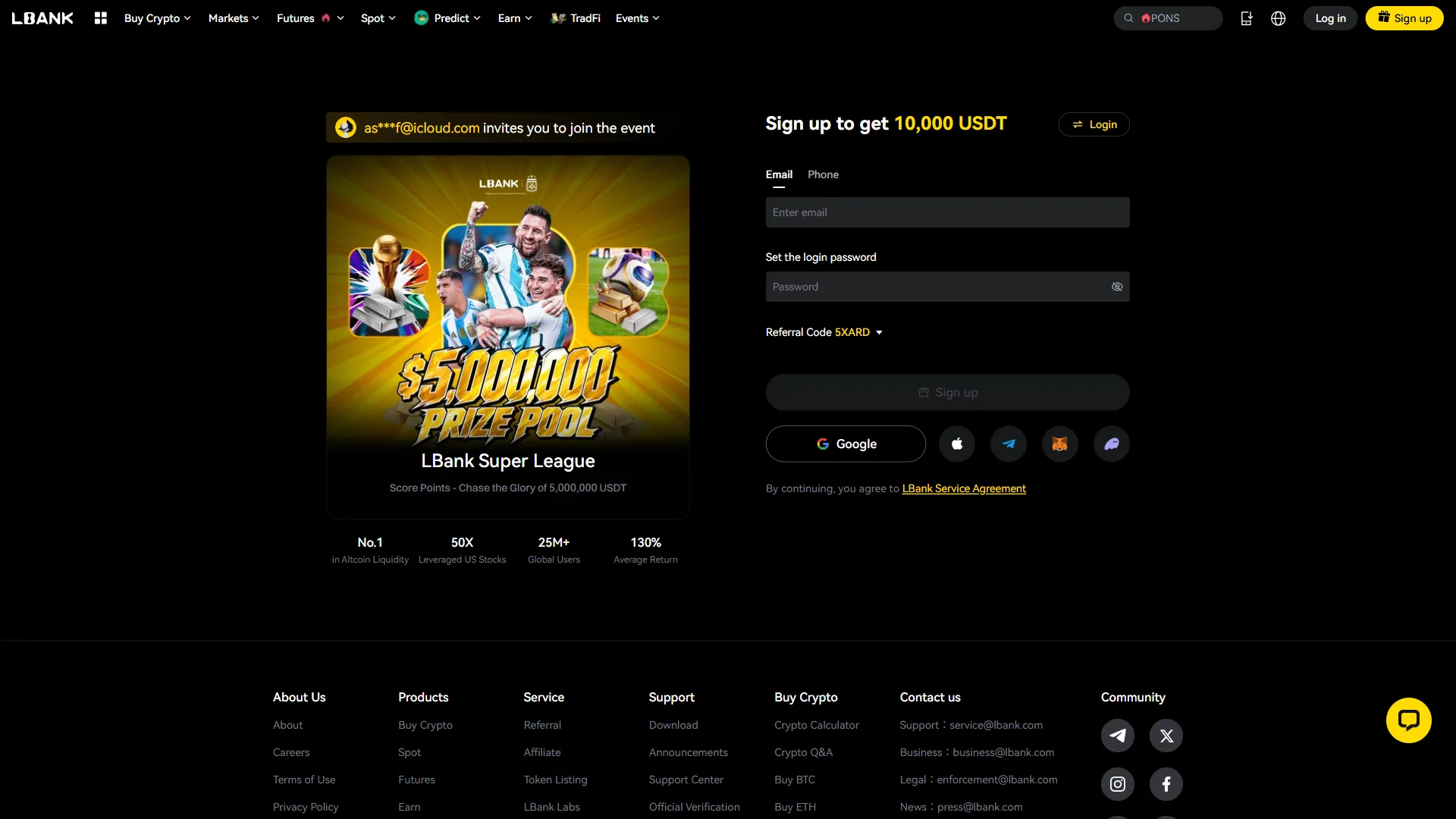
The screen shows “Referral Code 5XARD”, confirming that the referral code 5XARD was correctly applied.
chainhelm continuously verifies the validity of the code and confirms it remains usable.
What the LBank referral code “5XARD” gets you
Apply this code at sign-up to receive the following benefits on LBank:
- Benefit: a new-user bonus of up to 10,000 USD equivalent
- Expiration: None
- Eligibility: New users
To receive the benefits, you need to enter the code when you create your account. Be careful not to miss this step.
LBank sign-up steps with the referral code
We cover the sign-up process separately for PC/browser and smartphone (mobile).
PC/browser sign-up steps
-
First, open the LBank official sign-up page (the link applies the referral code). When you open it, you’ll see a screen like the one below.
-
Enter your email and set a password
— Figure 2The empty sign-up form2026-07-17 Email and password sit empty, while the referral code already reads "5XARD" and "Sign up" is still inactive. Source: chainhelm editorial On the sign-up panel, leave the “Email” tab selected and type your address into the “Enter email” field. Just below it, choose a password in the “Set the login password” field.
Check that the “Referral Code” box already reads “5XARD” — opening the page through the invitation link applies this for you, so there is nothing to type here.
While either field is still blank, the “Sign up” button stays grayed out and won’t respond. You can also start from a “Google”, Apple, Telegram, or wallet account instead, and continuing means you accept the “LBank Service Agreement”.
-
Check the password rules and sign up
— Figure 3The completed sign-up form2026-07-17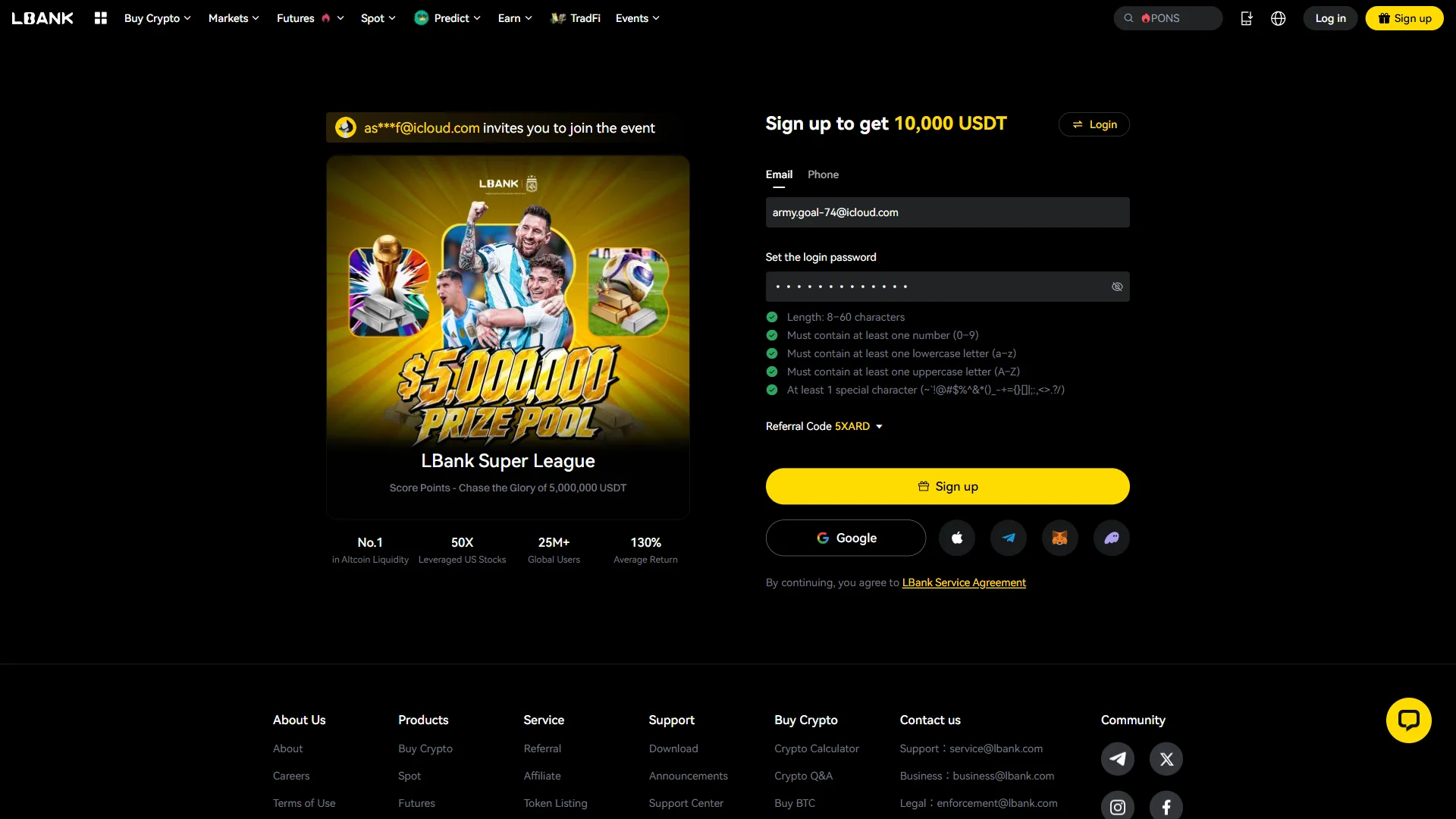
All five password rules show green checkmarks, and the "Sign up" button is now active in yellow. Source: chainhelm editorial As you type your password, a requirement list appears beneath the field. Confirm that every line has turned green: a length of 8 to 60 characters, plus at least one number, one lowercase letter, one uppercase letter, and one special character.
Once all five are met and both fields are filled, the “Sign up” button turns solid yellow. Click it to submit the form.
LBank then opens a “Security Verification” window so it can confirm the email address you entered.
-
Enter the email verification code
— Figure 4The verification window2026-07-17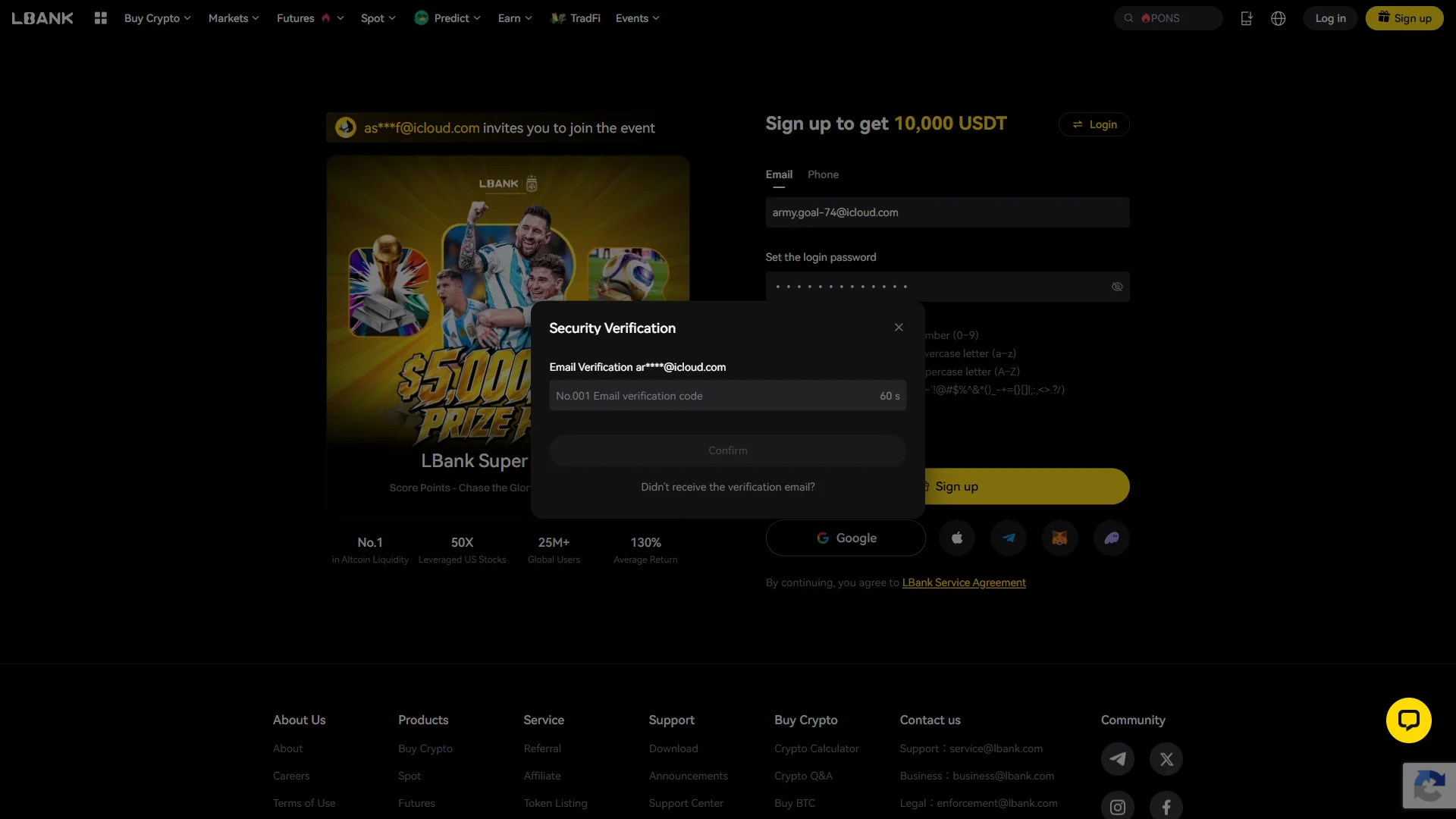
The code field is empty with a resend countdown running, and "Confirm" stays inactive until six digits are entered. Source: chainhelm editorial The “Security Verification” window asks for the code LBank just emailed to the address you registered. Open that inbox in a separate tab to read it — the next screen shows what to look for.
Type the six digits into the “No.001 Email verification code” field. The sequence number in front of it, “No.001”, should match the one in the email, and the counter beside the field shows how long until you can request a new code.
When the code is complete, the “Confirm” button becomes active; click it to finish creating your account. If nothing arrives, use “Didn’t receive the verification email?” to send it again.
-
Find the code in your inbox
— Figure 5The verification email2026-07-17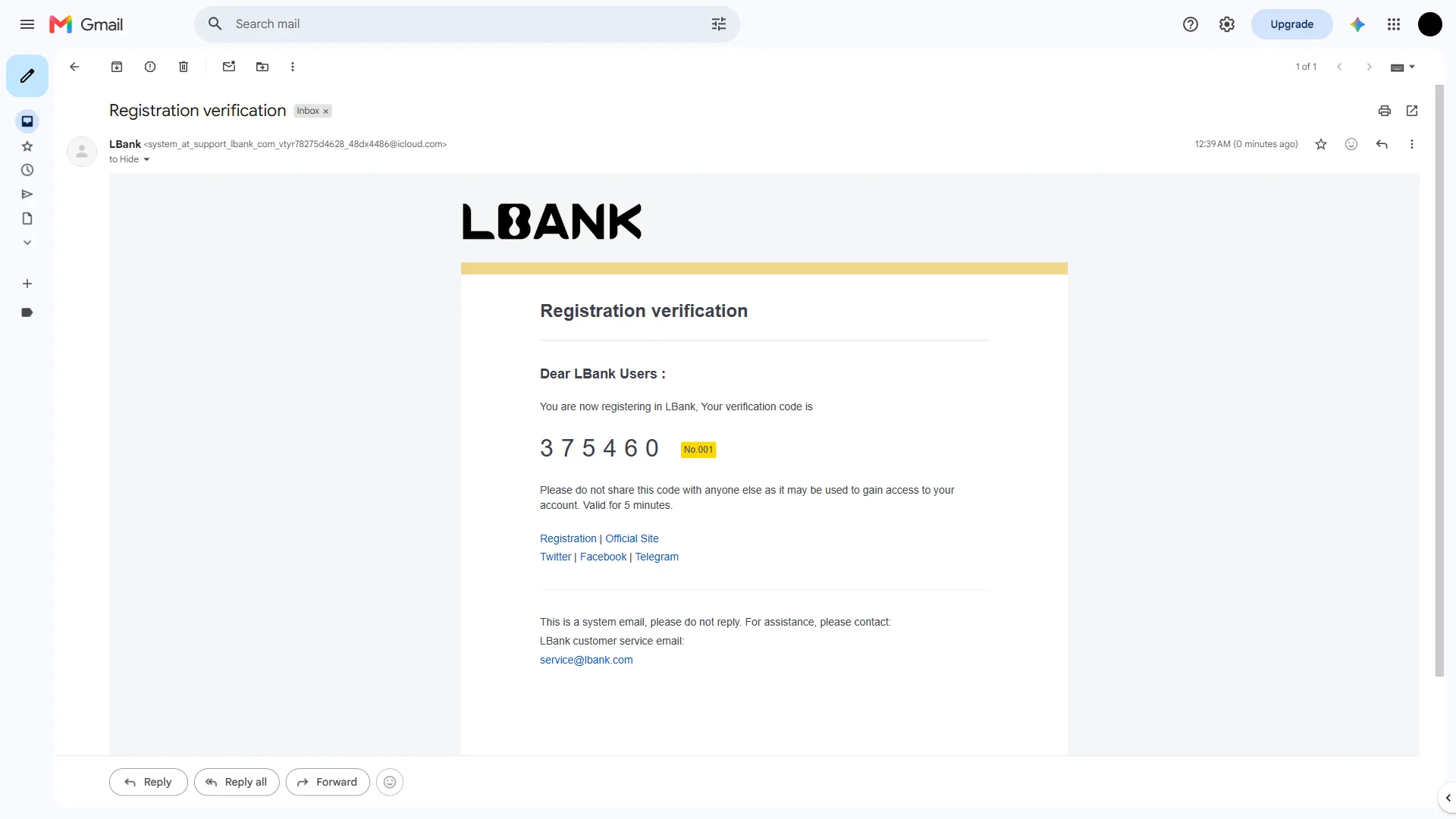
The email presents a six-digit code beside the "No.001" tag and notes that it is valid for five minutes. Source: chainhelm editorial Switch to the inbox for the address you signed up with and open the message titled “Registration verification” from “LBank”. It usually arrives within a minute.
Inside, the six-digit code is shown in large type next to the same “No.001” label from the verification window, along with a note that it is valid for only five minutes.
Copy those digits and return to the “Security Verification” window to enter them. LBank sends this as a system email and warns that the code should never be shared, since anyone who has it could reach your account.
Smartphone (iOS / Android) sign-up steps
-
First, open the LBank official sign-up page in the mobile app or browser (the link applies the referral code). When you open it, you’ll see a screen like the one below.
-
Enter your email and set a password
— Figure 6The empty sign-up form2026-07-17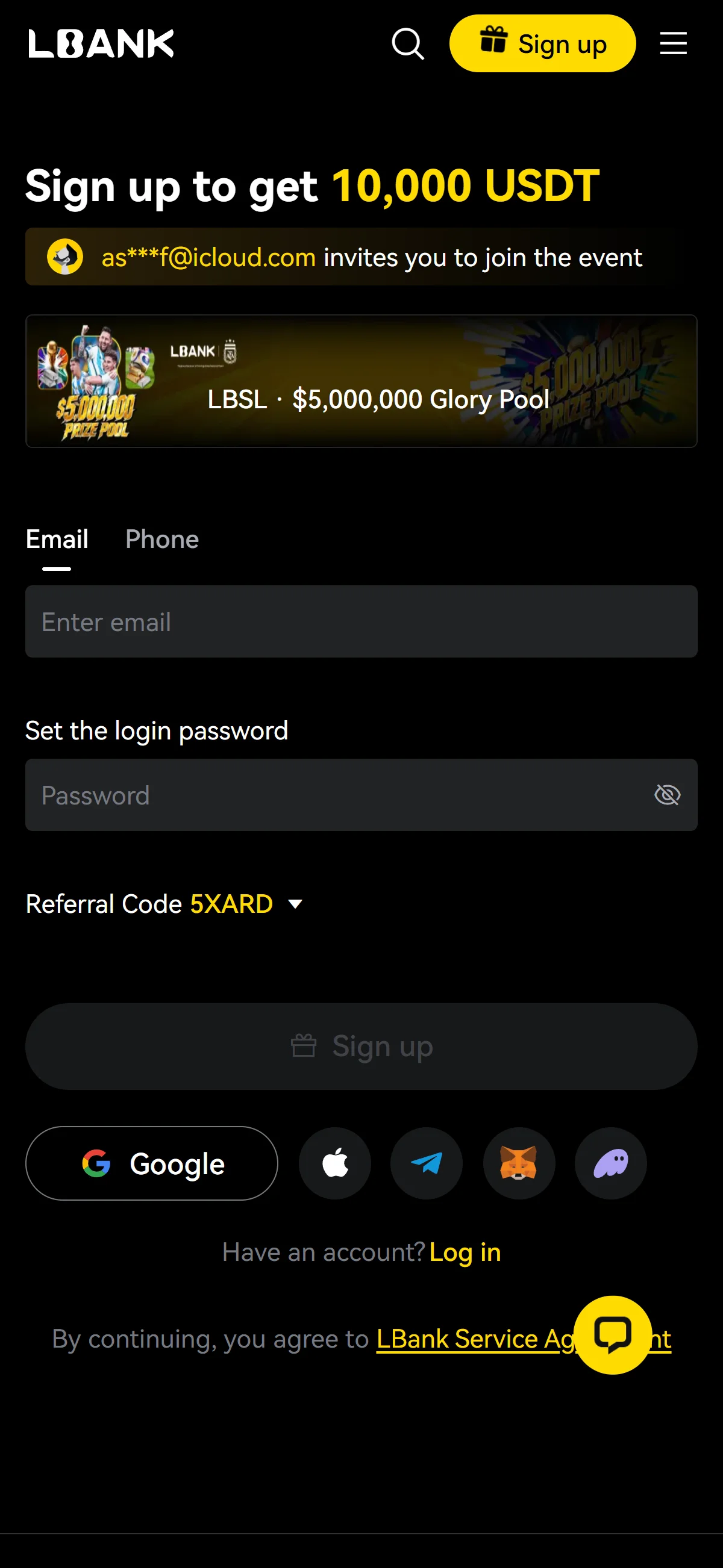
Email and password sit empty, while the referral code already reads "5XARD" and "Sign up" is still inactive. Source: chainhelm editorial On the sign-up panel, leave the “Email” tab selected and type your address into the “Enter email” field. Just below it, choose a password in the “Set the login password” field.
Check that the “Referral Code” box already reads “5XARD” — opening the page through the invitation link applies this for you, so there is nothing to type here.
While either field is still blank, the “Sign up” button stays grayed out and won’t respond. You can also start from a “Google”, Apple, Telegram, or wallet account instead, and continuing means you accept the “LBank Service Agreement”.
-
Check the password rules and sign up
— Figure 7The completed sign-up form2026-07-17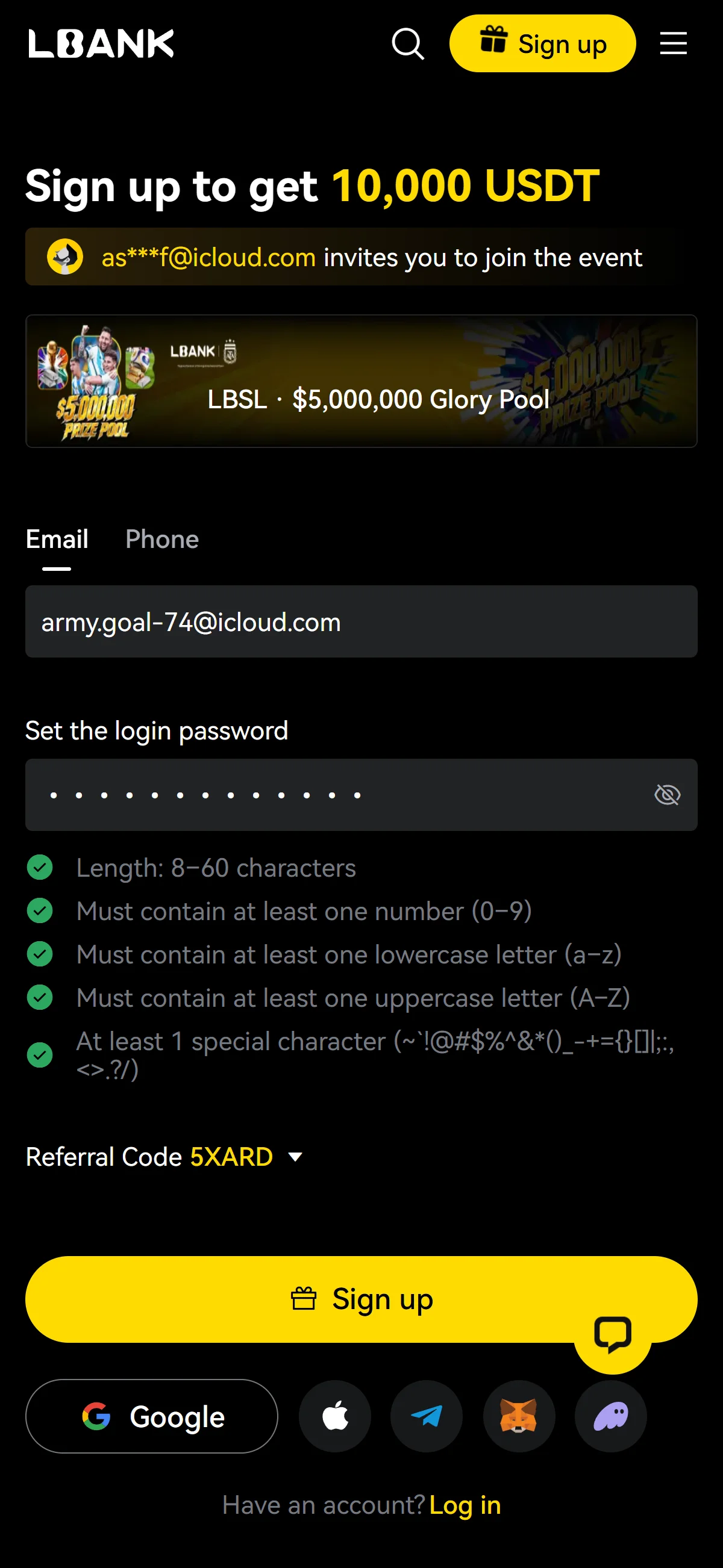
All five password rules show green checkmarks, and the "Sign up" button is now active in yellow. Source: chainhelm editorial As you type your password, a requirement list appears beneath the field. Confirm that every line has turned green: a length of 8 to 60 characters, plus at least one number, one lowercase letter, one uppercase letter, and one special character.
Once all five are met and both fields are filled, the “Sign up” button turns solid yellow. Click it to submit the form.
LBank then opens a “Security Verification” window so it can confirm the email address you entered.
-
Enter the email verification code
— Figure 8The verification window2026-07-17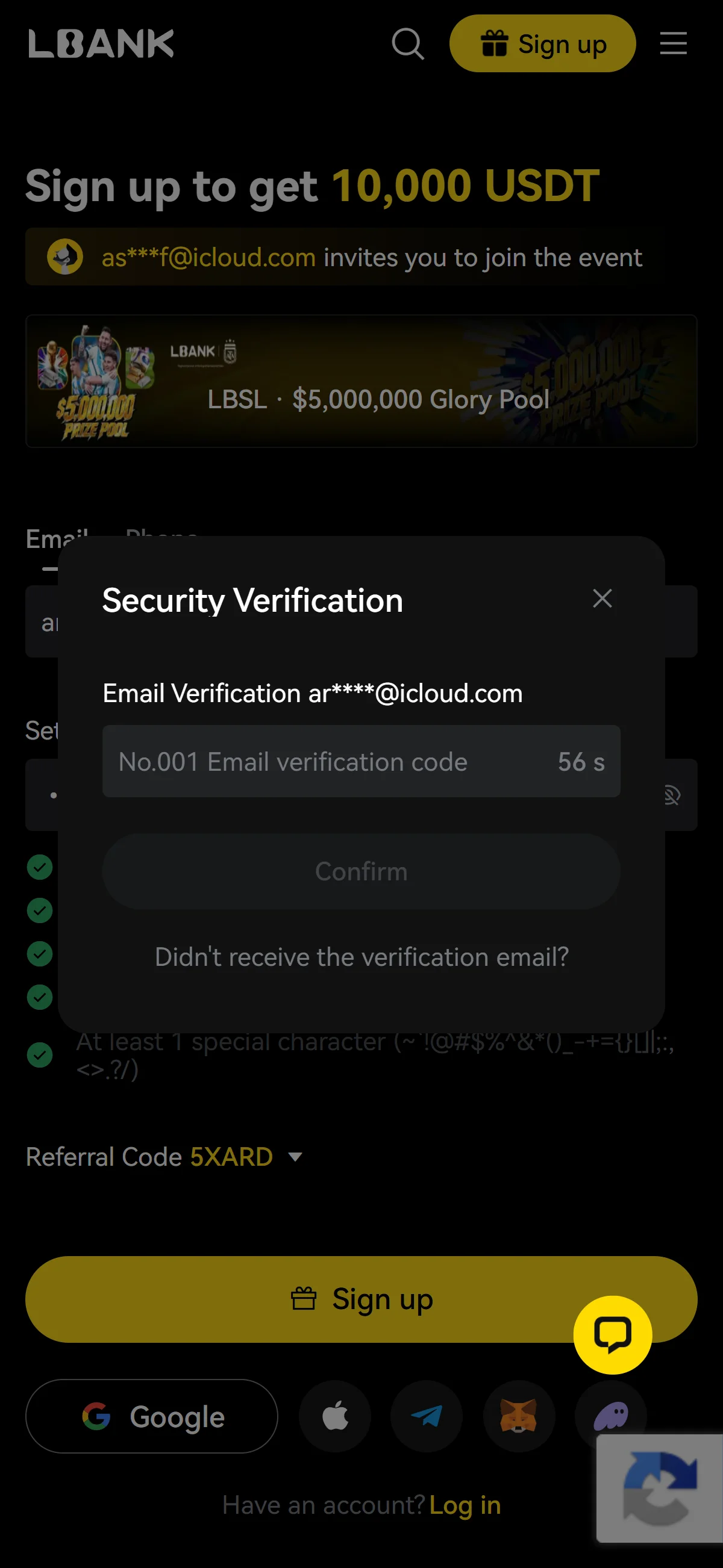
The code field is empty with a resend countdown running, and "Confirm" stays inactive until six digits are entered. Source: chainhelm editorial The “Security Verification” window asks for the code LBank just emailed to the address you registered. Open that inbox in a separate tab to read it — the next screen shows what to look for.
Type the six digits into the “No.001 Email verification code” field. The sequence number in front of it, “No.001”, should match the one in the email, and the counter beside the field shows how long until you can request a new code.
When the code is complete, the “Confirm” button becomes active; click it to finish creating your account. If nothing arrives, use “Didn’t receive the verification email?” to send it again.
-
Find the code in your inbox
— Figure 9The verification email2026-07-17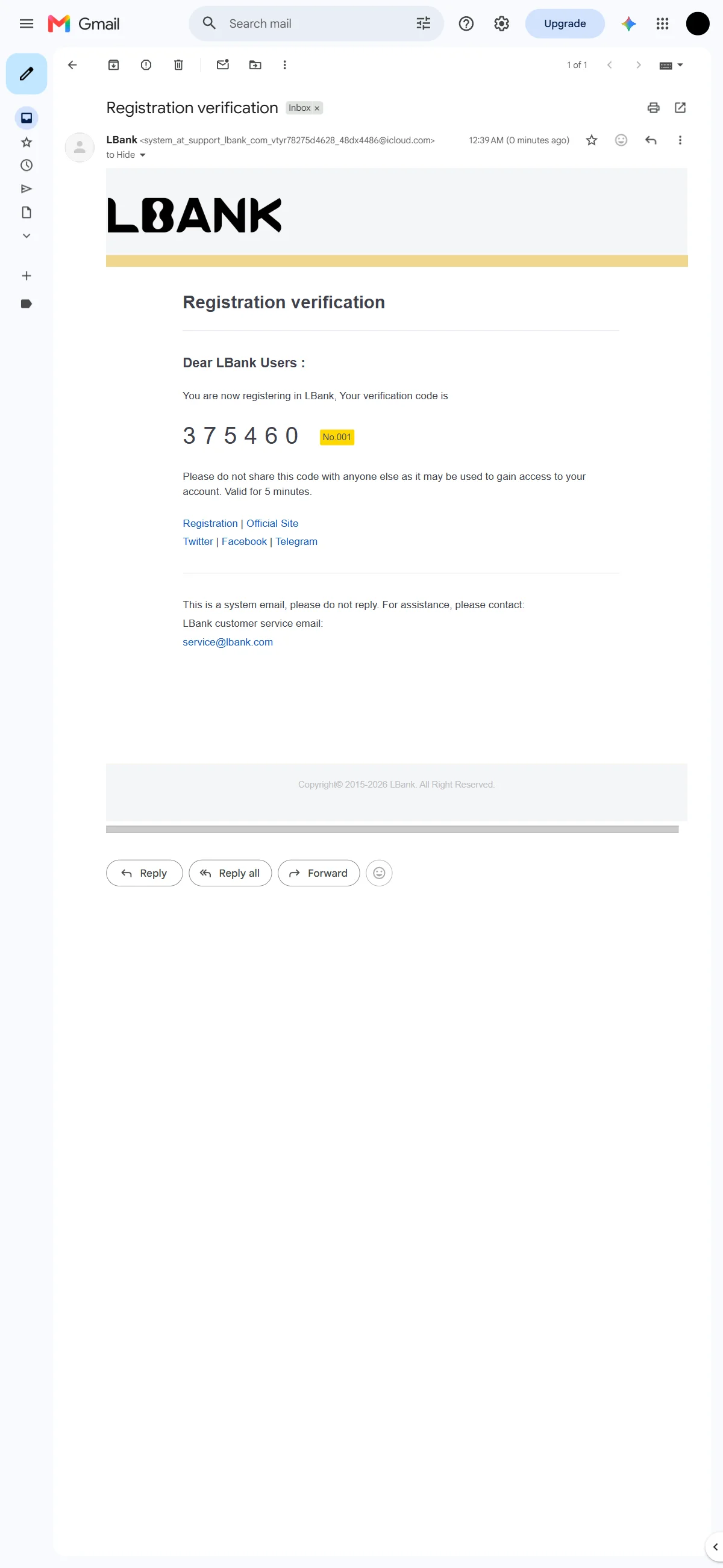
The email presents a six-digit code beside the "No.001" tag and notes that it is valid for five minutes. Source: chainhelm editorial Switch to the inbox for the address you signed up with and open the message titled “Registration verification” from “LBank”. It usually arrives within a minute.
Inside, the six-digit code is shown in large type next to the same “No.001” label from the verification window, along with a note that it is valid for only five minutes.
Copy those digits and return to the “Security Verification” window to enter them. LBank sends this as a system email and warns that the code should never be shared, since anyone who has it could reach your account.
What to do after signing up at LBank
We cover identity verification separately for PC/browser and smartphone (mobile).
PC/browser identity verification
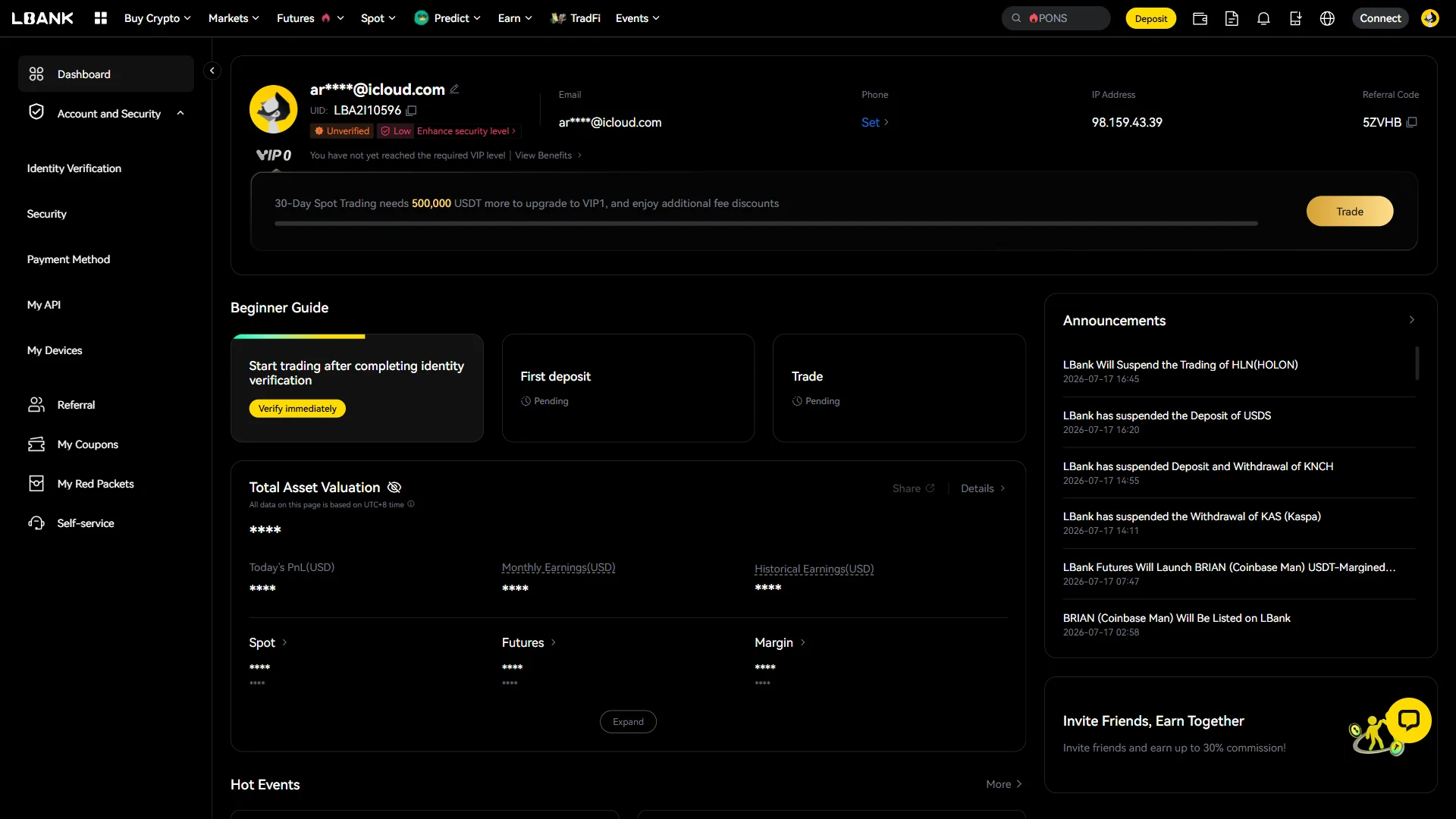
Once the account is created, LBank drops you on your dashboard. Next to your email address you’ll see an “Unverified” badge and a “Low” security marker — both expected for a brand-new account.
The “Beginner Guide” lays out what comes next: the first card, about trading after completing identity verification, sits ahead of “First deposit” and “Trade”, which both read “Pending” until you verify.
Click “Verify immediately” on that first card to begin identity verification. LBank opens the document-type screen where you choose which ID to submit.
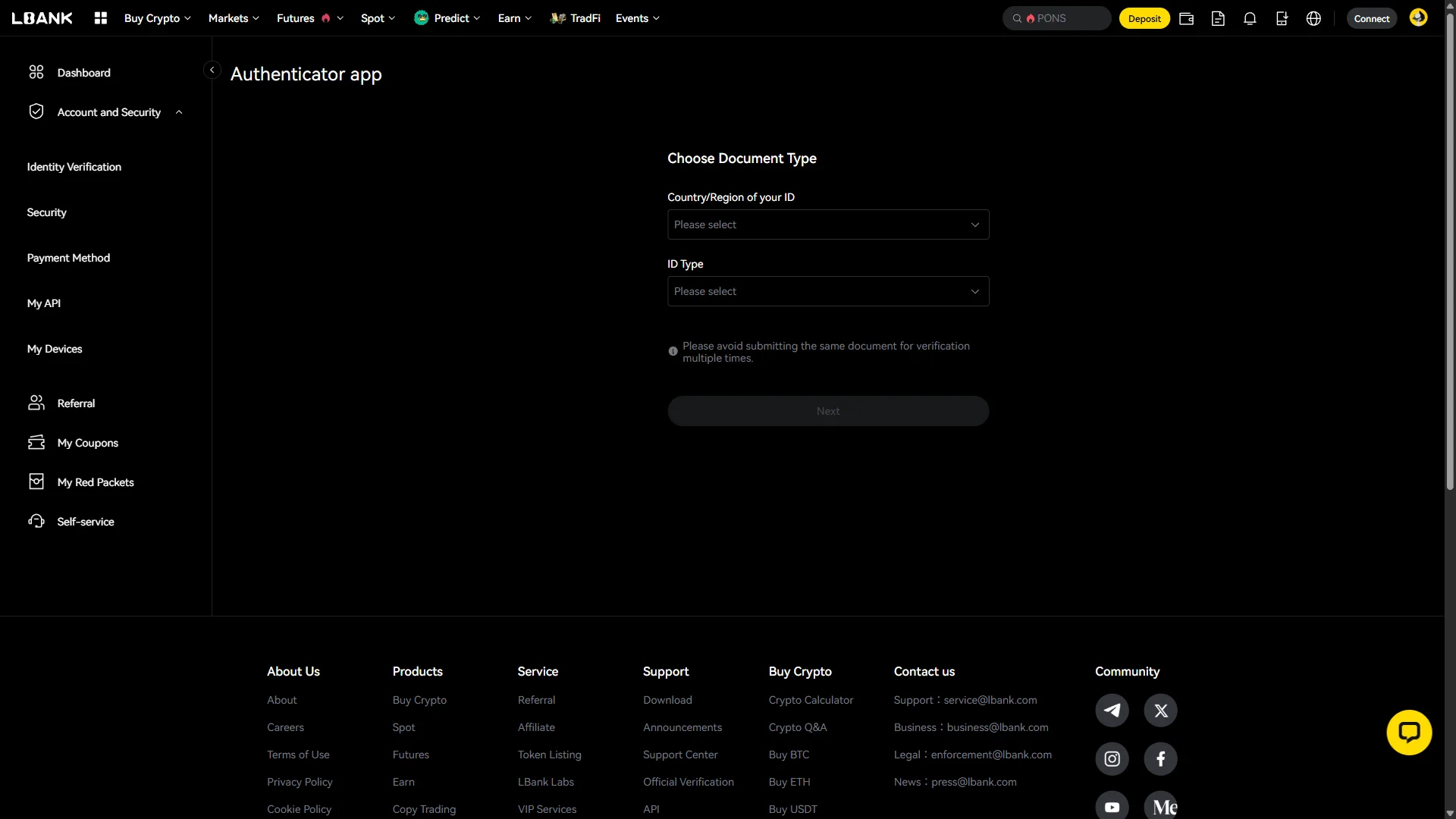
On the “Choose Document Type” screen, open the “Country/Region of your ID” dropdown and pick the country that issued your document. Both menus start on “Please select”.
Then open “ID Type” and choose the kind of document you’ll upload. LBank notes here to avoid submitting the same document for verification more than once.
Once both menus are set, the “Next” button becomes active. Click “Next” to continue.
Smartphone (iOS / Android) identity verification
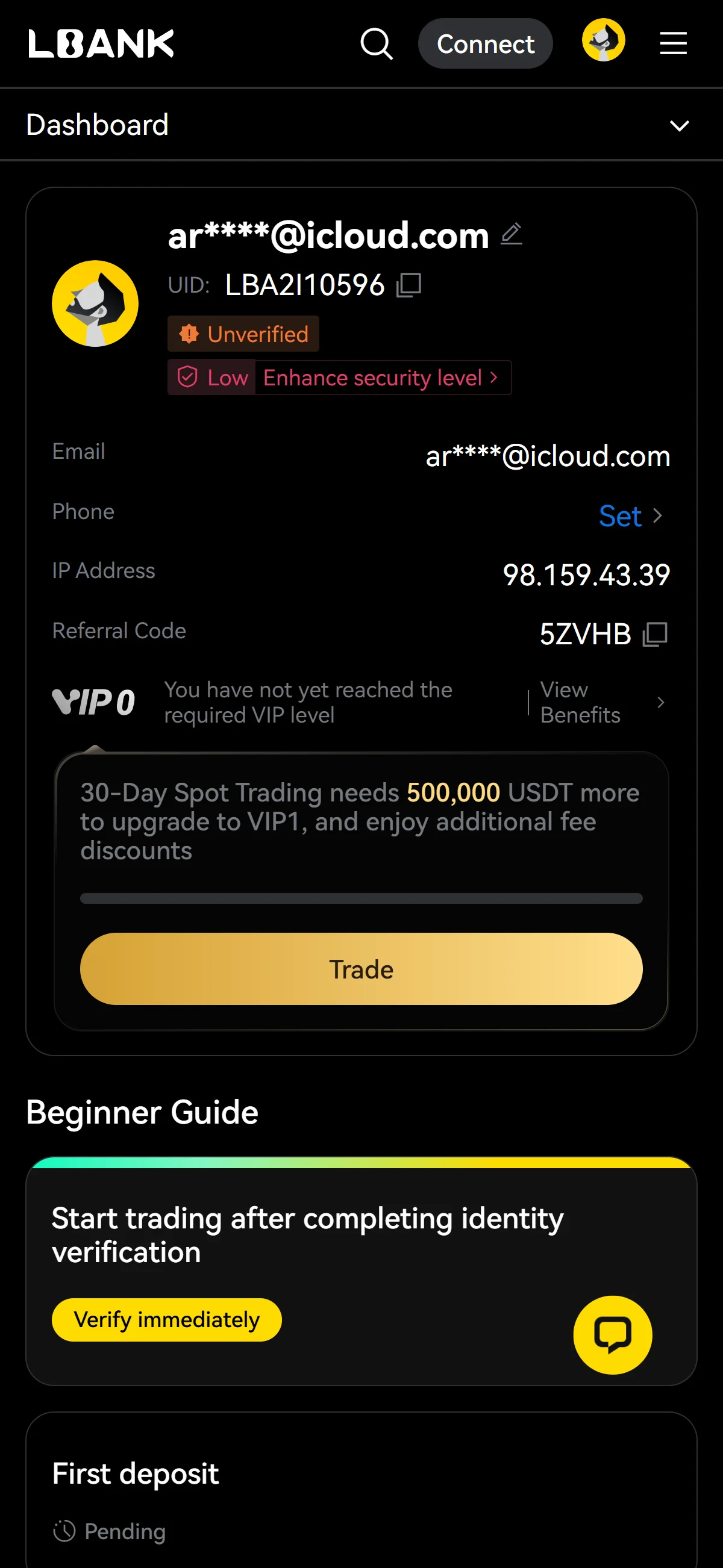
Once the account is created, LBank drops you on your dashboard. Next to your email address you’ll see an “Unverified” badge and a “Low” security marker — both expected for a brand-new account.
The “Beginner Guide” lays out what comes next: the first card, about trading after completing identity verification, sits ahead of “First deposit” and “Trade”, which both read “Pending” until you verify.
Click “Verify immediately” on that first card to begin identity verification. LBank opens the document-type screen where you choose which ID to submit.
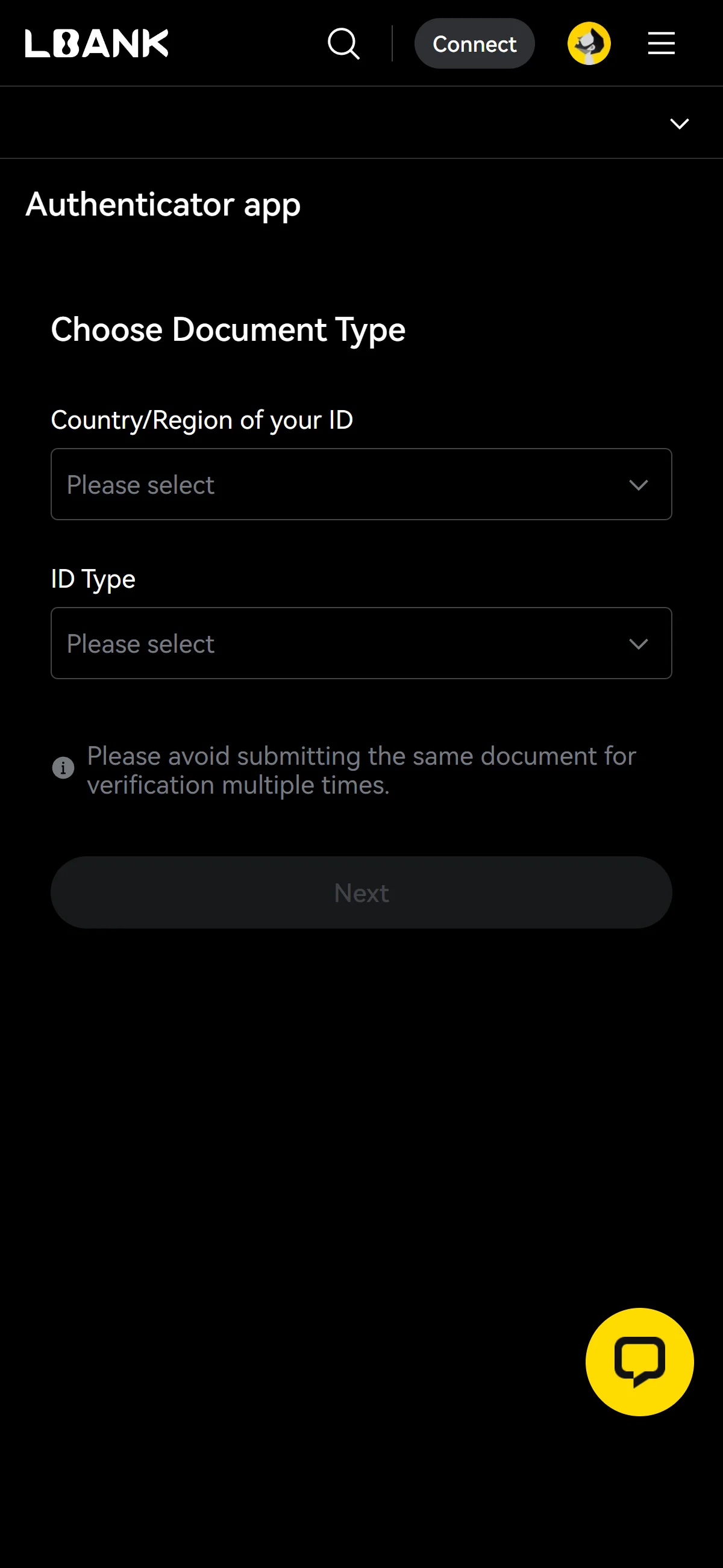
On the “Choose Document Type” screen, open the “Country/Region of your ID” dropdown and pick the country that issued your document. Both menus start on “Please select”.
Then open “ID Type” and choose the kind of document you’ll upload. LBank notes here to avoid submitting the same document for verification more than once.
Once both menus are set, the “Next” button becomes active. Click “Next” to continue.
With your account created, identity verification is the final gate: deposits and trading stay pending until your ID is approved, after which both become available.
The LBank referral code cannot be added after sign-up
The referral code can only be entered at sign-up — it cannot be added afterwards.
If you overlook this and complete registration without the code, there is no mechanism for linking it to that account after the fact.
If you have not yet completed KYC (identity verification), creating a fresh account is an option worth considering. Some exchanges, though, restrict opening more than one account in their terms of use.
- Does the sign-up screen show referral code 5XARD as applied? (Going through the link applies it automatically; where the exchange provides a code field, check there as well.)
- Once registration is complete, open the Referral / Rewards page and confirm that the referral shows as linked to your account
◆ ◇ ◆
What is LBank
LBank’s origins, scale, and leadership
LBank has been running since 2015, trading under the LBank brand while the company behind it, LBK Blockchain Co., Limited, is registered in the British Virgin Islands. That offshore base is not a footnote: it is the structural reason the exchange’s legal standing swings so widely from one country to the next, which the regulatory chapter below traces in detail.
What matters more than any single figure is how soft these numbers are. The 25-million-user count is LBank’s own; CoinMarketCap’s profile still puts it at “more than 12M,” and neither is independently audited — so chainhelm treats both as self-reported reach rather than verified scale. A reader should read the ranking the same way: LBank sits at #23 on CoinGecko but does not appear in CoinMarketCap’s spot top ten, so it is a mid-table venue by liquidity, not a headline one.
On governance, Allen Wei is the current Global CEO, and founder and co-founder Eric He stepped back as the exchange’s primary decision-maker in September 2024 — a change the risk chapter returns to, noted here only as the present line of authority.
Spot and futures fees, and the LBK token
LBank’s headline spot fee is a flat 0.10% for both maker and taker, easing only once you climb to the top VIP7 tier; perpetual futures start lower. The schedule below is current as of 2026-07-17.
- Spot (VIP0)
- 0.10% maker / 0.10% taker — scales to 0% maker / 0.03% taker at VIP7
- Futures (standard)
- 0.02% maker / 0.06% taker (personalized VIP rates require sign-in)
- Deposits
- No fee
- Withdrawals
- Per-asset dynamic network fee — no single published rate
What is missing from that table is as telling as what is in it. LBank’s own token, LBK, carries no confirmed spot-fee reduction — the official schedule has no native-token discount column at all, which sets LBank apart from the BNB or OKB model where holding the house token cuts the fee directly. For a fee-sensitive reader that removes one of the usual levers for lowering cost, and it is a durable structural trait rather than a number that will drift. Because withdrawals are charged as per-asset network fees with no single published rate, the true cost of moving a specific coin out is only visible at the withdrawal screen.
◆ ◇ ◆
What makes LBank distinct
LBank’s edge — early listings, high leverage, and no-mandatory-KYC
Where LBank tries to win is speed and reach into the long tail of the market. It runs an aggressive early- and pre-market listing operation — 184 spot assets went live in the second quarter of 2026, 34 of them as premieres — fed by a Launchpad and a Pre-Market venue built around meme and small-cap tokens. The panel below sets out the scale that defines its pitch.
Two traits sharpen that pitch further. LBank lets you create an account and trade crypto without mandatory identity verification — KYC is required only for fiat services — which lowers the barrier to starting but, as the risk chapter notes, is also an anti-money-laundering consideration. And its derivatives run hot: perpetuals reach up to 125x on major pairs and up to 200x on select memecoin Omni Futures contracts, well above what regulated venues offer retail. Around these sit LBank Predict, an event-prediction market with up to 5x, and the Visa-linked LBank Card.
The breadth behind the headline is real: spot spans roughly 800 coins across about 818 pairs, alongside USDT- and coin-margined futures (around 764 pairs), spot margin added in September 2025, copy trading, and an earn suite. In plain terms, this is a venue built for long-tail-altcoin hunters and high-leverage traders — not for someone who wants a short, vetted menu.
LBank versus the venues readers weigh against it
Set against the venues a reader actually weighs it against, LBank competes on price and coin count more than on trust. On headline spot fees it sits level with the biggest names — Binance and Bybit both match its flat 0.10% — while listing far more of the long tail (around 800 coins against roughly 448 at Binance and 447 at Bybit). The cards below place the four cross-market names most readers compare it with; the trade-off is consistent, since every one of them requires the mandatory KYC that LBank does not.
Binance
Bybit
OKX
Coinbase
Closer to home, the flagship a reader would line up against LBank shifts by market. In the United Kingdom it is Revolut and its Revolut X exchange (FCA-registered, GBP-native, maker 0.00% / taker 0.09%); in Singapore it is Coinhako (MAS-licensed, SGD onramp, a flat ≈0.6% and a narrower range), with OKX’s MAS-licensed Singapore arm as the breadth peer; in Australia it is CoinSpot (AUSTRAC- and ASIC-registered, around 480 coins, order-book 0.1% but Instant Buy 1%, spot only). Each trades some of LBank’s reach and leverage for domestic regulation and native-currency rails. These coin counts and volumes can be inflated across the board, so treat them as order-of-magnitude rather than precise.
The traders better served elsewhere
For some readers the honest answer is that LBank is the wrong venue. Anyone resident in a region its User Agreement excludes — the United States, Canada, Mainland China, Hong Kong and the other barred jurisdictions — cannot use the global platform at all, and should read the availability chapter below for the regulated route in their market. Just as clearly, security- and transparency-first holders are better served elsewhere: LBank carries a CER.live security grade of B, its Proof of Reserves is self-published rather than independently audited, and its on-chain reserves are small next to the volume it reports. The risk chapter puts numbers to each of those; the verdict here is simply that if audited custody and a clean volume record are your priority, a more heavily regulated exchange is the better home. This is the one place chainhelm draws the “who should look elsewhere” line — the rest of the article assumes a reader for whom LBank’s reach and leverage are the point.
◆ ◇ ◆
LBank regulatory landscape
The registrations LBank holds — and what they are not
LBank does hold registrations, but it matters what kind they are. The three it states — a FinCEN money-services registration in the United States, a FINTRAC one in Canada, and an AUSTRAC digital-currency-exchange registration in Australia — are all anti-money-laundering registrations, not securities or exchange licenses, and all are self-stated rather than independently verified. The figure lists them as LBank presents them.
- FinCEN MSB (United States)
- Reg. 31000218200614 — AML money-services registration, not a securities or exchange license
- FINTRAC MSB (Canada)
- M22603388 — AML money-services registration
- AUSTRAC DCE (Australia)
- DCE100674274-001, via LBK.INFO PTY. LTD — digital-currency-exchange AML registration
The revealing detail is the contradiction inside that list: LBank claims US and Canadian AML registrations while its own User Agreement excludes US and Canadian persons from the platform. chainhelm reads that gap as the signal it is — a registration is a filing, not a license to serve a market, and a reader should not treat any of these as permission to sign up from an excluded country. LBank also runs no affiliated regional entities, so where the global platform is closed to a reader’s market there is no local LBank to fall back on; the route is to a third-party alternative, which the next chapter handles country by country.
The excluded-regions map and access restrictions
The reach of that exclusion is wide. LBank’s User Agreement bars roughly thirty-six countries and regions — among them the United States, Canada, Mainland China, Hong Kong, Macau, Russia, Kazakhstan and Ukraine, alongside sanctioned states such as Iran, Iraq, North Korea, Cuba and Venezuela, plus the non-ISO territories of Crimea, Donetsk and Luhansk. On top of the outright bars, an SMS Service Restrictions update in force since December 2025 limits text-message verification and notification in certain regions for compliance reasons, routing affected users to alternative verification methods.
For readers in this article’s English-speaking markets the map is friendlier, as the panel below shows; that availability is why the United Kingdom, Singapore and Australia appear here as landscape context rather than in the country-by-country chapter that follows.
The regulatory trajectory
Put the pieces together and the direction of travel is clear. LBank is tightening its geo-compliance — a broad and lengthening excluded-regions list, regional SMS restrictions, a set of self-stated AML registrations — while remaining, at its core, a lightly regulated venue: it operates under registration frameworks rather than full licensing or audited Proof of Reserves, and it keeps the major regulated markets at arm’s length by excluding them.
The compliance surface is expanding, but it has not turned LBank into a licensed exchange.
For a reader that is the honest summary — geo-compliance is broadening, yet the underlying standing has not changed, and the availability chapter below is where that plays out market by market.
◆ ◇ ◆
LBank availability across major jurisdictions
United States — LBank excludes US persons
LBank is closed to readers in the United States. Its User Agreement excludes US persons, so registration on the global platform is not available — and that is a self-exclusion by LBank, not a US ban. No US enforcement action targets the exchange itself; it surfaces only as one named trading venue in the Department of Justice’s “Operation Token Mirrors” case out of Saitama (announced 2024-10-09), not as a defendant or the subject of any charge. For a US reader the practical upshot is simple: the route is a US-regulated venue, and the four below are where that leads.
Coinbase
Kraken
Crypto.com
Gemini
The choice among them is about rails and reach, not about getting back to LBank. Coinbase is the largest US-domiciled venue but its Advanced fees sit well above LBank’s flat 0.10%; Kraken covers every state except New York and Maine; Crypto.com carries the lowest headline fee of the set but is closed to New York; and Gemini, on its NYDFS trust charter, is the one option open to New York residents. All four require full KYC — the trade a US reader makes for domestic regulation.
India — FIU-IND takedown makes new sign-up unlawful
India is a harder stop still. On 2025-10-01 the Financial Intelligence Unit-India named LBank in a takedown order — number six of twenty-five offshore virtual-digital-asset providers — under the Prevention of Money Laundering Act and the IT Act, which means opening a new LBank account is not a lawful route for an Indian reader. LBank is not FIU-registered and does not deduct the 1% TDS required under Section 194S, so that tax handling would fall entirely on the user. The lawful path is an FIU-registered venue; the four below are the ones an Indian reader weighs.
CoinDCX
CoinSwitch
Binance
Bybit
Between them they cover the two honest options — stay domestic or use a registered global name. CoinDCX and CoinSwitch are Indian, run INR bank and UPI rails, and deduct the 1% TDS at source, which keeps compliance simple. Binance and Bybit are FIU-registered globally — Binance the closest match to LBank’s breadth, Bybit the closest to its high-leverage and copy-trading profile — but leave the 30% tax and 1% TDS for the user to manage. None is presented as a way back to LBank; each is a lawful destination in its own right.
◆ ◇ ◆
Risks to acknowledge before using LBank
Counterparty health — reserves, Proof of Reserves, and security grade
The first risk is the one you cannot control: whether the exchange can cover what it holds. LBank’s identified on-chain reserves come to only about 12.7M to 12.9M USD across three independent trackers — a figure that is very small next to the multi-billion-dollar daily volume and 25-million-user reach the exchange reports. The numbers sit in the panel below.
Two caveats make that thinner still. LBank’s Proof of Reserves is self-published, not audited: it announced a Merkle-tree PoR back in November 2022 but names no third-party auditor, and CER.live records the exchange as “without proof of reserves audit” even though LBank markets a 1:1 reserve claim. Its security grade is dragged down by a penetration-testing sub-score of zero, though it does hold ISO 27001 and runs an active bug bounty. chainhelm’s read for a reader is proportionate, not alarmist: none of this is evidence of loss, but it is a thin and self-attested safety margin, and it argues for keeping only working balances on the platform rather than treating it as long-term custody.
Volume integrity — the wash-trade record
The second risk is older, and it is about the honesty of the numbers. In March 2019 Bitwise, in a report to the US Securities and Exchange Commission, placed LBank among the exchanges whose reported volume looked largely non-economic — wash-traded — rather than among the ten it judged to carry genuine volume. That is a data-quality flag, not a breach, and no direct user-fund loss was ever quantified from it, but it is the reason the inflated-volume caveat runs through this whole article.
The same theme recurs more recently: LBank is named as one trading venue in the US Department of Justice’s 2024 “Operation Token Mirrors” case — only as a venue, with no charge or penalty against LBank itself — which is worth reading as a lingering volume-integrity signal rather than an enforcement finding against the exchange.
Governance change and shrinking market access
In September 2024, on the exchange’s ninth anniversary, founder and co-founder Eric He stepped down as its primary decision-maker amid an internal-management dispute over a listing-poster incident, leaving Allen Wei as Global CEO — a key-person change worth watching rather than a scandal. Around the same window, LBank’s map of usable markets has been contracting: it wound Russia down to withdraw-only from May 2025, and India, Indonesia and Türkiye have each since moved to restrict or block access. The timeline collects those moves.
Read forward rather than backward, the pattern is the real point: a venue that is tightening jurisdiction by jurisdiction is one whose access could be curtailed in a reader’s own market next, with little notice. That is not a prediction about any single country — it is the reason to watch the availability chapter above and to avoid parking on the platform anything you could not withdraw quickly.