— Contents 10 sections
- 01 Is the MEXC referral code “1GNtz” still active?
- 02 What the MEXC referral code “1GNtz” gets you
- 03 MEXC sign-up steps with the referral code
- 04 What to do after signing up at MEXC
- 05 The MEXC referral code cannot be added after sign-up
- 06 What is MEXC
- 07 What makes MEXC distinct
- 08 MEXC regulatory landscape
- 09 MEXC availability across major jurisdictions
- 10 Risks to acknowledge before using MEXC
chainhelm’s exclusive MEXC referral code is .
As of 2026-07-10, we signed up as a new user and confirmed that the referral code was applied.
Enter the code at sign-up to receive new-user bonuses worth up to 10,020 USD. You can only do this during registration, so we recommend entering it right then and there.
This article covers the sign-up process with the MEXC referral code, MEXC’s distinguishing features, availability across major jurisdictions, and the risks to acknowledge — with the sign-up flow and code application verified first-hand by chainhelm’s editorial team.
Is the MEXC referral code “1GNtz” still active?
The chainhelm editorial team created a fresh MEXC account on 2026-07-10 and confirmed that the referral code “1GNtz” is still active.
Here is the actual screen captured during verification.
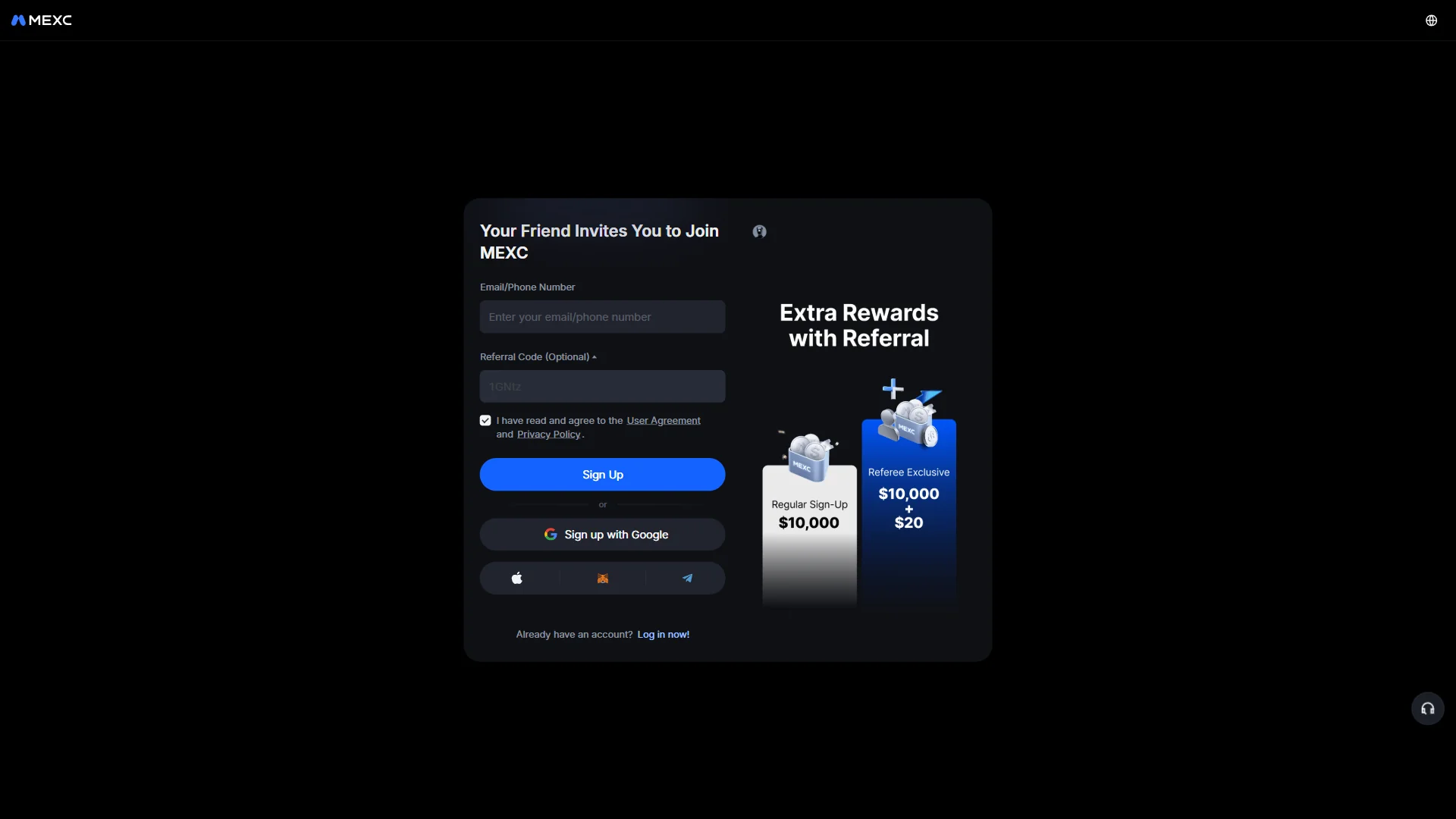
The screen shows “Your Friend Invites You to Join MEXC”, confirming that the referral code 1GNtz was correctly applied.
chainhelm continuously verifies the validity of the code and confirms it remains usable.
What the MEXC referral code “1GNtz” gets you
Apply this code at sign-up to receive the following benefits on MEXC:
- Benefit: new-user bonuses worth up to 10,020 USD
- Expiration: None
- Eligibility: New users
To receive the benefits, you need to enter the code when you create your account. Be careful not to miss this step.
MEXC sign-up steps with the referral code
We cover the sign-up process separately for PC/browser and smartphone (mobile).
PC/browser sign-up steps
-
First, open the MEXC official sign-up page (the link applies the referral code). When you open it, you’ll see a screen like the one below.
-
Open the referral sign-up form
The MEXC referral form2026-07-10 The sign-up form with an empty email field and the referral code 1GNtz already filled in. Source: chainhelm editorial Open the referral link to land on the “Your Friend Invites You to Join MEXC” sign-up form, then type your email address or phone number into the empty “Email/Phone Number” field. The “Referral Code (Optional)” field already carries the invite code 1GNtz, so you can leave it as it is.
Before moving on, make sure the “I have read and agree to the User Agreement and Privacy Policy” box stays ticked; the panel beside the form lays out the referral rewards that go with signing up this way.
If you would rather not use an email address or phone number, the form also lets you sign up with a Google, Apple, MetaMask, or Telegram account instead.
-
Submit the sign-up form
Sign-up form filled in2026-07-10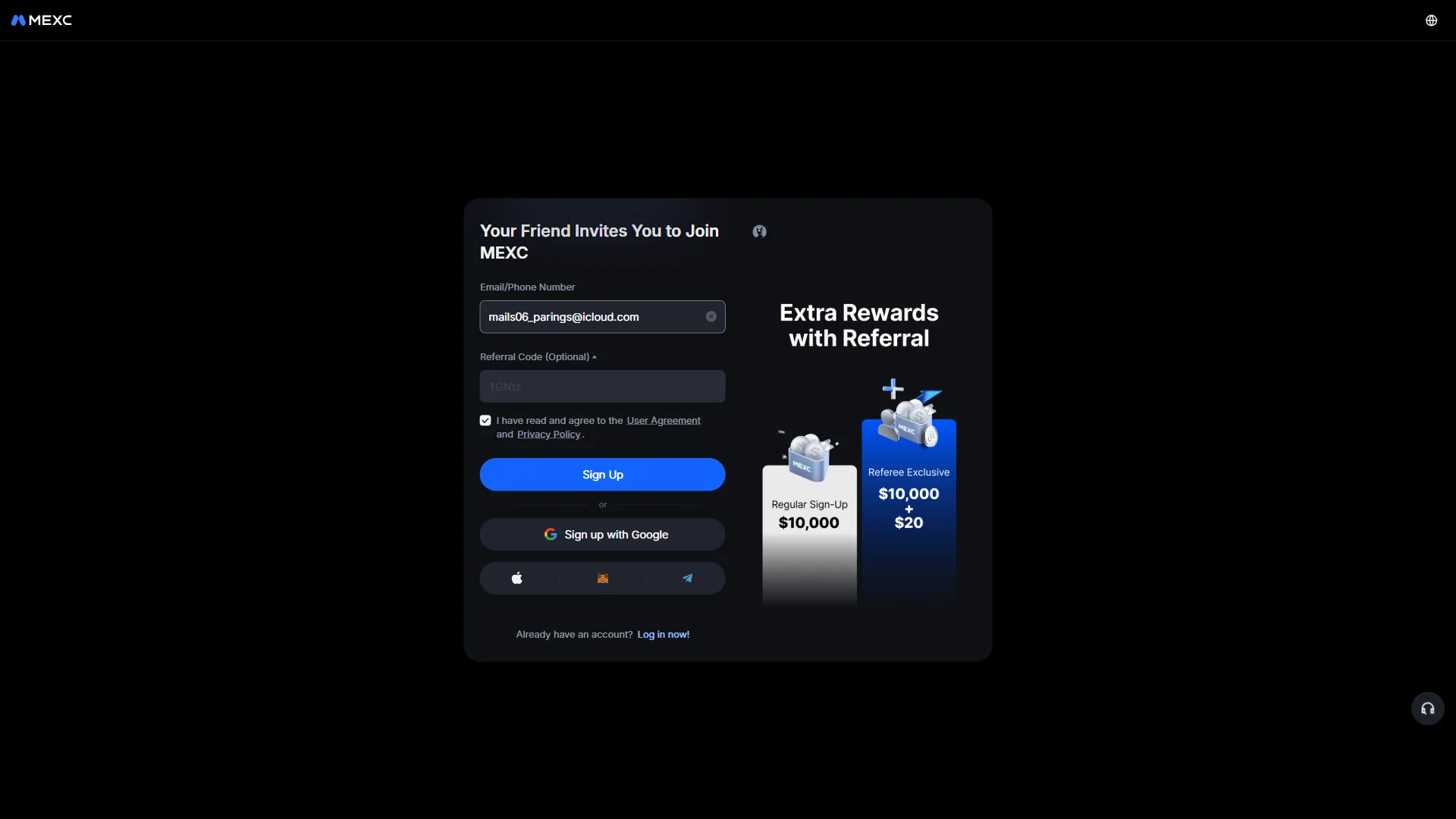
The email address entered in the field, with the "Sign Up" button ready to submit. Source: chainhelm editorial With your email address filled in and the referral code still in place, click the “Sign Up” button to submit the form. MEXC then brings up a slider puzzle to confirm you are a real person before moving on to email verification.
-
Pass the slider check
Slider puzzle check2026-07-10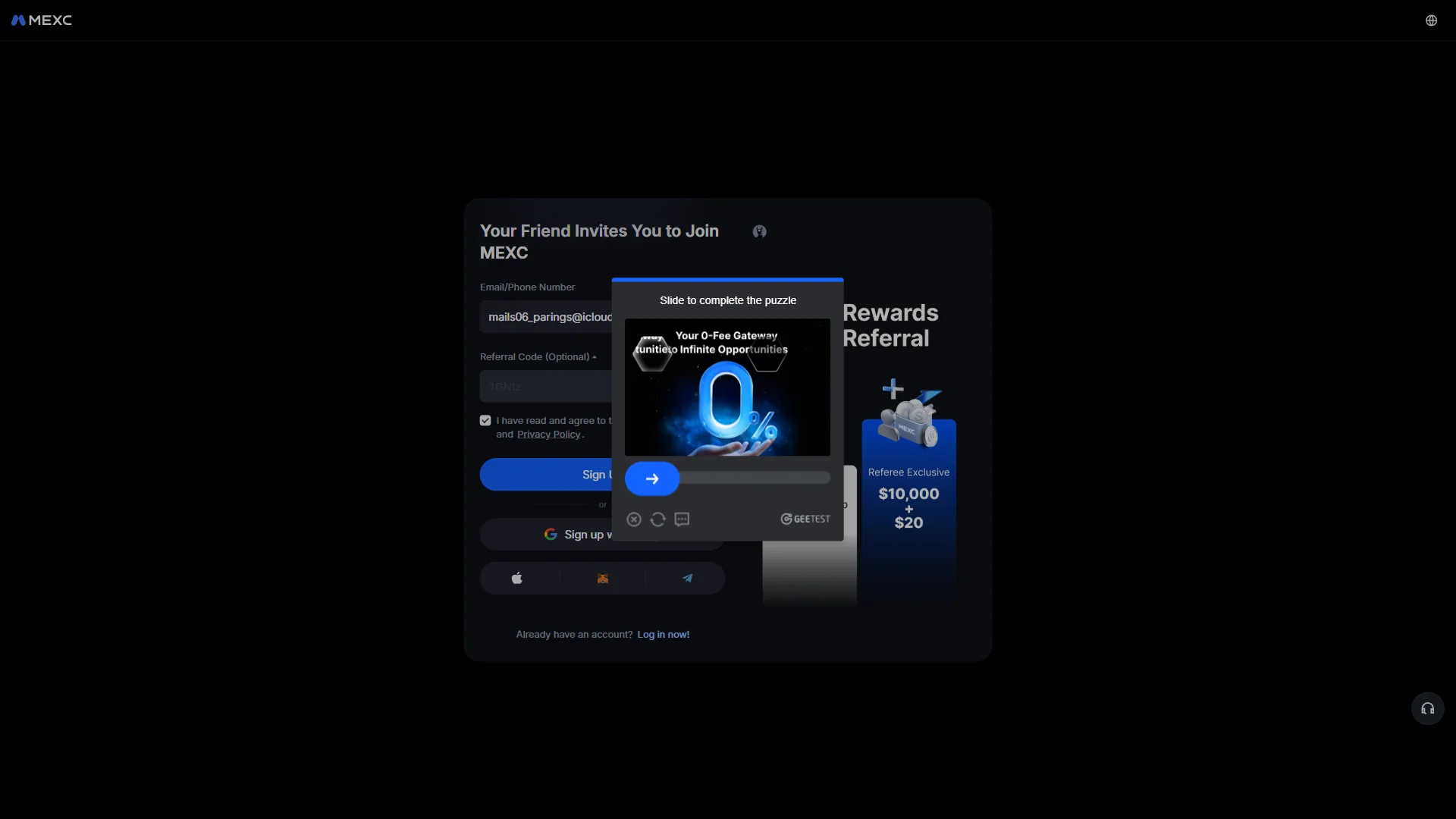
The slider captcha window that asks you to drag the handle to complete the puzzle. Source: chainhelm editorial Drag the handle along the bar at the bottom of the “Slide to complete the puzzle” window until the puzzle piece locks into place. Once the check passes, MEXC sends a code to your email and opens the code-entry screen.
-
Enter the email code
Email code entry2026-07-10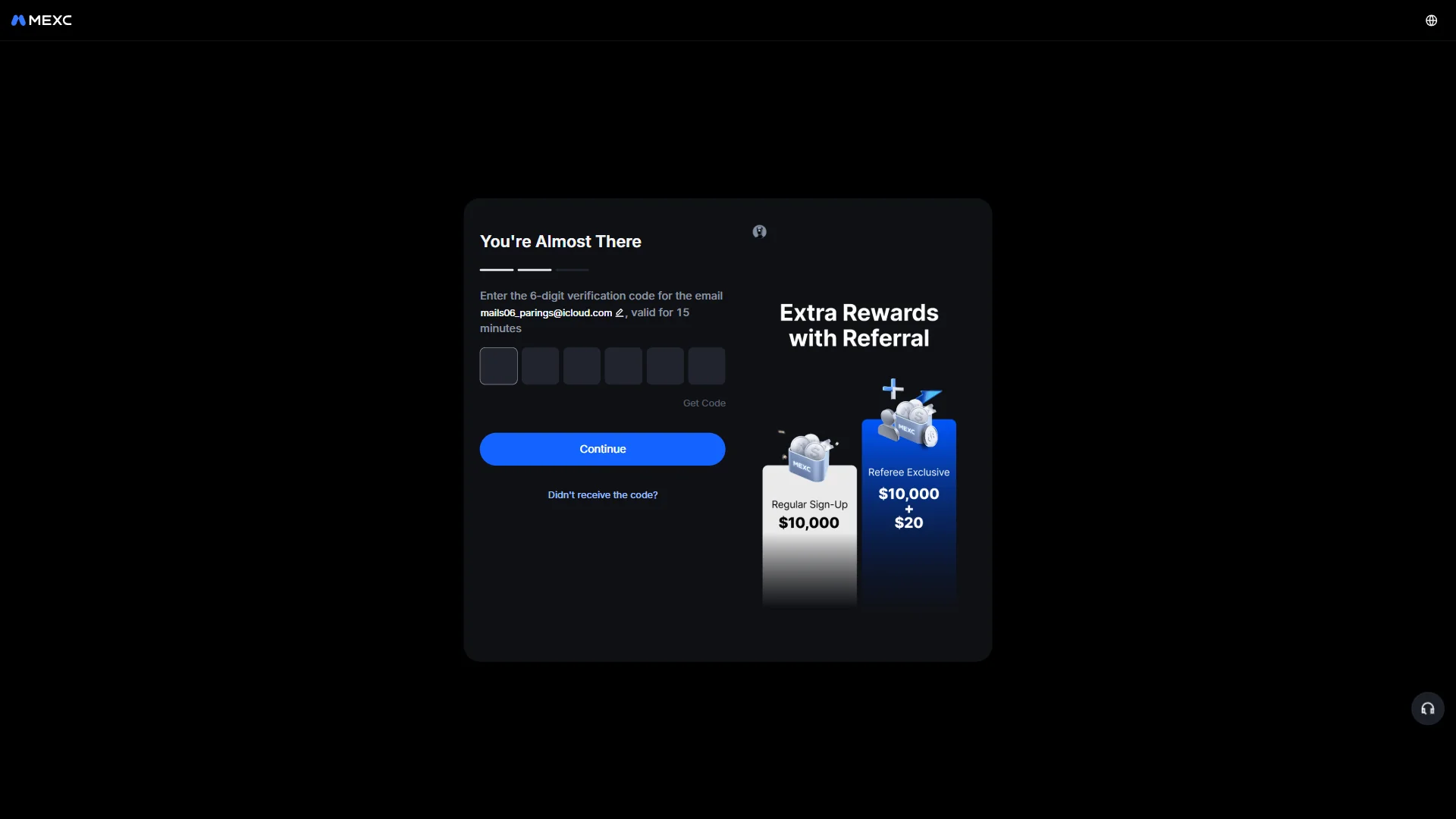
The verification screen with six empty code boxes and a note that the code stays valid for 15 minutes. Source: chainhelm editorial On the “You’re Almost There” screen, click “Get Code” to have the six-digit code sent to the email address shown, then type each digit into the six boxes. The code only stays valid for 15 minutes, so enter it promptly.
Click “Continue” to confirm the code and move on to setting your password. If nothing arrives, use “Didn’t receive the code?” to request it again.
-
Get the code from your inbox
Verification email2026-07-10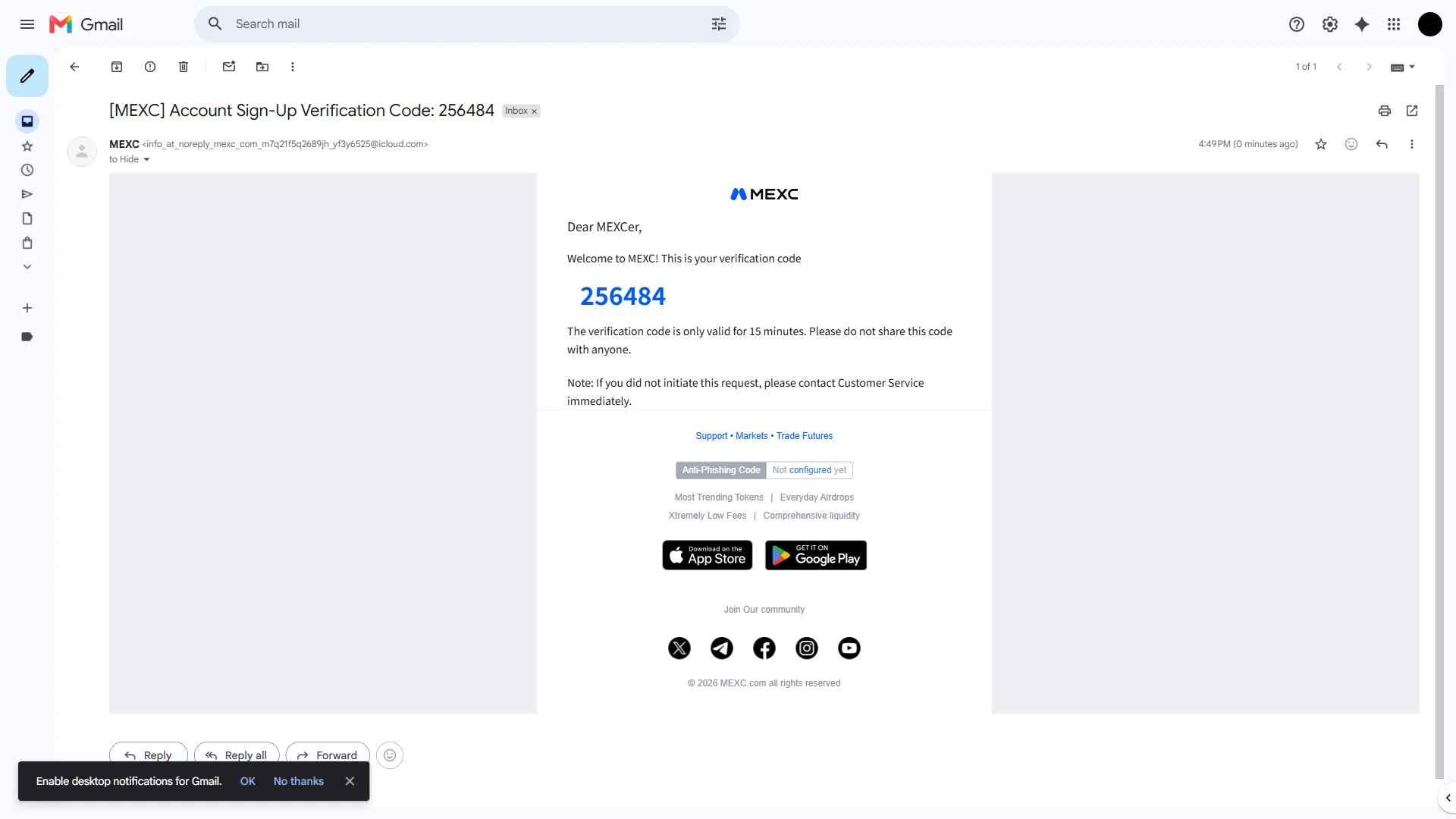
The MEXC sign-up email showing the six-digit verification code and its 15-minute validity. Source: chainhelm editorial Switch to your email inbox and open the message titled “[MEXC] Account Sign-Up Verification Code”. The six-digit code sits in large blue text inside the email, so copy it and paste it back into the boxes on the sign-up screen. Keep in mind that the code works for only 15 minutes.
-
Set your account password
Set password screen2026-07-10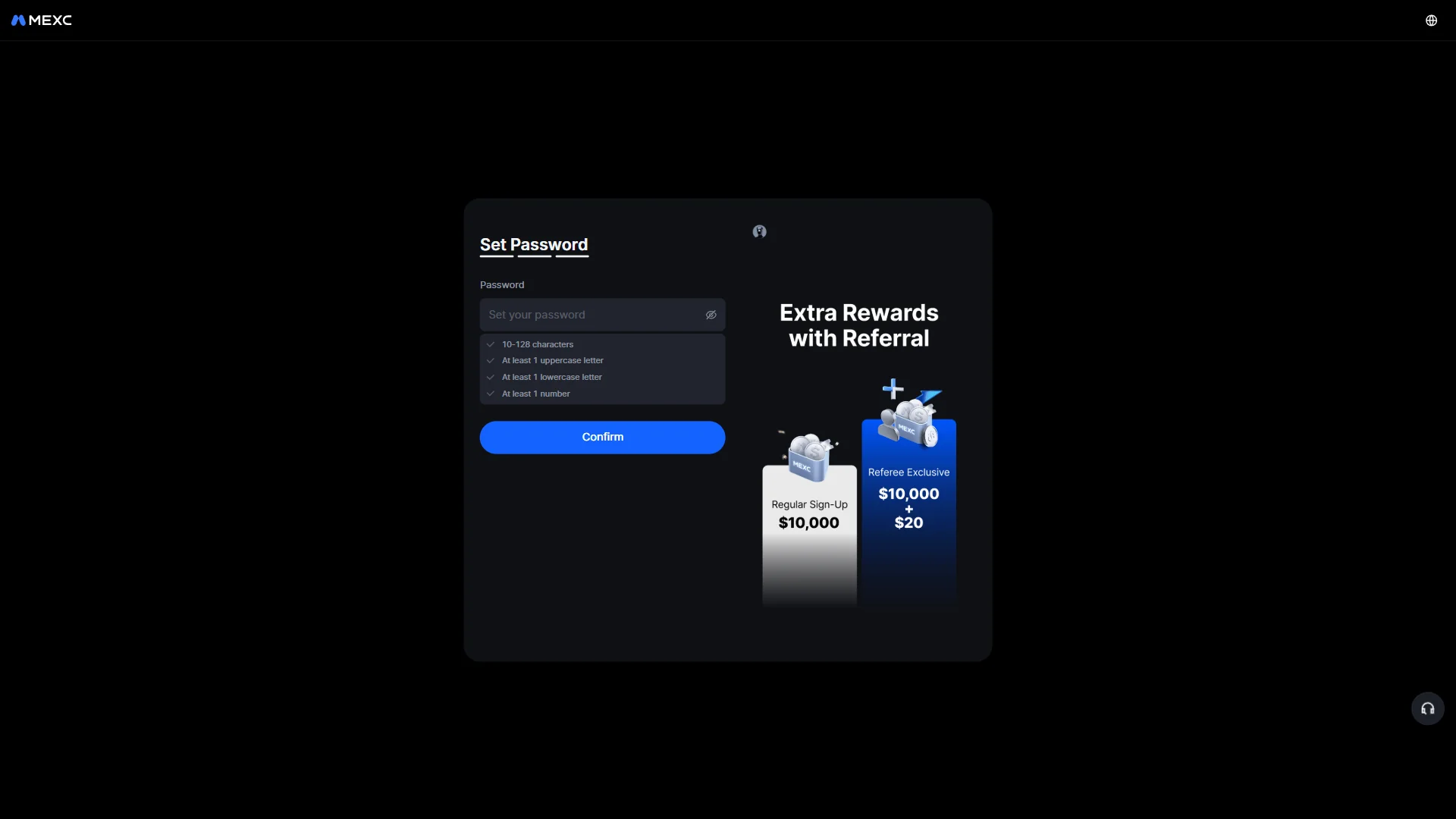
The empty password field above a checklist of the rules the password has to meet. Source: chainhelm editorial On the “Set Password” screen, type a password into the empty “Password” field. The checklist just below spells out the rules it has to meet: 10 to 128 characters, plus at least one uppercase letter, one lowercase letter, and one number. Click the eye icon if you want to check what you have typed.
-
Confirm the password
Password rules met2026-07-10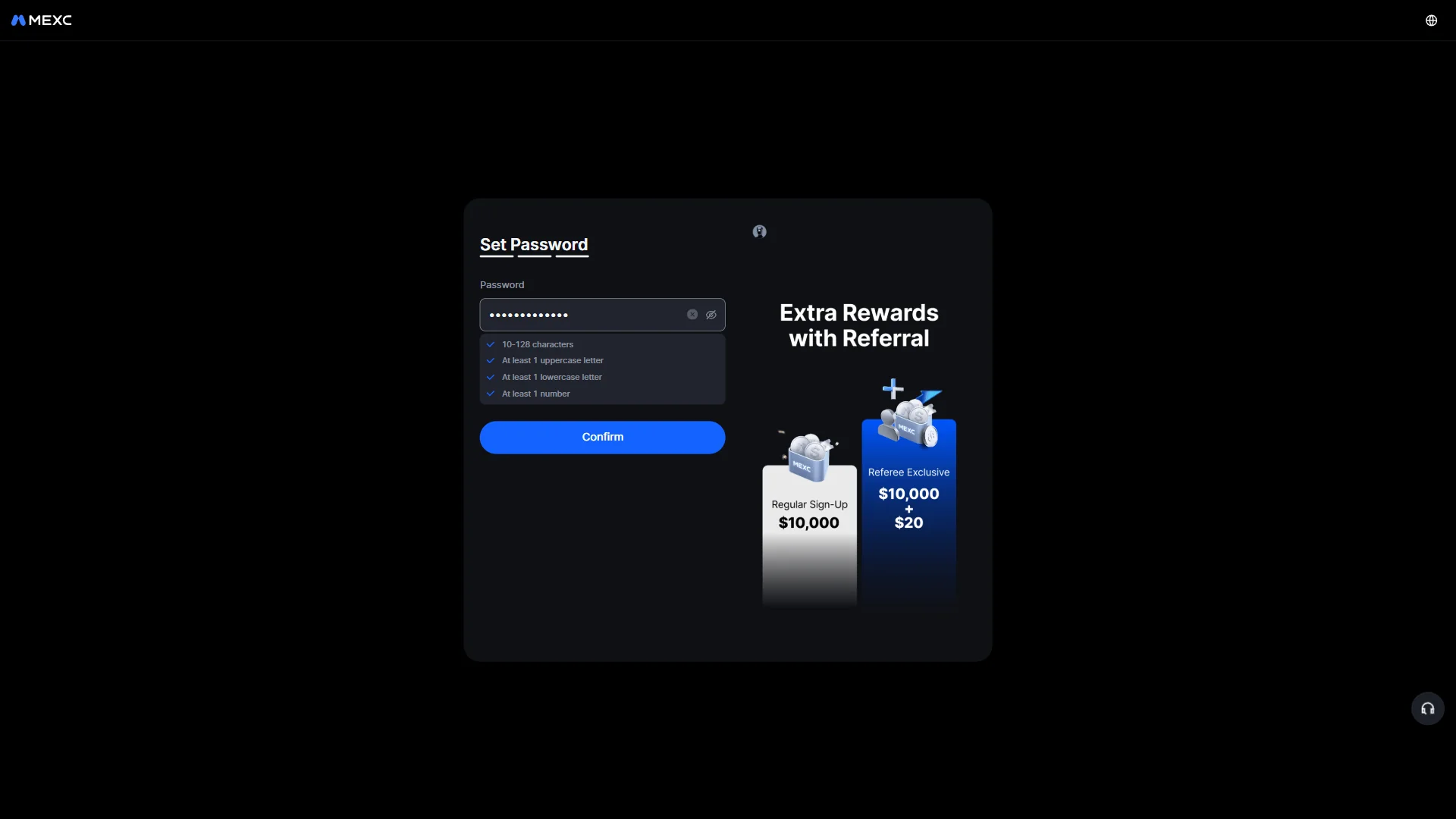
The password entered with every rule in the checklist marked as satisfied. Source: chainhelm editorial Once every rule in the checklist turns blue to show your password is accepted, click the “Confirm” button. MEXC creates your account and brings up a window asking you to complete KYC verification.
-
Start KYC verification
KYC prompt window2026-07-10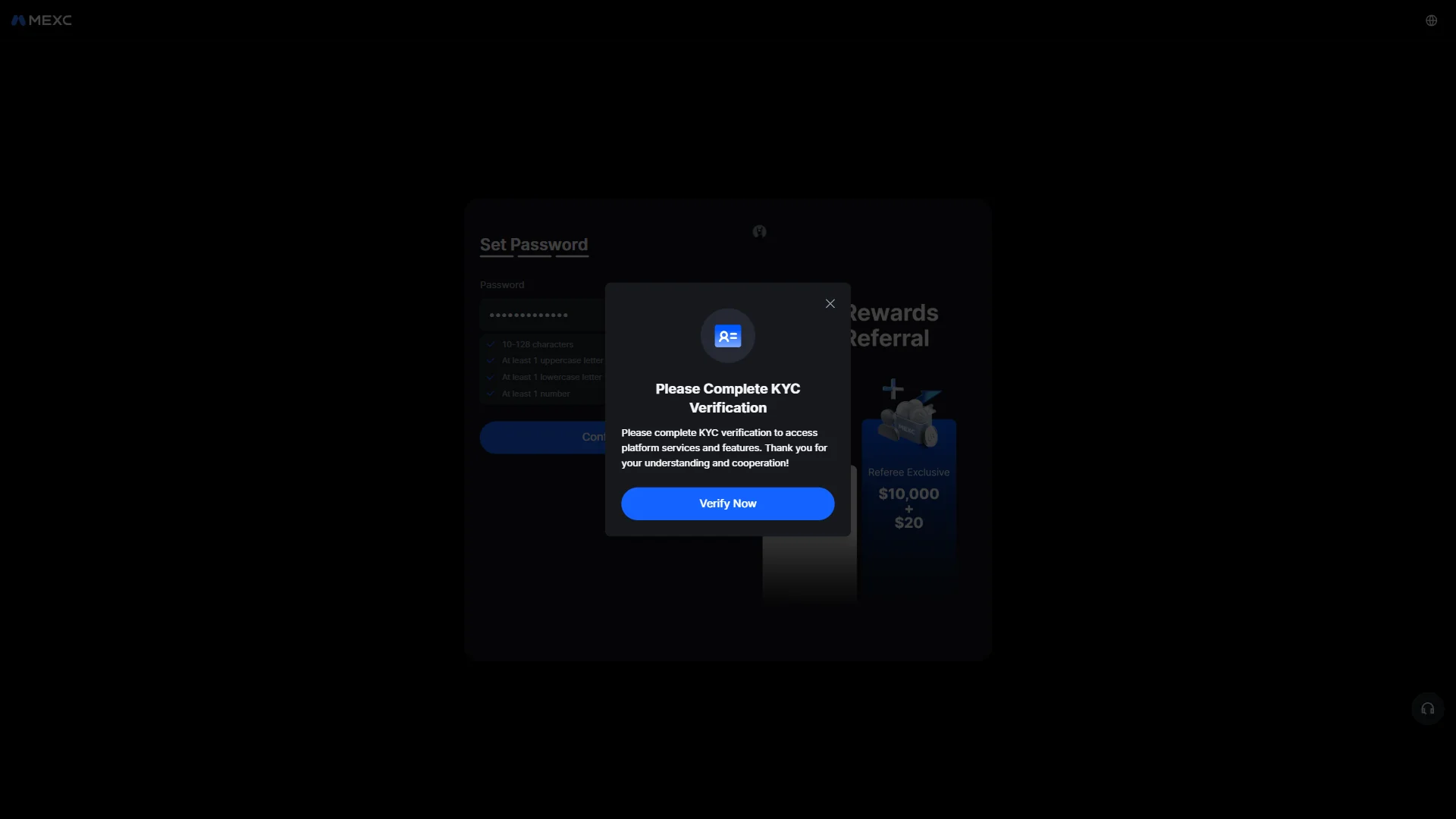
The pop-up asking you to complete KYC verification, with a "Verify Now" button. Source: chainhelm editorial After your account is created, a “Please Complete KYC Verification” window opens over the form. Click “Verify Now” to open the identification page and begin confirming your identity. You can also close the window with the X and return to KYC later.
Smartphone (iOS / Android) sign-up steps
-
First, open the MEXC official sign-up page in the mobile app or browser (the link applies the referral code). When you open it, you’ll see a screen like the one below.
-
Open the referral sign-up form
The MEXC referral form2026-07-10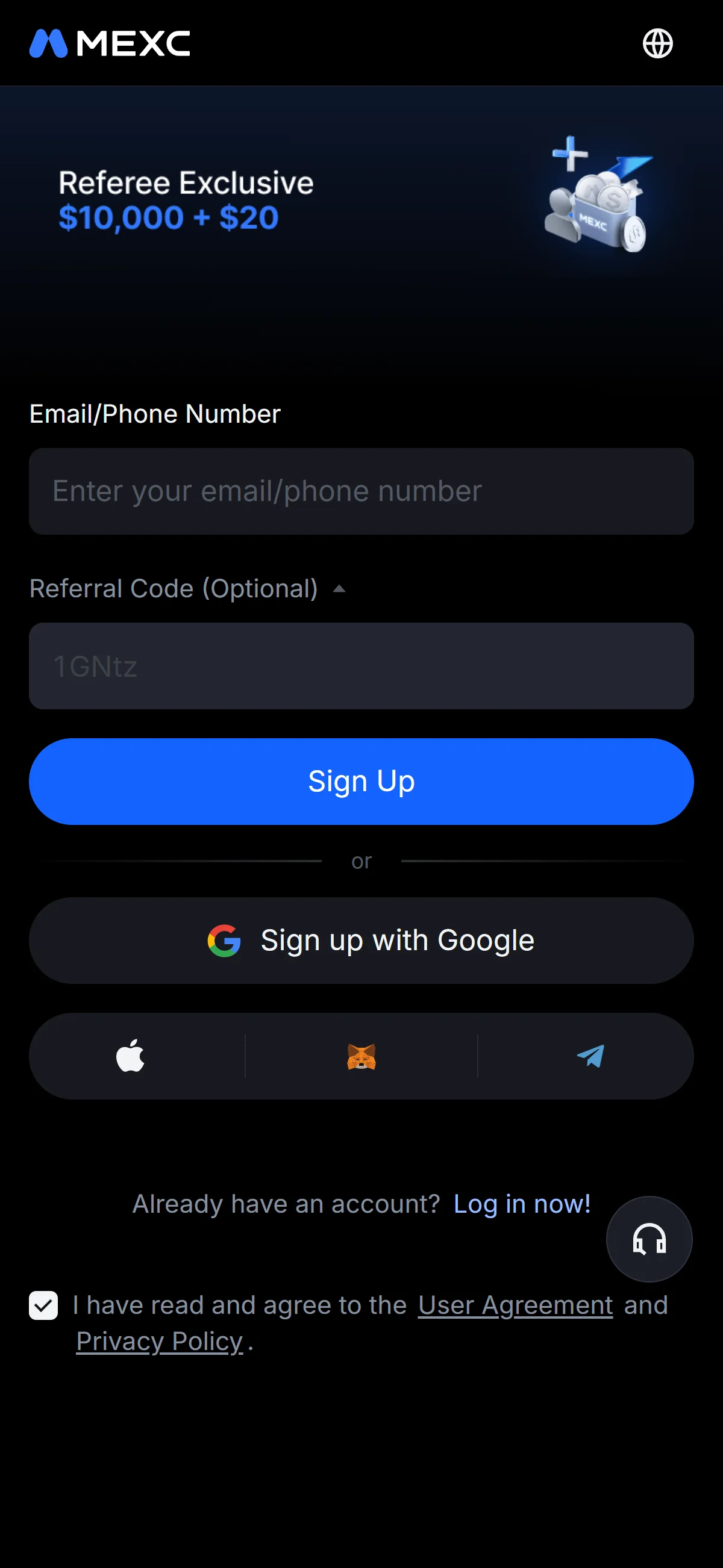
The sign-up form with an empty email field and the referral code 1GNtz already filled in. Source: chainhelm editorial Open the referral link to land on the “Your Friend Invites You to Join MEXC” sign-up form, then type your email address or phone number into the empty “Email/Phone Number” field. The “Referral Code (Optional)” field already carries the invite code 1GNtz, so you can leave it as it is.
Before moving on, make sure the “I have read and agree to the User Agreement and Privacy Policy” box stays ticked; the panel beside the form lays out the referral rewards that go with signing up this way.
If you would rather not use an email address or phone number, the form also lets you sign up with a Google, Apple, MetaMask, or Telegram account instead.
-
Submit the sign-up form
Sign-up form filled in2026-07-10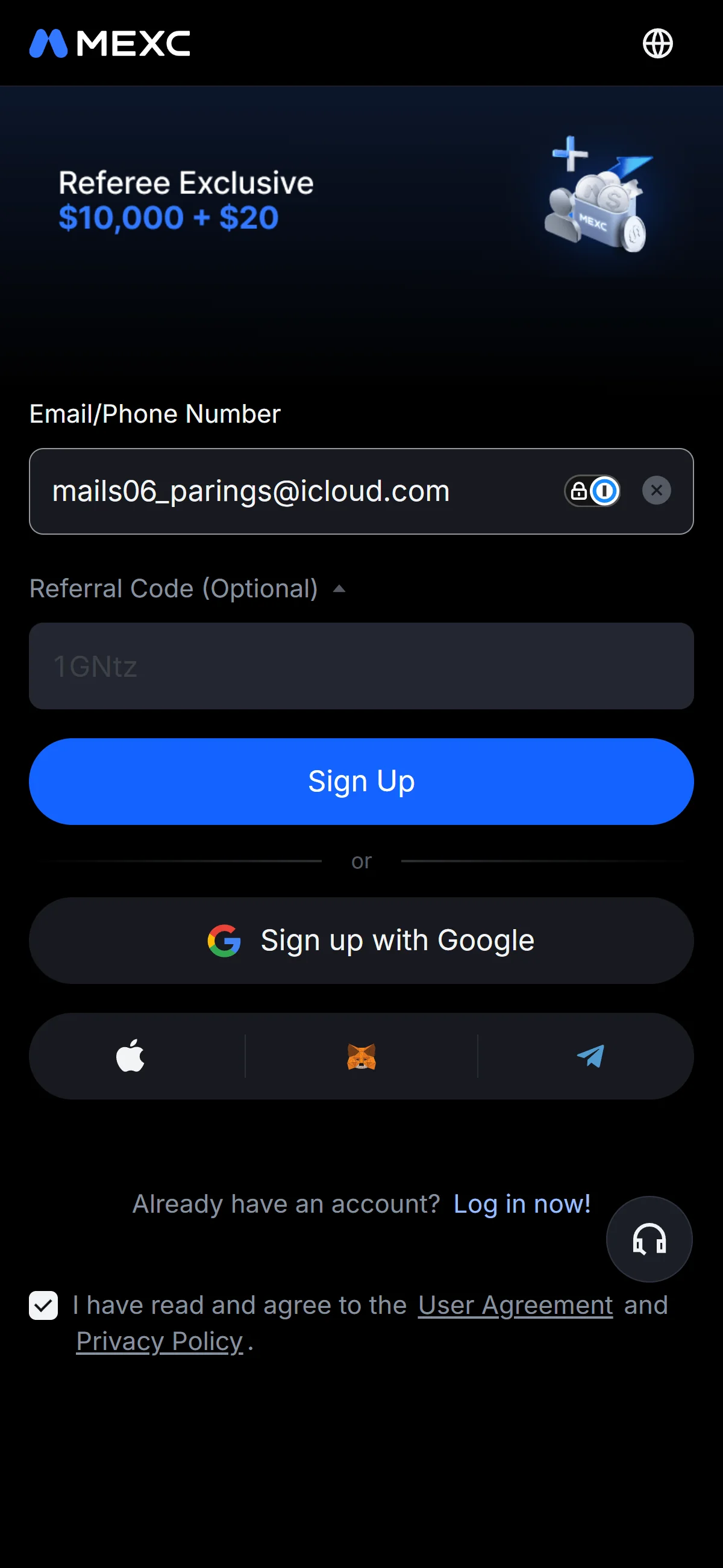
The email address entered in the field, with the "Sign Up" button ready to submit. Source: chainhelm editorial With your email address filled in and the referral code still in place, click the “Sign Up” button to submit the form. MEXC then brings up a slider puzzle to confirm you are a real person before moving on to email verification.
-
Pass the slider check
Slider puzzle check2026-07-10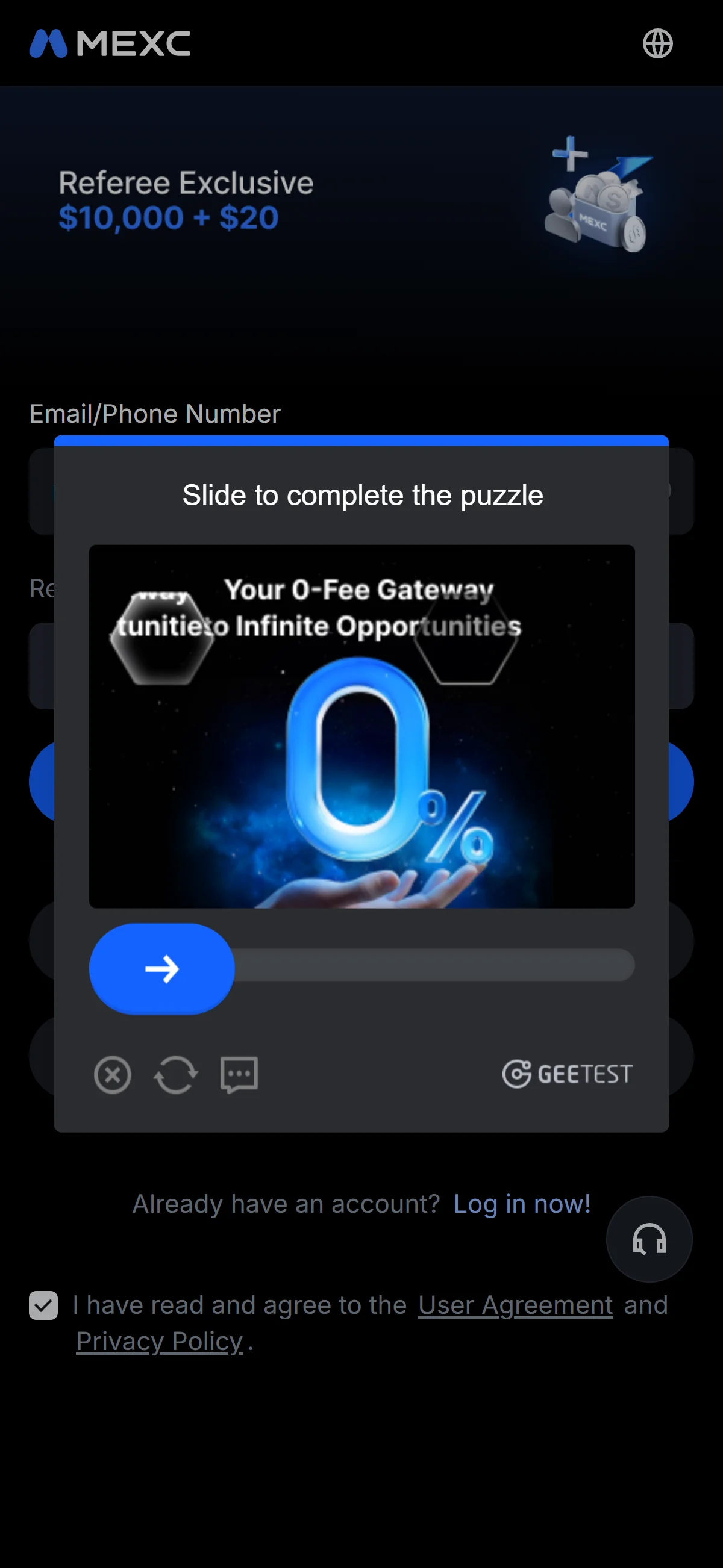
The slider captcha window that asks you to drag the handle to complete the puzzle. Source: chainhelm editorial Drag the handle along the bar at the bottom of the “Slide to complete the puzzle” window until the puzzle piece locks into place. Once the check passes, MEXC sends a code to your email and opens the code-entry screen.
-
Enter the email code
Email code entry2026-07-10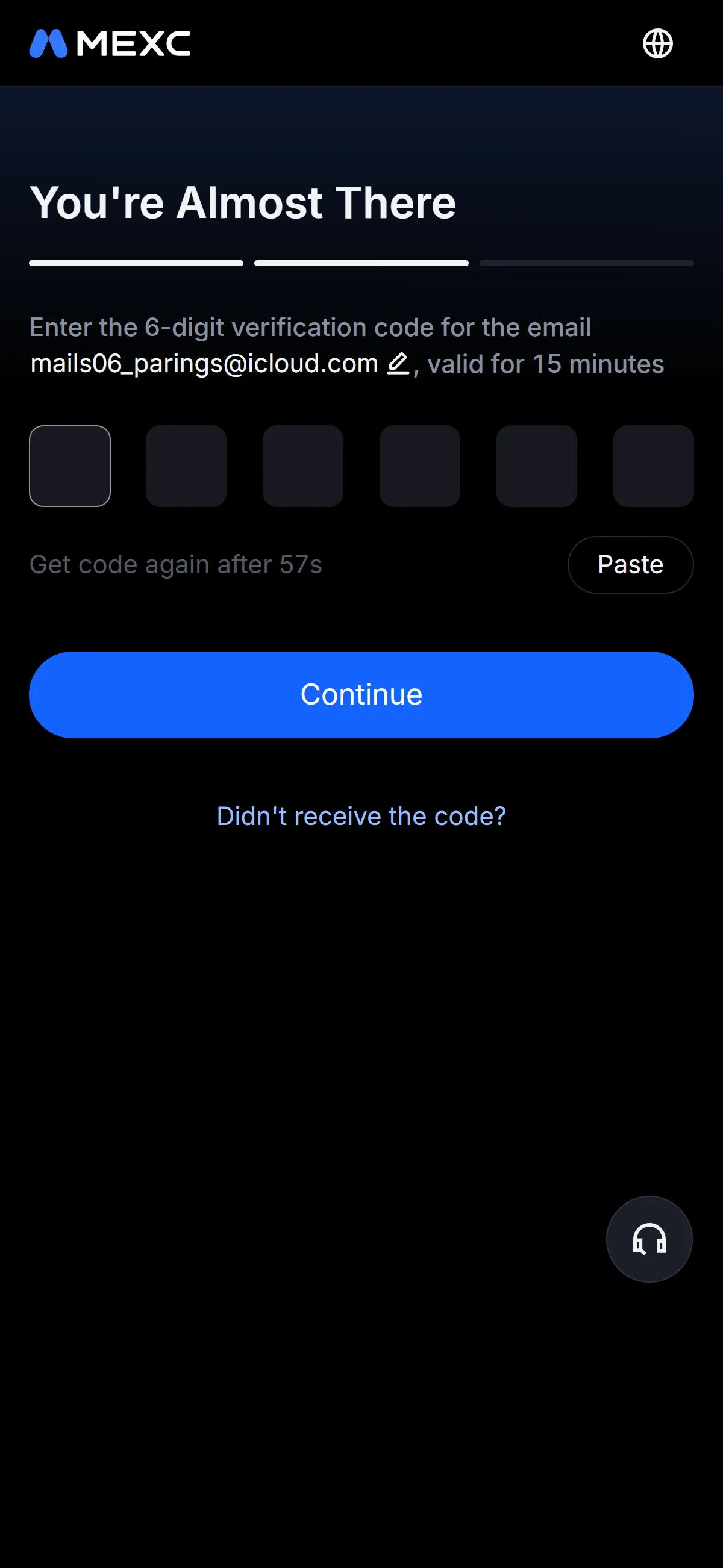
The verification screen with six empty code boxes and a note that the code stays valid for 15 minutes. Source: chainhelm editorial On the “You’re Almost There” screen, click “Get Code” to have the six-digit code sent to the email address shown, then type each digit into the six boxes. The code only stays valid for 15 minutes, so enter it promptly.
Click “Continue” to confirm the code and move on to setting your password. If nothing arrives, use “Didn’t receive the code?” to request it again.
-
Get the code from your inbox
Verification email2026-07-10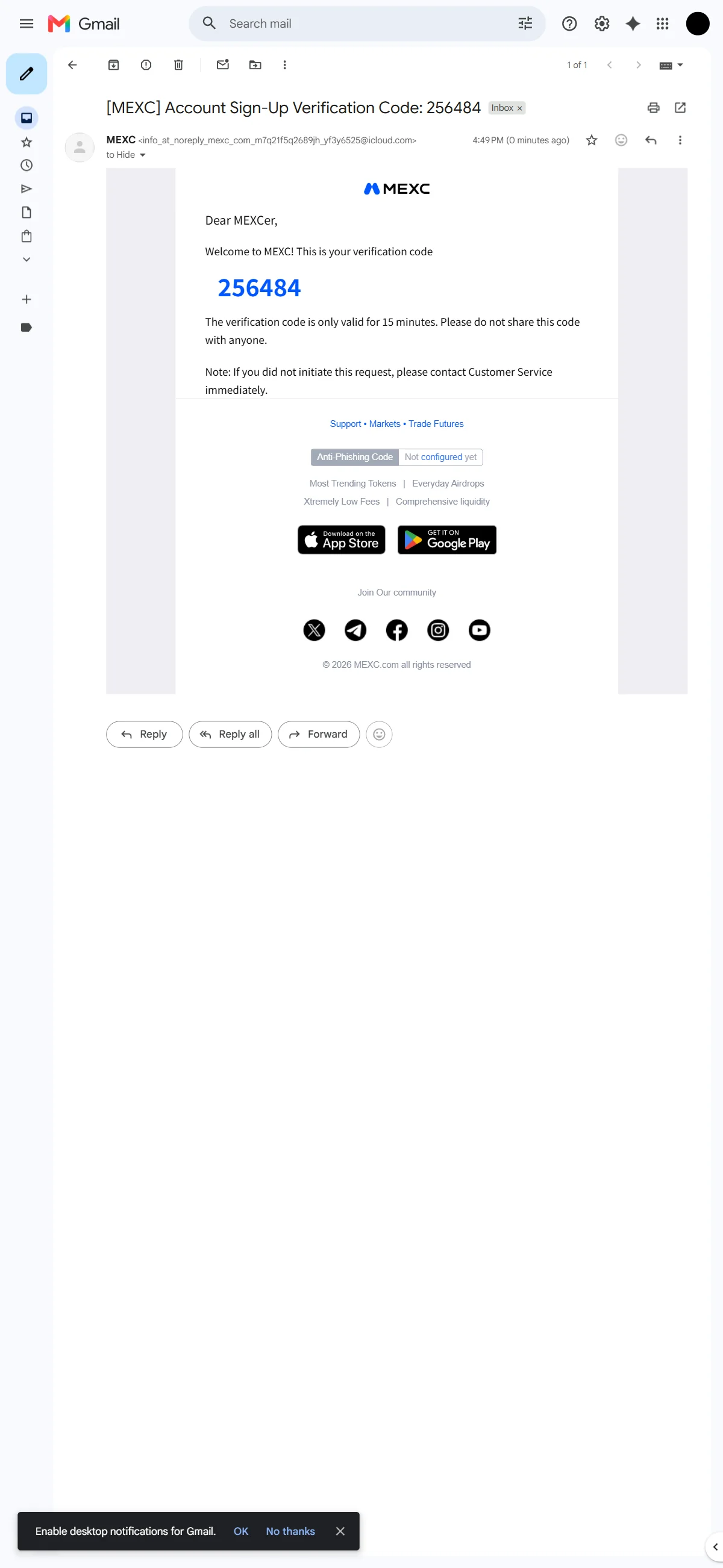
The MEXC sign-up email showing the six-digit verification code and its 15-minute validity. Source: chainhelm editorial Switch to your email inbox and open the message titled “[MEXC] Account Sign-Up Verification Code”. The six-digit code sits in large blue text inside the email, so copy it and paste it back into the boxes on the sign-up screen. Keep in mind that the code works for only 15 minutes.
-
Set your account password
Set password screen2026-07-10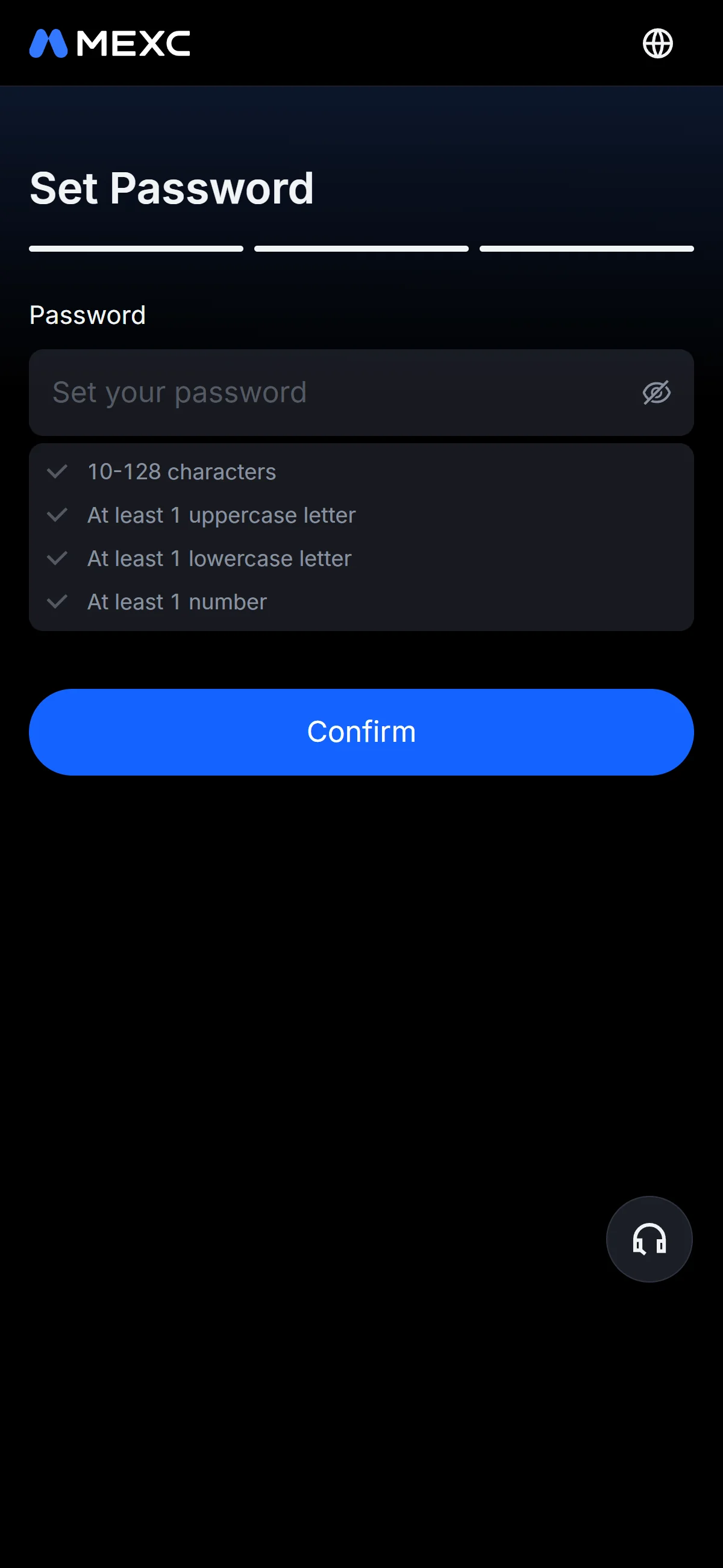
The empty password field above a checklist of the rules the password has to meet. Source: chainhelm editorial On the “Set Password” screen, type a password into the empty “Password” field. The checklist just below spells out the rules it has to meet: 10 to 128 characters, plus at least one uppercase letter, one lowercase letter, and one number. Click the eye icon if you want to check what you have typed.
-
Confirm the password
Password rules met2026-07-10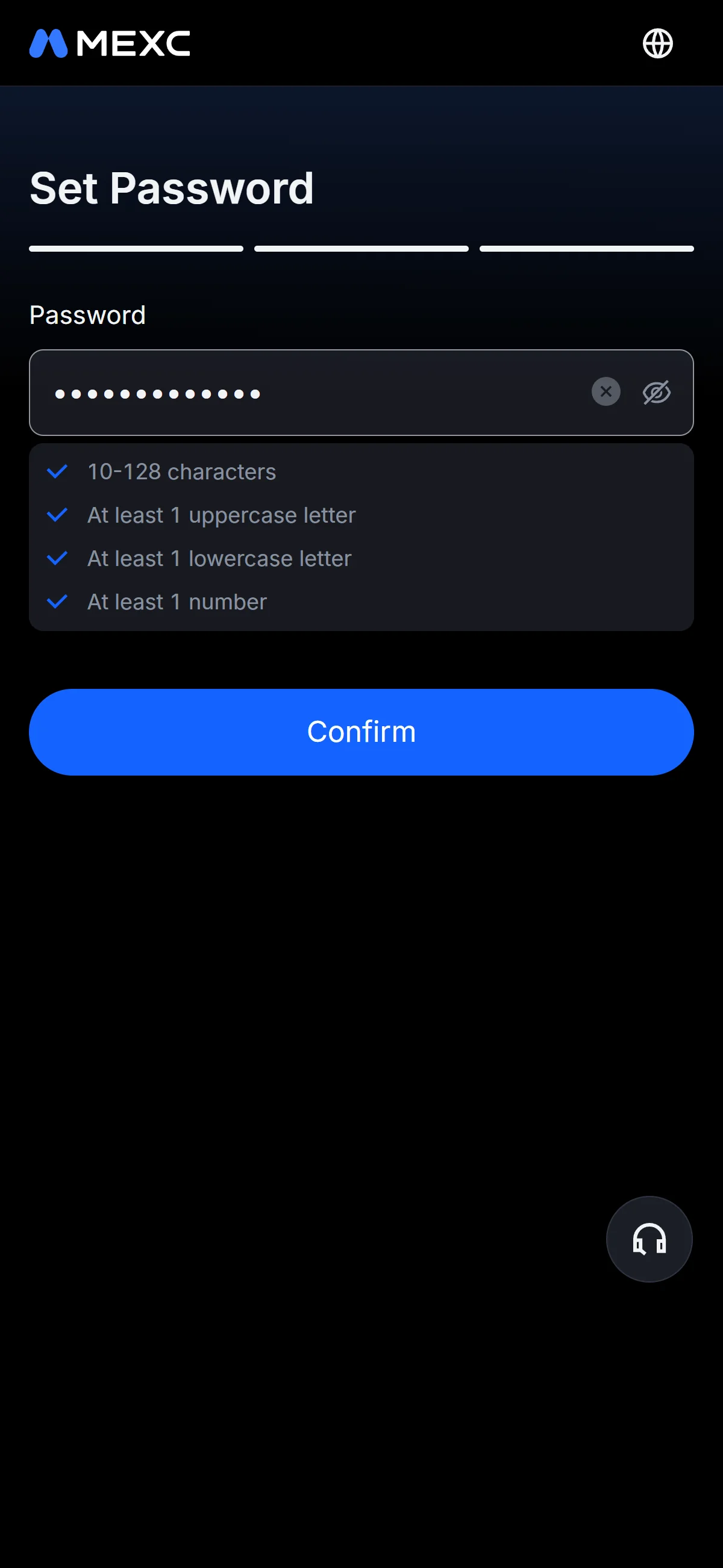
The password entered with every rule in the checklist marked as satisfied. Source: chainhelm editorial Once every rule in the checklist turns blue to show your password is accepted, click the “Confirm” button. MEXC creates your account and brings up a window asking you to complete KYC verification.
-
Start KYC verification
KYC prompt window2026-07-10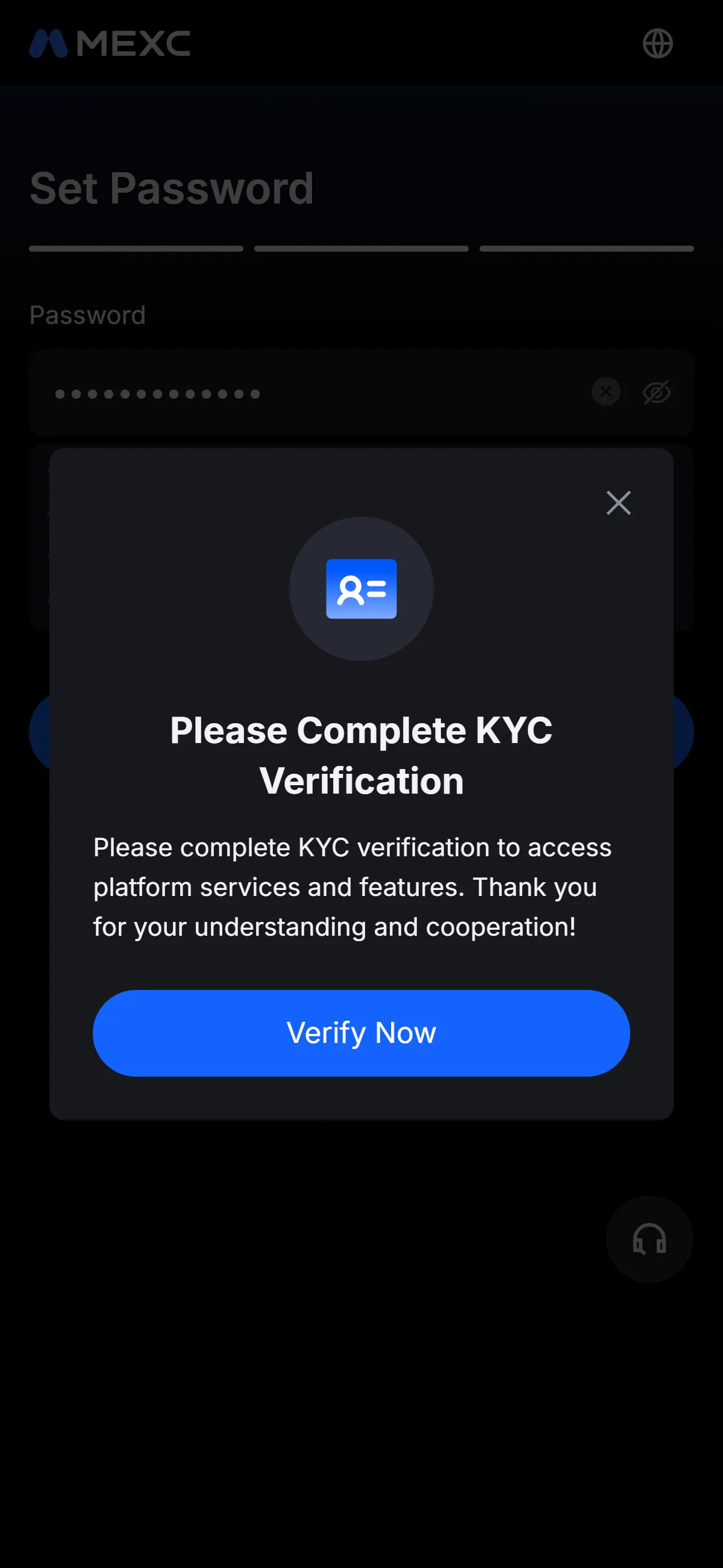
The pop-up asking you to complete KYC verification, with a "Verify Now" button. Source: chainhelm editorial After your account is created, a “Please Complete KYC Verification” window opens over the form. Click “Verify Now” to open the identification page and begin confirming your identity. You can also close the window with the X and return to KYC later.
What to do after signing up at MEXC
We cover identity verification separately for PC/browser and smartphone (mobile).
PC/browser identity verification
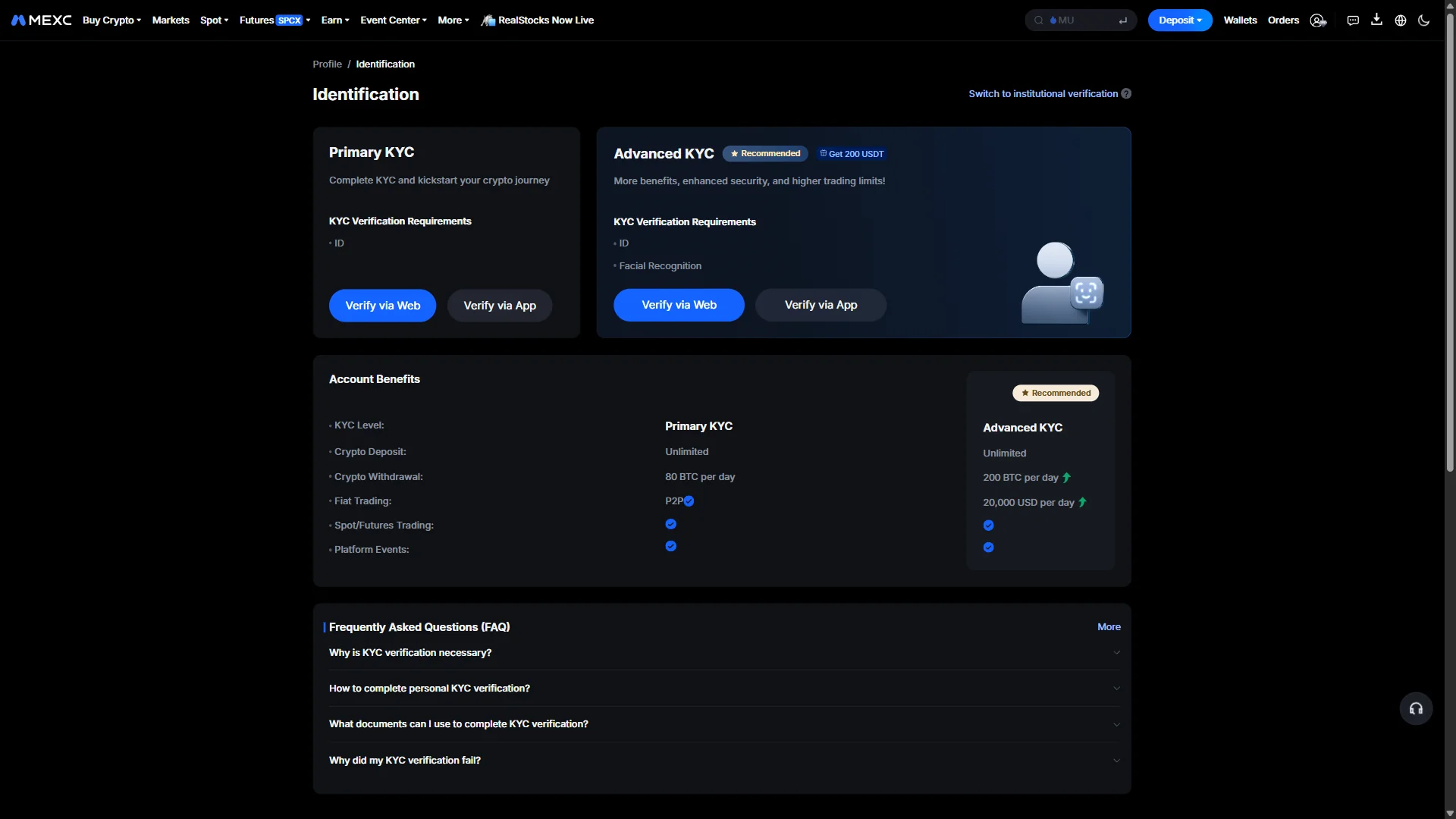
The “Identification” page offers two levels: “Primary KYC”, which only needs your ID, and “Advanced KYC”, which also adds facial recognition. The “Account Benefits” table underneath compares the limits each level unlocks, such as the higher withdrawal and fiat-trading caps on the advanced tier.
To carry on in your browser, click “Verify via Web” under “Primary KYC”, which opens the country and ID-type selection. Each card also offers “Verify via App” if you would rather finish in the mobile app.
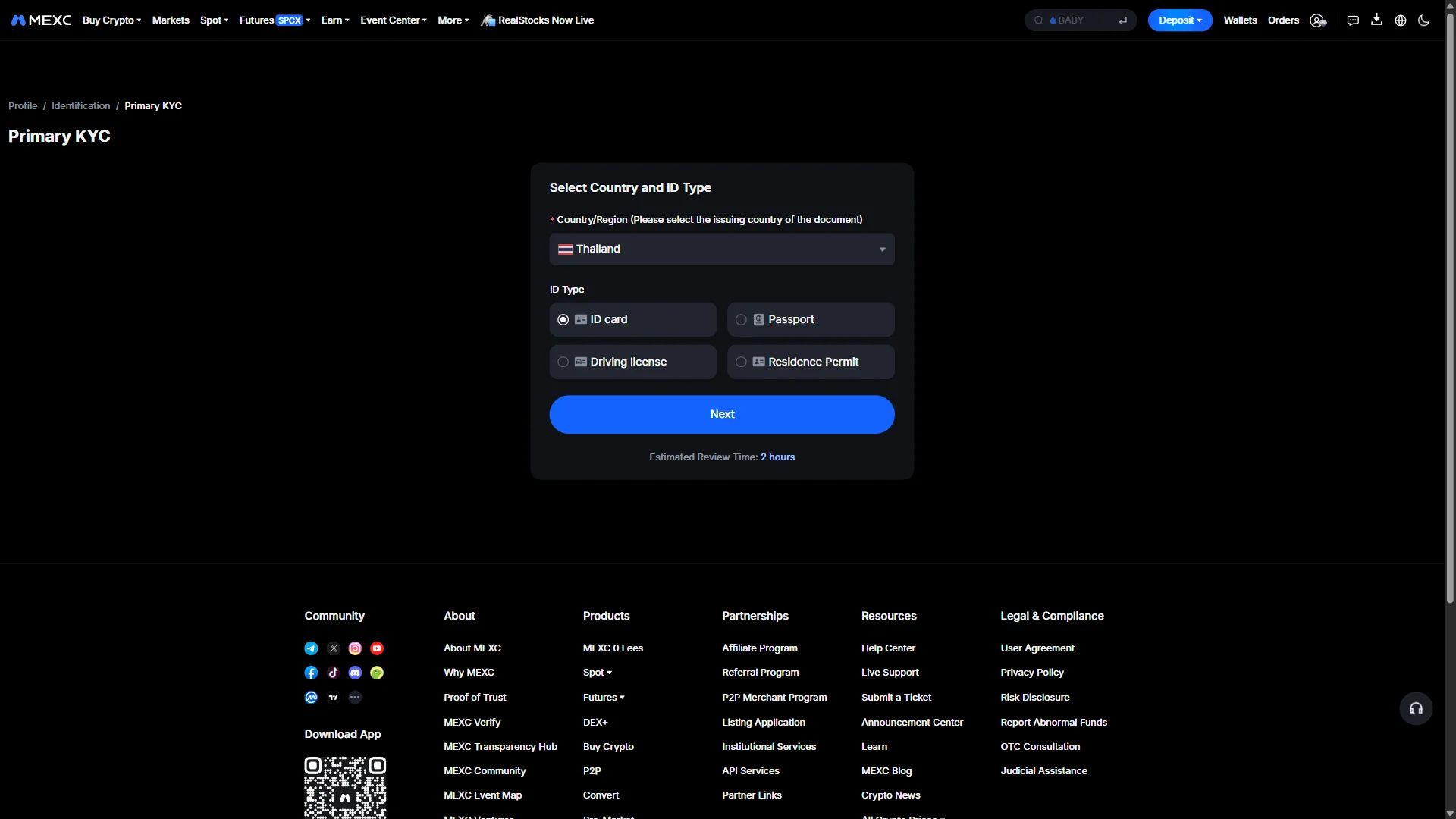
On the “Select Country and ID Type” screen, open the “Country/Region” dropdown and pick the country that issued your document. Then choose one of the four ID types — “ID card”, “Passport”, “Driving license”, or “Residence Permit” — and click “Next”. The screen also notes an “Estimated Review Time: 2 hours” for the check.
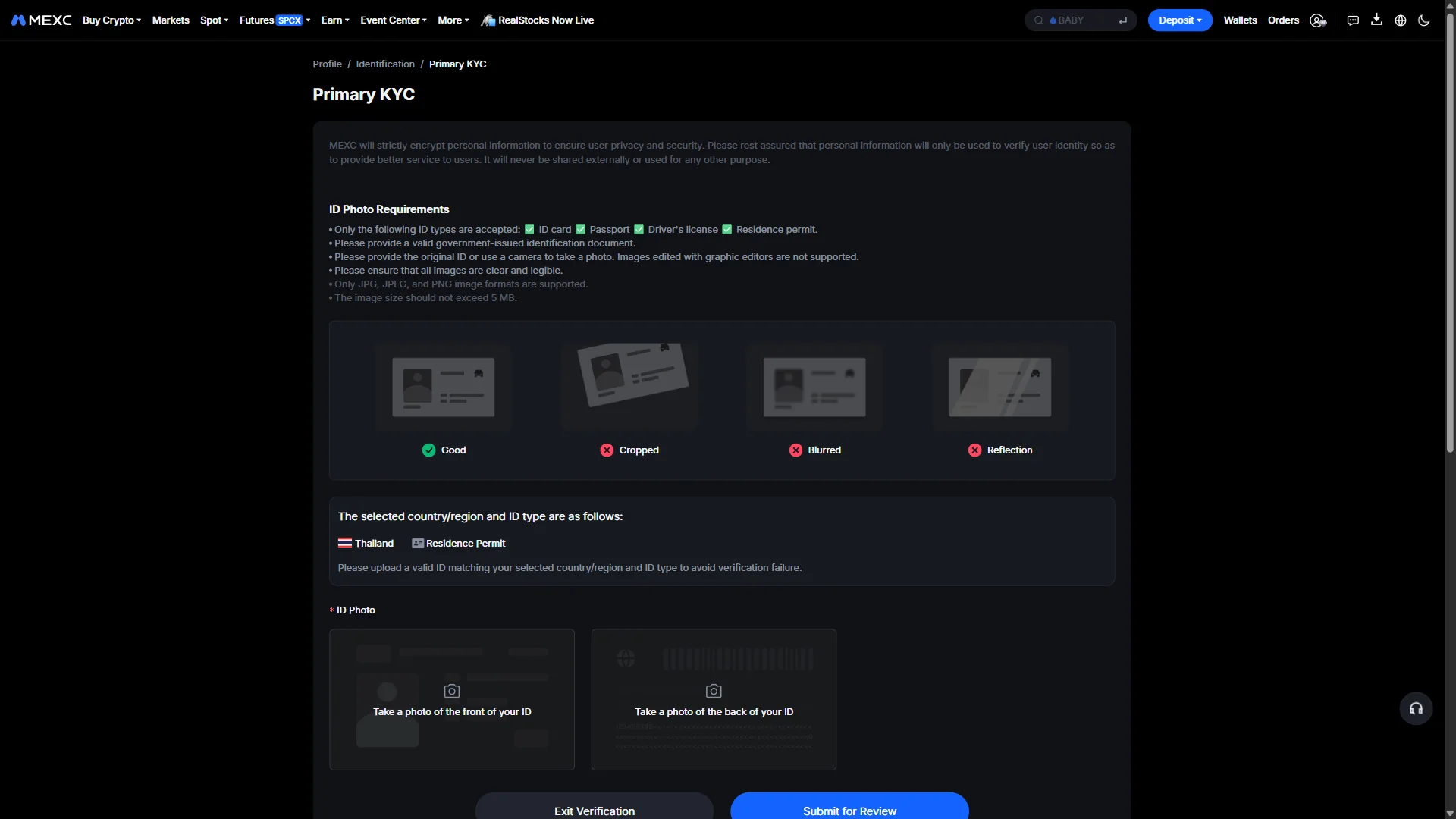
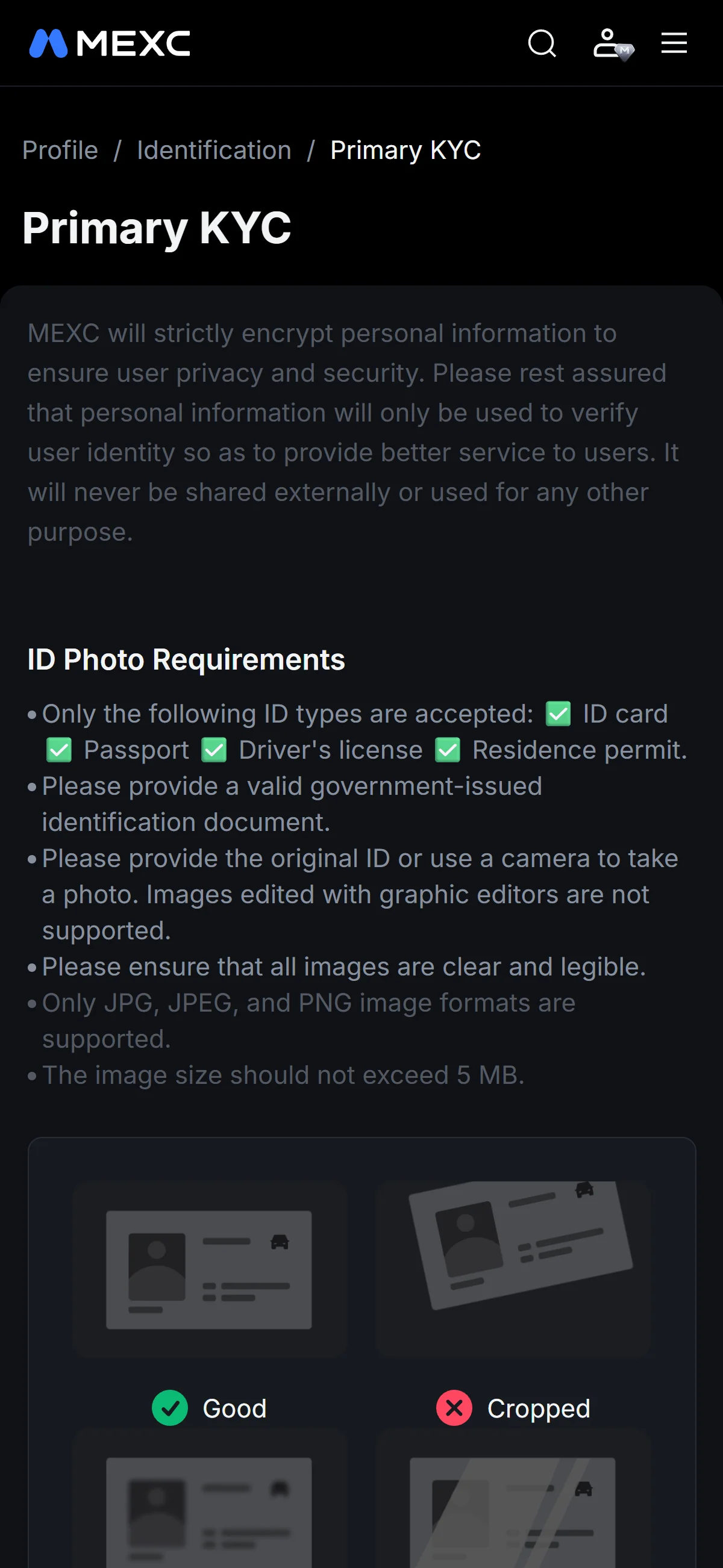
Read the “ID Photo Requirements” first: the document has to be a valid, government-issued original that is clear and legible, saved as a JPG, JPEG, or PNG under 5 MB. The sample photos alongside — one marked “Good” against “Cropped”, “Blurred”, and “Reflection” — show at a glance what passes and what to avoid.
Upload the front and back of your document into the two slots, starting with “Take a photo of the front of your ID” and its matching back slot, then click “Submit for Review”.
Smartphone (iOS / Android) identity verification
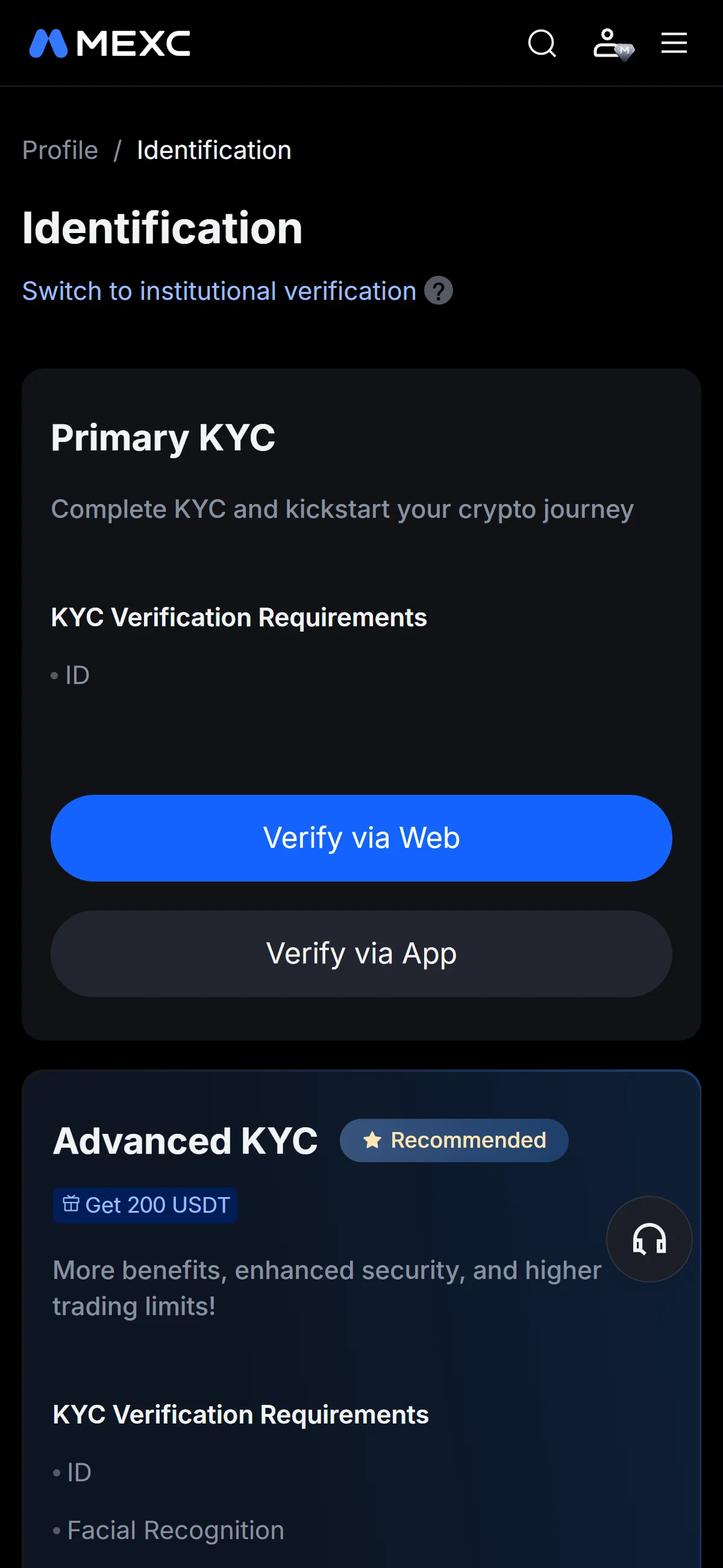
The “Identification” page offers two levels: “Primary KYC”, which only needs your ID, and “Advanced KYC”, which also adds facial recognition. The “Account Benefits” table underneath compares the limits each level unlocks, such as the higher withdrawal and fiat-trading caps on the advanced tier.
To carry on in your browser, click “Verify via Web” under “Primary KYC”, which opens the country and ID-type selection. Each card also offers “Verify via App” if you would rather finish in the mobile app.
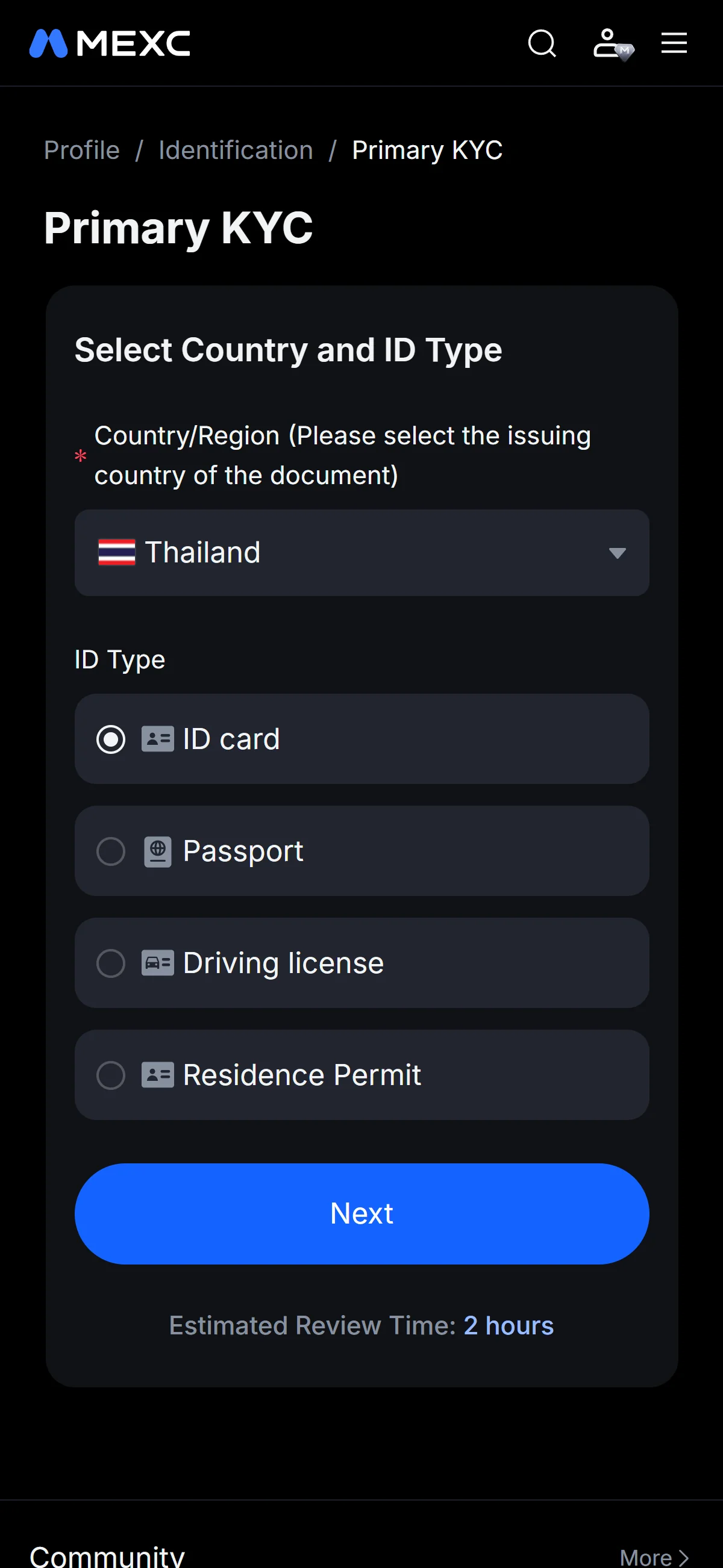
On the “Select Country and ID Type” screen, open the “Country/Region” dropdown and pick the country that issued your document. Then choose one of the four ID types — “ID card”, “Passport”, “Driving license”, or “Residence Permit” — and click “Next”. The screen also notes an “Estimated Review Time: 2 hours” for the check.
Read the “ID Photo Requirements” first: the document has to be a valid, government-issued original that is clear and legible, saved as a JPG, JPEG, or PNG under 5 MB. The sample photos alongside — one marked “Good” against “Cropped”, “Blurred”, and “Reflection” — show at a glance what passes and what to avoid.
Upload the front and back of your document into the two slots, starting with “Take a photo of the front of your ID” and its matching back slot, then click “Submit for Review”.
That wraps up the sign-up and KYC submission — MEXC now reviews your documents, which the country-selection screen estimated at around two hours.
The MEXC referral code cannot be added after sign-up
The referral code can only be entered at sign-up — it cannot be added afterwards.
If you overlook this and complete registration without the code, there is no mechanism for linking it to that account after the fact.
If you have not yet completed KYC (identity verification), creating a fresh account is an option worth considering. Some exchanges, though, restrict opening more than one account in their terms of use.
- Does the sign-up screen show referral code 1GNtz as applied? (Going through the link applies it automatically; where the exchange provides a code field, check there as well.)
- Once registration is complete, open the Referral / Rewards page and confirm that the referral shows as linked to your account
◆ ◇ ◆
What is MEXC
MEXC’s scale, origins, and product reach
MEXC launched in 2018 and runs from an offshore base in Victoria, Seychelles, under the operating entity MX Global Ltd (Seychelles IBC No. 238047). Unlike many of the exchanges it competes with, it discloses no single consolidated global operating company — a structural detail that matters later, when the question turns to recourse.
Those headline figures deserve one caveat: spot 24-hour volume lands somewhere around USD 0.82B to 1.0B depending on the tracker, because methodologies and wash-trade filters differ from one data provider to the next. What is not in dispute is the breadth — thousands of listed coins alongside deep USDT-M perpetual markets. On the corporate side, Vugar Usi Zade became CEO on 2026-04-08, the deflationary MX Token 2.0 model arrived in 2025, and RealStocks launched on 2026-06-03: a trajectory of product expansion rather than retreat. For a prospective user, the practical read is that MEXC is a large, fast-moving venue — with the depth to match, and the offshore posture to weigh.
Trading costs and the MX-token fee discount
The number on a fee schedule is only part of the real cost of trading; funding and withdrawal costs sit alongside it. On the trading side, MEXC’s schedule is unusually flat, and it leans on that as a headline selling point.
0% maker
0% maker / 0.02% taker
The one durable way to push those fees lower is the exchange’s own token. Holding or using MX applies a standard 20% deduction on both spot and USDT-M futures fees, and some sources cite a higher futures tier of up to 50% above an MX-holding threshold. MX itself is an ERC-20 utility token with a 1 billion maximum supply and a quarterly buyback-and-burn. Notably, MEXC publishes no conventional 30-day-volume VIP ladder — the schedule is flat-to-near-zero with per-pair special rates instead — and on-chain withdrawal fees vary by asset and network rather than following a single flat rate. All figures here are as of 2026-07-10, and a flat schedule like this can be re-priced at any time, so it is worth re-checking before you commit.
What makes MEXC distinct
What sets MEXC apart from Tier-1 exchanges
Strip away the marketing and MEXC’s edge comes down to two things: how quickly it lists new tokens, and how little it charges to trade spot. It lists early and in volume — 3,000+ assets by its own count — which puts newly issued altcoins within reach ahead of larger venues; the flip side is that a great many of those assets are unvetted and high-risk. On fees, 0% maker pricing plus a rotating roster of 0-fee promotional pairs (its “0-Fee Fest”) undercuts the roughly 0.1% base that most major exchanges charge.
Beyond speed and price, three products give MEXC a distinct shape that a prospective user should understand before choosing it.
- Leveraged ETF tokens
- Products such as BTC3L and BTC3S carry a fixed 2x–5x daily multiple and trade on spot — no margin account, no funding rate, and no liquidation price to watch. Convenient, but the fixed-multiple mechanics decay in choppy markets.
- RealStocks
- Launched 2026-06-03: 0-commission real US equities with dividend rights, alongside Ondo-issued tokenized stock and ETF pairs, folded into a single crypto exchange.
- No-mandatory-KYC basic trading
- Tier 0 allows account creation and basic spot/futures trading with withdrawals up to 5 BTC/day before verification — lower onboarding friction, at the cost of a weaker regulatory posture and real account-freeze exposure.
Who MEXC suits, and when a regulated venue fits better
The honest verdict is that MEXC is built for a specific kind of trader, not for everyone.
MEXC fits fast-moving altcoin and high-leverage traders who accept an offshore, unlicensed venue — anyone who needs regulatory recourse, or who lives in a market MEXC does not serve, is better off elsewhere.chainhelm editorial verdict
Concretely, it suits experienced crypto and early-token speculators, and derivatives users chasing high leverage at low cost, who knowingly accept the trade-offs of an unlicensed offshore exchange. For readers who do not fit that profile, the choice is worth laying out plainly.
Breadth and low fees matter most
Recourse or your jurisdiction rules it out
Against Tier-1 exchanges the comparison is genuinely two-sided: MEXC leads on the breadth and speed of new-token listings and on near-zero spot fees, while the Tier-1 venues charge more — roughly 0.1% base — but offer more thoroughly vetted assets and materially stronger regulatory standing. Which way that trade cuts depends on what you value; for readers in several major markets, though, the choice is made for them, as the next chapters set out.
MEXC regulatory landscape
Licensing standing: unlicensed across major jurisdictions
On paper MEXC reaches 170+ countries; in the eyes of financial regulators, it holds no major-jurisdiction license to do so. As of 2026-07-10, the Seychelles Financial Services Authority (2026-05-26) stated that the operating entity MX Global Ltd holds no license and never applied for one — a breach of the country’s VASP Act 2024 — while the Netherlands’ AFM (2025-09-16) flagged MEXC for operating without MiCA authorization.
Prohibited, restricted, and exited markets
MEXC publishes its own list of jurisdictions it will not serve, and the map of where it is prohibited, restricted, or has exited is wide.
The pattern is consistent: wherever a jurisdiction runs a functioning licensing regime for crypto, MEXC tends to be either shut out or operating at the regulator’s sufferance. Among the markets this article covers, Australia is the outlier where MEXC still onboards new users — but it does so without a local license, and with local regulatory caveats attached rather than the reassurance a licensed venue provides.
A tightening regulatory trajectory
Read as a sequence, these actions all point in one direction.
The direction of travel is tightening, not loosening — each recent regulatory action narrows where MEXC can lawfully serve new users.2025–2026 regulatory record
The AFM warning, the Seychelles enforcement notice, and the EU/EEA MiCA exit all land within roughly a year of one another, and they arrive on top of the 2025 account-freeze controversies. For anyone weighing MEXC, the takeaway is directional rather than momentary: availability in regulated markets is contracting, not expanding, and a market open to you today may not stay that way.
MEXC availability across major jurisdictions
Of the markets this article covers, Australia is the one where MEXC still accepts new sign-ups (see the regulatory-landscape chapter above). In the four below — the United States, the United Kingdom, Singapore, and India — MEXC does not accept new registrations, so the referral code cannot be applied at all. Because MEXC operates no own-brand regional entity that onboards new users, each section points instead to third-party venues licensed in that market. These are presented flat and on the facts: the aim is the outcome that serves you, not a detour back to MEXC.
United States: prohibited by MEXC — use a US-regulated venue
MEXC itself lists the United States as a prohibited jurisdiction: it accepts no new registrations and blocks US IP addresses, so there is no way to apply the code. This is a complete block with no MEXC path, so the sensible move is a US-regulated exchange.
Coinbase
Kraken
Gemini
Crypto.com
United Kingdom: FCA-flagged and off-limits — FCA-registered alternatives
The United Kingdom is a prohibited jurisdiction under MEXC’s User Agreement, and MEXC sits on the FCA Warning List (2024-03-22); neither a new sign-up nor referral use is possible. That points to an FCA-registered venue.
Coinbase
Kraken
Crypto.com
One caveat applies across all three: the FCA’s ban on selling crypto derivatives to UK retail clients means none of them offers crypto derivatives to UK retail — spot and, where offered, other products only.
Singapore: prohibited under MEXC’s terms — MAS-licensed alternatives
Singapore is a prohibited jurisdiction under MEXC’s terms — its predecessor MXC appears on the MAS Investor Alert List — so a new sign-up with the code is not possible. The alternative is an MAS-licensed venue.
Coinhako
Independent Reserve
OKX SG
Crypto.com
All four hold an MAS Major Payment Institution license and provide SGD on- and off-ramps, in direct contrast to MEXC’s prohibited status.
India: services suspended since February 2026 — FIU-IND-registered alternatives
MEXC suspended all India services on 2026-02-28 — withdrawals only — while its FIU-IND registration remains pending, and it had already paused new India sign-ups from 2026-01-15. A new registration with the code is therefore off the table, so the route is an FIU-IND-registered venue.
CoinDCX
CoinSwitch
ZebPay
Each of these is on the FIU-IND register and handles Indian TDS and PMLA compliance natively — the exact status MEXC lacks, since it is not on the register.
◆ ◇ ◆
Risks to acknowledge before using MEXC
Counterparty health and fund access
The question that matters most about any exchange is blunt: can it stay solvent, and will it let you withdraw? MEXC’s record on the second half of that question is mixed, and the clearest example is recent.
The funds came back, but the episode is the point: it was one of a broader 2025 wave of restrictions on profitable accounts under risk control. And recourse is thin. With MX Global Ltd flagged unlicensed by the Seychelles FSA (2026-05-26) and MEXC flagged by the Netherlands AFM (2025-09-16), there is no major-jurisdiction regulator to appeal to if an account is frozen.
How much MEXC actually holds is itself contested — reserve estimates diverge sharply by source, a reminder to treat any single headline figure with caution.
One point cuts the other way, and it belongs in the record: since its 2018 founding, MEXC has had no publicly disclosed major hack or theft of user funds. The counterparty concern here is about fund access and recourse, not a history of breaches.
Regulatory exposure and unvetted-asset risk
Beyond solvency, three risks attach specifically to how MEXC operates — and each is something you carry, not something you control.
- Future exclusion from your market
- Regulated-market availability is tightening — the EU/EEA MiCA exit took effect 2026-07-01 — so today’s access is no guarantee you can keep using MEXC in your jurisdiction tomorrow.
- No-mandatory-KYC exposure
- Tier 0 lets you trade with withdrawals up to 5 BTC/day before verification, but it carries compliance and account-restriction risk, and MEXC does not routinely report activity to tax authorities — users self-report.
- Unvetted-asset and securities risk
- A very large number of newly issued, long-tail tokens are vetted by no securities regulator, and the tokenized US equities carry securities characteristics without US securities registration — both elevating loss and de-listing risk.