— Contents 8 sections
- 01 Does the Polymarket referral code “chainhelm” still work?
- 02 How to sign up at Polymarket and fund your account
- 03 What is Polymarket
- 04 Polymarket fees: what you actually pay
- 05 How Polymarket compares with other prediction markets
- 06 Polymarket regulatory landscape
- 07 Polymarket availability — country by country
- 08 Risks to acknowledge before using Polymarket
chainhelm’s Polymarket referral code is .
There are two ways to apply it — sign up through the Polymarket official sign-up page with the code applied, or type chainhelm into the “Referral Code (Optional)” field on the username screen during sign-up. Through the link, the referral applies automatically even if you leave that field empty.
As of 2026-07-12, the chainhelm editorial team created fresh accounts both ways — via the link with the field left empty, and by typing the code — and confirmed the referral was attributed in both cases.
This guide covers how the referral link and the code field work, the sign-up and deposit steps for PC and mobile, Polymarket’s fees, how it compares with other prediction markets, country-by-country availability, and the risks to acknowledge.
Does the Polymarket referral code “chainhelm” still work?
As of 2026-07-12, the chainhelm editorial team verified the code “chainhelm” both ways — signing up through the referral link with the code field left empty, and typing the code into the “Referral Code (Optional)” field — and the referral was attributed in both cases.
Here is the actual screen captured during verification.
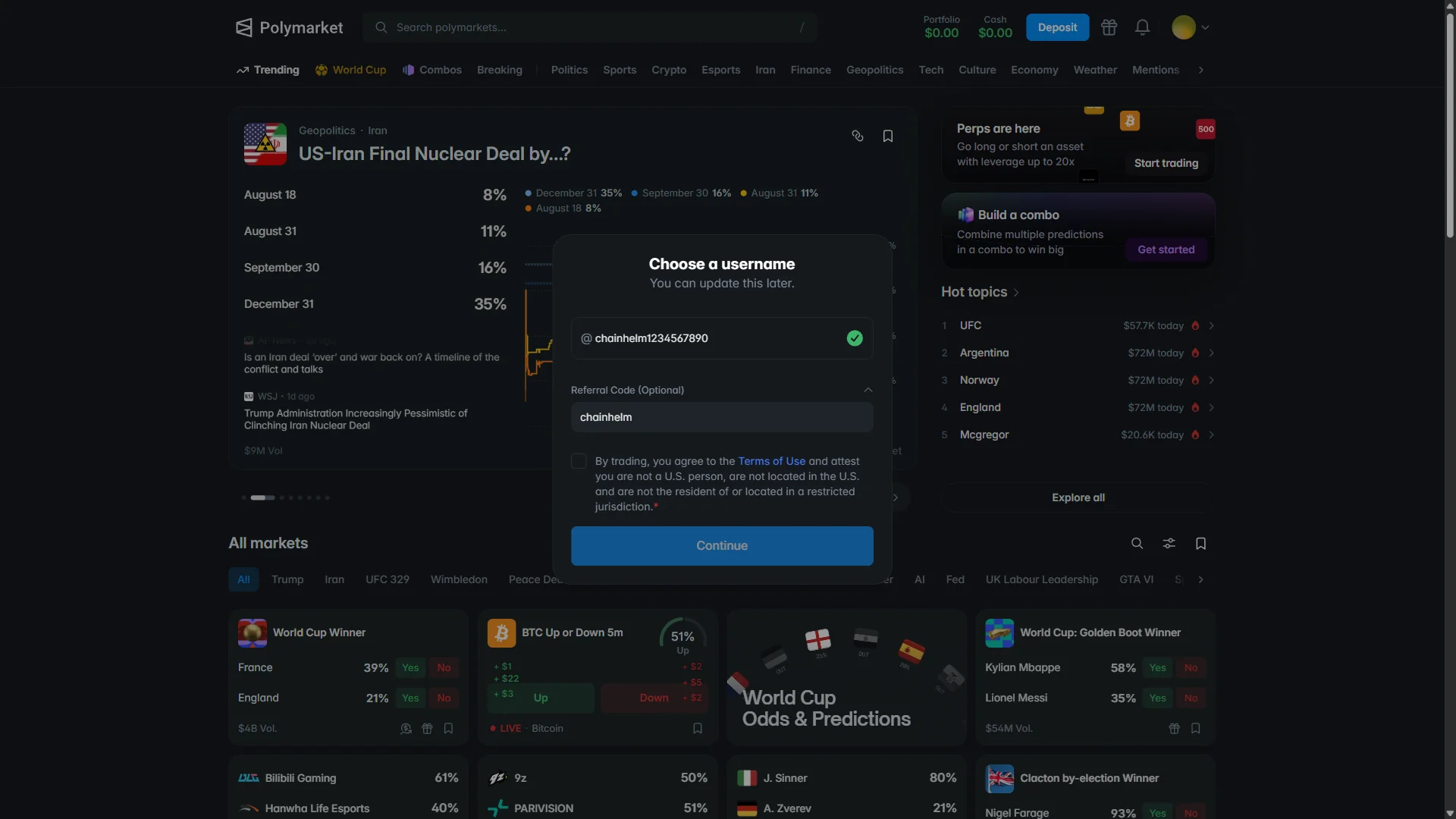
When you open the referral link, the code disappears from the URL right away, and the “Referral Code (Optional)” field on the sign-up form stays empty — this is by design. Your browser remembers the referral: open the link, complete sign-up, and it is applied — we confirmed this by registering with the field left empty.
There is only one thing to watch: the referral lives in the browser you opened the link in, so complete sign-up in that same browser (if you would rather register on another browser or device, just open the link again there). Typing chainhelm into the “Referral Code (Optional)” field on the username screen works as well — we verified that path too.
A few mechanics are worth knowing before you register. Attribution is recorded when you sign up within 30 days of clicking the link; it applies to new accounts only; and it cannot be added or changed once sign-up is complete. In practice, that means the moment to get this right is at registration itself — which, as the steps below show, is nothing more involved than opening the link (or entering chainhelm yourself) before you finish.
chainhelm re-checks that the link and code remain active, and updates this page when anything changes.
How to sign up at Polymarket and fund your account
We cover sign-up and the first deposit separately for PC/browser and smartphone (mobile).
PC/browser sign-up and deposit steps
-
Go to the Polymarket official sign-up page (the link carries the referral code “chainhelm”). When it opens, you’ll see a screen like the one below.
-
Open the sign-up window
Polymarket homepage, logged out2026-07-12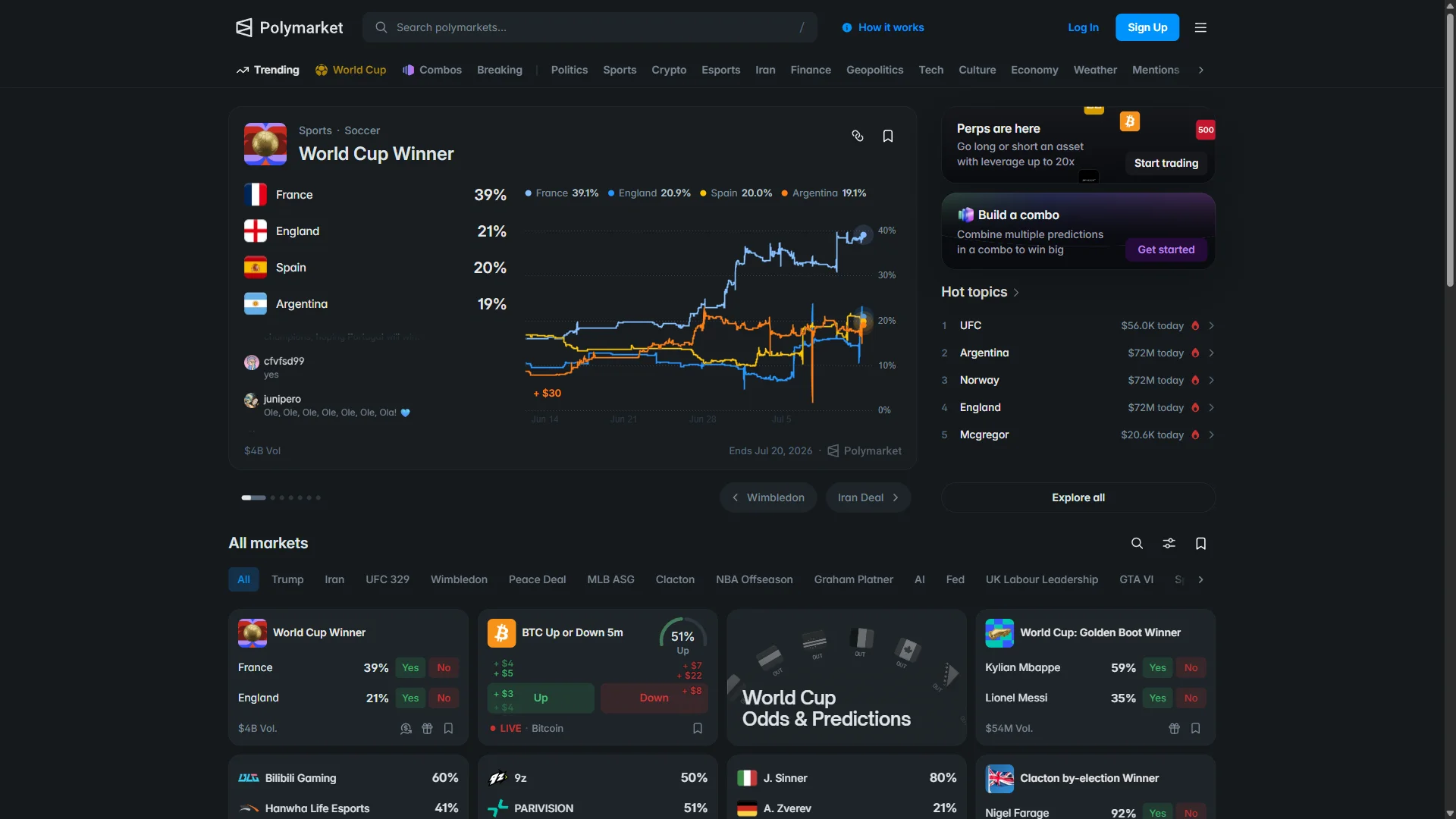
The logged-out Polymarket homepage, with the "Sign Up" button in the top-right of the header. Source: chainhelm editorial Opening chainhelm’s referral link brings you to the Polymarket homepage while you are still logged out. You will not see any on-screen referral banner or code, and that is normal — the referral travels invisibly with the link and is applied in the background.
To begin, click “Sign Up” in the top-right of the header. The sign-up window opens on top of the homepage.
-
Enter your email
Sign-up window: email entry2026-07-12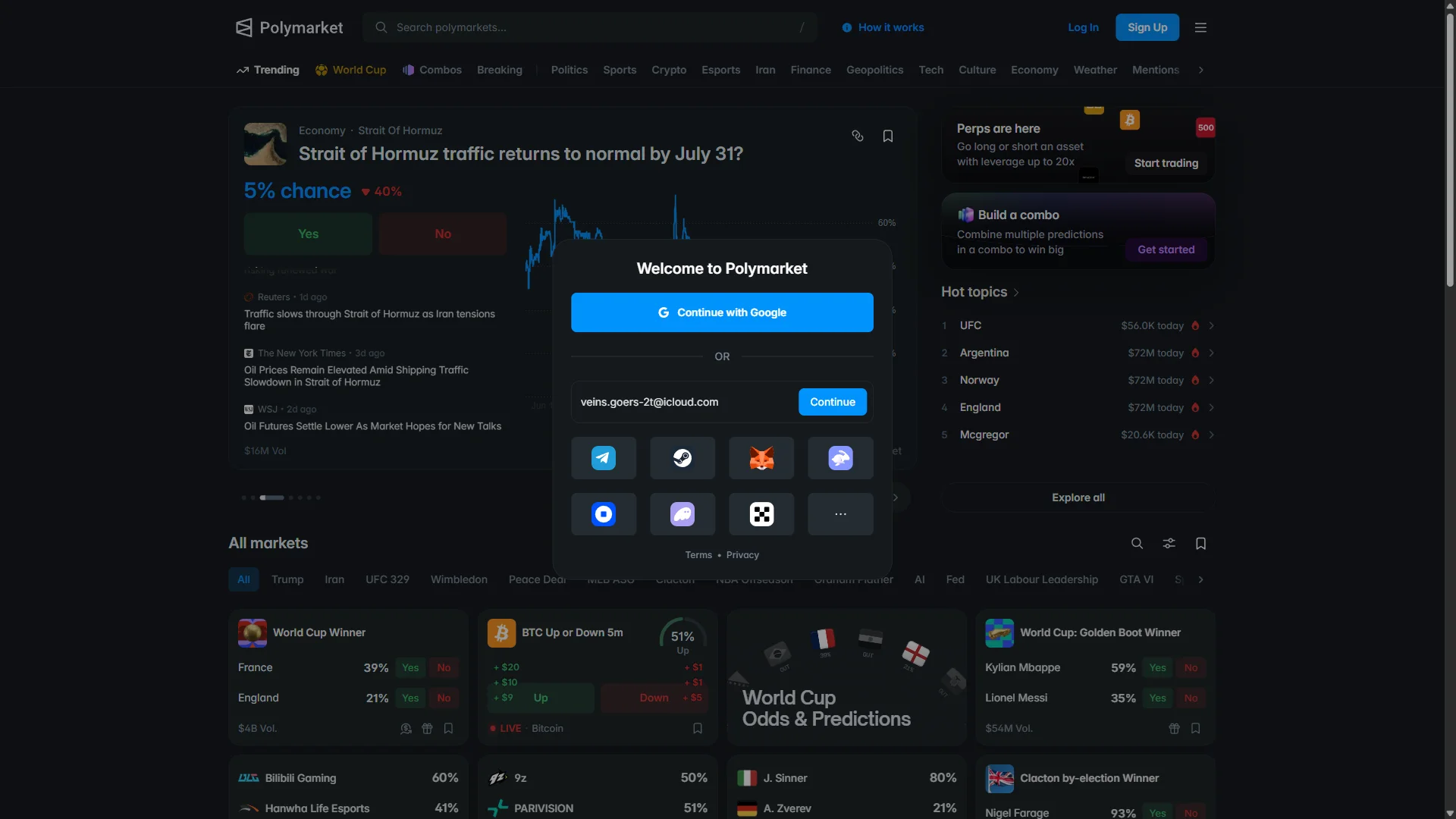
The "Welcome to Polymarket" window with an email filled in, alongside Google and wallet sign-in options. Source: chainhelm editorial In the “Welcome to Polymarket” window, type your address into the “Email address” field and click “Continue”.
If you would rather not use email, the same window offers “Continue with Google” and a row of wallet-login options; any one of them starts the account instead. Once you continue with your email, Polymarket sends a verification code and moves you to the code-entry screen.
-
Head to your inbox for the code
Verification code entry2026-07-12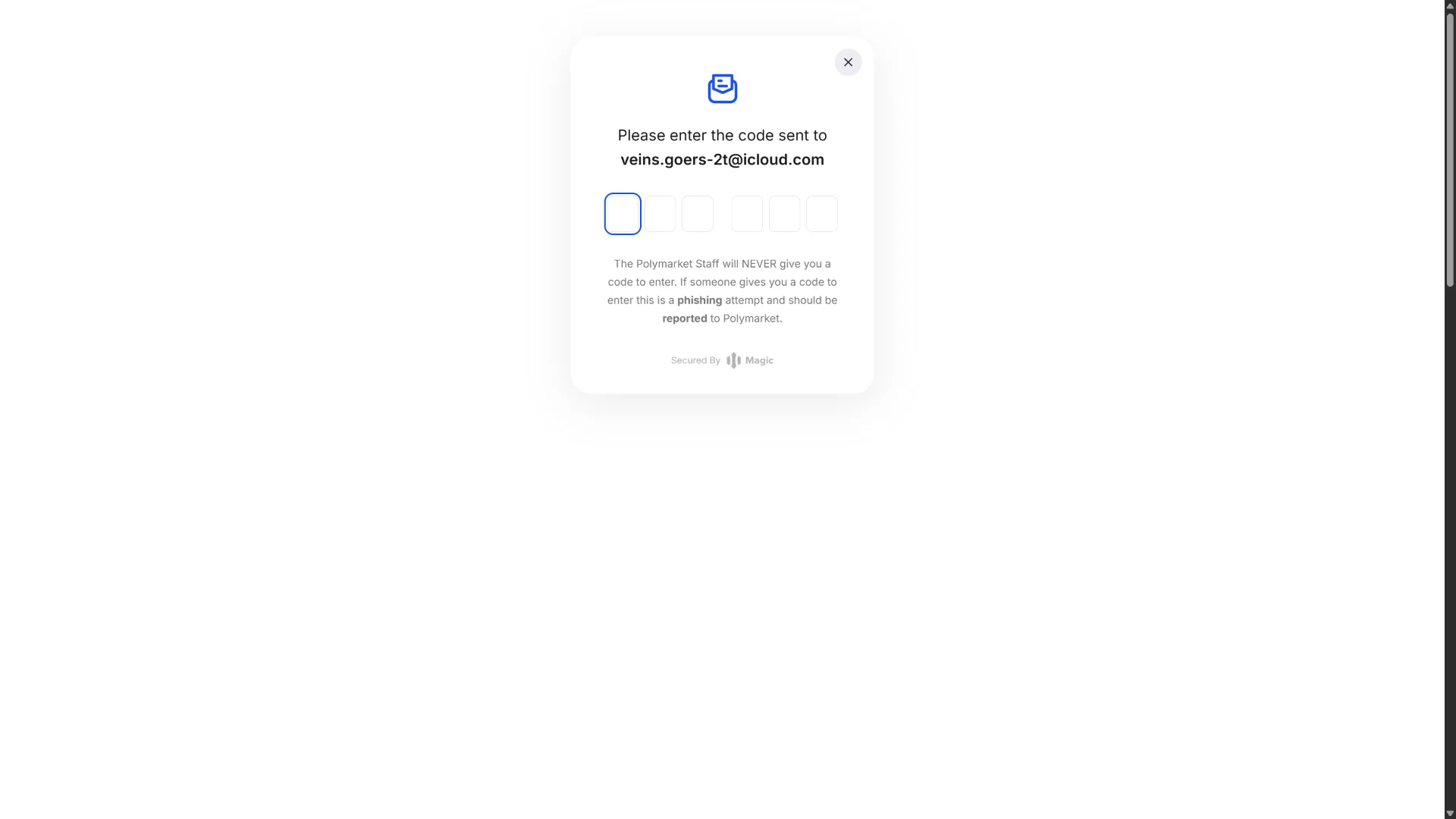
The code screen with six empty boxes and a phishing warning, addressed to the email you entered. Source: chainhelm editorial The verification screen shows six empty boxes and confirms that a code was sent to the email address you just entered.
Read the notice below the boxes: Polymarket staff will never give you a code, so treat anyone who hands you one as a phishing attempt. Leave this screen open and switch to your email inbox to find the code.
-
Copy the code from your email
Login-code email2026-07-12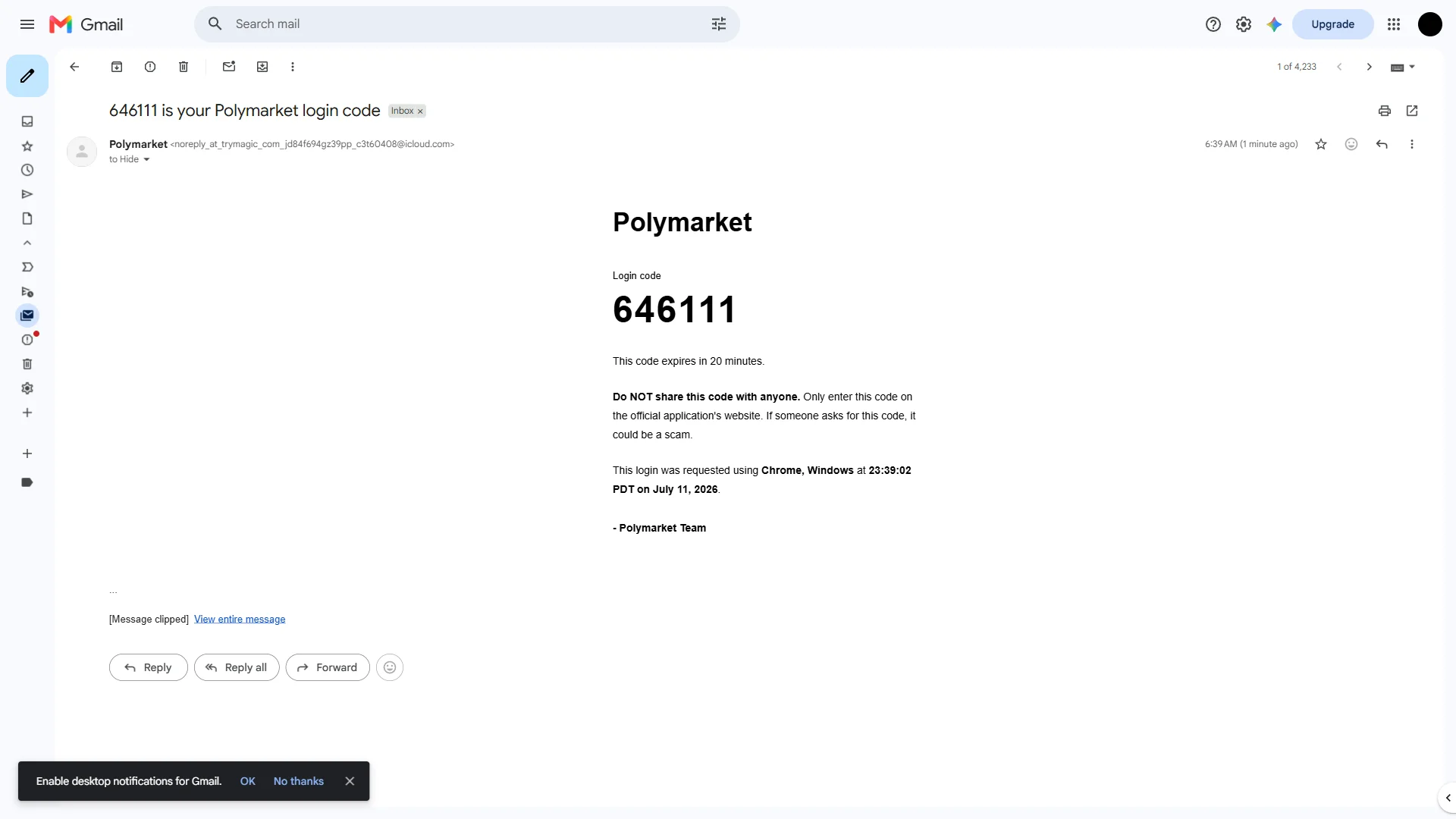
The Polymarket email showing the six-digit login code and its 20-minute expiry note. Source: chainhelm editorial Open the message from Polymarket in your inbox. It shows your six-digit code under “Login code”, along with a reminder that the code expires in 20 minutes and must never be shared with anyone.
Note the code, return to the verification screen, and type it into the six boxes. Once the code is accepted, Polymarket takes you to the username screen.
-
Choose your username
Choose a username2026-07-12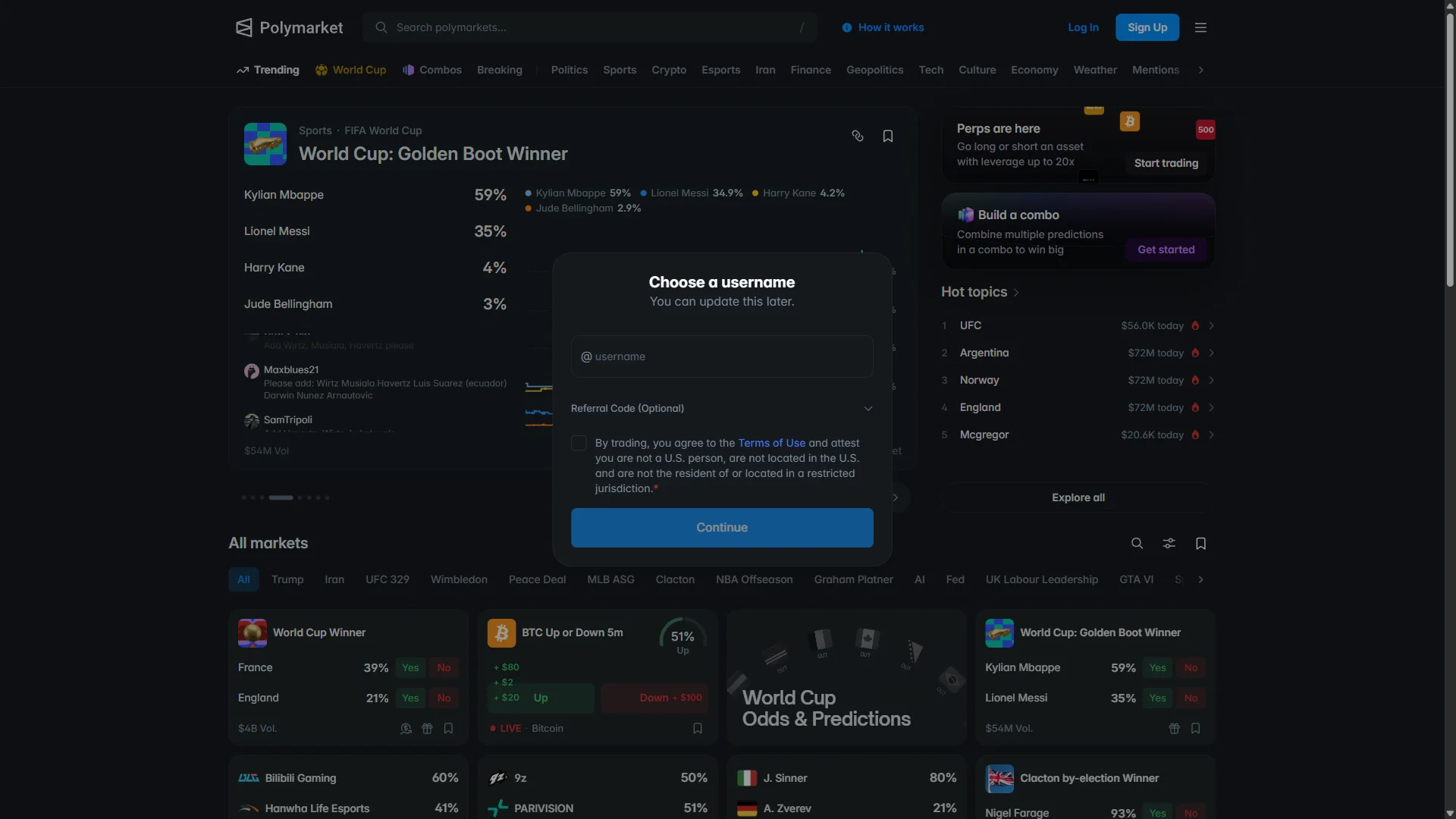
The username screen with an empty field and the "Referral Code (Optional)" section collapsed. Source: chainhelm editorial On the “Choose a username” screen, type the name you want into the empty field. You can change it later, so it does not need to be final.
Below it, “Referral Code (Optional)” stays collapsed by default. If you arrived through chainhelm’s link, you can leave this section closed and empty — the referral is already applied and verified from the link, and a collapsed or blank field here does not mean it is missing. If you would rather enter the code by hand, you can expand this section, which the next step covers.
-
Add the referral code, then continue
Referral code and agreement2026-07-12 The username filled in and chainhelm typed into the expanded "Referral Code (Optional)" field. Source: chainhelm editorial If you want to enter the referral code yourself, expand “Referral Code (Optional)” and type chainhelm into the field. This manual step is optional for link users — the code is already applied from the link — but entering chainhelm here applies and verifies it too, and an empty field never means the code is missing.
With the username filled in, check the box agreeing to the “Terms of Use” and attesting that you are not a U.S. person and are not located in a restricted jurisdiction.
Click “Continue” to finish registration. Polymarket confirms the account and shows the prompt to fund it.
-
Finish sign-up and start funding
Account created, fund prompt2026-07-12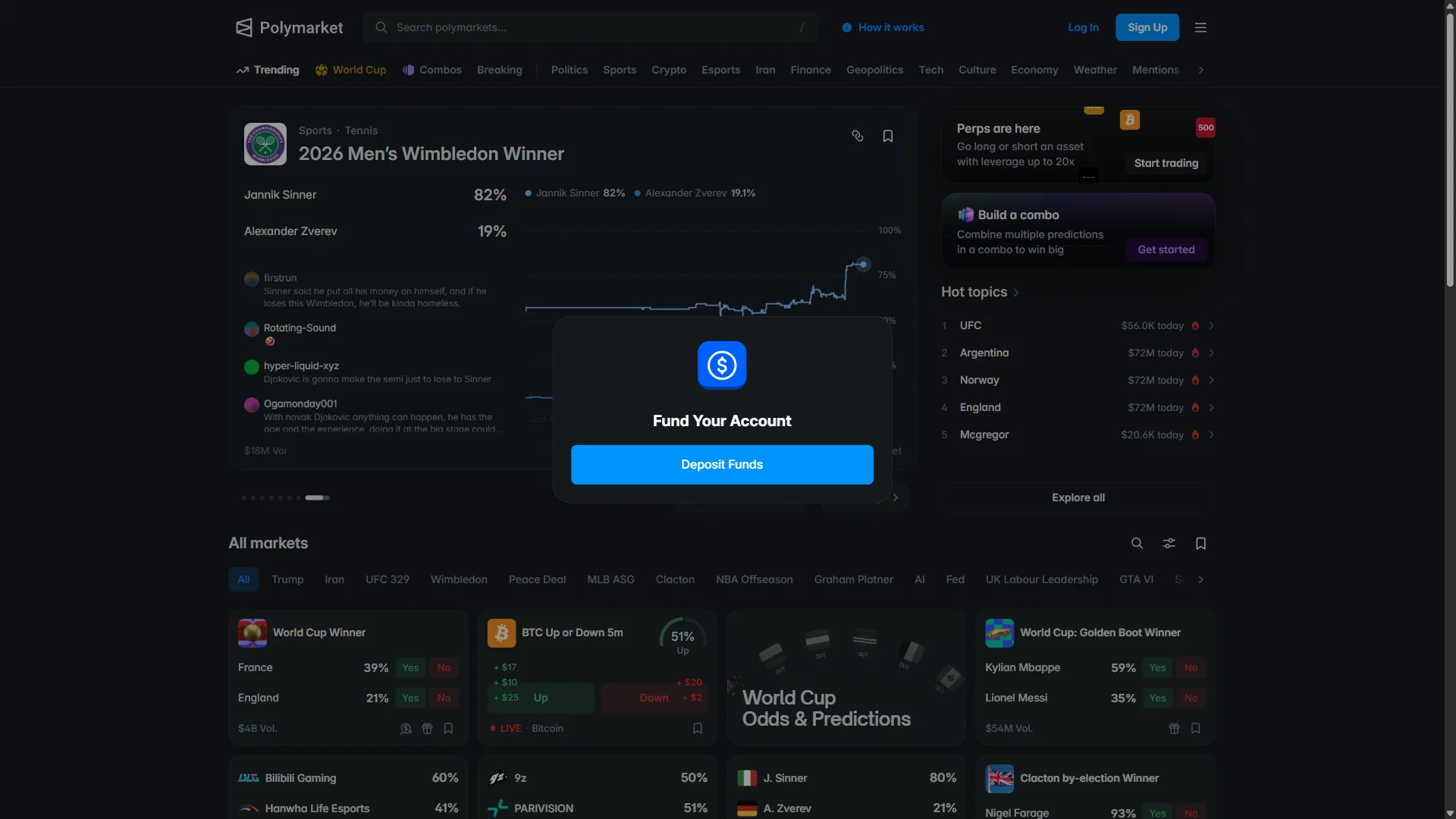
The "Fund Your Account" prompt with its "Deposit Funds" button, shown once the account is created. Source: chainhelm editorial Registration is complete, and Polymarket shows the “Fund Your Account” prompt over the homepage.
Click “Deposit Funds” to open the deposit options, where you choose how to add money to the account.
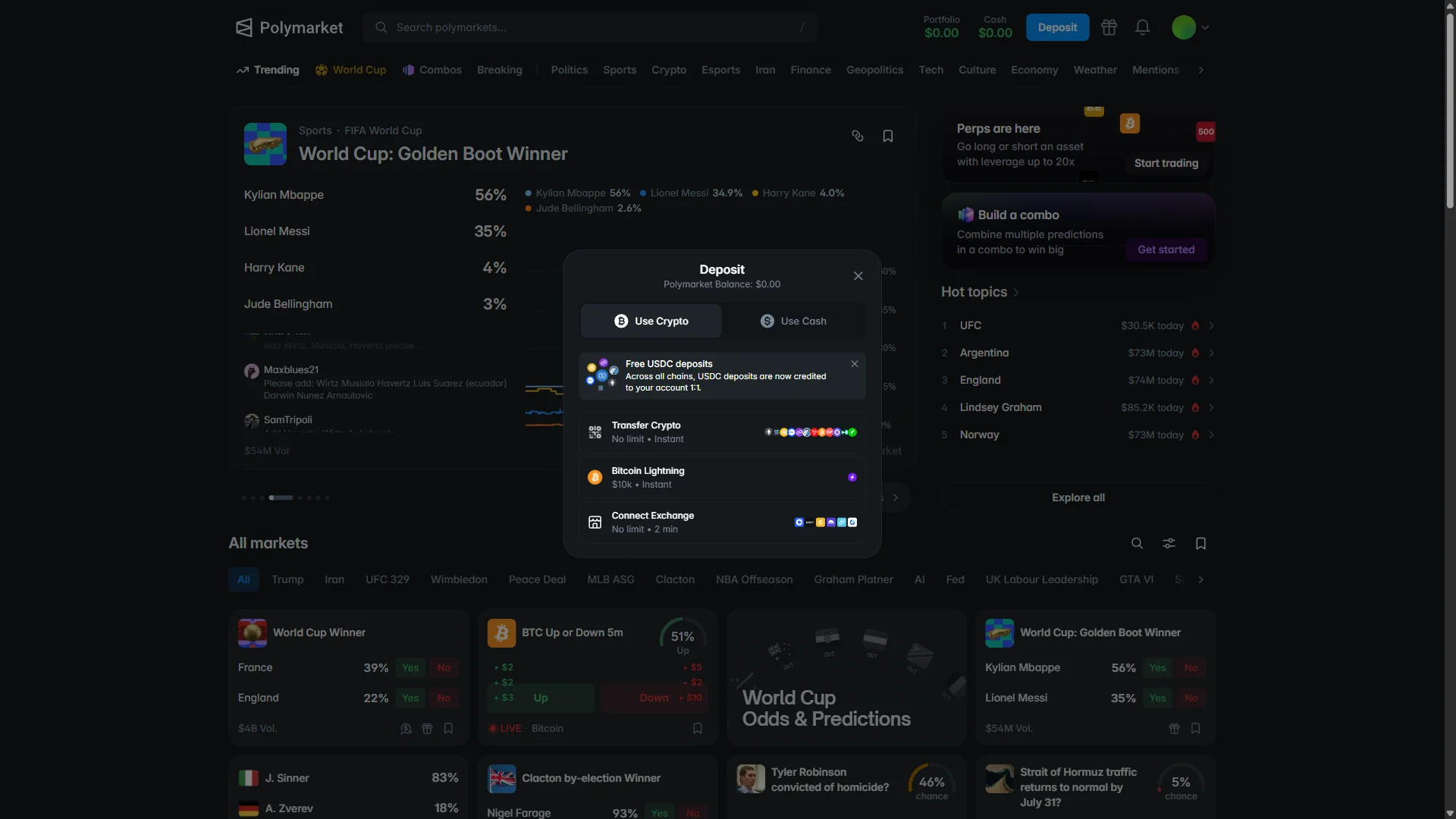
The “Deposit” window opens on the “Use Crypto” tab, with the Polymarket balance still at $0.00. A banner at the top notes that USDC deposits are credited to your account 1:1 across all chains.
Three crypto methods are listed, each with its own limit and speed: “Transfer Crypto” (no limit, instant), “Bitcoin Lightning” (up to $10k, instant), and “Connect Exchange” (no limit, about two minutes). Pick the method that matches how you hold crypto, or switch to the “Use Cash” tab for card and bank options.
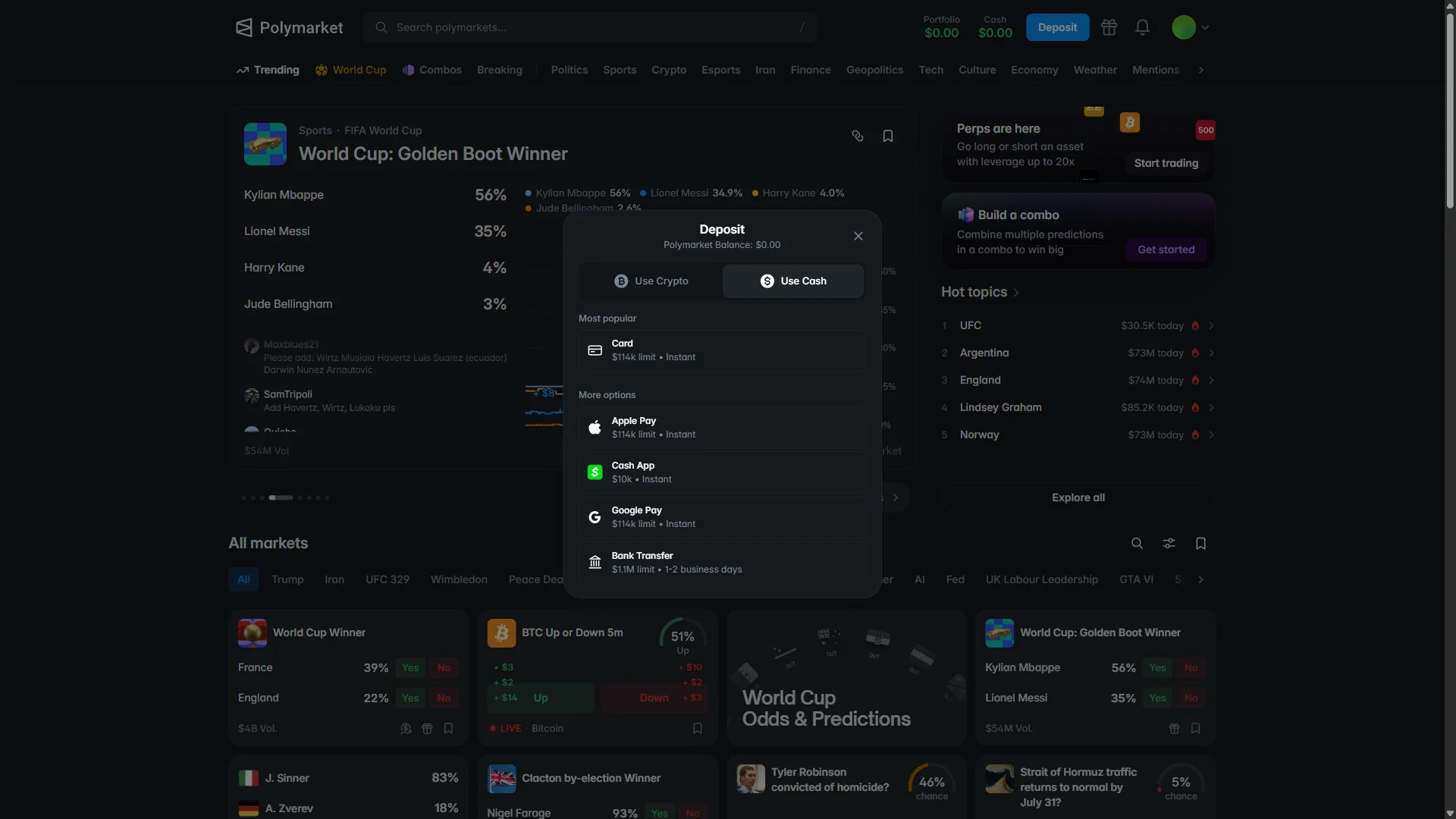
On the “Use Cash” tab, the funding methods are grouped by popularity. “Card” sits under “Most popular” with a $114k limit and instant funding.
“More options” lists the rest, each with its own limit and speed: “Apple Pay” ($114k, instant), “Cash App” ($10k, instant), “Google Pay” ($114k, instant), and “Bank Transfer” ($1.1M, one to two business days). Choose whichever method you want to use to fund the account.
Smartphone (iOS / Android) sign-up and deposit steps
-
Go to the Polymarket official sign-up page in your mobile browser or app (the link carries the referral code “chainhelm”). When it opens, you’ll see a screen like the one below.
-
Open the sign-up window
Polymarket homepage, logged out2026-07-12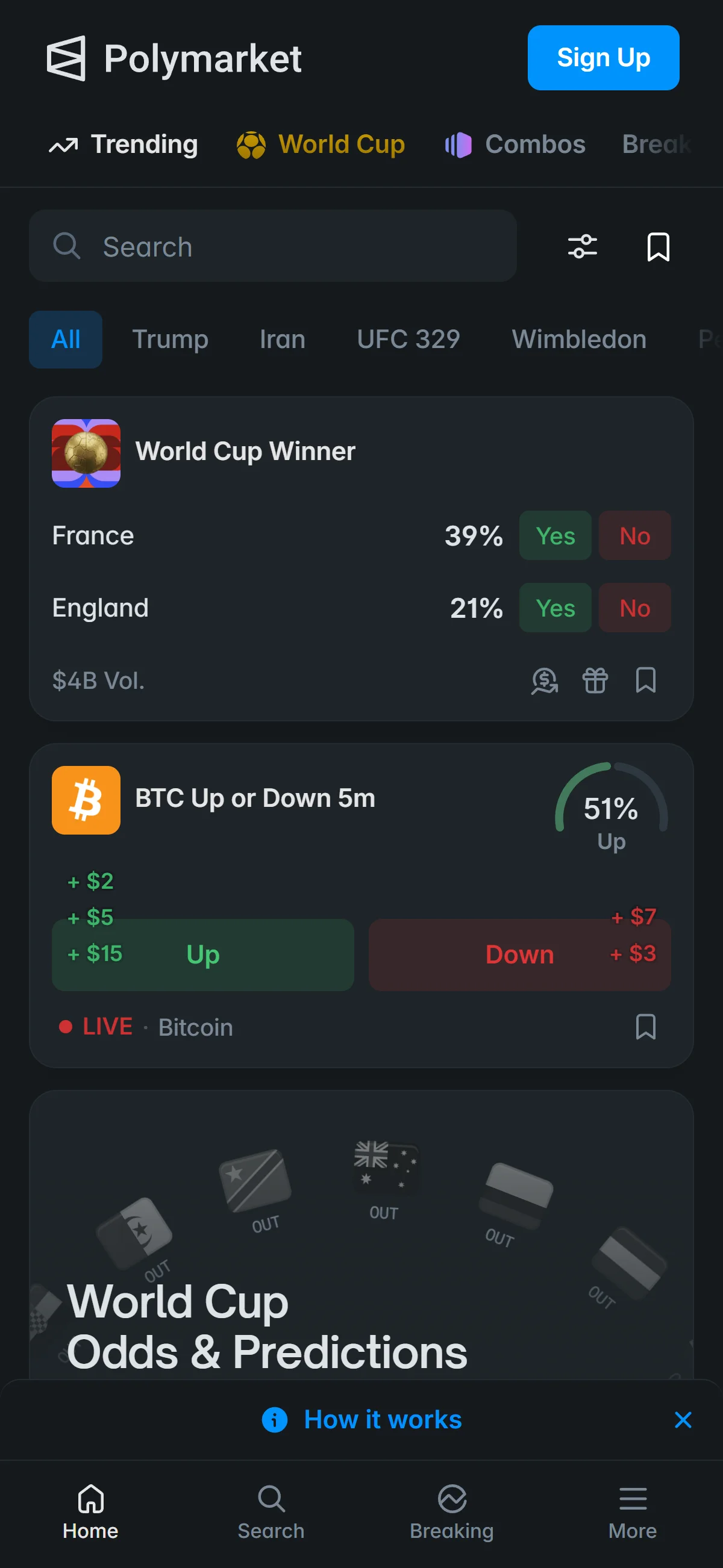
The logged-out Polymarket homepage, with the "Sign Up" button in the top-right of the header. Source: chainhelm editorial Opening chainhelm’s referral link brings you to the Polymarket homepage while you are still logged out. You will not see any on-screen referral banner or code, and that is normal — the referral travels invisibly with the link and is applied in the background.
To begin, click “Sign Up” in the top-right of the header. The sign-up window opens on top of the homepage.
-
Enter your email
Sign-up window: email entry2026-07-12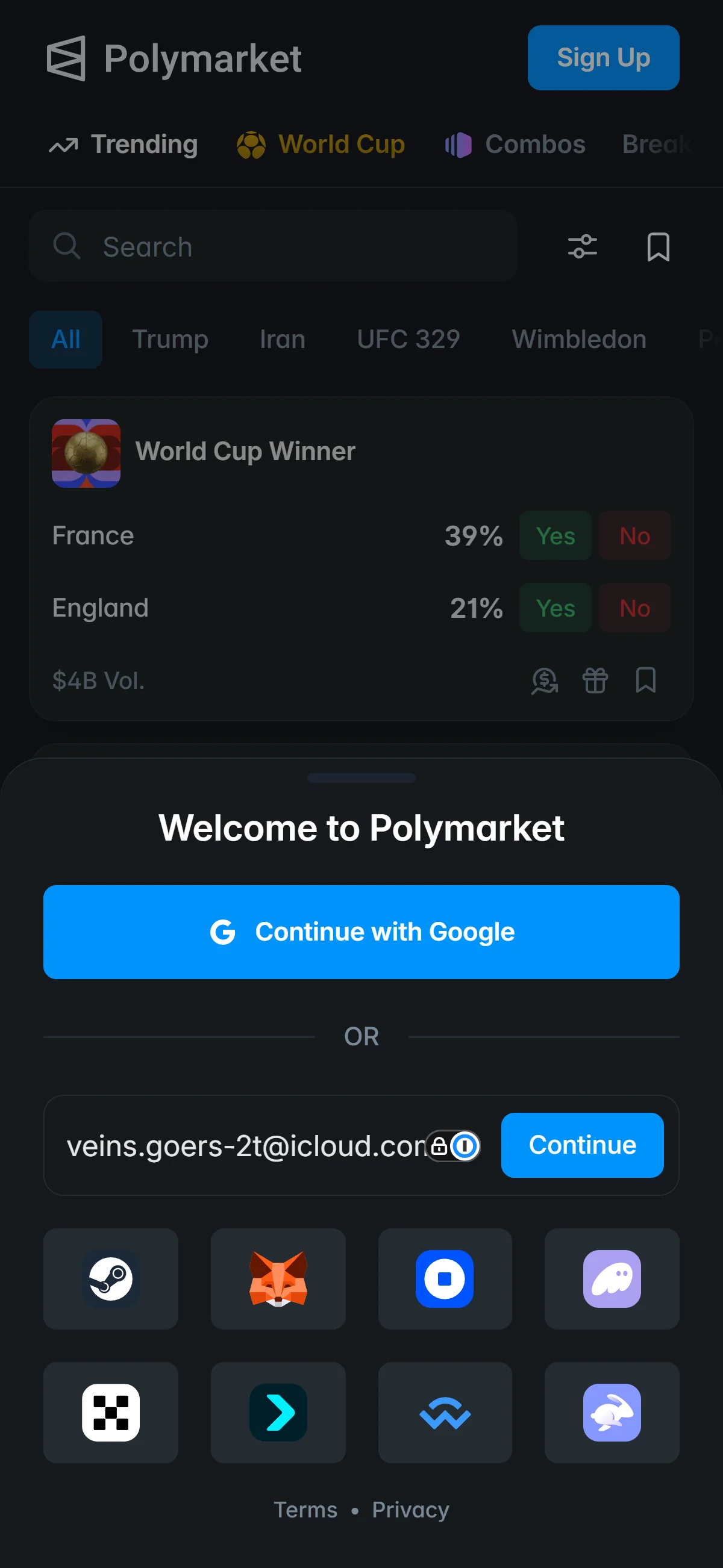
The "Welcome to Polymarket" window with an email filled in, alongside Google and wallet sign-in options. Source: chainhelm editorial In the “Welcome to Polymarket” window, type your address into the “Email address” field and click “Continue”.
If you would rather not use email, the same window offers “Continue with Google” and a row of wallet-login options; any one of them starts the account instead. Once you continue with your email, Polymarket sends a verification code and moves you to the code-entry screen.
-
Head to your inbox for the code
Verification code entry2026-07-12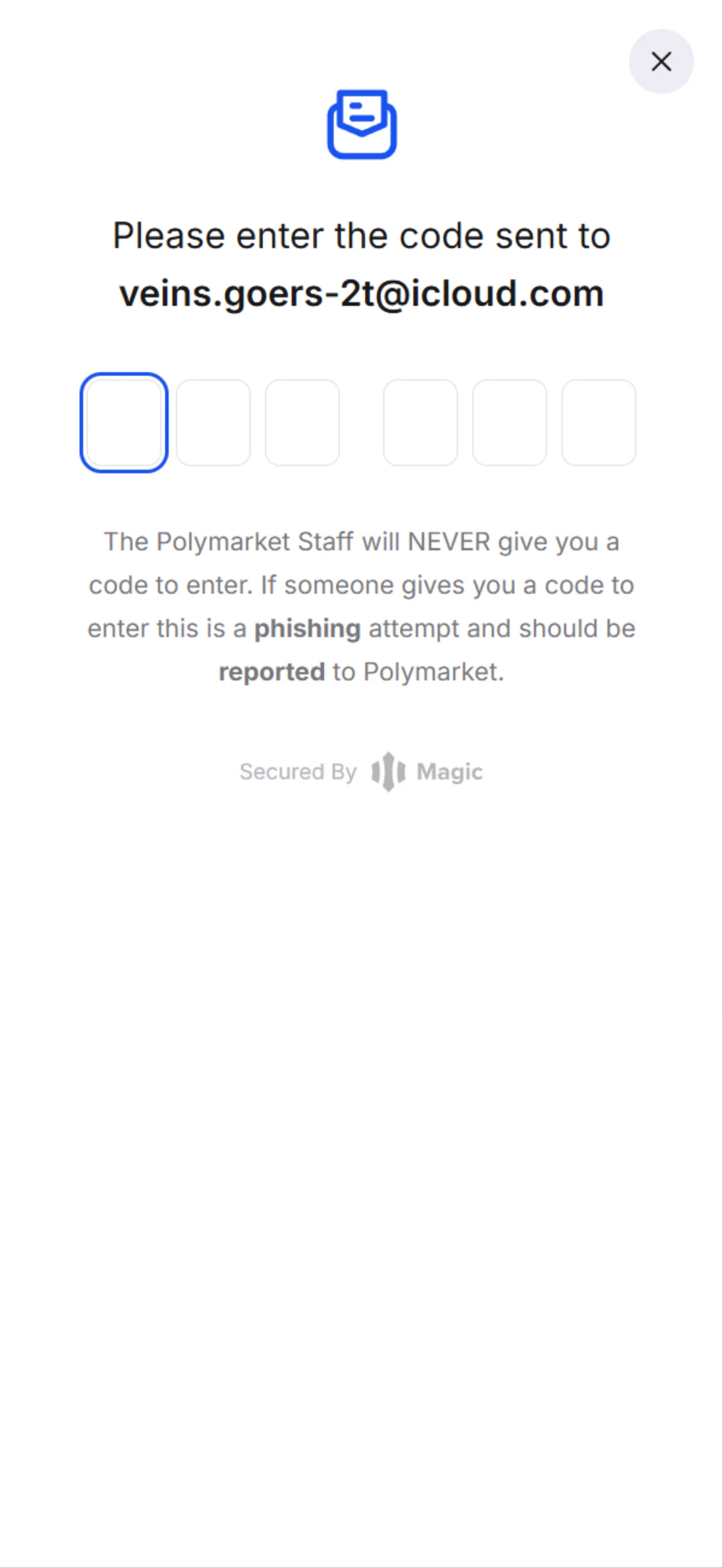
The code screen with six empty boxes and a phishing warning, addressed to the email you entered. Source: chainhelm editorial The verification screen shows six empty boxes and confirms that a code was sent to the email address you just entered.
Read the notice below the boxes: Polymarket staff will never give you a code, so treat anyone who hands you one as a phishing attempt. Leave this screen open and switch to your email inbox to find the code.
-
Copy the code from your email
Login-code email2026-07-12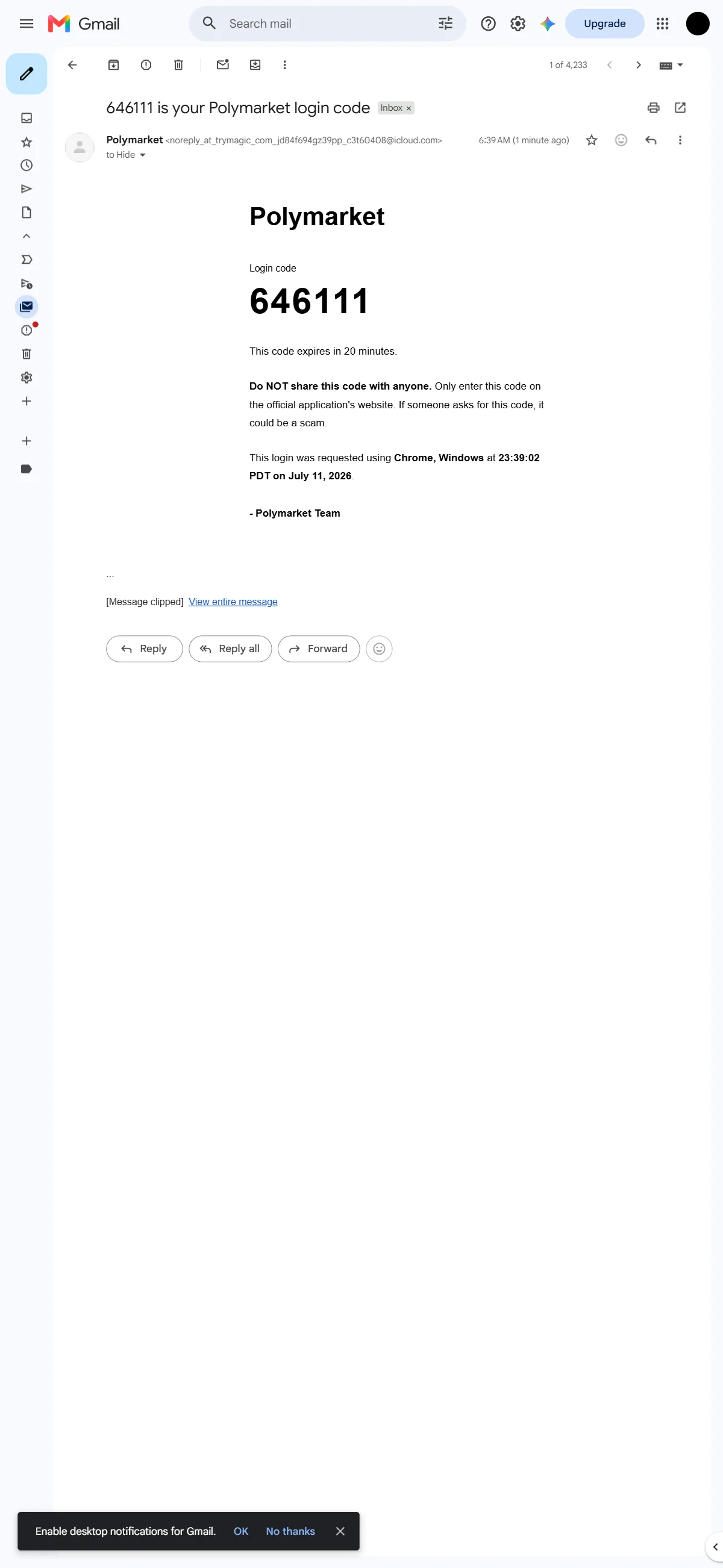
The Polymarket email showing the six-digit login code and its 20-minute expiry note. Source: chainhelm editorial Open the message from Polymarket in your inbox. It shows your six-digit code under “Login code”, along with a reminder that the code expires in 20 minutes and must never be shared with anyone.
Note the code, return to the verification screen, and type it into the six boxes. Once the code is accepted, Polymarket takes you to the username screen.
-
Choose your username
Choose a username2026-07-12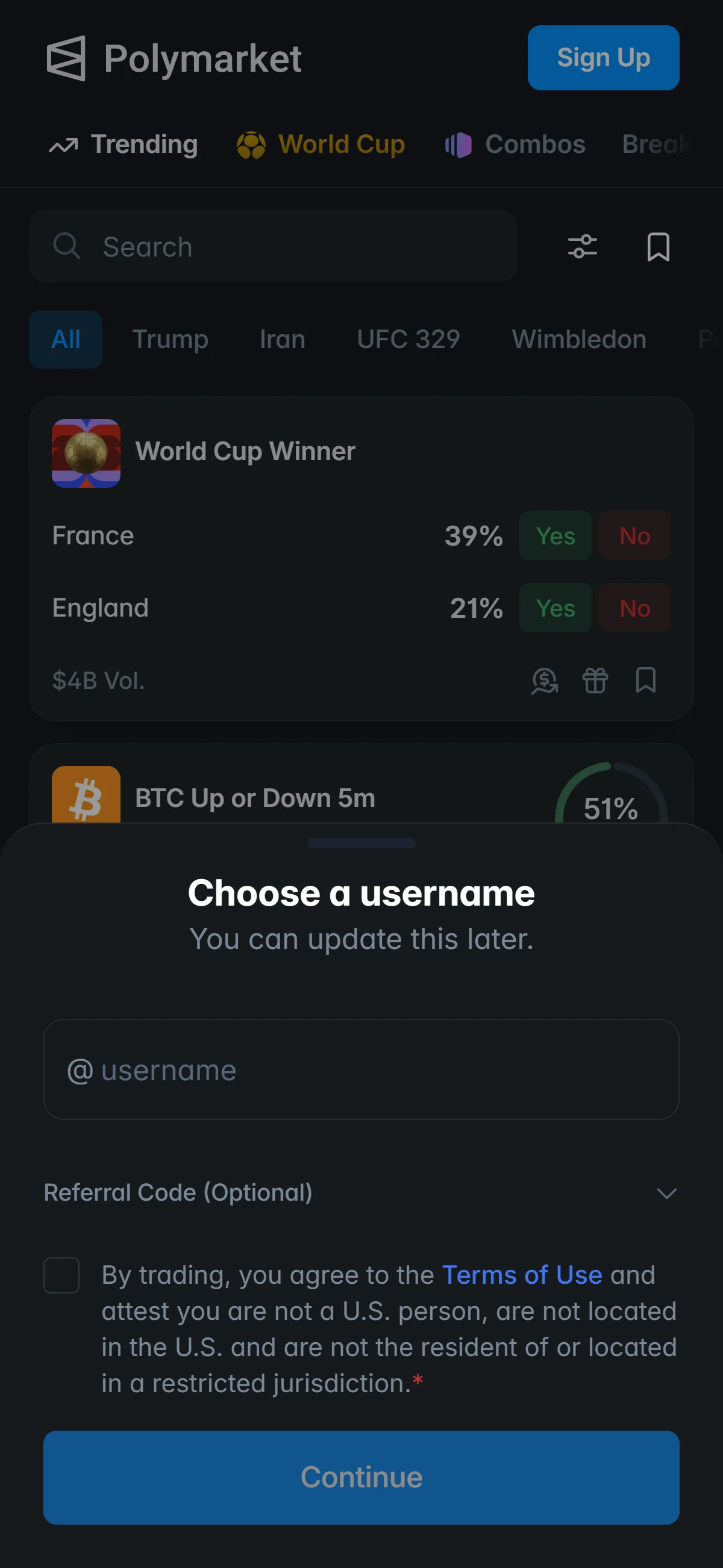
The username screen with an empty field and the "Referral Code (Optional)" section collapsed. Source: chainhelm editorial On the “Choose a username” screen, type the name you want into the empty field. You can change it later, so it does not need to be final.
Below it, “Referral Code (Optional)” stays collapsed by default. If you arrived through chainhelm’s link, you can leave this section closed and empty — the referral is already applied and verified from the link, and a collapsed or blank field here does not mean it is missing. If you would rather enter the code by hand, you can expand this section, which the next step covers.
-
Add the referral code, then continue
Referral code and agreement2026-07-12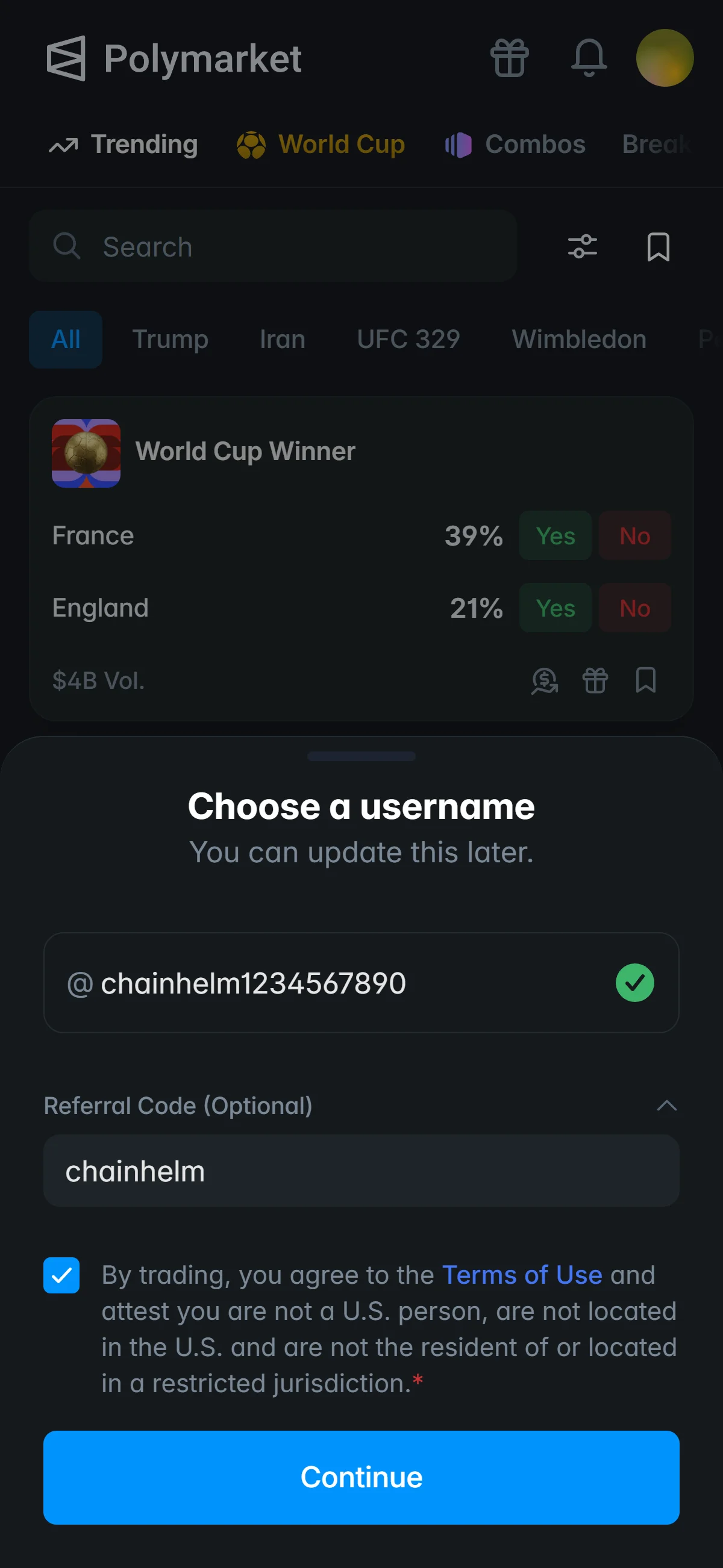
The username filled in and chainhelm typed into the expanded "Referral Code (Optional)" field. Source: chainhelm editorial If you want to enter the referral code yourself, expand “Referral Code (Optional)” and type chainhelm into the field. This manual step is optional for link users — the code is already applied from the link — but entering chainhelm here applies and verifies it too, and an empty field never means the code is missing.
With the username filled in, check the box agreeing to the “Terms of Use” and attesting that you are not a U.S. person and are not located in a restricted jurisdiction.
Click “Continue” to finish registration. Polymarket confirms the account and shows the prompt to fund it.
-
Finish sign-up and start funding
Account created, fund prompt2026-07-12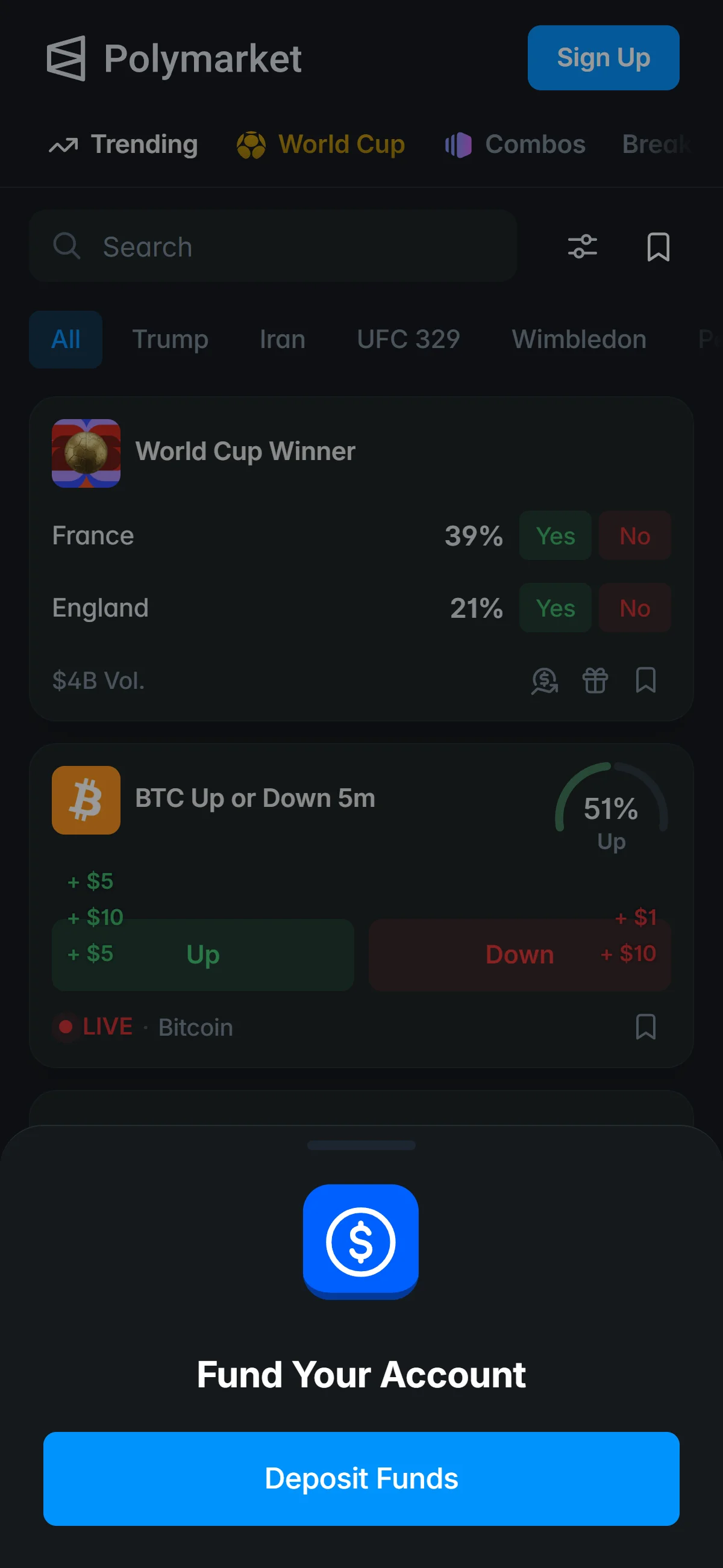
The "Fund Your Account" prompt with its "Deposit Funds" button, shown once the account is created. Source: chainhelm editorial Registration is complete, and Polymarket shows the “Fund Your Account” prompt over the homepage.
Click “Deposit Funds” to open the deposit options, where you choose how to add money to the account.
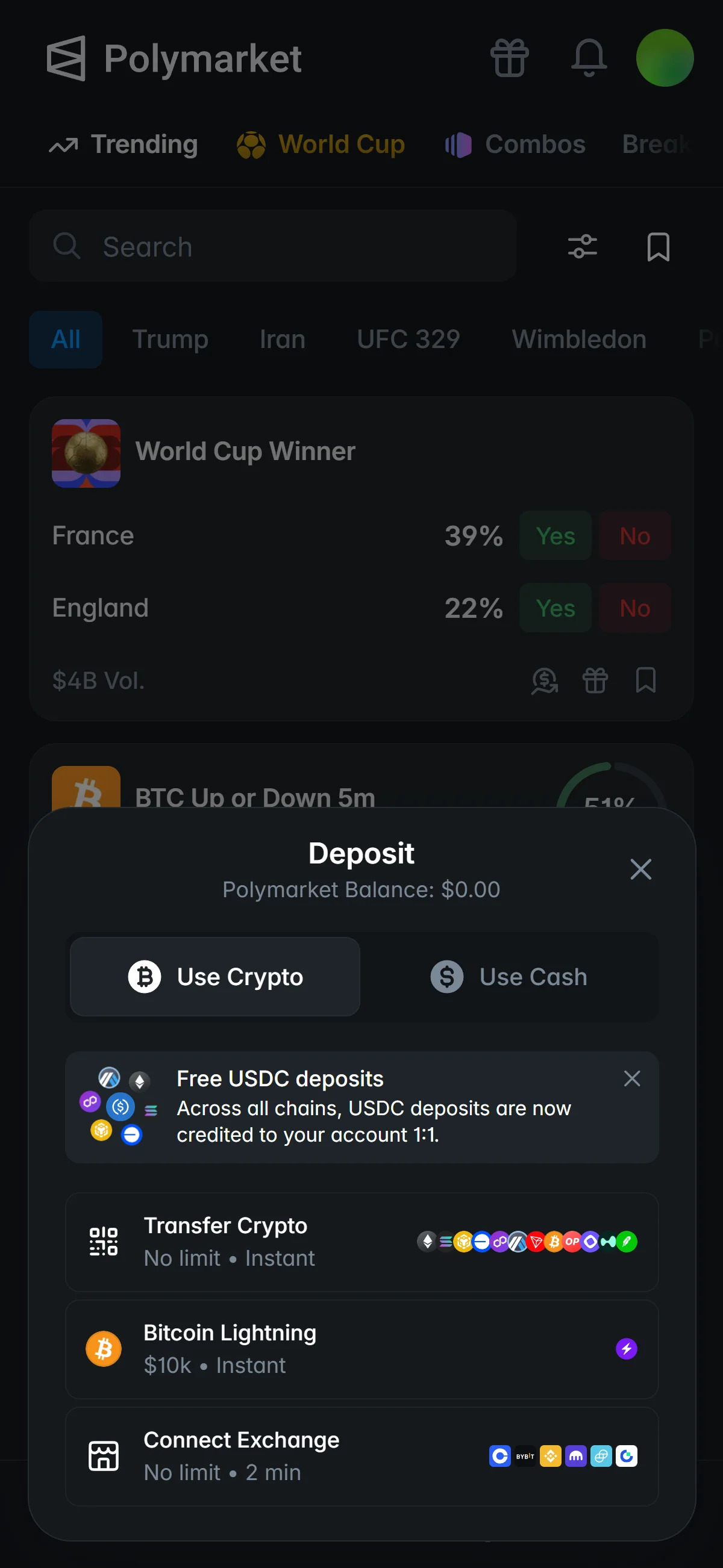
The “Deposit” window opens on the “Use Crypto” tab, with the Polymarket balance still at $0.00. A banner at the top notes that USDC deposits are credited to your account 1:1 across all chains.
Three crypto methods are listed, each with its own limit and speed: “Transfer Crypto” (no limit, instant), “Bitcoin Lightning” (up to $10k, instant), and “Connect Exchange” (no limit, about two minutes). Pick the method that matches how you hold crypto, or switch to the “Use Cash” tab for card and bank options.
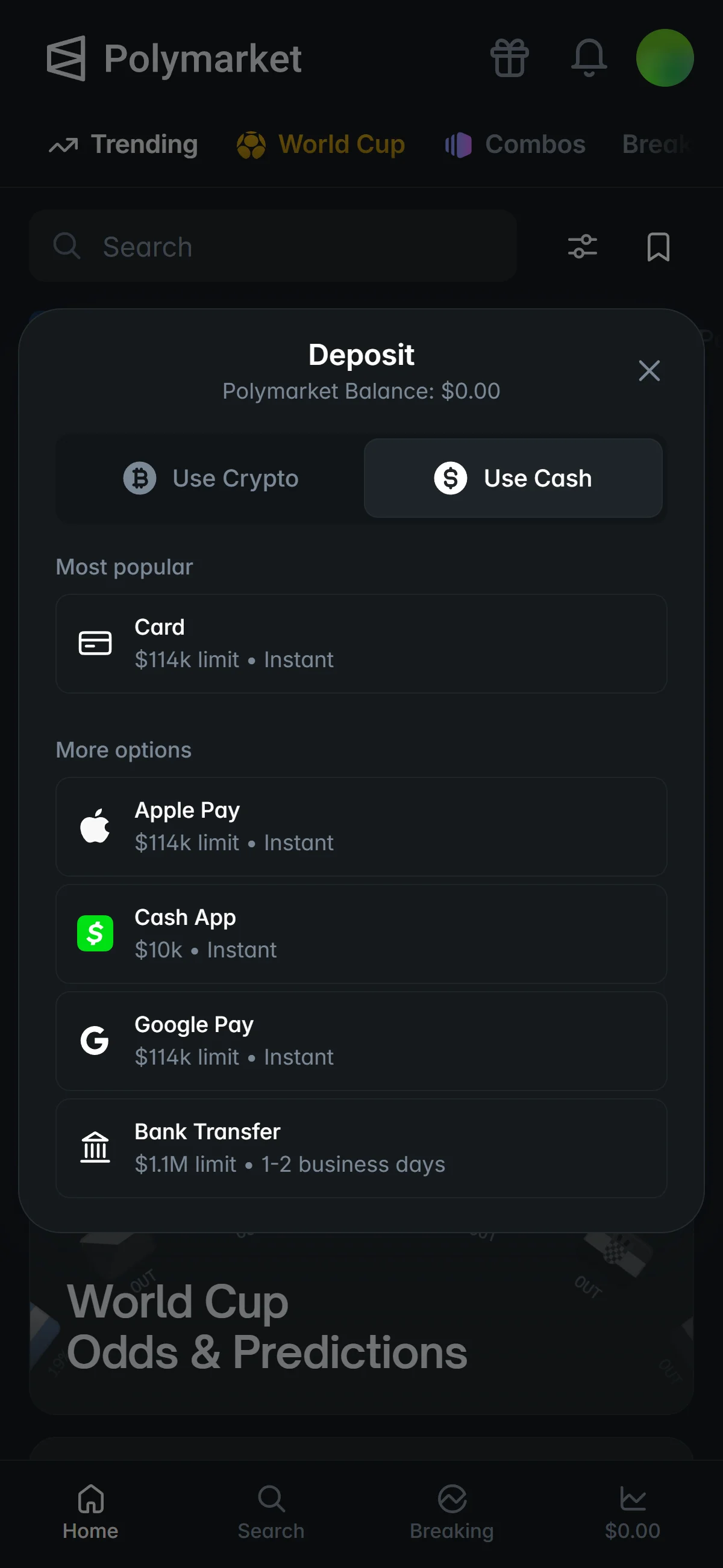
On the “Use Cash” tab, the funding methods are grouped by popularity. “Card” sits under “Most popular” with a $114k limit and instant funding.
“More options” lists the rest, each with its own limit and speed: “Apple Pay” ($114k, instant), “Cash App” ($10k, instant), “Google Pay” ($114k, instant), and “Bank Transfer” ($1.1M, one to two business days). Choose whichever method you want to use to fund the account.
Polymarket funds an account two ways — crypto, where USDC is credited 1:1, or cash by card and bank — so once you choose one and add funds, the account is ready to trade.
- Did you open the sign-up page through the referral link? (The code disappears from the URL and the field stays empty after that — the referral is still attached.)
- Complete sign-up in the same browser you opened the link in (typing chainhelm into the “Referral Code (Optional)” field works just as well — both paths verified).
What is Polymarket
From a 2020 startup to the largest prediction market
Polymarket launched in June 2020 in New York City, built by Shayne Coplan — then 22 — who pivoted an earlier DeFi project, Union Market, into a prediction market during the COVID-19 pandemic. It calls itself the “World’s Largest Prediction Market”, and the structure behind that phrase is specific: a non-custodial, on-chain event-contract exchange on Polygon that runs a central limit order book with on-chain settlement.
Every market is a binary Yes/No question whose outcome tokens — ERC1155 tokens issued under a Conditional Token Framework — each redeem for $1 when the market resolves, across Politics, Sports, Crypto, Finance, Geopolitics, Culture, Tech and AI, Weather, Economics and Esports. A separate Perps product exists, collateralized by pUSD, an ERC-20 wrapper for a 1:1 USDC claim on Polygon.
chainhelm reads those numbers as the category’s defining fact. They mark an order-of-magnitude jump from roughly $1.2B a month during 2025 into the $10-20B-a-month range across the first half of 2026. Because the model is non-custodial — each user trades from their own Polygon proxy wallet — Polymarket publishes no headline registered-user count, yet active wallets are reported to have more than tripled in the six months into early 2026. For a reader comparing venues, the practical takeaway is depth: this is the deepest-liquidity book in the category, operating at a genuinely different scale from most peers, not merely one prediction market among many.
Two entities: the offshore global platform and Polymarket US
Global platform (polymarket.com)
Polymarket US (QCX LLC)
Polymarket’s operational headquarters sit in Manhattan, but the international platform’s legal home is Panama — and in May 2026 NPR reported that the stated Panama address could not be physically located. The distinction between the two entities above is not a footnote: it decides which product a reader can actually use. The chainhelm code belongs to the offshore global platform and does not carry over to Polymarket US, which runs its own separate referral system. What that means for a reader in a specific country is the availability chapter’s job, not this one’s.
Backing and trajectory: DOJ/CFTC clearance, QCX, and ICE
Read as a trajectory rather than a verdict, the sequence shows who now stands behind Polymarket and where it is heading: cleared by its US federal investigators, holding a licensed contract-market subsidiary, and drawing strategic investment from ICE. chainhelm keeps the harder questions — the resolution disputes and the open marketing probe — for the risks chapter. Here the point is narrower: this is no longer a fringe offshore venue, and its direction of travel is toward regulated US infrastructure.
Polymarket fees: what you actually pay
What you pay to trade: the per-category taker fee
Polymarket’s trading fee falls entirely on takers: makers who post resting orders are never charged. A taker pays a fee set by the formula fee = C x feeRate x p x (1 - p), where p is the price (the implied probability) and C the contract size — a shape that peaks at a 50% probability and shrinks toward either end, with a minimum charge of 0.00001 USDC. As of 2026-07-10, the feeRate is not one flat number but a per-category coefficient:
- Crypto
- 0.07
- Economics, Culture, Weather, Other
- 0.05
- Finance, Politics, Tech, Mentions
- 0.04
- Sports
- 0.03
- Geopolitics
- 0 (no taker fee)
Two things are worth holding onto. First, Polymarket historically charged zero trading fees; both the category taker fee and the Perps schedule below reflect a 2025-2026 change, so older guides that call the platform fee-free are out of date. Second, because feeRate is a coefficient inside that formula rather than a flat percentage, what you actually pay depends on the price you trade at — highest near a 50/50 market, lowest on lopsided ones.
The Perps product prices differently, on flat rates: a maker receives 0.00005 (0.5 bps) and a taker pays 0.0002 (2 bps), charged as abs(price x quantity) x rate in pUSD, with no published volume-tiered ladder.
Funding costs and the absence of a fee-reduction token
On funding, Polymarket publishes no explicit deposit, bridge, or withdrawal fee schedule beyond per-chain minimums; what you pay is the source chain’s own network gas. The minimum deposit is $2 overall, with per-chain floors of roughly $2 on Polygon and most EVM chains, about $7 on Ethereum, and about $9 on Bitcoin and Tron. Withdrawals simply unwrap pUSD back to USDC through an off-ramp contract.
There is no native-token route to lower fees, because there is no native token. Polymarket has no tradable utility token and no token-based fee-reduction mechanism at all — pUSD is a USDC-backed collateral wrapper, not a fee lever — and the company’s official position is that no airdrop or token generation event has been announced. Treat any “POLY” fee-cut or airdrop claim as speculation until Polymarket says otherwise.
How Polymarket compares with other prediction markets
Polymarket vs Kalshi and other event venues
The most direct comparison is Kalshi.
Polymarket (global)
Kalshi (KalshiEX LLC)
Kalshi aside, the rest of the field divides by what the “money” is:
- Manifold Markets
- Play-money (Mana, non-cashable); zero trading fees.
- Metaculus
- Reputation-based forecasting, not wagering.
- PredictIt
- US-regulated event contracts.
- Robinhood / IBKR ForecastEx
- US-regulated event contracts offered through brokers.
- B3 Contratos de Eventos
- Exchange-listed event contracts (Brazil).
Against a regulated venue like Kalshi, Polymarket’s trade-off is legible: no US oversight, but an on-chain, non-custodial order book with the broadest global market breadth in the category.
When another venue fits you better
No single venue fits everyone, and chainhelm is direct about where Polymarket is the wrong choice. A US resident who wants a fully domestic-regulated market should look to Polymarket US or Kalshi — the global platform blocks US persons outright. Anyone in a jurisdiction where Polymarket is blocked needs a locally licensed venue instead, not a workaround. And anyone after conventional crypto trading — spot or derivatives coin pairs, staking, or earn products — is in the wrong place entirely: Polymarket lists no coin pairs and offers no earn products, only event contracts.
Polymarket regulatory landscape
The US turn: from an offshore ban to a CFTC-regulated market
The single most consequential chapter in Polymarket’s regulatory history is American. In January 2022 the CFTC settled with Polymarket for running an unregistered facility: the platform paid a $1.4M penalty, blocked its US customers, and wound down non-compliant markets, then operated offshore for the next three years. The re-entry, when it came in 2025, was through the front door — a Designated Contract Market path for event contracts held by QCX LLC, doing business as Polymarket US, under an amended CFTC Order of Designation in November 2025 that allows intermediated US market access. The global polymarket.com platform, though, remains offshore and unlicensed for US persons; the license belongs to the separate US entity, not to the global book.
The global map: excluded and close-only jurisdictions
Beyond the US, Polymarket draws its own map of where it will not operate.
The list reads as the platform’s own footprint, not personal advice. It runs on two tiers — a fully excluded set where sign-up is barred, plus sanctioned states, and a narrower close-only tier where existing positions can be wound down but no new ones opened. Where a reader’s own country sits on that map, and what it means for them personally, is the next chapter’s job.
A formalizing but contested trajectory
Put the pieces together and the direction is mixed but legible: Polymarket is formalizing under scrutiny. From an offshore, US-banned posture it cleared its DOJ and CFTC probes in July 2025, acquired a CFTC-licensed DCM, secured the amended Order of Designation in November 2025, and relaunched a regulated US app in December 2025 with ICE’s backing. The counterweight arrived almost at once: a new 2026 CFTC investigation into alleged deceptive marketing, plus congressional pressure.
A platform formalizing under scrutiny — cleared by its US regulators in 2025, then placed under a fresh CFTC marketing probe in 2026.
One landscape fact belongs here rather than in the country guide: alongside the offshore platform, a regulated local sibling now exists — Polymarket US (QCX LLC), the CFTC-regulated entity — as part of that same formalizing trajectory. What it means for a specific reader, and whether the chainhelm referral reaches it, is a question the availability chapter answers country by country.
◆ ◇ ◆
Polymarket availability — country by country
This is the chapter that decides whether anything above is usable for you. chainhelm covers each market it serves in this language plainly: where Polymarket stands, on whose authority, and — where it matters — what personal legal exposure a user would carry. It does not route readers around blocks, and it does not describe circumvention. For the five markets here, the honest headline is the same: the global platform is not available.
United States: blocked on the global platform; Polymarket US is a separate entity
On the offshore platform the status is unambiguous: polymarket.com has geo-blocked US persons since the January 2022 CFTC order, and the chainhelm referral — which belongs to that offshore platform — cannot be used from the US. What exists instead is a different product. Polymarket US (QCX LLC), the CFTC-regulated Designated Contract Market, relaunched in December 2025 across more than 40 states with its own app and its own, separate referral system, which means the chainhelm code does not apply there. chainhelm states this as a plain fact about the platform’s US entity, not as a place to route you toward. Coverage is not uniform even within the country: a Nevada court injunction and a Minnesota prohibition effective August 2026 are among the state-level gaps. There is nothing here about getting around that block — from the US, the global platform this article’s referral belongs to is simply off-limits.
United Kingdom: blocked under FCA and UKGC rules
For a UK reader, sign-up, deposits, and new positions are all geo-blocked, and the basis is doubled. The Financial Conduct Authority’s 2019 ban on selling retail binary options (PS19/11) already caught products of this shape, and on 2026-02-04 the Gambling Commission (UKGC) stated that it treats prediction markets as unlicensed betting intermediaries. chainhelm presents no equivalent substitute. As neutral context only, the lawful UK category for this kind of activity is the UKGC-licensed betting exchange — a gambling-licensing regime, and a different product — but that is background, not a recommendation, and there is no circumvention route to describe.
Singapore: blocked as illegal remote gambling, with user-side penalties
Singapore sits on Polymarket’s close-only list and, more seriously, the activity is treated as illegal remote gambling under the Gambling Control Act 2022; access was blocked between December 2024 and January 2025. The part a reader must not gloss over is personal.
chainhelm states this plainly rather than softening it. Lawful, Singapore-relevant options do exist — access to IBKR’s ForecastEx, and Singapore Pools — but they are noted here only as fact, not offered as equivalent substitutes, and nothing on this page is circumvention guidance.
Australia: ISP-blocked as a prohibited wagering service
In Australia, Polymarket is behind a government ISP block. Since 2025-08-13 the Australian Communications and Media Authority (ACMA) has had the domain and its API blocked under the Interactive Gambling Act 2001, treating the platform as a prohibited wagering service — a gambling framework, note, rather than financial regulation. chainhelm presents no workaround and no equivalent. Betfair, as the only licensed betting exchange in the market, can be named as a neutral piece of the landscape, but that is all it is — not a reroute, and this section adds no steps for getting around the block.
India: ISP-blocked, with no lawful real-money option
India is the bluntest case in this set. Polymarket has been ISP-blocked by MeitY under Section 69A of the IT Act since around May 2026, and the Promotion and Regulation of Online Gaming Act 2025 (PROGA) makes real-money prediction markets non-licensable in the first place. That combination has a consequence chainhelm states directly: there is no lawful real-money option to point to. The domestic opinion-trading apps a reader might remember — Probo, MPL Opinio, TradeX — have shut down under PROGA, so there is no compliant real-money alternative to document. Saying there is none is the honest answer, and this section carries the block and the legal reality rather than any steps for restoring access.
Risks to acknowledge before using Polymarket
Market resolution and the UMA oracle
The deepest risk on Polymarket is not price — it is how a market is decided. Every market resolves through UMA’s Optimistic Oracle: someone proposes an outcome backed by a bond, a challenge window of about two hours opens, and a dispute escalates to a token-holder vote in UMA’s Data Verification Mechanism. The mechanism’s weak point showed in March 2025, when the roughly $7M market on a “Ukraine minerals agreement” resolved “Yes” despite no agreement having been reached — after a single large UMA holder cast about 5M UMA, around a quarter of the dispute vote.
For a reader, the takeaway is concrete: resolution risk is a design property here, not a rare glitch, and there is no house that overrides a bad decentralized vote.
Custody, the June 2026 frontend hack, and no protection fund
Custody on Polymarket is non-custodial, which cuts both ways — and June 2026 showed the sharp edge. On 2026-06-25 a supply-chain attack through a compromised third-party vendor injected malicious JavaScript into polymarket.com and tricked some users into signing malicious transactions; about $3.1M in pUSD was drained from 11 wallets and bridged from Polygon to Ethereum. The smart contracts themselves were untouched — the attack was on the website front end — and Polymarket removed the compromised dependency and committed to reimburse the affected users in full.
Size positions on the assumption that if funds are lost to a front-end or signing exploit again, recovery is a hope, not a guarantee.
Regulatory, access, and token risk
The regulatory cloud that offsets Polymarket’s 2025 clearances is a marketing probe. On 2026-06-26, first reported by the Wall Street Journal, the CFTC opened what it called an “ongoing and extensive” investigation into alleged deceptive marketing.
Paid creators were reportedly told not to disclose sponsorship, and two US senators urged a federal probe; as of the research date there are no charges or findings. Two further risks round out the picture. Access itself can be withdrawn: the excluded and close-only footprint expanded across 2026 — Japan, Australia, India, Vietnam, Indonesia, Argentina, Colombia and Brazil among the additions — so a country that is usable today can be geo-blocked or reclassified tomorrow, potentially leaving open positions close-only. And on tokens, Polymarket’s official position is that no airdrop or token generation event has been announced; a “POLY” token and airdrop are widely rumored, but a reader should treat both as officially unannounced and not act on the expectation.