— Contents 11 sections
- 01 Is the Nado referral code “5cnqg8y” still active?
- 02 Nado sign-up steps with the referral code
- 03 What to do after connecting to Nado
- 04 The Nado referral code cannot be added after sign-up
- 05 Nado Points accrue weekly, and no token has been announced
- 06 An order book on Ink, operated by Spira Arc Inc. under Panamanian law
- 07 Ranked 23rd by 24-hour perpetual volume, and what that number leaves out
- 08 Nado excludes countries rather than licensing into them
- 09 Trading is switched off in the US, and available in the UK, Singapore, Australia and India
- 10 No published audit, an operator-run sequencer, and one settlement currency
- 11 The code applies once, on a wallet that has not connected before
chainhelm’s exclusive Nado referral code is .
As of 2026-08-10, we connected a new wallet and confirmed that the referral code was applied.
The referral code takes effect only on your first wallet connection — a one-time thing.
This article covers the sign-up process (wallet connection) with the Nado referral code, Nado’s distinguishing features, availability in the US, the UK, Singapore, Australia and India, and the risks to acknowledge — with the connection flow and code application verified first-hand by chainhelm’s editorial team.
Is the Nado referral code “5cnqg8y” still active?
The chainhelm editorial team connected to Nado with a fresh wallet on 2026-08-10 and confirmed that the referral code “5cnqg8y” is still active.
Here is the actual screen captured during verification.
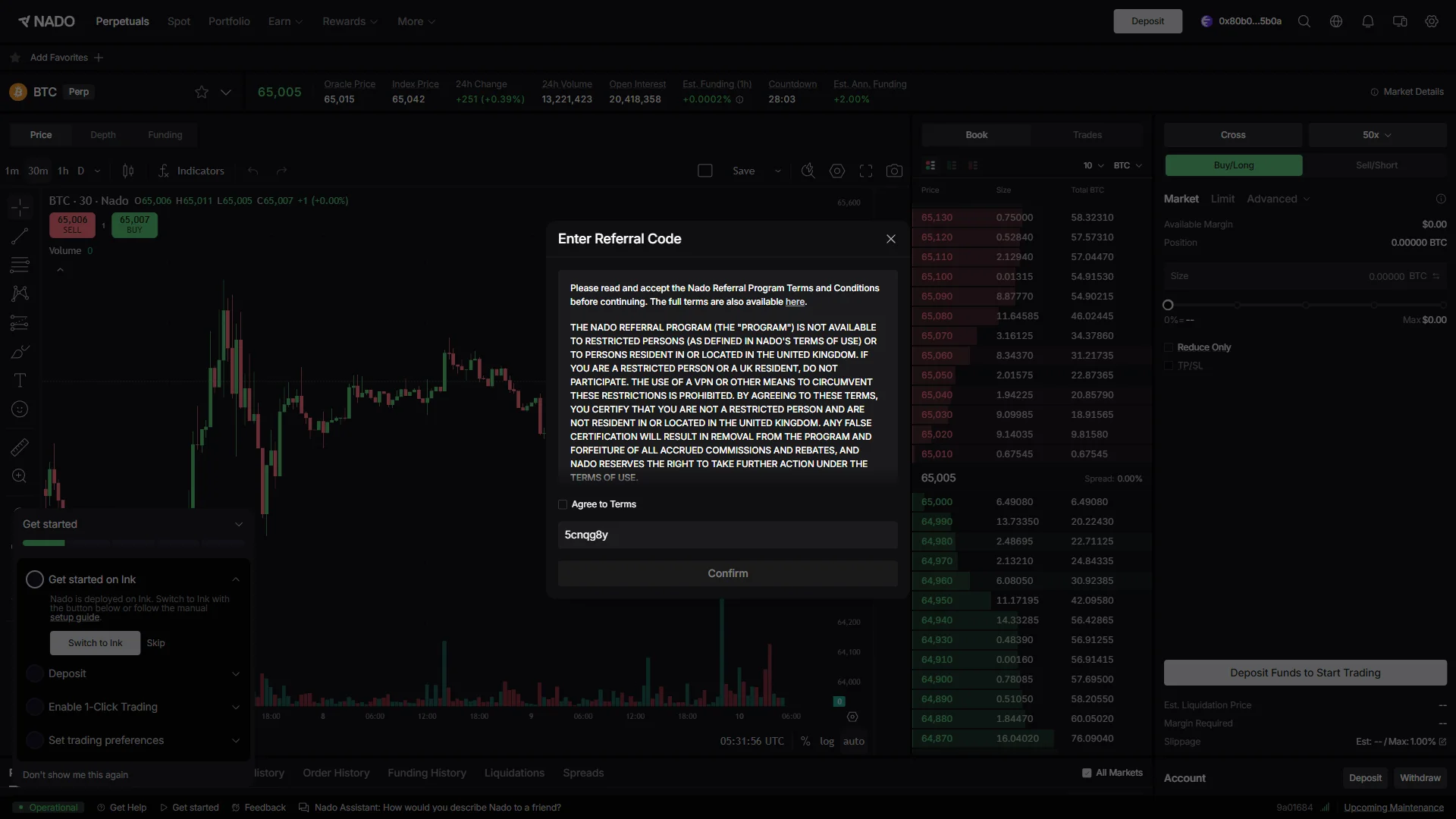
The screen shows “Enter Referral Code”, confirming that referral code 5cnqg8y has been retained from the link and will be applied when you connect your wallet.
chainhelm continuously verifies the validity of the code and confirms it remains usable.
There is a second piece of evidence a few screens later: the signature your wallet asks for at account creation spells the code out in words, as “I am using referral code 5cnqg8y”. You will see that screen in the walkthrough below.
One correction is worth making early, because most pages on this topic still get it wrong. Since Season 2 opened access on 2026-05-21, signing up requires no code at all. The code is an optional entry made at account creation, not a condition of registration — which means the question actually in front of you is not how to obtain a code, but whether you want to trade on Nado at all.
Nado sign-up steps with the referral code
We cover the connection process separately for PC/browser and smartphone (mobile).
PC/browser connection steps
- First, open the Nado official page (the link applies the referral code). When you open it, you’ll see a screen like the one below.
Click “Sign In” on the trading screen
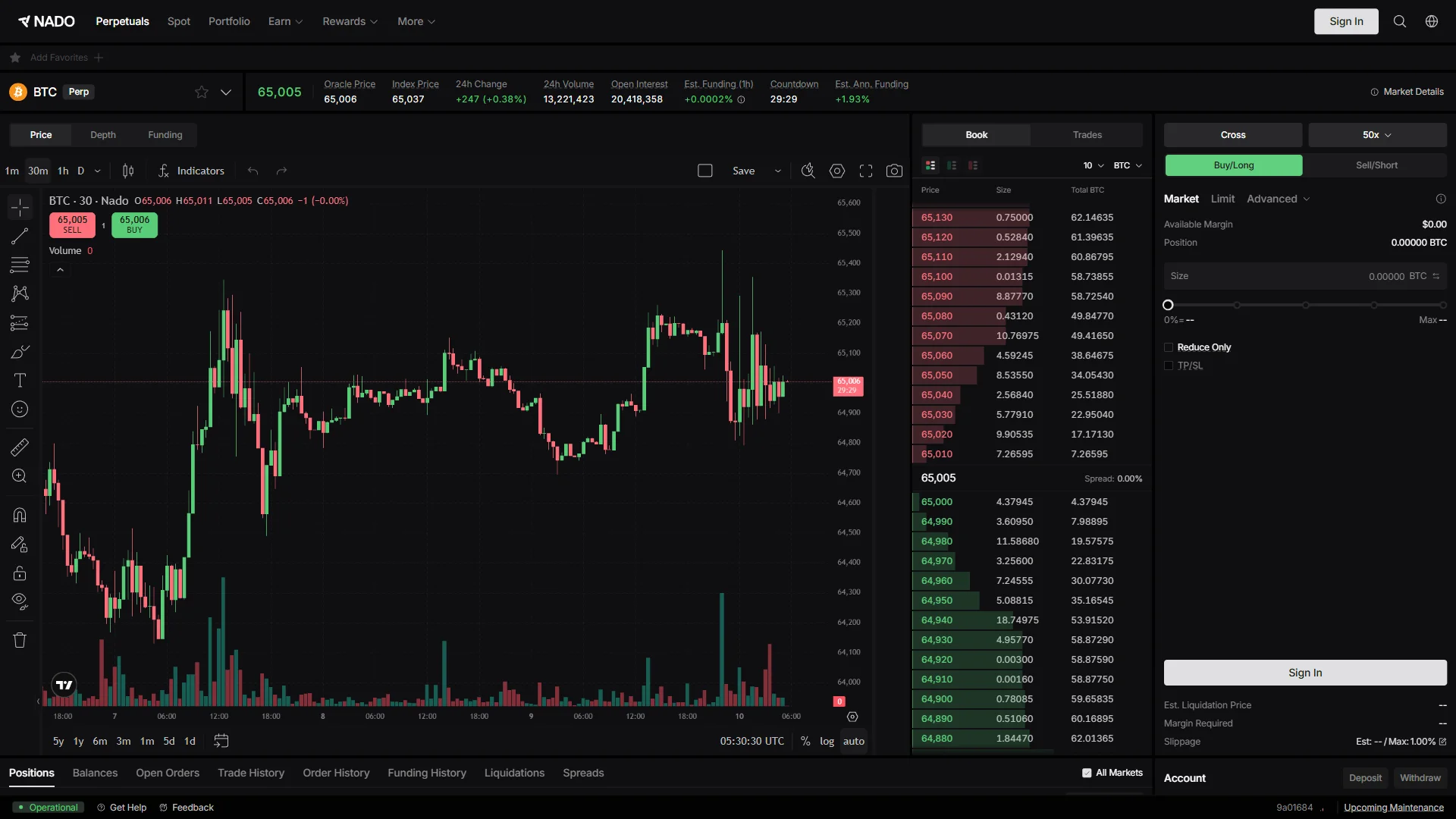
Click “Sign In” at the top right of the trading screen to start connecting an account. Charts, order book and market data all load without an account, so the “Sign In” button in the header is what tells you the session is still signed out.
Pick “Rabby Wallet” from the list
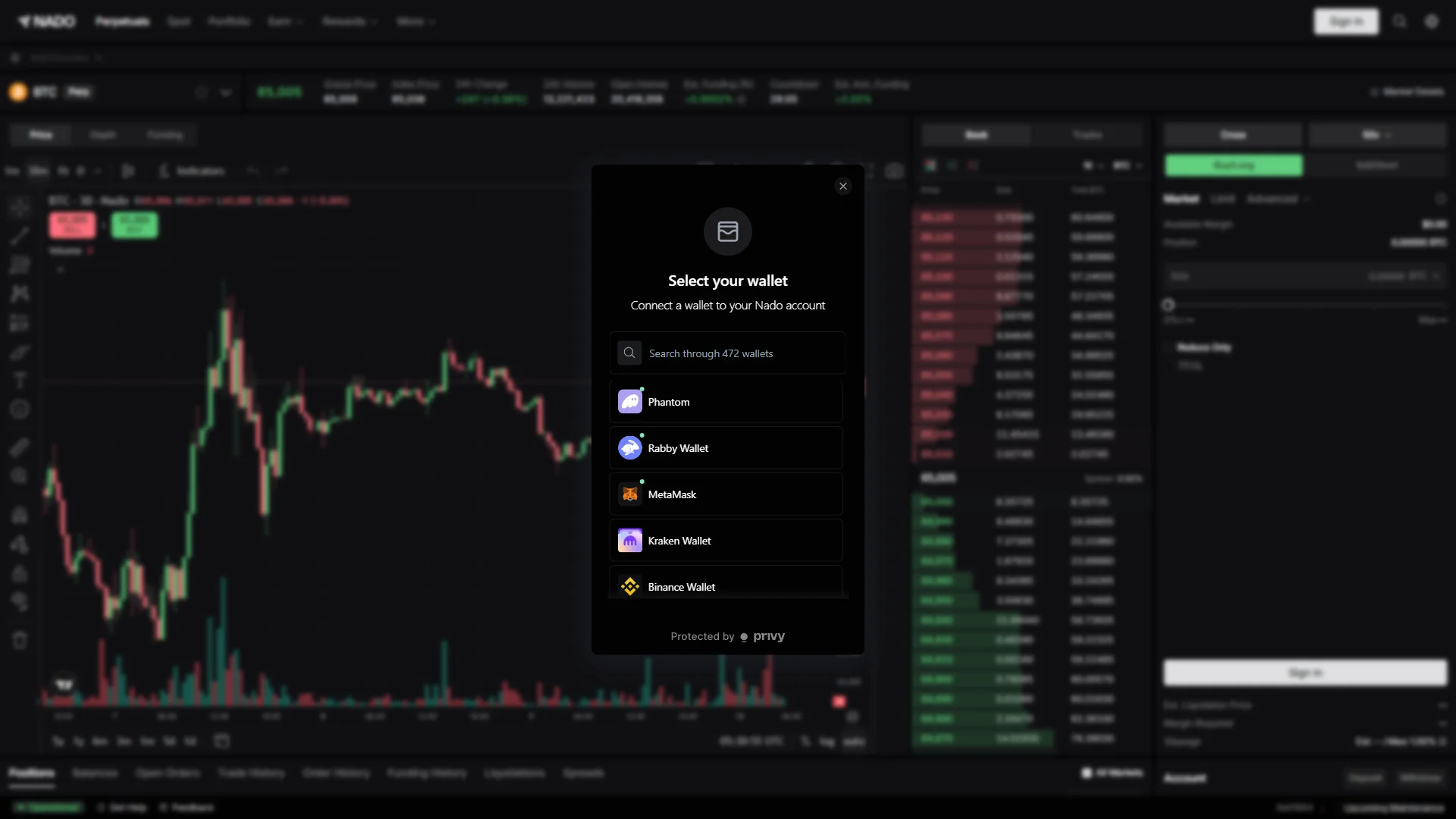
In the “Select your wallet” modal, click “Rabby Wallet” — or type the name of the wallet you actually use into the search box above the list, which covers 472 wallets. The approval windows shown from here on are Rabby’s, so they will look somewhat different if you connect a different wallet.
Click “Retry” if the connection stalls
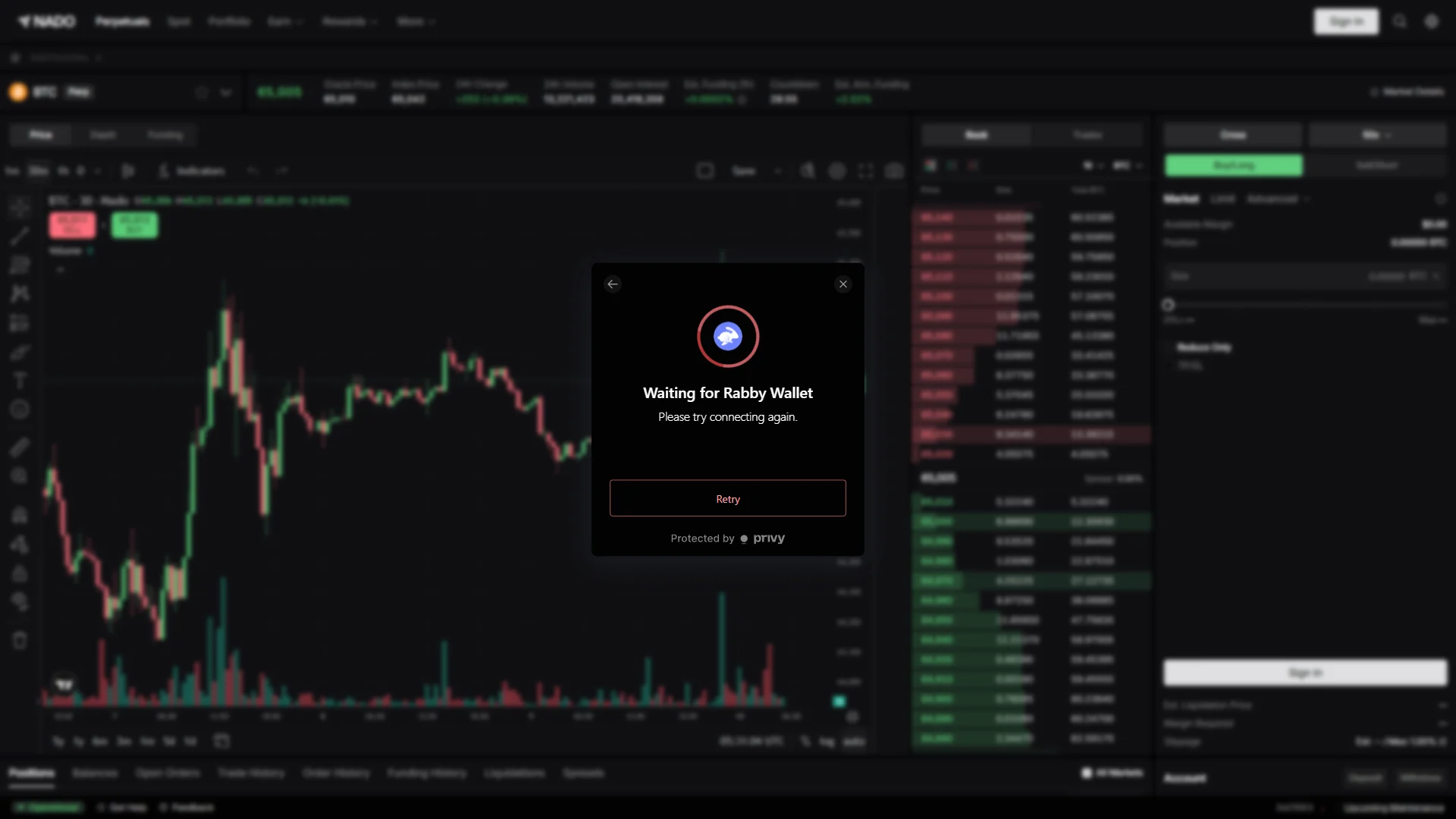
If the request does not go through, the modal switches to “Waiting for Rabby Wallet” with the note “Please try connecting again.” — click “Retry” to send it once more. The approval itself opens in your wallet’s own extension window rather than in the browser tab, so check that window before you decide the connection has failed.
Approve the connection with “Connect”
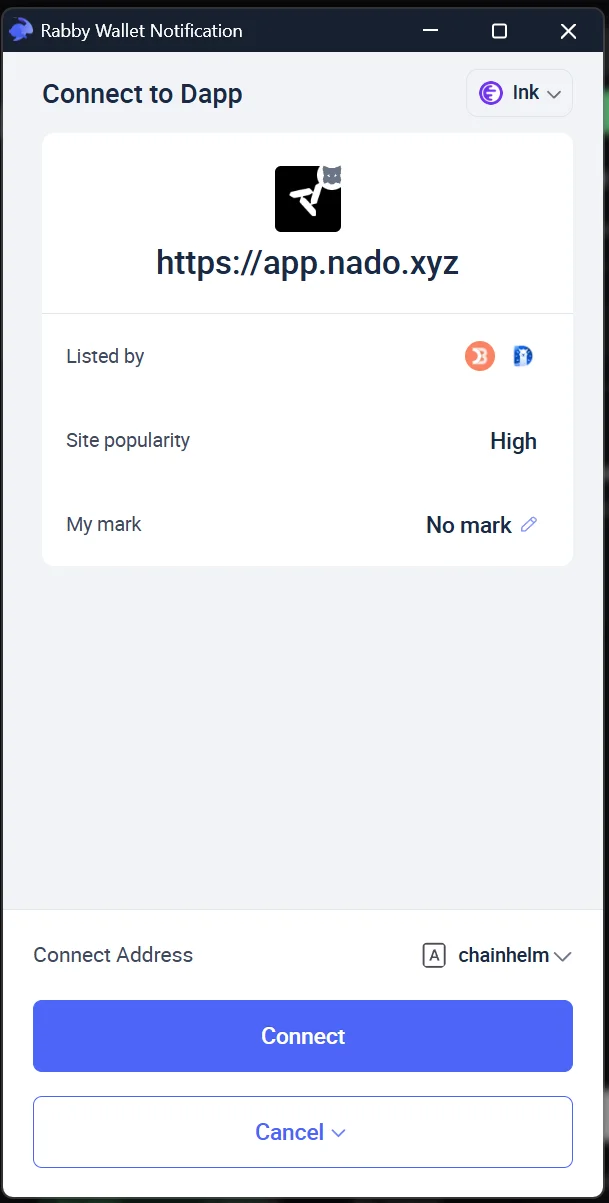
Your wallet opens a separate “Connect to Dapp” window: check that the origin reads https://app.nado.xyz and that the network selector at the top right shows “Ink”, then click “Connect”.
That origin line is the only thing separating the real site from a look-alike domain, so approve the connection only when it matches character for character.
Read the terms and click “Agree to Terms”
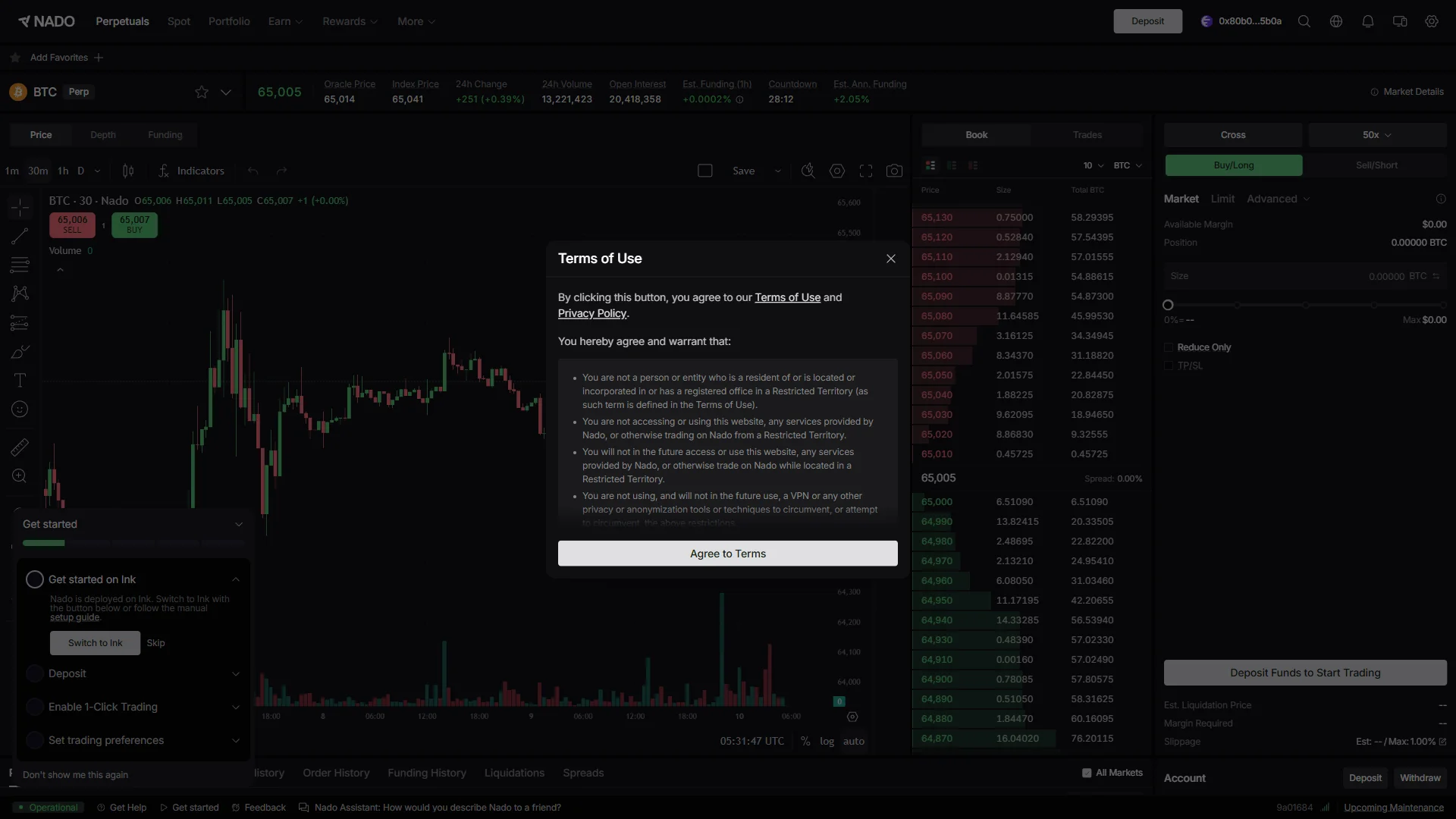
With the wallet connected, a “Terms of Use” dialog opens; read the bullet list of what you are warranting and click “Agree to Terms” to continue. Those bullets are worth the minute they take, since they cover restricted territories and the commitment not to circumvent them, and the full “Terms of Use” and “Privacy Policy” are linked at the top of the dialog.
Check the prefilled referral code
The “Enter Referral Code” dialog opens with the code field already filled in as “5cnqg8y” from the referral link, so read that value before you do anything else. “Confirm” stays grayed out for as long as the “Agree to Terms” checkbox above the field is unchecked.
Check “Agree to Terms” and click “Confirm”
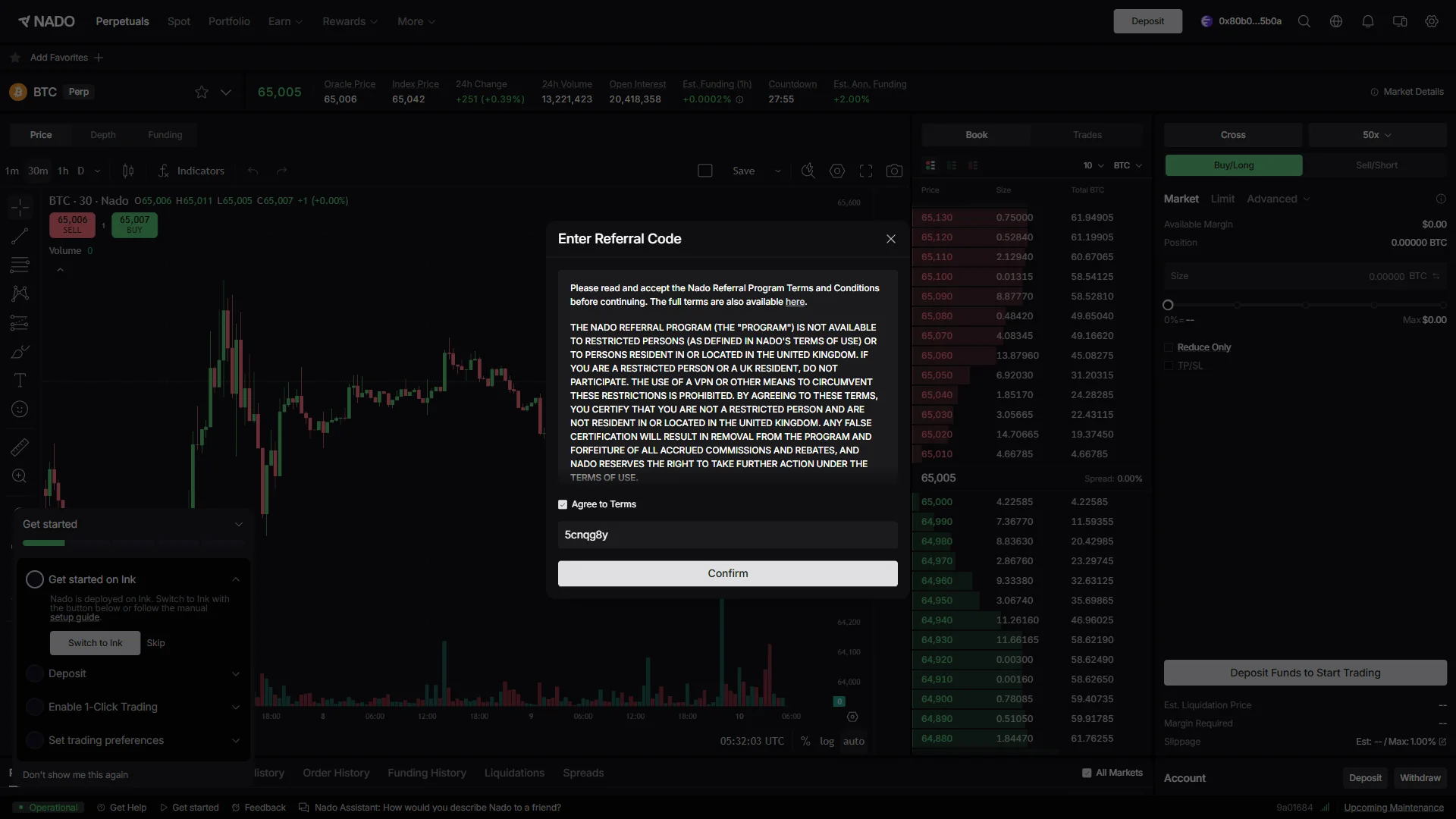
Click the “Agree to Terms” checkbox to accept the referral program terms, which turns “Confirm” from gray to active, then click “Confirm”. Your wallet takes over at that point and asks for a signature, so the code is not applied by this dialog alone.
Sign the referral message
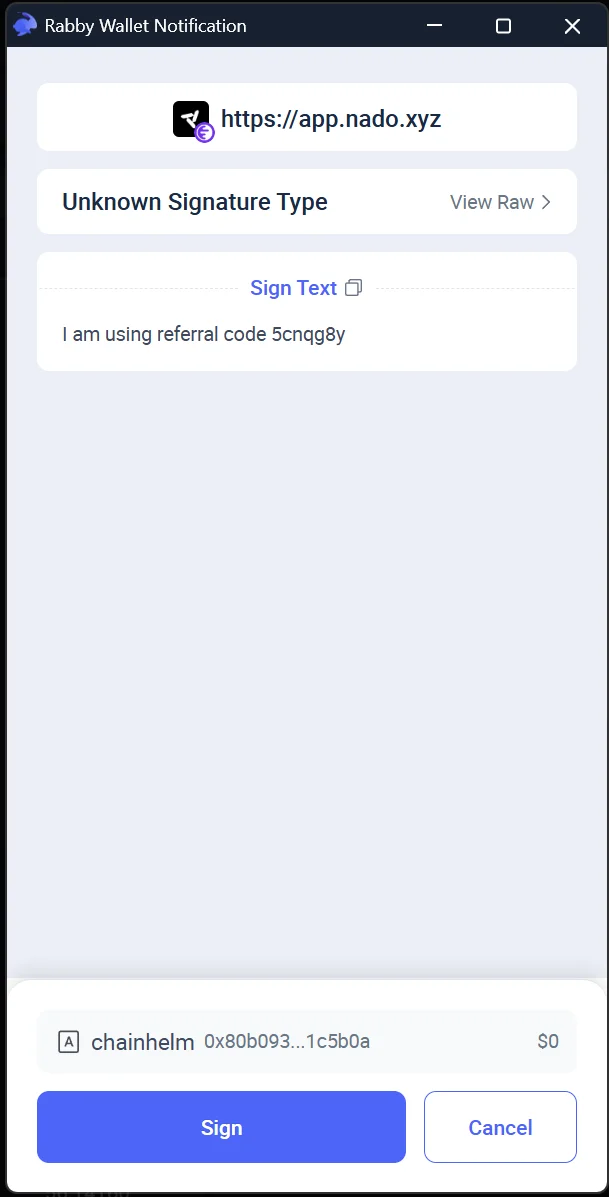
Your wallet opens a signature request: read the “Sign Text” box, which spells out “I am using referral code 5cnqg8y”, and click “Sign” once the code matches the one you just confirmed. This is a text signature rather than a transaction, so the wording is the whole of what you are approving — there is no amount to check.
Click “Confirm” to finish signing
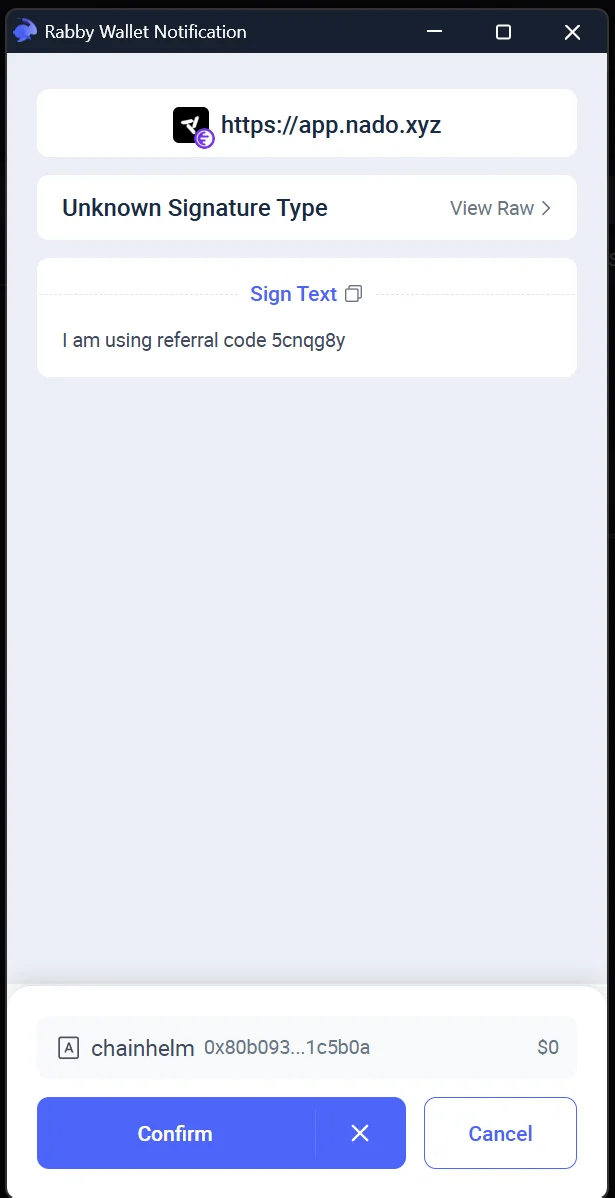
The same window then asks for one more press: click “Confirm” to hand the signed message back. The “Sign Text” box does not change between the two presses, so if the wording or the code reads differently now, cancel instead of confirming.
Back on the trading screen with the referral applied
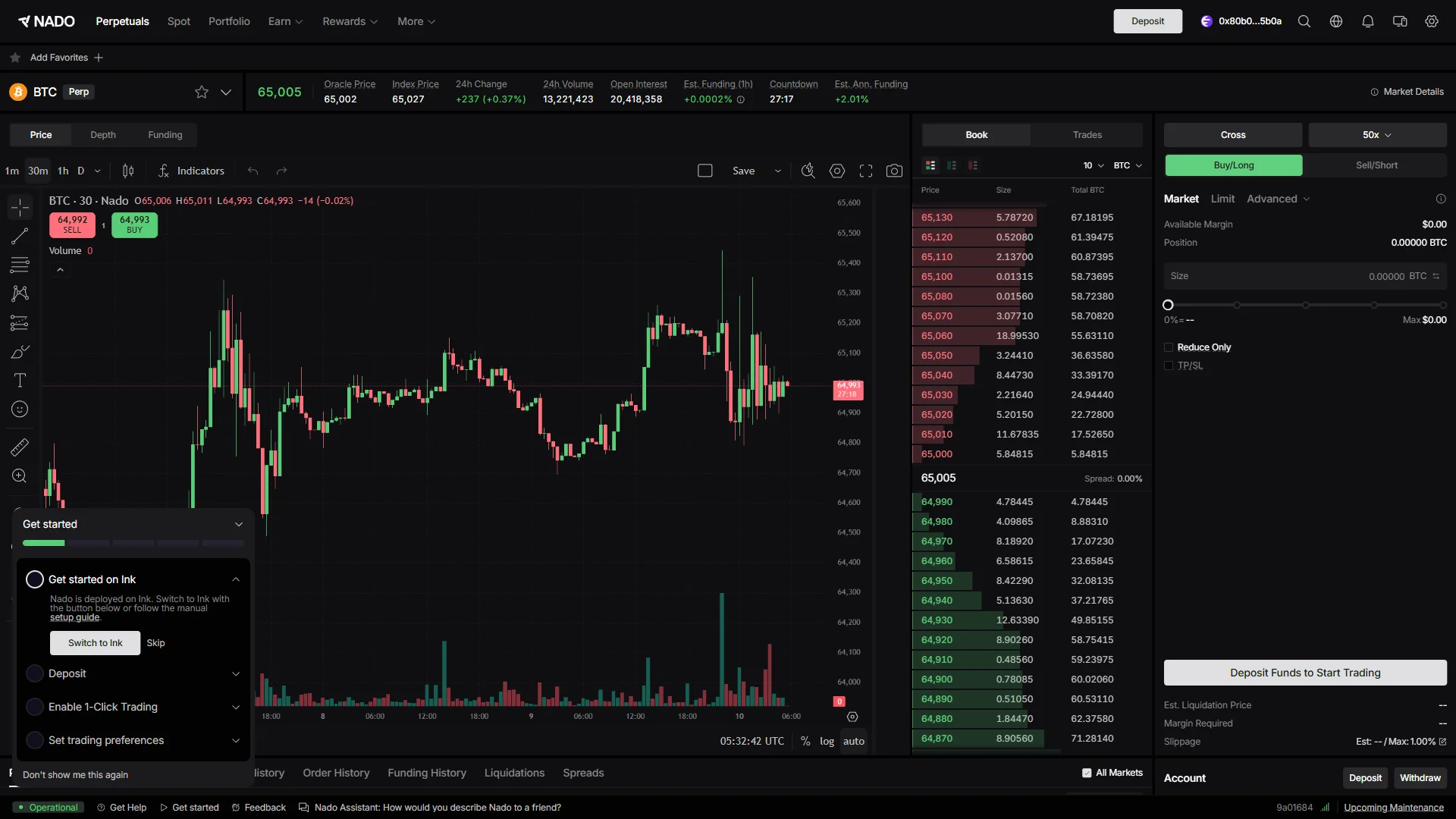
Once the signature goes through, the dialogs close and you are back on the trading screen with your wallet address in the header and “Deposit” beside it. The order panel on the right now reads “Deposit Funds to Start Trading”, which is the cue that the account is set up and only needs funds.
Smartphone (iOS / Android) connection steps
- First, open the Nado official page in your mobile browser or your wallet app’s in-app browser (the link applies the referral code). When you open it, you’ll see a screen like the one below.
Tap “Sign In” on the trading screen
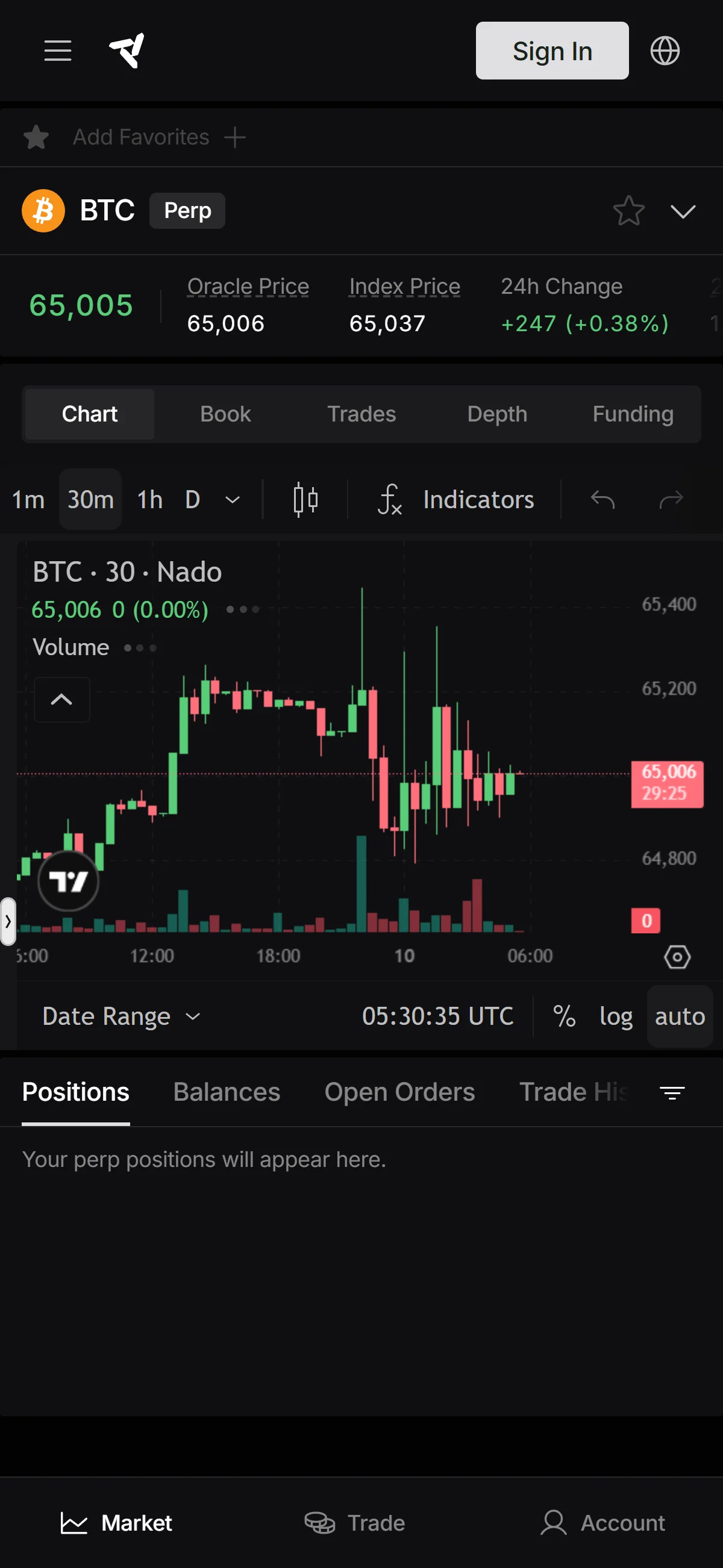
Tap “Sign In” in the top bar of the trading screen to start connecting an account. The Positions tab under the chart still holds only a placeholder message, which is the quickest way to see that nothing is connected yet.
Tap “Continue with a wallet”
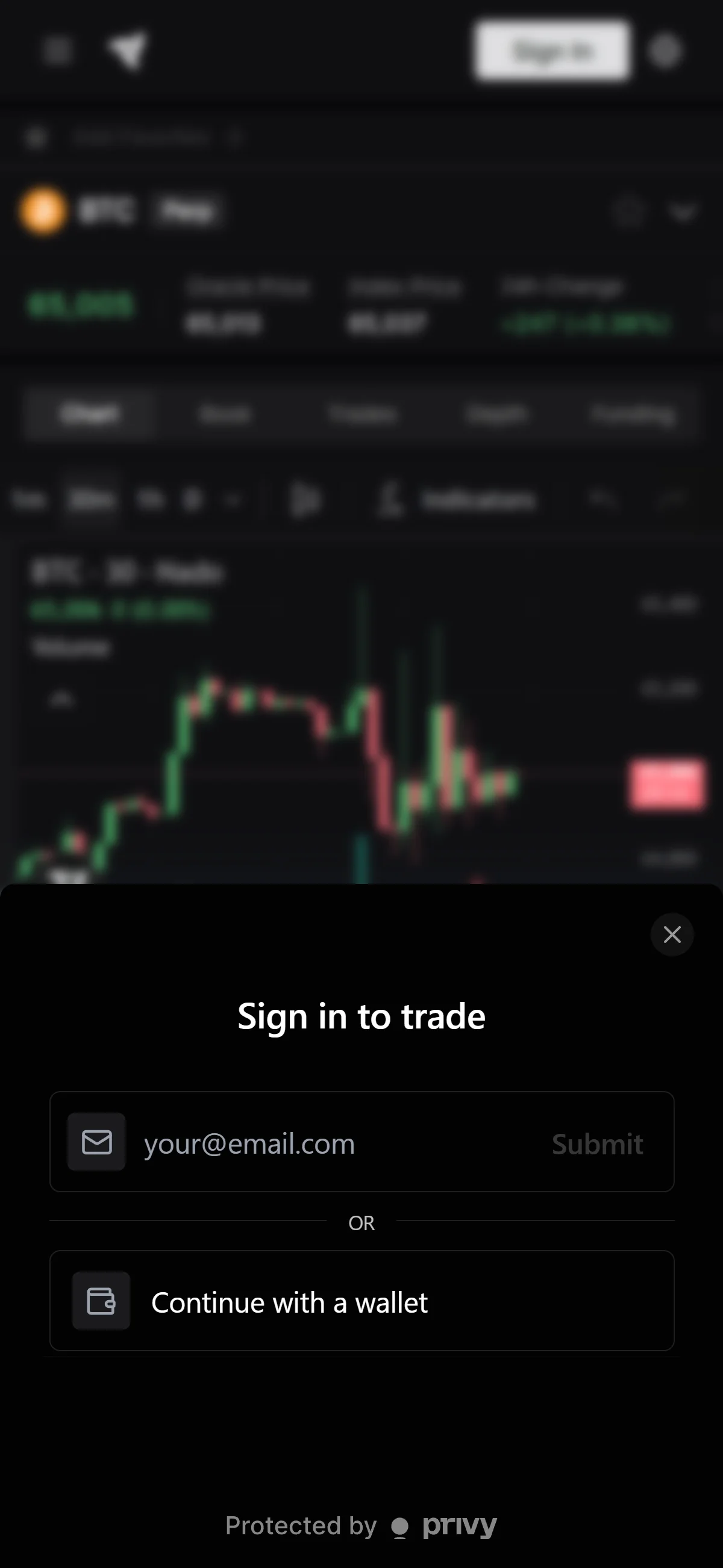
The “Sign in to trade” sheet slides up from the bottom; tap “Continue with a wallet” below the divider to sign in with a wallet rather than an email address. Signing in by email and tapping “Submit” stays available, but the wallet route is the one this guide follows from here on.
Tap “Rabby Wallet” in the list
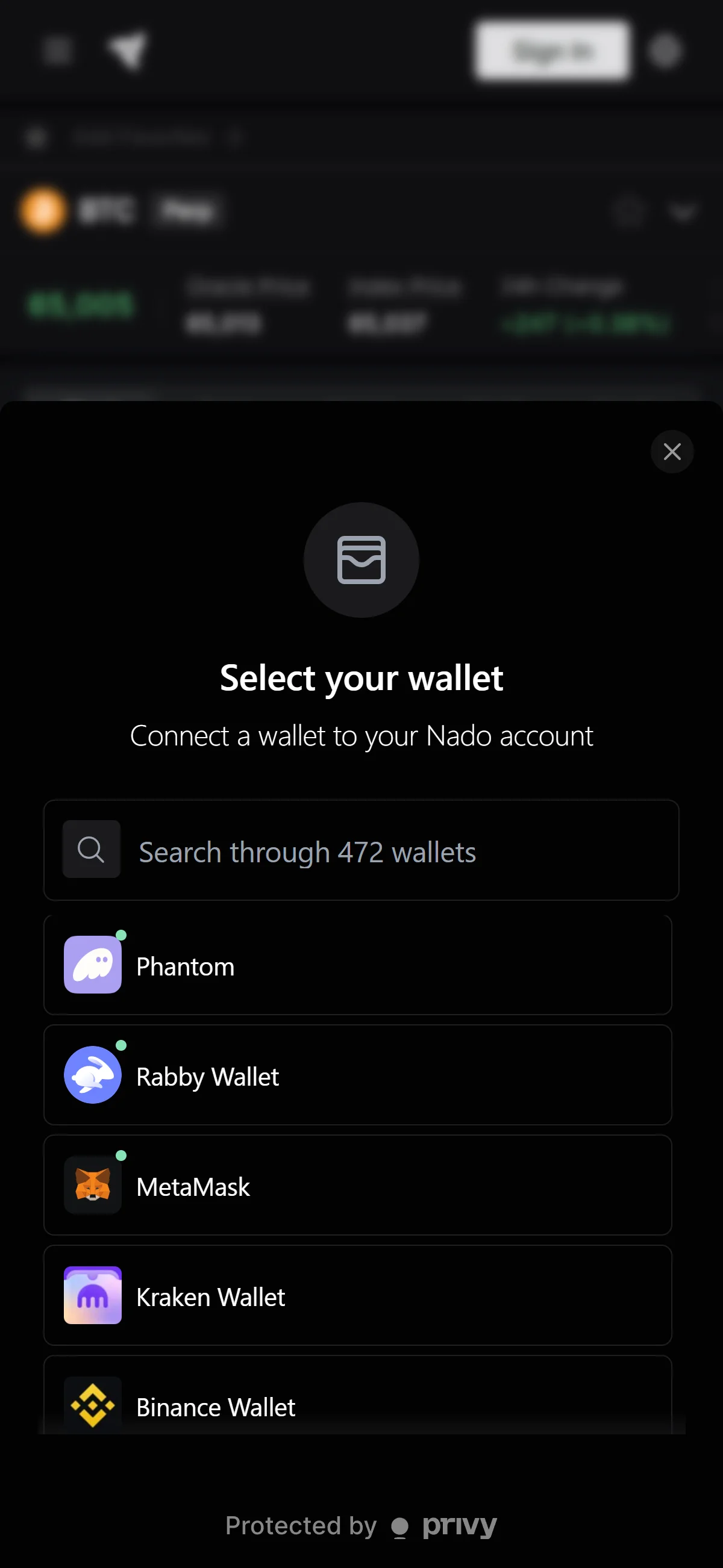
In the “Select your wallet” sheet, tap “Rabby Wallet” to connect it to your Nado account. If the wallet you use is not among the first entries, search for it by name in the box above the list, which covers 472 wallets.
Tap “Retry” if the connection stalls
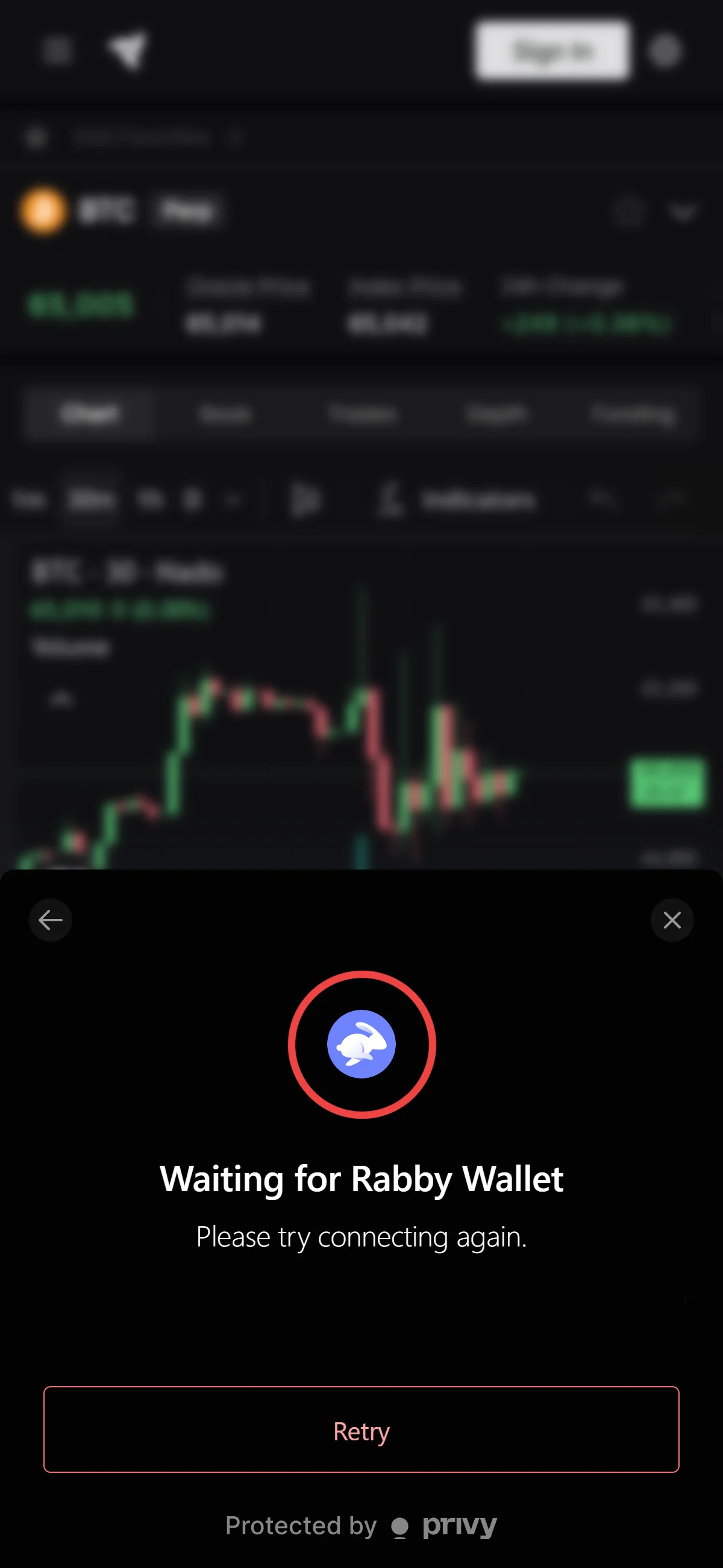
When the sheet turns into “Waiting for Rabby Wallet” with the note “Please try connecting again.”, tap “Retry” to send the connection request again. The sheet keeps waiting until the wallet answers, so approve the request in your wallet app and then come back to this screen.
Read the terms and tap “Agree to Terms”
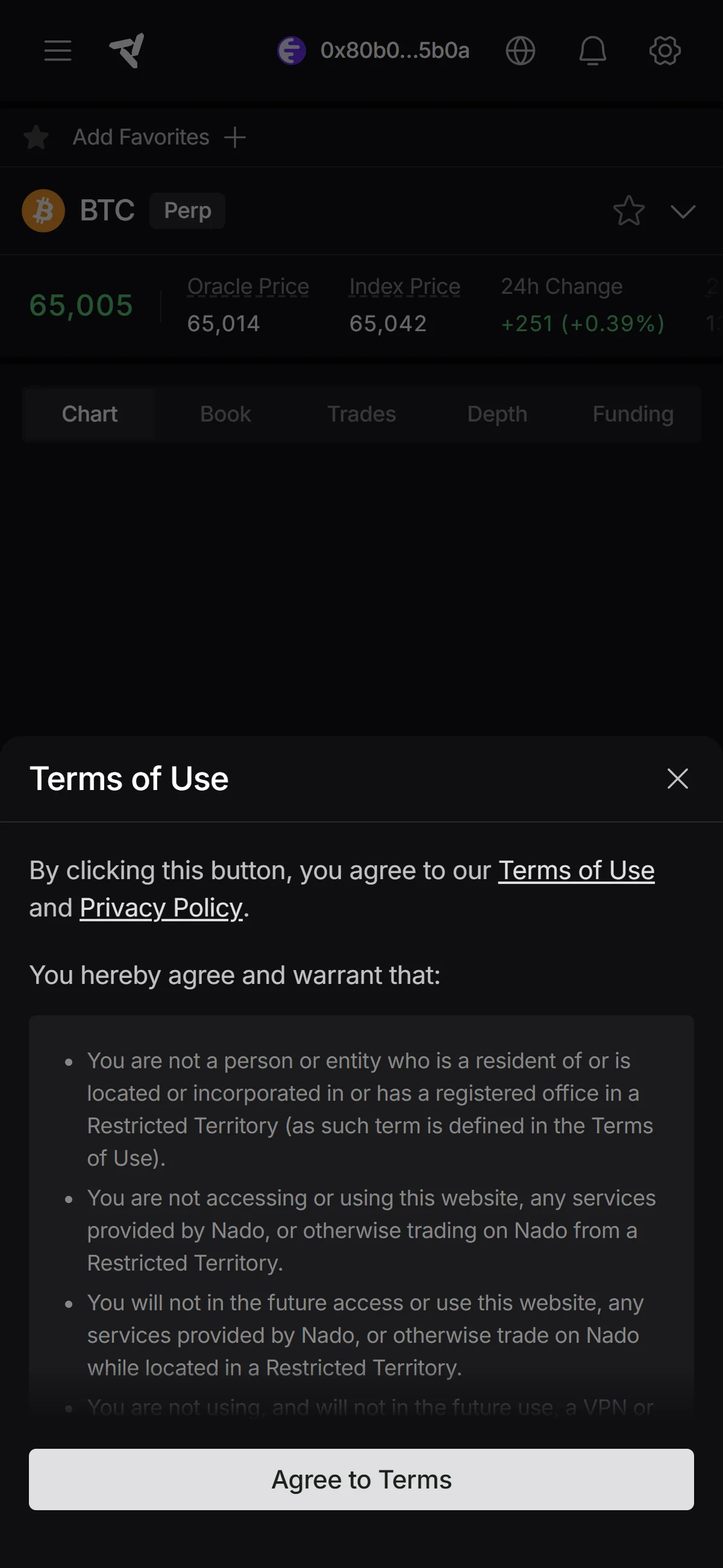
Once the wallet is connected, the “Terms of Use” sheet opens; scroll through the warranties and tap “Agree to Terms” at the bottom of the sheet. Your connected address now sits in the top bar, which is the quickest confirmation that the wallet finished connecting before you agree to anything.
Check the prefilled referral code
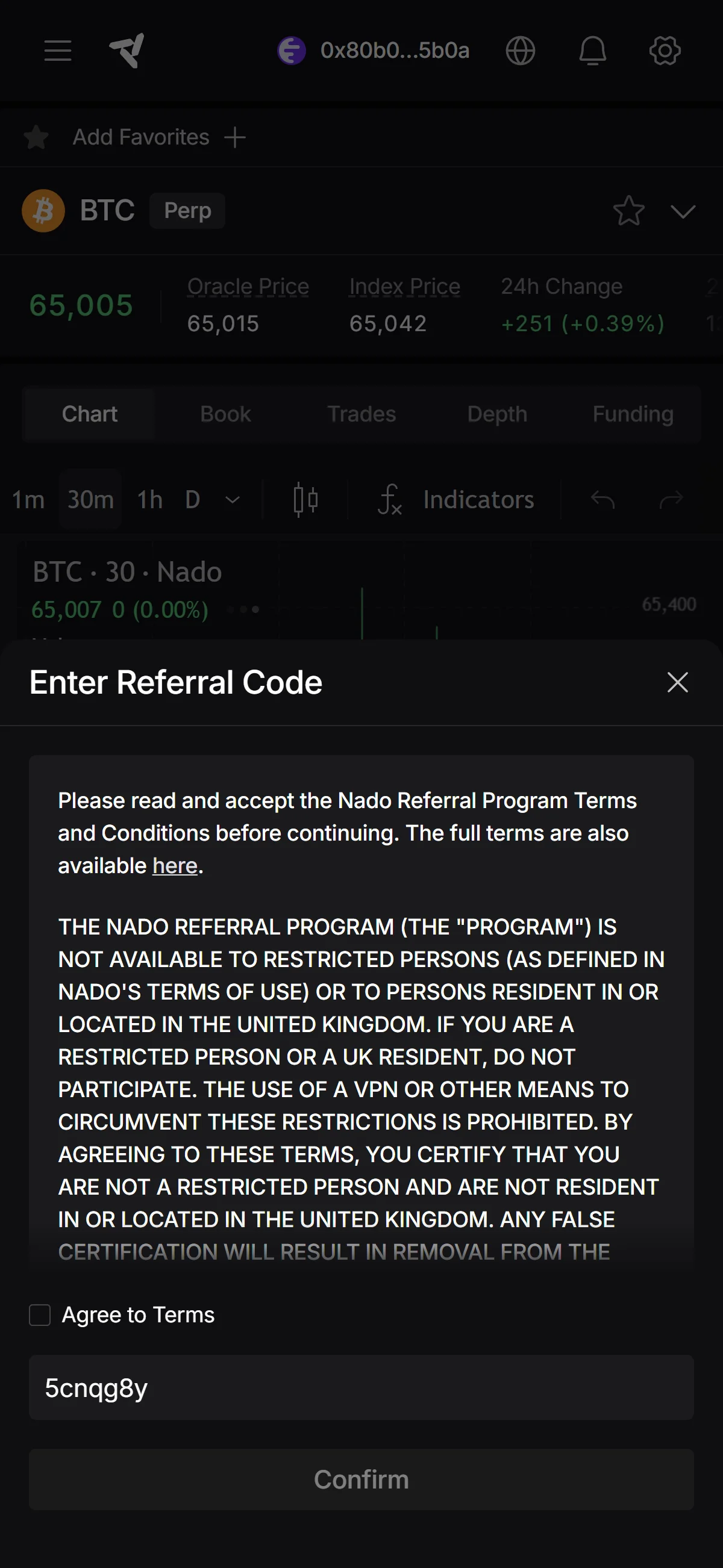
The “Enter Referral Code” sheet opens with “5cnqg8y” already in the code field, carried over from the referral link — check that it matches before you go further. “Confirm” at the bottom of the sheet stays inactive until you check “Agree to Terms” just above the field.
Check “Agree to Terms” and tap “Confirm”
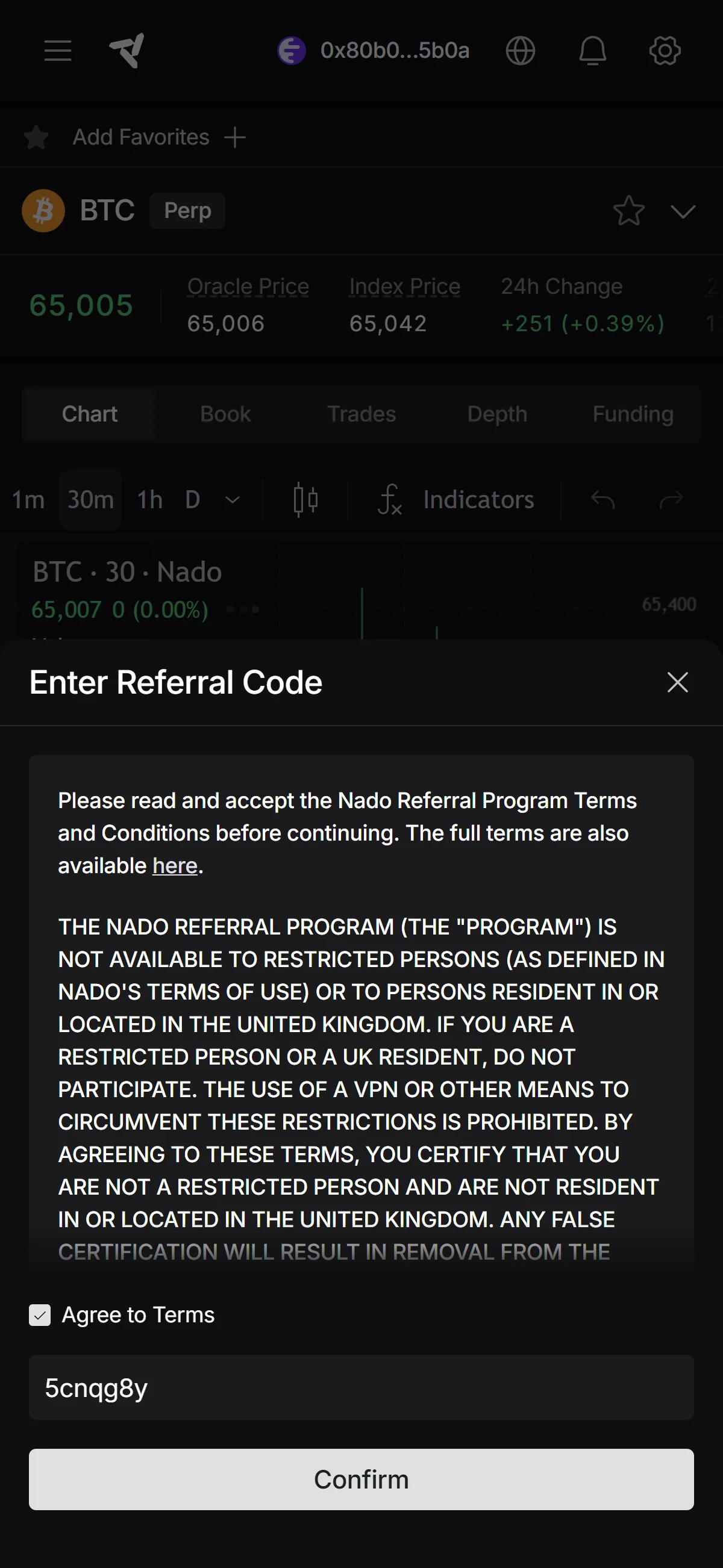
Tap the “Agree to Terms” checkbox and “Confirm” at the bottom of the sheet turns from gray to active; tap it to send the code. Your wallet then asks you to sign, so nothing is applied until that signature goes through.
What to do after connecting to Nado
We cover the deposit process separately for PC/browser and smartphone (mobile).
PC/browser deposit steps
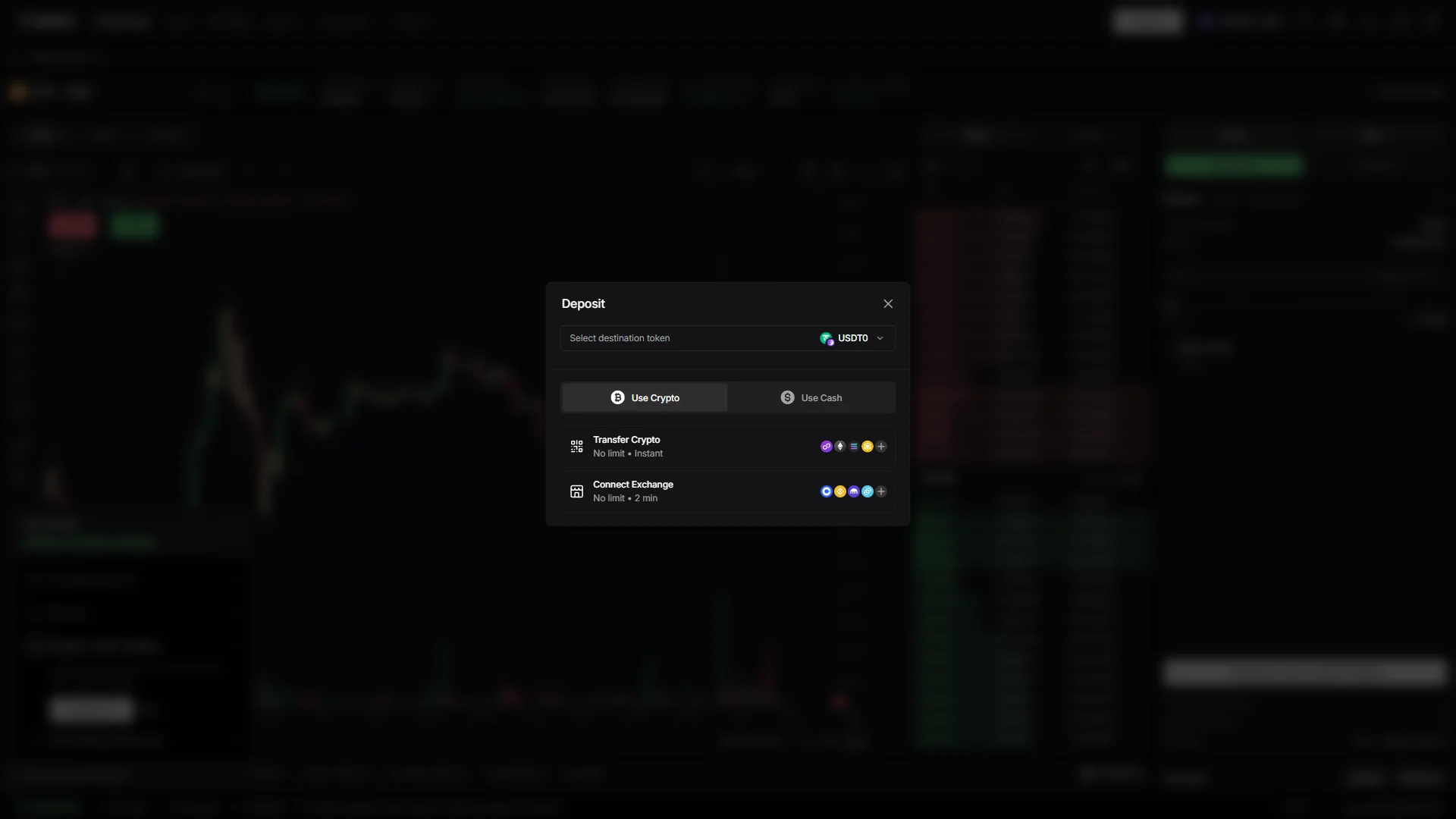
Click “Deposit” in the header to open the deposit dialog. It opens on the “Use Crypto” tab with “Select destination token” already set to “USDT0”, so change that selector first if you want your balance in a different token.
The crypto side offers two routes: “Transfer Crypto” brings coins in from a wallet on one of the chains shown as icons, and “Connect Exchange” pulls them from an account you already hold at a listed exchange. Both are marked “No limit”, quoted at “Instant” and “2 min” respectively.
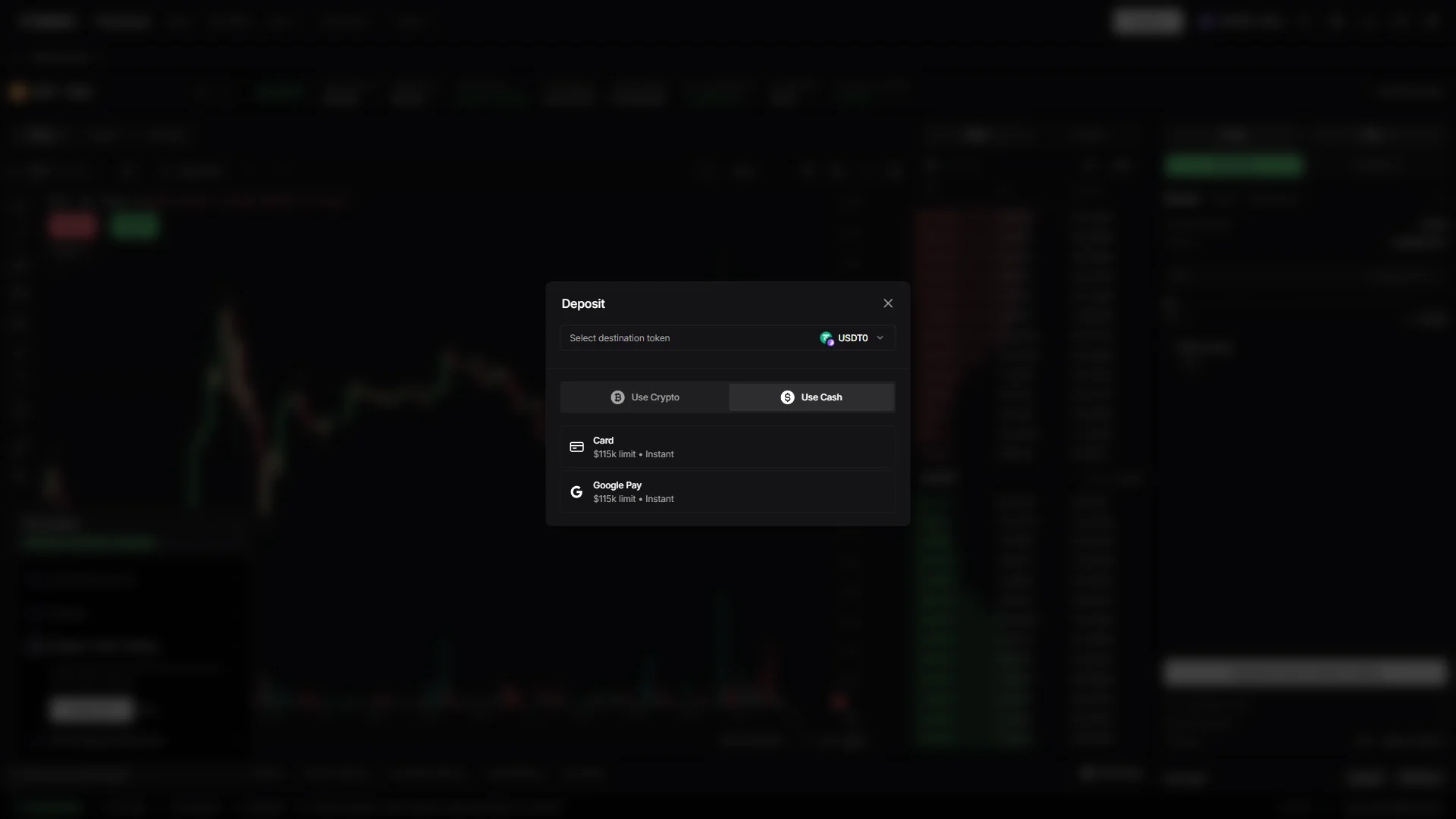
Click the “Use Cash” tab in the same dialog to fund the account with money instead of coins, which swaps the list for “Card” and “Google Pay”. Both are quoted at “$115k limit” and “Instant”, and both credit the destination token still selected at the top of the dialog, so set that selector before you start.
One thing to know before you take that route: the cash options are operated by a third-party payment provider, which runs a one-time identity check the first time you use one. It is the only identity step anywhere in this flow.
Smartphone (iOS / Android) deposit steps
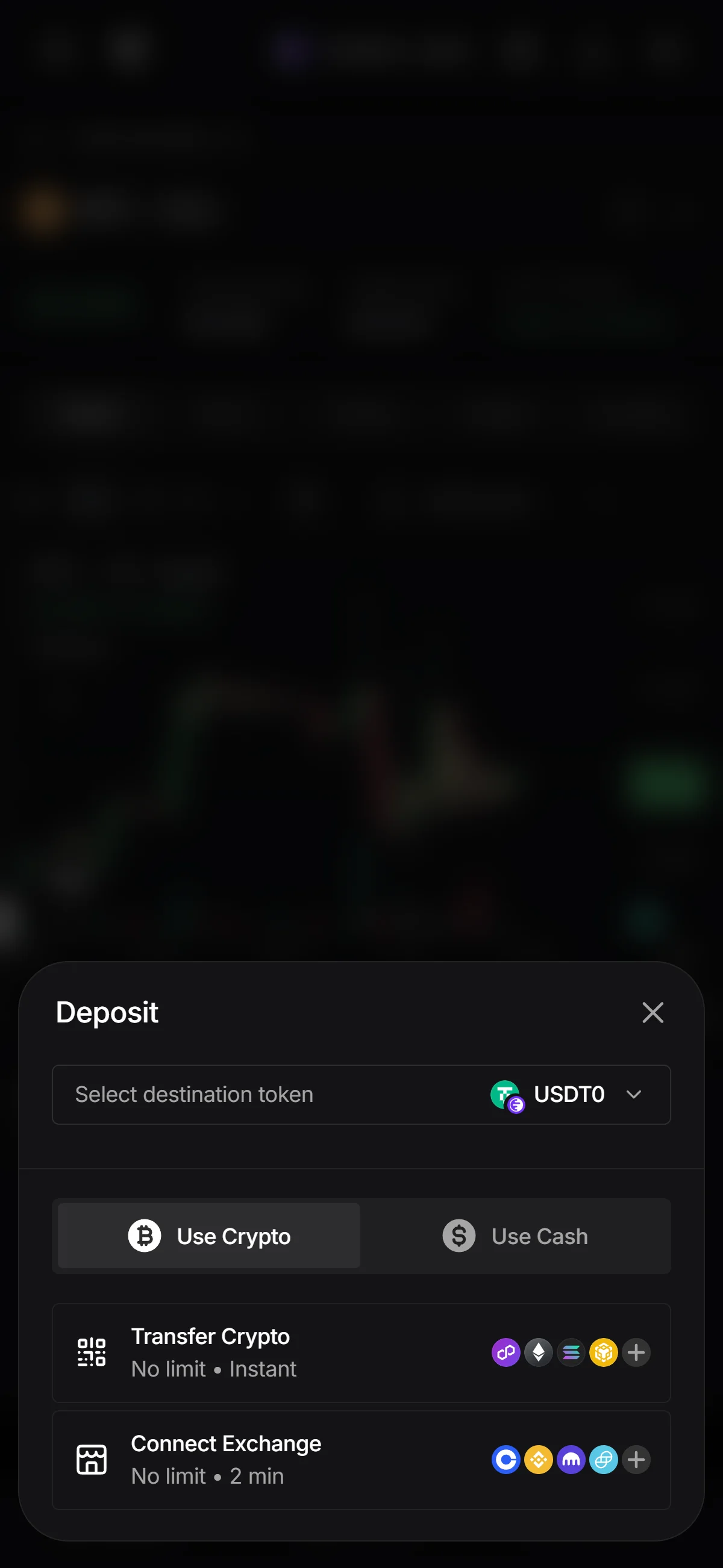
The “Deposit” sheet slides up on the “Use Crypto” tab, with “Select destination token” already set to “USDT0” — tap that selector first if you want a different token credited.
The two crypto routes are “Transfer Crypto”, which brings coins in from a wallet on one of the chains shown as icons, and “Connect Exchange”, which pulls them from an exchange account you already hold. Both are marked “No limit”, quoted at “Instant” and “2 min” respectively.
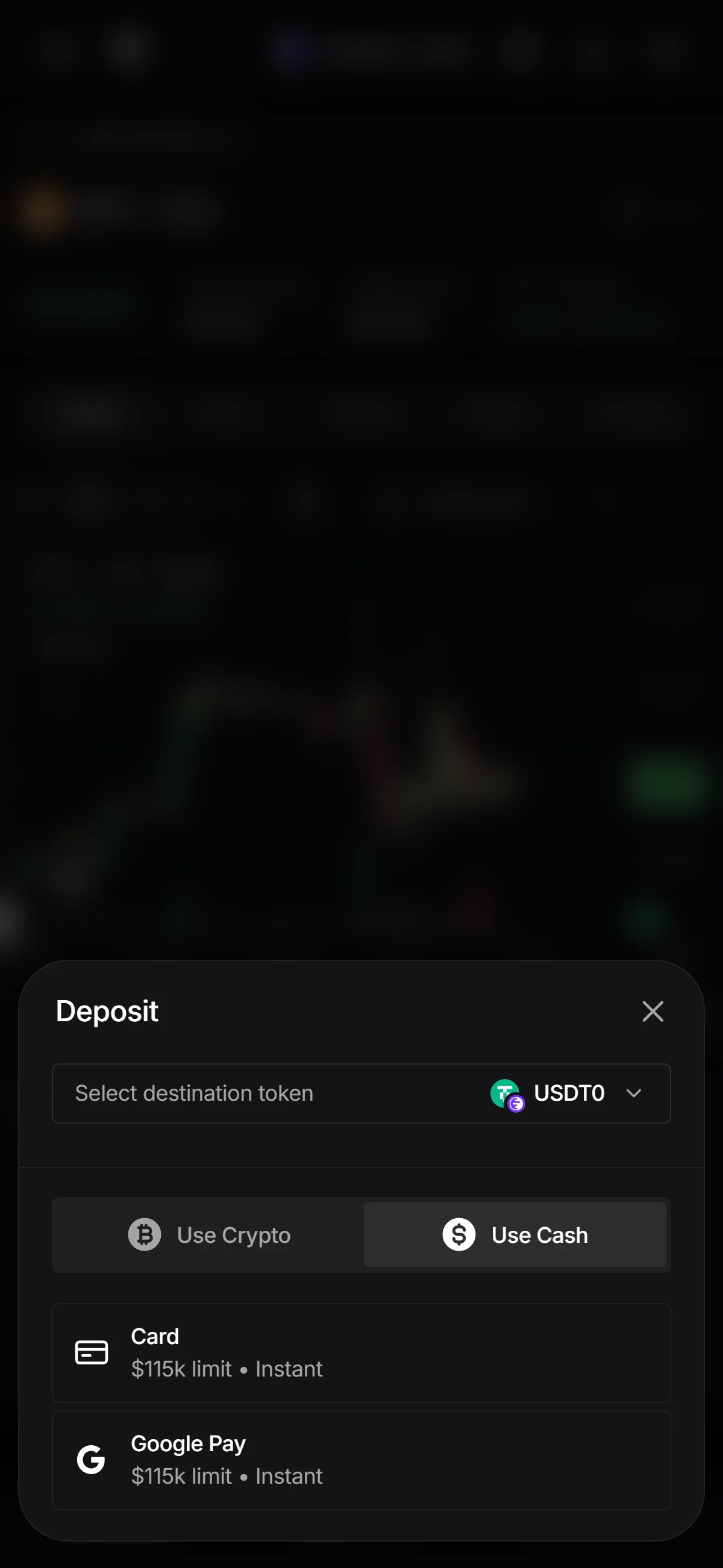
Tap the “Use Cash” tab in the same sheet to pay with money rather than coins, and the list changes to “Card” and “Google Pay”. Both are quoted at “$115k limit” and “Instant”, and both credit the destination token still shown at the top of the sheet, so check that selector before you start.
Whichever way you fund the account, the deposit screen is the single entry point: pick the destination token at the top, then choose between the two crypto routes and the two cash routes.
The Nado referral code cannot be added after sign-up
The referral code can only be applied once — the first time you connect your wallet.
If you complete the connection without the code applied, there is no way to link it to that wallet afterwards, and the only route left is to start over with a new wallet.
- Is referral code 5cnqg8y shown as applied while you connect your wallet? (check that the “Enter Referral Code” dialog opens with the code already in the field)
- Then read the signature your wallet asks for: the sign text should spell out “I am using referral code 5cnqg8y”. Those two screens are the whole of your confirmation, and there is no page to check afterwards, so take care not to miss them
There are exactly two ways the code reaches that field. Either the referral link prefills it for you, as it did in the walkthrough above, or you type it into the same field yourself while your wallet is connecting. Both paths run through one field at one moment, and that moment does not come round again.
There is also no screen you can open later to settle the question. Nado does have a Referrals page behind the login, but it is documented as the tracking surface for the person doing the referring, not as a confirmation screen for the person who entered a code. That is why the two screens on the way in are the ones to read carefully — the prefilled code dialog and the signature text that names the code — because together they are the only confirmation you get.
◆ ◇ ◆
Nado Points accrue weekly, and no token has been announced
Private Alpha, Season 1, and the Season 2 running now
Nado runs a rewards program called Nado Points, and it is live. It has been through three phases since the protocol opened its doors, and the one running now began on 2026-05-21.
The Private Alpha ended with 6,915,074 points distributed, after an exercise the documentation calls “The Choice” in which eligible users picked an NFT, a fee refund, or keeping their points. Season 1 then ran on weekly epochs, with a snapshot every Thursday and a distribution every Friday, until it closed with a cumulative 24,941,776 points handed out across Private Alpha, the off-season and Season 1 combined. Nothing was reset at the season boundary: balances, Trader Tier history, NFT multipliers and existing referral relationships all carried into Season 2.
The one distribution on record is the NFT itself. Templars of the Storm has a total supply of 1,200 and was offered to the top 30% of Private Alpha users by points. Holding one attaches a three-tier points multiplier tied to the NFT’s Wind Force trait, evaluated at each weekly epoch and applying only to the wallet that holds it.
The weekly pool floats between 300,000 and 950,000 points
Season 2 changed how much there is to go around each week. In place of a fixed weekly allocation, the pool is now tied to how much the protocol trades.
Between those two ends, each additional dollar of volume adds points at an accelerating rate, so a quiet week still pays something and a busy one pays more than proportionally. Three kinds of activity feed the pool: trading, participation in the liquidity vault — scored on your average proportional share of the vault during the weekly epoch — and referrals that generate real usage.
Your individual share is not a simple slice of that pool. It is computed from your trading activity relative to the rest of the protocol, then adjusted for your fee tier and for what the documentation calls toxicity. The practical consequence is that the same trade is not worth the same to everyone, and two accounts placing identical orders can end the week with different allocations.
Points themselves are non-transferable, cannot be traded, and are shown inside the app. Trader Tiers, which run from Breeze up to Tornado, are a weekly classification by points ranking and are stated to influence future vault mechanics rather than to pay anything today.
What can reduce a weekly allocation to zero
Geography comes first, because it governs access rather than accrual. The Restricted Territories named in the Terms of Use apply to using Nado at all, so a resident of a restricted jurisdiction cannot take part in the program in the first place. Which countries those are, and where your own sits, is covered further down.
On the trading side, the documentation prohibits non-organic behavior — wash trading and self-matching are the two named examples — and states that it may result in a reduced or zero allocation for a weekly epoch. Season 2 layers the toxicity adjustment on top of that, so activity does not have to be flagged as abusive to be worth less.
The same logic is applied to referrals: referral points are stated to recognize real growth, and referral farming or coordinated low-quality activity may result in a reduced or zero referral allocation for an epoch. The documentation also notes that promotions and referrals may be governed by separate rules carrying their own eligibility requirements.
There is no token, and no conversion has been stated
The other half of that picture matters just as much: no statement disclaiming a future token was located either. The operator has neither promised one nor ruled one out.
That silence is where third-party coverage tends to fill in. A number of sites assert that Nado Points convert into a network token at a token event and attach timing to the claim. No primary source from Nado or from the Ink Foundation confirms either the conversion or the timing, so those claims are not restated here as fact, and you will find no estimate of future value, conversion rate or timing anywhere in this article.
The quiet should not be read as a hint either: the documentation record for the trailing twelve months contains no announcement of a token, an audit or a token event at all.
An order book on Ink, operated by Spira Arc Inc. under Panamanian law
Spira Arc Inc., Panamanian law, and no named individuals
The Terms of Use name Spira Arc Inc., together with its affiliates and collectively styled “Nado”, as the operator of the site and the services. Where that company is incorporated is not stated anywhere in the official materials. What is stated is the law it runs under: the Terms are governed by the law of the Republic of Panama, with binding arbitration seated in Panama City. It is an unusual arrangement, because Panama is simultaneously one of the venue’s own restricted territories.
The lineage is easier to trace than the corporate structure. The team behind Vertex Protocol joined the Ink Foundation under an agreement announced on 2025-07-08, and Nado launched publicly on 2026-01-30. The documentation attributes the project to “the team that brought you Kraken”.
No individual is named in any role at Nado or at Spira Arc Inc. in any primary source. Vertex’s founders are named in the 2025 press release and Kraken’s leadership is a matter of public record, but neither is presented anywhere as Nado’s. For a venue holding user collateral, that anonymity is a fact about the venue rather than a gap in reporting.
The current Terms of Use were last updated 2026-05-13. That date matters again below; here it is simply how current the governing document is.
An off-chain sequencer, batched settlement on Ink, and about 50m USD locked
The labels here are opaque; the substance is not. Your orders are matched by software the operator runs, off the blockchain, in the same way a conventional exchange matches orders; the results are then written to a network called Ink in batches. Ink is a layer-2 network built on Ethereum, which means it settles back to Ethereum rather than running as a chain of its own.
Custody works differently from the matching. Assets sit in smart contracts you control rather than in an account the operator holds, and you can withdraw at will.
Perpetuals, spot, a liquidity vault and money markets
Perpetuals
Spot
Liquidity vault
Money markets
Nado’s documentation states up to 20x on perpetuals, and separately up to 5x on spot positions. Those are the documented ceilings, and on perpetuals the live product does not match them: the order-entry panel on the BTC perpetual market carried a cross-margin selector reading 50x when it was checked on 2026-07-29, and the gap between the documented figure and the one the interface offered has not been reconciled.
On the lending side, the protocol takes a 20% interest fee, so a lender receives 80% of the optimal rate the curve produces. What makes the collateral pool behind all four products unusual is taken up further down.
1.0 bps maker and 3.5 bps taker at the entry tier
- Maker, entry tier
- 1.0 bps
- Taker, entry tier
- 3.5 bps
- Currency perpetuals
- 0.2 bps maker, 0.7 bps taker
- Funding
- Settled hourly, capped at plus or minus 2% a day
- Order placement
- 0 USDT0
- Standard withdrawal
- 1 USDT0
The entry-tier figures above are the ones published in the documentation, and the rates the venue’s live API returns for its markets match them. Two details are easy to miss: makers pay at the entry tier rather than being paid, since rebates begin only at higher tiers; and tiers are set by your combined trading volume over the prior 30 days, with the counter resetting monthly.
Funding is the mechanic most likely to be new if you have only bought and sold crypto before. It is a periodic payment that flows between the traders holding long positions and those holding short ones, depending on which way the market is leaning, and it is not a fee the venue charges you.
You do not pay blockchain gas on trading actions here. Nado charges flat fees in USDT0 instead and batches its on-chain submissions, which is why placing an order costs nothing and a standard withdrawal has a fixed price rather than a variable one. You will still need a small amount of ETH on Ink for wallet-level actions, such as approving your first deposit.
There is no token-holding fee discount, for the straightforward reason that there is no token. The Templars of the Storm NFT stands in its place, assigning an automatic fee tier based on its Wind Force trait — though the table mapping trait to tier is published only as an image, so it cannot be reproduced here.
What it takes to open an account
No identity check applies on the protocol path: connecting a wallet, depositing crypto and trading require none, which is the ordinary condition for a venue of this type.
The exception is the one already visible on the deposit screen. The card and wallet-pay routes are run by a third-party provider, Fun.xyz, which collects a one-time verification the first time you use them — which is why the venue cannot be called identity-free without that qualification.
The floor for getting started is low: a 5 USD equivalent first deposit opens a trading account, and direct deposits arriving from other chains carry their own credited minimums of between 3 and 10 USD depending on the network.
Ranked 23rd by 24-hour perpetual volume, and what that number leaves out
0.401% of perpetual volume, against 43.8% at the leader
In the 2026-07-29 snapshot used throughout this article, Nado’s 89,110,000 USD of 24-hour perpetual volume placed it 23rd among the 125 ranked protocols. That rank sounds respectable until you see what the distribution looks like.
Both the rank and the share come from one dated snapshot, and perpetual volume rankings move quickly, so treat them as a reading taken on one day rather than a settled position. The peer names above are there for scale only.
Open interest and fee revenue produce no comparable ranking
Open interest — the total value of positions still open — stood at 66,590,000 USD in the same snapshot. There is no rank to put beside it, because several rows in that snapshot showed no open-interest figure at all, and a rank computed against an incomplete field would not be reliable. The absolute number is worth having; the ranking would not be.
Fee revenue is a different kind of gap. Nado is not listed in the aggregator’s fees ranking at all. That is recorded here as not found, not as zero revenue — the venue plainly charges fees, as set out above. A missing row and an empty till look identical in a table, and only one of them is a fact.
One collateral pool, and markets that are not crypto
The documented differentiator is a single collateral pool that backs spot, perpetual and money-market positions at the same time, with exposures netting against each other through one health score. In practice that means a spot holding can offset a perpetual short rather than sitting in a separate bucket, and the margin engine automatically treats the two sides as one hedged position instead of charging margin on each as if they were unrelated bets.
The range of markets is the second departure from the norm. Four asset classes sit in the same account — crypto, tokenized US equities and index proxies, currencies and commodities — and markets whose underlying is closed for the weekend stay tradable through a documented closed-hours pricing method.
The third is quieter and matters later: wrapped tokenized equities are accepted as collateral, not merely listed as things to trade. What that implies for securities law comes up in the regulatory section below; as a description of the product, it is simply unusual.
Nado excludes countries rather than licensing into them
Two published exclusion lists that do not match
Terms of Use, last updated 2026-05-13
Documentation, Restricted Territories page
The two documents disagree in three ways that change what a reader should conclude. They place the United States, Canada and Panama in different tiers, one treating them as excluded outright and the other as merely non-interactive. They define Ukraine differently, as a whole country in one and as three named regions in the other. And Syria is named explicitly in the documentation while the Terms sweep it in through the sanctions catch-all instead.
Where they diverge, the Terms are the binding instrument and the more restrictive reading; the documentation is best understood as a description of how the interface actually behaves. The practical rule that follows is simple: nobody is permitted to use this venue merely because the page renders for them.
Access is decided by where the connection comes from
Access turns on the location a person connects from: depending on the region, someone is either blocked outright or shown an interface they cannot interact with. No wallet-level screening is described for access itself, though users do warrant that neither they nor their wallet address appears on sanctions lists.
There is a structural point here that is easy to get wrong by analogy. At a fully permissionless venue, the front end and the contracts are genuinely separable layers. Here they are not, or not to the same degree: matching does not happen on-chain; it happens on a sequencer the operator runs, and the gateway contract is documented as the entry point for everything that sequencer submits.
No license anywhere, and no regulator has acted so far
The operator holds no financial-services license or registration in any jurisdiction. It manages its regulatory exposure by excluding jurisdictions instead of licensing into them, which is the inverse of how a centralized exchange typically operates: no license map, no home regulator, no supervised entity anywhere. The Terms say as much in their own words: Nado is not registered or licensed by any regulatory agency or authority, and no such body has reviewed or approved the software.
No regulatory action by any authority against the venue or its operator was identified. That has to be read against how short the record is: public operation began 2026-01-30, so this is roughly six months, not a long-term clearance.
Equity and currency markets without a matching license
The legal terms were refreshed on 2026-05-13, eight days before access was opened to everyone on 2026-05-21. The sequence is worth noting without assigning a motive to it.
What the venue has been building in the meantime runs the other way. Product expansion has moved toward asset classes that carry heavier securities and derivatives regulation, while no corresponding license has been obtained, and disputes are channeled into binding individual arbitration in Panama City under a class-action waiver.
The equity-referencing perpetuals and the tokenized equity collateral are the products most exposed to being characterized as securities, and the operator publishes no legal analysis of either. This article records that exposure; it does not supply a classification that no authority has made.
Trading is switched off in the US, and available in the UK, Singapore, Australia and India
United States: view-only on one list, restricted outright on the other
On the venue’s own tiers, the documentation classifies the United States as a View-Only Territory: the interface may be opened and viewed, but trading and every interactive feature are disabled. The binding Terms go further, folding the country into the Restricted Territories definition — United States, Canada, Republic of Panama — to which the service is stated not to be offered.
Where the two diverge, the Terms are authoritative and the more restrictive of the two. A US reader is not permitted here just because the page loads.
What is off is everything: perpetuals, spot and vault interaction alike, since the documented restriction covers trading and all interactive features with no exception published for any individual product. The earliest version of the Terms that lists the United States is dated 2025-12-09, so there is no documented window in which the venue was open to US users.
Whether US law reaches the individual is a separate question, and the answer is narrower than people assume. No US law was identified that makes it an offense for a resident to access a non-custodial perpetuals protocol. The Commodity Exchange Act provisions at issue impose duties on the offeror, the facility and the intermediary, and the enforcement actions on record in this area were brought against protocol operators rather than against retail participants. Read that as no user-directed prohibition identified, not as clearance.
The bar that actually applies is the venue’s own. The regulated route to crypto perpetuals in the US runs through registered venues, and this is not one of them — it holds no US registration or license, as it holds none anywhere.
United Kingdom: no restriction from Nado, and no FCA protections for you
The United Kingdom appears on neither of the venue’s restriction tiers. One misreading is easy to fall into: the United Kingdom is named in the Terms, but only as one of the two jurisdictions whose sanctions the catch-all clause refers to. It is never listed as a restricted territory itself.
No UK provision was located that prohibits a resident from trading on an offshore venue. The rule that governs this product domestically is a conduct obligation imposed on specified categories of regulated firm, not a prohibition addressed to the consumer, and this venue falls outside those firm categories entirely.
The consequence is therefore about the absence of protection rather than about legality. Because no authorized firm may sell or market crypto derivatives to a UK retail client, there is no domestically regulated route to these products at all — not a worse one, none. A UK reader trading here has no FCA conduct-rule protection, no Financial Ombudsman Service recourse and no Financial Services Compensation Scheme cover.
The venue holds no UK authorization of any kind.
The UK rules are also mid-transition: the new cryptoasset regime does not fully commence until 2027, and guidance on decentralized arrangements is still to be consulted on. No determination exists for this venue today.
Singapore: the licensing duty runs against the provider, not the user
Singapore is absent from the Terms’ Restricted Territories definition and from both documentation tiers. The country is not named in either document.
No Singapore law was found that prohibits a resident from accessing or trading on an unlicensed offshore venue. The operative prohibition sits in section 5(1) of the Payment Services Act 2019, and it attaches to the person carrying on the unlicensed business — not to that person’s customers. It is a supply-side rule, and reading it as a rule about you would be reading it wrong.
The regulator’s published position toward users is advisory rather than prohibitive: a warning about dealing with unregulated entities and about the loss of protection that follows, not a statement that using them is unlawful. The two are routinely blurred, and they are not the same thing.
Nado holds no MAS license, and everything that would come with one is absent along with it: no licensing protections, no statutory asset-segregation or custody safeguards, and no supervised route for a dispute.
One question stays open. Whether the tokenized-equity products engage other Singapore statutes has no published determination, and this article does not supply one.
Australia: the 2:1 retail cap binds licensed issuers, not this venue
Australia is absent from both restriction tiers, consistently across the Terms of Use, the documentation and the territory list built into the app itself.
No Australian law was found that prohibits a resident from using an offshore or decentralized trading protocol. Financial services duties are imposed on the person carrying on the business rather than on the retail customer, and when the regulator describes what a user gives up, it does so in terms of assumed risk and forfeited protections — internal dispute resolution and client-money protections among them — rather than illegality.
One Australian figure is worth knowing, and it is easily misread. Australian-licensed retail providers are capped at 2:1 leverage where the underlying asset is crypto, while this venue documents up to 20x and its live order-entry panel offered 50x when it was checked on 2026-07-29. The gap between those figures exists because the venue sits outside the Australian licensing perimeter — not because it is breaching a cap that has been held to apply to it.
The regulator’s own 2026 landscape review describes the treatment of perpetual futures as less settled and notes that such products might sit outside traditional perimeters. That is an open question rather than permission.
The venue holds no Australian license or registration, and no Australian authority has addressed it.
India: individual use is not prohibited, and nothing supervises it
India appears in neither restriction tier, and the Terms of Use, the documentation and the app’s own configuration all agree on that.
Individual use is not prohibited. The 2018 banking circular that restricted banking services for virtual currency customers was set aside by the Supreme Court on 2020-03-04, and the compliance obligations in place since then attach to service providers rather than to the people who use them.
Not prohibited is neither regulated nor protected, and the difference matters here more than almost anywhere else. No Indian statute confers investor protection or recourse on a user of an offshore or decentralized platform, and no Indian authority supervises this venue.
The India-specific exposure worth knowing is about access, not about legality. The power India has actually used against offshore platforms is an order to block their front ends — applied to 25 platforms on 2025-10-01, none of them this venue and none of them decentralized. An action of that kind cuts off the way in while positions and collateral stay where they are.
The venue holds no Indian registration. Whether a non-custodial protocol falls inside the registration regime at all has no published determination.
One note on funding, the single place where identity and currency controls meet for an Indian reader: the cash routes on the deposit screen are run by a third party whose availability in India was not verified, and depositing crypto you already hold avoids that path entirely.
No published audit, an operator-run sequencer, and one settlement currency
No audit has been published, and admin authority sits with an unnamed multisig
The largest gap is the one that is hardest to see from inside the app. No smart-contract audit report has been published. That absence was checked rather than assumed: the full documentation index, the public contracts repository and web search were all searched, and none of them turned up a report. Third-party summaries claiming the venue “has undergone security audits” trace back to no published report and are not treated as evidence here.
Administration is centralized in a way you cannot inspect. Full admin authority over the contracts belongs to a multisig, but its address, its signer set and its threshold are not published, and no timelock on admin or upgrade actions is documented. The practical effect is that you cannot independently establish who is able to change what, or how much warning you would get.
The code is partly open. Eight public repositories exist, but the component that performs order matching is not among them, and only one repository declares a license at all, which leaves reuse rights unclear.
A bug bounty does exist, and it should not be read as a substitute for an audit — the two answer different questions. Its scope and reward terms could not be confirmed.
Order matching depends on a sequencer the operator runs
This is the trade-off behind the execution quality described earlier, and the documentation states it plainly rather than burying it: matching runs on a sequencer the operator controls. Fast execution and operator dependence are the same fact seen from two sides.
Two fixed weekly maintenance windows — Mondays and Thursdays at 22:30 UTC — can degrade the app for around ten minutes each. The documentation states that assets remain on-chain and are not at risk during them, which is the reassuring half; the other half is that the app can be unavailable at a predictable time twice a week.
Liquidation is measured against the oracle price, not the chart
If you have only traded on centralized venues, this is the mechanic most likely to surprise you. Liquidation is evaluated against the oracle price — an external reference feed — and not against the price drawn on the app’s own chart, which shows the venue’s traded price. A position can therefore be closed out without the chart ever appearing to touch the level you were watching.
Liquidation is also permissionless. Any user may act as liquidator by submitting a transaction, buying the discounted assets or covering the marked-up liabilities for profit, and a fee is paid to whoever does it. There is no queue and no operator discretion in it.
One inconsistency in the operator’s own documentation bears on exactly this mechanism: the oracles page names one set of providers while the FAQ names a different one as the source of the price that triggers liquidations. The oracles page is corroborated elsewhere in the documentation and appears to be the current one, but no primary source resolves the contradiction, so it is flagged here rather than quietly settled.
The insurance fund holds 1,240,035 USD, roughly 1.9% of open interest on the same date.Gateway API, 2026-07-29
What the documentation does not say about that fund is as relevant as its size. There is no published description of how it is capitalized, of the conditions under which it is drawn down, or of whether any backstop exists beyond it.
Every balance is denominated in a single stablecoin
Every balance, every profit-and-loss figure and every fee on Nado is denominated in USDT0. That concentrates your exposure in one stablecoin issuer, which is not EU-authorized, and the operator publishes no assessment of what that concentration means for a user holding collateral there.
The clean incident record is short and self-reported
No incidents are recorded across the entire published history of the status page, and trailing 90-day uptime sits at or near 100% across the services listed. Two caveats decide how much that is worth: the status page is run and self-reported by the operator itself, and the record covers roughly six months of public operation.
The clean record also excludes the twice-weekly degradation described above, because scheduled maintenance is handled separately from incidents.
◆ ◇ ◆
The code applies once, on a wallet that has not connected before
The code is 5cnqg8y, and chainhelm’s editorial team confirmed that it applied on 2026-08-10. It goes in once, during account creation, in the field the referral link fills in for you — and it cannot be attached to that wallet at any point afterwards. Since access opened on 2026-05-21, registration no longer requires an invite of any kind, so the code is optional rather than a requirement. That leaves you with a decision about the venue itself, not about the code.